
Failure Thresholds
A failure threshold sets how much a test can fail before Collate marks it as failed. By default the threshold is0, so a single failing row fails the test. Raise it to tolerate a known level of bad data, such as a column that’s allowed to be up to 1% null.
This page explains what the threshold means for each kind of test. To set one in the UI, see Set a Failure Threshold.
Threshold Parameters
A threshold is two test parameters that work together:
The unit decides how the number is read:
ABSOLUTEis a fixed amount, such as 10 failing rows.PERCENTAGEis a share, such as 1% of the rows the test evaluated.
ABSOLUTE and PERCENTAGE:
The comparison is inclusive. A test with a threshold of 5% and exactly 5% failing rows passes.
How Each Test Applies the Threshold
How a test reads the threshold depends on what it checks. The Preview in the test case form restates the rule for the selected test, for example “Fail when more than 1% of rows inemail fail this test.”
Row-Level Tests
Row-level tests count the rows that break the rule. The test fails when that count is above the threshold. UnderPERCENTAGE, the count is divided by the denominator in this table.
For these tests a
PERCENTAGE threshold can’t be higher than 100.
A few tests have extra rules:
- Column Values to be in Set only applies the threshold when Match enum is on. With it off, the test passes as soon as one allowed value occurs, so it has no failing rows to tolerate. Collate rejects a non-zero threshold in that mode.
- Column Values to be Between and Column Value Lengths to be Between don’t widen the range. The threshold is the number or share of rows allowed outside it. A null value doesn’t count as outside the range.
- Column Values To Be At Expected Location shows the threshold fields but doesn’t apply them yet. It’s still evaluated with no tolerance, and the form shows a warning.
Statistical Tests
Statistical tests compare one measured value, such as a mean or a row count, with a range or an expected value. For these tests the threshold widens what’s accepted, so a small deviation doesn’t fail the test.
How the threshold widens the check depends on the unit:
ABSOLUTE: The range[min, max]becomes[min − threshold, max + threshold]. An expected value passes when the measured value is withinthresholdof it.PERCENTAGE: Each bound moves outward by that percentage of its own value. An expected value passes when the measured value is within that percentage of it.
A
PERCENTAGE threshold above 100 is allowed for statistical tests. The widening also applies to bounds that Collate learns from your data when you use dynamic assertions. The Preview and each run’s details show the configured range and the effective range side by side.
Custom SQL Query
Custom SQL Query keeps its own Threshold and Operator. Its threshold is the value the query result is compared with, using the operator, rather than a number of failures to tolerate. The form shows each operator as words, such as at most for<= and at least for >=.
Threshold Unit changes what’s compared:
ABSOLUTE: This is the default. The number of rows the query returns, or the number it returns under the COUNT strategy, is compared with the threshold.PERCENTAGE: That number is first turned into a percentage of the table’s row count, and then compared with the threshold.
PERCENTAGE, Collate runs an exact COUNT(*) on the whole table to get the row count. If the query returns rows but the row count can’t be computed, Collate marks the run as Aborted.
Custom SQL Expression Tests
A test definition you create in the Test Library supports a failure threshold when it declares both athreshold and a thresholdUnit parameter. Each row the SQL expression returns counts as one failing row. Under PERCENTAGE, the denominator is the row count of the whole table. A definition that doesn’t declare thresholdUnit keeps the original rule: the test fails if the expression returns any row.
Thresholds and Sampling
When a table’s profiler is configured with a sample, most tests only read the sampled rows. The unit you choose decides whether your threshold still means the same thing:PERCENTAGEis stable under sampling. A 1% share of a sample estimates a 1% share of the table, within sampling error.ABSOLUTEisn’t. A limit of 10 failing rows is checked against the sample, so it doesn’t carry over to the full table.
PERCENTAGE on sampled tables. Collate doesn’t scale sampled counts up to the full table.
Each run records what it read. The run details show a Sampled or Partitioned badge when the run didn’t read the whole table, and the result message ends with the scope, for example “Evaluated on a 10% sample of the table.” When a sampled run uses an ABSOLUTE threshold, the message also says that the count doesn’t carry over to the full table.
Some tests have extra sampling caveats in their result message:
- Tests that sum values read a smaller total on a sample. These are Column Values Missing Count, Column Values Sum to be Between, Table Row Count to Equal, Table Row Count to be Between, and Table Row Inserted Count to be Between.
- Tests that look at extremes might miss the table’s real minimum or maximum. These are Column Value Max. to be Between, Column Value Min. to be Between, Column Values to be Between, and Column Value Lengths to be Between.
Tests That Read the Whole Table
Custom SQL Query and custom SQL expression tests from the Test Library run their SQL as written. The configured sample and partition filter don’t apply to them, and their result message says so. TheirPERCENTAGE denominator is also taken from the whole table.
For more information about how to configure sampling and partitioning, see Sampling and Partitioning your Tables.
Bounds of Zero With a Percentage Threshold
APERCENTAGE threshold on a statistical test is a percentage of the bound. When a bound is 0, the tolerance on that side is also 0, so that side stays strict:
- A range of 0 to 100 with a 10% threshold accepts 0 to 110. Any negative value still fails.
- An expected value of
0with a 10% threshold still fails on a measured value of1.
0, use an ABSOLUTE threshold instead. For example, an expected value of 0 with a threshold of 5 ABSOLUTE accepts −5 to 5. The form shows a warning when a percentage threshold meets a bound of 0.
Thresholds in Dimension-Level Tests
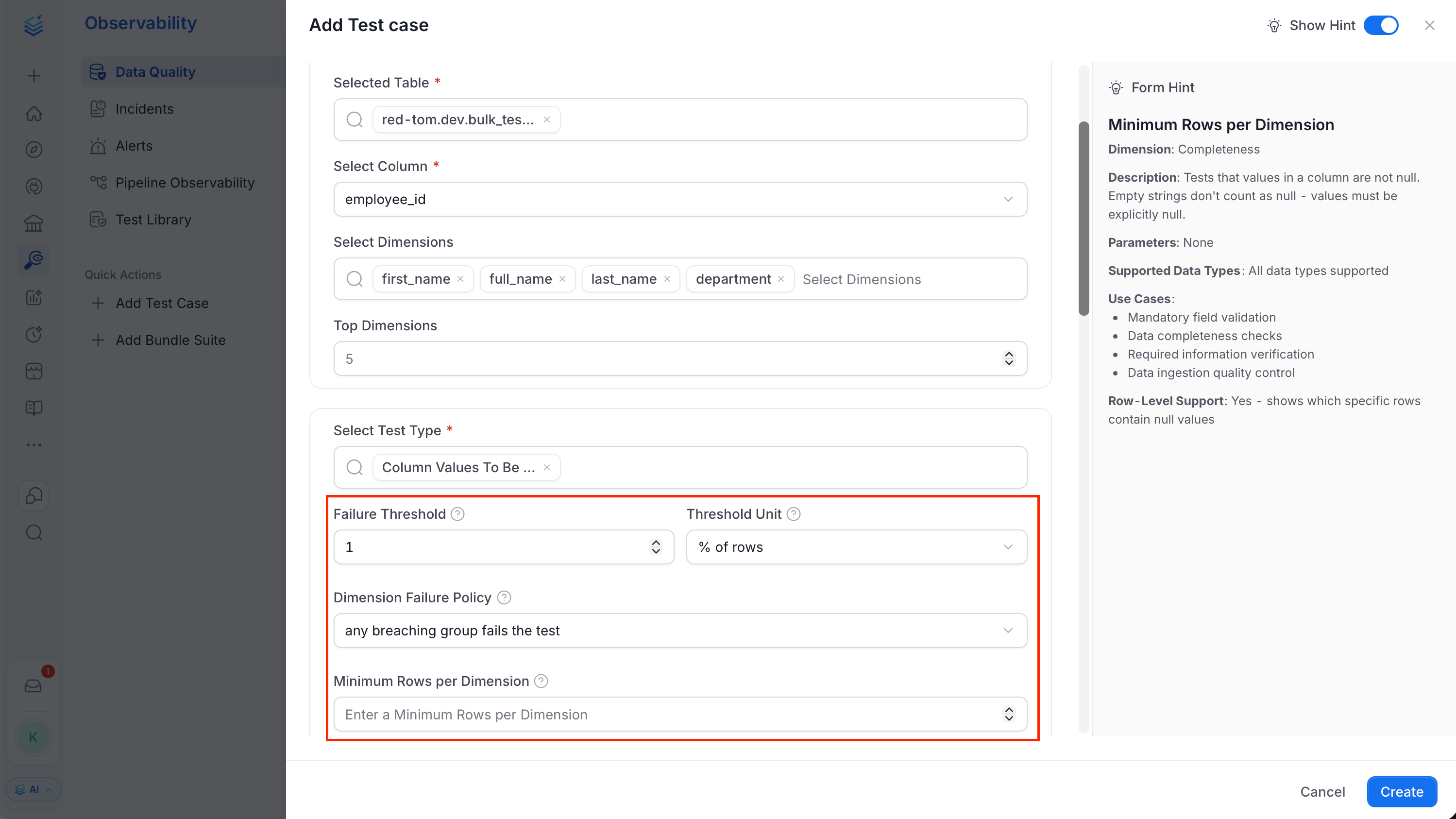
A dimension-level test evaluates each dimension group with the same threshold as the overall result. UnderPERCENTAGE, each group uses its own denominator, so 1% means 1% of that group’s rows.
Dimension Failure Policy
The Dimension Failure Policy decides whether group results can change the test case status:
A dimension that couldn’t be evaluated, for example because its query failed, doesn’t change the status under either policy.
The Others Group Is Only Checked Together
Groups outside the Top Dimensions are merged into one Others group, which is checked like any other group. Because the tail groups are only checked together, one failing small group can be hidden by the healthy groups merged with it. To check a group on its own, raise Top Dimensions so it’s ranked inside the top groups.Minimum Rows per Dimension
UnderPERCENTAGE, a very small group can breach the threshold by chance. With 10 rows, a single null is already 10%. Minimum Rows per Dimension keeps groups with fewer rows than this from failing the test.
An excluded group is still evaluated, and it keeps its own status. The run details mark it Excluded from roll-up, and the result message lists the small groups that failed without failing the test.
Minimum Rows per Dimension only has an effect with both the ANY_DIMENSION policy and a PERCENTAGE threshold, and the form only shows it then. The default is 0, which excludes no group. It’s available on the row-level column tests.
Row Inserted Count Window and Partitioning
Table Row Inserted Count to be Between has its own time window, set by Column Name, Range Type, and Range Interval. For example, a Range Type ofDAY and a Range Interval of 1 count the rows from the last day. This window is a test parameter. It’s separate from the partition settings in the table’s profiler configuration.
If the profiler configuration also sets a partition or a sample, the test applies it on top of the window. To count every row in the window, don’t configure a partition or sample that would remove rows from it.
Validation Errors
Collate checks threshold values when you save a test case. It rejects a test case and returns an error when:- The threshold isn’t a number.
- The threshold is negative.
- A row-level test has a
PERCENTAGEthreshold above 100. - Column Values to be in Set has a non-zero threshold while Match enum is off.
Existing Test Cases
Test cases created before failure thresholds existed don’t have the threshold parameters. They run with a threshold of0 and the ABSOLUTE unit, so their results don’t change. Existing Custom SQL Query test cases keep comparing their threshold with the number of rows, as before.