
AI Governance
Note: AI Governance is in Preview. It’s under active development, and some areas of this guide will change as the feature matures.
Before You Start
- Collate AI must be installed and enabled in your workspace. AI Governance is part of the AI experience, and its pages aren’t reachable until Collate AI is on.
- AI Governance lives inside the Governance module, under a dedicated AI Assets section, not as its own top-level product area.
Access AI Governance
- In the left navigation bar, select Governance.
-
Under the AI Assets section, select Overview.
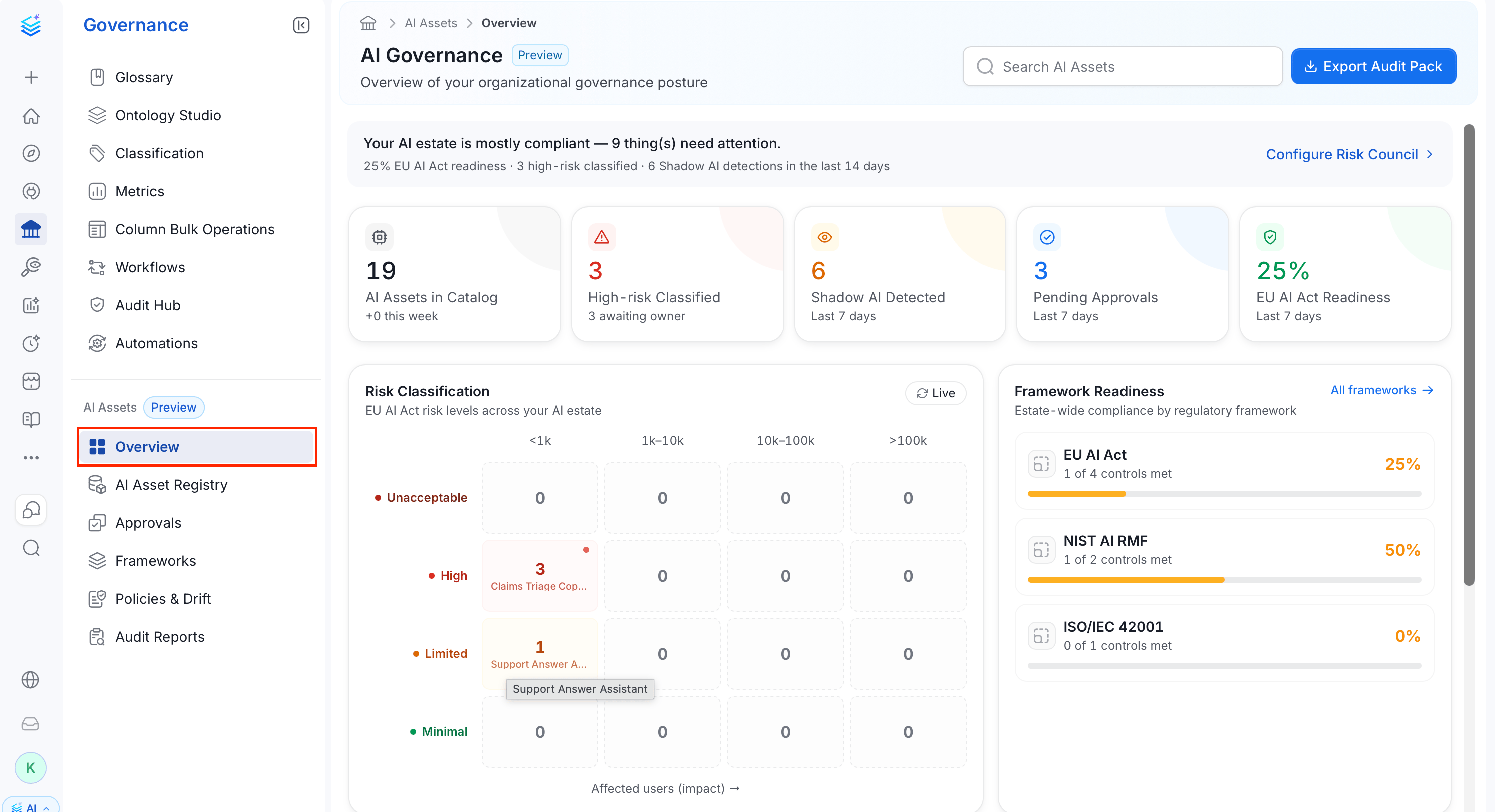
Overview Page
The Overview page is a dashboard summarizing your AI estate’s registration and compliance status. It has six parts.Summary Banner
A one-line summary of items needing attention is followed by EU AI Act readiness and the number of assets classified High risk. The Configure Risk Council link on the right takes you to the Approvals page, where reviewers approve or reject pending assets.Stat Cards
Four cards summarize the current state of your AI estate:
The current interface labels the Pending Approvals and EU AI Act Readiness cards “Last 7 days,” but these figures aren’t filtered by those time windows. The catalog card’s “this week” count is a fixed zero, and the High-risk card’s “awaiting owner” count displays pending approvals.
Note: Readiness percentages reflect how far your assessments have progressed, not a declaration that your organization is legally compliant. Treat them as a progress indicator for your governance work, not a compliance attestation.
Risk Classification
A matrix of your AI estate’s EU AI Act risk levels (Unacceptable, High, Limited, Minimal) against estimated affected-user-count bands (<1k, 1k-10k, 10k-100k, >100k). Each non-empty cell shows the asset count and, for a small count, the asset name. Click Live to refresh the matrix against current data.
Framework Readiness
A compliance summary per enabled framework (for example, EU AI Act, NIST AI RMF, or ISO/IEC 42001), showing controls met out of the total and a percentage readiness bar. A framework can carry a FOCUS badge to flag it as the framework you’re currently prioritizing. Select All frameworks to open the full Frameworks page.Approvals Queue
A shortlist of assets waiting on a decision, headed by the reviewing group (Risk Council) and the number of assets still awaiting a decision. Each row shows:- The asset name and the person who submitted it.
- The submission date.
- The asset’s risk-level badge (for example, High or Limited).
Recent Activity
A timeline of the most recent governance events, scoped to the last 24 hours. Each entry names the event (for example, Approved by Risk Council or Submitted to Risk Council for review), its timestamp, and a View link that opens the affected asset.What You Can Do
- Register an AI Application through a guided intake wizard that captures its type, deployment stage, data access, and EU AI Act risk classification.
- Approve or reject assets pending review, with automatic intake checks for an owner, risk classification, fairness evidence, a data protection impact assessment (DPIA) reference, and transparency disclosure.
- Enable built-in regulatory frameworks (EU AI Act, NIST AI RMF, ISO/IEC 42001, and others), or create a custom one.
- Review built-in AI policies, such as personally identifiable information (PII) access and fairness checks, and see which assets breach them.
- Export an audit pack: a PDF and/or JSON evidence bundle scoped to your whole estate, a domain, or a single asset.