
Reverse Metadata Application
The Reverse Metadata Application ensures real-time synchronization of metadata changes. Once installed and configured, any updates made to selected assets in Collate—such as descriptions, tags, or owners—are automatically in real-time propagated back to the source systems. There’s no need to trigger the application manually. This live sync ensures Collate remains the single source of truth while all connected systems stay up to date and compliant with governance policies.
Supported Connectors and Features
Overview
With this application, you can automatically sync metadata changes such as:Descriptions
When you update the table or column descriptions in Collate, these changes will get updated in the selected data assets based on your defined logic. Example:- The
customer_orderstable in Collate has the description updated to: “Stores historical order transactions from all regions.” - This updated description is written back to the
customer_orderstable using the configured channel as per your defined logic.
Owners
You can assign ownership (individuals or teams) to data assets in Collate and sync this information back to the data source. Example:-
You assign John Doe as the owner of the table
customer_datain Collate. - This ownership info is saved in the original system’s metadata, making it easier to identify responsibilities and understand data flow.
Tags
Tag metadata (likePII, sensitive, finance-related, etc.) applied in Collate can be sent back to the source system to enforce governance policies.
Example:
- You apply the tag
PII.Sensitiveto theXYZdata asset. - If the logic is defined, this tag will also be updated in the corresponding data asset in the source system.
Key Features
- Automated Metadata Propagation: Sync metadata updates (tags, owners, descriptions) from Collate to source systems without manual intervention.
- Configurable Channels: Create multiple sync channels to define exactly which asset or metadata types to sync. Once configured, changes sync live — no manual action needed.
Custom SQL Templates
Use SQL templates to customize update behavior per connector.Use Cases
- Maintain consistent metadata across Collate and Database by syncing SQL-based description updates.
- Improve data discovery by propagating column-level comments from Database back into Collate.
- Strengthen governance by capturing ownership changes in Database through SQL and syncing them to Collate.
- Enhance metadata visibility by syncing Database tag updates (e.g., PII.Sensitive) into Collate.
- Drive metadata accuracy by reflecting schema description changes in Database directly within Collate.
- Unify metadata management by capturing SQL-applied labels in Database and syncing them automatically to Collate.
How SQL Templates Work
Use the following SQL templates to filter your database operations and automatically trigger reverse metadata sync when these queries are executed.Update Description in Snowflake
SQL Variable:-Update Table Owner in Databricks
SQL Variable:-Update Tags in BigQuery
SQL Variable:-Installation
- Navigate to Settings > Applications.
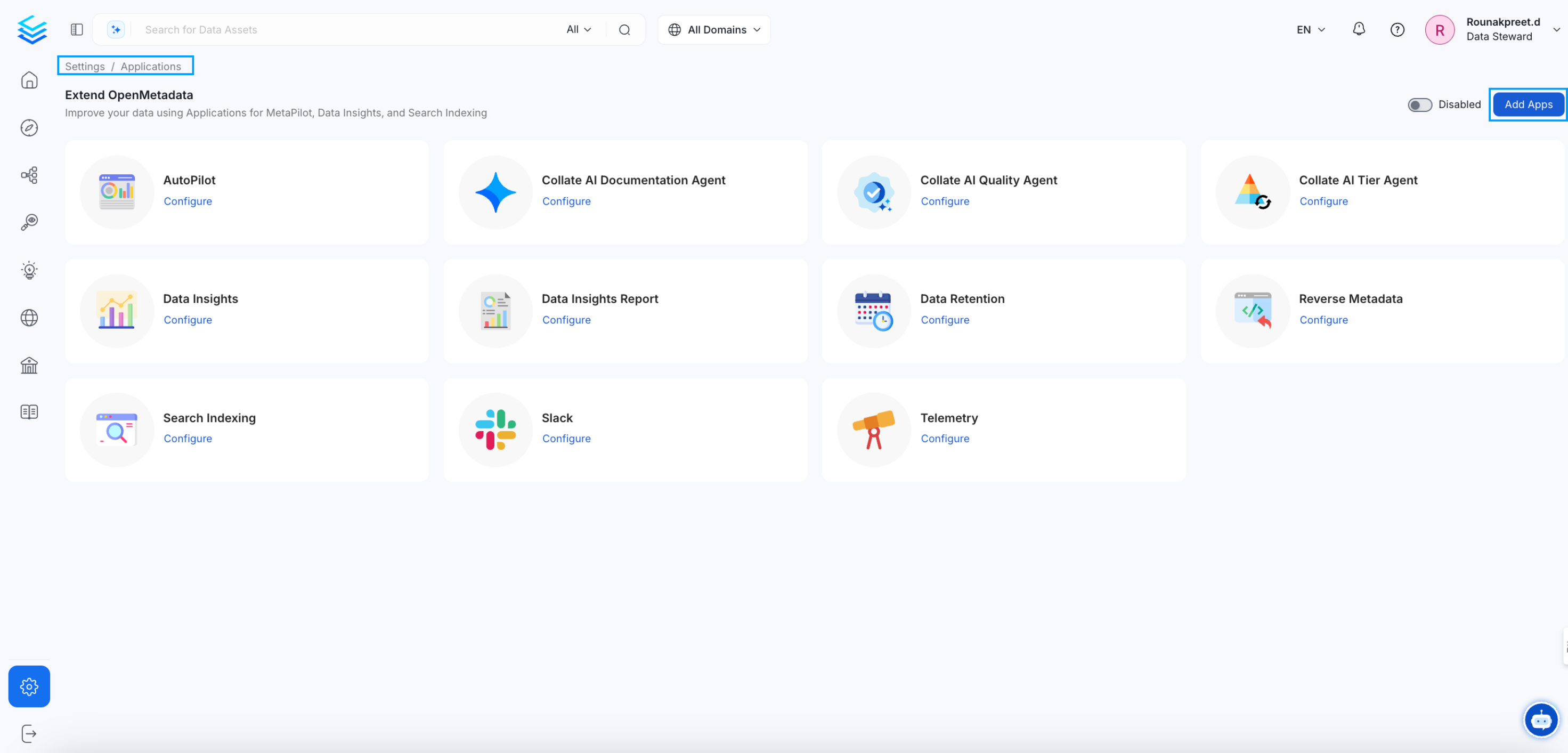
- Click Add Apps and install the Reverse Metadata Application.
- After installation, configure the synchronization channels as described below in screenshot. The Filter section allows you to define which assets should be included in a sync channel by applying conditions based on tables: the service, database or schema they belong to, their name, owners, domain, and even by Custom Properties!
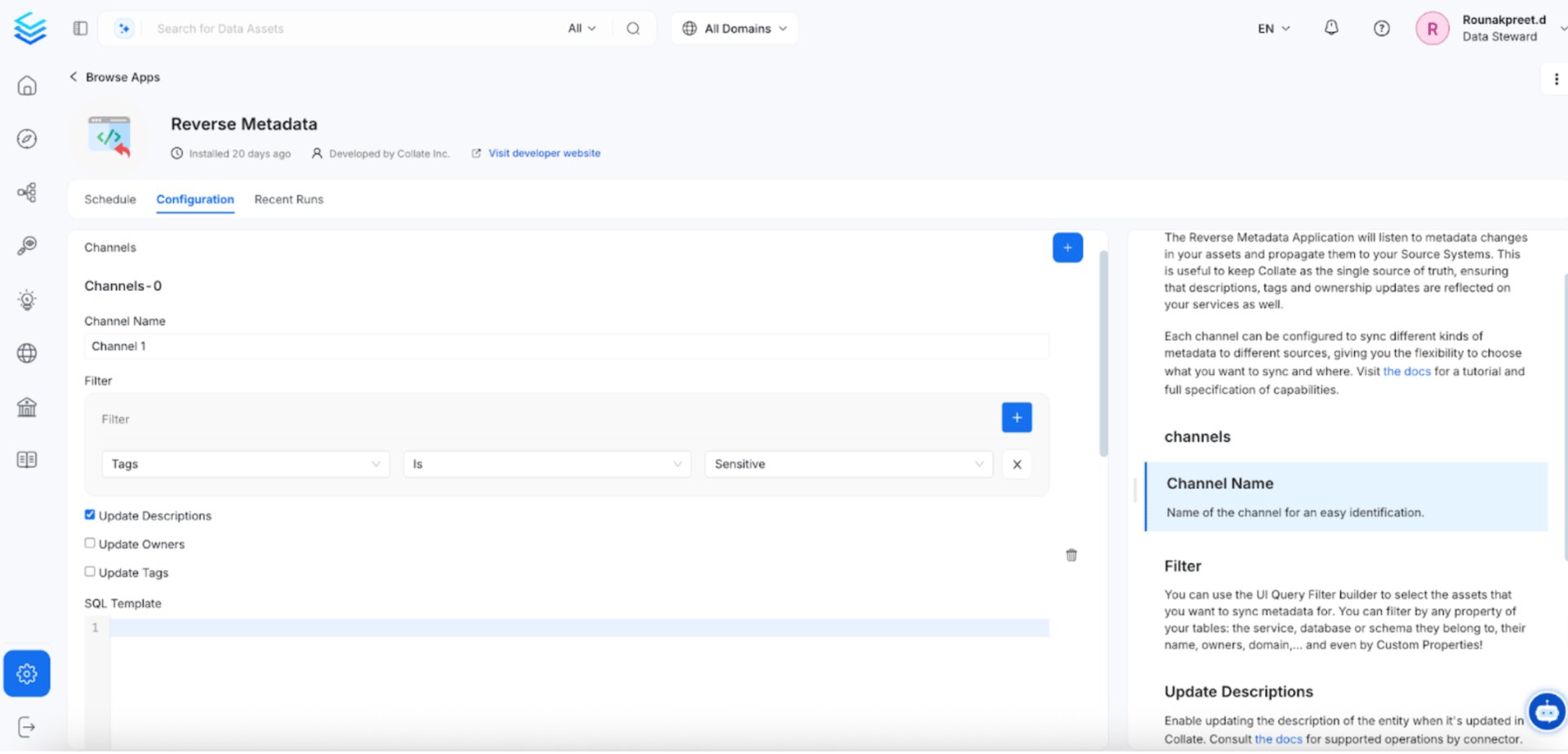 In the above screenshot, a filter is set to update descriptions only when the tag is “Sensitive.” This helps keep all sensitive tag descriptions in sync. At the same time, reverse metadata runs automatically.
Channel Configuration
Each sync process is managed through a channel. You can define multiple channels for different services or metadata types.Sink Service Configuration
The Sink Service parameter allows you to redirect metadata changes from one service to a different target service. This is particularly useful when you want to maintain metadata consistency across different systems.Use Case Example
Scenario: You have a Trino service configured in OpenMetadata, but you want to sync all metadata changes to your Apache Ranger security service for centralized governance. Example Channel Setup:
How it works:
- You update a table tags in the Trino service within Collate
- The reverse metadata application detects this change
- Instead of syncing back to Trino, it syncs to the specified Ranger service
- The Ranger service receives the updated metadata and applies governance policies
Run Now to Clean Workflows
 Users can monitor the running state of workflows, and in case of a failure, use the options below to clean them up:
- Run Now:- This lets you manually initiate a cleanup operation for failed workflows. This option will only be used to clean workflows. They will not trigger reverse metadata. It is an automatic synchronization.
- Scheduled Run:- This automatically re-runs cleanup operations based on a defined schedule (e.g., daily or weekly).
 In the Recent Runs tab, users can monitor the results of all workflow executions. Detailed logs are available for each run, making it easy to review outcomes and troubleshoot any failures.