
Ingest Lineage from dbt
Collate reads lineage information from your dbtmanifest.json file and uses it to build upstream and downstream traceability for your data models.
Collate extracts lineage from two sources in the manifest file: the depends_on key (node-level relationships) and the compiled_code or compiled_sql key (query-level relationships).
Note: To capture lineage, the
compiled_code field must be present in your manifest.json.- If
compiled_codeis missing, Collate will not capture lineage for that node. - To make sure
compiled_codeis populated, run one of the following commands in your dbt project before ingestion:dbt compiledbt docs generate
How Collate Builds dbt Lineage
Collate uses two approaches to build lineage — node dependencies and query parsing.Step 1: Lineage from depends_on
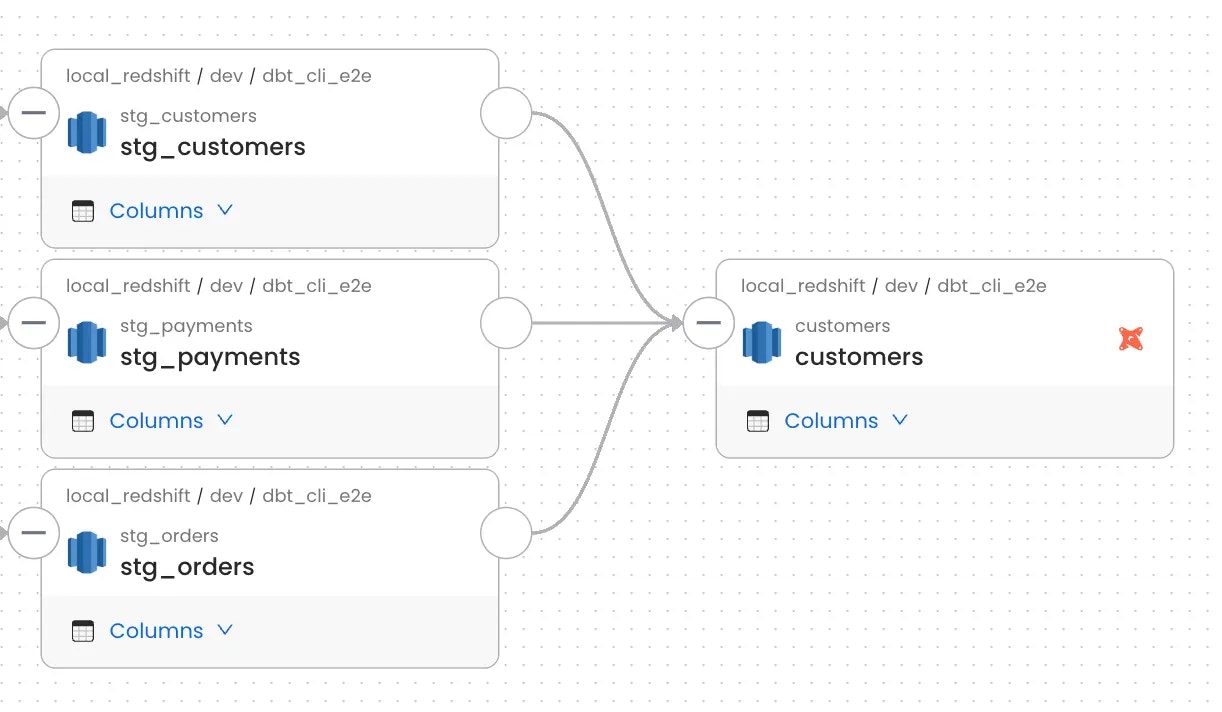
Collate reads node-level lineage from the depends_on.nodes field in manifest.json.
Here’s an example — the customers model depends on three staging models:
Step 2: Lineage from dbt Queries
Collate also parses the compiled SQL query for each model to extract finer-grained source and target relationships. The query sits undernode_name → compiled_code (or compiled_sql in older dbt versions):
Note: If the lineage parser can’t interpret the query, lineage for that node won’t be created. Check the ingestion logs for parsing errors.
Map dbt Catalog Names to Collate Databases
Collate matches each model inmanifest.json to a table using the database name that dbt writes into the manifest. That name can differ from the name the connector ingested the table under. For example, dbt-trino writes the Trino catalog name (bq_catalog) for tables that the BigQuery connector ingests under the GCP project ID (my-gcp-project). Without a match, Collate can’t link the dbt model to the table.
Use Catalog Mapping in the dbt ingestion configuration to resolve this. Add one entry per catalog:
- Key: the database name in the dbt manifest, for example
bq_catalog. Keys are matched ignoring case. - Value: the database name in Collate, for example
my-gcp-project.
catalogMapping under sourceConfig.config: