
SAML SSO Configuration
SAML (Security Assertion Markup Language) SSO enables users to authenticate with enterprise identity providers such as ADFS, Shibboleth, or Okta. This setup allows secure, federated login to Collate through SAML assertions.Overview
Collate supports Single Sign-On (SSO) integration with various identity providers, enabling secure, centralized user authentication.-
Navigate to Settings > SSO.
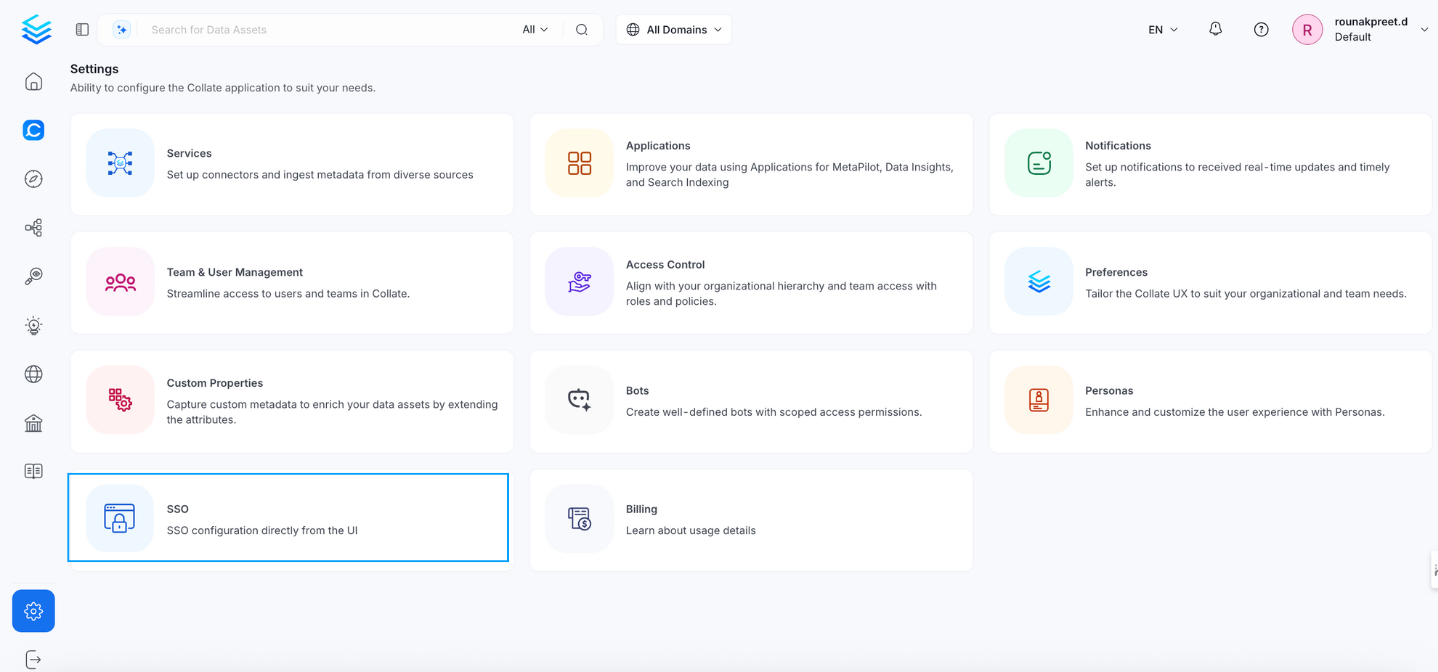
-
Select the service provider.
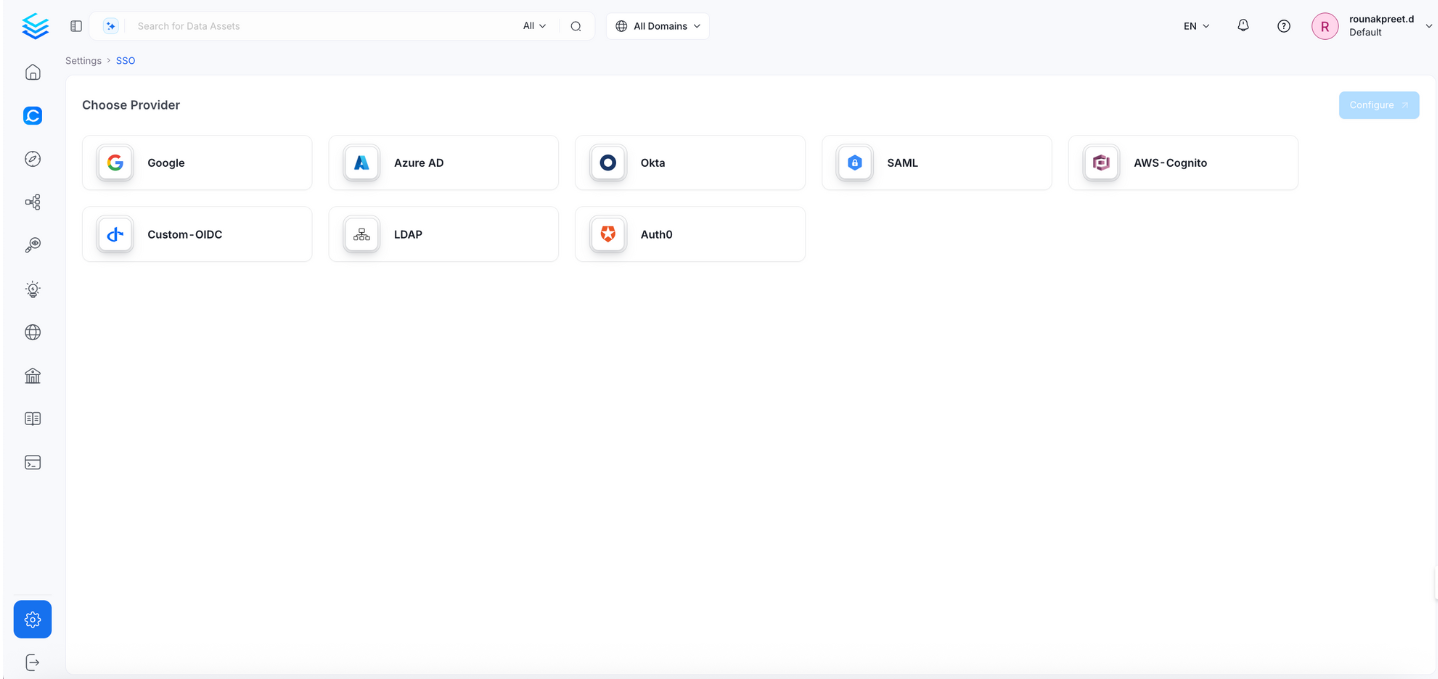
-
Click Configure to set up Single Sign-On (SSO). See Configuration Fields.
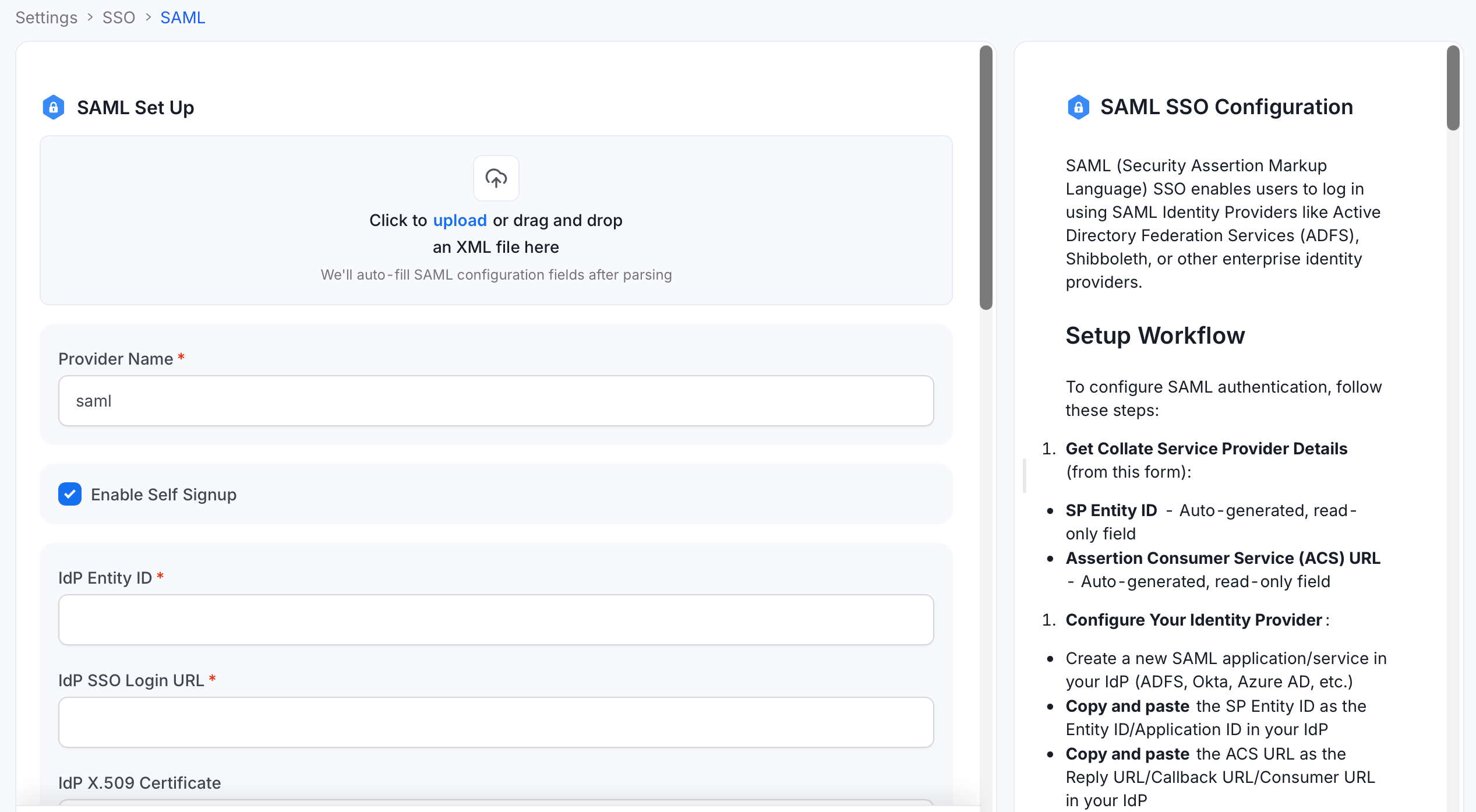
- Click Save to finish the SSO configuration.
Setup Workflow
To configure SAML authentication, follow these steps:-
Get Collate Service Provider details from the configuration form:
- SP Entity ID — Auto-generated, read-only.
- Assertion Consumer Service (ACS) URL — Auto-generated, read-only.
-
Configure your Identity Provider:
- Create a new SAML application in your IdP (ADFS, Okta, Azure AD, etc.).
- Copy the SP Entity ID and paste it as the Entity ID / Application ID in your IdP.
- Copy the ACS URL and paste it as the Reply URL / Callback URL / Consumer URL in your IdP.
- Configure user attribute and claim mappings in your IdP.
-
Get Identity Provider details from your IdP:
- IdP Entity ID
- IdP SSO Login URL
- IdP X.509 Certificate
- Complete the configuration in Collate, then click Save.
Configuration Fields
This section lists all fields in the order they appear in the Collate SSO configuration form.Tip: The configuration form includes an XML upload area at the top. Upload your IdP’s SAML metadata XML file to auto-fill the IdP Entity ID, IdP SSO Login URL, and IdP X.509 Certificate fields automatically.
General Configuration
Provider Name
- Definition: A human-readable name for this SAML SSO configuration instance.
- Example:
ADFS SSO,Company SAML,Okta SAML - Why it matters: Helps identify this SSO configuration in logs and user interfaces.
- Note: This is a display name and doesn’t affect authentication functionality.
Enable Self Signup
- Definition: Allows users to automatically create Collate accounts on their first SAML login.
- Options: Enabled | Disabled
- Example: Enabled
- Why it matters: Controls whether new SAML users can join automatically or need manual approval.
- Note: Disable for stricter control over user access.
Identity Provider (IdP) Configuration
Enter the details provided by your identity provider to establish the SAML trust relationship.IdP Entity ID
- Definition: Unique identifier for the Identity Provider.
- Example:
https://adfs.company.com/adfs/services/trust - Why it matters: SAML messages use this to identify the IdP.
- Note: Must match exactly what is configured in your IdP.
IdP SSO Login URL
- Definition: URL where users are redirected to authenticate with the IdP.
- Example:
https://adfs.company.com/adfs/ls/ - Why it matters: This is where authentication requests are sent.
- Note: Usually provided by your IdP administrator.
IdP X.509 Certificate
- Definition: Public certificate used to verify SAML assertions from the IdP.
- Example:
-----BEGIN CERTIFICATE-----\nMIIC...certificate content...\n-----END CERTIFICATE----- - Why it matters: Ensures SAML assertions are genuinely from your IdP.
- Note:
- Must include the full certificate with
BEGIN CERTIFICATEandEND CERTIFICATElines. - Can be multi-line.
- Must include the full certificate with
Name ID Format
- Definition: Format of the SAML NameID element that identifies users.
- Default:
urn:oasis:names:tc:SAML:1.1:nameid-format:emailAddress - Example:
urn:oasis:names:tc:SAML:1.1:nameid-format:emailAddress - Why it matters: Determines how users are identified in SAML assertions.
- Note: Email format is most common and recommended. The Collate username is derived as the part before
@.
Service Provider (SP) Configuration
Read-only Collate endpoints to register in your identity provider’s SAML application settings.SP Entity ID
- Definition: Unique identifier for Collate as a Service Provider.
- Example:
https://openmetadata.company.com - Why it matters: Your IdP uses this to identify Collate in SAML exchanges.
- Note:
- This field is read-only — it is auto-populated based on your Collate deployment URL.
- Copy this value and paste it as the Entity ID (or Application ID) in your SAML Identity Provider configuration.
Assertion Consumer Service (ACS) URL
- Definition: URL where the IdP sends SAML assertions after authentication.
- Example:
https://openmetadata.company.com/callback - Why it matters: This is where SAML responses are posted after login.
- Note:
- This field is read-only — it is auto-populated based on your Collate deployment URL.
- Copy this value and paste it as the ACS URL (also called Reply URL, Callback URL, or Consumer URL) in your SAML Identity Provider configuration.
SP X.509 Certificate
- Definition: Collate’s public certificate used by the IdP to verify signed requests.
- Example:
-----BEGIN CERTIFICATE-----\nMIIC...certificate content...\n-----END CERTIFICATE----- - Why it matters: Required if signing SAML requests sent from Collate.
- Note: Required when Send Signed Auth Request is enabled.
SP Private Key
- Definition: Private key used to sign SAML requests and decrypt encrypted assertions.
- Example:
-----BEGIN PRIVATE KEY-----\nMIIE...private key content...\n-----END PRIVATE KEY----- - Why it matters: Used to sign SAML requests and decrypt responses.
- Note:
- Keep this secure and encrypted.
- Required when signing or encryption is enabled.
Security Configuration
Control signature and encryption requirements for SAML assertions and messages.Strict Mode
- Definition: Only accept valid signed and encrypted assertions when the relevant flags are set.
- Default: false
- Example: true
- Why it matters: Enforces signature and encryption validation for enhanced security.
- Note: Recommended for production environments.
Send Signed Auth Request
- Definition: Whether to sign authentication requests sent to the IdP.
- Default: false
- Example: true
- Why it matters: Ensures authenticity of requests from Collate.
- Note: Requires SP Private Key to be configured.
Want Messages Signed
- Definition: Require entire SAML messages to be digitally signed by the IdP.
- Default: false
- Example: true
- Why it matters: Provides additional security beyond assertion signing.
Want Assertions Signed
- Definition: Require SAML assertions to be digitally signed by the IdP.
- Default: false
- Example: true
- Why it matters: Ensures assertions haven’t been tampered with.
- Note: Highly recommended for security.
Advanced Configuration
The following field is grouped under Advanced Config in the UI (collapsed by default):Token Validity
- Definition: Validity period in seconds for JWT tokens created from SAML responses.
- Default: 3600 (1 hour)
- Example: 7200
- Why it matters: Controls how long users stay logged in after SAML authentication.
- Note: This controls the Collate JWT token lifetime, not the SAML assertion lifetime.
Debug Mode
- Definition: Enable detailed logging for SAML authentication.
- Default: false
- Example: true
- Why it matters: Helps troubleshoot SAML configuration issues.
- Note: Only enable for troubleshooting. Disable in production for security and performance.
SAML Display Name Attributes
- Definition: SAML assertion attributes used to derive the user’s display name in Collate.
- Example:
displayName,cn,givenName - Why it matters: Controls how users’ names are shown in the Collate UI after SAML login.
- Note: Enter each attribute name and press Enter. Collate will use the first attribute that returns a non-empty value.
Enable Auto Redirect
- Definition: Automatically redirects users to the SAML Identity Provider without showing the Collate login page.
- Default: false
- Example: true
- Why it matters: Provides a seamless SSO experience — users who are already authenticated with the IdP are logged in automatically.
- Note: Disable if you need users to be able to choose between SSO and other login methods.
Authorizer Configuration
Control which users and domains are permitted to access Collate.Admin Principals
- Definition: Users granted admin access in Collate.
- Example:
["john.doe", "jane.admin"] - Why it matters: These users will have full administrative privileges in Collate.
- Note: Enter usernames only — not email addresses. For SAML with email NameID format, the username is derived as the part before
@(for example,john.doe@company.com→john.doe).
Principal Domain
- Definition: Default domain for user principals.
- Example:
company.com - Why it matters: Used to construct full user identifiers when only a username is provided.
Enforce Principal Domain
- Definition: Restricts login to users belonging to the configured Principal Domain.
- Default: false
- Example: true
- Why it matters: Adds an extra layer of security by limiting access to a specific domain.
Enable Secure Socket Connection
- Definition: Enables SSL/TLS for all SSO communication.
- Default:
false - Example:
true - Why it matters: Ensures encrypted communication between Collate and the IdP.
- Note: Recommended in production environments.
Allowed Domains
- Definition: List of email domains permitted to authenticate with Collate.
- Example:
["company.com", "partner.com"] - Why it matters: Provides fine-grained control over which email domains can authenticate via SAML.
- Note:
- Works in conjunction with Enforce Principal Domain.
- Leave empty if you only use a single domain configured in Principal Domain.
Default OAuth Role
- Definition: Default role assigned to new users when they first sign in via SSO self-signup.
- Example:
DataConsumer - Why it matters: Controls the starting permission level for new users who join through self-signup.
- Note: Leave empty to create users without any role. Requires Enable Self Signup to be active. The role must already exist in Collate.
Summary Table
Troubleshooting
If users are automatically logged out and unable to log in again due to a bad authentication configuration, you can reset the security setup using the following command:Docker Security
Configure Auth0 SSO to access the UI and APIs.
Bare Metal Security
Configure Azure SSO to access the UI and APIs.
Kubernetes Security
Configure a custom OIDC SSO to access the UI and APIs.
Google SSO
Configure Google SSO to access the UI and APIs.
Okta SSO
Configure Okta SSO to access the UI and APIs.
Amazon Cognito SSO
Configure Amazon Cognito SSO to access the UI and APIs.
SAML
Configure SAML SSO to access the UI and APIs.
LDAP
Configure LDAP SSO to access the UI and APIs.