
Custom OIDC SSO Configuration
Custom OIDC authentication enables integration with any OpenID Connect (OIDC) compliant identity provider such as Keycloak, Authentik, PingIdentity, or other enterprise identity solutions.Overview
Collate supports Single Sign-On (SSO) integration with various identity providers, enabling secure, centralized user authentication.-
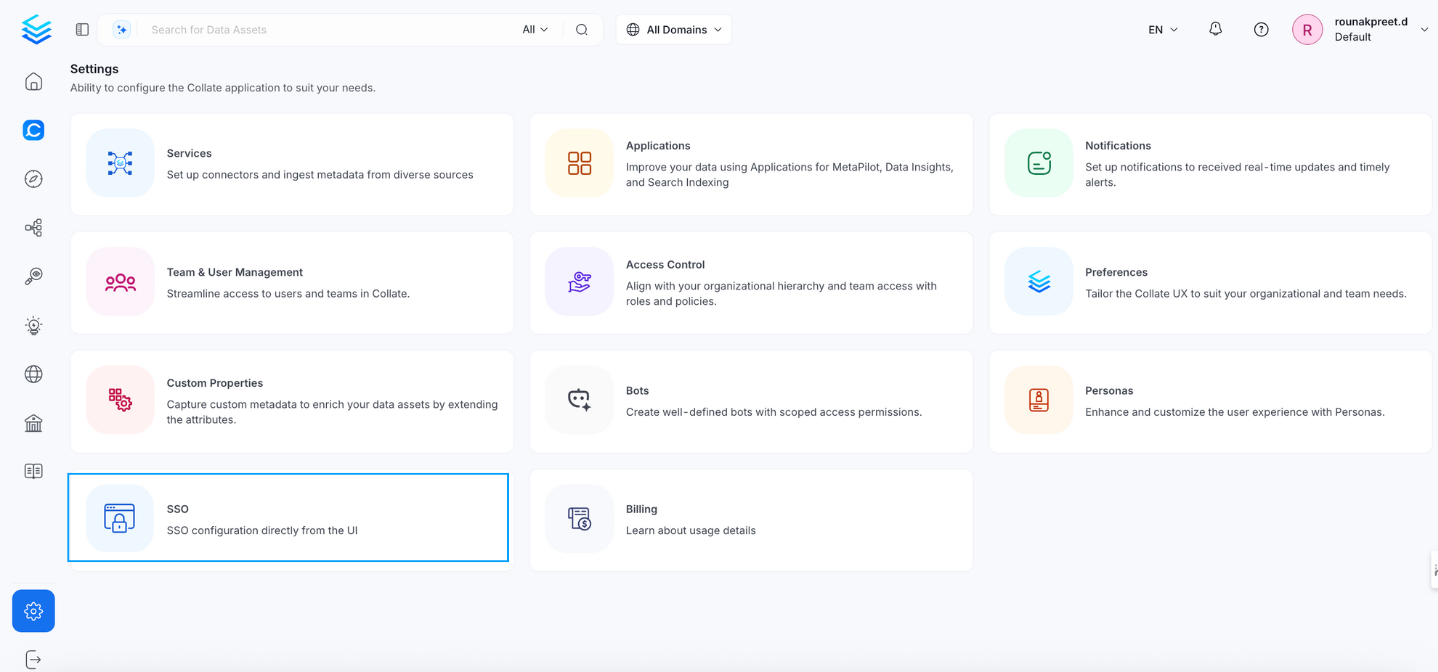
Navigate to Settings > SSO.
-
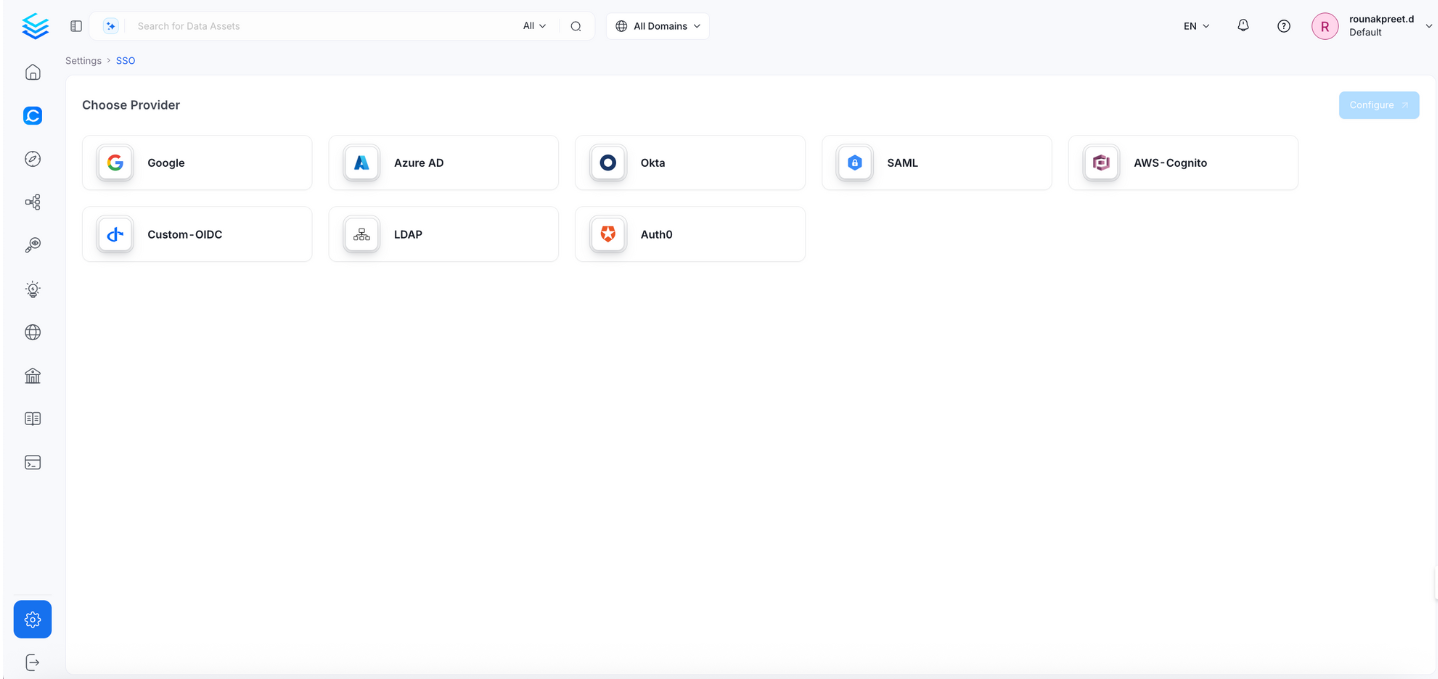
Select the service provider.
-
Click Configure to set up Single Sign-On (SSO). See Configuration Fields.
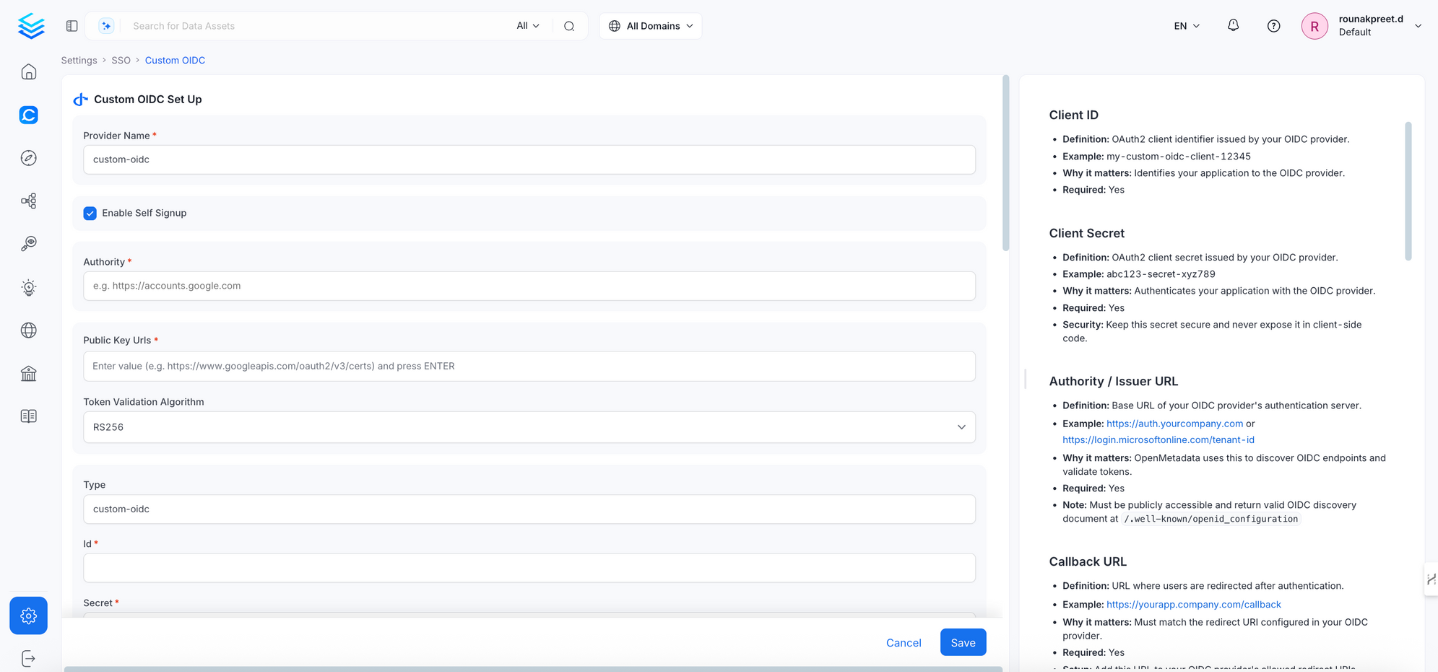
- Click Save to finish the SSO configuration.
Configuration Fields
This section lists all fields in the order they appear in the Collate SSO configuration form.General Configuration
Provider Name
- Definition: A human-readable name for this OIDC configuration instance.
- Example:
Company SSO,Internal Auth,Keycloak SSO - Why it matters: Helps identify this SSO configuration in logs and user interfaces.
- Note: This is a display name and doesn’t affect authentication functionality.
Enable Self Signup
- Definition: Allows new users to create Collate accounts through OIDC authentication.
- Default:
false - Why it matters: Controls whether unknown users can automatically create accounts.
- Note: Enable only if you trust all users from your OIDC provider.
Authority
- Definition: Base URL of your OIDC provider’s authentication server.
- Example:
https://auth.yourcompany.comorhttps://keycloak.company.com/realms/your-realm - Why it matters: Collate uses this to discover OIDC endpoints and validate tokens.
- Note: Must be publicly accessible and return a valid OIDC discovery document at
/.well-known/openid-configuration.
Public Key Urls
- Definition: URLs pointing to the OIDC provider’s public keys used to verify token signatures.
- Example:
https://auth.yourcompany.com/oauth2/v3/certs - Why it matters: Collate fetches public keys from these URLs to validate JWT signatures from your provider.
- Note: Enter each URL and press Enter. Leave empty to use keys from the discovery document.
Token Validation Algorithm
- Definition: Algorithm used to validate JWT token signatures from the OIDC provider.
- Default:
RS256 - Options:
RS256,RS384,RS512,HS256,HS384,HS512 - Example:
RS256 - Why it matters: Must match the signing algorithm configured in your OIDC provider.
OIDC Configuration
Configure the OIDC client credentials, discovery endpoint, and token behavior.Id
- Definition: OAuth2 client identifier issued by your OIDC provider.
- Example:
my-custom-oidc-client-12345 - Why it matters: Identifies your application to the OIDC provider.
- Note: Found in your OIDC provider’s application settings.
Secret
- Definition: OAuth2 client secret issued by your OIDC provider.
- Example:
abc123-secret-xyz789 - Why it matters: Authenticates your application with the OIDC provider.
- Note: Keep this value secure. Never expose it in client-side code.
Scope
- Definition: OAuth2 scopes to request from the OIDC provider.
- Default:
openid profile email - Example:
openid profile email groups - Why it matters: Determines what user information Collate can access.
- Note:
openid— Required for OIDC.profile— Access to user profile information.email— Access to user email address.groups— Access to user group memberships (if supported by your provider).
DiscoveryUri
- Definition: Your OIDC provider’s OpenID Connect metadata endpoint.
- Example:
https://auth.yourcompany.com/.well-known/openid-configuration - Why it matters: Allows Collate to automatically discover the provider’s OIDC endpoints.
- Note: Usually
{authority}/.well-known/openid-configuration.
PreferredJwsAlgorithm
- Definition: Preferred JSON Web Signature algorithm for token validation.
- Default:
RS256 - Example:
RS256 - Why it matters: Specifies the preferred algorithm when the provider supports multiple signing options.
- Note: Must match the algorithm your OIDC provider uses to sign tokens.
ResponseType
- Definition: OAuth2 response type for the authorization flow.
- Default:
code - Options:
code,token,id_token - Example:
code - Why it matters: Determines which OAuth2 flow is used. Authorization Code flow (
code) is the most secure.
ClientAuthenticationMethod
- Definition: Method used to authenticate the client with the OIDC provider.
- Default:
client_secret_post - Options:
client_secret_basic|client_secret_post|client_secret_jwt|private_key_jwt - Example:
client_secret_post - Why it matters: Must match the client authentication method configured in your OIDC provider.
Tenant
- Definition: Tenant identifier if your OIDC provider supports multi-tenancy.
- Example:
your-tenant-idorcompany-realm - Why it matters: Identifies the specific tenant or realm within a multi-tenant OIDC provider.
- Note: Leave empty if your provider is single-tenant.
ServerUrl
- Definition: Base URL of your Collate deployment.
- Example:
https://demo.getcollate.io - Why it matters: Used internally to construct redirect URLs.
- Note: This field is read-only — it is auto-populated based on your Collate deployment URL.
CallbackUrl
- Definition: URL where the OIDC provider redirects after authentication.
- Example:
https://openmetadata.company.com/callback - Why it matters: Must be registered in your OIDC provider configuration.
- Note:
- This field is read-only — it is auto-populated as
{your-domain}/callback. - Copy this URL and add it to your OIDC provider’s allowed redirect URIs list.
- This field is read-only — it is auto-populated as
Prompt
- Definition: Controls the OIDC provider’s authentication prompt behavior.
- Options:
none,login,consent,select_account - Example:
login - Why it matters: Defines how the login experience behaves for users.
- Note:
login: Always prompt for credentials.none: Use existing session silently (SSO).consent: Prompt for permissions.
Advanced Configuration
The following fields are grouped under Advanced Config in the UI (collapsed by default):UseNonce
- Definition: Security feature to prevent replay attacks in OIDC flows.
- Default:
false - Why it matters: Enhances security by ensuring each authentication request is unique.
disablePkce
- Definition: Whether to disable Proof Key for Code Exchange.
- Default:
false - Why it matters: PKCE adds security to the authorization code flow.
- Note: Should remain
false(enabled) in most cases.
MaxClockSkew
- Definition: Maximum allowed time difference in seconds between systems when validating tokens.
- Default:
0 - Why it matters: Prevents token validation failures due to minor clock differences between servers.
TokenValidity
- Definition: Duration in seconds that tokens remain valid.
- Default:
3600 - Example:
3600 - Why it matters: Balances token lifetime against security requirements.
MaxAge
- Definition: Maximum authentication age in seconds before re-authentication is required.
- Default:
0 - Example:
3600 - Why it matters: Controls how frequently users must re-authenticate.
SessionExpiry
- Definition: How long user sessions remain valid in seconds.
- Default:
604800(7 days) - Why it matters: Controls session timeout for confidential clients.
JWT Claims
Map identity token claims to Collate user identities and team assignments.Jwt Principal Claims
- Definition: JWT claims used to identify users in Collate. The first claim that returns a value is used.
- Default:
["email", "preferred_username", "sub"] - Example:
["email", "username", "sub"] - Why it matters: Determines how users are matched to their Collate accounts.
- Note: At least one claim must correspond to the user’s email address.
Jwt Principal Claims Mapping
Definition: Maps JSON Web Token (JWT) claims to Collate user profile fields. Supported keys: Onlyemail and username are valid mapping targets in jwtPrincipalClaimsMapping.
Example:
collate_field:jwt_claim (for example, "email:email").
Note: The display name is derived automatically from standard OIDC/JWT claims — you don’t need to configure it using
jwtPrincipalClaimsMapping. If you need richer name handling, make sure your OIDC provider is configured to include given_name and family_name as claims in the ID token — Collate will pick them up automatically.Jwt Team Claim Mapping
- Definition: JWT claim containing team or department information for automatic team assignment in Collate.
- Example:
department,groups,organization,team - Why it matters: Automatically assigns users to existing Collate teams based on their OIDC provider attributes at login.
- Note:
- Ensure the claim is included in the ID token by your OIDC provider.
- Common attributes:
department,organization,groups,roles. - The team must already exist in Collate for assignment to work.
- Only teams of type Group can be auto-assigned. Team names are case-sensitive.
Enable Auto Redirect
- Definition: Automatically redirects users to the OIDC Identity Provider without showing the Collate login page.
- Default:
false - Why it matters: Provides a seamless SSO experience — users already authenticated with the IdP are logged in automatically.
- Note: Disable if you need users to be able to choose between SSO and other login methods.
Authorizer Configuration
Control which users and domains are permitted to access Collate.Admin Principals
- Definition: Users granted admin access in Collate.
- Example:
["admin", "sysadmin", "john.doe"] - Why it matters: Grants full admin privileges in Collate.
- Note: Enter usernames only — not email addresses. Use the part of the email before
@(for example, foradmin@company.com, enteradmin).
Principal Domain
- Definition: Default domain appended to usernames when the domain is not present in claims.
- Example:
company.com - Why it matters: Ensures consistent user identification across systems.
- Note: Optional — only needed if usernames don’t include domain information.
Enforce Principal Domain
- Definition: Restricts login to users belonging to the configured Principal Domain.
- Default:
false - Example:
true - Why it matters: Adds an extra layer of security by limiting access to a specific domain.
Enable Secure Socket Connection
- Definition: Enables SSL/TLS for all SSO communication.
- Default:
false - Example:
true - Why it matters: Ensures encrypted communication between Collate and your OIDC provider.
- Note: Recommended in production environments.
Allowed Email Registration Domains
- Definition: Domains allowed to register new accounts via SSO self-signup.
- Example:
company.com - Why it matters: Restricts which email domains can create new Collate accounts through self-signup.
- Note: Use
"all"to allow any domain. Leave empty to block all self-signup registrations. Requires Enable Self Signup to be active.
Allowed Domains
- Definition: List of email domains permitted to authenticate with Collate.
- Example:
["company.com", "external-partner.com"] - Why it matters: Provides fine-grained control over which email domains can authenticate via your OIDC provider.
- Note:
- Works in conjunction with Enforce Principal Domain.
- Leave empty if you only use a single domain configured in Principal Domain.
Use Roles From Provider
- Definition: Use roles returned by the OIDC provider in the token to assign Collate roles.
- Default:
false - Why it matters: Enables role-based access control driven by your provider’s role assignments.
- Note: Roles must be included in the token and must match existing Collate role names.
Default OAuth Role
- Definition: Default role assigned to new users when they first sign in via SSO self-signup.
- Example:
DataConsumer - Why it matters: Controls the starting permission level for new users who join through self-signup.
- Note: Leave empty to create users without any role. Requires Enable Self Signup to be active. The role must already exist in Collate.
Summary
Quick reference of all configuration fields and their example values.Common OIDC Provider Examples
Sample configurations for popular OIDC-compliant identity providers. KeycloakTroubleshooting
If users are automatically logged out and unable to log in again due to a bad authentication configuration, you can reset the security setup using the following command:Docker Security
Configure Auth0 SSO to access the UI and APIs.
Bare Metal Security
Configure Azure SSO to access the UI and APIs.
Kubernetes Security
Configure a custom OIDC SSO to access the UI and APIs.
Google SSO
Configure Google SSO to access the UI and APIs.
Okta SSO
Configure Okta SSO to access the UI and APIs.
Amazon Cognito SSO
Configure Amazon Cognito SSO to access the UI and APIs.
SAML
Configure SAML SSO to access the UI and APIs.
LDAP
Configure LDAP SSO to access the UI and APIs.