
Building Blocks of Authorization: Rules, Policies, and Roles
Collate controls access through three building blocks: rules define what is allowed or denied, policies group rules together and apply them to teams, and roles bundle policies into job-function templates you can assign to users. Every access decision Collate makes comes down to three questions: who is the user, what are they trying to access, and what do they want to do with it?Rules
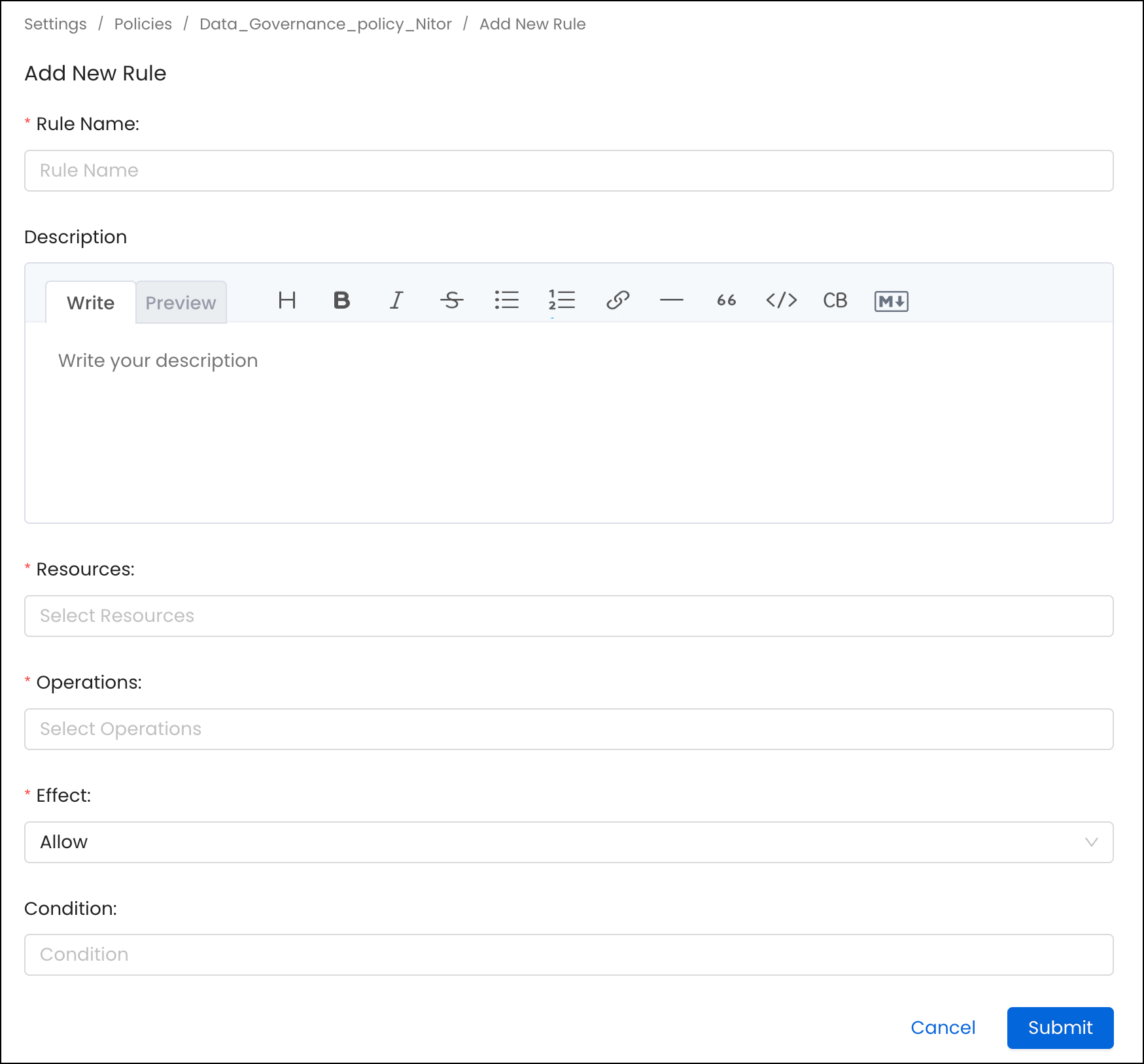
A rule in a policy is the building block of authorization. It contains the following:- Name: A unique name to define the rule
- Description: Description of the rule
- Resources: List of resources this rule applies to. An admin can select a specific resource, such as Table or All, to apply against all resources.
- Operations: List of operations this rule applies to. An admin can select a specific operation such as EditOwners or All to apply against all the operations.
- Condition: Expressions written using policy functions that evaluate true or false.
- Effect: Deny or Allow the operation.
Operations
When you build a rule, you pick one or more operations to cover. Each operation controls a specific action – for example,ViewAll, EditTags, or Delete.
Operations vary in risk level, from low-risk viewing permissions to critical
admin-only actions like Impersonate, EditPolicy, EditRole, and GenerateToken.
For a reference for common operations, risk levels, and recommended role assignments, see
Resource scope and operations reference.
Condition
Conditions let you make a rule apply only when certain things are true about the asset being accessed. For example, you can write a rule that only applies to assets tagged asPII.Sensitive, or only to assets that don’t have an owner yet.
Collate uses SpEL-based expressions for conditions. For more information about SpEL expressions, see Spring Expression Language (SpEL).
Following are some examples of conditions:
Use hasDomain() With Bots
hasDomain() evaluates the domains on the requesting principal. For a bot request, the principal is the user account associated with that bot. Assigning a domain only to the asset does not give the bot access.
For example, a bot with a policy that allows ViewBasic only when hasDomain() is true receives a 403 [ViewBasic] not allowed response when the asset belongs to Finance but the bot user does not. To resolve the error:
- Open Settings > Bots, select the bot, and identify its associated bot user.
- In Settings > Members > Users, open the bot user’s profile.
- Add the asset’s domain in the Domains card. An administrator must make this change.
- Retry the request after the domain assignment is saved.
hasDomain() condition and limit its resources and operations to the minimum required. Removing the condition allows the rule to match resources outside the bot’s domains.
Roles Based Access Controls (RBAC) Search supports only some of these conditions. It evaluates noOwner(), isOwner(), matchAllTags(), matchAnyTag(), hasDomain(), and inAnyTeam(). It ignores matchTeam() when it filters search results. Access to the asset itself still honors matchTeam().
To limit search results by team, use isOwner(). In search, it also matches assets owned by any team the user belongs to. The inAnyTeam('<team>') condition checks only the user’s team membership: if the user is in that team, it matches every asset.
Use conditions to assess data assets like Tables, Topics, and Dashboards for specific attributes.
Example: Consider the noOwner() condition when applied to the table fact_orders. If this table lacks an assigned owner, then the condition returns true. However, if an owner is present, it returns false.
Another instance: The matchAnyTag(‘PII.Sensitive’) condition, when applied to the dim_address table that carries the PII.Sensitive tag, will yield true. But, without this specific tag, the outcome is false.
You can combine conditions with && (both must be true) or || (either can be true). For example:
Use Service Attributes in Policy Conditions
Every service can store three deployment attributes.Set Service Attributes
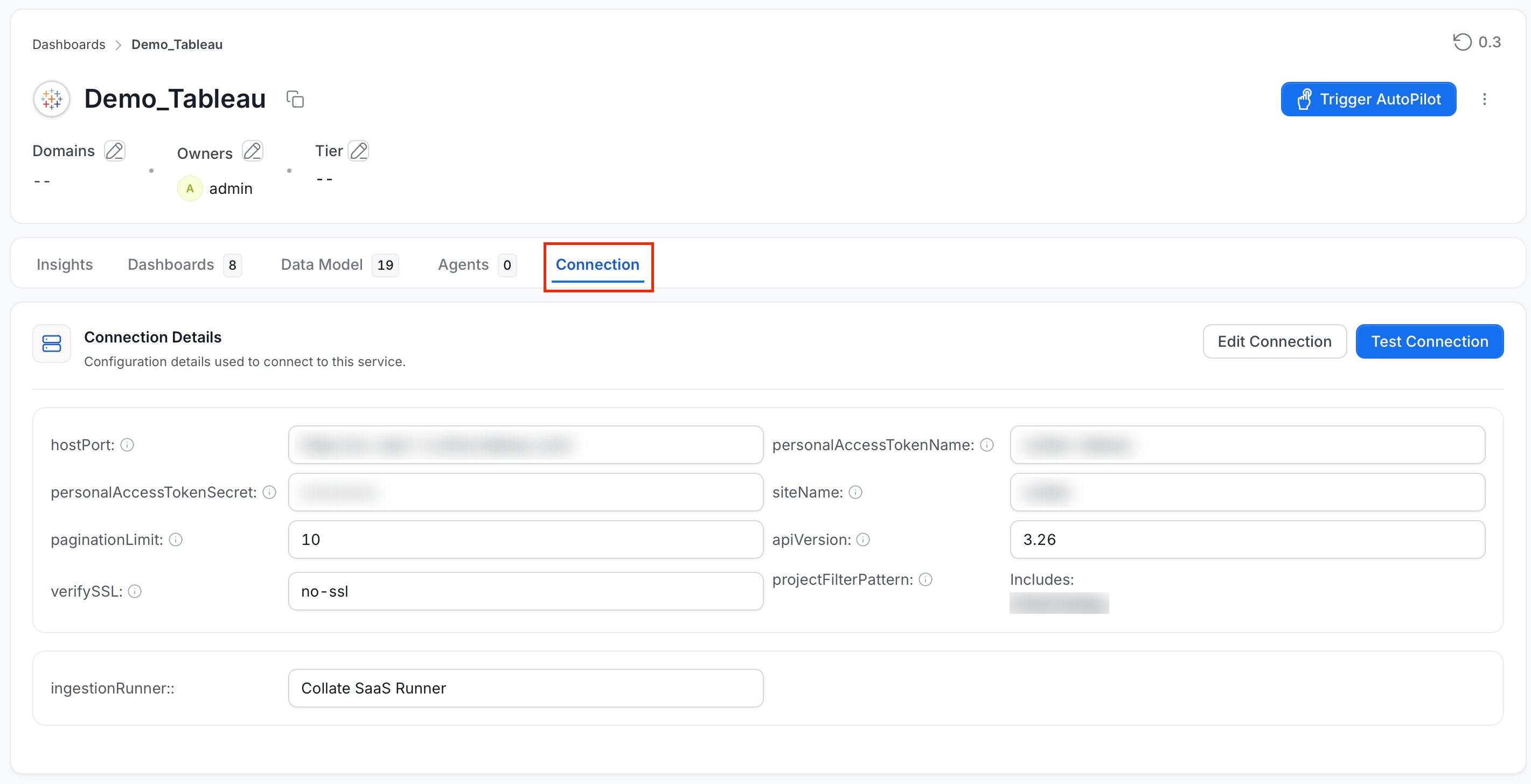
You need permission to edit the service.- Navigate to Settings > Services.
- Select the service category, then open the service you want to configure.
-
Click the Connection tab.
-
In the Service Attributes section, click Edit.

-
Complete the following steps:
- Select an Environment.
- Optional: Enter the Region and Deployment identifier.
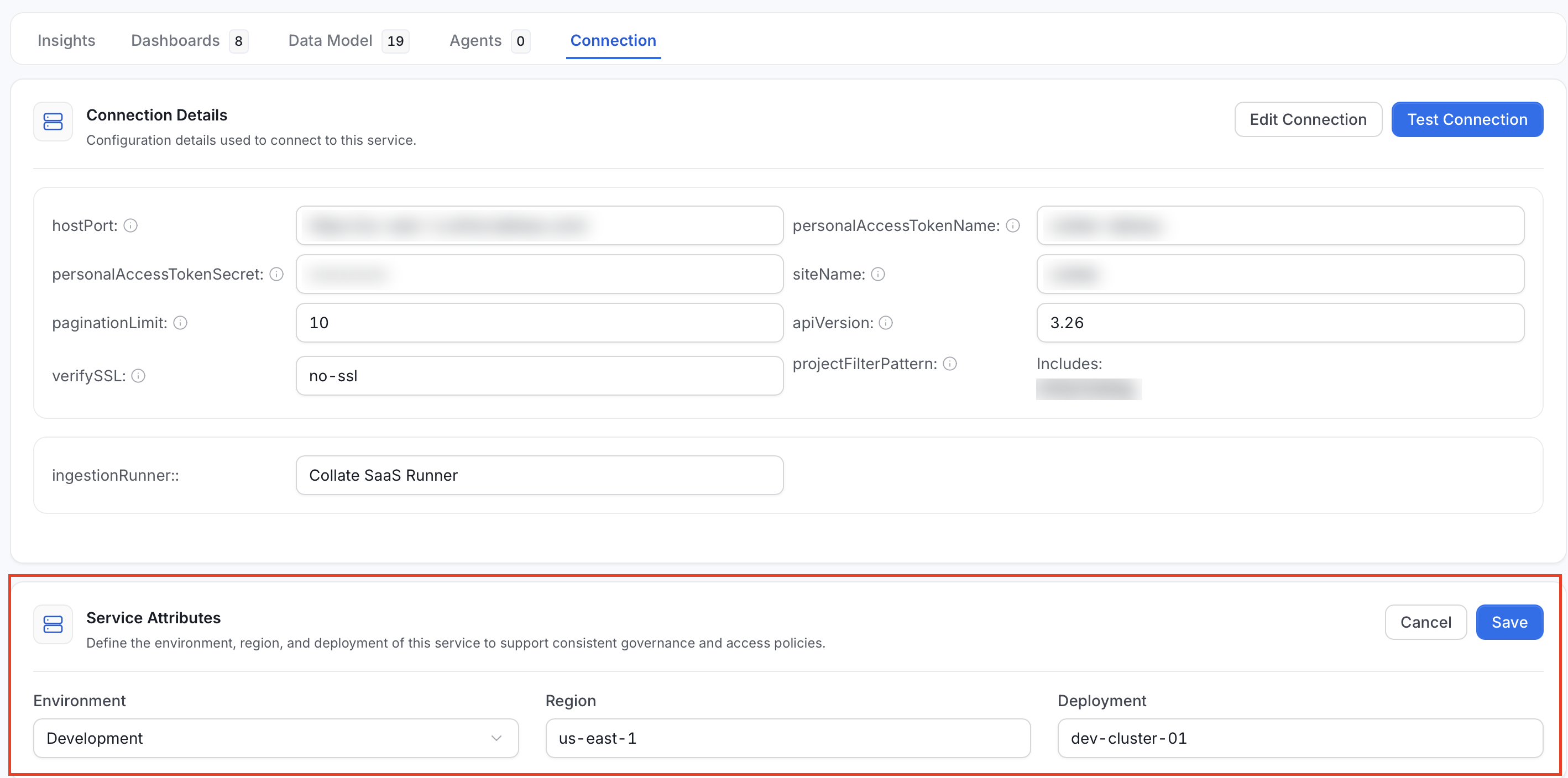
- Click Save.
The referenced value must exist when you save the policy. These conditions return false for resources that do not belong to a service. Examples include glossary terms and users.
For example, the following condition can be used in a
Deny rule to prevent access to assets from development services:
Deny rule can hide both the service and its assets.
Create a Service-Scoped Policy Rule
Test the rule in an unassigned policy before applying it to users or teams.- Navigate to Settings > Access Control > Policies.
- Create a policy or open the policy.
- Click Add Rule.
-
Complete the following steps:
- Enter the Rule Name.
- Optional: Enter a Description.
-
Select the required Resources and Operations. For example, select All and
ViewAllto evaluate view access across service-backed resources. -
Set Effect to
DenyorAllow. When rules conflict,Denytakes precedence. -
In Condition, enter a service-aware expression. For example:
Confirm that the editor reports Valid condition.
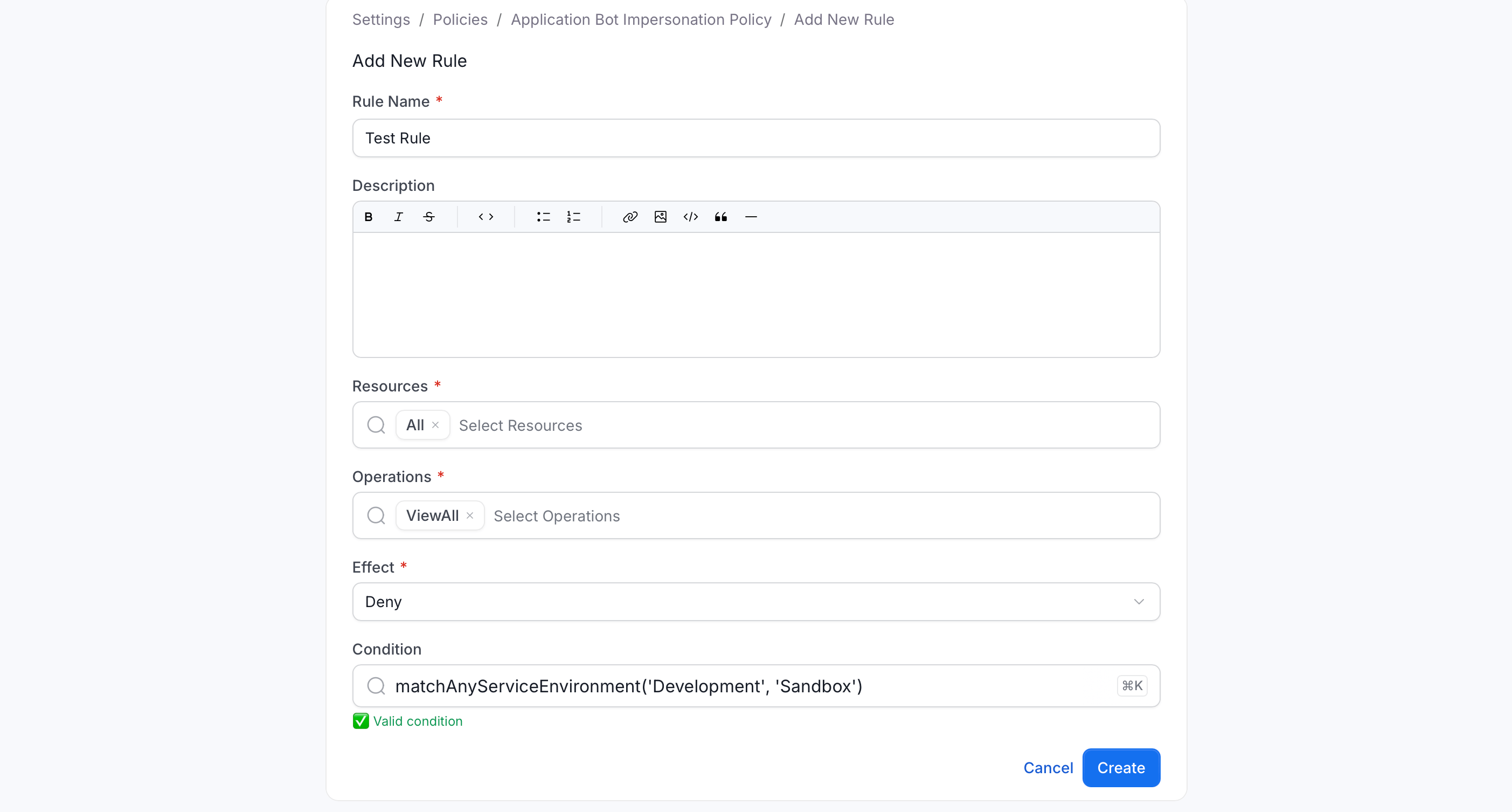
- Click Create.
Understand Inherited Service Tags
Tags now pass down automatically through the service hierarchy. For example, a tag on a database service is inherited by its databases, database schemas, and tables.- Collate marks inherited tags as
Derived. - Inherited tags are merged with the tags assigned directly to the child asset.
- If the child asset already has the same tag assigned directly, the child’s tag takes precedence.
matchAnyTag(...) also evaluate inherited tags.
After you upgrade, reindex Collate so existing assets receive their inherited tags in search. Until reindexing finishes, an asset’s own page can show inherited tags before they appear in Explore.
Restrict Requests Made Through Bots
Use impersonation conditions inDeny rules to restrict actions attributed to a bot acting on a person’s behalf. This includes requests that use the X-Impersonate-User header and Model Context Protocol (MCP) or Collate AI tool calls.
Use this condition to match every request attributed to a bot:
isImpersonated() with matchAnyTag(...) to protect tagged assets. The tag’s fully qualified name must already exist in Collate or the condition will be invalid. Put isImpersonated() before the tag condition so ordinary requests can stop evaluation before Collate loads the tags. When you use impersonatedBy(...), the supplied name must resolve to a bot or to its bot user.
Create a Bot Attribution Rule
Create the rule in an unassigned test policy first. A broad impersonationDeny rule can block MCP and Collate AI tool access to matching resources.
- Navigate to Settings > Access Control > Policies.
- Create a policy or open the policy.
- Click Add Rule.
-
Complete the following steps:
- Enter the Rule Name.
- Optional: Enter a Description.
- Select the required Resources and Operations.
- Set Effect to
Deny. - In Condition, enter
isImpersonated()orimpersonatedBy('<existing-bot-name>'). Confirm that the editor reports Valid condition.
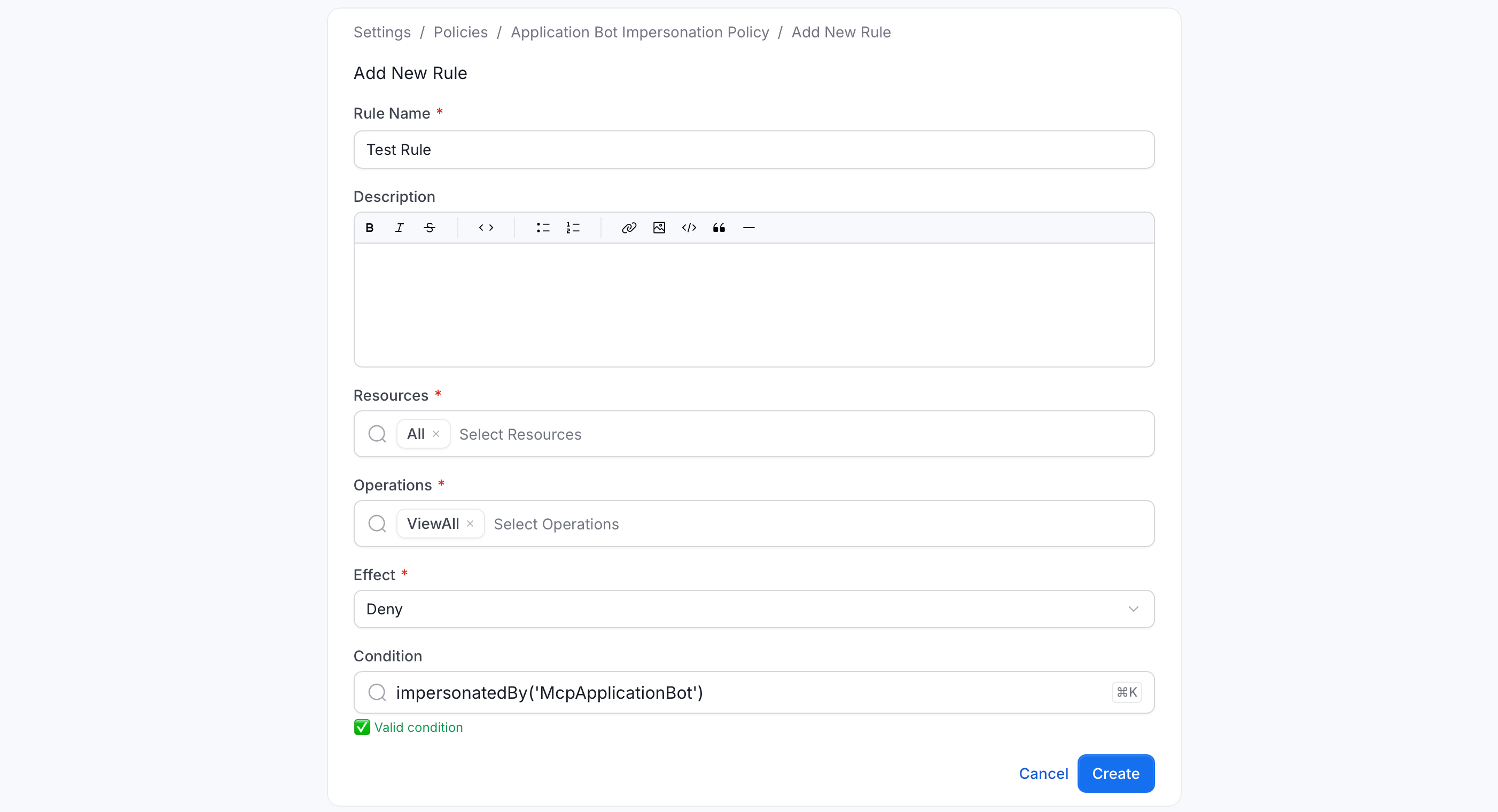
- Click Create.
Default Rules
Go to Settings > Policies > Organization Policy to see the three rules that come built in and apply to everyone in your organization.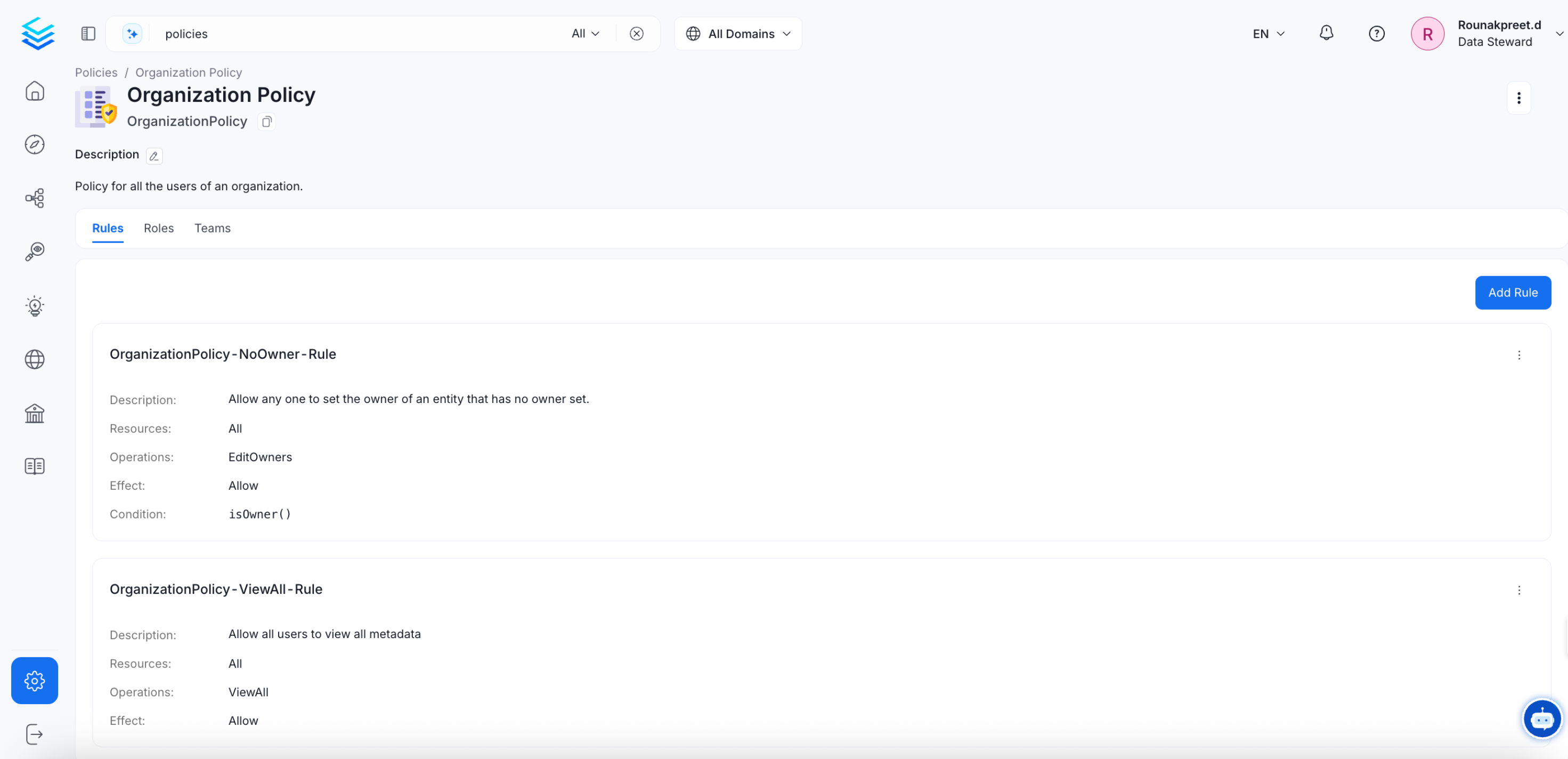
-
OrganizationPolicy-NoOwner-Rule
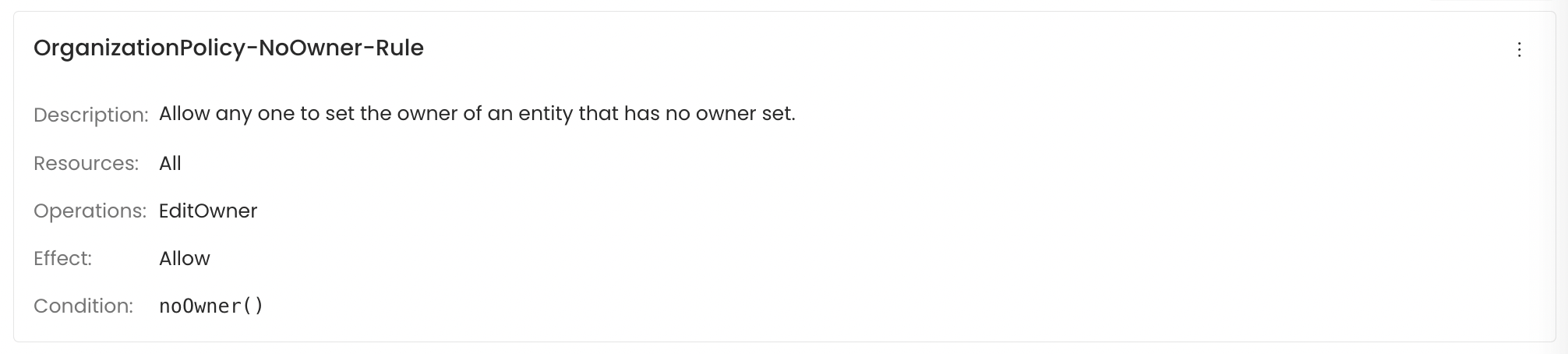
-
OrganizationPolicy-Owner-Rule
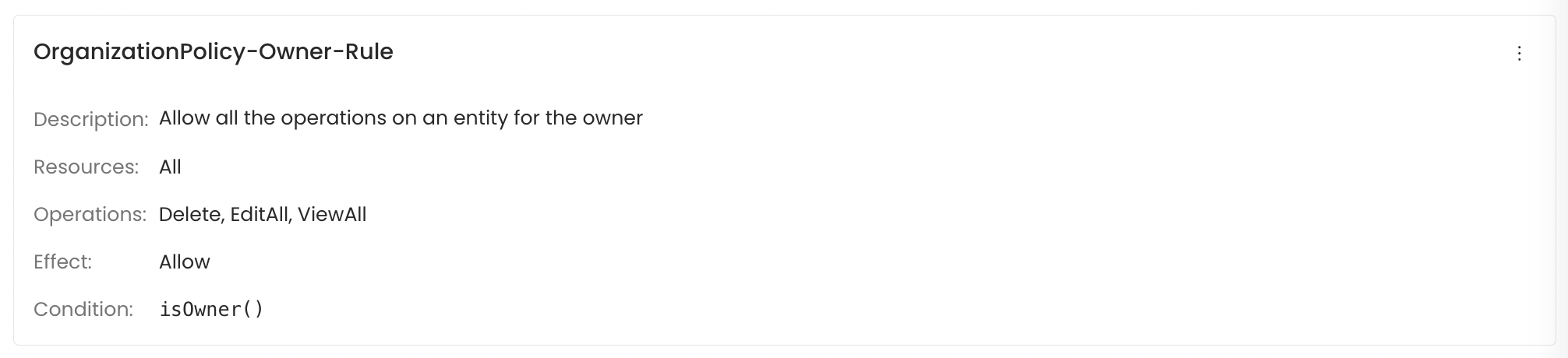
- OrganizationPolicy-ViewAll-Rule This rule lets every user view every asset. It has no condition, so it applies to all users and all assets, whether or not they own the asset or belong to its team. This is why everyone can find and open any asset in Explore by default. With RBAC Search turned on, this rule still applies. For more information, see Roles Based Access Controls (RBAC) Search.
Policies
A policy is a named group of rules. When you access a resource in Collate, it checks all the rules in all the policies that apply to your account and decides whether to allow or deny the action.How Policies Work
When rules conflict If two rules in the same policy disagree – for example, one allowsEditDescription and another denies it – the Deny always wins.
How policies are assigned
Policies are assigned to teams, not to individual users. When you’re added to a team, you automatically inherit all the policies assigned to that team.
Inheritance and Application
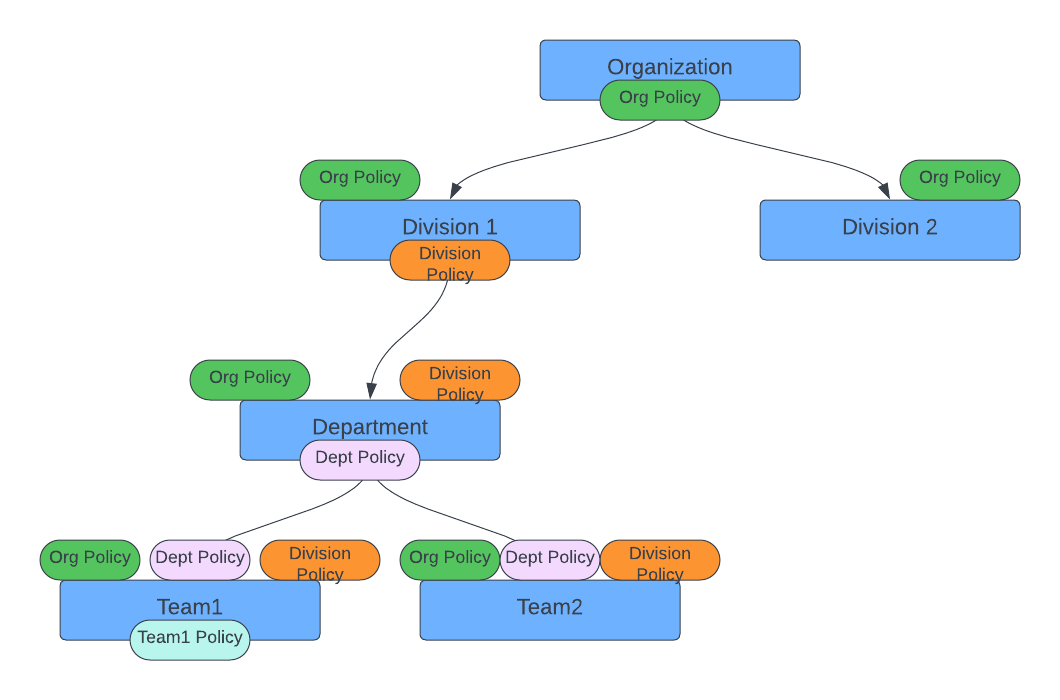
Separation of Duties
For teams with compliance or regulatory requirements, it’s good practice to make sure no single person can complete a sensitive process from start to finish on their own. Split the steps across two roles so each one requires a different person.Roles
A role is a ready-made bundle of policies that matches a job function. Instead of assigning individual policies to every user, you assign them a role and they get all the right policies in one step.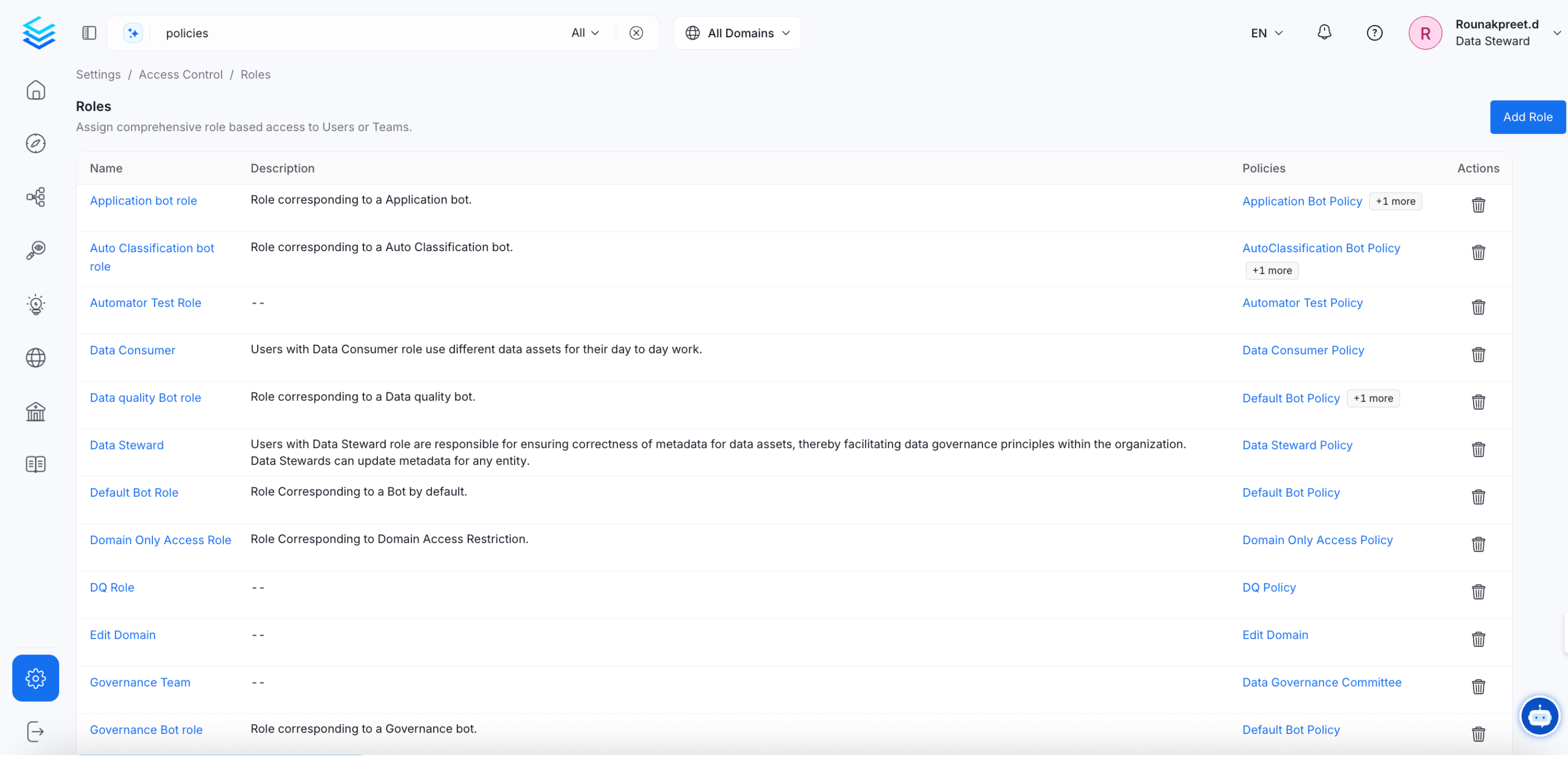
- Data engineers build and maintain data assets – they need
Create,Deploy, andTrigger - Analysts explore and use data – they need
ViewAll,ViewUsage, andViewQueries - Data stewards manage governance – they need
EditTags,EditGlossaryTerms, andEditCertification
Common Mistakes to Avoid
Roles Based Access Controls (RBAC) Search
By default, every user can search for and find any data asset in Collate, regardless of whether they have permission to access it. If you want search results to reflect each user’s permissions, turn on RBAC Search. Search then shows only the assets that the user’s policies allow them to see. The built-in Organization Policy allows everyone to see every asset, so this takes effect only after you change that. For more information, see How Search Combines Your Policies. To enable or disable this, go to Settings > Preferences > Search.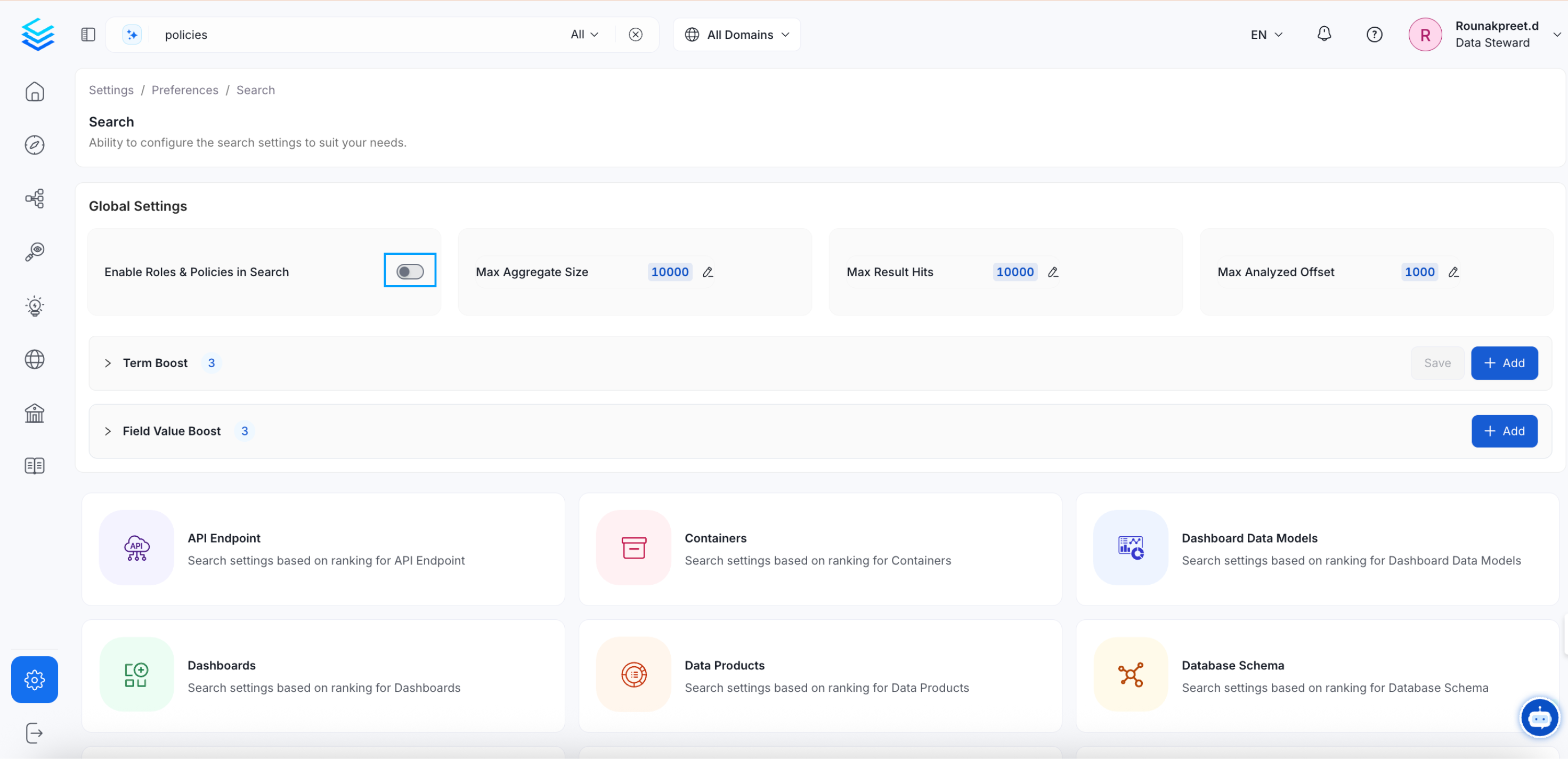
What Changes When You Turn It On
Search results are filtered by permission – users only see assets their role gives them access to, which helps with data security and compliance. Permissions apply at the point of discovery – users can’t find or browse assets they’re not allowed to access, even through search.How Search Combines Your Policies
RBAC Search combines the rules from all of a user’s policies, including the Organization Policy. An asset shows up in search if at least one allow rule lets the user see it, unless a deny rule blocks it. Search only looks at rules that grantViewBasic, ViewAll, or All. It skips every other rule.
The Organization Policy includes OrganizationPolicy-ViewAll-Rule, which grants ViewAll on all resources with no condition. Because of this rule, every user sees every asset in search, even with RBAC Search turned on. A role that grants ViewAll only under isOwner() doesn’t change this. The unconditional rule still shows non-owned assets. Any other policy with an unconditional rule that grants ViewBasic, ViewAll, or All has the same effect. Examples are the policy of the Data Consumer role and a read-only viewer policy that grants ViewBasic on tables.
For strict isolation, make sure no policy that applies to the user grants ViewBasic, ViewAll, or All without a condition. To change the Organization Policy, go to Settings > Policies > Organization Policy, and either delete OrganizationPolicy-ViewAll-Rule or add a condition such as isOwner() to it. Collate doesn’t restore the built-in rules when the server restarts. Owners and owning teams keep access through OrganizationPolicy-Owner-Rule.
Before You Turn It On
Check your roles and policies are fully configured – make sure every user and team has the right permissions for the assets they need. Incomplete configuration can cause users to lose visibility of assets they should see. Check for unconditionalViewBasic, ViewAll, and All rules: if you need users to see only some assets, review every policy that applies to them.
Test with real users after enabling – ask someone from each role to run searches and confirm they’re seeing the right results.
For a full guide on setting up roles and policies, see Roles and Policies. Enabling RBAC Search makes sure Collate’s search aligns with your organization’s data governance and access requirements.
Use Cases: Creating Roles & Policies in Collate
Tailor your policies to meet your organizational and team needs.
Troubleshooting: Queries Tab Is Empty for Non-Admin Users
If a table has queries and an admin can see them, but a non-admin user sees an empty Queries tab, check the following in order:- RBAC Search: Go to Settings > Preferences > Search and check whether RBAC Search is on. When it is on, policies filter the Queries list, so continue to step 2. When it is off, search results aren’t filtered by policies, so go to step 3.
- Query resource rule: Confirm that one of the user’s policies has an Allow rule on the
Queryresource withViewAll(orAll) and noisOwner()condition. Table-levelViewAllorViewQueriesdoesn’t control this tab. Owning the table doesn’t help either, becauseisOwner()in search matches the owners of the query. - Query ingestion: Confirm that query ingestion has run for the service. An admin should see the queries on the table.
- Permission Debugger: Use the Permission Debugger to evaluate
ViewAllon theQueryresource for the affected user.