
Search Configuration Settings
Search configuration controls how results are ranked, weighted, and displayed across your platform. By tuning these settings, you can make your most important assets easier to find — surfacing trusted, frequently used data at the top of results while reducing noise from less relevant matches. You can adjust search behavior at two levels:- Global level — rules that apply to every search across all asset types on the platform. See Global Settings.
- Asset type level — rules that apply to one specific type, such as Tables, Dashboards, or APIs. See Asset Type Level Search Configuration.
How to Access
To access and configure these settings, navigate to Settings > Preferences > Search.Global Settings
Global settings control how search behaves across your entire platform. Changes here affect every asset type, every search query, and every user.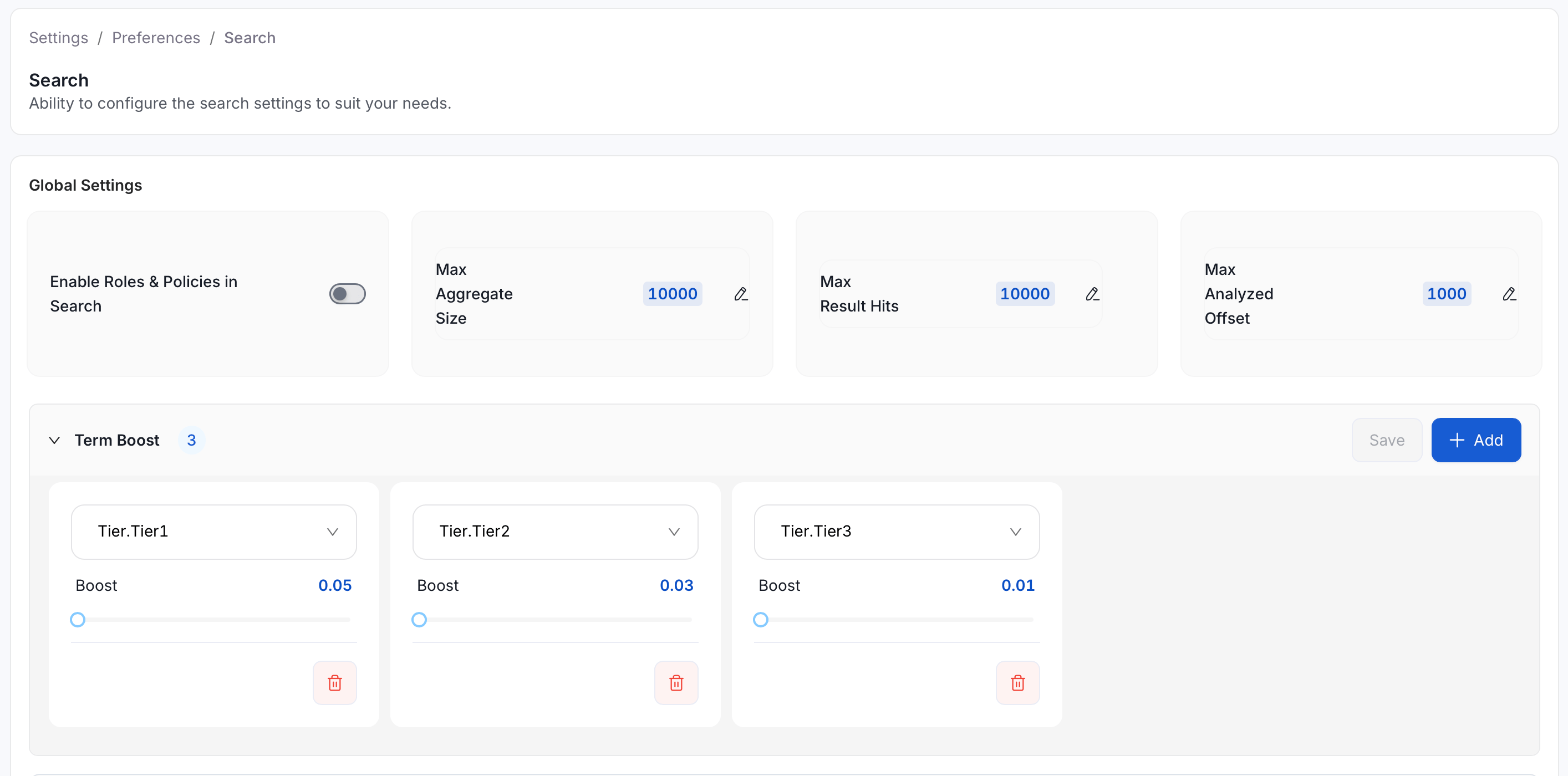
Configurable Options
These settings control platform-wide performance limits and access rules for search. In most cases, the defaults work well for smaller deployments. Increase the limits if your platform contains a large number of assets and users report incomplete or truncated results.Term Boost (Global)
Term boost lets you promote assets with a specific tag so they appear higher across all search results — regardless of asset type. Select a tag from the dropdown, then use the slider to set how strongly it should be promoted. A higher boost value pushes those assets further up the results list. Example:
In this setup, Tier 1 assets appear above Tier 2 and Tier 3 assets when all other relevance signals are equal. This is useful when you want to steer users toward trusted, production-ready data.
Field Value Boost (Global)
Field value boost promotes assets based on a numeric field — such as usage count or votes — so that frequently used or highly rated assets naturally rise in search results. It works the same way as the asset-type field value boost but applies platform-wide, across every asset type. To configure it, open Settings > Preferences > Search and use the Add, Edit, and Delete options in the Field Value Boost section. Changes here apply to every asset type. Any field value boost set at the asset-type level is applied in addition to the global one — both contribute to an asset’s final ranking. The following defaults are seeded by the system and apply globally unless changed:Asset Type Level Search Configuration
Asset type settings let you fine-tune how search behaves for a specific kind of asset — for example, Tables, Dashboards, or Pipelines — without affecting how other types behave. Each section has an Add, Edit, and Delete option so you can build out your configuration incrementally. If something isn’t working the way you expected, select Restore Defaults to reset the entire search configuration — this replaces the fullsearchConfig with system defaults across all sections, not just the current one.
Domains
Domains behave differently from the other entries in this list. A Domain groups data assets together (it isn’t a data asset itself), so it doesn’t appear in Explore or global search results. Searching Explore for a Domain’s name returns only the assets and Data Products inside that Domain, not the Domain entity. To find and open a Domain directly, see Domains. The Domains section under Search settings still matters: it controls ranking and matching wherever Domains are looked up elsewhere in the platform. It just doesn’t affect what appears in Explore.Search Preview
The asset-type settings screen is split into two panels. The left panel contains your configuration sections — Matching Fields, Term Boost, and others. The right panel is a live Preview pane that shows real search results based on your current (unsaved) settings. Type a query into the Search for Data Assets bar in the preview pane to see which assets would be returned. Each result shows the asset’s name, breadcrumb path, description, domain, owners, tier, and a SCORE value so you can see exactly how your configuration is influencing relevance ranking. The preview updates as you adjust matching fields, weights, or boost settings — without affecting live search results for other users. Once the results look right, click Save to apply your changes. If you want to undo all changes and return to the system defaults, click Restore Defaults in the preview pane header.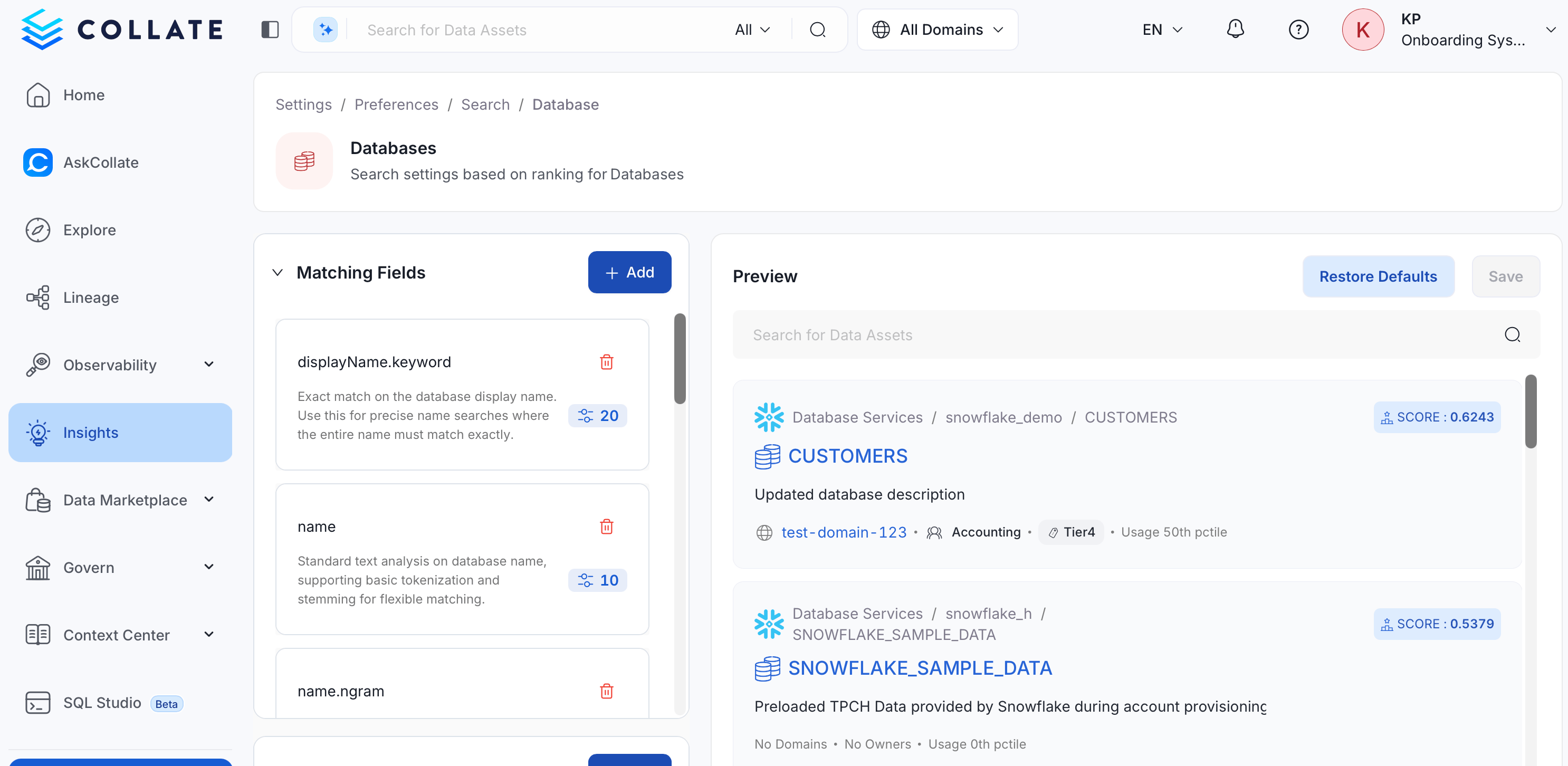
Matching Fields
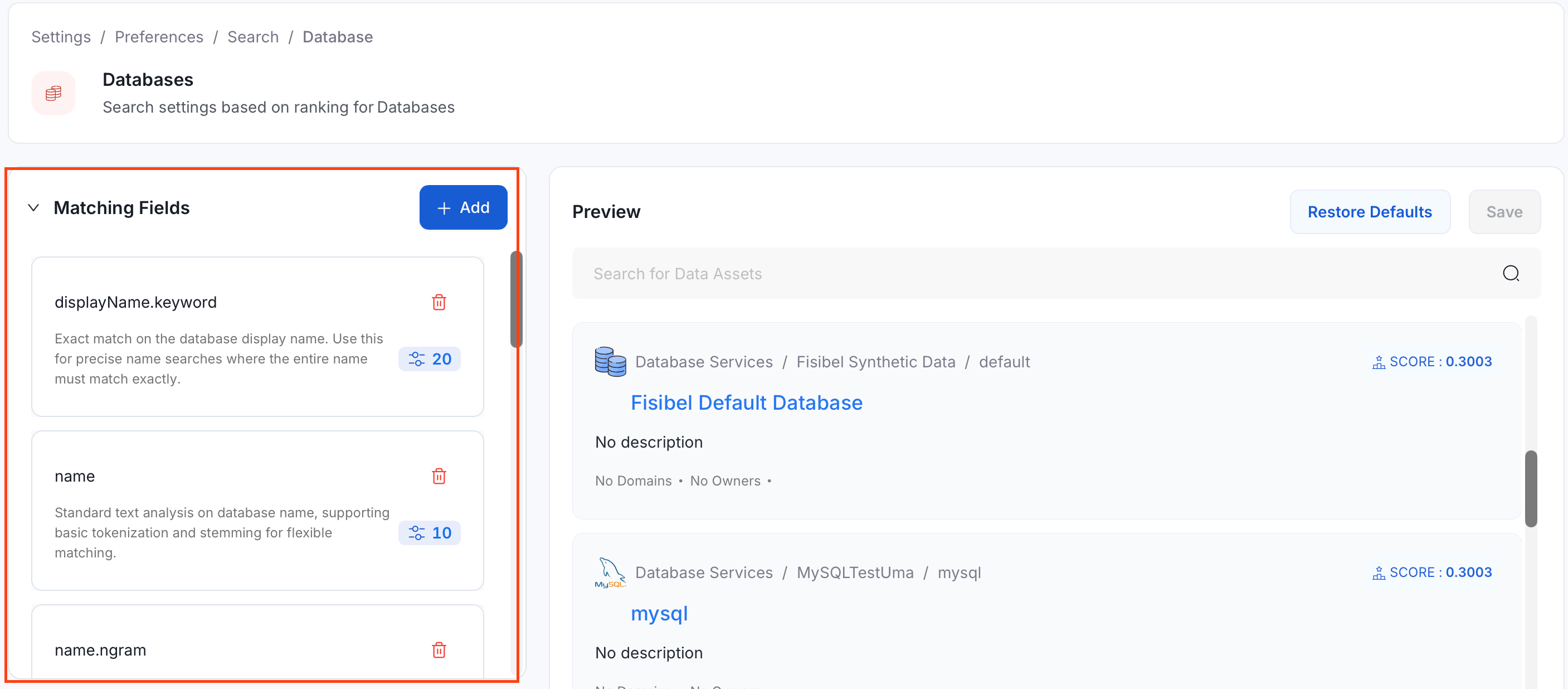
Matching fields define which parts of an asset’s metadata are considered when your search query runs. For example, ifdescription is included as a matching field, searching for a keyword will also look inside asset descriptions — not just names.
- To add a new matching field, click Add.
- To configure the settings in an existing field, select the respective matching fields card.
Matching Fields Settings
Each field has four settings: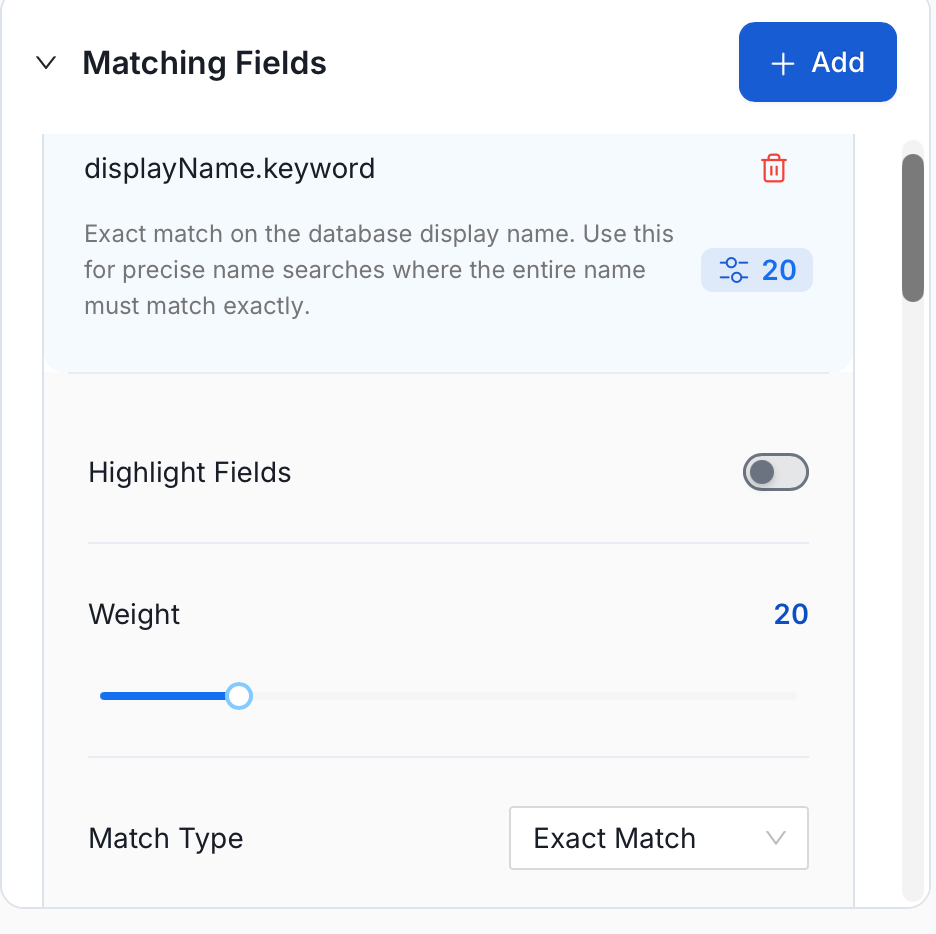
Match Types
Match type controls how flexible or strict the comparison between your search query and a field’s value is. Choosing the right match type for each field helps you return accurate results without overwhelming users with noise.Available Matching Fields
The table below lists the fields you can configure, along with their default weights and match types. Table is used as an example — other asset types follow the same pattern with fields suited to their structure.
These fields are available across most asset types and can be added from the field picker:
Asset-Type-Specific Fields
Some asset types have additional fields that reflect their unique structure. These are only available when configuring search for that specific asset type. Dashboardcharts.name— Names of charts included in the dashboardcharts.description— Descriptions of charts included in the dashboardcharts.tags.tagFQN.text— Tags applied to individual charts within the dashboard
messageSchema.schemaFields.name.keyword— Exact name of a field in the topic’s message schemamessageSchema.schemaFields.description— Description of a field in the topic’s message schema
tasks.name— Names of tasks within the pipelinetasks.description— Descriptions of tasks within the pipeline
dataModel.columns.name— Column names in the container’s data modeldataModel.columns.name.keyword— Column names — exact match only
mlFeatures.name— Names of features the model uses as inputsmlFeatures.description— Descriptions of features the model uses as inputs
responseSchema.schemaFields.name.keyword— Exact name of a field in the API response schemarequestSchema.schemaFields.name.keyword— Exact name of a field in the API request schema
queryText— The full SQL text of the queryqueryText.ngram— Partial word matching within the SQL text
synonyms— Alternative names or synonyms for the glossary termsynonyms.ngram— Partial word matching on synonym textglossary.name— The name of the glossary the term belongs to
Score Mode and Boost Mode
When multiple boost rules are active at the same time, score mode and boost mode control how they’re combined and applied to the final result order.
Defaults: Score mode = Sum, Boost mode = Multiply
Term Boost
Term boost for an asset type works the same way as global term boost, but only affects results for that specific asset type. Select a tag from the dropdown and use the slider to set the boost value. Assets with that tag will appear higher in results when users search within that asset type.Field Value Boost
Field value boost lets you rank assets higher based on a numeric metric — for example, how many times an asset was used last week, or how many upvotes it has received. This helps surface active, well-regarded assets without requiring users to filter manually. To add a field value boost, click Add and configure the following options: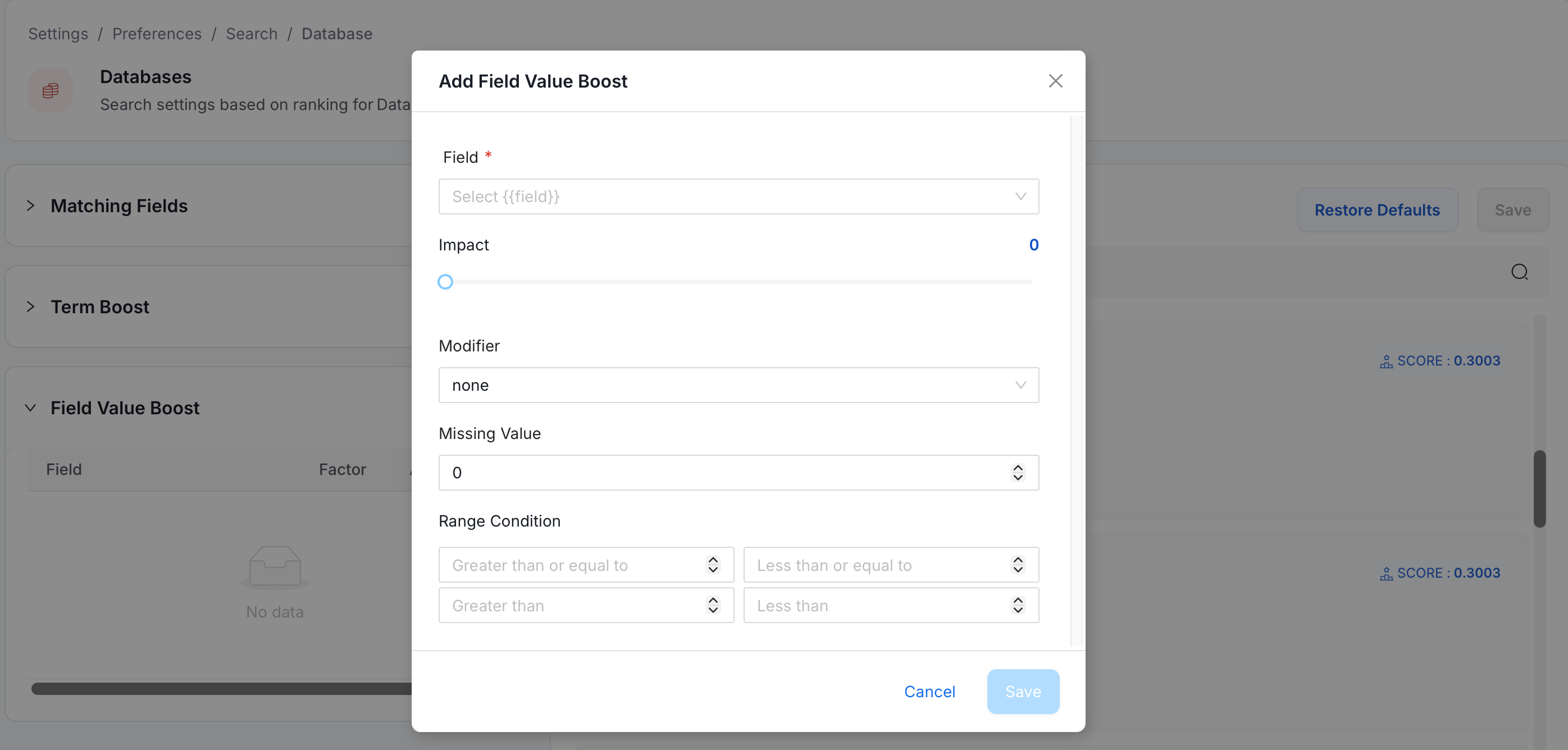
Restore Defaults
Selecting Restore Defaults resets the entire search configuration for your platform by replacing the fullsearchConfig with the original system defaults. This resets all sections at once — matching fields, term boost, score mode, boost mode, and field value boost.
Best Practices
These recommendations help you get the most consistent and useful results from search configuration.- Use Exact match on
.keywordfields likename.keywordwhen you want only precise name matches to count. This is useful when your assets have highly similar names and partial matches create confusion. - Use Phrase match on
nameanddisplayNamewhen word order matters. For example, “customer orders” should rank higher than an asset where the same two words appear in different fields. - Use Fuzzy match sparingly. It helps users find assets despite typos, but applying it to too many fields increases the chance of irrelevant results appearing.
- Use Standard match for description fields and other free-text content where users’ exact phrasing is unpredictable.
- Use Term boost to promote assets with important tags — such as a tier level or certification — so they consistently appear near the top of results for all users.
- Use Field value boost to ensure frequently used or highly rated assets surface first, especially in large catalogs where relevance alone may not distinguish quality.
- Avoid assigning very high weights to many fields at once. When too many fields have high weights, each individual boost contributes less, and the overall ranking becomes harder to reason about.