
Lineage Query Filtering

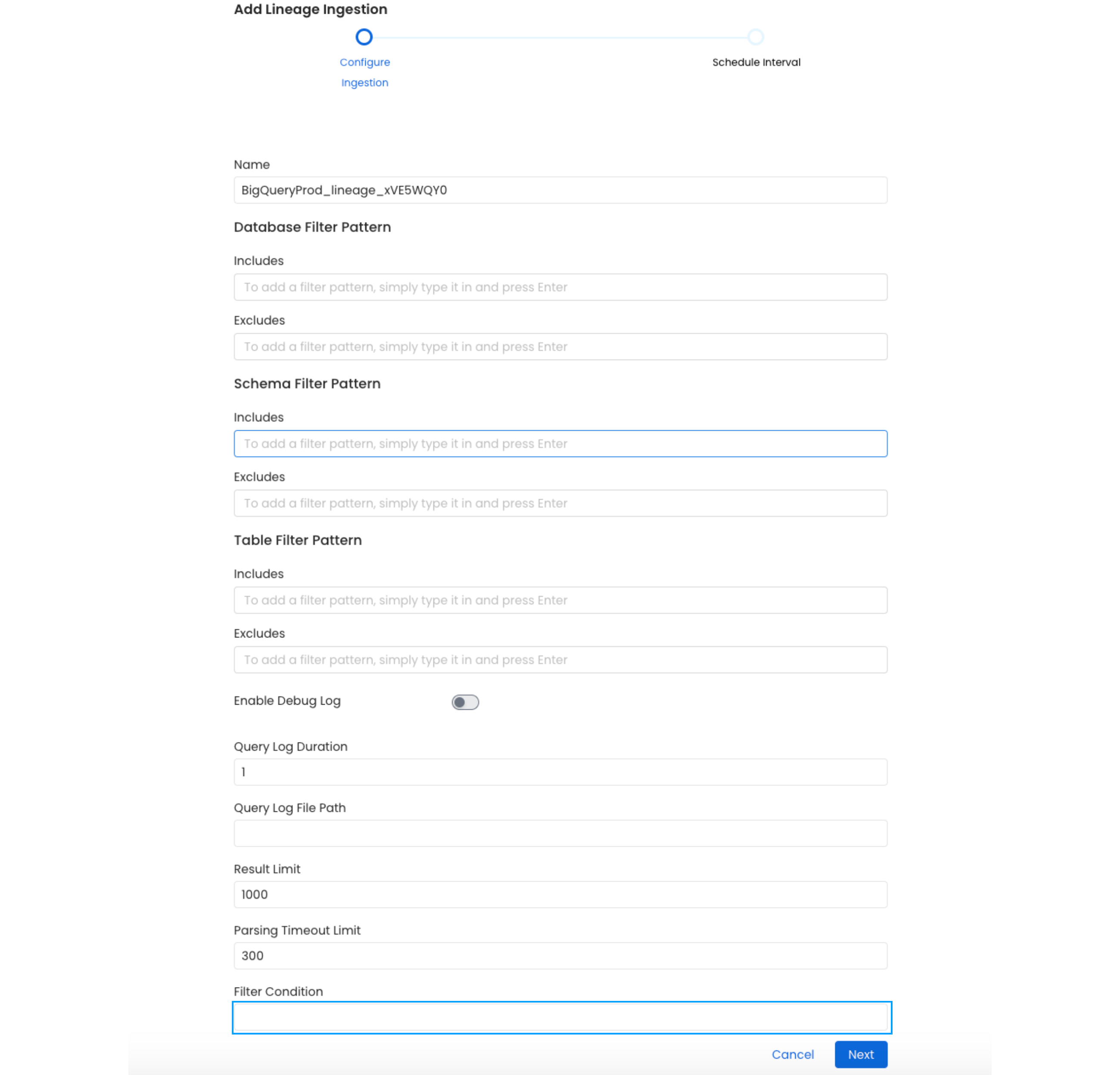
In order to extract usage information, OpenMetadata parses the queries that have run against the database. We fetch these queries from the query history table of the respective data source. This query fetches all the queries executed within configured no of days. In this guide we we understand how we can filter out the query history result set, this can help to exclude queries with specific pattern or queries executed on a specific schema or database, depending on the data source. Query filtering is supported for both Usage & Lineage workflows. While configuring either usage or lineage workflow you will find a Filtering Condition text field where you can provide the sql condition which will be added to already existing conditions with an AND operation. In later part of this document you will find how to write this condition for supported data source. filter-condition-field
Snowflake Filter Condition

To fetch the query history log from snowflake we execute the following query
SELECT
      query_type,
      query_text,
      user_name,
      database_name,
      schema_name,
      start_time,
      end_time,
      total_elapsed_time/1000 duration
    from snowflake.account_usage.query_history
    WHERE query_text NOT LIKE '/* {app": "OpenMetadata", %} */%'
    AND query_text NOT LIKE '/* {"app": "dbt", %} */%'
    AND start_time between to_timestamp_ltz('{start_time}') and to_timestamp_ltz('{end_time}')
    AND QUERY_TYPE NOT IN ('ROLLBACK','CREATE_USER',....)

    AND {**your filter condition**}

    LIMIT {result_limit}
You can refer to this snowflake documentation to find out more about the query history table. For example if you want to add a condition to filter out queries executed by metabase client, i.e. the queries staring with -- metabase % then you can put the condition as query_text NOT LIKE '--metabase %' you also need to further restrict the query log and need only queries which have been executed on SALES database then you can put the filter condition as query_text NOT LIKE '--metabase %' AND database_name='SALES'.

Bigquery Filter Condition

To fetch the query history log from bigquery we execute the following query
SELECT
   project_id as database_name,
   user_email as user_name,
   statement_type as query_type,
   start_time,
   end_time,
   query as query_text,
   null as schema_name,
   total_slot_ms/1000 as duration
FROM `region-{region}`.INFORMATION_SCHEMA.JOBS_BY_PROJECT
WHERE creation_time BETWEEN "{start_time}" AND "{end_time}"
  AND statement_type IN ("SELECT",....)

  AND {**your filter condition**}

  AND job_type = "QUERY"
  AND state = "DONE"
  AND IFNULL(statement_type, "NO") not in ("NO", "DROP_TABLE", "CREATE_TABLE")
  AND query NOT LIKE '/* {{"app": "OpenMetadata", %%}} */%%'
  AND query NOT LIKE '/* {{"app": "dbt", %%}} */%%'
  LIMIT {result_limit}
You can refer to this bigquery documentation to find out more about the JOBS_BY_PROJECT table. For example if you want to add a condition to filter out queries executed by metabase client, i.e. the queries staring with -- metabase % then you can put the condition as query NOT LIKE '--metabase %'.

MSSQL Filter Condition

To fetch the query history log from MSSQL we execute the following query
SELECT TOP {result_limit}
    db.NAME database_name,
    t.text query_text,
    s.last_execution_time start_time,
    DATEADD(s, s.total_elapsed_time/1000, s.last_execution_time) end_time,
    s.total_elapsed_time/1000 duration,
    NULL schema_name,
    NULL query_type,
    NULL user_name,
    NULL aborted
FROM sys.dm_exec_cached_plans AS p
INNER JOIN sys.dm_exec_query_stats AS s
ON p.plan_handle = s.plan_handle
CROSS APPLY sys.Dm_exec_sql_text(p.plan_handle) AS t
INNER JOIN sys.databases db
ON db.database_id = t.dbid
WHERE s.last_execution_time between '{start_time}' and '{end_time}'
    AND t.text NOT LIKE '/* {{"app": "OpenMetadata", %%}} */%%'
    AND t.text NOT LIKE '/* {{"app": "dbt", %%}} */%%'
    AND p.objtype != 'Prepared'

    AND {**your filter condition**}

ORDER BY s.last_execution_time DESC
You can refer to this mssql documentation to find out more about the dm_exec_cached_plans table. For example if you want to add a condition to filter out queries executed by metabase client, i.e. the queries staring with -- metabase % then you can put the condition as t.text NOT LIKE '--metabase %'. you also need to further restrict the query log and need only queries which have been executed on SALES database then you can put the filter condition as t.text NOT LIKE '--metabase %' AND db.NAME='SALES'.

Clickhouse Filter Condition

To fetch the query history log from clickhouse we execute the following query
Select
    query_start_time start_time,
    DATEADD(query_duration_ms, query_start_time) end_time,
    query_duration_ms/1000 duration,
    'default' database_name,
    user user_name,
    FALSE aborted,
    query_id query_id,
    query query_text,
    databases schema_name,
    tables tables
From system.query_log
Where start_time between '{start_time}' and '{end_time}'
and CAST(type,'Int8') <> 3
and CAST(type,'Int8') <> 4
and query NOT LIKE '/* {{"app": "OpenMetadata", %%}} */%%'
and query NOT LIKE '/* {{"app": "dbt", %%}} */%%'

AND {**your filter condition**}

and (`type`='QueryFinish' or `type`='QueryStart')
LIMIT {result_limit}
You can refer to this clickhouse documentation to find out more about the query_log table. For example if you want to add a condition to filter out queries executed by metabase client, i.e. the queries staring with -- metabase % then you can put the condition as query NOT LIKE '--metabase %'.

Vertica Filter Condition

To fetch the query history log from vertica we execute the following query
SELECT
    DBNAME() AS database_name,
    p.query AS query_text,
    r.start_timestamp AS start_time,
    r.end_timestamp AS end_time,
    p.schema_name,
    p.query_duration_us/1000 AS duration,
    p.query_type,
    p.user_name,
    NULL aborted
    FROM query_profiles p
    LEFT JOIN query_requests r
      ON p.TRANSACTION_ID = r.TRANSACTION_ID
     AND p.STATEMENT_ID = r.STATEMENT_ID
    WHERE query_start between '{start_time}' and '{end_time}'
      AND query NOT LIKE '%%/* {{"app": "OpenMetadata", %%}} */%%'
      AND query NOT LIKE '/* {{"app": "dbt", %%}} */%%'
      AND success = 1

      AND {**your filter condition**}

    ORDER BY query_start DESC
    LIMIT {result_limit}
You can refer to this vertica documentation to find out more about the query_profiles table. For example if you want to add a condition to filter out queries executed by metabase client, i.e. the queries staring with -- metabase % then you can put the condition as query NOT LIKE '--metabase %'.

Redshift Filter Condition

To fetch the query history log from redshift we execute the following query
SELECT *
      FROM pg_catalog.stl_query
WHERE userid > 1

    AND {**your filter condition**}

    -- Filter out all automated & cursor queries
    AND querytxt NOT LIKE '/* {{"app": "OpenMetadata", %%}} */%%'
    AND querytxt NOT LIKE '/* {{"app": "dbt", %%}} */%%'
    AND aborted = 0
    AND starttime >= '{start_time}'
    AND starttime < '{end_time}'
    LIMIT {result_limit}
You can refer to this redshift documentation to find out more about the stl_query table. For example if you want to add a condition to filter out queries executed by metabase client, i.e. the queries staring with -- metabase % then you can put the condition as query NOT LIKE '--metabase %'.