
Profiler Metrics
Here you will find information about the supported metrics for the different types. A Metric is a computation that Collate can run on top of a Table or Column to receive a value back. They are the primary building block of Collate’s Profiler.- Metrics define the queries and computations generically. They do not aim at specific columns or database dialects. Instead, they are expressions built with SQLAlchemy that should run everywhere.
- A Profiler is the binding between a set of metrics and the external world. The Profiler contains the Table and Session information and is in charge of executing the metrics.
Table Metrics
Those are the metrics computed at the Table level.Row Count
It computes the number of rows in the Table.Column Count
Returns the number of columns in the Table.Column Names
Returns the list of column names in the Table.System Metrics
System metrics provide information related to DML operations performed on the table. These metrics present a concise view of your data freshness. In a typical data processing flow tables are updated at a certain frequency. Table freshness will be monitored by confirming a set of operations has been performed against the table. To increase trust in your data assets, Collate will monitor theINSERT, UPDATE and DELETE operations performed against your table to showcase 2 metrics related to freshness (see below for more details). With this information, you are able to see when a specific operation was last perform and how many rows it affected.
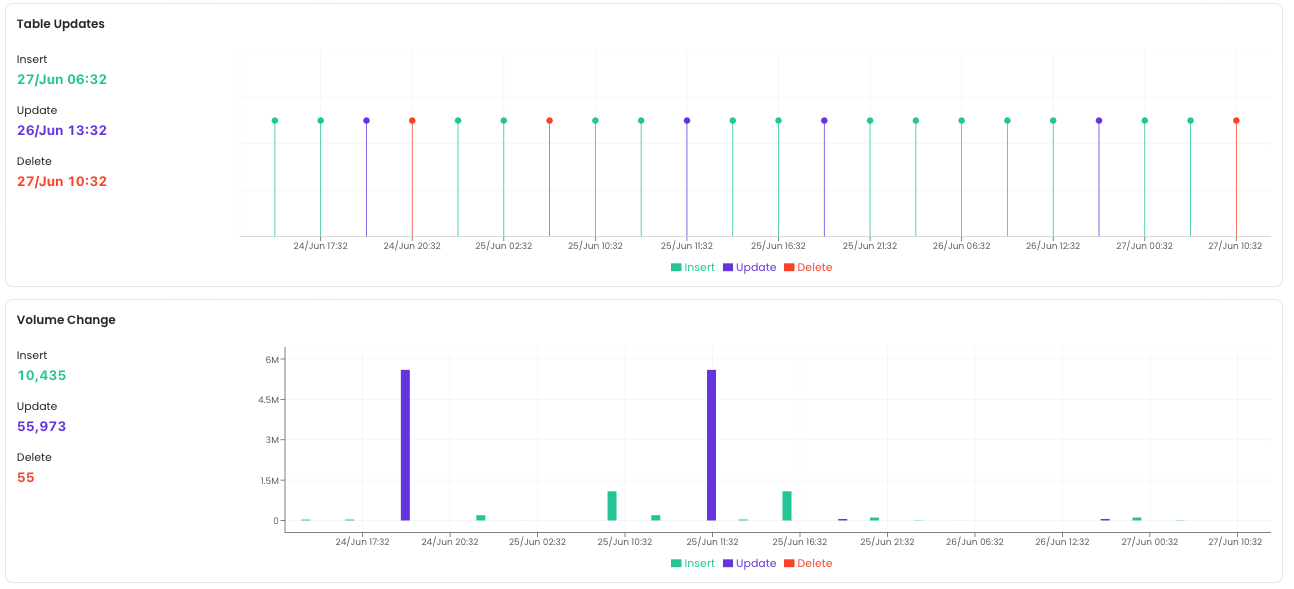
DML Operations
This metric shows all the DML operations performed (INSERT, UPDATE, DELETE) against the table in a timeseries fashion.
Rows Affected by the DML Operation
This metric shows the number of rows that were affected by a DML operation (INSERT, UPDATE, DELETE) over time.
Column Metrics
Metrics that Collate runs for all columns.Note that Collate does not currently support complex types such as ARRAY or STRUCT. The implementation will come down the road.
Values Count
It is the total count of the values in the column. Ignores nulls.Values Percentage
Percentage of values in this column vs. the Row Count.Duplicate Count
Informs the number of rows that have duplicated values in a column. Computed ascount(col) - count(distinct(col)).
Null Count
The number of null values in a column.Null Proportion
It shows the ratio of null values vs. the total number of values in a column.Null Missing Count
The number of null values plus empty-string values in a column that can contain strings. Unlike Null Count, this also treats empty strings as missing values. The exact empty-string behavior depends on the profiler backend and column type.Unique Count
The number of unique values in a column, those that appear only once. For example,[1, 2, 2, 3, 3, 4] => [1, 4] => count = 2.
Unique Proportion
Unique Count / Values Count.Distinct Count
The number of different items in a column. For example,[1, 2, 2, 3, 3, 4] => [1, 2, 3, 4] => count = 4.
Distinct Proportion
Distinct Count / Values Count.Count in Set
Counts the number of values in a column that match a specified set of values. Requires the set of values to check against.Like Count
Counts the number of values in a column matching a specified SQLLIKE pattern. Requires a pattern.
Case-Insensitive Like Count
Counts the number of values in a column matching a specified pattern, ignoring case. Requires a pattern. The Collate Spark implementation currently evaluates the pattern with case-sensitive regular-expression (rlike) semantics; see the warning above.
Not Like Count
Counts rows whose value does not match a specified SQLLIKE pattern. SQL-backed runs count NULL values as non-matches, while Spark-backed runs do not count NULL results from the negated predicate.
Regex Count
Counts the number of values in a column matching a specified regular expression.Not Regex Count
Counts rows whose value does not match a specified regular expression. SQL-backed runs countNULL values as non-matches, while Spark-backed runs do not count NULL results from the negated predicate. The current Pandas implementation counts matching values instead, so do not use this metric with a Pandas profiler until that implementation is corrected.
Min
Only for numerical values. Returns the minimum.Max
Only for numerical values. Returns the maximum.Min Length
Only for concatenable values. Returns the minimum length of the values in a column.Max Length
Only for concatenable values. Returns the maximum length of the values in a column.Mean
- Numerical values: returns the average of the values.
- Concatenable values: returns the average length of the values.
Median
Only for numerical values. This is currently not supported in MySQL.Sum
Only for numerical values. Returns the sum of all values in a column.Standard Deviation
Only for numerical values. Returns the standard deviation.Histogram
The histogram returns a dictionary of the different bins and the number of values found for that bin. It will be computed only if the Inter Quartile Range value is available.First Quartile
Only for numerical values. Middle number between the smallest value and the median.Third Quartile
Only for numerical values. Middle number between the median and the greatest value.Inter Quartile Range
Only for numerical values. Difference between the third quartile and the first quartile.Nonparametric Skew
Measure of skewness of the column distribution. Nonparametric skew is computed as follows. WhereGrant Access to User for System Metrics
Collate uses system tables to compute system metrics. Find the required access as well as more details for your database engine below.Snowflake
Collate uses theQUERY_HISTORY_BY_WAREHOUSE view of the INFORMATION_SCHEMA to collect metrics about DML operations. The QUERY ID is passed to the RESULT_SCAN function to get the number of rows affected by the operation. Ensure the user running the profiler workflow has access to this view and this function.
Collate will look at the past 24 hours to fetch the operations that were performed against a table.
Important
For the Snowflake system, the system will parse the DDL query and attempt to match database, schema, and table name to entities in Collate. If the DDL query does not include all 3 elements Collate will not be able to ingest this metric.
Redshift
Collate uses the following to fetch DML operations as well as the number of rows affected by these operations.SVV_TABLE_INFO,STL_INSERT, andSTL_DELETEin Provisioned ClusterSYS_QUERY_DETAILin Serverless instance
BigQuery
BigQuery uses theJOBS table of the INFORMATION_SCHEMA to fetch DML operations as well as the number of rows affected by these operations. Make sure your data location is properly set when creating your BigQuery service connection in Collate.
Collate will look at the previous day to fetch the operations that were performed against a table filter on the creation_time partition field to limit the size of data scanned.
Collate reads
INFORMATION_SCHEMA.JOBS only in the GCP project that contains the table. If a table is updated by jobs that run in a different GCP project (for example, a dbt setup that runs in another project), Collate does not detect those jobs. The DML Operations and Rows Affected metrics stay empty even though the table was updated. There is currently no option to scan additional projects or the whole organization.