
Python SDK for Lineage
In this guide, we will use the Python SDK to create and fetch Lineage information. For simplicity, we are going to create lineage between Tables. However, this would work with ANY entity. You can find the Lineage Entity defined here, as well as the Entity defining the payload to add a new lineage: AddLineage. In the following sections we will:- Create a Database Service, a Database, a Schema and two Tables,
- Add Lineage between both Tables,
- Get the Lineage information back.
Creating the Entities
To prepare the necessary ingredients, execute the following steps. All functions that we are going to use related to Lineage can be found here.1. Preparing the Client
2. Creating the Database Service
We are mocking a MySQL instance. Note how we need to pass the right configuration classMysqlConnection, as a
parameter for the generic DatabaseConnection type.
3. Creating the Database
Any Entity that is created and linked to another Entity, has to hold thefullyQualifiedName to the Entity it
relates to. In this case, a Database is bound to a specific service.
4. Creating the Schema
The same happens with the Schemas. They are related to a Database.5. Creating the Tables
And finally, Tables are contained in a specific Schema, so we use thefullyQualifiedName here as well.
We are doing a simple example with a single column.
6. Adding Lineage
With everything prepared, we can now create the lineage between both entities.fromEntity node
we added:
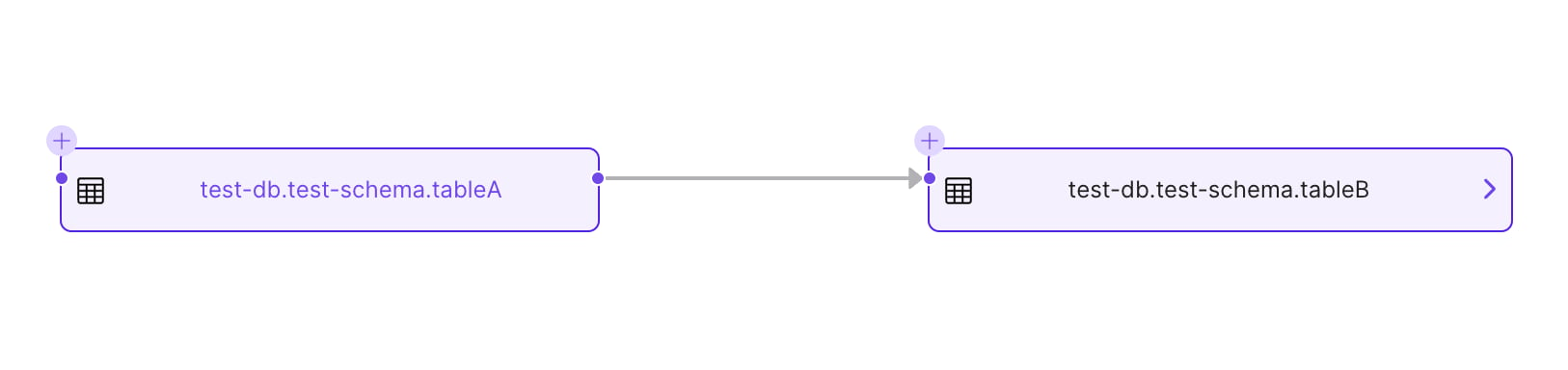
7. Fetching Lineage
Finally, let’s fetch the lineage from the other node involved:Lineage Details
Note how when adding lineage information we give to the API an AddLineage Request. This is composed of an Entity Edge, whose definition you can find here. In a nutshell, an Entity Edge has:- The Entity Reference as the lineage origin,
- The Entity Reference as the lineage destination,
- Optionally, Lineage Details.
sqlQueryspecifying the transformation,- An array of
columnsLineageas an object with an array of source and destination columns, as well as their own specific transformation function, - Optionally, the Entity Reference of a Pipeline powering the transformation from Table A to Table B.
Lineage.add_lineage(...) helper covers direct edges. For advanced payloads, construct an AddLineageRequest
and submit it with Lineage.add_lineage_request(...).
Let’s see how to do that and play with the possible combinations.
First, import the required classes and create a new table:
Column Level Lineage
We can start by linking our columns together. For that we are going to create:- A
ColumnLineageobject, linking our Table A column ID -> Table C column ID. Note that this can be a list! - A
LineageDetailsobject, passing the column lineage and the SQL query that powers the transformation.
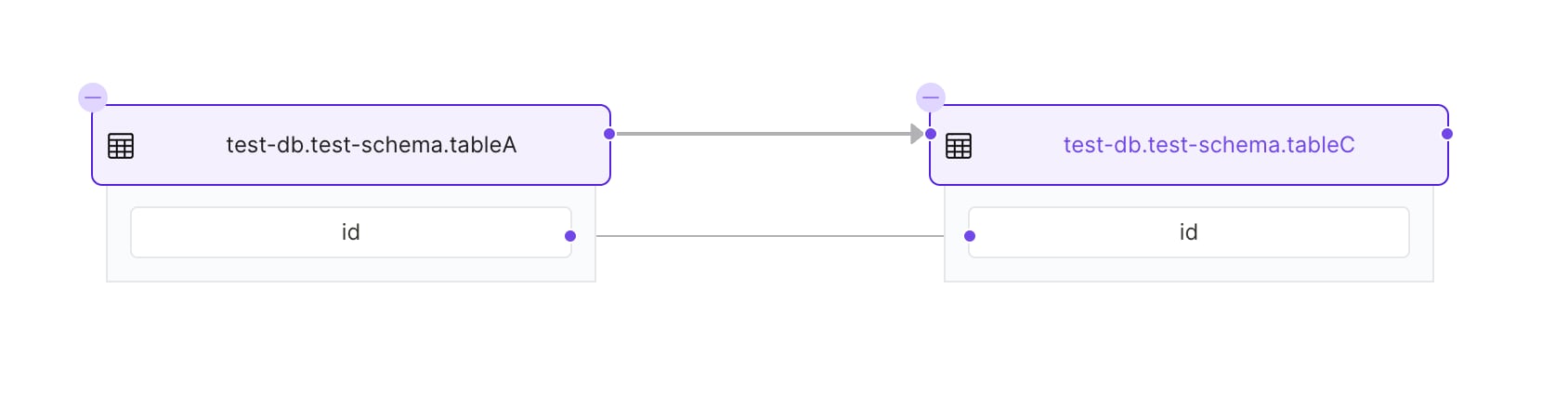
Adding a Pipeline Reference
We can as well pass the reference to the pipeline used to create the lineage (e.g., the ETL feeding the tables). To prepare this example, we need to start by creating the Pipeline Entity. Again, we’ll need first to prepare the Pipeline Service:Pipeline service creation is managed through the OpenMetadata UI or the ingestion CLI. Once a pipeline service exists, you can create pipeline entities against it using the SDK as shown below.
pipeline argument
as an Entity Reference:
Automated SQL Lineage
To have lineage generated from a SQL query, calladd_lineage_by_query. metadata.sdk.api.Lineage doesn’t expose it,
but the client returned by configure(...) does, through its ometa property. This is the same call the
CLI makes.
source_table to target_table within the local_mysql database service.
add_lineage_by_query takes these parameters:
- database_service: The database service that contains the tables in the query. The SQL dialect is taken from its service type.
- sql: The query to parse.
- database_name and schema_name: (Optional) The database and schema to use for table names that the query doesn’t qualify.
- timeout: Timeout for the lineage parsing process, in seconds.
- check_patch: Defaults to
False. The CLI sets it toTrue.
add_lineage_by_query returns None and doesn’t raise on failure. Parsing and API errors are only logged, so enable
logging to see them. Check that get_by_name found the service before calling it: when database_service is None,
the method does nothing.Automated SQL Lineage via CLI
To create the automated sql lineage via CLI, you need to make sure that you have installed the openmetadata-ingestion package in your local environment using commandpip install openmetadata-ingestion.
Once that is done you will have to prepare a yaml file as follows.
- serviceName: Name of the database service which contains the table involved in query.
- query: You can specify the raw sql query within the yaml file itself.
- filePath: In case the query is too big then you can also save query in a file and pass the path to the file in this field.
- parseTimeout: Timeout for the lineage parsing process.
- workflowConfig: The main property here is the openMetadataServerConfig, where you can define the host and security provider of your OpenMetadata installation.