
Airflow REST API Connection
The REST API connection communicates with the Airflow web server over HTTP/HTTPS. It does not require direct access to Airflow’s underlying metadata database, making it the right choice for managed Airflow deployments (Astronomer, Cloud Composer, MWAA) or any setup where direct database access is unavailable or undesirable.What the REST API connection captures
- DAG topology and task structure
- Pipeline schedules and run statuses
- DAG owners and tags
- Pipeline status history (configurable look-back window)
Supported Deployments
Common Parameters
These parameters apply regardless of which authentication method you select.Host and Port — Format by Deployment
Authentication Methods
1. Basic Auth
Best for: Self-hosted Airflow. Basic Auth uses a username and password to authenticate against the Airflow web server. Collate automatically exchanges the credentials for a short-lived JWT viaPOST /auth/token, which is then sent as Authorization: Bearer <token> on all subsequent requests.
Required Parameters
Required Airflow Permissions
Create a dedicated Airflow user with the Viewer role. The user needs read access to DAGs, DAG runs, task instances, task logs, event logs, and configuration. No write permissions are required.UI Setup
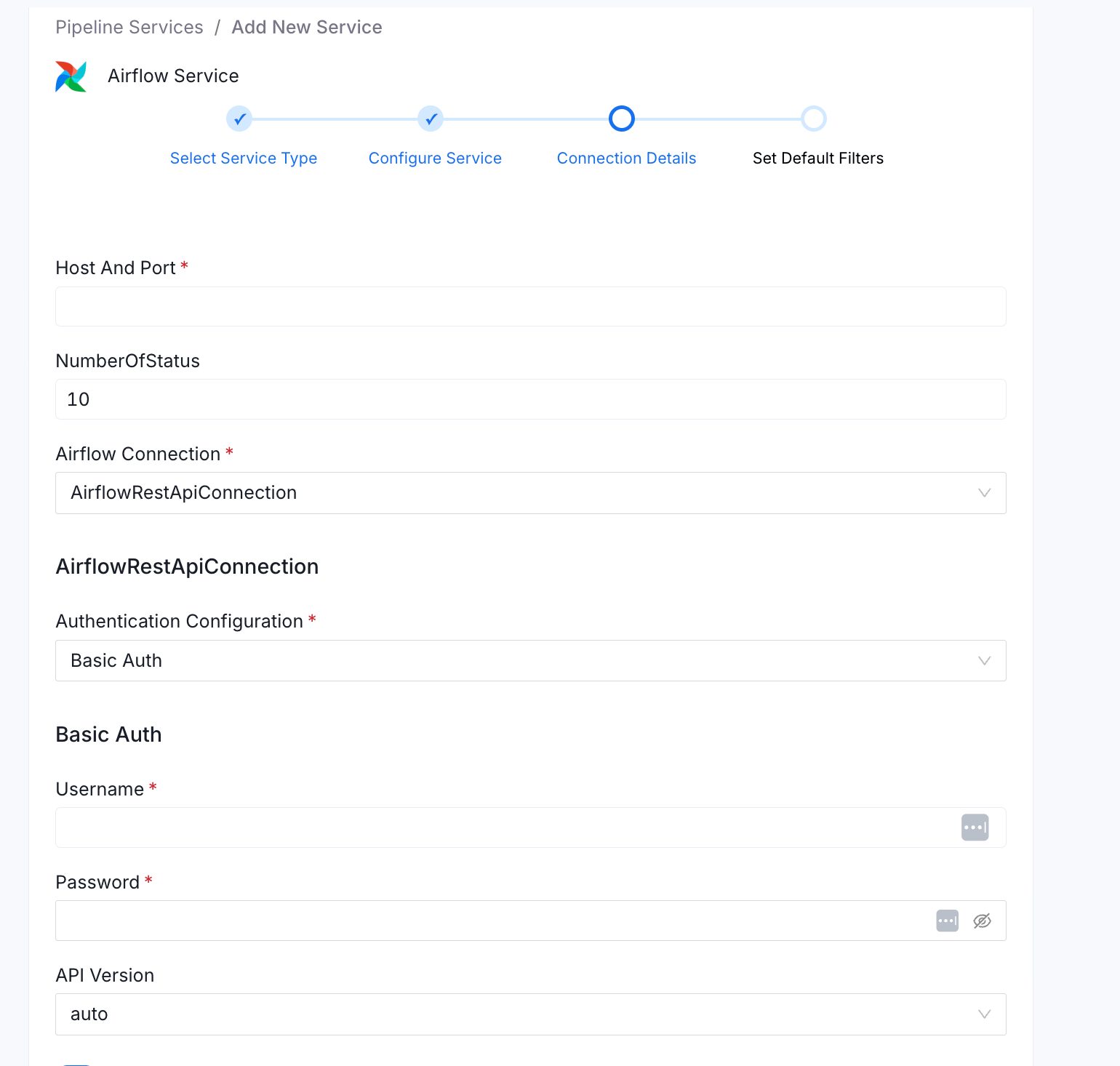
OpenLineage Setup — Basic Auth
Configure the namespace and HTTP transport inairflow.cfg:
OpenLineageClient in the task body.
2. Access Token
Best for: Astronomer, or any Airflow deployment with a pre-generated bearer token. Access Token auth sends a static bearer token on every request asAuthorization: Bearer <token>. Use this when you have generated a long-lived deployment API token in Astronomer, or when your Airflow instance exposes token-based authentication.
Required Parameters
UI Setup
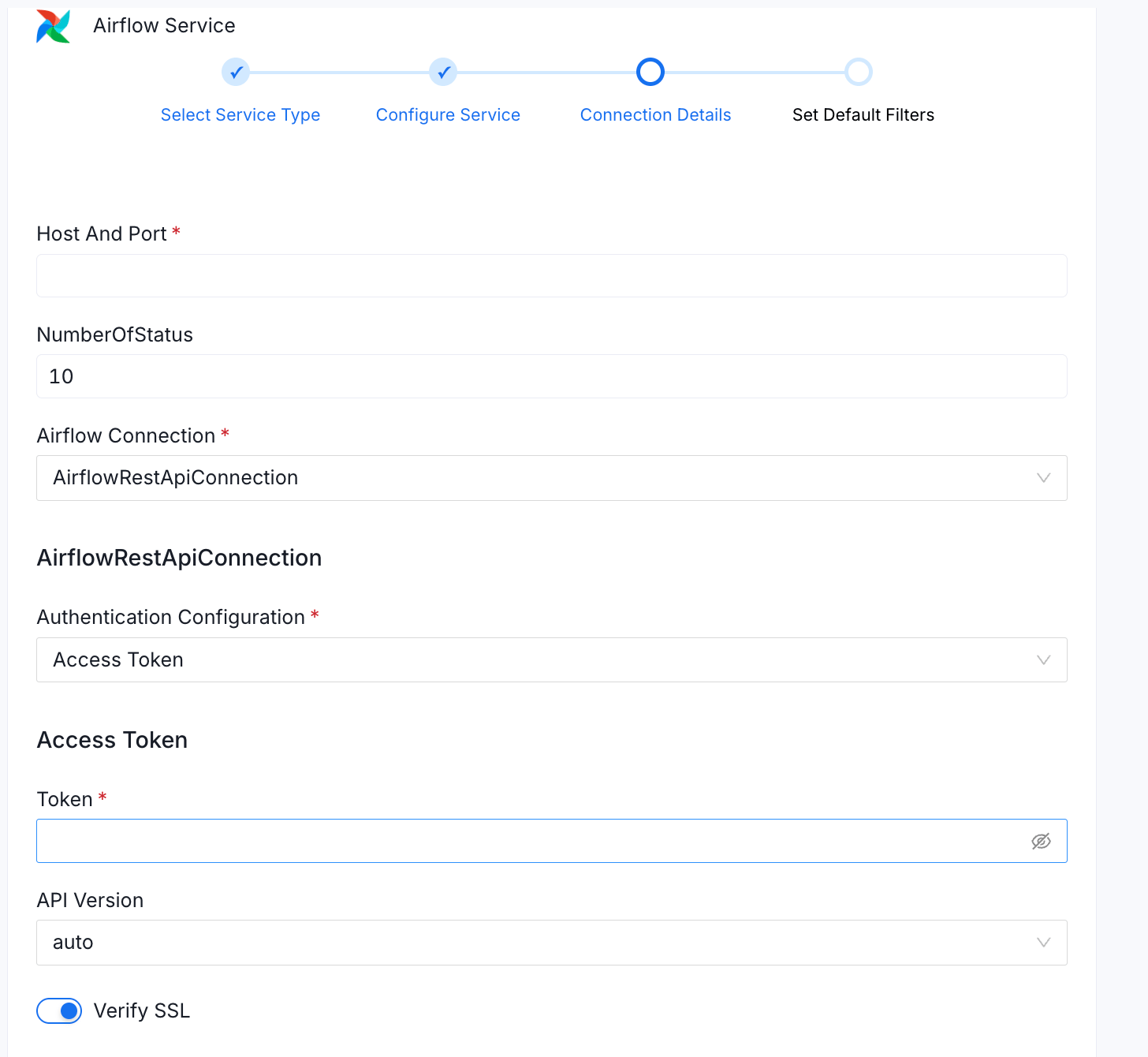
Required Permissions
Astronomer: The Deployment API token must have at least Viewer access to the deployment. In the Astronomer UI, when creating a token, assign it theViewer deployment role. This grants read access to DAGs, runs, and task instances via the Airflow REST API.
Generating an Astronomer Deployment API Token
1
Navigate to Deployments
Open the Astronomer UI and navigate to Deployments.
2
Select your deployment
Select your target deployment.
3
Open API Keys / Tokens
Go to API Keys or Tokens (label varies by Astronomer version).
4
Generate Token
Click Add API Key / Generate Token, give it a name such as
collate-ingestion, assign it the Viewer role, and copy the value.5
Paste into Collate
Paste it into the Token field in Collate.
Astronomer deployment API tokens are scoped to a single deployment. If you ingest from multiple Astronomer deployments, create one token per deployment and one Collate Airflow service per deployment.
Generating a Token for Self-Hosted Airflow
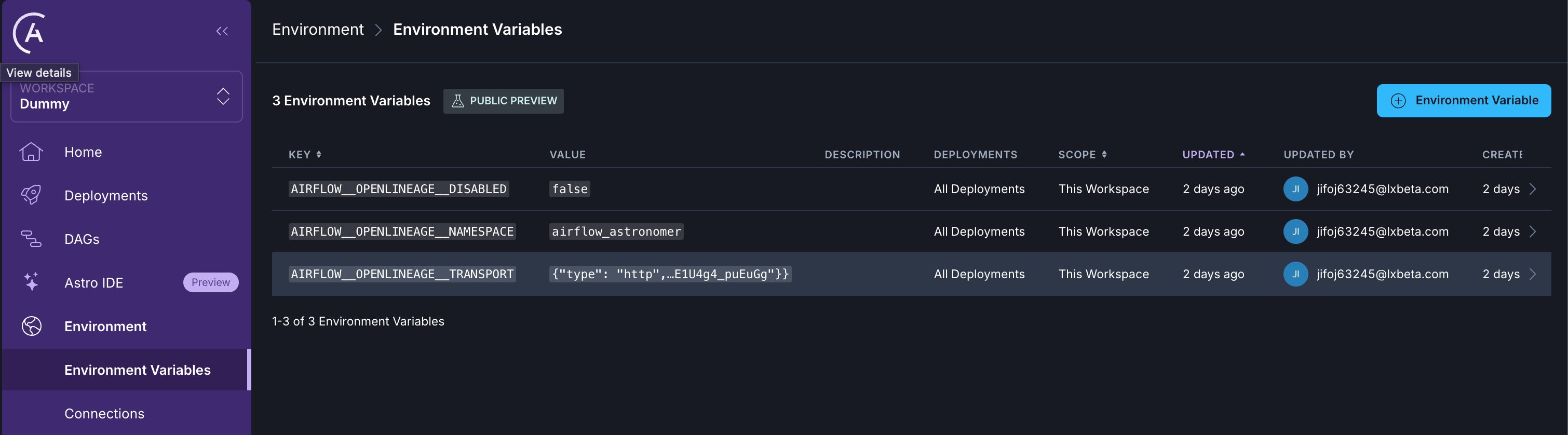
Exchange credentials for a JWT via the Airflow REST API:OpenLineage Setup — Astronomer (Access Token)
apache-airflow-providers-openlineage is included in Astronomer’s base Airflow image — no extra package installation is needed.
Set the namespace and transport via Astronomer environment variables (Deployments → Environment Variables). Mark the transport variable as Secret since it contains your Collate JWT:
3. GCP Service Account (Google Cloud Composer)
Best for: Google Cloud Composer environments. This method uses a GCP service account to obtain short-lived OAuth2 tokens for authenticating with the Cloud Composer Airflow web server. Tokens are automatically refreshed at runtime viagoogle-auth, so ingestion runs are never interrupted by token expiry.
Required Parameters
Credential Sub-Types
UI Setup
The screenshot below shows GCP Credentials Values selected. The same form is used for all four credential sub-types — switching the GCP Credentials Configuration dropdown reveals the relevant fields for each type.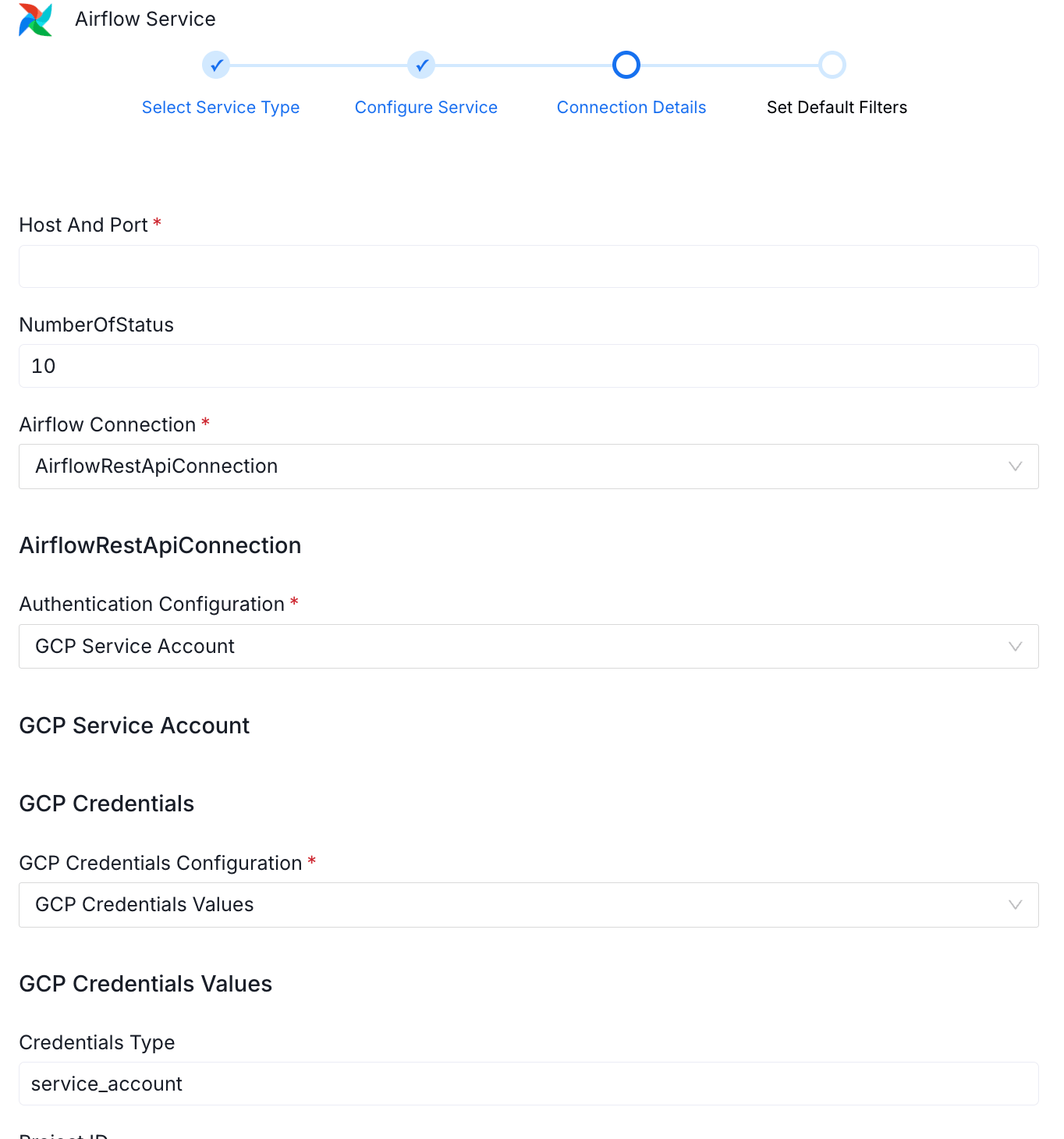
Finding Your Cloud Composer Airflow URL
In GCP Console: Composer → Environments → select your environment → click Open Airflow UI. Copy the base URL:Required Permissions
The service account must have read access to DAGs, DAG runs, task instances, and task logs in the Composer environment.OpenLineage Setup — GCP / Cloud Composer
apache-airflow-providers-openlineage ships with Cloud Composer — no additional PyPI packages are needed.
In GCP Console, go to Composer → Environments → Edit → Airflow configuration overrides and add the following entries:
The
lineage.backend = dataplex entry routes Airflow’s native lineage through GCP Data Lineage (Dataplex), while the openlineage.* entries send OpenLineage events to Collate. Both can be active simultaneously.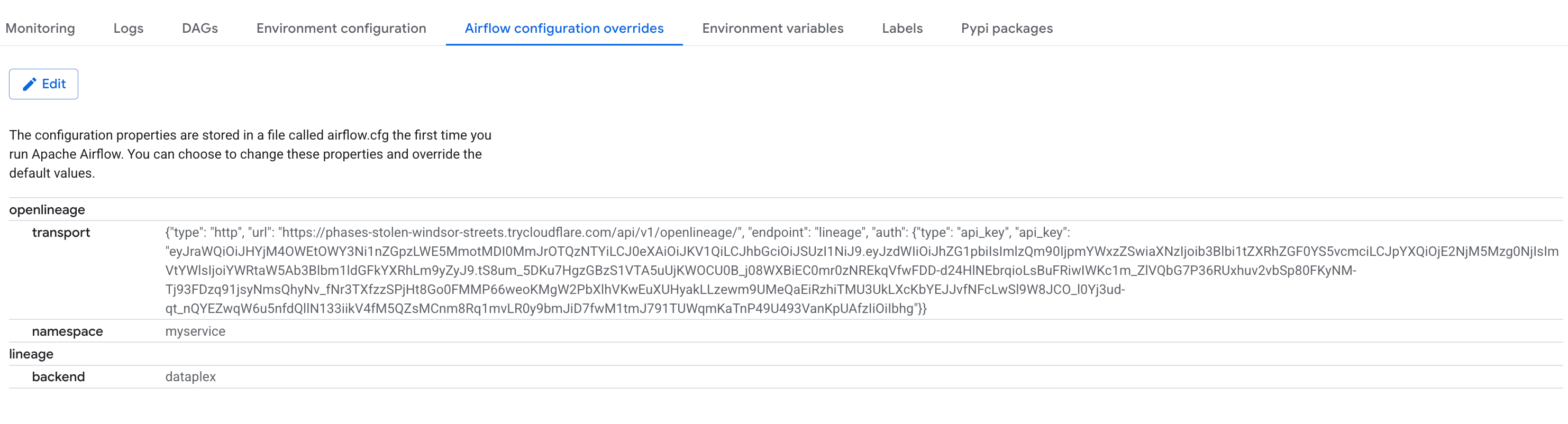
4. MWAA Configuration (Amazon Managed Workflows for Apache Airflow)
Best for: Amazon MWAA environments. MWAA does not expose the Airflow web server with simple username/password authentication. Instead, Collate uses your AWS credentials to call the MWAA control plane’sInvokeRestApi action directly, which forwards the request to the Airflow REST API. No separate token exchange happens.
Required Parameters
UI Setup
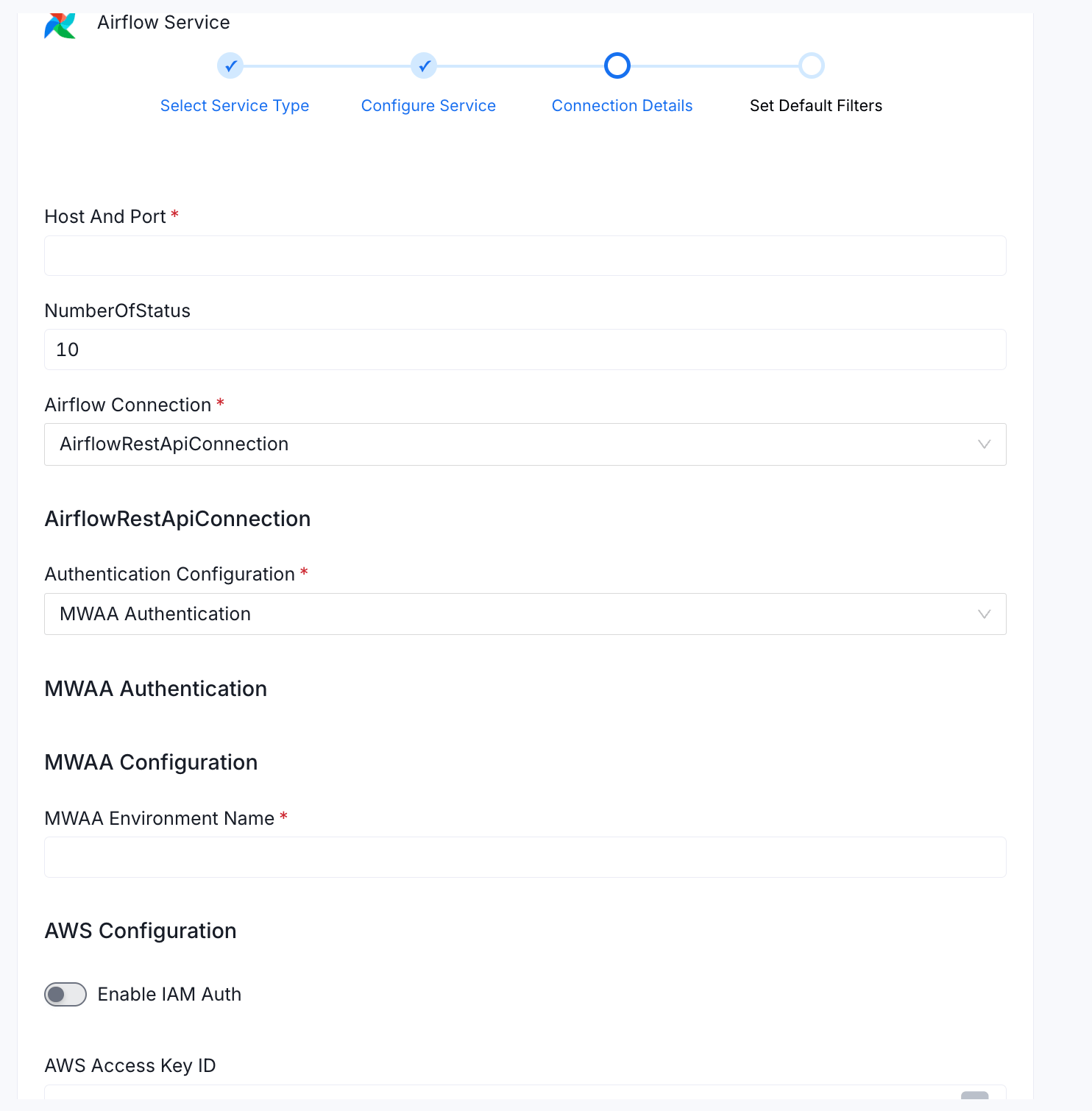
Finding Your MWAA Airflow URL
In AWS Console: Amazon MWAA → Environments → select your environment → copy the Airflow UI URL shown in the environment details panel. Use only the base URL — do not include any trailing path.Required Permissions
The IAM user or role must have access to DAGs, DAG runs, task instances, and task logs in the MWAA environment.OpenLineage Setup — Amazon MWAA
Unlike Cloud Composer and Astronomer, MWAA doesn’t preinstallapache-airflow-providers-openlineage on either its Airflow 2 or Airflow 3 environments (the community apache/airflow Docker image bundles it, but MWAA images don’t). Install it through the environment’s requirements.txt. The MWAA workers must also be able to reach the Collate server over HTTPS (public network egress or equivalent VPC connectivity).
1
Add the provider to requirements.txt
Add the OpenLineage provider to the Replace
requirements.txt file in your environment’s S3 bucket, together with the constraint line MWAA requires:<airflow-version> and <python-version> with your environment’s versions, for example constraints-2.10.1/constraints-3.11.txt. If the environment has no requirements.txt yet, upload one to the S3 bucket and register it under Requirements file in the environment settings.This assumes the environment can reach PyPI and GitHub during the requirements install. A MWAA environment with private network access mode (no internet egress) can’t resolve
apache-airflow-providers-openlineage this way. Instead, download the provider and its dependencies as wheel files and package them in a plugins.zip on your environment’s S3 bucket, then point requirements.txt at that local path with --find-links /usr/local/airflow/plugins and --no-index instead of the constraint line above.2
Add the OpenLineage configuration options
In the MWAA console, edit the environment and add two custom entries under Airflow configuration options:
MWAA translates these to the
AIRFLOW__OPENLINEAGE__NAMESPACE and AIRFLOW__OPENLINEAGE__TRANSPORT environment variables on the workers.3
Save and wait for the environment update
Saving applies the changes through an environment update, which typically takes 20–30 minutes. Once complete, DAG task completions push OpenLineage events to Collate.
API Version
TheapiVersion field controls which Airflow REST API version Collate targets:
Use
auto for new connections. Pin to v2 only if the auto-detection probe causes issues in your environment (e.g., strict WAF rules that reject the probe request).
SSL Verification
TheverifySSL flag (default true) controls whether Collate validates the Airflow server’s TLS certificate chain.
- Set to
truefor all production environments. - Set to
falseonly in local development when using self-signed certificates. Never disable SSL verification in production.
Pipeline Filter Pattern
Patterns are evaluated as Python regular expressions against DAG IDs. If bothincludes and excludes match a DAG ID, the DAG is included.
OpenLineage Setup Summary
Lineage configuration is independent of the REST API auth method. The OpenLineage provider sends events to Collate using a separate HTTP transport — the configuration is the same regardless of how Collate authenticates to Airflow for metadata extraction. Collate OpenLineage endpoint:POST /api/v1/openlineage/lineage
Once configured, every DAG task completion automatically emits an OpenLineage event to Collate, populating lineage edges between pipeline tasks and the data assets they read from and write to.
OpenLineage auto-instruments SQL-native operators (PostgreSQL, MySQL, Snowflake, BigQuery, etc.). For Python
@task operators, emit events explicitly using OpenLineageClient.from_environment() in the task body with the input and output datasets.