
Requirements
These are the permissions you will require to fetch the metadata from Salesforce.- API Access: You must have the API Enabled permission in your Salesforce organization.
- Object Permissions: You must have read access to the Salesforce objects that you want to ingest.
Metadata Ingestion
To ingest metadata from Salesforce, you need to create a service connection. The service connects Salesforce with Collate. Once you create a service, Collate automatically starts ingesting metadata.Step 1: Add New Service
Open the Services page and start a new service.-
Navigate to Settings > Services and select Database Services.
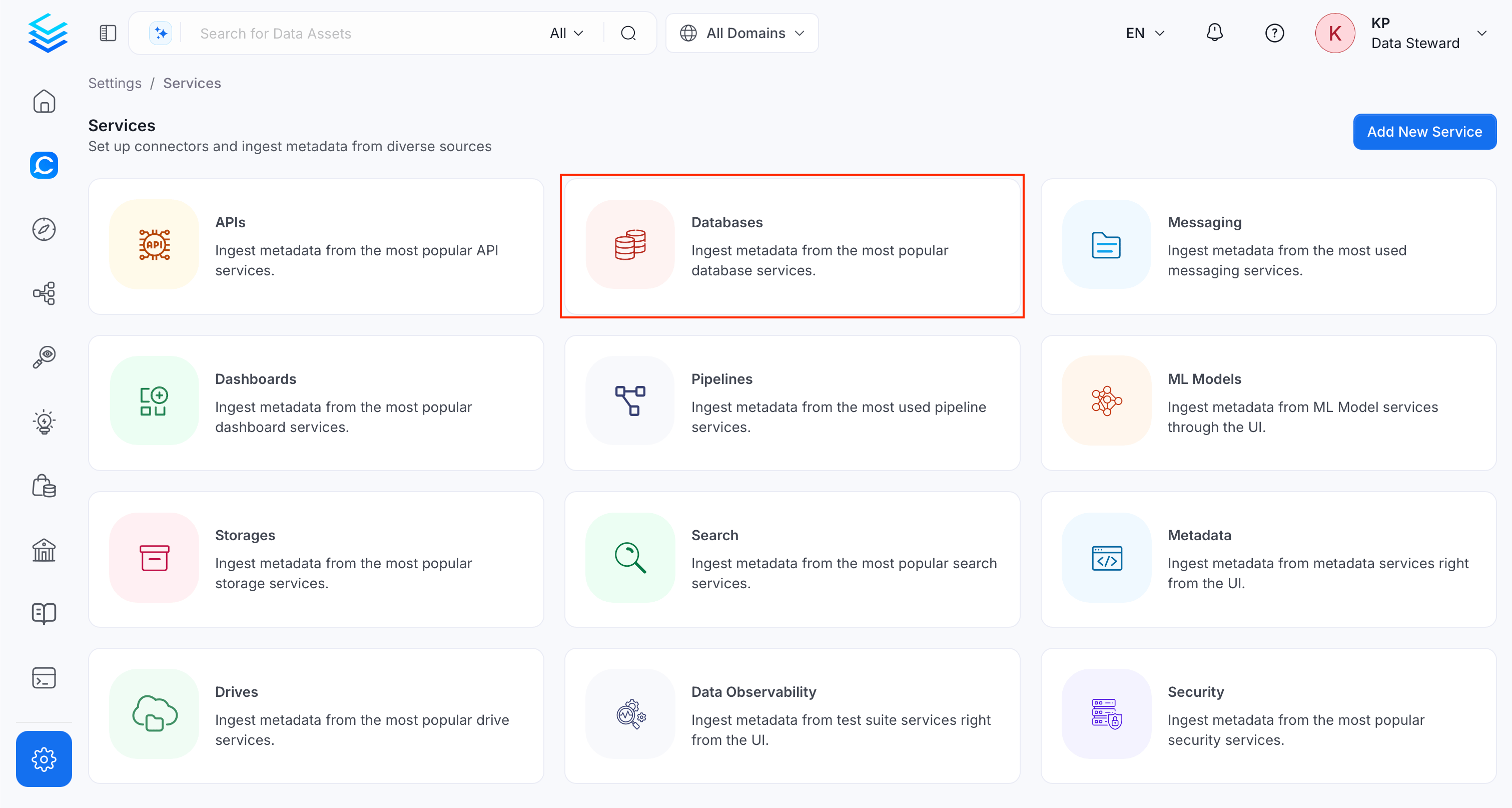
-
Click Add New Service.
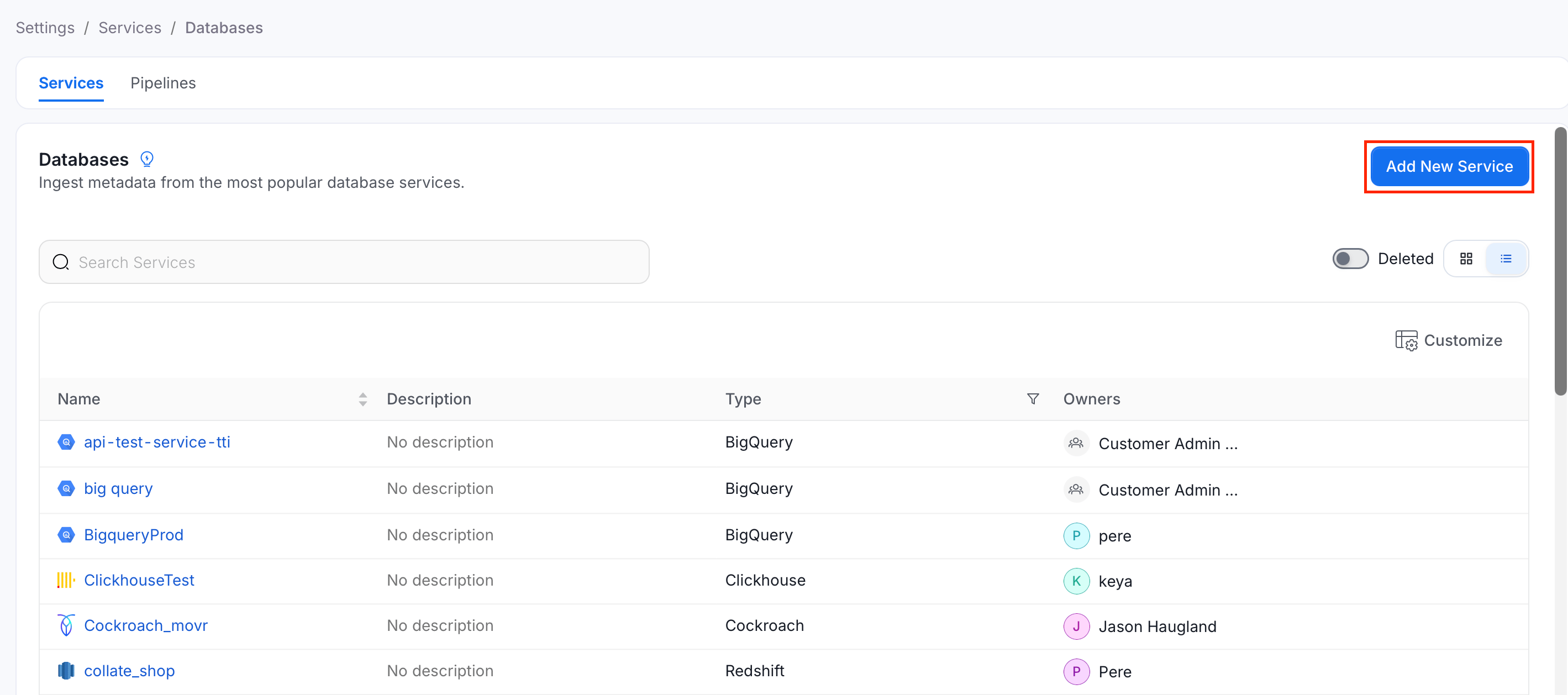
Step 2: Select a Service and Connector
From the service type dropdown, select Database Services, then click the Salesforce connector tile.
Step 3: Add Service Name and Description
- Enter a unique, descriptive Service Name. Collate identifies services by their service name. Enter a name that distinguishes this deployment from other Salesforce services you are ingesting metadata from.
- Optional: Enter a Description for the service.
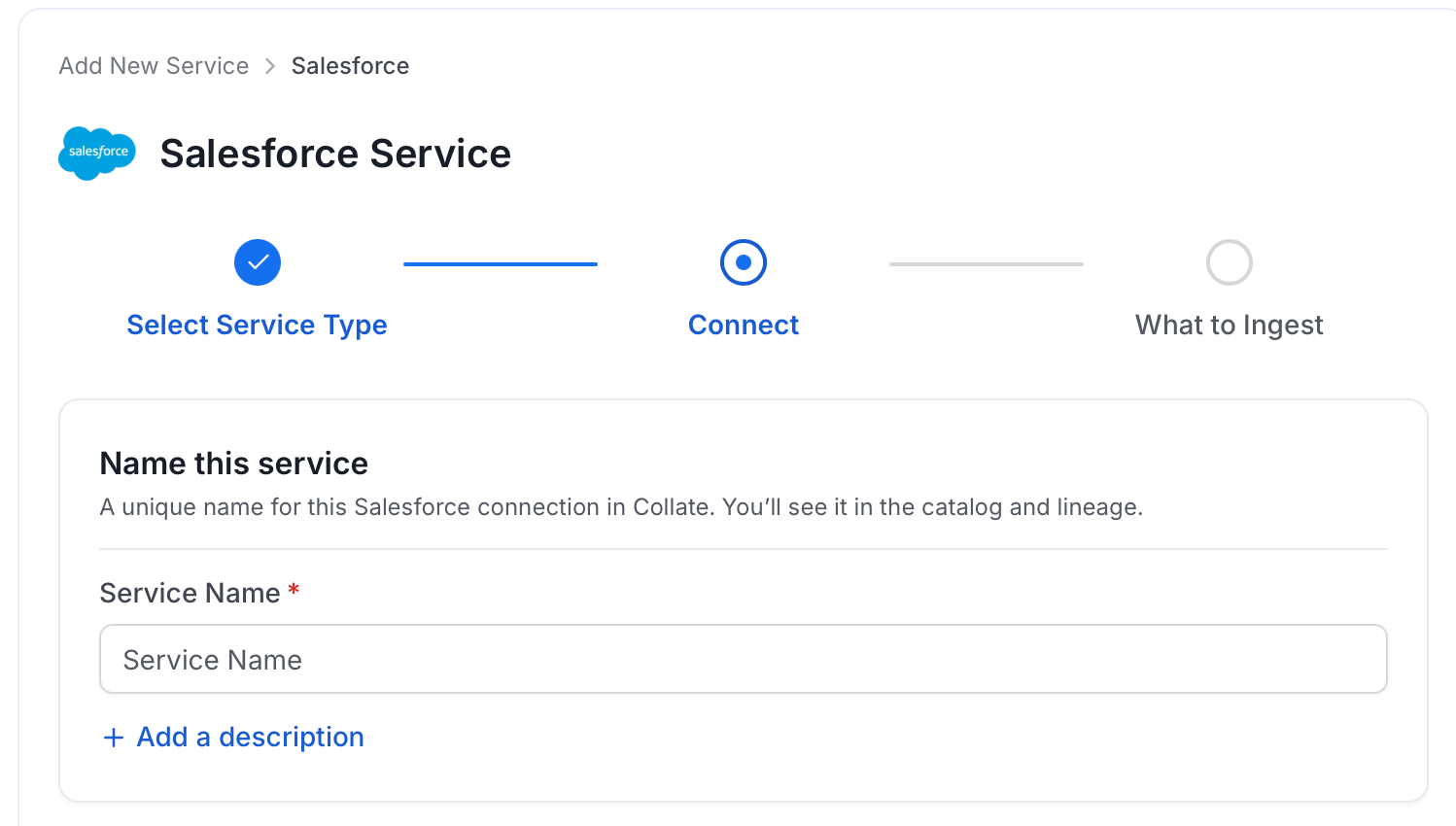
Note: The service name can’t be changed after you set it.
Step 4: Configure Connection Options
Specify where ingestion runs, provide your source credentials, and verify the connection.Select Ingestion Runner
Select an Ingestion Runner: the runner where the ingestion pipeline will execute.
Enter Connection Details
Enter the connection details for Salesforce. The right-hand panel in the UI displays inline help for each field.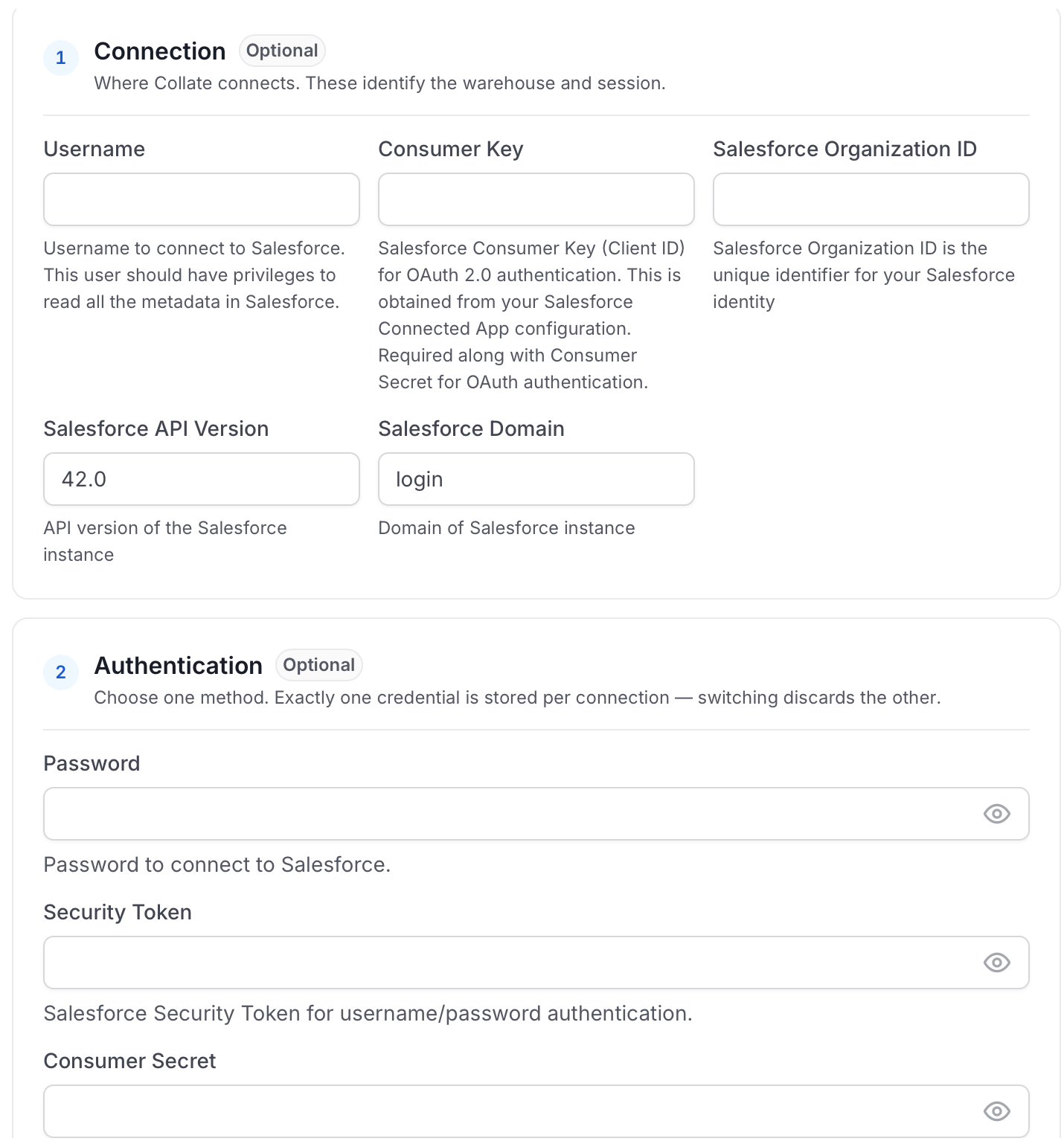
-
OAuth 2.0 client credentials flow: Use Consumer Key and Consumer Secret without Username or Password. This requires a Salesforce My Domain value in the Salesforce Domain field, such as
mycompany.my. It does not work with the defaultloginortestdomains. -
OAuth 2.0 password flow: Use Consumer Key and Consumer Secret together with Username and Password. Use this flow when Salesforce Domain is
loginortest.- Consumer Key: Salesforce Consumer Key (Client ID) for OAuth 2.0 authentication.
- Consumer Secret: Salesforce Consumer Secret (Client Secret) for OAuth 2.0 authentication.
-
Username / Password (Legacy)
- Username: Username to connect to Salesforce. This user should have the access defined in the requirements.
- Password: Password to connect to Salesforce.
- Security Token: Salesforce Security Token for legacy username/password authentication. Use this only when you are not using Consumer Key and Consumer Secret. You can check this doc to get the token.
- Organization ID: Salesforce Organization ID is the unique identifier for your Salesforce identity. You can check out this doc on how to get your Salesforce Organization ID.
- Salesforce Object Names: List the Salesforce object names to ingest. If you leave this blank, Collate ingests all available objects that pass the filter pattern.
- Database Name: Optional name to use for the database in Collate. If left blank, the connector uses the default database name.
-
Salesforce API Version: Follow Find the Salesforce API Version to get the API version. Enter the numeric value in the field, for example
62.0. The connector defaults to42.0. Use a version supported by your Salesforce org and update it when Salesforce retires older API versions. The constraint depends on your authentication method:- OAuth 2.0: Any supported Salesforce API version works, including the default
42.0. - Username / Password (Legacy): Use version
64.0or lower. Salesforce removed SOAP API login support in version65.0and later — using65.0or higher with username/password authentication will cause authentication to fail.
- OAuth 2.0: Any supported Salesforce API version works, including the default
-
Salesforce Domain: Specify the Salesforce domain (subdomain only) to use for authentication. This field accepts only the domain prefix, not the full URL.
Common values:
login(default) - For production instances (resolves tohttps://login.salesforce.com)test- For sandbox instances (resolves tohttps://test.salesforce.com)
.myor.sandbox.my, but without.salesforce.com. Examples:- If your My Domain URL is
https://mycompany.my.salesforce.com, enter:mycompany.my - If your sandbox My Domain URL is
https://mycompany--uat.sandbox.my.salesforce.com, enter:mycompany--uat.sandbox.my - If your URL is
https://example-dot-com--uat.sandbox.my.salesforce.com, enter:example-dot-com--uat.sandbox.my
Note: Important: Don’t enter the full URL or include.salesforce.com. Only enter the subdomain prefix as shown in the examples above.
sslConfig in the source.
Advanced Configuration
Database Services include an Advanced Configuration section for passing extra arguments to the connector and, if needed, changing the connection scheme. You need this only for advanced connectivity scenarios or customizations.- Connection Options (Optional): Enter the details for any additional connection options that can be sent to the database during the connection. These details must be added as key-value pairs.
- Connection Arguments (Optional): Enter the details for any additional connection arguments such as security or protocol configs that can be sent during the connection. These details must be added as key-value pairs.
Test Connection
- Click Test Connection to verify the credentials.
- After the test succeeds, click Save.

Step 5: Configure Ingestion Options
In the What to Ingest step, use filter patterns to control which assets Collate ingests from your database service. Filter rules match asset names using the following match types.How Filter Patterns Work
- Include: Add one or more comma-separated values. Each value uses one of the following match types. Collate ingests only assets whose names match at least one rule. Leave blank to include all assets.
- Exclude: Add one or more comma-separated values. Each value uses one of the following match types. Collate skips any asset whose name matches a rule. Leave blank to exclude nothing.
- contains: matches any name containing the value. For example,
salesmatchesmy_sales_dataandsales_2024. - starts with: matches names beginning with the value. For example,
prod_matchesprod_dbandprod_schema. - ends with: matches names ending with the value. For example,
_rawmatchesevents_rawandlogs_raw. - is exactly: matches the exact name only. For example,
analyticsmatches onlyanalytics. - matches regex: matches names using a regular expression. For example,
^prod_.*_v\d+$matchesprod_events_v1.
Filter Options
The Database, Schema, and Table sections each include the following filter options:- Database: Controls which databases Collate ingests from the source.
- Schema: Controls which schemas within the ingested databases are included.
- Table: Controls which tables and views within the ingested schemas are included.
- Scan Mode: Choose between the following scan modes:
- Scan all: Ingests every asset of that type the connector can access. This is the default.
- Only specific: Enables include rules so only assets matching at least one rule are ingested.
- Exclude system toggle: Use this toggle to filter out system-reserved names defined by the connector for that asset type.
- Always exclude: Add permanent exclusion rules (shown in red). Assets matching these rules are never ingested, regardless of include rules.
- Preview: Shows a real-time summary of what will be in scope based on your current rules.
- Include rules: In Only specific mode, click + Add to define a rule. Added rules appear as chips. An asset is included if it matches any rule.
Step 6: Create & Deploy
Click Create & Deploy to deploy the agent and start the first metadata ingestion run. Collate saves the service configuration and immediately begins pulling metadata from the source. To monitor ingestion progress or view the service you just added, go to Settings > Services and select your service.Configure Metadata Agent and Schedule Ingestion
The Metadata Agent extracts schemas, tables, columns, and other structural metadata from your source and keeps your Collate catalog in sync. It powers discovery, lineage, and governance across your data assets. When you click Create & Deploy, Collate automatically deploys a Metadata Agent for this service and triggers the first ingestion run. View its status and run history from the Agents tab on the service detail page. To configure the additional Metadata Agent and schedule ingestion, follow these steps:- Navigate to Settings > Services and select the Databases service.
- Select your service and click the Agents tab.
-
Click Add Agent and select Metadata from the dropdown.
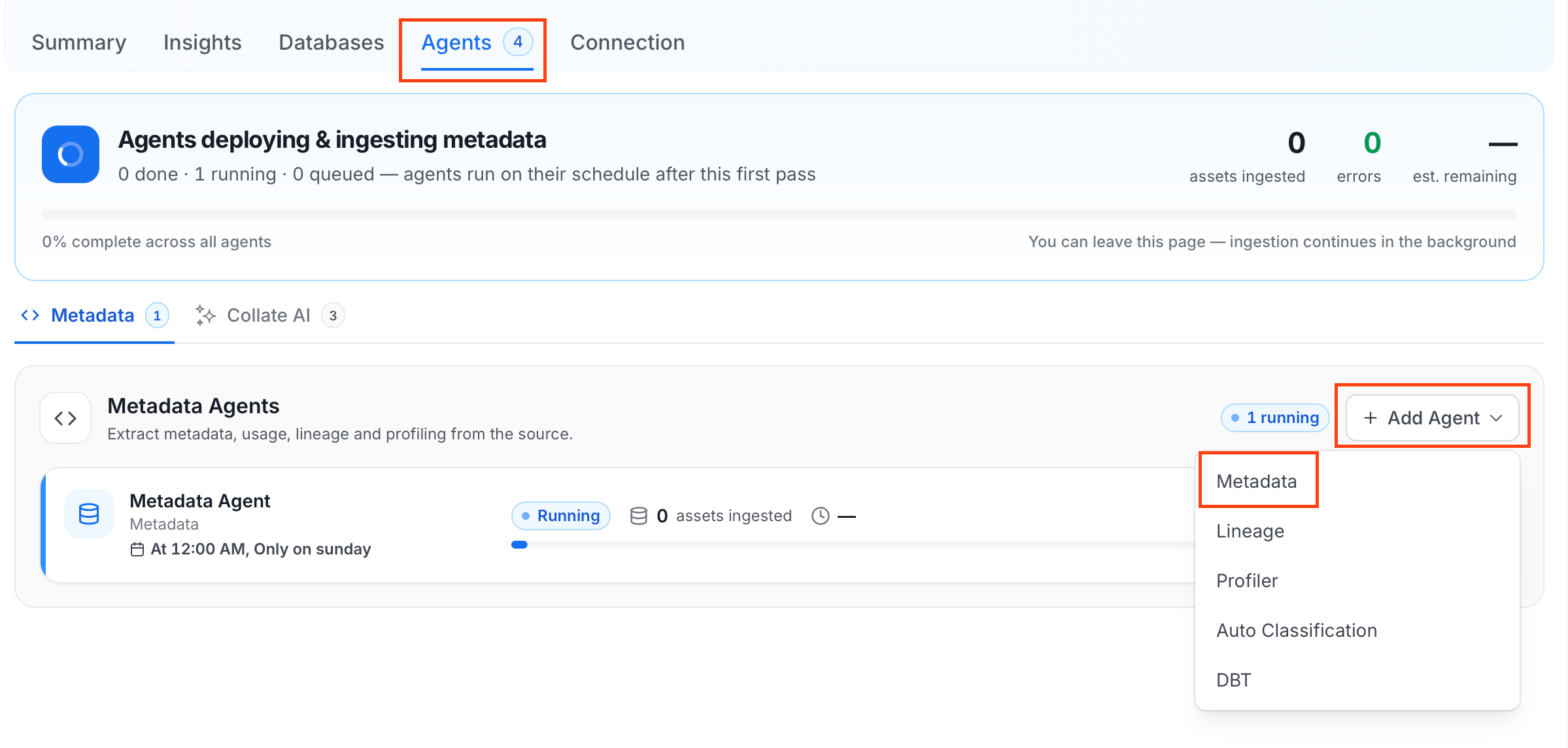
-
On the Configure Ingestion page, do the following and click Next.
-
Name this Ingestion: Enter a unique, recognizable name for this ingestion pipeline.

-
Agent Setup: Configure core parameters for metadata extraction. The following fields are available:
For more information, see Hierarchical Owner Configuration.
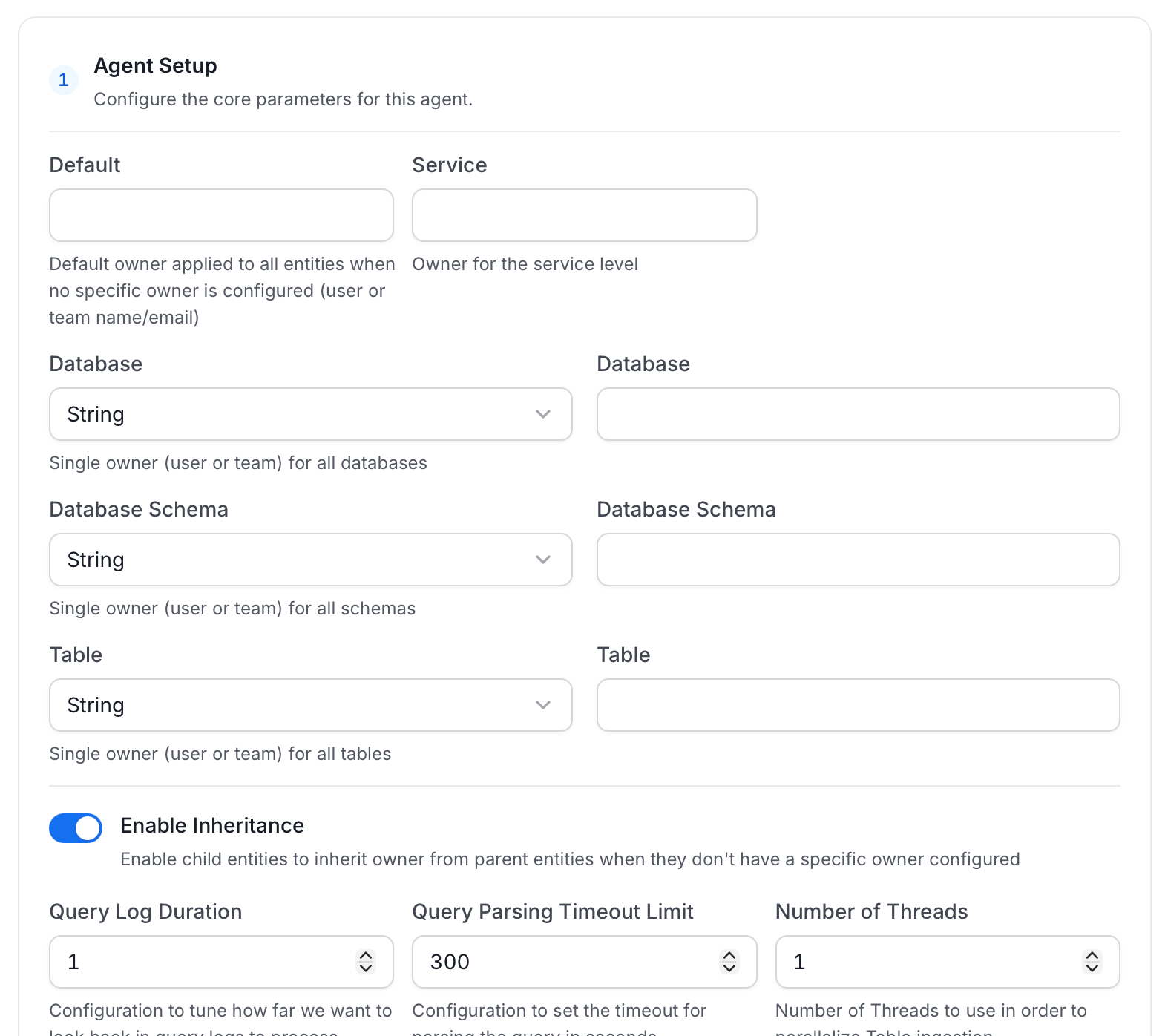
-
Filter Patterns: Apply include or exclude rules to scope which databases, schemas, tables, and stored procedures this agent ingests. These follow the same filter options described in Step 5.
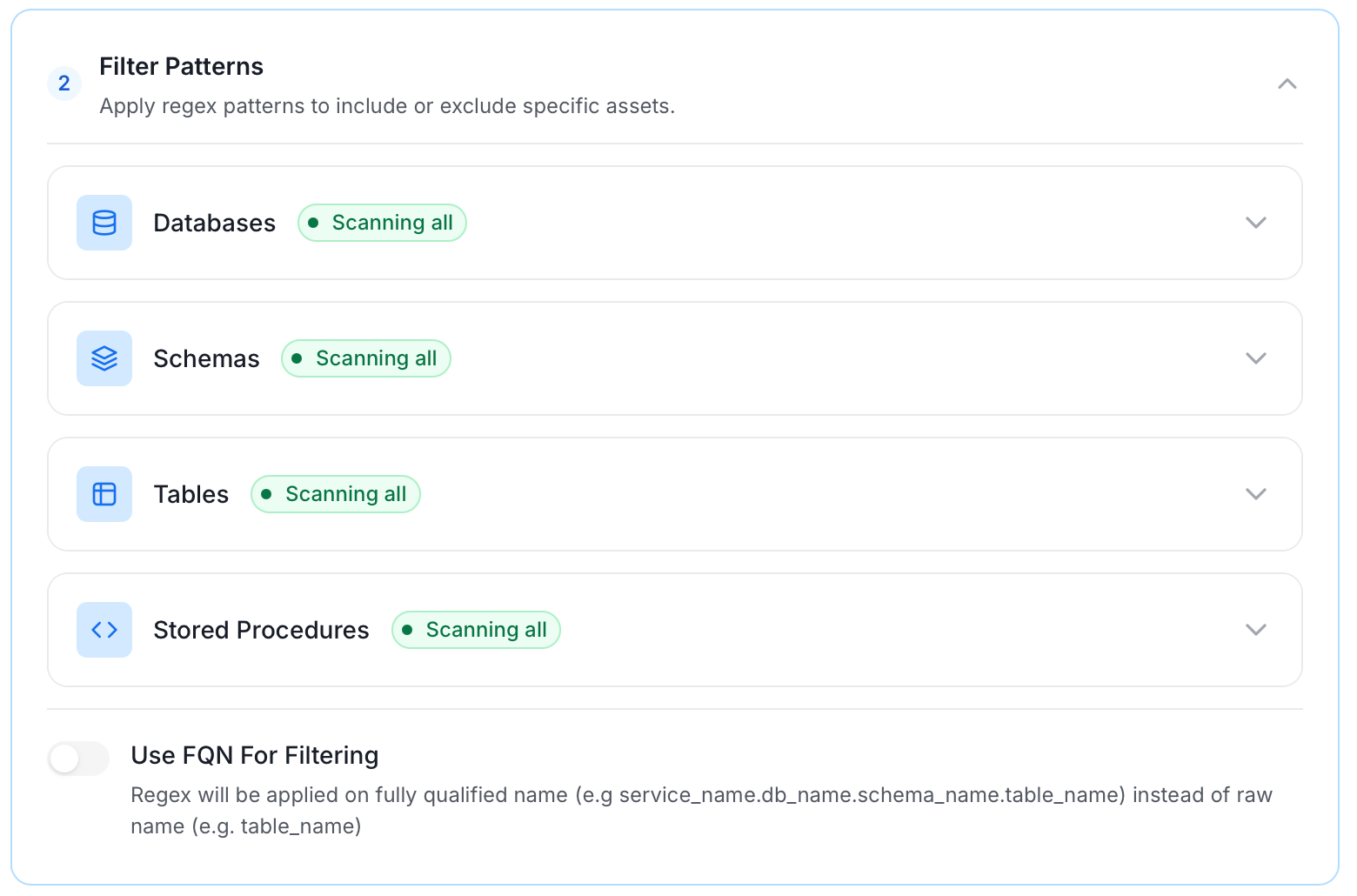
-
Scope & Behaviour: Control how the agent handles metadata during ingestion. Toggle each option on or off based on your needs:
Note: Available toggles vary by connector. Stored procedure options only appear for connectors that support stored procedures.
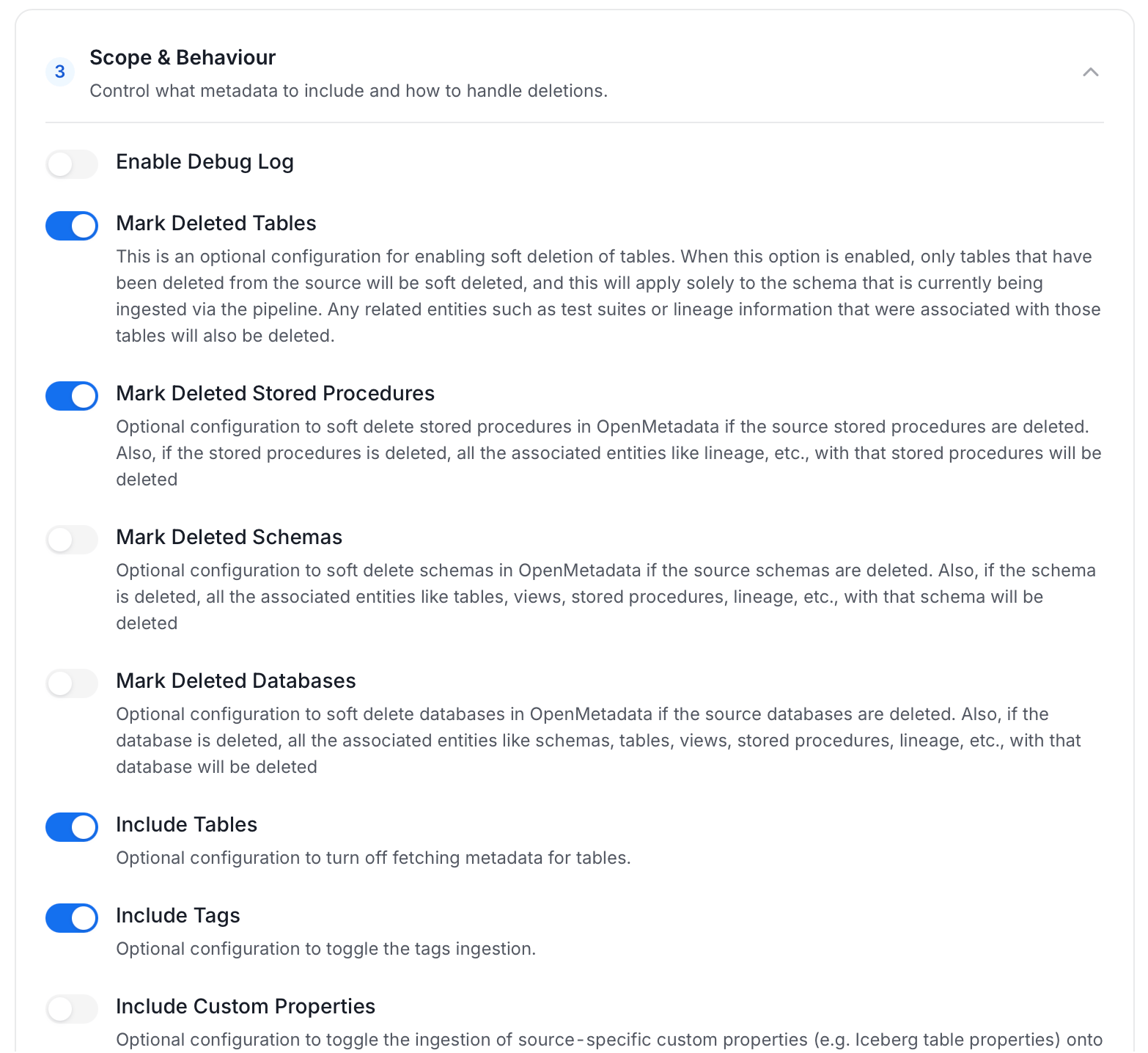
-
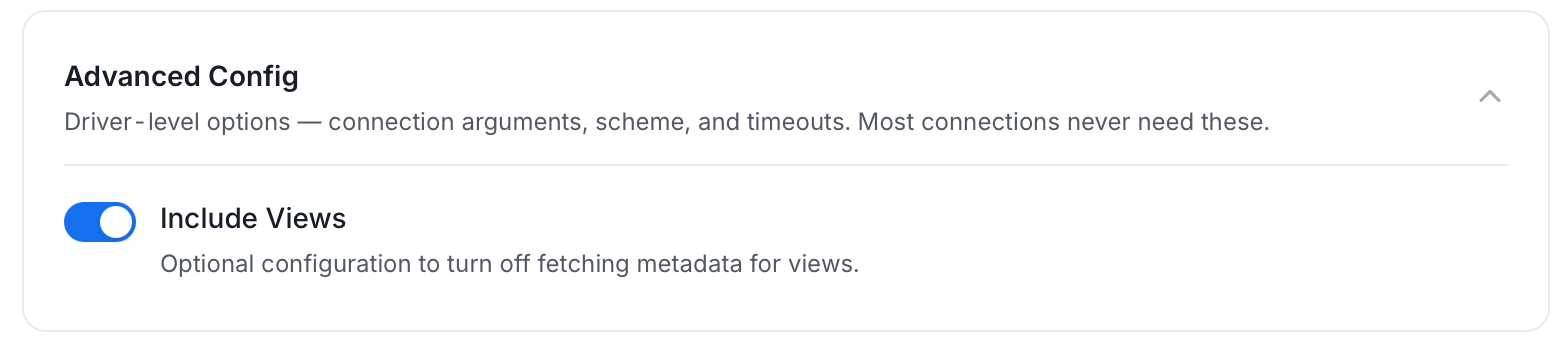
Advanced Config: Driver-level options (connection arguments, scheme, and timeouts). Most connections never need these, and they vary by connector. This section also has one ingestion-scope toggle:
-
Name this Ingestion: Enter a unique, recognizable name for this ingestion pipeline.
-
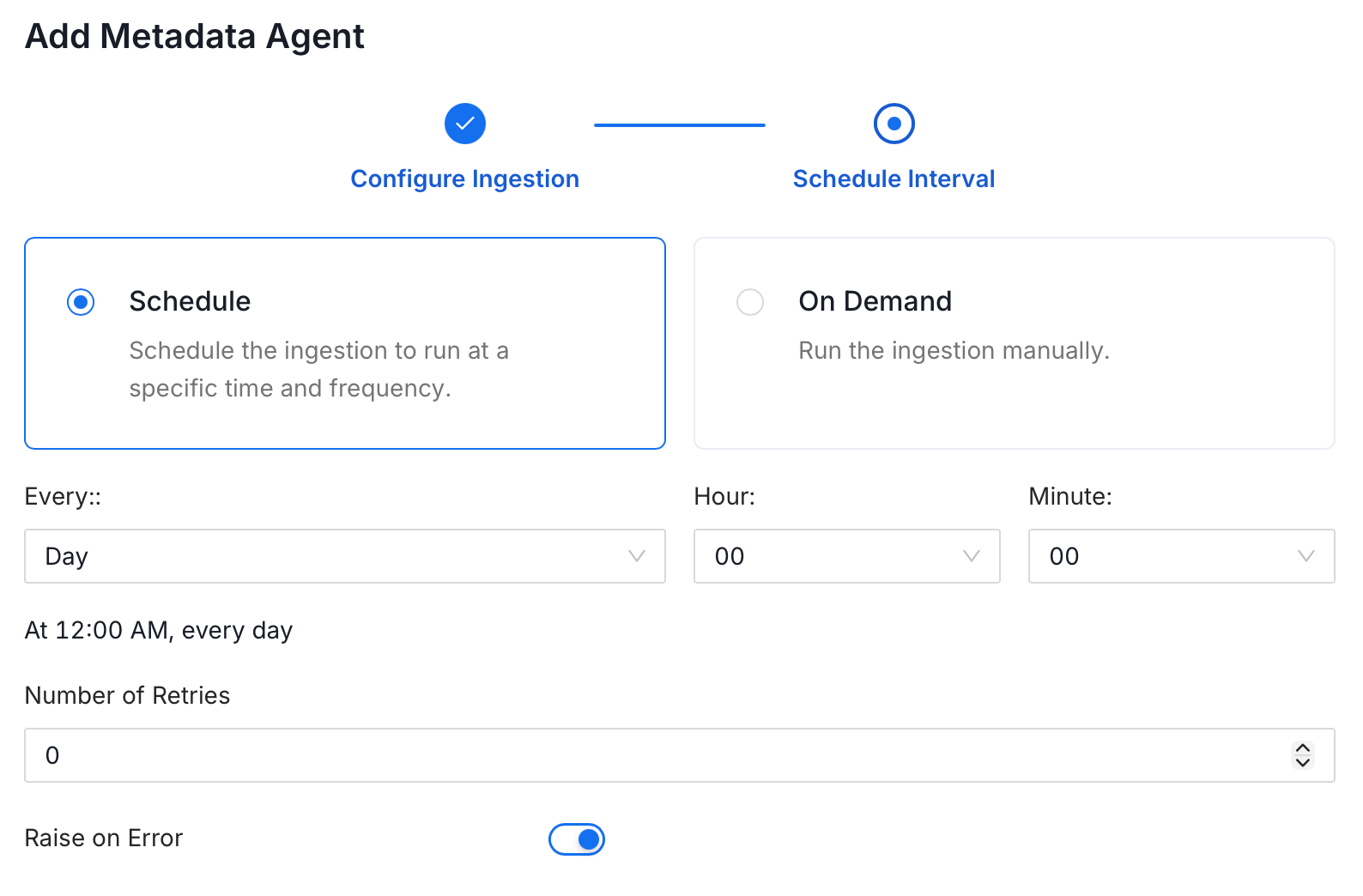
On the Schedule Interval page, set when the agent runs:
- Schedule: Choose a preset interval (Hourly, Daily, Weekly, Monthly) or enter a custom cron expression.
- On-Demand: No automatic schedule. Trigger the agent manually when needed.
- Click Add to deploy the agent.
Securing Salesforce Connection with SSL in Collate
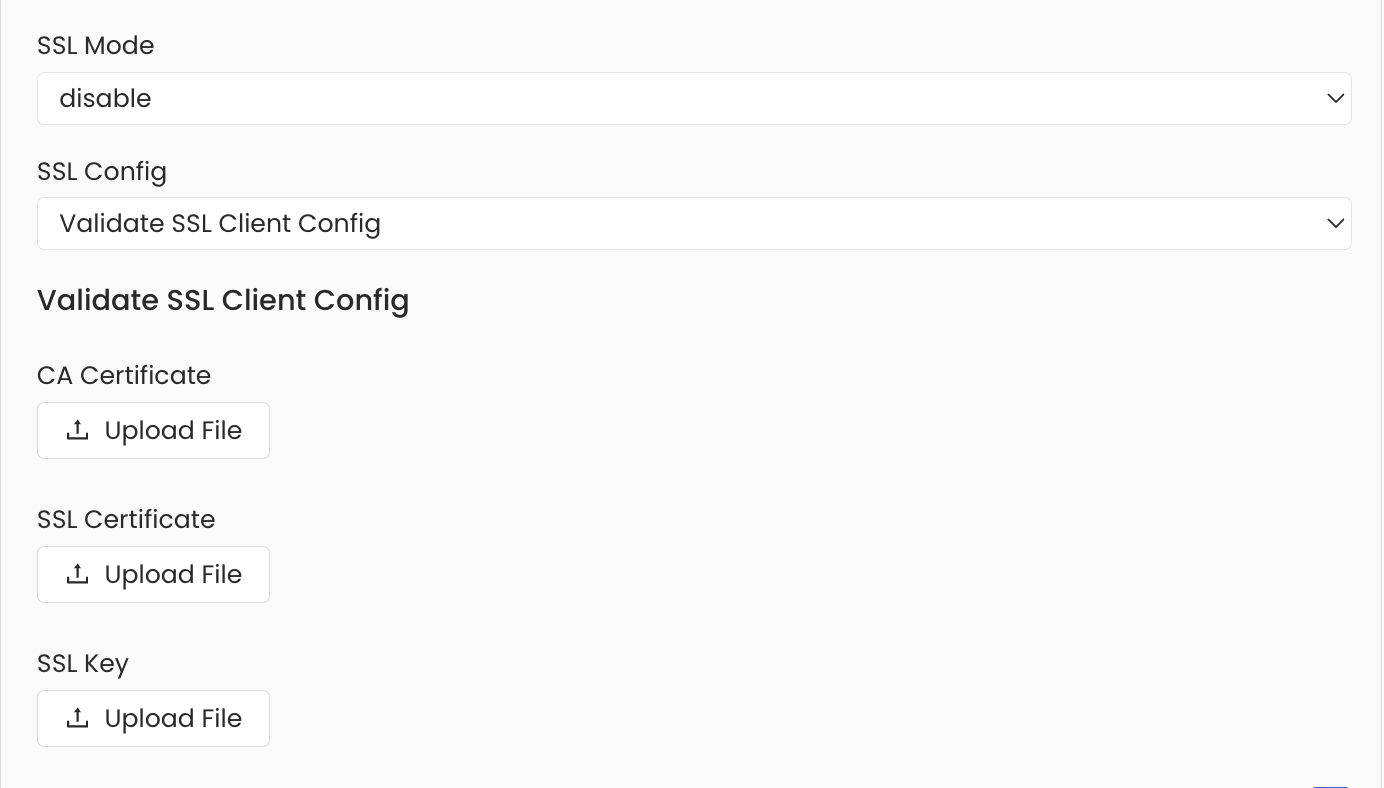
To establish secure connections between Collate and Salesforce, navigate to theAdvanced Config section. Here, you can provide the CA certificate used for SSL validation by specifying caCertificate. Alternatively, if both client and server require mutual authentication, use all three parameters: ssl_key, ssl_cert, and ssl_ca. In this case, ssl_cert is used for the client’s SSL certificate, ssl_key for the private key associated with the SSL certificate, and ssl_ca for the CA certificate that validates the server certificate.
Troubleshooting
Salesforce Troubleshooting
Learn more about how to troubleshoot common Salesforce connector issues and resolve configuration or ingestion errors.