
Import & Export
Collate is not a dead end for your semantics. An ontology authored in Protégé, exported from an EDM tool, or produced by a standards body can be imported as first-class glossary terms and typed relations, and exported back out in a form other tools accept. Open Import / Export from the Ontology Studio header.Import
Accepted Formats
The modal auto-detects the syntax from the file you choose. JSON-LD can use inline contexts or the bundled Collate contexts.
What Gets Mapped
Relationship types referenced by the ontology are registered if they do not already exist, that step requires admin, so a non-admin import proceeds without registering new global types rather than silently escalating privileges.
Dry Run First
Parse / dry run validates the file and produces a full preview with nothing persisted. The result reports:- Terms created and terms updated
- Relations added and relationship types registered
- Concept mappings added
- Per-concept attributes created
- Messages for anything skipped or needing review
- A SHACL validation report when validation is enabled
The Lossless Annex
Real-world ontologies contain more than Collate’s model represents, annotation properties, provenance triples, vendor extensions, SWRL rules. Discarding them would make import a one-way door. Instead, Collate computes the difference between the source graph and what it represented natively, canonicalizes it, and stores it as an annex revision keyed by content checksum against the glossary. On export, the annex is merged back in. That is what makes the round-trip honest: what you import is what you get back, even for the parts Collate does not model itself.API
dryRun=false to commit. Requires EditAll on the target glossary. Content types accepted: text/turtle, application/rdf+xml, application/n-triples, application/ld+json, text/plain.
Export
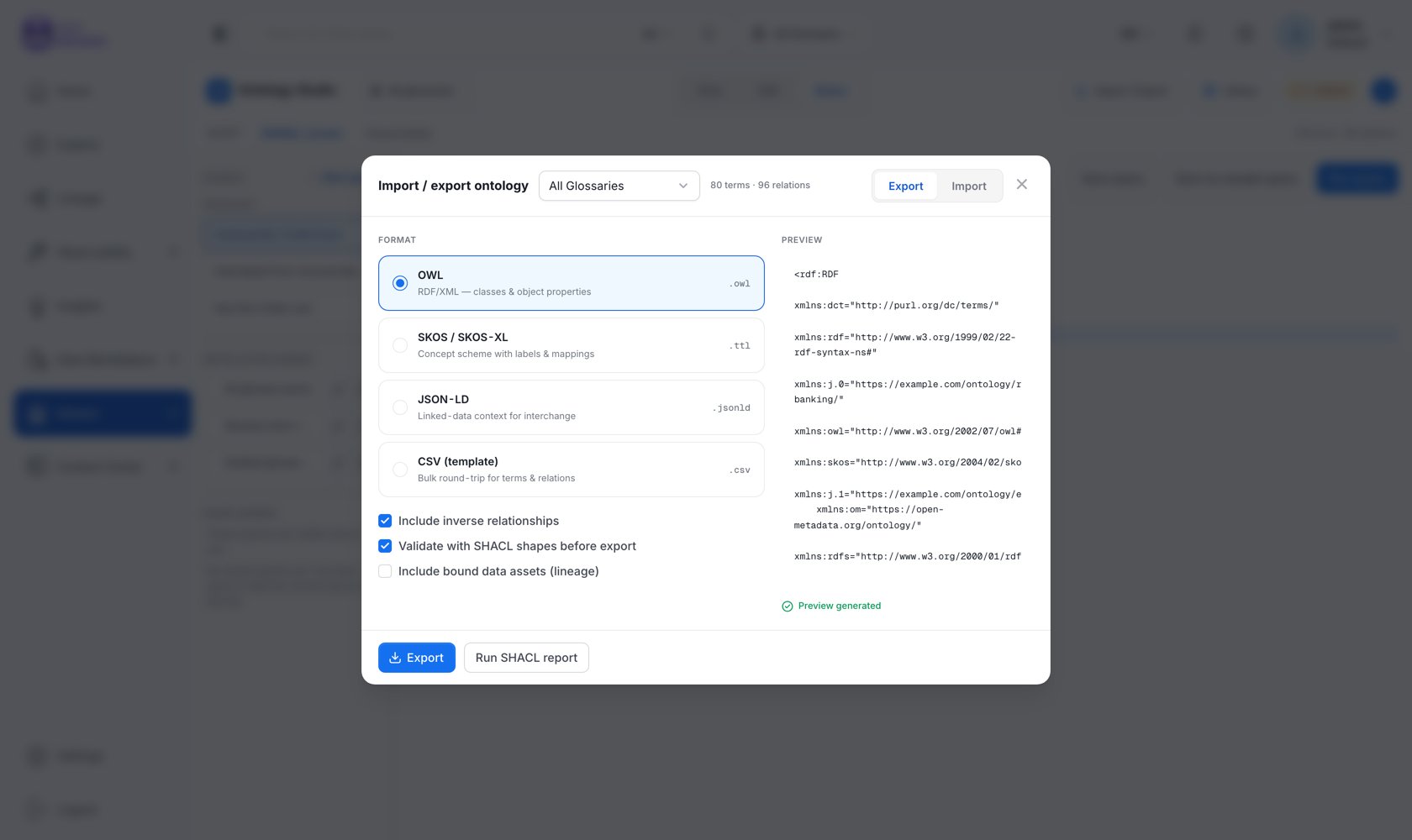
Formats
Options
- Include inverse relationships: emit the inverse of each typed relation as well, using each relationship type’s declared
owl:inverseOf. Maps to theincludeRelationsAPI parameter. - Validate with SHACL shapes before export (admin only), run SHACL validation first and warn if the model does not conform. Violations do not block the export; you get the report and decide. Run SHACL report downloads the full
sh:ValidationReportas Turtle.
What Is Exported
The export is built from the database-primary model, not the triple store, so it works with RDF disabled. It includes:- The glossary as an
owl:Ontology/skos:ConceptSchemewith its base IRI and prefixes - Concepts with labels, definitions, and IRIs
- Hierarchy
- Typed relationships, with each relationship type declared as an
owl:ObjectPropertycarrying its characteristics andowl:inverseOf - Ontology attributes as
owl:DatatypePropertydeclarations - Authored OWL axioms
- Concept mappings as
skos:*Match/owl:sameAs - The lossless annex
API
ViewAll on the glossary. format accepts turtle, rdfxml, ntriples, jsonld.
Exporting the Graph, Not the Model
The formats above export one ontology model. To export a slice of the knowledge graph, an entity and its neighborhood, including instance data, useGET /api/v1/rdf/graph/explore/export (Turtle or JSON-LD, admin only), or GET /api/v1/rdf/ontology for the canonical OpenMetadata ontology itself.
Next
Ontology Library
Pre-verified packs that install without an import step.
Reasoning & Validation
What SHACL validation checks.