> ## Documentation Index
> Fetch the complete documentation index at: https://docs.getcollate.io/llms.txt
> Use this file to discover all available pages before exploring further.
# SAML SSO Configuration | Collate
> Step-by-step guide to configure SAML-based SSO using ADFS, Okta, or Shibboleth for secure enterprise authentication and federated login in Collate.
# SAML SSO Configuration
* [Troubleshooting](#troubleshooting)
SAML (Security Assertion Markup Language) SSO enables users to authenticate with enterprise identity providers such as ADFS, Shibboleth, or Okta. This setup allows secure, federated login to Collate through SAML assertions.
This guide walks you through configuring Collate with a SAML provider using **Confidential client** settings (Client ID + Client Secret).
## Overview
Collate supports Single Sign-On (SSO) integration with various identity providers, enabling secure, centralized user authentication.
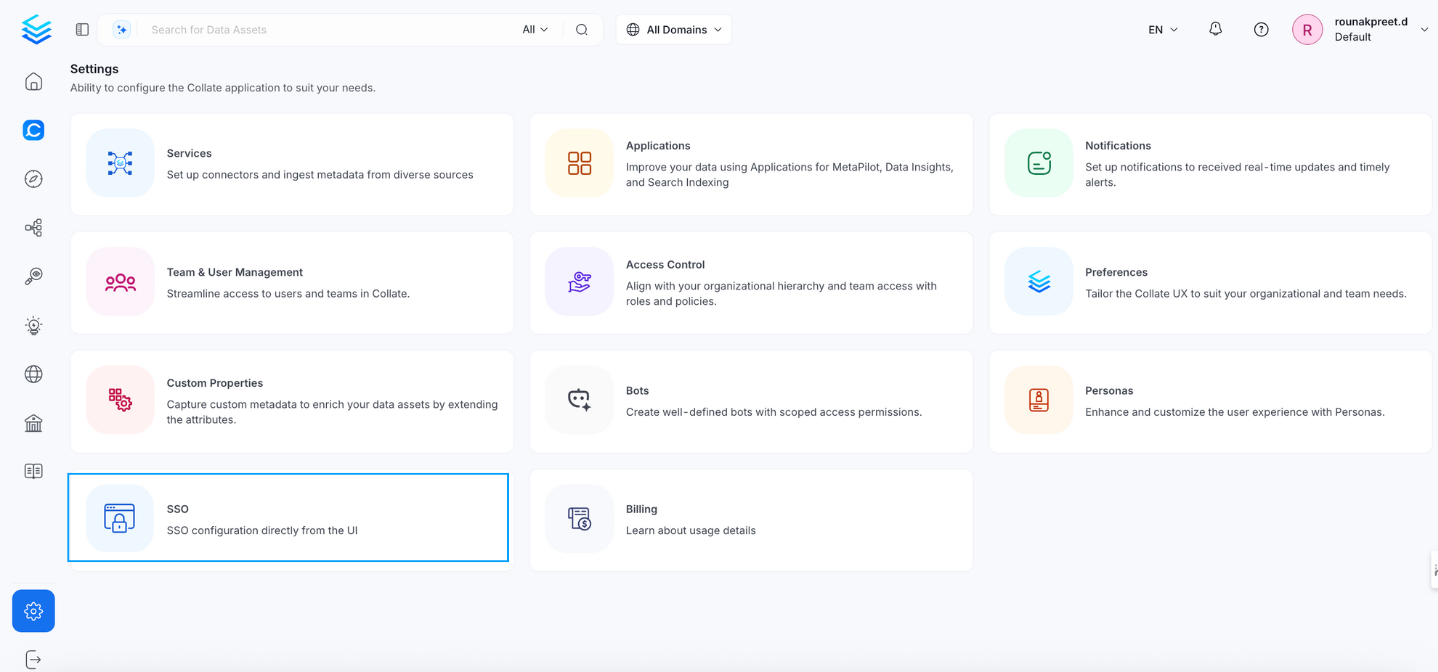
* **Navigate to:** `Settings > SSO`
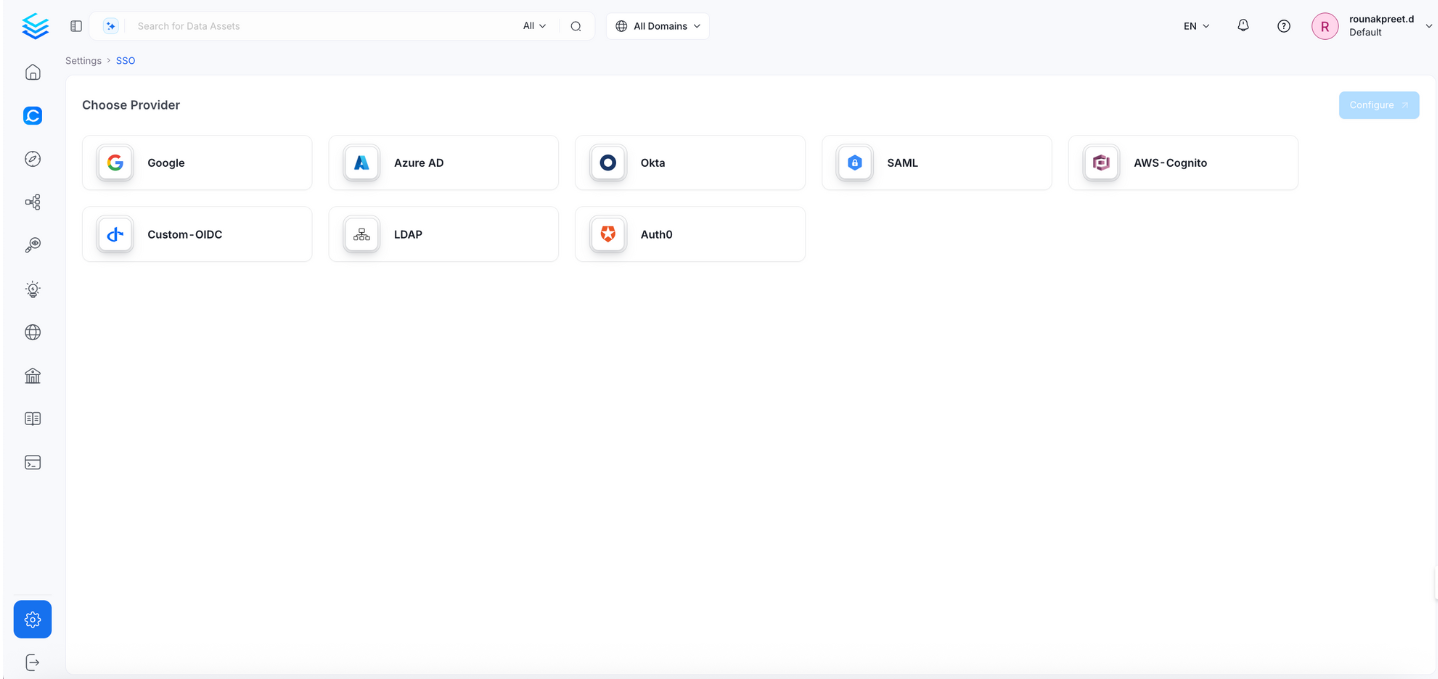
 * Select the service provider.
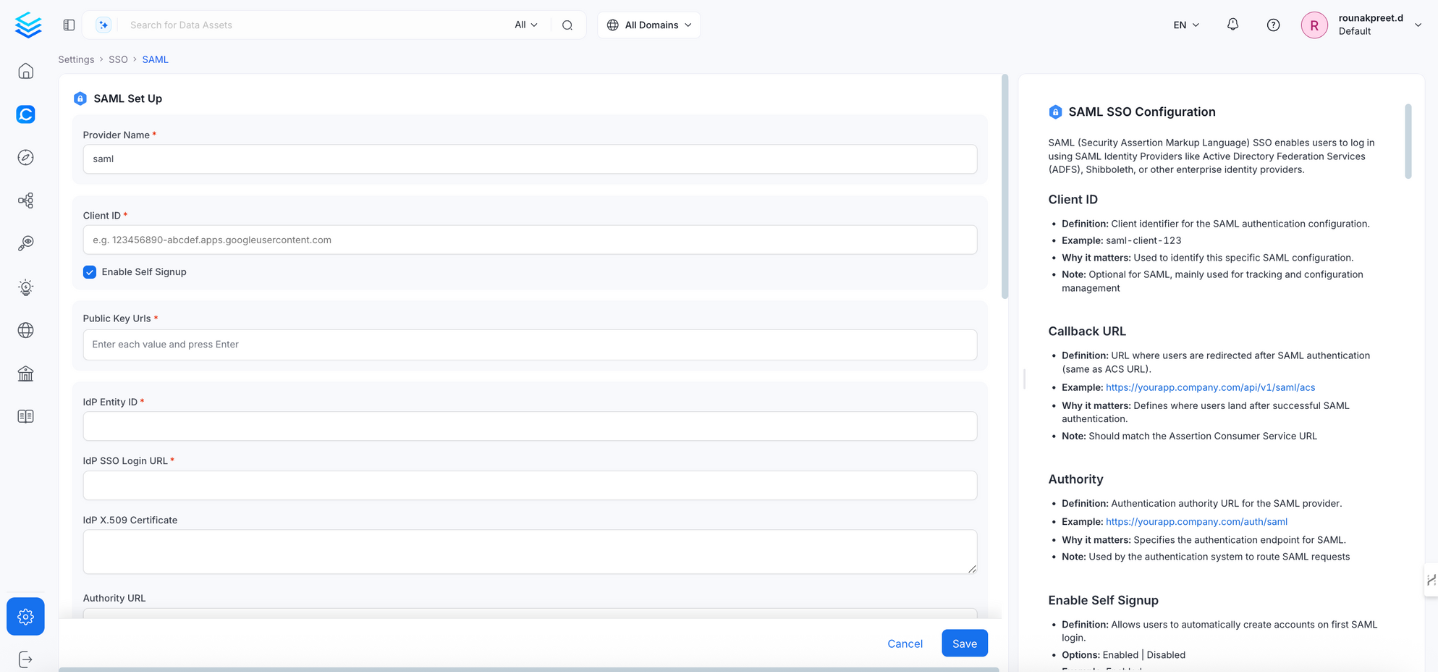
 Click Configure to set up Single Sign-On (SSO). After completing the configuration, click Save to apply the changes.
 ## Configuration Fields
This section contains the form fields that must be completed when setting up Single Sign-On (SSO).
### Client ID
* **Definition:** Client identifier for this SAML configuration.
* **Example:** `saml-client-123`
* **Why it matters:** Useful for tracking and management.
* **Note:** Optional in SAML setup.
### Enable Self Signup
* **Definition:** Allows new users to auto-create accounts on first login.
* **Options:** Enabled | Disabled
* **Example:** Enabled
### Public Key URLs
* **Definition:** URLs for verifying JWT signatures (used if SAML generates JWT).
* **Example:** `["https://yourapp.company.com/.well-known/jwks.json"]`
### IdP Entity ID
* **Definition:** Identifier for your Identity Provider (IdP).
* **Example:** `https://adfs.company.com/adfs/services/trust`
### SSO Login URL
* **Definition:** URL where users are redirected to log in with your IdP.
* **Example:** `https://adfs.company.com/adfs/ls/`
### IdP X.509 Certificate
* **Definition:** Certificate used to verify incoming SAML assertions.
* **Note:** Must include the full certificate with `BEGIN` and `END` lines.
### Authority URL
* **Definition:** Used for IdP-initiated login flows.
* **Example:** `https://adfs.company.com/adfs/ls/idpinitiatedsignon.aspx`
### Name ID Format
* **Definition:** Format used to identify users.
* **Default/Example:** `urn:oasis:names:tc:SAML:2.0:nameid-format:emailAddress`
### Assertion Consumer Service (ACS) URL
* **Definition:** URL where SAML assertions are sent post-authentication.
* **Example:** `https://openmetadata.company.com/api/v1/saml/acs`
### SP X.509 Certificate
* **Definition:** Collate’s public certificate.
* **Note:** Required if you want to sign authentication requests.
### SP Private Key
* **Definition:** Used to sign SAML requests or decrypt assertions.
* **Note:** Must be stored securely.
### SP Callback URL
* **Definition:** Redirect path after successful login.
* **Example:** `https://openmetadata.company.com/saml/callback`
### Token Validity
* **Definition:** Token expiration time in seconds.
* **Default:** 3600
* **Example:** 7200
### Send Signed Auth Request
* **Definition:** Whether to sign SAML requests from Collate.
* **Default:** false
* **Example:** true
### Want Messages Signed
* **Definition:** Require SAML messages to be signed by IdP.
* **Default:** false
* **Example:** true
### Want Assertions Signed
* **Definition:** Require assertions to be signed by IdP.
* **Default:** false
* **Example:** true
### Debug Mode
* **Definition:** Enable detailed logs for SAML login attempts.
* **Default:** false
* **Example:** true
* **Note:** Use only for troubleshooting. Disable in production.
### JWT Principal Claims
* **Definition:** Claims used to identify the user (when SAML generates JWT).
* **Example:** `["preferred_username", "email", "sub"]`
### JWT Principal Claims Mapping
**Definition:** Maps SAML assertion attributes to Collate user profile fields.
**Supported keys:** Only `email` and `username` are valid mapping targets in `jwtPrincipalClaimsMapping`.
**Example:**
```yaml theme={null}
["email:email", "username:preferred_username"]
```
**Why it matters:** Controls how SAML assertion data maps to user profiles in Collate.
**Format:** `collate_field:saml_attribute` (for example, `"email:email"`).
**Note:** The display name is derived automatically from standard SAML attributes — you don't need to configure it using `jwtPrincipalClaimsMapping`.
If you need richer name handling, make sure your IdP (ADFS, Okta, Shibboleth) is configured to include `given_name` and `family_name` in the SAML assertion — Collate will pick them up automatically.
**Important:** Using any other key (for example, `name` or `firstName`) will cause the service to fail on startup with a validation error.
### Admin Principals
* **Definition:** Users with admin access in Collate.
* **Example:** `["admin@example.com", "security@example.com"]`
### Principal Domain
* **Definition:** Default domain used to resolve user identity.
* **Example:** `company.com`
### Enforce Principal Domain
* **Definition:** Restrict access to users within a specific domain.
* **Default:** false
* **Example:** true
### Enable Secure Socket Connection
* **Definition:** Enable SSL/TLS for secure SAML communication.
* **Default:** false
* **Example:** true
* **Note:** Strongly recommended for production environments.
***
## ✅ Summary Table
| **Field** | **Example / Default** |
| ------------------------ | -------------------------------------------------------------------------------------------------------------------- |
| Client ID | saml-client-123 |
| Enable Self Signup | Enabled |
| Public Key URLs | [https://yourapp.company.com/.well-known/jwks.json](https://yourapp.company.com/.well-known/jwks.json) |
| IdP Entity ID | [https://adfs.company.com/adfs/services/trust](https://adfs.company.com/adfs/services/trust) |
| SSO Login URL | [https://adfs.company.com/adfs/ls/](https://adfs.company.com/adfs/ls/) |
| IdP X509 Certificate | Multiline PEM certificate |
| Authority URL | [https://adfs.company.com/adfs/ls/idpinitiatedsignon.aspx](https://adfs.company.com/adfs/ls/idpinitiatedsignon.aspx) |
| Name ID Format | urn:oasis:names:tc:SAML:2.0:nameid-format:emailAddress |
| ACS URL | [https://openmetadata.company.com/api/v1/saml/acs](https://openmetadata.company.com/api/v1/saml/acs) |
| SP X509 Certificate | Multiline PEM certificate |
| SP Private Key | Multiline PEM private key |
| SP Callback URL | [https://openmetadata.company.com/saml/callback](https://openmetadata.company.com/saml/callback) |
| Token Validity | 3600 |
| Send Signed Auth Request | true |
| Want Messages Signed | true |
| Want Assertions Signed | true |
| Debug Mode | false |
| JWT Principal Claims | \["preferred\_username", "email", "sub"] |
| JWT Mapping | \["email:email", "name:displayName", "firstName:given\_name"] |
| Admin Principals | \["[admin@example.com](mailto:admin@example.com)", "[security@example.com](mailto:security@example.com)"] |
| Principal Domain | company.com |
| Enforce Principal Domain | false |
| SSL/TLS | true |
### Troubleshooting
If users are automatically logged out and unable to log in again due to a bad authentication configuration, you can reset the security setup using the following command:
```
./bootstrap/openmetadata-ops.sh remove-security-config --force
```
After executing the command, **restart the server**. The authentication values from your YAML or Helm chart will then be reapplied on startup. The following tiles detail how to apply this configuration:
Configure Auth0 SSO to access the UI and APIs.
Configure Azure SSO to access the UI and APIs.
Configure a custom OIDC SSO to access the UI and APIs.
Configure Google SSO to access the UI and APIs.
Configure Okta SSO to access the UI and APIs.
Configure Amazon Cognito SSO to access the UI and APIs.
Configure SAML SSO to access the UI and APIs.
Configure LDAP SSO to access the UI and APIs.
## Configuration Fields
This section contains the form fields that must be completed when setting up Single Sign-On (SSO).
### Client ID
* **Definition:** Client identifier for this SAML configuration.
* **Example:** `saml-client-123`
* **Why it matters:** Useful for tracking and management.
* **Note:** Optional in SAML setup.
### Enable Self Signup
* **Definition:** Allows new users to auto-create accounts on first login.
* **Options:** Enabled | Disabled
* **Example:** Enabled
### Public Key URLs
* **Definition:** URLs for verifying JWT signatures (used if SAML generates JWT).
* **Example:** `["https://yourapp.company.com/.well-known/jwks.json"]`
### IdP Entity ID
* **Definition:** Identifier for your Identity Provider (IdP).
* **Example:** `https://adfs.company.com/adfs/services/trust`
### SSO Login URL
* **Definition:** URL where users are redirected to log in with your IdP.
* **Example:** `https://adfs.company.com/adfs/ls/`
### IdP X.509 Certificate
* **Definition:** Certificate used to verify incoming SAML assertions.
* **Note:** Must include the full certificate with `BEGIN` and `END` lines.
### Authority URL
* **Definition:** Used for IdP-initiated login flows.
* **Example:** `https://adfs.company.com/adfs/ls/idpinitiatedsignon.aspx`
### Name ID Format
* **Definition:** Format used to identify users.
* **Default/Example:** `urn:oasis:names:tc:SAML:2.0:nameid-format:emailAddress`
### Assertion Consumer Service (ACS) URL
* **Definition:** URL where SAML assertions are sent post-authentication.
* **Example:** `https://openmetadata.company.com/api/v1/saml/acs`
### SP X.509 Certificate
* **Definition:** Collate’s public certificate.
* **Note:** Required if you want to sign authentication requests.
### SP Private Key
* **Definition:** Used to sign SAML requests or decrypt assertions.
* **Note:** Must be stored securely.
### SP Callback URL
* **Definition:** Redirect path after successful login.
* **Example:** `https://openmetadata.company.com/saml/callback`
### Token Validity
* **Definition:** Token expiration time in seconds.
* **Default:** 3600
* **Example:** 7200
### Send Signed Auth Request
* **Definition:** Whether to sign SAML requests from Collate.
* **Default:** false
* **Example:** true
### Want Messages Signed
* **Definition:** Require SAML messages to be signed by IdP.
* **Default:** false
* **Example:** true
### Want Assertions Signed
* **Definition:** Require assertions to be signed by IdP.
* **Default:** false
* **Example:** true
### Debug Mode
* **Definition:** Enable detailed logs for SAML login attempts.
* **Default:** false
* **Example:** true
* **Note:** Use only for troubleshooting. Disable in production.
### JWT Principal Claims
* **Definition:** Claims used to identify the user (when SAML generates JWT).
* **Example:** `["preferred_username", "email", "sub"]`
### JWT Principal Claims Mapping
**Definition:** Maps SAML assertion attributes to Collate user profile fields.
**Supported keys:** Only `email` and `username` are valid mapping targets in `jwtPrincipalClaimsMapping`.
**Example:**
```yaml theme={null}
["email:email", "username:preferred_username"]
```
**Why it matters:** Controls how SAML assertion data maps to user profiles in Collate.
**Format:** `collate_field:saml_attribute` (for example, `"email:email"`).
**Note:** The display name is derived automatically from standard SAML attributes — you don't need to configure it using `jwtPrincipalClaimsMapping`.
If you need richer name handling, make sure your IdP (ADFS, Okta, Shibboleth) is configured to include `given_name` and `family_name` in the SAML assertion — Collate will pick them up automatically.
**Important:** Using any other key (for example, `name` or `firstName`) will cause the service to fail on startup with a validation error.
### Admin Principals
* **Definition:** Users with admin access in Collate.
* **Example:** `["admin@example.com", "security@example.com"]`
### Principal Domain
* **Definition:** Default domain used to resolve user identity.
* **Example:** `company.com`
### Enforce Principal Domain
* **Definition:** Restrict access to users within a specific domain.
* **Default:** false
* **Example:** true
### Enable Secure Socket Connection
* **Definition:** Enable SSL/TLS for secure SAML communication.
* **Default:** false
* **Example:** true
* **Note:** Strongly recommended for production environments.
***
## ✅ Summary Table
| **Field** | **Example / Default** |
| ------------------------ | -------------------------------------------------------------------------------------------------------------------- |
| Client ID | saml-client-123 |
| Enable Self Signup | Enabled |
| Public Key URLs | [https://yourapp.company.com/.well-known/jwks.json](https://yourapp.company.com/.well-known/jwks.json) |
| IdP Entity ID | [https://adfs.company.com/adfs/services/trust](https://adfs.company.com/adfs/services/trust) |
| SSO Login URL | [https://adfs.company.com/adfs/ls/](https://adfs.company.com/adfs/ls/) |
| IdP X509 Certificate | Multiline PEM certificate |
| Authority URL | [https://adfs.company.com/adfs/ls/idpinitiatedsignon.aspx](https://adfs.company.com/adfs/ls/idpinitiatedsignon.aspx) |
| Name ID Format | urn:oasis:names:tc:SAML:2.0:nameid-format:emailAddress |
| ACS URL | [https://openmetadata.company.com/api/v1/saml/acs](https://openmetadata.company.com/api/v1/saml/acs) |
| SP X509 Certificate | Multiline PEM certificate |
| SP Private Key | Multiline PEM private key |
| SP Callback URL | [https://openmetadata.company.com/saml/callback](https://openmetadata.company.com/saml/callback) |
| Token Validity | 3600 |
| Send Signed Auth Request | true |
| Want Messages Signed | true |
| Want Assertions Signed | true |
| Debug Mode | false |
| JWT Principal Claims | \["preferred\_username", "email", "sub"] |
| JWT Mapping | \["email:email", "name:displayName", "firstName:given\_name"] |
| Admin Principals | \["[admin@example.com](mailto:admin@example.com)", "[security@example.com](mailto:security@example.com)"] |
| Principal Domain | company.com |
| Enforce Principal Domain | false |
| SSL/TLS | true |
### Troubleshooting
If users are automatically logged out and unable to log in again due to a bad authentication configuration, you can reset the security setup using the following command:
```
./bootstrap/openmetadata-ops.sh remove-security-config --force
```
After executing the command, **restart the server**. The authentication values from your YAML or Helm chart will then be reapplied on startup. The following tiles detail how to apply this configuration:
Configure Auth0 SSO to access the UI and APIs.
Configure Azure SSO to access the UI and APIs.
Configure a custom OIDC SSO to access the UI and APIs.
Configure Google SSO to access the UI and APIs.
Configure Okta SSO to access the UI and APIs.
Configure Amazon Cognito SSO to access the UI and APIs.
Configure SAML SSO to access the UI and APIs.
Configure LDAP SSO to access the UI and APIs.