> ## Documentation Index
> Fetch the complete documentation index at: https://docs.getcollate.io/llms.txt
> Use this file to discover all available pages before exploring further.
# Okta SSO Configuration Guide | Confidential Client Setup
> Comprehensive guide to setting up Okta SSO for confidential clients using OIDC. Includes client secret configuration, secure token handling, and advanced security options.
# Okta SSO Configuration (Confidential Client)
* [Troubleshooting](#troubleshooting)
Okta Single Sign-On (SSO) enables users to log in to Collate with their Okta credentials using **OAuth 2.0** and **OpenID Connect (OIDC)** protocols.
This guide walks you through configuring Collate with a Custom OIDC provider using **Confidential client** settings (Client ID + Client Secret).
## Overview
Collate supports Single Sign-On (SSO) integration with various identity providers, enabling secure, centralized user authentication.
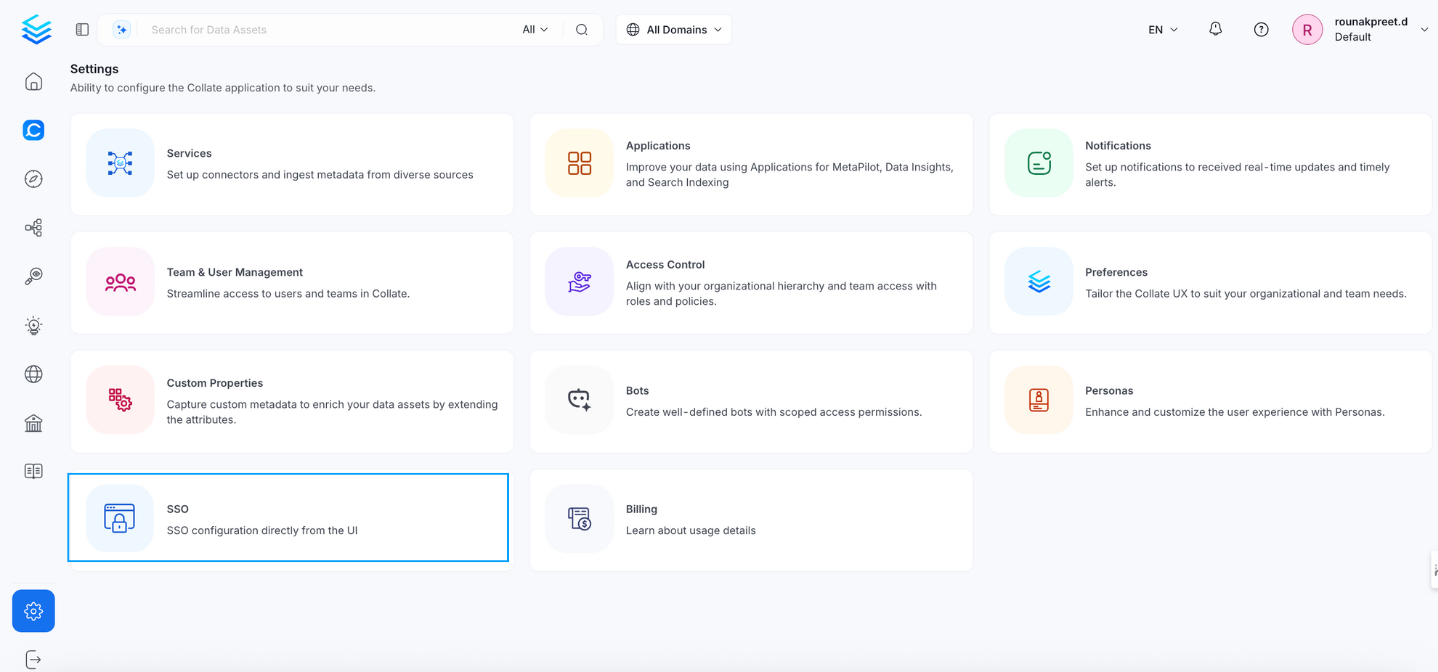
* **Navigate to:** `Settings > SSO`
 * Select the service provider.
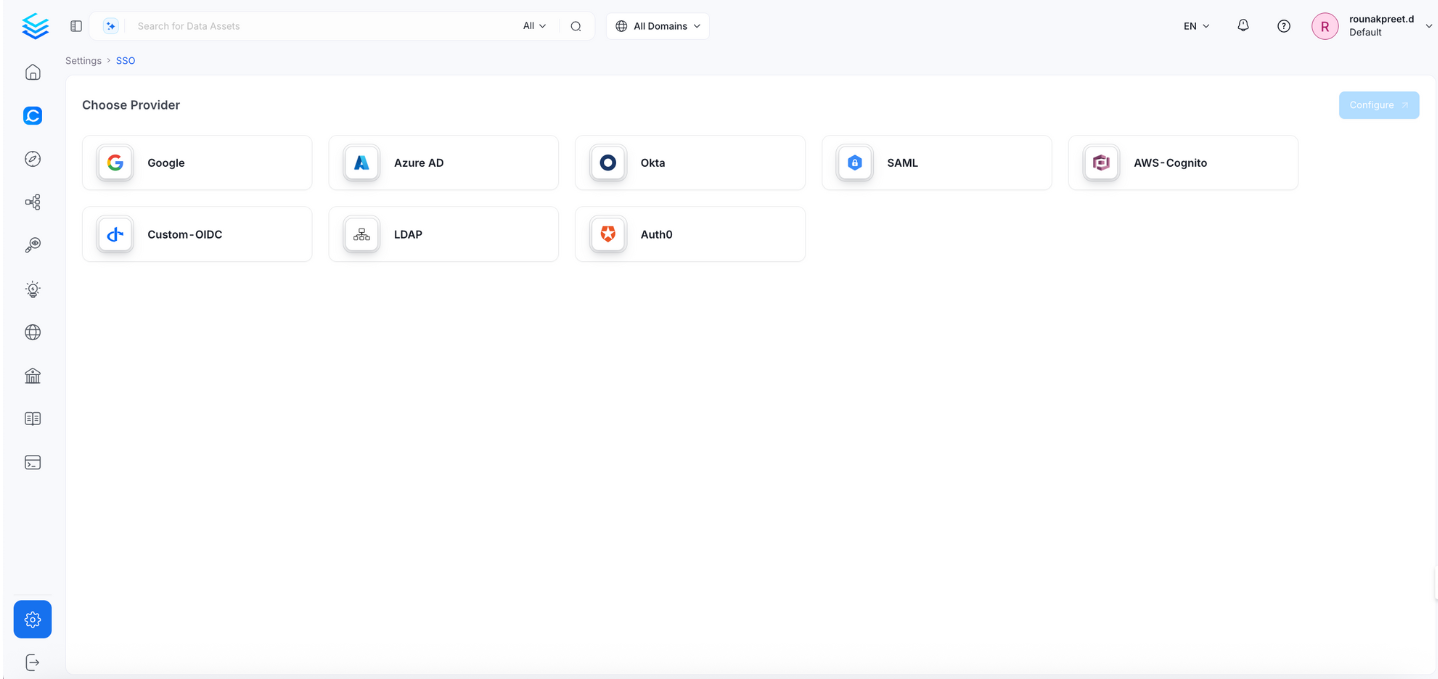 Click Configure to set up Single Sign-On (SSO). After completing the configuration, click Save to apply the changes.
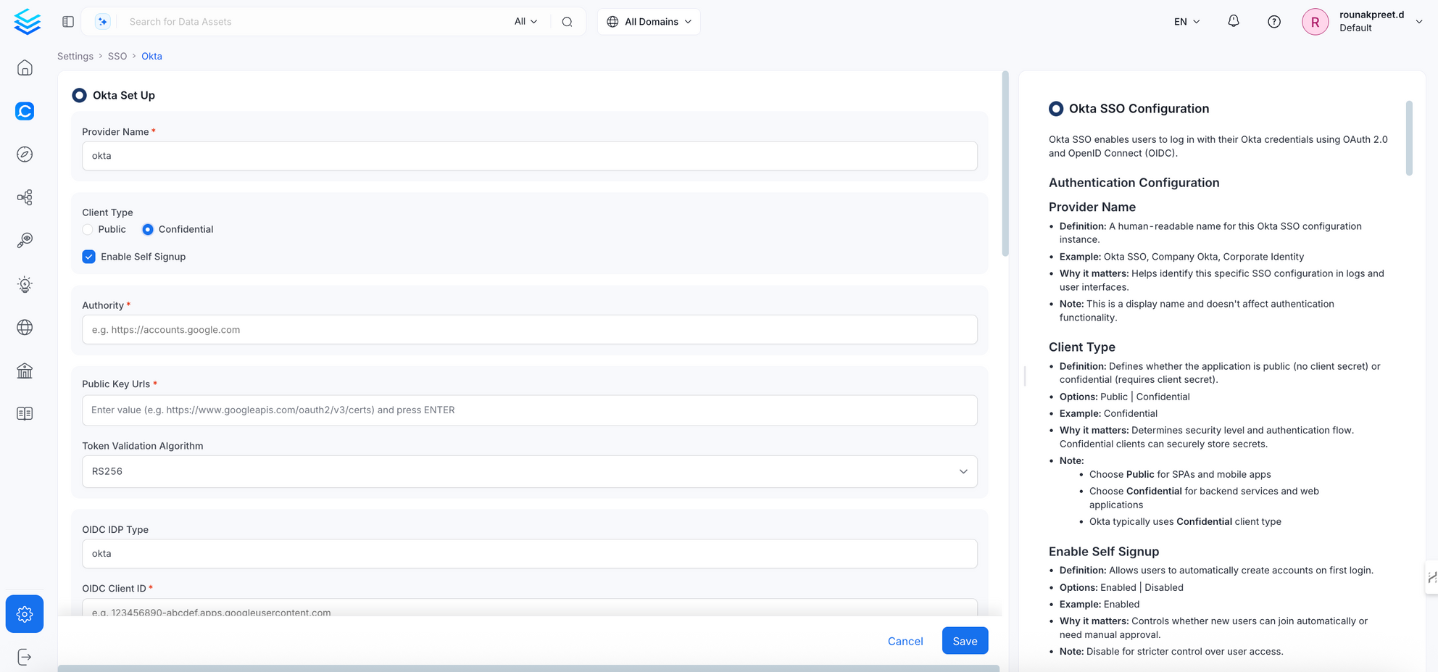 ## Provider Name
Defines a readable name to identify this Okta SSO configuration.
* **Example:** `Okta SSO`, `Company Okta`
* **Note:** This is for display purposes only and does not affect authentication functionality.
## Authentication Configuration (Confidential)
This section contains the form fields that must be completed when setting up Single Sign-On (SSO).
### Enable Self Signup
Allows users to create Collate accounts on first login.
* **Options:** Enabled | Disabled
* **Recommended:** Disabled (for tighter access control)
### Authority
Your Okta domain URL used to issue tokens.
* **Example:** `https://dev-123456.okta.com` or `https://company.okta.com`
* **Note:** This must match your Okta domain exactly.
### Public Key URLs
URLs where Okta publishes its public signing keys.
* **Example:** `["https://dev-123456.okta.com/oauth2/v1/keys"]`
* **Note:** Usually auto-discovered via discovery URI.
### Token Validation Algorithm
Specifies the JWT algorithm to validate token signatures.
* **Options:** RS256 | RS384 | RS512
* **Default:** RS256
### Client Type
Defines the application type: public (no secret) or confidential (requires client secret).
* **Recommended:** Confidential (for backend services and web apps)
### OIDC Client ID
The client ID from your Okta app registration.
* **Example:** `0oabc123def456ghi789`
### OIDC Client Secret
The client secret for authenticating your confidential client.
* **Example:** `abc123def456ghi789jkl012mno345pqr678st`
* **Note:** Only used for confidential clients. Rotate regularly.
### OIDC Request Scopes
Permissions requested during authentication.
* **Default:** `openid email profile`
* **Optional:** Add `groups` for group-based authorization.
### OIDC Discovery URI
URI to retrieve Okta’s OIDC metadata.
* **Example:** `https://dev-123456.okta.com/.well-known/openid-configuration`
### OIDC Use Nonce
Enables anti-replay protection.
* **Default:** true
### OIDC Preferred JWS Algorithm
Preferred JWT signing algorithm.
* **Default:** RS256
### OIDC Response Type
Defines the OAuth flow type.
* **Options:** `id_token` | `code`
* **Recommended:** `code` (authorization code flow)
### OIDC Disable PKCE
Disables PKCE (Proof Key for Code Exchange).
* **Default:** false
* **Note:** Should generally remain enabled for security.
### OIDC Max Clock Skew
Allowed time difference (in seconds) between systems during token validation.
* **Example:** `0`
### OIDC Client Authentication Method
Specifies how the client authenticates with Okta.
* **Options:** `client_secret_basic` | `client_secret_post` | `client_secret_jwt` | `private_key_jwt`
* **Default:** `client_secret_basic`
### OIDC Token Validity
How long tokens remain valid (in seconds).
* **Default:** `0` (uses Okta’s default)
* **Example:** `3600` (1 hour)
### OIDC Tenant
Your Okta organization subdomain.
* **Example:** `dev-123456`, `company`
### OIDC Server URL
* **Definition:** Your OM server URL.
* **Example:** `https://yourapp.company.com`.
* **Why it matters:** specifies the URL at which OM is hosted.
### Callback URL
Redirect URI for handling login responses.
* **Example:** `https://yourapp.company.com/callback`
* **Note:** Must match exactly in Okta → Applications → Sign-in redirect URIs
### OIDC Max Age
Maximum time (in seconds) before forcing re-authentication.
* **Example:** `3600`
* **Optional:** Leave empty to use default behavior.
### OIDC Prompt
Controls authentication behavior.
* **Options:** `none` | `login` | `consent` | `select_account`
* **Recommended:** `login` (forces credential prompt)
### OIDC Session Expiry
Controls user session duration (in seconds).
* **Default:** `604800` (7 days)
### JWT Principal Claims
JWT fields used to identify the authenticated user.
* **Example:** `["preferred_username", "email", "sub"]`
### JWT Principal Claims Mapping
**Definition:** Maps JSON Web Token (JWT) claims to Collate user profile fields.
**Supported keys:** Only `email` and `username` are valid mapping targets in `jwtPrincipalClaimsMapping`.
**Example:**
```yaml theme={null}
["email:email", "username:preferred_username"]
```
**Why it matters:** Controls how SSO login data maps to user profiles in Collate.
**Format:** `collate_field:jwt_claim` (for example, `"email:email"`).
**Note:** The display name is derived automatically from standard OIDC/JWT claims — you don't need to configure it using `jwtPrincipalClaimsMapping`.
If you need richer name handling, make sure Okta includes `given_name` and `family_name` as claims in the ID token — Collate will pick them up automatically.
**Important:** Using any other key (for example, `name` or `firstName`) will cause the service to fail on startup with a validation error.
### Admin Principals
List of users with full admin access.
* **Example:** `["admin@company.com", "superuser@company.com"]`
* **Note:** Must match one of the JWT claim values.
### Principal Domain
Default domain for user identifiers.
* **Example:** `company.com`
### Enforce Principal Domain
Restricts access to users within the configured domain.
* **Default:** false
* **Example:** true
### Enable Secure Socket Connection
Enforces secure (SSL/TLS) communication.
* **Default:** false
* **Recommended:** true for production environments
## Summary
| **Field** | **Example / Default** |
| --------------------------------- | ---------------------------------------------------------------------------------------------------------------------------- |
| Client Type | Confidential |
| OIDC Client ID | 0oabc123def456ghi789 |
| OIDC Client Secret | abc123def456ghi789jkl012mno345pqr678st |
| Callback URL | [https://yourapp.company.com/callback](https://yourapp.company.com/callback) |
| Authority | [https://dev-123456.okta.com](https://dev-123456.okta.com) |
| OIDC Discovery URI | [https://dev-123456.okta.com/.well-known/openid-configuration](https://dev-123456.okta.com/.well-known/openid-configuration) |
| Public Key URLs | [https://dev-123456.okta.com/oauth2/v1/keys](https://dev-123456.okta.com/oauth2/v1/keys) |
| Token Validation Algorithm | RS256 |
| OIDC Response Type | code |
| OIDC Request Scopes | openid email profile groups |
| OIDC Preferred JWS Algorithm | RS256 |
| OIDC Use Nonce | true |
| OIDC Disable PKCE | false |
| OIDC Client Authentication Method | client\_secret\_basic |
| OIDC Max Clock Skew | 0 |
| OIDC Token Validity | 3600 |
| OIDC Max Age | 3600 |
| OIDC Prompt | login |
| OIDC Session Expiry | 604800 |
| OIDC Tenant | dev-123456 |
| OIDC Server URL | [https://dev-123456.okta.com](https://dev-123456.okta.com) |
| JWT Principal Claims | \["preferred\_username", "email", "sub"] |
| JWT Mapping | \["email:email", "name:name", "firstName:given\_name"] |
| Admin Principals | \["[admin@company.com](mailto:admin@company.com)"] |
| Principal Domain | company.com |
| Enforce Principal Domain | false |
| SSL/TLS | true |
### Troubleshooting
If users are automatically logged out and unable to log in again due to a bad authentication configuration, you can reset the security setup using the following command:
```
./bootstrap/openmetadata-ops.sh remove-security-config --force
```
After executing the command, **restart the server**. The authentication values from your YAML or Helm chart will then be reapplied on startup. The following tiles detail how to apply this configuration:
Configure Auth0 SSO to access the UI and APIs.
Configure Azure SSO to access the UI and APIs.
Configure a custom OIDC SSO to access the UI and APIs.
Configure Google SSO to access the UI and APIs.
Configure Okta SSO to access the UI and APIs.
Configure Amazon Cognito SSO to access the UI and APIs.
Configure SAML SSO to access the UI and APIs.
Configure LDAP SSO to access the UI and APIs.
## Provider Name
Defines a readable name to identify this Okta SSO configuration.
* **Example:** `Okta SSO`, `Company Okta`
* **Note:** This is for display purposes only and does not affect authentication functionality.
## Authentication Configuration (Confidential)
This section contains the form fields that must be completed when setting up Single Sign-On (SSO).
### Enable Self Signup
Allows users to create Collate accounts on first login.
* **Options:** Enabled | Disabled
* **Recommended:** Disabled (for tighter access control)
### Authority
Your Okta domain URL used to issue tokens.
* **Example:** `https://dev-123456.okta.com` or `https://company.okta.com`
* **Note:** This must match your Okta domain exactly.
### Public Key URLs
URLs where Okta publishes its public signing keys.
* **Example:** `["https://dev-123456.okta.com/oauth2/v1/keys"]`
* **Note:** Usually auto-discovered via discovery URI.
### Token Validation Algorithm
Specifies the JWT algorithm to validate token signatures.
* **Options:** RS256 | RS384 | RS512
* **Default:** RS256
### Client Type
Defines the application type: public (no secret) or confidential (requires client secret).
* **Recommended:** Confidential (for backend services and web apps)
### OIDC Client ID
The client ID from your Okta app registration.
* **Example:** `0oabc123def456ghi789`
### OIDC Client Secret
The client secret for authenticating your confidential client.
* **Example:** `abc123def456ghi789jkl012mno345pqr678st`
* **Note:** Only used for confidential clients. Rotate regularly.
### OIDC Request Scopes
Permissions requested during authentication.
* **Default:** `openid email profile`
* **Optional:** Add `groups` for group-based authorization.
### OIDC Discovery URI
URI to retrieve Okta’s OIDC metadata.
* **Example:** `https://dev-123456.okta.com/.well-known/openid-configuration`
### OIDC Use Nonce
Enables anti-replay protection.
* **Default:** true
### OIDC Preferred JWS Algorithm
Preferred JWT signing algorithm.
* **Default:** RS256
### OIDC Response Type
Defines the OAuth flow type.
* **Options:** `id_token` | `code`
* **Recommended:** `code` (authorization code flow)
### OIDC Disable PKCE
Disables PKCE (Proof Key for Code Exchange).
* **Default:** false
* **Note:** Should generally remain enabled for security.
### OIDC Max Clock Skew
Allowed time difference (in seconds) between systems during token validation.
* **Example:** `0`
### OIDC Client Authentication Method
Specifies how the client authenticates with Okta.
* **Options:** `client_secret_basic` | `client_secret_post` | `client_secret_jwt` | `private_key_jwt`
* **Default:** `client_secret_basic`
### OIDC Token Validity
How long tokens remain valid (in seconds).
* **Default:** `0` (uses Okta’s default)
* **Example:** `3600` (1 hour)
### OIDC Tenant
Your Okta organization subdomain.
* **Example:** `dev-123456`, `company`
### OIDC Server URL
* **Definition:** Your OM server URL.
* **Example:** `https://yourapp.company.com`.
* **Why it matters:** specifies the URL at which OM is hosted.
### Callback URL
Redirect URI for handling login responses.
* **Example:** `https://yourapp.company.com/callback`
* **Note:** Must match exactly in Okta → Applications → Sign-in redirect URIs
### OIDC Max Age
Maximum time (in seconds) before forcing re-authentication.
* **Example:** `3600`
* **Optional:** Leave empty to use default behavior.
### OIDC Prompt
Controls authentication behavior.
* **Options:** `none` | `login` | `consent` | `select_account`
* **Recommended:** `login` (forces credential prompt)
### OIDC Session Expiry
Controls user session duration (in seconds).
* **Default:** `604800` (7 days)
### JWT Principal Claims
JWT fields used to identify the authenticated user.
* **Example:** `["preferred_username", "email", "sub"]`
### JWT Principal Claims Mapping
**Definition:** Maps JSON Web Token (JWT) claims to Collate user profile fields.
**Supported keys:** Only `email` and `username` are valid mapping targets in `jwtPrincipalClaimsMapping`.
**Example:**
```yaml theme={null}
["email:email", "username:preferred_username"]
```
**Why it matters:** Controls how SSO login data maps to user profiles in Collate.
**Format:** `collate_field:jwt_claim` (for example, `"email:email"`).
**Note:** The display name is derived automatically from standard OIDC/JWT claims — you don't need to configure it using `jwtPrincipalClaimsMapping`.
If you need richer name handling, make sure Okta includes `given_name` and `family_name` as claims in the ID token — Collate will pick them up automatically.
**Important:** Using any other key (for example, `name` or `firstName`) will cause the service to fail on startup with a validation error.
### Admin Principals
List of users with full admin access.
* **Example:** `["admin@company.com", "superuser@company.com"]`
* **Note:** Must match one of the JWT claim values.
### Principal Domain
Default domain for user identifiers.
* **Example:** `company.com`
### Enforce Principal Domain
Restricts access to users within the configured domain.
* **Default:** false
* **Example:** true
### Enable Secure Socket Connection
Enforces secure (SSL/TLS) communication.
* **Default:** false
* **Recommended:** true for production environments
## Summary
| **Field** | **Example / Default** |
| --------------------------------- | ---------------------------------------------------------------------------------------------------------------------------- |
| Client Type | Confidential |
| OIDC Client ID | 0oabc123def456ghi789 |
| OIDC Client Secret | abc123def456ghi789jkl012mno345pqr678st |
| Callback URL | [https://yourapp.company.com/callback](https://yourapp.company.com/callback) |
| Authority | [https://dev-123456.okta.com](https://dev-123456.okta.com) |
| OIDC Discovery URI | [https://dev-123456.okta.com/.well-known/openid-configuration](https://dev-123456.okta.com/.well-known/openid-configuration) |
| Public Key URLs | [https://dev-123456.okta.com/oauth2/v1/keys](https://dev-123456.okta.com/oauth2/v1/keys) |
| Token Validation Algorithm | RS256 |
| OIDC Response Type | code |
| OIDC Request Scopes | openid email profile groups |
| OIDC Preferred JWS Algorithm | RS256 |
| OIDC Use Nonce | true |
| OIDC Disable PKCE | false |
| OIDC Client Authentication Method | client\_secret\_basic |
| OIDC Max Clock Skew | 0 |
| OIDC Token Validity | 3600 |
| OIDC Max Age | 3600 |
| OIDC Prompt | login |
| OIDC Session Expiry | 604800 |
| OIDC Tenant | dev-123456 |
| OIDC Server URL | [https://dev-123456.okta.com](https://dev-123456.okta.com) |
| JWT Principal Claims | \["preferred\_username", "email", "sub"] |
| JWT Mapping | \["email:email", "name:name", "firstName:given\_name"] |
| Admin Principals | \["[admin@company.com](mailto:admin@company.com)"] |
| Principal Domain | company.com |
| Enforce Principal Domain | false |
| SSL/TLS | true |
### Troubleshooting
If users are automatically logged out and unable to log in again due to a bad authentication configuration, you can reset the security setup using the following command:
```
./bootstrap/openmetadata-ops.sh remove-security-config --force
```
After executing the command, **restart the server**. The authentication values from your YAML or Helm chart will then be reapplied on startup. The following tiles detail how to apply this configuration:
Configure Auth0 SSO to access the UI and APIs.
Configure Azure SSO to access the UI and APIs.
Configure a custom OIDC SSO to access the UI and APIs.
Configure Google SSO to access the UI and APIs.
Configure Okta SSO to access the UI and APIs.
Configure Amazon Cognito SSO to access the UI and APIs.
Configure SAML SSO to access the UI and APIs.
Configure LDAP SSO to access the UI and APIs.