> ## Documentation Index
> Fetch the complete documentation index at: https://docs.getcollate.io/llms.txt
> Use this file to discover all available pages before exploring further.
# AWS Cognito SSO Configuration for Confidential Apps
> Learn to configure AWS Cognito SSO for confidential clients with OIDC, secure token handling, and client secret setup for web and backend apps.
# AWS Cognito SSO Configuration (Confidential)
* [Troubleshooting](#troubleshooting)
AWS Cognito SSO enables users to log in using credentials from an AWS Cognito User Pool through OAuth 2.0 and OpenID Connect (OIDC).
This configuration supports **Confidential Clients**, which use both Client ID and Client Secret for secure backend authentication.
This guide walks you through configuring Collate with a AWS Cognito provider using **Confidential client** settings (Client ID + Client Secret).
## Overview
Collate supports Single Sign-On (SSO) integration with various identity providers, enabling secure, centralized user authentication.
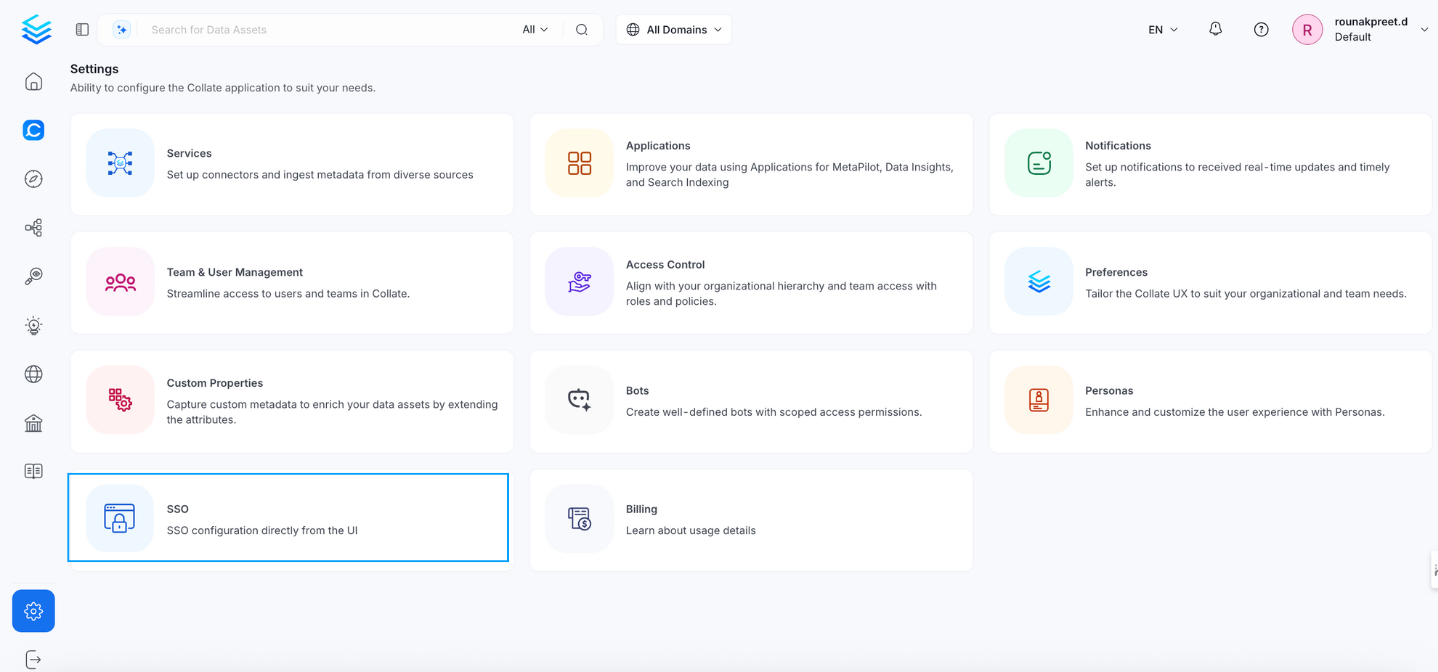
* **Navigate to:** `Settings > SSO`
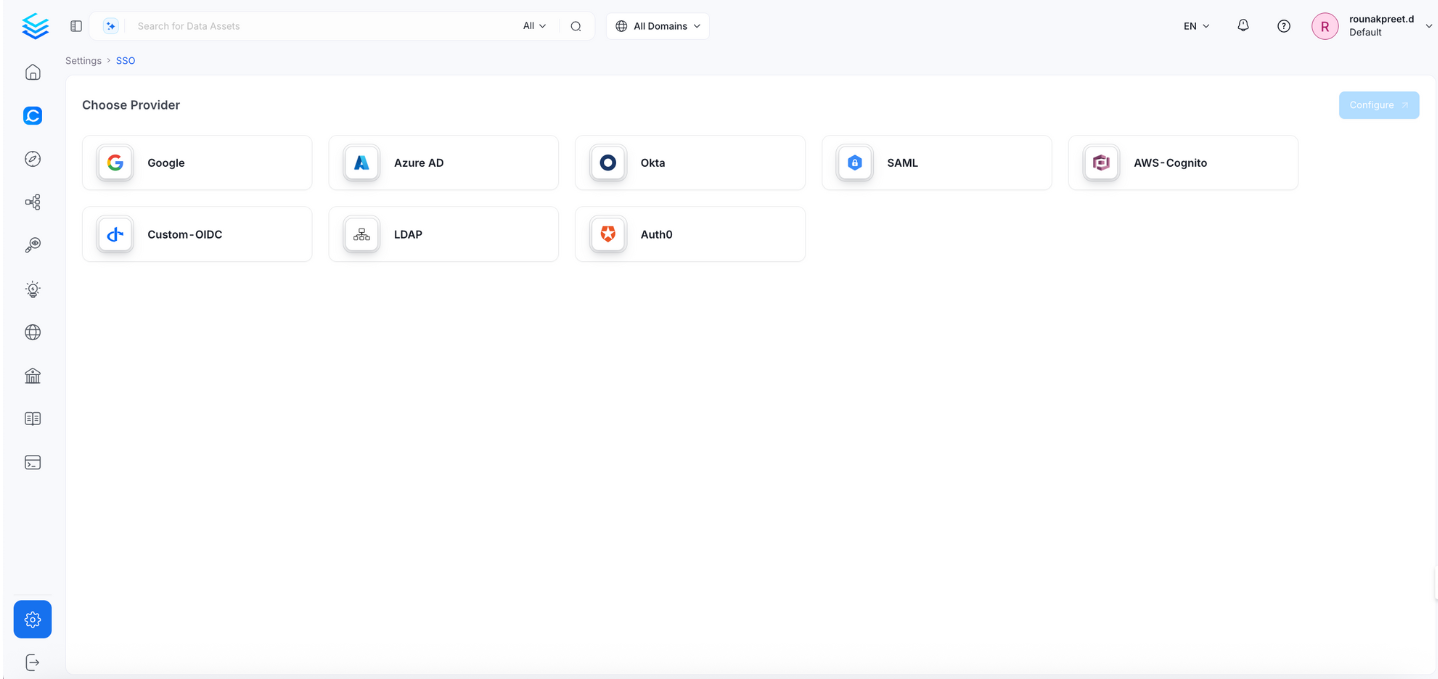
 * Select the service provider.
 Click Configure to set up Single Sign-On (SSO). After completing the configuration, click Save to apply the changes.
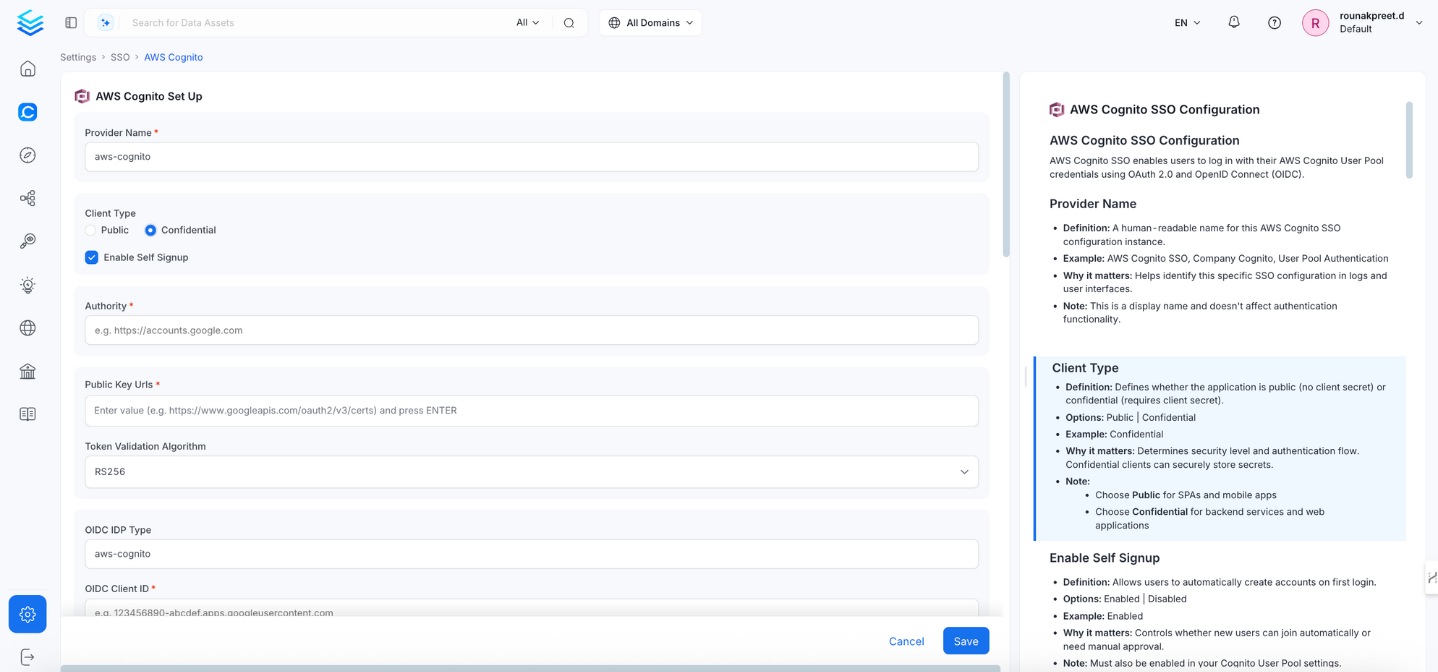 ## Configuration Fields
This section contains the form fields that must be completed when setting up Single Sign-On (SSO).
### Provider Name
* **Definition:** A human-readable name for this AWS Cognito SSO configuration instance.
* **Example:** `AWS Cognito SSO`, `Company Cognito`, `User Pool Authentication`
* **Why it matters:** Helps identify this configuration in logs and UI.
* **Note:** This is a display name and doesn't affect authentication.
### Client Type
* **Definition:** Defines whether the application is public (no client secret) or confidential (requires client secret).
* **Options:** Public | Confidential
* **Example:** Confidential
* **Why it matters:** Determines security level and authentication flow. Confidential clients securely store secrets.
* **Note:**
* Use **Public** for lightweight, client-side apps.
* Use **Confidential** for backend or server-based applications.
### Authority
* **Definition:** AWS Cognito User Pool domain that issues tokens.
* **Example:** `https://cognito-idp.us-east-1.amazonaws.com/us-east-1_ABC123DEF`
* **Why it matters:** Specifies which Cognito User Pool Collate authenticates against.
* **Note:** Use the format `https://cognito-idp.{region}.amazonaws.com/{user-pool-id}`.
### Public Key URLs
* **Definition:** URL(s) where AWS Cognito publishes its public keys for token verification.
* **Example:** `["https://cognito-idp.us-east-1.amazonaws.com/us-east-1_ABC123DEF/.well-known/jwks.json"]`
* **Why it matters:** Used to verify JWT token signatures from Cognito.
* **Note:** Typically auto-discovered; manual setup is rarely required.
### Token Validation Algorithm
* **Definition:** Algorithm used to validate JWT token signatures.
* **Options:** RS256 | RS384 | RS512
* **Default:** RS256
* **Example:** RS256
* **Why it matters:** Must match the signing algorithm used by AWS Cognito.
* **Note:** Cognito defaults to RS256.
### OIDC Client ID
* **Definition:** The App Client ID from your AWS Cognito User Pool.
* **Example:** `1a2b3c4d5e6f7g8h9i0j1k2l3m4n5o6p`
* **Why it matters:** Identifies your application during authentication.
* **Note:** Found in **AWS Console → Cognito → User Pools → App Integration → App Clients**.
### OIDC Client Secret
* **Definition:** Secret key for confidential client authentication.
* **Example:** `a1b2c3d4e5f6g7h8i9j0k1l2m3n4o5p6q7r8s9t0`
* **Why it matters:** Required for secure server-to-server communication.
* **Note:**
* Generated in **Cognito → User Pool → App Client → Generate Secret**.
* Store securely and rotate regularly.
* Only visible for Confidential client types.
### OIDC Request Scopes
* **Definition:** Scopes requested from AWS Cognito during authentication.
* **Default:** `openid email profile`
* **Example:** `openid email profile aws.cognito.signin.user.admin`
* **Why it matters:** Defines what user information Collate can access.
* **Note:** Must match scopes configured in your Cognito app client.
### OIDC Discovery URI
* **Definition:** AWS Cognito’s OIDC metadata endpoint.
* **Example:** `https://cognito-idp.us-east-1.amazonaws.com/us-east-1_ABC123DEF/.well-known/openid-configuration`
* **Why it matters:** Allows Collate to auto-discover endpoints for tokens and authorization.
* **Note:** Replace `{region}` and `{user-pool-id}` with your values.
### OIDC Use Nonce
* **Definition:** Prevents replay attacks by ensuring each authentication request is unique.
* **Default:** true
* **Example:** true
### OIDC Preferred JWS Algorithm
* **Definition:** JWT signature verification algorithm.
* **Default:** RS256
* **Example:** RS256
### OIDC Response Type
* **Definition:** Expected response type during OAuth authentication.
* **Default:** `id_token`
* **Options:** `id_token` | `code`
* **Example:** `code`
* **Why it matters:** The `code` flow is recommended for Confidential Clients.
* **Note:** Authorization Code flow provides enhanced security.
### OIDC Disable PKCE
* **Definition:** Whether to disable Proof Key for Code Exchange (PKCE).
* **Default:** false
* **Example:** false
* **Why it matters:** PKCE protects against code interception attacks.
* **Note:** Should generally remain enabled (`false`).
### OIDC Max Clock Skew
* **Definition:** Maximum allowed time difference when validating tokens.
* **Example:** 0 (seconds)
### OIDC Client Authentication Method
* **Definition:** Method used to authenticate the client with AWS Cognito.
* **Default:** `client_secret_basic`
* **Options:** `client_secret_basic` | `client_secret_post`
* **Example:** `client_secret_basic`
* **Why it matters:** Must align with your app client configuration.
### OIDC Token Validity
* **Definition:** Token expiration duration in seconds.
* **Default:** 0 (inherits provider default)
* **Example:** 3600
* **Why it matters:** Controls session duration and refresh timing.
### OIDC Tenant
* **Definition:** Cognito User Pool ID.
* **Example:** `us-east-1_ABC123DEF`
* **Why it matters:** Uniquely identifies your Cognito User Pool.
### OIDC Server URL
* **Definition:** Base URL for AWS Cognito’s authentication server.
* **Example:** `https://cognito-idp.us-east-1.amazonaws.com`
* **Why it matters:** Defines the token and userinfo API endpoints.
### OIDC Callback URL
* **Definition:** Redirect URI where Cognito sends authentication responses.
* **Example:** `https://yourapp.company.com/callback`
* **Note:**
* Must be registered in Cognito → User Pool → Hosted UI → Allowed Callback URLs.
* Always use HTTPS in production.
### OIDC Max Age
* **Definition:** Maximum authentication age before re-login is required.
* **Example:** 3600 (seconds)
### OIDC Prompt
* **Definition:** Controls how Cognito prompts users during authentication.
* **Options:** none | login | consent | select\_account
* **Example:** login
* **Note:**
* `login`: Always prompt for credentials
* `none`: Use existing session silently (SSO)
### OIDC Session Expiry
* **Definition:** Session expiration duration (seconds).
* **Default:** 604800 (7 days)
### JWT Principal Claims
* **Definition:** Claims used to identify users.
* **Example:** `["cognito:username", "email", "sub"]`
* **Note:** Common Cognito claims include `cognito:username`, `email`, `sub`, `preferred_username`.
### JWT Principal Claims Mapping
**Definition:** Maps JSON Web Token (JWT) claims to Collate user profile fields.
**Supported keys:** Only `email` and `username` are valid mapping targets in `jwtPrincipalClaimsMapping`.
**Example:**
```yaml theme={null}
["email:email", "username:preferred_username"]
```
**Why it matters:** Controls how SSO login data maps to user profiles in Collate.
**Format:** `collate_field:jwt_claim` (for example, `"email:email"`).
**Note:** The display name is derived automatically from standard OIDC/JWT claims — you don't need to configure it using `jwtPrincipalClaimsMapping`.
If you need richer name handling, make sure your Cognito User Pool is configured to include `given_name` and `family_name` as standard attributes — Collate will pick them up automatically.
**Important:** Using any other key (for example, `name` or `firstName`) will cause the service to fail on startup with a validation error.
### Admin Principals
* **Definition:** Users with administrative privileges in Collate.
* **Example:** `["admin@company.com", "superuser@company.com"]`
### Principal Domain
* **Definition:** Default domain for user principals.
* **Example:** `company.com`
### Enforce Principal Domain
* **Definition:** Enforces domain restriction for user logins.
* **Default:** false
* **Example:** true
### Enable Secure Socket Connection
* **Definition:** Enables SSL/TLS for secure connections.
* **Default:** false
* **Example:** true
* **Note:** Must be enabled in production environments.
## Summary Table
| **Field** | **Example / Default** |
| -------------------------- | ----------------------------------------------------------------------------------------------------------------------------------------------------------------------------------------------------- |
| Client Type | Confidential |
| OIDC Client ID | 1a2b3c4d5e6f7g8h9i0j1k2l3m4n5o6p |
| OIDC Client Secret | a1b2c3d4e5f6g7h8i9j0k1l2m3n4o5p6q7r8s9t0 |
| Authority | [https://cognito-idp.us-east-1.amazonaws.com/us-east-1\_ABC123DEF](https://cognito-idp.us-east-1.amazonaws.com/us-east-1_ABC123DEF) |
| OIDC Discovery URI | [https://cognito-idp.us-east-1.amazonaws.com/us-east-1\_ABC123DEF/.well-known/openid-configuration](https://cognito-idp.us-east-1.amazonaws.com/us-east-1_ABC123DEF/.well-known/openid-configuration) |
| OIDC Callback URL | [https://yourapp.company.com/callback](https://yourapp.company.com/callback) |
| OIDC Response Type | code |
| Token Validation Algorithm | RS256 |
| JWT Principal Claims | \["cognito:username", "email", "sub"] |
| JWT Mapping | \["email:email", "name:name", "firstName:given\_name"] |
| OIDC Request Scopes | openid email profile aws.cognito.signin.user.admin |
| OIDC Token Validity | 3600 |
| OIDC Session Expiry | 604800 |
| Admin Principals | \["[admin@company.com](mailto:admin@company.com)", "[superuser@company.com](mailto:superuser@company.com)"] |
| Principal Domain | company.com |
| Enforce Principal Domain | false |
| SSL/TLS | true |
### Troubleshooting
If users are automatically logged out and unable to log in again due to a bad authentication configuration, you can reset the security setup using the following command:
```
./bootstrap/openmetadata-ops.sh remove-security-config --force
```
After executing the command, **restart the server**. The authentication values from your YAML or Helm chart will then be reapplied on startup. The following tiles detail how to apply this configuration:
Configure Auth0 SSO to access the UI and APIs.
Configure Azure SSO to access the UI and APIs.
Configure a custom OIDC SSO to access the UI and APIs.
Configure Google SSO to access the UI and APIs.
Configure Okta SSO to access the UI and APIs.
Configure Amazon Cognito SSO to access the UI and APIs.
Configure SAML SSO to access the UI and APIs.
Configure LDAP SSO to access the UI and APIs.
## Configuration Fields
This section contains the form fields that must be completed when setting up Single Sign-On (SSO).
### Provider Name
* **Definition:** A human-readable name for this AWS Cognito SSO configuration instance.
* **Example:** `AWS Cognito SSO`, `Company Cognito`, `User Pool Authentication`
* **Why it matters:** Helps identify this configuration in logs and UI.
* **Note:** This is a display name and doesn't affect authentication.
### Client Type
* **Definition:** Defines whether the application is public (no client secret) or confidential (requires client secret).
* **Options:** Public | Confidential
* **Example:** Confidential
* **Why it matters:** Determines security level and authentication flow. Confidential clients securely store secrets.
* **Note:**
* Use **Public** for lightweight, client-side apps.
* Use **Confidential** for backend or server-based applications.
### Authority
* **Definition:** AWS Cognito User Pool domain that issues tokens.
* **Example:** `https://cognito-idp.us-east-1.amazonaws.com/us-east-1_ABC123DEF`
* **Why it matters:** Specifies which Cognito User Pool Collate authenticates against.
* **Note:** Use the format `https://cognito-idp.{region}.amazonaws.com/{user-pool-id}`.
### Public Key URLs
* **Definition:** URL(s) where AWS Cognito publishes its public keys for token verification.
* **Example:** `["https://cognito-idp.us-east-1.amazonaws.com/us-east-1_ABC123DEF/.well-known/jwks.json"]`
* **Why it matters:** Used to verify JWT token signatures from Cognito.
* **Note:** Typically auto-discovered; manual setup is rarely required.
### Token Validation Algorithm
* **Definition:** Algorithm used to validate JWT token signatures.
* **Options:** RS256 | RS384 | RS512
* **Default:** RS256
* **Example:** RS256
* **Why it matters:** Must match the signing algorithm used by AWS Cognito.
* **Note:** Cognito defaults to RS256.
### OIDC Client ID
* **Definition:** The App Client ID from your AWS Cognito User Pool.
* **Example:** `1a2b3c4d5e6f7g8h9i0j1k2l3m4n5o6p`
* **Why it matters:** Identifies your application during authentication.
* **Note:** Found in **AWS Console → Cognito → User Pools → App Integration → App Clients**.
### OIDC Client Secret
* **Definition:** Secret key for confidential client authentication.
* **Example:** `a1b2c3d4e5f6g7h8i9j0k1l2m3n4o5p6q7r8s9t0`
* **Why it matters:** Required for secure server-to-server communication.
* **Note:**
* Generated in **Cognito → User Pool → App Client → Generate Secret**.
* Store securely and rotate regularly.
* Only visible for Confidential client types.
### OIDC Request Scopes
* **Definition:** Scopes requested from AWS Cognito during authentication.
* **Default:** `openid email profile`
* **Example:** `openid email profile aws.cognito.signin.user.admin`
* **Why it matters:** Defines what user information Collate can access.
* **Note:** Must match scopes configured in your Cognito app client.
### OIDC Discovery URI
* **Definition:** AWS Cognito’s OIDC metadata endpoint.
* **Example:** `https://cognito-idp.us-east-1.amazonaws.com/us-east-1_ABC123DEF/.well-known/openid-configuration`
* **Why it matters:** Allows Collate to auto-discover endpoints for tokens and authorization.
* **Note:** Replace `{region}` and `{user-pool-id}` with your values.
### OIDC Use Nonce
* **Definition:** Prevents replay attacks by ensuring each authentication request is unique.
* **Default:** true
* **Example:** true
### OIDC Preferred JWS Algorithm
* **Definition:** JWT signature verification algorithm.
* **Default:** RS256
* **Example:** RS256
### OIDC Response Type
* **Definition:** Expected response type during OAuth authentication.
* **Default:** `id_token`
* **Options:** `id_token` | `code`
* **Example:** `code`
* **Why it matters:** The `code` flow is recommended for Confidential Clients.
* **Note:** Authorization Code flow provides enhanced security.
### OIDC Disable PKCE
* **Definition:** Whether to disable Proof Key for Code Exchange (PKCE).
* **Default:** false
* **Example:** false
* **Why it matters:** PKCE protects against code interception attacks.
* **Note:** Should generally remain enabled (`false`).
### OIDC Max Clock Skew
* **Definition:** Maximum allowed time difference when validating tokens.
* **Example:** 0 (seconds)
### OIDC Client Authentication Method
* **Definition:** Method used to authenticate the client with AWS Cognito.
* **Default:** `client_secret_basic`
* **Options:** `client_secret_basic` | `client_secret_post`
* **Example:** `client_secret_basic`
* **Why it matters:** Must align with your app client configuration.
### OIDC Token Validity
* **Definition:** Token expiration duration in seconds.
* **Default:** 0 (inherits provider default)
* **Example:** 3600
* **Why it matters:** Controls session duration and refresh timing.
### OIDC Tenant
* **Definition:** Cognito User Pool ID.
* **Example:** `us-east-1_ABC123DEF`
* **Why it matters:** Uniquely identifies your Cognito User Pool.
### OIDC Server URL
* **Definition:** Base URL for AWS Cognito’s authentication server.
* **Example:** `https://cognito-idp.us-east-1.amazonaws.com`
* **Why it matters:** Defines the token and userinfo API endpoints.
### OIDC Callback URL
* **Definition:** Redirect URI where Cognito sends authentication responses.
* **Example:** `https://yourapp.company.com/callback`
* **Note:**
* Must be registered in Cognito → User Pool → Hosted UI → Allowed Callback URLs.
* Always use HTTPS in production.
### OIDC Max Age
* **Definition:** Maximum authentication age before re-login is required.
* **Example:** 3600 (seconds)
### OIDC Prompt
* **Definition:** Controls how Cognito prompts users during authentication.
* **Options:** none | login | consent | select\_account
* **Example:** login
* **Note:**
* `login`: Always prompt for credentials
* `none`: Use existing session silently (SSO)
### OIDC Session Expiry
* **Definition:** Session expiration duration (seconds).
* **Default:** 604800 (7 days)
### JWT Principal Claims
* **Definition:** Claims used to identify users.
* **Example:** `["cognito:username", "email", "sub"]`
* **Note:** Common Cognito claims include `cognito:username`, `email`, `sub`, `preferred_username`.
### JWT Principal Claims Mapping
**Definition:** Maps JSON Web Token (JWT) claims to Collate user profile fields.
**Supported keys:** Only `email` and `username` are valid mapping targets in `jwtPrincipalClaimsMapping`.
**Example:**
```yaml theme={null}
["email:email", "username:preferred_username"]
```
**Why it matters:** Controls how SSO login data maps to user profiles in Collate.
**Format:** `collate_field:jwt_claim` (for example, `"email:email"`).
**Note:** The display name is derived automatically from standard OIDC/JWT claims — you don't need to configure it using `jwtPrincipalClaimsMapping`.
If you need richer name handling, make sure your Cognito User Pool is configured to include `given_name` and `family_name` as standard attributes — Collate will pick them up automatically.
**Important:** Using any other key (for example, `name` or `firstName`) will cause the service to fail on startup with a validation error.
### Admin Principals
* **Definition:** Users with administrative privileges in Collate.
* **Example:** `["admin@company.com", "superuser@company.com"]`
### Principal Domain
* **Definition:** Default domain for user principals.
* **Example:** `company.com`
### Enforce Principal Domain
* **Definition:** Enforces domain restriction for user logins.
* **Default:** false
* **Example:** true
### Enable Secure Socket Connection
* **Definition:** Enables SSL/TLS for secure connections.
* **Default:** false
* **Example:** true
* **Note:** Must be enabled in production environments.
## Summary Table
| **Field** | **Example / Default** |
| -------------------------- | ----------------------------------------------------------------------------------------------------------------------------------------------------------------------------------------------------- |
| Client Type | Confidential |
| OIDC Client ID | 1a2b3c4d5e6f7g8h9i0j1k2l3m4n5o6p |
| OIDC Client Secret | a1b2c3d4e5f6g7h8i9j0k1l2m3n4o5p6q7r8s9t0 |
| Authority | [https://cognito-idp.us-east-1.amazonaws.com/us-east-1\_ABC123DEF](https://cognito-idp.us-east-1.amazonaws.com/us-east-1_ABC123DEF) |
| OIDC Discovery URI | [https://cognito-idp.us-east-1.amazonaws.com/us-east-1\_ABC123DEF/.well-known/openid-configuration](https://cognito-idp.us-east-1.amazonaws.com/us-east-1_ABC123DEF/.well-known/openid-configuration) |
| OIDC Callback URL | [https://yourapp.company.com/callback](https://yourapp.company.com/callback) |
| OIDC Response Type | code |
| Token Validation Algorithm | RS256 |
| JWT Principal Claims | \["cognito:username", "email", "sub"] |
| JWT Mapping | \["email:email", "name:name", "firstName:given\_name"] |
| OIDC Request Scopes | openid email profile aws.cognito.signin.user.admin |
| OIDC Token Validity | 3600 |
| OIDC Session Expiry | 604800 |
| Admin Principals | \["[admin@company.com](mailto:admin@company.com)", "[superuser@company.com](mailto:superuser@company.com)"] |
| Principal Domain | company.com |
| Enforce Principal Domain | false |
| SSL/TLS | true |
### Troubleshooting
If users are automatically logged out and unable to log in again due to a bad authentication configuration, you can reset the security setup using the following command:
```
./bootstrap/openmetadata-ops.sh remove-security-config --force
```
After executing the command, **restart the server**. The authentication values from your YAML or Helm chart will then be reapplied on startup. The following tiles detail how to apply this configuration:
Configure Auth0 SSO to access the UI and APIs.
Configure Azure SSO to access the UI and APIs.
Configure a custom OIDC SSO to access the UI and APIs.
Configure Google SSO to access the UI and APIs.
Configure Okta SSO to access the UI and APIs.
Configure Amazon Cognito SSO to access the UI and APIs.
Configure SAML SSO to access the UI and APIs.
Configure LDAP SSO to access the UI and APIs.