> ## Documentation Index
> Fetch the complete documentation index at: https://docs.getcollate.io/llms.txt
> Use this file to discover all available pages before exploring further.
# Use Cases: Roles and Policies
> Review real-world role-based access use cases for securing metadata access across teams, departments, and personas.
# Use Cases: Roles and Policies
Collate includes two default configurations out of the box – the Organization Policy and the Data Consumer role – both designed to encourage open data collaboration across your team.
Keep the Organization Policy in place. It lets everyone view assets and claim ownership when no owner is assigned, which keeps your catalog healthy and well-maintained.
For individual teams, tailor your policies to match what each team actually needs. The use cases below show how to handle the most common access control scenarios – from simple service creation to sensitive personally identifiable information (PII) protection.
## Use Cases
### Use Case 1: Let Teams Create Services and Extract Metadata
**Goal**: Allow specific users to set up database connections and run ingestion pipelines without needing an admin every time.
Create a policy with **Database Service**, **Ingestion Pipeline**, and **Workflow** resources, with all operations set to `Allow`.
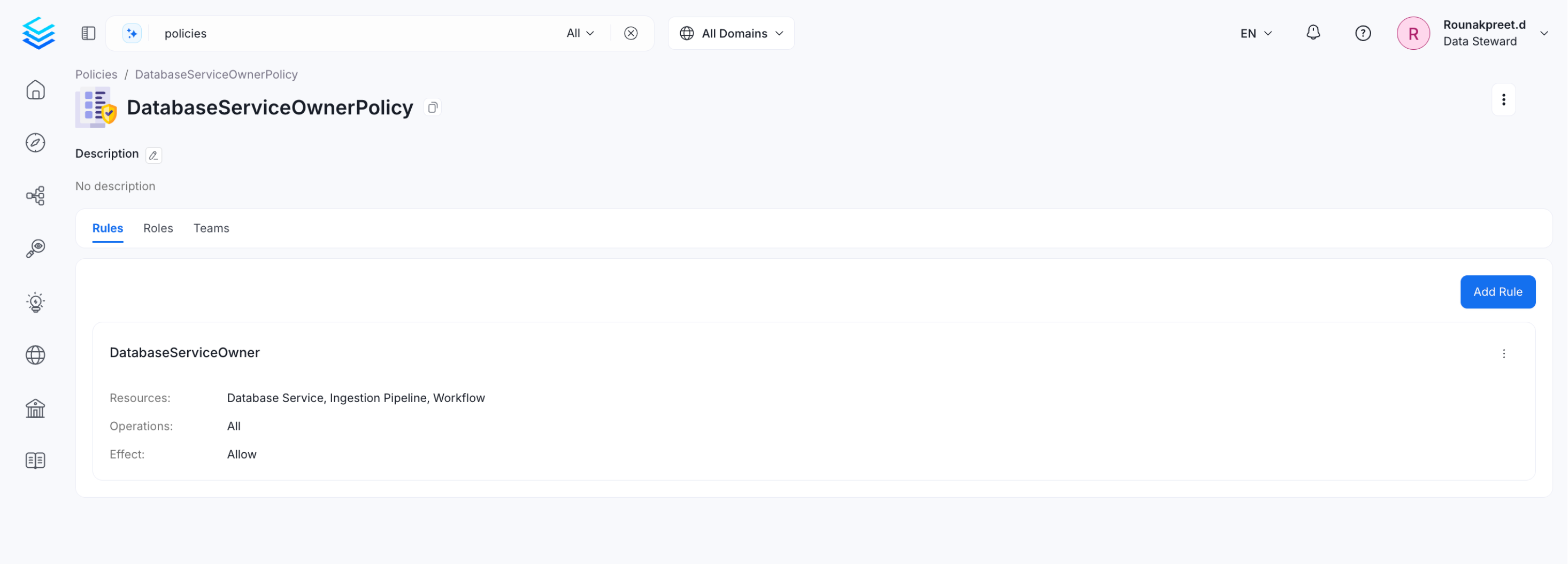 Create a `ServiceOwner` role and assign this policy to it. Users with this role can create services and extract metadata on their own – no admin involvement needed.
### Use Case 2: Set Up a Data Steward Role
**Goal**: Give data stewards the access they need to manage governance – creating glossaries, applying tags, and editing metadata across all assets.
Build a policy with two rules:
1. **Allow glossary operations** – allows all operations on Glossary and Glossary Term resources, so the steward can create and manage business definitions.
2. **Edit rule** – grants `EditDescription` and `EditTags` on all entities, so the steward can enrich and label data assets across the catalog.
Create a `ServiceOwner` role and assign this policy to it. Users with this role can create services and extract metadata on their own – no admin involvement needed.
### Use Case 2: Set Up a Data Steward Role
**Goal**: Give data stewards the access they need to manage governance – creating glossaries, applying tags, and editing metadata across all assets.
Build a policy with two rules:
1. **Allow glossary operations** – allows all operations on Glossary and Glossary Term resources, so the steward can create and manage business definitions.
2. **Edit rule** – grants `EditDescription` and `EditTags` on all entities, so the steward can enrich and label data assets across the catalog.
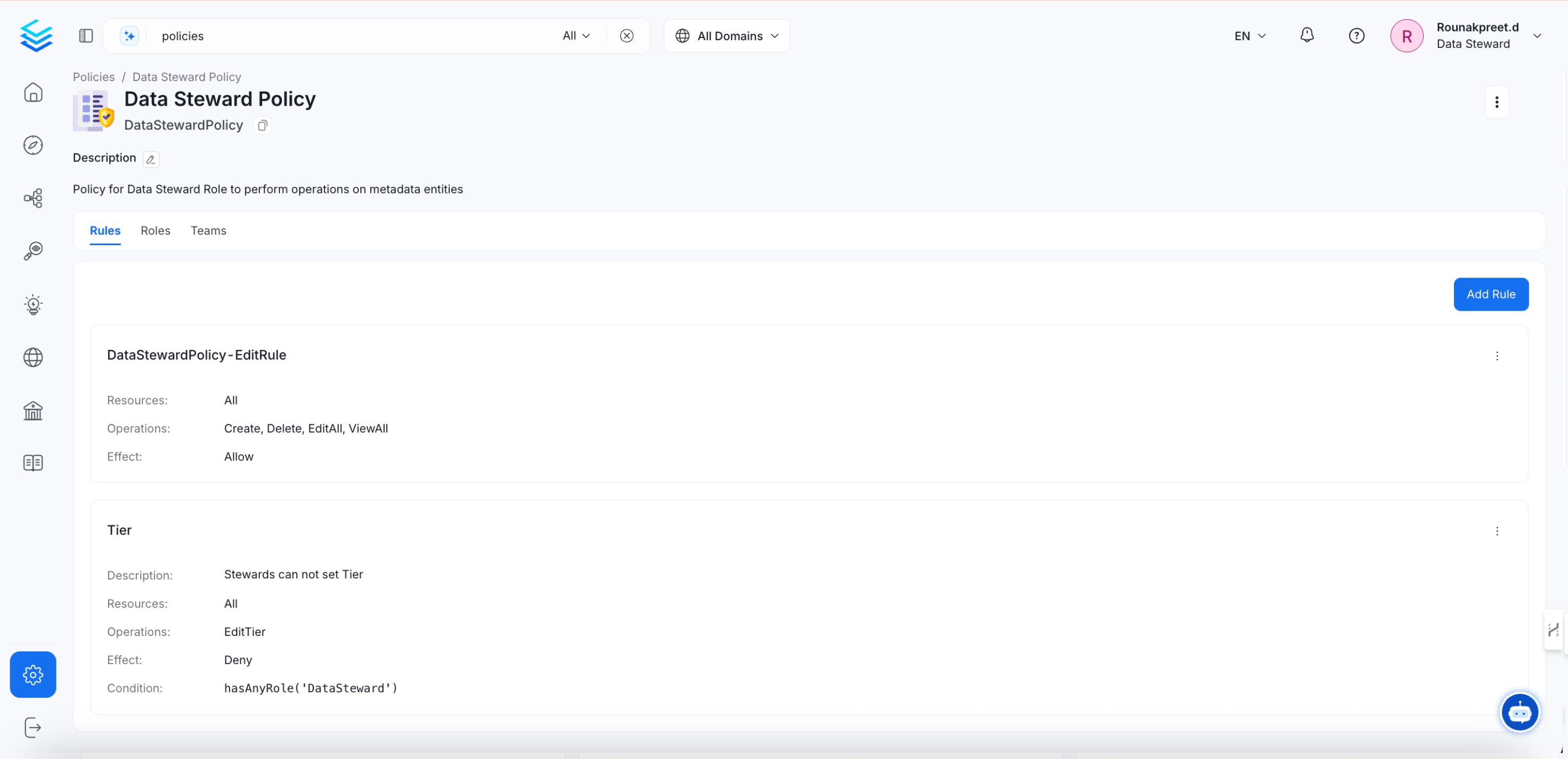 Adjust these permissions to match your organization's governance requirements.
### Use Case 3: Restrict Access to Assets Owned by a Specific Team
**Goal**: Make sure only the team that owns a data asset can access it – block everyone else.
Create a rule that denies all operations when the user isn't the owner of the asset and their team isn't the owner either.
Adjust these permissions to match your organization's governance requirements.
### Use Case 3: Restrict Access to Assets Owned by a Specific Team
**Goal**: Make sure only the team that owns a data asset can access it – block everyone else.
Create a rule that denies all operations when the user isn't the owner of the asset and their team isn't the owner either.
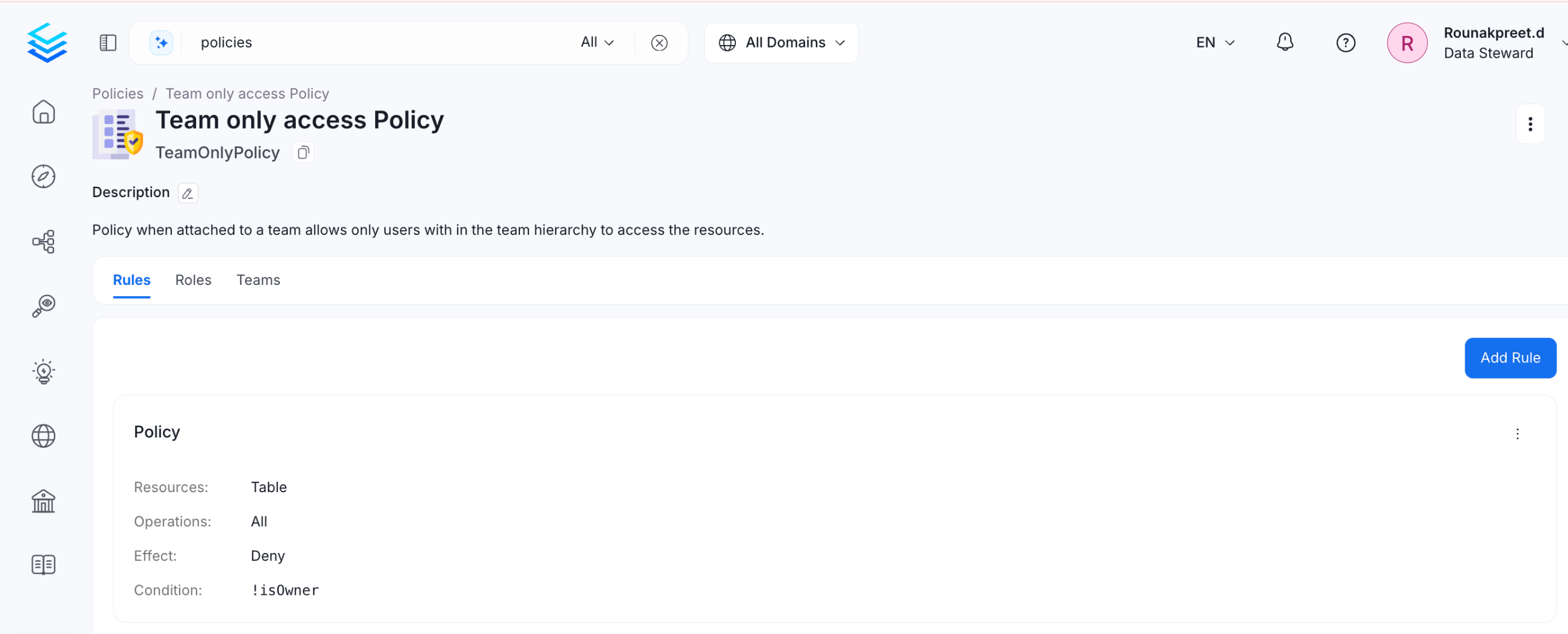 This rule uses the `isOwner()` and `matchTeam()` conditions together. If neither condition is true for the user, access is denied.
### Use Case 4: Protect PII-Tagged Assets and Allow Only Owners to Access Them
**Goal**: Lock down any asset tagged with `PII.Sensitive` so only its owner or owning team can access it.
Create a rule that denies all operations on a Table when it carries the `PII.Sensitive` tag and the user isn't the owner – and their team isn't the owner either.
This rule uses the `isOwner()` and `matchTeam()` conditions together. If neither condition is true for the user, access is denied.
### Use Case 4: Protect PII-Tagged Assets and Allow Only Owners to Access Them
**Goal**: Lock down any asset tagged with `PII.Sensitive` so only its owner or owning team can access it.
Create a rule that denies all operations on a Table when it carries the `PII.Sensitive` tag and the user isn't the owner – and their team isn't the owner either.
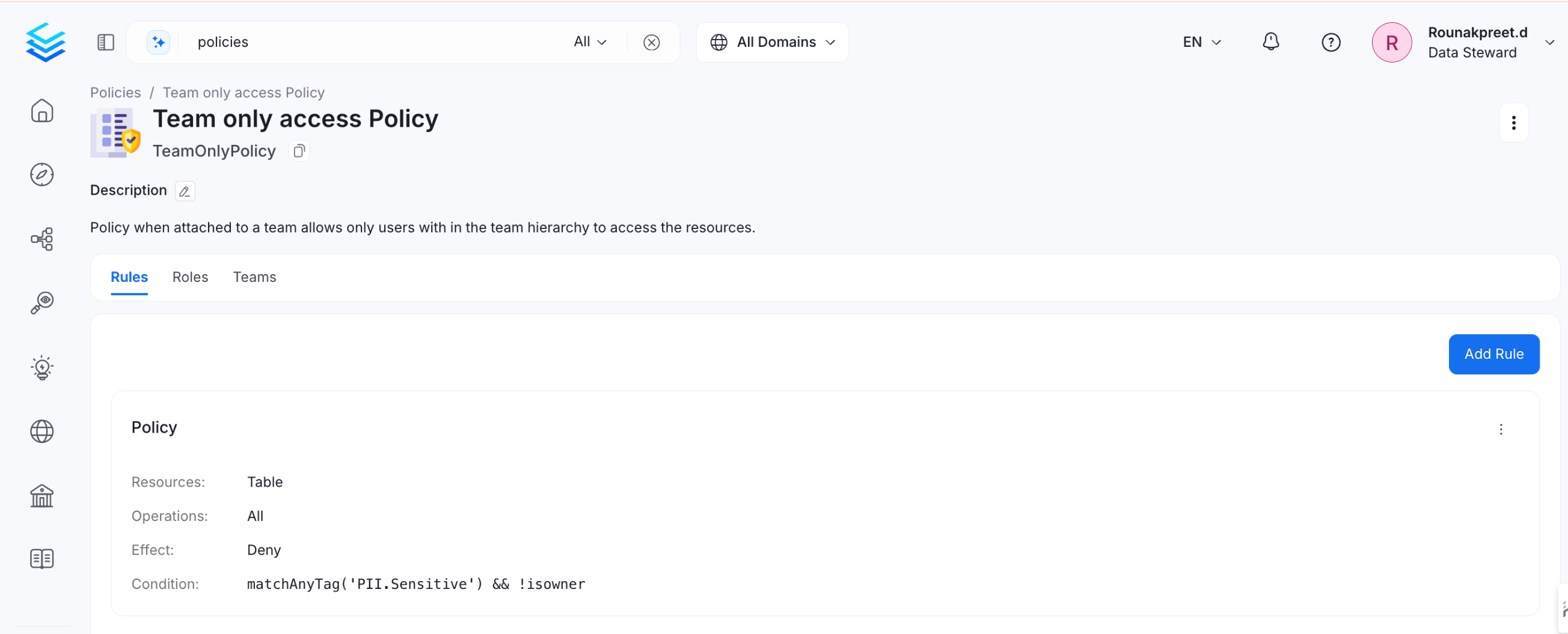 This rule combines `matchAllTags('PII.Sensitive')` with `isOwner()` and `matchTeam()` conditions. All three are evaluated together – if the asset is tagged PII and the user has no ownership claim, access is denied.
### Use Case 5: Set Up a Read-Only Viewer Role
**Goal**: Give business stakeholders access to browse the catalog and understand what data exists, without exposing raw data or query history.
Create a policy with the following rules:
| Resource | Operations |
| -------------------------------- | ---------------------- |
| Table, Database, Database Schema | `ViewBasic`, `ViewAll` |
| Dashboard, Chart | `ViewBasic`, `ViewAll` |
| Glossary, Glossary Term, Tag | `ViewBasic` |
| Domain, Data Product | `ViewBasic` |
| Page | `ViewBasic`, `ViewAll` |
Create a `Read-Only Viewer` role and assign this policy to it.
**Note**: Leave out `ViewSampleData`, `ViewUsage`, and `ViewQueries`. A viewer needs to
understand what exists – not access raw data or behavioral analytics.
### Use Case 6: Set Up a Data Analyst Role
**Goal**: Give analysts full metadata visibility, query context, and the ability to enrich assets with descriptions and tags.
Create a policy with the following rules:
| Resource | Operations |
| ------------------------------- | --------------------------------------------------------------------- |
| Table, Database Schema | `ViewAll`, `ViewUsage`, `ViewDataProfile`, `ViewQueries`, `ViewTests` |
| Dashboard, Dashboard Data Model | `ViewAll`, `EditDescription` |
| Glossary Term, Tag | `ViewAll`, `EditGlossaryTerms`, `EditTags` |
| Query, Saved Query | `ViewAll`, `Create` |
| Test Case Result | `ViewTests` |
Create a `Data Analyst` role and assign this policy to it.
**Note**: `ViewSampleData` is not included by default. If analysts need to preview row-level data, create a separate `Analyst – Sample Data` role and require manager approval before assigning it.
### Use Case 7: Set Up a Data Engineer Role
**Goal**: Give engineers full control over pipelines, ingestion, and data asset structure.
Create a policy with the following rules:
| Resource | Operations |
| ---------------------------------------------- | ------------------------------------------------------------ |
| Table, Database Schema, Database | `ViewAll`, `Create`, `EditLineage`, `EditEntityRelationship` |
| Pipeline, Pipeline Service, Ingestion Pipeline | `ViewAll`, `Create`, `EditAll`, `Deploy`, `Trigger`, `Kill` |
| Ingestion Runner | `ViewAll`, `Create`, `Trigger` |
| Storage Service, Database Service | `ViewAll`, `Create` |
| Test Suite, Test Case, Test Definition | `ViewAll`, `Create`, `EditTests`, `CreateTests` |
| Workflow, Workflow Definition | `ViewAll`, `Create`, `EditAll`, `Deploy` |
Create a `Data Engineer` role and assign this policy to it.
**Note**: Don't include `EditPolicy`, `EditRole`, or `Delete` on User and Team resources. Infrastructure access doesn't require access control modification.
### Use Case 8: Scope a Role to a Specific Domain
**Goal**: Give a user analyst-level access within one domain – for example, Finance – without giving them access to assets in other domains.
Create a `Data Analyst – Finance` role for users or teams that should have Finance domain access. In the policy, set the resource to `Table` with a condition using `hasDomain('Finance')`. Assign `ViewAll`, `ViewUsage`, and `ViewQueries` to this scoped policy.
Repeat this pattern for other domains as needed – for example, a `Data Steward – Marketing` role that can only edit tags and glossary terms within the Marketing domain.
This keeps permissions tight and limits the impact if a role is misconfigured.
### Use Case 9: Set Up Temporary Elevated Access
**Goal**: Give a user short-term access to sensitive permissions – for example, during an incident or audit – without permanently changing their role.
1. Create a `Break-Glass` role that includes `ViewSampleData` and `ViewTestCaseFailedRowsSample`.
2. Assign this role to the user temporarily with a defined end date.
3. After the session, review Audit Logs to confirm what actions were taken.
4. Remove the role assignment once the task is complete.
**Tip**: Always review Audit Logs after any break-glass access event. Go to **Settings > Audit Logs** to see a full record of every action taken during the session.
## Related Pages
* [Building Blocks of Authorization – Rules, Policies, and Roles](/how-to-guides/admin-guide/roles-policies/authorization) – how rules, policies, and roles work
* [Resource Scope and Operations Reference](/how-to-guides/admin-guide/roles-policies/resource-scope) – reference guide for resources and operations
This rule combines `matchAllTags('PII.Sensitive')` with `isOwner()` and `matchTeam()` conditions. All three are evaluated together – if the asset is tagged PII and the user has no ownership claim, access is denied.
### Use Case 5: Set Up a Read-Only Viewer Role
**Goal**: Give business stakeholders access to browse the catalog and understand what data exists, without exposing raw data or query history.
Create a policy with the following rules:
| Resource | Operations |
| -------------------------------- | ---------------------- |
| Table, Database, Database Schema | `ViewBasic`, `ViewAll` |
| Dashboard, Chart | `ViewBasic`, `ViewAll` |
| Glossary, Glossary Term, Tag | `ViewBasic` |
| Domain, Data Product | `ViewBasic` |
| Page | `ViewBasic`, `ViewAll` |
Create a `Read-Only Viewer` role and assign this policy to it.
**Note**: Leave out `ViewSampleData`, `ViewUsage`, and `ViewQueries`. A viewer needs to
understand what exists – not access raw data or behavioral analytics.
### Use Case 6: Set Up a Data Analyst Role
**Goal**: Give analysts full metadata visibility, query context, and the ability to enrich assets with descriptions and tags.
Create a policy with the following rules:
| Resource | Operations |
| ------------------------------- | --------------------------------------------------------------------- |
| Table, Database Schema | `ViewAll`, `ViewUsage`, `ViewDataProfile`, `ViewQueries`, `ViewTests` |
| Dashboard, Dashboard Data Model | `ViewAll`, `EditDescription` |
| Glossary Term, Tag | `ViewAll`, `EditGlossaryTerms`, `EditTags` |
| Query, Saved Query | `ViewAll`, `Create` |
| Test Case Result | `ViewTests` |
Create a `Data Analyst` role and assign this policy to it.
**Note**: `ViewSampleData` is not included by default. If analysts need to preview row-level data, create a separate `Analyst – Sample Data` role and require manager approval before assigning it.
### Use Case 7: Set Up a Data Engineer Role
**Goal**: Give engineers full control over pipelines, ingestion, and data asset structure.
Create a policy with the following rules:
| Resource | Operations |
| ---------------------------------------------- | ------------------------------------------------------------ |
| Table, Database Schema, Database | `ViewAll`, `Create`, `EditLineage`, `EditEntityRelationship` |
| Pipeline, Pipeline Service, Ingestion Pipeline | `ViewAll`, `Create`, `EditAll`, `Deploy`, `Trigger`, `Kill` |
| Ingestion Runner | `ViewAll`, `Create`, `Trigger` |
| Storage Service, Database Service | `ViewAll`, `Create` |
| Test Suite, Test Case, Test Definition | `ViewAll`, `Create`, `EditTests`, `CreateTests` |
| Workflow, Workflow Definition | `ViewAll`, `Create`, `EditAll`, `Deploy` |
Create a `Data Engineer` role and assign this policy to it.
**Note**: Don't include `EditPolicy`, `EditRole`, or `Delete` on User and Team resources. Infrastructure access doesn't require access control modification.
### Use Case 8: Scope a Role to a Specific Domain
**Goal**: Give a user analyst-level access within one domain – for example, Finance – without giving them access to assets in other domains.
Create a `Data Analyst – Finance` role for users or teams that should have Finance domain access. In the policy, set the resource to `Table` with a condition using `hasDomain('Finance')`. Assign `ViewAll`, `ViewUsage`, and `ViewQueries` to this scoped policy.
Repeat this pattern for other domains as needed – for example, a `Data Steward – Marketing` role that can only edit tags and glossary terms within the Marketing domain.
This keeps permissions tight and limits the impact if a role is misconfigured.
### Use Case 9: Set Up Temporary Elevated Access
**Goal**: Give a user short-term access to sensitive permissions – for example, during an incident or audit – without permanently changing their role.
1. Create a `Break-Glass` role that includes `ViewSampleData` and `ViewTestCaseFailedRowsSample`.
2. Assign this role to the user temporarily with a defined end date.
3. After the session, review Audit Logs to confirm what actions were taken.
4. Remove the role assignment once the task is complete.
**Tip**: Always review Audit Logs after any break-glass access event. Go to **Settings > Audit Logs** to see a full record of every action taken during the session.
## Related Pages
* [Building Blocks of Authorization – Rules, Policies, and Roles](/how-to-guides/admin-guide/roles-policies/authorization) – how rules, policies, and roles work
* [Resource Scope and Operations Reference](/how-to-guides/admin-guide/roles-policies/resource-scope) – reference guide for resources and operations