> ## Documentation Index
> Fetch the complete documentation index at: https://docs.getcollate.io/llms.txt
> Use this file to discover all available pages before exploring further.
# How to Configure SSO in UI | Official Documentation
> Configure SSO in the UI with step-by-step guidance for public and confidential clients. Learn setup, mapping, security options, and troubleshooting tips.
# SSO
* [SSO Configuration Public](#sso-configuration-public)
* [SSO Configuration Confidential](#sso-configuration-confidential)
* [Troubleshooting](#troubleshooting)
## Overview
OpenMetadata supports Single Sign-On (SSO) integration with various identity providers, enabling secure, centralized user authentication.
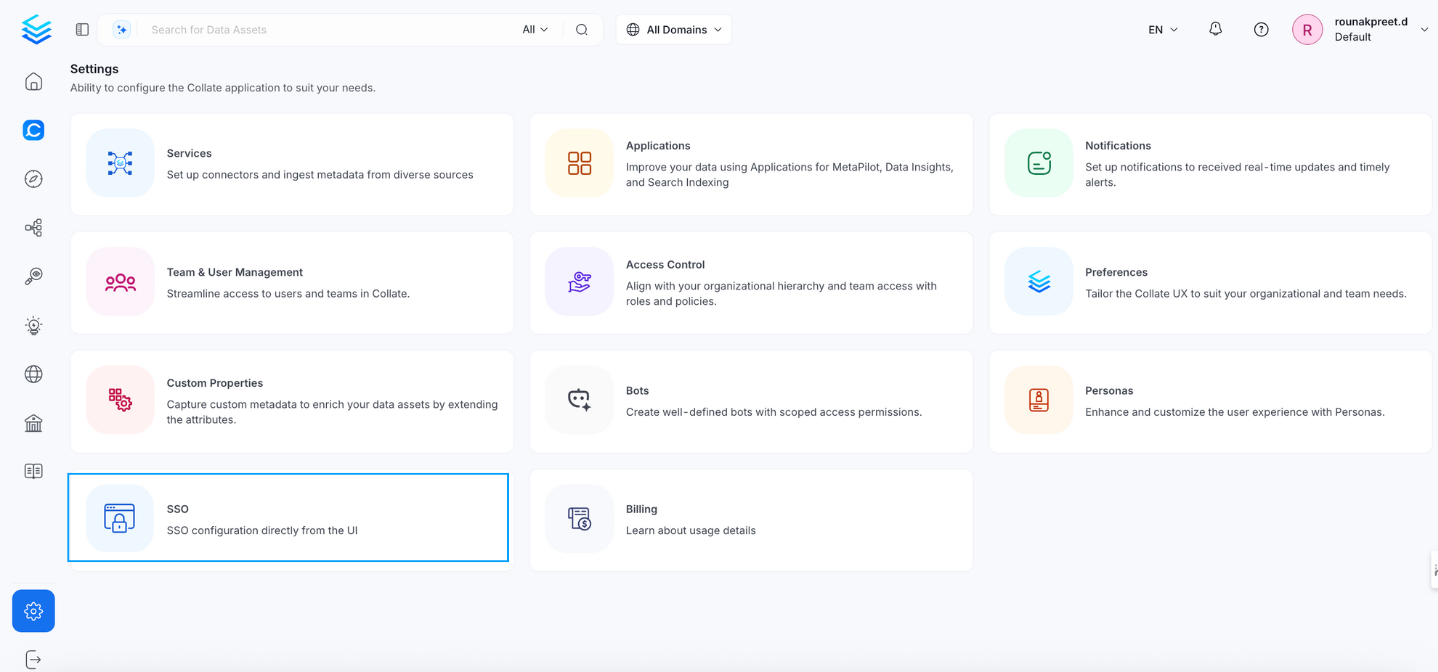
* **Navigate to:** `Settings > SSO`
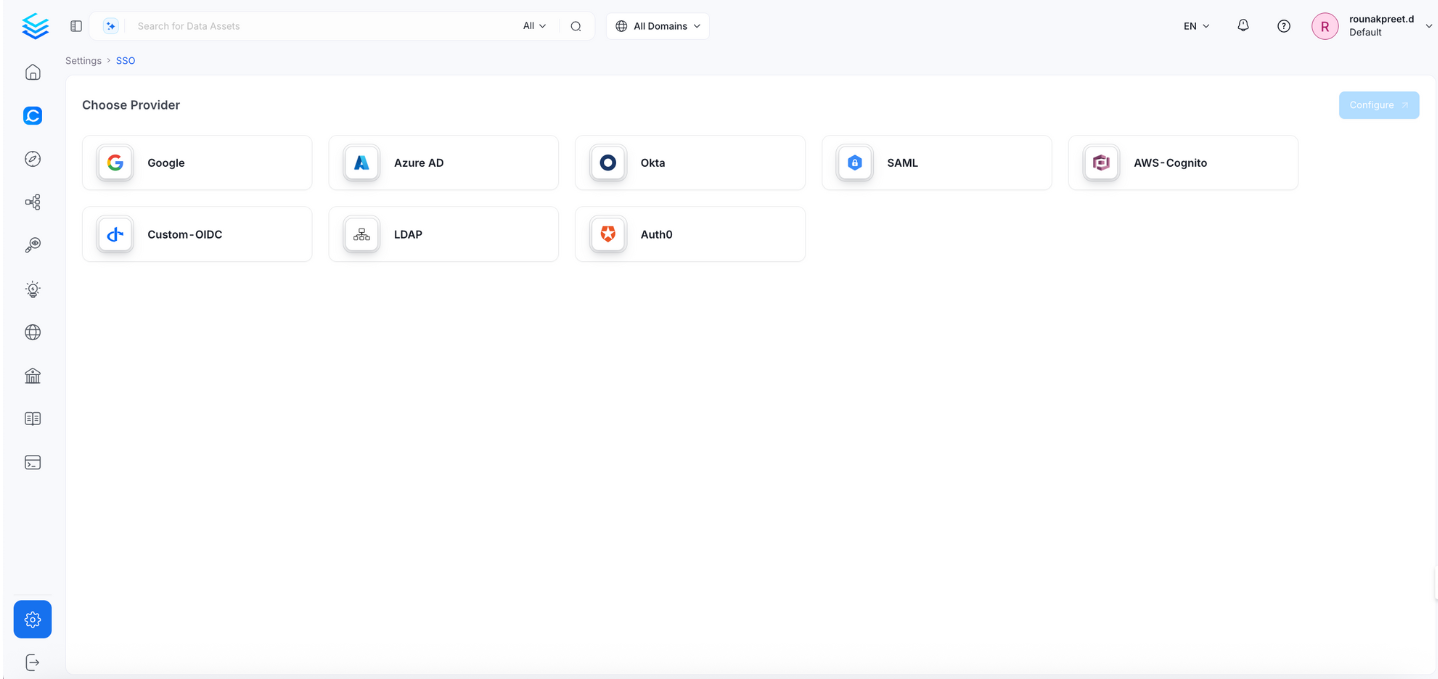
 * Select the service provider. For instance, we have selected google as the service provider
 ## SSO Configuration Public
This configuration is recommended for **public applications**, such as **SPAs (Single Page Applications)** and **mobile apps**. It does **not require a client secret**.
## SSO Configuration Public
This configuration is recommended for **public applications**, such as **SPAs (Single Page Applications)** and **mobile apps**. It does **not require a client secret**.
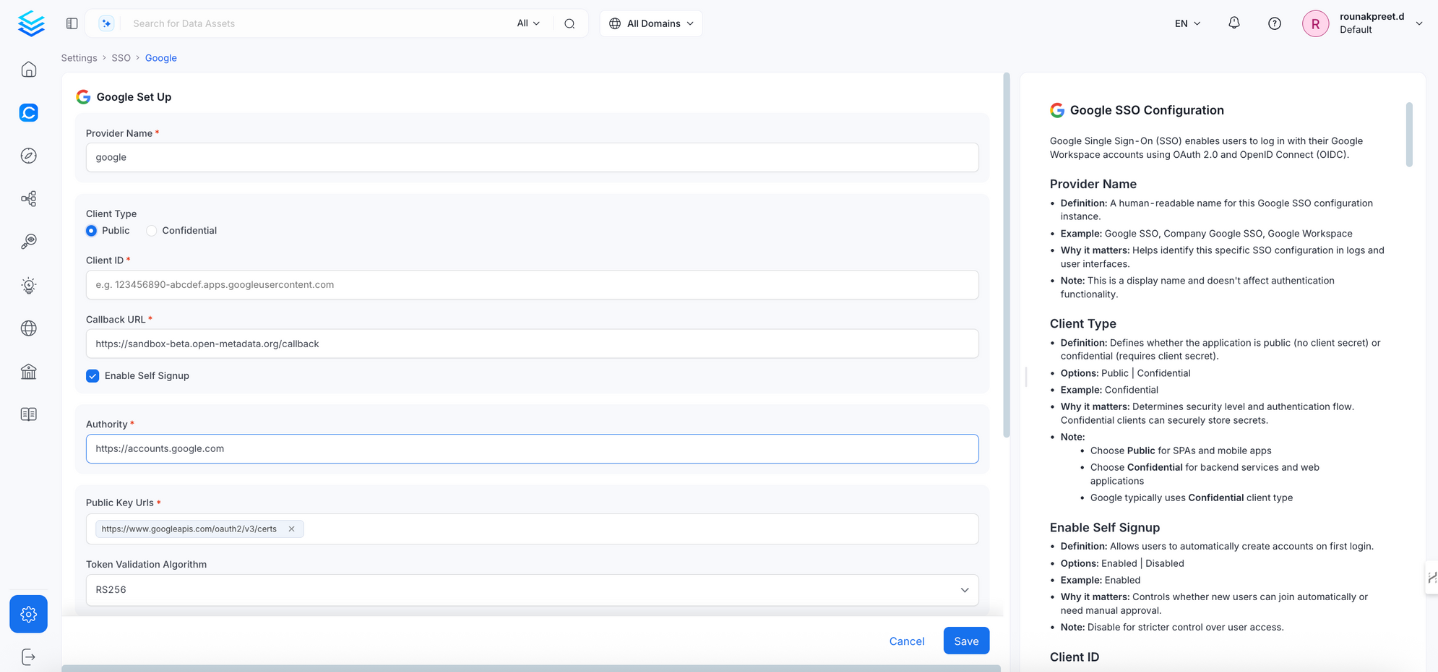 ### 1. Client Type
* **Definition:** Defines whether the application is `Public` (no client secret) or `Confidential` (requires client secret).
* **Options:** `Public` | `Confidential`
* **Example:** `Public`
* **Why it matters:** Determines the security level and OAuth flow type.
* **Note:**
* Choose `Public` for SPAs and mobile apps.
* Google typically uses `Confidential` for server-side apps.
### 2. Callback URL
* **Definition:** Redirect URL where Google sends authentication responses.
* **Example:** `https://yourapp.company.com/callback`
* **Why it matters:** Must match exactly with Google Cloud Console’s registered redirect URL.
* **Note:**
* Must be registered under **OAuth 2.0 Client > Authorized Redirect URLs**.
* Always use **HTTPS** in production.
### 3. Enable Self Signup
* **Definition:** Allows users to automatically create accounts on first login.
* **Options:** `Enabled` | `Disabled`
* **Example:** `Enabled`
* **Why it matters:** Controls whether new users are auto-created.
* **Note:** Set to `Disabled` for stricter access control.
### 4. Authority
* **Definition:** Google’s OAuth 2.0 authorization server.
* **Default & Example:** `https://accounts.google.com`
* **Why it matters:** Specifies where OpenMetadata should send auth requests.
* **Note:** Usually does not need to be changed.
### 5. Public Key URLs
* **Definition:** URL(s) where Google publishes its JWT signing keys.
* **Example:** `["https://www.googleapis.com/oauth2/v3/certs"]`
* **Why it matters:** Required to verify JWT token signatures.
* **Note:** Typically auto-discovered via OIDC discovery endpoint.
### 6. Token Validation Algorithm
* **Definition:** Algorithm used to validate JWT tokens.
* **Options:** `RS256` | `RS384` | `RS512`
* **Default & Example:** `RS256`
* **Why it matters:** Must match Google’s signing algorithm.
* **Note:** Google typically uses `RS256`.
### 7. JWT Principal Claims
* **Definition:** JWT fields used to identify the user.
* **Example:** `["email", "sub"]`
* **Why it matters:** Identifies the user in OpenMetadata.
* **Note:** Use `email` for consistency and compatibility. For domain scoping, use the `hd` claim.
### 8. JWT Principal Claims Mapping
* **Definition:** Maps JWT claims to OpenMetadata user attributes.
* **Example:**
```json theme={null}
["email:email", "name:name", "firstName:given_name", "lastName:family_name"]
```
* **Why it matters:** Maps identity information to OpenMetadata user profiles.
* **Note:** Use the format `openmetadata_field:jwt_claim`.
### 9. Admin Principals
* **Definition:** List of email addresses with admin access.
* **Example:** `["admin@company.com", "superuser@company.com"]`
* **Why it matters:** Grants admin-level privileges in the system.
* **Note:** Email must match a JWT claim.
### 10. Principal Domain
* **Definition:** Default domain for constructing user emails.
* **Example:** `company.com`
* **Why it matters:** Helps form complete user identifiers from partial input.
* **Note:** Matches your Google Workspace domain.
### 11. Enforce Principal Domain
* **Definition:** Restrict login to users from a specific domain.
* **Default:** false
* **Example:** `true`
* **Why it matters:** Adds domain-level access control.
* **Note:** Use with hd parameter in custom OIDC config.
### 12. Enable Secure Socket Connection
* **Definition:** Enables SSL/TLS for secure communications.
* **Default:** false
* **Example:** `true`
* **Why it matters:** Ensures secure token exchange and communication.
* **Note:** Must be true in production.
## SSO Configuration Confidential
This configuration is required for web applications and backend services that can securely store client credentials.
### 1. Client Type
* **Definition:** Defines whether the application is `Public` (no client secret) or `Confidential` (requires client secret).
* **Options:** `Public` | `Confidential`
* **Example:** `Public`
* **Why it matters:** Determines the security level and OAuth flow type.
* **Note:**
* Choose `Public` for SPAs and mobile apps.
* Google typically uses `Confidential` for server-side apps.
### 2. Callback URL
* **Definition:** Redirect URL where Google sends authentication responses.
* **Example:** `https://yourapp.company.com/callback`
* **Why it matters:** Must match exactly with Google Cloud Console’s registered redirect URL.
* **Note:**
* Must be registered under **OAuth 2.0 Client > Authorized Redirect URLs**.
* Always use **HTTPS** in production.
### 3. Enable Self Signup
* **Definition:** Allows users to automatically create accounts on first login.
* **Options:** `Enabled` | `Disabled`
* **Example:** `Enabled`
* **Why it matters:** Controls whether new users are auto-created.
* **Note:** Set to `Disabled` for stricter access control.
### 4. Authority
* **Definition:** Google’s OAuth 2.0 authorization server.
* **Default & Example:** `https://accounts.google.com`
* **Why it matters:** Specifies where OpenMetadata should send auth requests.
* **Note:** Usually does not need to be changed.
### 5. Public Key URLs
* **Definition:** URL(s) where Google publishes its JWT signing keys.
* **Example:** `["https://www.googleapis.com/oauth2/v3/certs"]`
* **Why it matters:** Required to verify JWT token signatures.
* **Note:** Typically auto-discovered via OIDC discovery endpoint.
### 6. Token Validation Algorithm
* **Definition:** Algorithm used to validate JWT tokens.
* **Options:** `RS256` | `RS384` | `RS512`
* **Default & Example:** `RS256`
* **Why it matters:** Must match Google’s signing algorithm.
* **Note:** Google typically uses `RS256`.
### 7. JWT Principal Claims
* **Definition:** JWT fields used to identify the user.
* **Example:** `["email", "sub"]`
* **Why it matters:** Identifies the user in OpenMetadata.
* **Note:** Use `email` for consistency and compatibility. For domain scoping, use the `hd` claim.
### 8. JWT Principal Claims Mapping
* **Definition:** Maps JWT claims to OpenMetadata user attributes.
* **Example:**
```json theme={null}
["email:email", "name:name", "firstName:given_name", "lastName:family_name"]
```
* **Why it matters:** Maps identity information to OpenMetadata user profiles.
* **Note:** Use the format `openmetadata_field:jwt_claim`.
### 9. Admin Principals
* **Definition:** List of email addresses with admin access.
* **Example:** `["admin@company.com", "superuser@company.com"]`
* **Why it matters:** Grants admin-level privileges in the system.
* **Note:** Email must match a JWT claim.
### 10. Principal Domain
* **Definition:** Default domain for constructing user emails.
* **Example:** `company.com`
* **Why it matters:** Helps form complete user identifiers from partial input.
* **Note:** Matches your Google Workspace domain.
### 11. Enforce Principal Domain
* **Definition:** Restrict login to users from a specific domain.
* **Default:** false
* **Example:** `true`
* **Why it matters:** Adds domain-level access control.
* **Note:** Use with hd parameter in custom OIDC config.
### 12. Enable Secure Socket Connection
* **Definition:** Enables SSL/TLS for secure communications.
* **Default:** false
* **Example:** `true`
* **Why it matters:** Ensures secure token exchange and communication.
* **Note:** Must be true in production.
## SSO Configuration Confidential
This configuration is required for web applications and backend services that can securely store client credentials.
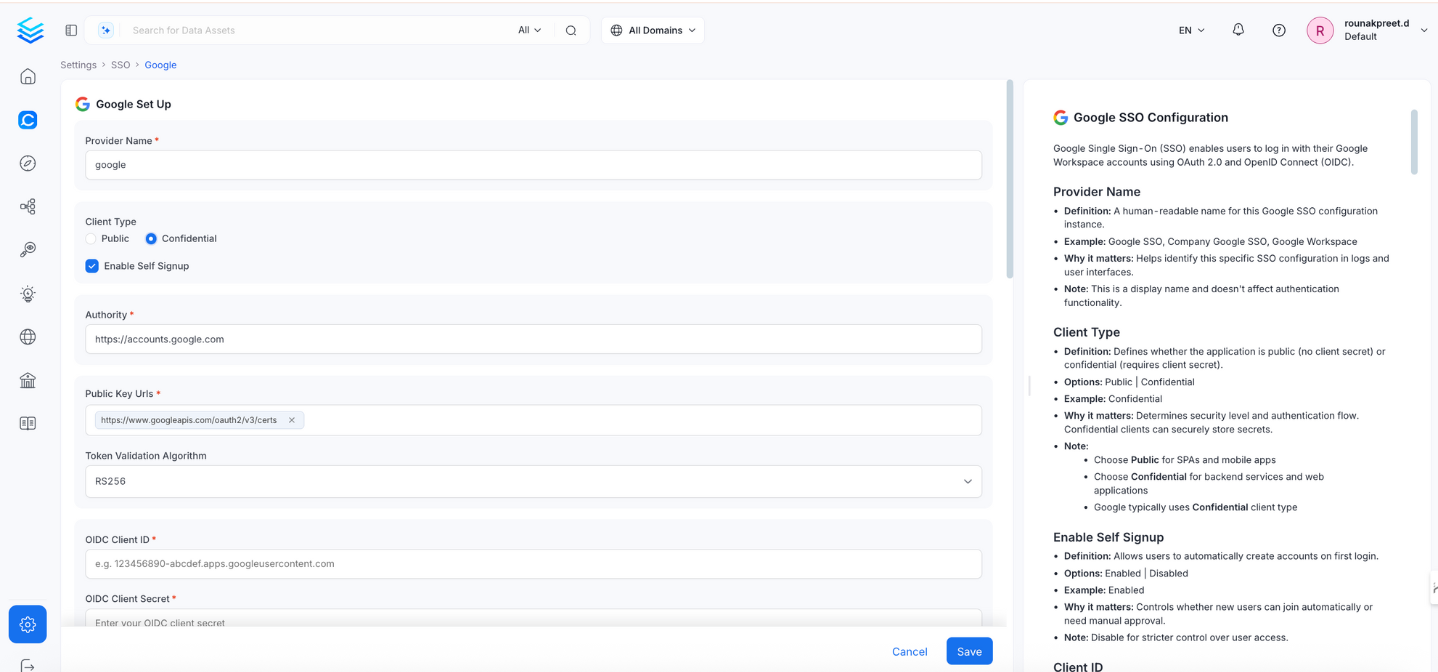 ### 1. Enable Self Signup
* **Definition:** Allows users to automatically create accounts on first login.
* **Options:** `Enabled` | `Disabled`
* **Example:** `Enabled`
* **Why it matters:** Controls whether new users are auto-created.
* **Note:** Set to `Disabled` for stricter access control.
### 2. Authority
* **Definition:** Google’s OAuth 2.0 authorization server.
* **Default & Example:** `https://accounts.google.com`
* **Why it matters:** Specifies where OpenMetadata should send auth requests.
* **Note:** Usually does not need to be changed.
### 3. Public Key URLs
* **Definition:** URL(s) where Google publishes its JWT signing keys.
* **Example:** `["https://www.googleapis.com/oauth2/v3/certs"]`
* **Why it matters:** Required to verify JWT token signatures.
* **Note:** Typically auto-discovered via OIDC discovery endpoint.
### 4. Token Validation Algorithm
* **Definition:** Algorithm used to validate JWT tokens.
* **Options:** `RS256` | `RS384` | `RS512`
* **Default & Example:** `RS256`
* **Why it matters:** Must match Google’s signing algorithm.
* **Note:** Google typically uses `RS256`.
### 5. OIDC Client ID
* **Definition:** OAuth 2.0 Client ID from Google Cloud Console.
* **Example:**
`123456789012-abcdefghijklmnopqrstuvwxyz123456.apps.googleusercontent.com`
* **Why it matters:** Uniquely identifies the app in the OIDC flow.
### 6. OIDC Client Secret
* **Definition:** Confidential key used to authenticate the app with Google.
* **Example:** `GOCSPX-abcdefghijklmnopqrstuvwxyz123456`
* **Why it matters:** Required for token exchange.
* **Note:**
* Found in Google Cloud Console > Credentials.
* Store securely and rotate periodically.
### 7. OIDC Request Scopes
* **Definition:** Permissions to request from Google during login.
* **Default:** openid email profile
* **Example:**
`openid email profile https://www.googleapis.com/auth/userinfo.email`
* **Why it matters:** Determines what user information is accessible.
### 8. OIDC Discovery URI
* **Definition:** Google OIDC metadata URL.
* **Example:** `https://accounts.google.com/.well-known/openid-configuration`
* **Why it matters:** Enables OpenMetadata to auto-discover endpoints.
### 9. OIDC Use Nonce
* **Definition:** Prevents replay attacks.
* **Default & Example:** `true`
* **Why it matters:** Enhances session-level security.
### 10. OIDC Preferred JWS Algorithm
* **Default & Example:** `RS256`
* **Why it matters:** Must match Google's token signing algorithm.
### 11. OIDC Response Type
* **Definition:** Type of OAuth response expected.
* **Options:** `id_token` | `code`
* **Default & Example:** `code`
* **Why it matters:** Defines OAuth flow; code is more secure.
### 12. OIDC Disable PKCE
* **Definition:** Disables Proof Key for Code Exchange.
* **Default & Example:** `false`
* **Why it matters:** PKCE adds protection to authorization code flow.
### 13. OIDC Max Clock Skew
* **Definition:** Allowed time difference between systems.
* **Example:** `0`
* **Why it matters:** Prevents token validation issues due to clock drift.
### 14. OIDC Client Authentication Method
* **Options:** client\_secret\_basic, client\_secret\_post, client\_secret\_jwt, private\_key\_jwt
* **Default & Example:** `client_secret_basic`
* **Why it matters:** Defines how the client secret is passed to Google.
### 15. OIDC Token Validity
* **Default:** 0 (use provider default)
* **Example:** `3600 (1 hour)`
* **Why it matters:** Sets how long a token is valid.
### 16. OIDC Callback URL
* **Definition:** Redirect URL where Google sends authentication responses.
* **Example:** `https://yourapp.company.com/callback`
* **Why it matters:** Must match exactly with Google Cloud Console’s registered redirect URL.
* **Note:**
* Must be registered under **OAuth 2.0 Client > Authorized Redirect URLs**.
* Always use **HTTPS** in production.
### 17. OIDC Max Age
* **Definition:** Maximum age of authentication before re-auth is required.
* **Example:** `3600`
* **Why it matters:** Controls session longevity.
### 18. OIDC Prompt
* **Options:** none, login, consent, select\_account
* **Example:** `select_account`
* **Why it matters:** Adjusts user experience during login.
* **Note:**
* login: Always prompt credentials.
* consent: Ask user for permission.
* select\_account: Display account picker.
* none: Attempt silent login (may fail if not authenticated).
### 19. OIDC Session Expiry
* **Default:** 604800 (7 days)
* **Example:** `604800`
* **Why it matters:** Defines how long the user stays logged in.
### 20. JWT Principal Claims Mapping
* **Definition:** Maps JWT claims to OpenMetadata user attributes.
* **Example:**
```json theme={null}
["email:email", "name:name", "firstName:given_name", "lastName:family_name"]
```
* **Why it matters:** Maps identity information to OpenMetadata user profiles.
* **Note:** Use the format `openmetadata_field:jwt_claim`.
### 21. Admin Principals
* **Definition:** List of email addresses with admin access.
* **Example:** `["admin@company.com", "superuser@company.com"]`
* **Why it matters:** Grants admin-level privileges in the system.
* **Note:** Email must match a JWT claim.
### 22. Principal Domain
* **Definition:** Default domain for constructing user emails.
* **Example:** `company.com`
* **Why it matters:** Helps form complete user identifiers from partial input.
* **Note:** Matches your Google Workspace domain.
### 23. Enforce Principal Domain
* **Definition:** Restrict login to users from a specific domain.
* **Default:** false
* **Example:** `true`
* **Why it matters:** Adds domain-level access control.
* **Note:** Use with hd parameter in custom OIDC config.
### 24. Enable Secure Socket Connection
* **Definition:** Enables SSL/TLS for secure communications.
* **Default:** false
* **Example:** `true`
* **Why it matters:** Ensures secure token exchange and communication.
* **Note:** Must be true in production.
### Troubleshooting
If users are automatically logged out and unable to log in again due to a bad authentication configuration, you can reset the security setup using the following command:
```
./bootstrap/openmetadata-ops.sh remove-security-config --force
```
After executing the command, **restart the server**. The authentication values from your YAML or Helm chart will then be reapplied on startup.
### 1. Enable Self Signup
* **Definition:** Allows users to automatically create accounts on first login.
* **Options:** `Enabled` | `Disabled`
* **Example:** `Enabled`
* **Why it matters:** Controls whether new users are auto-created.
* **Note:** Set to `Disabled` for stricter access control.
### 2. Authority
* **Definition:** Google’s OAuth 2.0 authorization server.
* **Default & Example:** `https://accounts.google.com`
* **Why it matters:** Specifies where OpenMetadata should send auth requests.
* **Note:** Usually does not need to be changed.
### 3. Public Key URLs
* **Definition:** URL(s) where Google publishes its JWT signing keys.
* **Example:** `["https://www.googleapis.com/oauth2/v3/certs"]`
* **Why it matters:** Required to verify JWT token signatures.
* **Note:** Typically auto-discovered via OIDC discovery endpoint.
### 4. Token Validation Algorithm
* **Definition:** Algorithm used to validate JWT tokens.
* **Options:** `RS256` | `RS384` | `RS512`
* **Default & Example:** `RS256`
* **Why it matters:** Must match Google’s signing algorithm.
* **Note:** Google typically uses `RS256`.
### 5. OIDC Client ID
* **Definition:** OAuth 2.0 Client ID from Google Cloud Console.
* **Example:**
`123456789012-abcdefghijklmnopqrstuvwxyz123456.apps.googleusercontent.com`
* **Why it matters:** Uniquely identifies the app in the OIDC flow.
### 6. OIDC Client Secret
* **Definition:** Confidential key used to authenticate the app with Google.
* **Example:** `GOCSPX-abcdefghijklmnopqrstuvwxyz123456`
* **Why it matters:** Required for token exchange.
* **Note:**
* Found in Google Cloud Console > Credentials.
* Store securely and rotate periodically.
### 7. OIDC Request Scopes
* **Definition:** Permissions to request from Google during login.
* **Default:** openid email profile
* **Example:**
`openid email profile https://www.googleapis.com/auth/userinfo.email`
* **Why it matters:** Determines what user information is accessible.
### 8. OIDC Discovery URI
* **Definition:** Google OIDC metadata URL.
* **Example:** `https://accounts.google.com/.well-known/openid-configuration`
* **Why it matters:** Enables OpenMetadata to auto-discover endpoints.
### 9. OIDC Use Nonce
* **Definition:** Prevents replay attacks.
* **Default & Example:** `true`
* **Why it matters:** Enhances session-level security.
### 10. OIDC Preferred JWS Algorithm
* **Default & Example:** `RS256`
* **Why it matters:** Must match Google's token signing algorithm.
### 11. OIDC Response Type
* **Definition:** Type of OAuth response expected.
* **Options:** `id_token` | `code`
* **Default & Example:** `code`
* **Why it matters:** Defines OAuth flow; code is more secure.
### 12. OIDC Disable PKCE
* **Definition:** Disables Proof Key for Code Exchange.
* **Default & Example:** `false`
* **Why it matters:** PKCE adds protection to authorization code flow.
### 13. OIDC Max Clock Skew
* **Definition:** Allowed time difference between systems.
* **Example:** `0`
* **Why it matters:** Prevents token validation issues due to clock drift.
### 14. OIDC Client Authentication Method
* **Options:** client\_secret\_basic, client\_secret\_post, client\_secret\_jwt, private\_key\_jwt
* **Default & Example:** `client_secret_basic`
* **Why it matters:** Defines how the client secret is passed to Google.
### 15. OIDC Token Validity
* **Default:** 0 (use provider default)
* **Example:** `3600 (1 hour)`
* **Why it matters:** Sets how long a token is valid.
### 16. OIDC Callback URL
* **Definition:** Redirect URL where Google sends authentication responses.
* **Example:** `https://yourapp.company.com/callback`
* **Why it matters:** Must match exactly with Google Cloud Console’s registered redirect URL.
* **Note:**
* Must be registered under **OAuth 2.0 Client > Authorized Redirect URLs**.
* Always use **HTTPS** in production.
### 17. OIDC Max Age
* **Definition:** Maximum age of authentication before re-auth is required.
* **Example:** `3600`
* **Why it matters:** Controls session longevity.
### 18. OIDC Prompt
* **Options:** none, login, consent, select\_account
* **Example:** `select_account`
* **Why it matters:** Adjusts user experience during login.
* **Note:**
* login: Always prompt credentials.
* consent: Ask user for permission.
* select\_account: Display account picker.
* none: Attempt silent login (may fail if not authenticated).
### 19. OIDC Session Expiry
* **Default:** 604800 (7 days)
* **Example:** `604800`
* **Why it matters:** Defines how long the user stays logged in.
### 20. JWT Principal Claims Mapping
* **Definition:** Maps JWT claims to OpenMetadata user attributes.
* **Example:**
```json theme={null}
["email:email", "name:name", "firstName:given_name", "lastName:family_name"]
```
* **Why it matters:** Maps identity information to OpenMetadata user profiles.
* **Note:** Use the format `openmetadata_field:jwt_claim`.
### 21. Admin Principals
* **Definition:** List of email addresses with admin access.
* **Example:** `["admin@company.com", "superuser@company.com"]`
* **Why it matters:** Grants admin-level privileges in the system.
* **Note:** Email must match a JWT claim.
### 22. Principal Domain
* **Definition:** Default domain for constructing user emails.
* **Example:** `company.com`
* **Why it matters:** Helps form complete user identifiers from partial input.
* **Note:** Matches your Google Workspace domain.
### 23. Enforce Principal Domain
* **Definition:** Restrict login to users from a specific domain.
* **Default:** false
* **Example:** `true`
* **Why it matters:** Adds domain-level access control.
* **Note:** Use with hd parameter in custom OIDC config.
### 24. Enable Secure Socket Connection
* **Definition:** Enables SSL/TLS for secure communications.
* **Default:** false
* **Example:** `true`
* **Why it matters:** Ensures secure token exchange and communication.
* **Note:** Must be true in production.
### Troubleshooting
If users are automatically logged out and unable to log in again due to a bad authentication configuration, you can reset the security setup using the following command:
```
./bootstrap/openmetadata-ops.sh remove-security-config --force
```
After executing the command, **restart the server**. The authentication values from your YAML or Helm chart will then be reapplied on startup.