> ## Documentation Index
> Fetch the complete documentation index at: https://docs.getcollate.io/llms.txt
> Use this file to discover all available pages before exploring further.
# Metadata Exporter Application
# Metadata Exporter Application
The **Metadata Exporter** application enables organizations to export all metadata from Collate into downstream analytical or data storage systems such as **Snowflake**, **BigQuery**, **Databricks**, and **Trino**. This includes:
* **Entity metadata** — Asset definitions, descriptions, tags, and ownership
* **Test case results** — Data Quality (DQ) pass/fail flags, rule IDs, asset metadata, and timestamps
* **Profiler stats data** — Column-level statistics and profiling metrics
## Overview
This capability supports:
* Feeding downstream dashboards (Power BI, Tableau).
* Triggering alerting and remediation workflows.
* Historical tracking and versioning of data quality scores (DQI).
## Key Features
* Supports **Snowflake**, **Databricks**, **BigQuery**, and **Trino** destinations.
* Manual or scheduled export runs.
* Selective export of entity metadata, data quality events, or profiler stats.
## How to Access
1. Go to **Settings > Applications > Metadata Exporter**.
 2. Review available tabs: **Schedule**, **Configuration**, **Recent Runs**.
 ## Configuration Options
### Ingestion Runner
Defines the agent responsible for executing the ingestion pipeline.
* **Example:** `Collate SaaS Agent`
### Connection Configuration
Establishes connectivity to your export destination (Snowflake, BigQuery, Databricks).
## Configuration Options
### Ingestion Runner
Defines the agent responsible for executing the ingestion pipeline.
* **Example:** `Collate SaaS Agent`
### Connection Configuration
Establishes connectivity to your export destination (Snowflake, BigQuery, Databricks).
 #### Snowflake Configuration
| Field | Description |
| ---------------------------- | ------------------------------------------------------------------------------------------------------------ |
| **Service Type** | Snowflake |
| **Username** | Snowflake user login |
| **Password** | User password (optional if using private key) |
| **Account** | Snowflake account identifier (e.g., `AAAAA-99999`) |
| **Role** | Snowflake role to assume (use a dedicated least-privilege role, see **Required Snowflake Privileges** below) |
| **Database** | Target database (e.g., `OBS_ANALYTICS`) |
| **Warehouse** | Target virtual warehouse (e.g., `COMPUTE_WH`) |
| **Query Tag** | Optional tagging for traceability |
| **Private Key & Passphrase** | For key-pair auth (optional, secure) |
**Advanced Option**
* **Client Session Keep Alive**: Useful for long-running exports.
**Required Snowflake Privileges**
The role used by the exporter needs the following privileges:
* `USAGE` on the warehouse
* `USAGE` on the database
* `USAGE` on the schema
* `CREATE TABLE` on the schema
The exporter creates and owns its target table, so `INSERT`, `MERGE`, `ALTER` and `DROP` all work through ownership with no further grants.
```sql theme={null}
-- Create a new role and user (skip if you already have them)
CREATE ROLE COLLATE_EXPORTER_ROLE;
CREATE USER COLLATE_EXPORTER_USER DEFAULT_ROLE=COLLATE_EXPORTER_ROLE PASSWORD='PASSWORD';
GRANT ROLE COLLATE_EXPORTER_ROLE TO USER COLLATE_EXPORTER_USER;
-- Grant the required privileges to the role
GRANT USAGE ON WAREHOUSE WAREHOUSE_NAME TO ROLE COLLATE_EXPORTER_ROLE;
GRANT USAGE ON DATABASE DATABASE_NAME TO ROLE COLLATE_EXPORTER_ROLE;
GRANT USAGE ON SCHEMA DATABASE_NAME.SCHEMA_NAME TO ROLE COLLATE_EXPORTER_ROLE;
GRANT CREATE TABLE ON SCHEMA DATABASE_NAME.SCHEMA_NAME TO ROLE COLLATE_EXPORTER_ROLE;
```
On connect, the exporter runs the standard Snowflake connection test, which also probes `SNOWFLAKE.ACCOUNT_USAGE` for tags, queries and lineage. With this role those checks are skipped with a warning and the export still succeeds. `IMPORTED PRIVILEGES` is not required.
#### BigQuery Configuration
| Field | Description |
| ------------------------ | -------------------------------------------------------------------- |
| **Service Type** | Must be `BigQuery` |
| **Project ID** | GCP project where the BigQuery dataset resides |
| **Dataset ID** | Target dataset where the metadata will be exported |
| **Table Name** | Destination table name (BQ table to export metadata to) |
| **Service Account JSON** | Contents of the service account key in JSON format with write access |
| **Location** | BigQuery region (e.g., `us-central1`) |
Ensure the service account has the **BigQuery Data Editor** and **BigQuery Job User** roles.
#### Databricks Configuration
| Field | Description |
| ------------------- | ------------------------------------------------------------------------- |
| **Service Type** | Must be `Databricks` |
| **Host URL** | Databricks workspace URL (e.g., `https://.azuredatabricks.net`) |
| **Token** | Personal Access Token (PAT) for API authentication |
| **Cluster ID** | Target cluster where jobs will run |
| **Database Name** | Target database within the Databricks environment |
| **Schema Name** | Schema (if applicable) |
| **Table Name** | Destination table to store metadata |
| **Path (Optional)** | DBFS path or external location (if exporting to files instead of a table) |
**Requirements**
* The token must have workspace-wide read/write access.
* The cluster must have access to the target database or mount location.
#### Trino Configuration
**Available from version 1.12.3**
| Field | Description |
| ----------------- | ------------------------------------------------------------------ |
| **Service Type** | Must be `Trino` |
| **Username** | Trino user login with sufficient privileges |
| **Password** | User password for Basic Authentication (or use JWT) |
| **Host and Port** | Fully qualified hostname and port number for your Trino deployment |
| **Catalog** | Trino catalog where the target database is stored |
| **Database Name** | Target database within the Trino catalog |
| **Schema Name** | Target schema (optional, restricts to a single schema) |
| **Table Name** | Destination table to store exported metadata |
**Authentication Options**
* **Basic Auth**: Username and password
* **JWT Auth**: Provide JWT token for authentication
* **Azure**: Client ID, Client Secret, Tenant ID, and Scopes for Azure AD authentication
Ensure the Trino user has `SELECT` and `INSERT` privileges on the target table and schema.
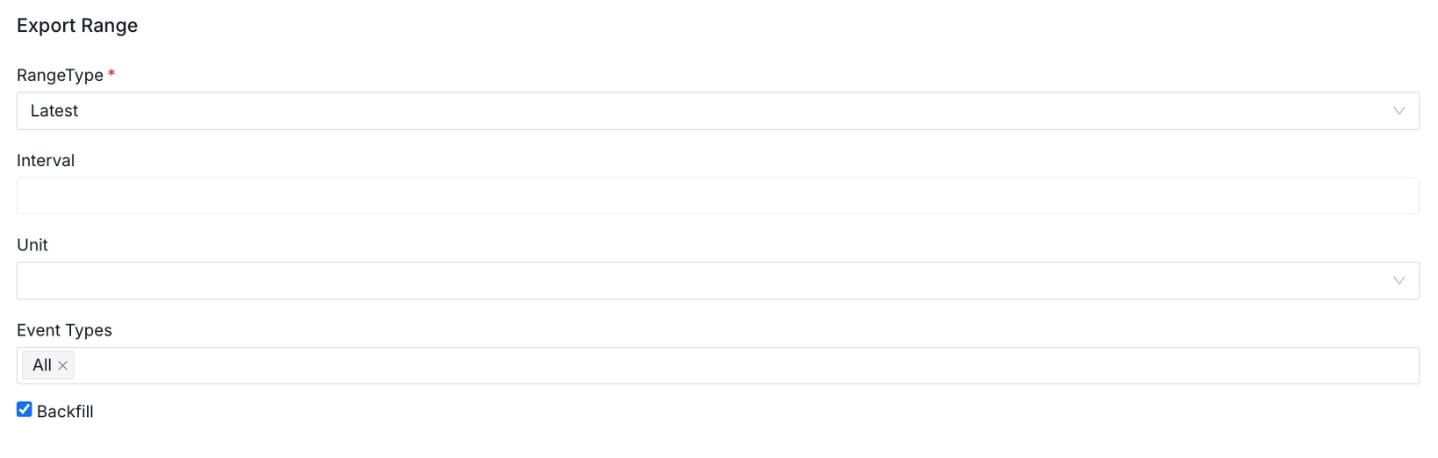
### Export Range
Defines the temporal scope of the data to be exported.
| Field | Description |
| ---------------------------------------- | -------------------------------------------------------------------- |
| **Range Type** (`exportRange.rangeType`) | Options: `ALL`, `LATEST`, or `DATE_RANGE` |
| **Interval** (`exportRange.interval`) | Used with `DATE_RANGE` (e.g., `7`) |
| **Unit** (`exportRange.unit`) | Time unit for the interval (e.g., `days`, `hours`) |
| **Event Types** | Select which types of DQ events to export (`All`, or specific types) |
| **Backfill** | Enable to process historical data on first run |
#### Snowflake Configuration
| Field | Description |
| ---------------------------- | ------------------------------------------------------------------------------------------------------------ |
| **Service Type** | Snowflake |
| **Username** | Snowflake user login |
| **Password** | User password (optional if using private key) |
| **Account** | Snowflake account identifier (e.g., `AAAAA-99999`) |
| **Role** | Snowflake role to assume (use a dedicated least-privilege role, see **Required Snowflake Privileges** below) |
| **Database** | Target database (e.g., `OBS_ANALYTICS`) |
| **Warehouse** | Target virtual warehouse (e.g., `COMPUTE_WH`) |
| **Query Tag** | Optional tagging for traceability |
| **Private Key & Passphrase** | For key-pair auth (optional, secure) |
**Advanced Option**
* **Client Session Keep Alive**: Useful for long-running exports.
**Required Snowflake Privileges**
The role used by the exporter needs the following privileges:
* `USAGE` on the warehouse
* `USAGE` on the database
* `USAGE` on the schema
* `CREATE TABLE` on the schema
The exporter creates and owns its target table, so `INSERT`, `MERGE`, `ALTER` and `DROP` all work through ownership with no further grants.
```sql theme={null}
-- Create a new role and user (skip if you already have them)
CREATE ROLE COLLATE_EXPORTER_ROLE;
CREATE USER COLLATE_EXPORTER_USER DEFAULT_ROLE=COLLATE_EXPORTER_ROLE PASSWORD='PASSWORD';
GRANT ROLE COLLATE_EXPORTER_ROLE TO USER COLLATE_EXPORTER_USER;
-- Grant the required privileges to the role
GRANT USAGE ON WAREHOUSE WAREHOUSE_NAME TO ROLE COLLATE_EXPORTER_ROLE;
GRANT USAGE ON DATABASE DATABASE_NAME TO ROLE COLLATE_EXPORTER_ROLE;
GRANT USAGE ON SCHEMA DATABASE_NAME.SCHEMA_NAME TO ROLE COLLATE_EXPORTER_ROLE;
GRANT CREATE TABLE ON SCHEMA DATABASE_NAME.SCHEMA_NAME TO ROLE COLLATE_EXPORTER_ROLE;
```
On connect, the exporter runs the standard Snowflake connection test, which also probes `SNOWFLAKE.ACCOUNT_USAGE` for tags, queries and lineage. With this role those checks are skipped with a warning and the export still succeeds. `IMPORTED PRIVILEGES` is not required.
#### BigQuery Configuration
| Field | Description |
| ------------------------ | -------------------------------------------------------------------- |
| **Service Type** | Must be `BigQuery` |
| **Project ID** | GCP project where the BigQuery dataset resides |
| **Dataset ID** | Target dataset where the metadata will be exported |
| **Table Name** | Destination table name (BQ table to export metadata to) |
| **Service Account JSON** | Contents of the service account key in JSON format with write access |
| **Location** | BigQuery region (e.g., `us-central1`) |
Ensure the service account has the **BigQuery Data Editor** and **BigQuery Job User** roles.
#### Databricks Configuration
| Field | Description |
| ------------------- | ------------------------------------------------------------------------- |
| **Service Type** | Must be `Databricks` |
| **Host URL** | Databricks workspace URL (e.g., `https://.azuredatabricks.net`) |
| **Token** | Personal Access Token (PAT) for API authentication |
| **Cluster ID** | Target cluster where jobs will run |
| **Database Name** | Target database within the Databricks environment |
| **Schema Name** | Schema (if applicable) |
| **Table Name** | Destination table to store metadata |
| **Path (Optional)** | DBFS path or external location (if exporting to files instead of a table) |
**Requirements**
* The token must have workspace-wide read/write access.
* The cluster must have access to the target database or mount location.
#### Trino Configuration
**Available from version 1.12.3**
| Field | Description |
| ----------------- | ------------------------------------------------------------------ |
| **Service Type** | Must be `Trino` |
| **Username** | Trino user login with sufficient privileges |
| **Password** | User password for Basic Authentication (or use JWT) |
| **Host and Port** | Fully qualified hostname and port number for your Trino deployment |
| **Catalog** | Trino catalog where the target database is stored |
| **Database Name** | Target database within the Trino catalog |
| **Schema Name** | Target schema (optional, restricts to a single schema) |
| **Table Name** | Destination table to store exported metadata |
**Authentication Options**
* **Basic Auth**: Username and password
* **JWT Auth**: Provide JWT token for authentication
* **Azure**: Client ID, Client Secret, Tenant ID, and Scopes for Azure AD authentication
Ensure the Trino user has `SELECT` and `INSERT` privileges on the target table and schema.
### Export Range
Defines the temporal scope of the data to be exported.
| Field | Description |
| ---------------------------------------- | -------------------------------------------------------------------- |
| **Range Type** (`exportRange.rangeType`) | Options: `ALL`, `LATEST`, or `DATE_RANGE` |
| **Interval** (`exportRange.interval`) | Used with `DATE_RANGE` (e.g., `7`) |
| **Unit** (`exportRange.unit`) | Time unit for the interval (e.g., `days`, `hours`) |
| **Event Types** | Select which types of DQ events to export (`All`, or specific types) |
| **Backfill** | Enable to process historical data on first run |
 ### Table Configuration
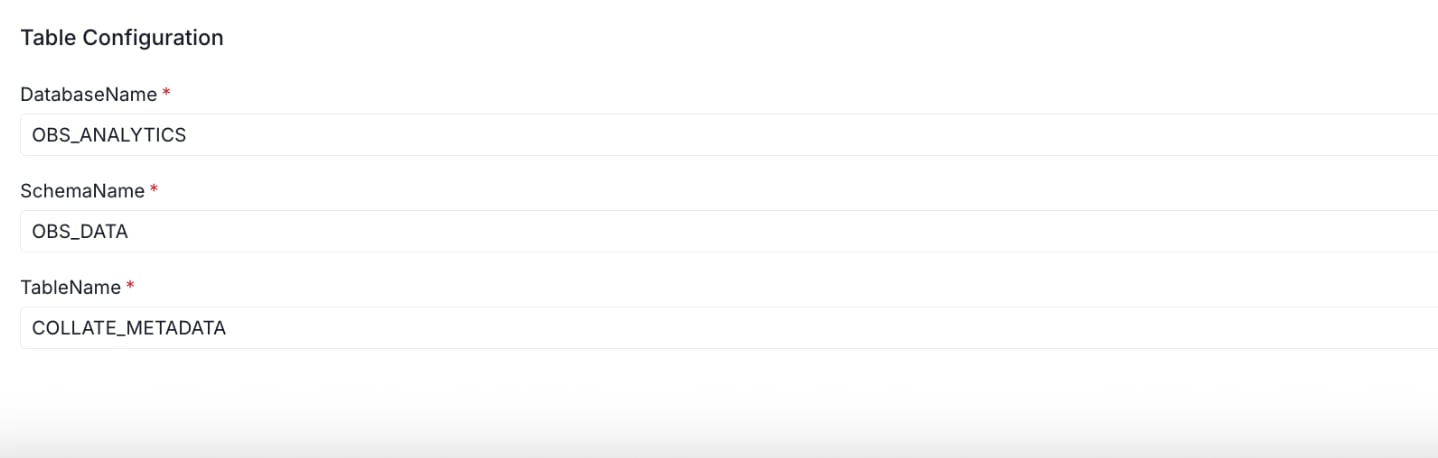
Specifies the target table where exported metadata will be written.
| Field | Description |
| ----------------------------------------------------- | ------------------------ |
| **Database Name** (`tableConfiguration.databaseName`) | e.g., `OBS_ANALYTICS` |
| **Schema Name** (`tableConfiguration.schemaName`) | e.g., `OBS_DATA` |
| **Table Name** (`tableConfiguration.tableName`) | e.g., `COLLATE_METADATA` |
### Table Configuration
Specifies the target table where exported metadata will be written.
| Field | Description |
| ----------------------------------------------------- | ------------------------ |
| **Database Name** (`tableConfiguration.databaseName`) | e.g., `OBS_ANALYTICS` |
| **Schema Name** (`tableConfiguration.schemaName`) | e.g., `OBS_DATA` |
| **Table Name** (`tableConfiguration.tableName`) | e.g., `COLLATE_METADATA` |
 ## Scheduling
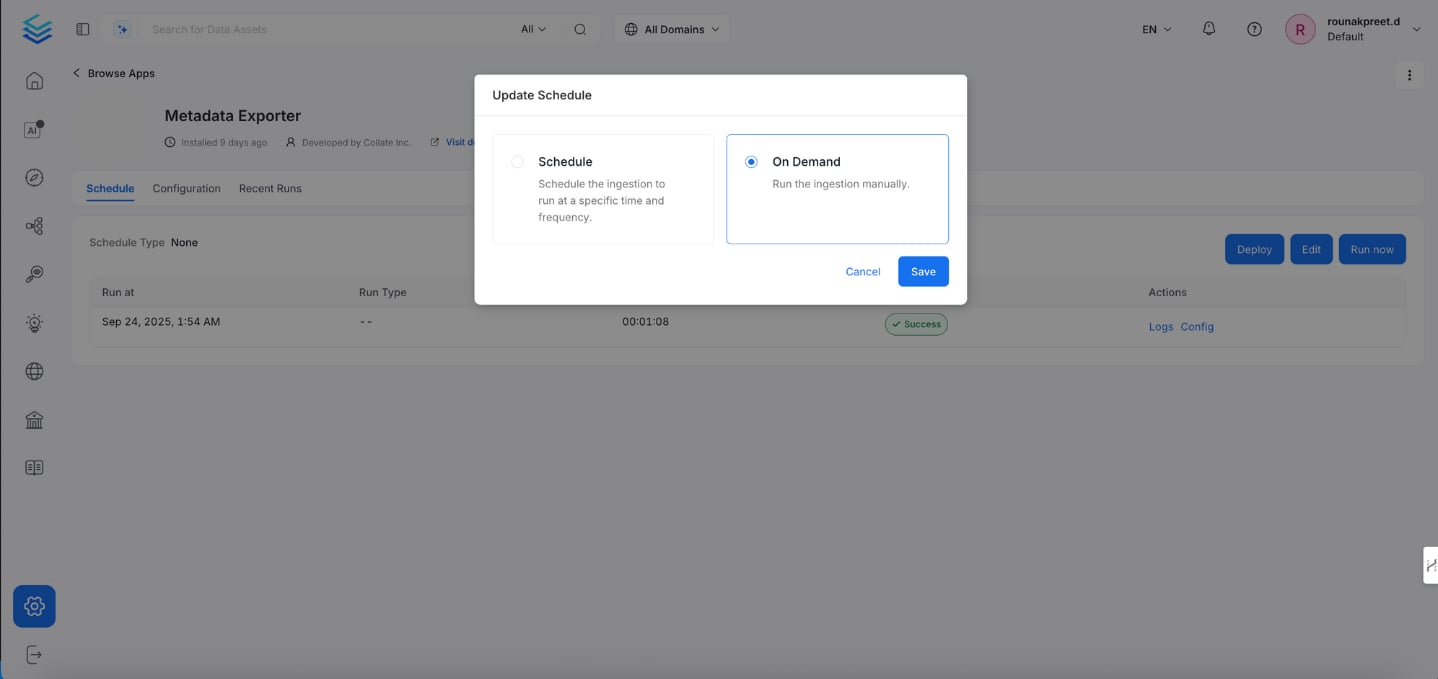
Configure how often the metadata export runs:
* **Manual**: Click `Run Now` on the Schedule tab.
* **Scheduled**: Set up periodic exports (feature roadmap).
## Scheduling
Configure how often the metadata export runs:
* **Manual**: Click `Run Now` on the Schedule tab.
* **Scheduled**: Set up periodic exports (feature roadmap).
 ## Monitoring Runs
Under the **Recent Runs** tab:
* View status: **Success** or **Failed**.
* Check run time, duration, logs, and the configuration used.
A successful export shows **Status: Success**, with details on execution duration and timestamps.
## Monitoring Runs
Under the **Recent Runs** tab:
* View status: **Success** or **Failed**.
* Check run time, duration, logs, and the configuration used.
A successful export shows **Status: Success**, with details on execution duration and timestamps.
 ## Metadata Exporter Application Parameters
| Key | Description |
| --------------------------------- | --------------------------------------------- |
| `exportRange.rangeType` | Defines range (`ALL`, `LATEST`, `DATE_RANGE`) |
| `exportRange.interval` | Interval number for `DATE_RANGE` |
| `exportRange.unit` | Time unit (`days`, `hours`) |
| `eventTypes` | Event types to export |
| `Backfill` | Boolean, historical data processing |
| `tableConfiguration.databaseName` | Target DB |
| `tableConfiguration.schemaName` | Target schema |
| `tableConfiguration.tableName` | Target table |
## Metadata Exporter Application Parameters
| Key | Description |
| --------------------------------- | --------------------------------------------- |
| `exportRange.rangeType` | Defines range (`ALL`, `LATEST`, `DATE_RANGE`) |
| `exportRange.interval` | Interval number for `DATE_RANGE` |
| `exportRange.unit` | Time unit (`days`, `hours`) |
| `eventTypes` | Event types to export |
| `Backfill` | Boolean, historical data processing |
| `tableConfiguration.databaseName` | Target DB |
| `tableConfiguration.schemaName` | Target schema |
| `tableConfiguration.tableName` | Target table |