
Enable Secrets Manager
Secret Manager integrations allow you to use your existing third-party Key Management Store (KMS) with OpenMetadata. Your credentials and sensitive information are stored in a tool that you control, and the KMS will mediate between any OpenMetadata internal requirement and sensitive information. Without a secret manager configured in OpenMetadata, all your sensitive data, any password field of a service connection parameters, bot credentials configuration or dbt configuration of an ingestion pipeline, were stored in MySQL (or Postgres) encrypted. The following diagram shows how is the process between the OM server and Airflow workflows: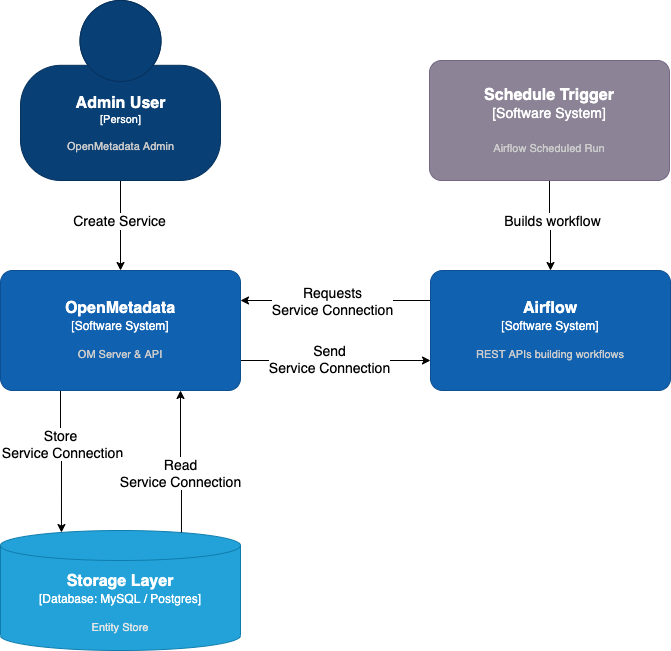
Workflow consumed by Airflow contains the service information as an EntityReference. We use that
reference to read the Service information, including its connection details. This information goes from
Database > OM > Airflow.
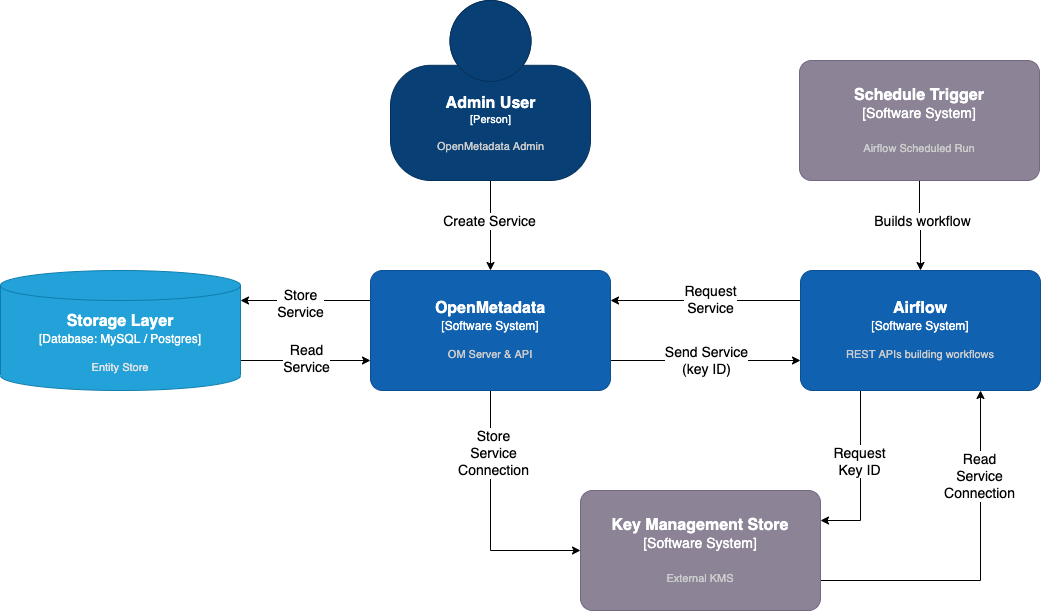
When the Secrets Manager is enabled, sensitive information stop being stored in any system from OpenMetadata. Instead,
the KMS will act as a mediator, as we can observe in the diagram below:
- The migration of all the sensitive data will be done automatically after restarting the OpenMetadata server, which can not be undone for the time being.
- Only users with permissions can edit and retrieve the service connections. The connection parameters will be hidden for all other users.
How it works
There are two types of secrets manager implementations.Managed secrets manager
All the sensitive data will be held automatically in the configured secrets manager, i.e., any password field stored in the connection parameters of a service, in a bot credentials configuration, or a dbt configuration of an ingestion pipeline. For example, suppose we create a MySQL service with the namemysql-test. In that case, the connection password will be
stored in the secrets manager using the secret id /openmetadata/database/mysql-test/password. When we retrieve the
connection parameters from the service, the password field will have the value
secret:/openmetadata/database/mysql-test/password.
We can also use secrets already stored in our secrets vault using the same convention secret:{secret_id}.
All the sensitive data (the secrets ids in this case) values will be encrypted using the Fernet algorithm as extra
security protection.
Non-managed secrets manager
On the other hand, the non-managed configuration allows flexibility on how we want to use our secrets vault. Instead of automatically storing all the sensitive data, we can use the secrets ids from our secrets vault following the conventionsecret:{secret_id} when filling in password fields of the connection parameters of a service, in a bot configuration,
or a dbt configuration of an ingestion pipeline.
The rest of the values which don’t follow the convention for using a secret will be encrypted using the Fernet algorithm
as extra security protection.