> ## Documentation Index
> Fetch the complete documentation index at: https://docs.getcollate.io/llms.txt
> Use this file to discover all available pages before exploring further.
# Breaking Changes - AI Agents & Automations | Official Documentation
> The Documentation, Tier and Quality agent apps are replaced by AI Automations in Collate 2.0. What the migration does, what you must do afterwards, and the Skills, Context Plugin and AI Analytics changes.
# AI Agents & Automations
**This is one of the most disruptive changes in Collate 2.0.** The three agent applications are
deleted during the upgrade and replaced by AI Automations. The migration preserves your
configuration, but the replacements arrive switched off.
## The agent apps are removed
**Breaking.** Affects every deployment that installed the Documentation, Tier or Quality agent.
These three applications no longer exist:
| Removed application | Replaced by |
| -------------------------------------------------- | ------------------------------------------------------ |
| `CollateAIApplication` (Documentation Agent) | An AI Automation built from the Documentation template |
| `CollateAITierAgentApplication` (Tier Agent) | An AI Automation built from the Tier template |
| `CollateAIQualityAgentApplication` (Quality Agent) | An AI Automation built from the Quality template |
Their `agentType` values (`CollateAI`, `CollateAITierAgent`, `CollateAIQualityAgent`) are removed from
the schema, their marketplace definitions are deleted, and their Quartz jobs are removed.
Only `Metadata` remains as an `agentType`. Automation that filters ingestion pipelines by
`agentType` should move to the new values `metadata` and `application`.
## What the migration does
The 2.0.0 migration runs these steps in order:
The retired `agentType` values are removed from the schema enum, so a persisted app row carrying
one would fail strict deserialization before any field is read. The migration clears the value
first (an update, not a delete), so the apps survive long enough to be converted.
`DataAccessRequestTaskWorkflow` is seeded so Data Access Requests can route through governance
workflows.
AutoPilot's legacy `runAppTask` nodes (which called the three agent apps) are replaced with
`createAndRunAIAutomationTask` nodes. Tier now runs **before** the profiler. Documentation and
Quality run **after** it.
Each installed agent app is deep-copied from its matching packaged template into a real
automation that carries the app's Elasticsearch filter, links the template's agent, and is named
with a `Migrated` suffix and a **(migrated)** display suffix. Provider is set to `USER` so it
surfaces in your review list.
The apps are hard-deleted. Each owns its bot, so the bot cascades away with it, and the backing
ingestion pipeline is undeployed from the runner rather than orphaned. Marketplace definitions
are removed separately, because deleting an app doesn't remove its definition.
Multi-parent AI charts are split, and chart and dashboard data is repaired for the 1.13 → 2.0 shape.
Each step is fault-isolated and idempotent. A failure on one app is logged and doesn't block
startup or the remaining steps.
## What you must do after upgrading
**The migrated automations are created disabled and unscheduled.** Your Documentation, Tier and
Quality agents stop running at the upgrade and stay stopped until you turn them back on.
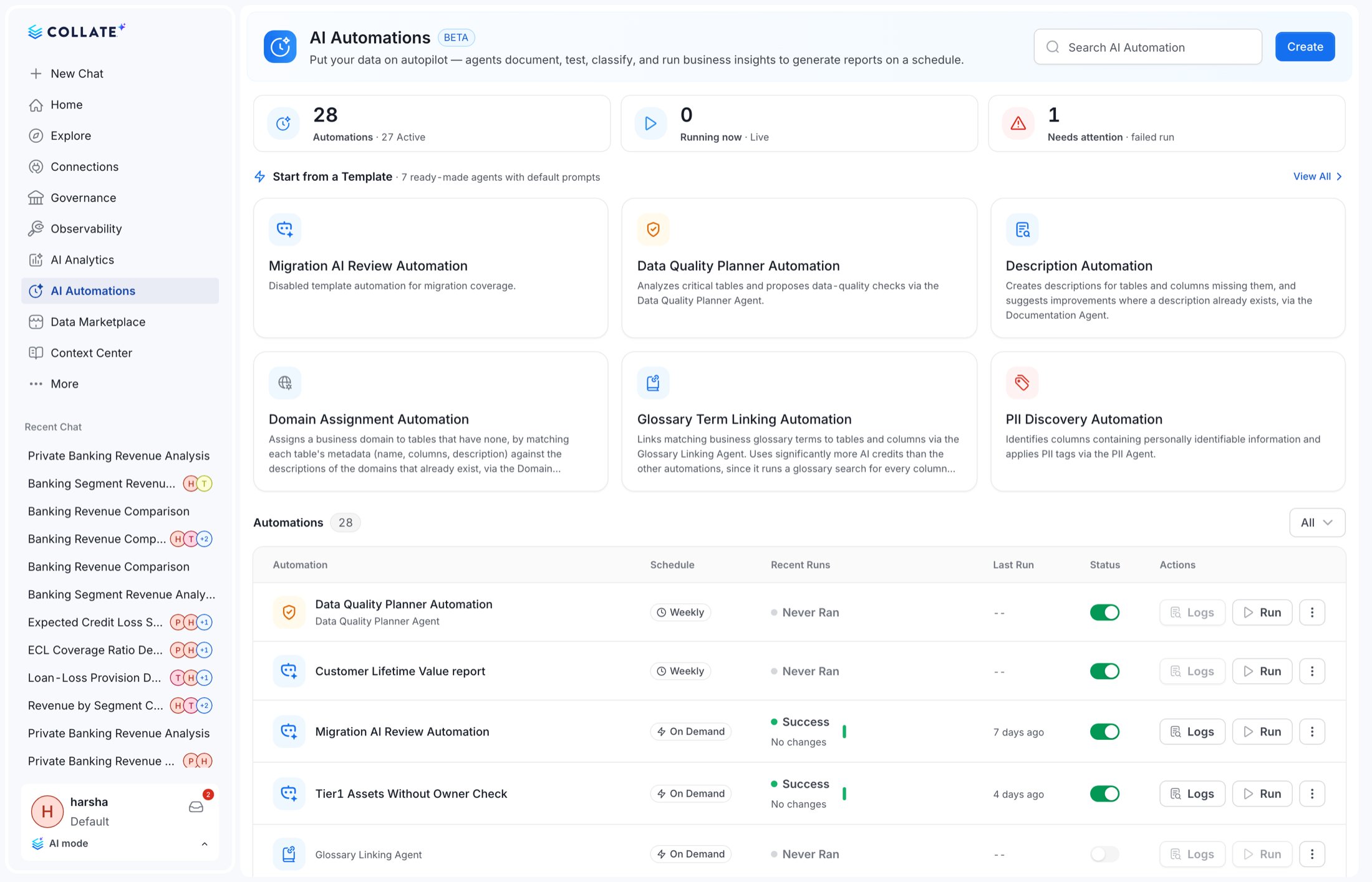
In AI Mode, go to **AI Automations**. Look for entries whose display name ends in **(migrated)**.
The automation carries the asset filter from the app it replaced. Confirm the scope is still what
you want. Asset counts are shown in the wizard.
The migration deliberately doesn't schedule the automation. Pick a cadence and toggle it on.
The migration never sets `destinations`. If the original agent notified a channel, reattach it.
Fresh 2.0 installs never had the agent apps, so none of this applies. The templates are simply
available in the AI Automations catalog.
### The agent app bots are removed with them
**Breaking for API and SDK clients.** Each removed app owned its bot through a containment
relationship, so the recursive delete removes the bot too. `CollateAIApplicationBot` (which was
attached to the Documentation agent) no longer exists after the upgrade, along with the Tier and
Quality agent bots.
If any script, SDK client or integration authenticates with a token issued to
`CollateAIApplicationBot`, it will start failing authorization after the upgrade. Reissue those
tokens against a bot that still exists before you upgrade. Collate AI impersonation is handled by the
automation bot going forward.
 ## AI Automations: what you get instead
AI Automations are a first-class entity at `/v1/ai/automations` with a considerably larger surface
than the apps they replace.
| Capability | Detail |
| --------------------------- | ---------------------------------------------------------------------------------------------------------------------------------- |
| **Templates** | Ship with Documentation, Tier, Quality, **PII Discovery**, **Glossary Term Linking** and **Domain Assignment** templates |
| **3-step wizard** | Template → Configure → Schedule, with agent icons, scope asset count and a flat query builder |
| **Server-side listing** | Search, filters, pagination and a `runState` filter: `GET /v1/ai/automations/search/list` |
| **Categories & providers** | Filter the catalog by category and by provider |
| **Run history with impact** | Per-run impact statistics, and a persisted latest-run impact snapshot |
| **Streamed logs** | `GET /v1/ai/automations/{id}/logs/stream/{runId}` streams run logs over SSE. A centralised logs modal is also available in the UI. |
| **Lifecycle control** | `deploy`, `trigger`, `toggle`, `kill` |
| **Reporting** | `runs/report` and `runs/publish`, plus chart-bearing email reports that can target Collate AI |
| **Incremental** | Entities already processed in previous runs are skipped |
| **Summary** | `GET /v1/ai/automations/summary` and `GET /v1/ai/automations/status` |
Run records are mapped onto the same shape the app run history used, so dashboards built on agent run
records keep working, but they must read from the automations endpoints, not
`GET /v1/collate/apps/name/{name}/agentRuns`, which is removed.
## Abilities are now Skills
**Breaking.** The `/v1/agents/abilities` namespace is renamed to `/v1/agents/skills`.
All fifteen endpoints move:
```diff theme={null}
- GET|POST|PUT /v1/agents/abilities
- GET|PATCH|DELETE /v1/agents/abilities/{id}
- GET|DELETE /v1/agents/abilities/name/{fqn}
- PUT /v1/agents/abilities/restore
- PUT /v1/agents/abilities/{id}/restoreDefault
- PUT|DELETE /v1/agents/abilities/{id}/followers[/{userId}]
- GET /v1/agents/abilities/{id}/versions[/{version}]
- DELETE /v1/agents/abilities/async/{id}
+ ...the same fifteen operations under /v1/agents/skills
```
The request and response shapes are unchanged: this is a path rename. Update the base path in any
client and you are done.
## Knowledge Center and Context Memory moved into the platform
**Breaking.** Knowledge Center is removed because the capability moved into the platform's own
Context Center. Context Memory keeps its paths but is reimplemented by the platform, dropping
three operations.
| Removed | Replacement |
| --------------------------------------- | ---------------------------- |
| `/v1/knowledgeCenter/**` (18 endpoints) | `/v1/contextCenter/pages/**` |
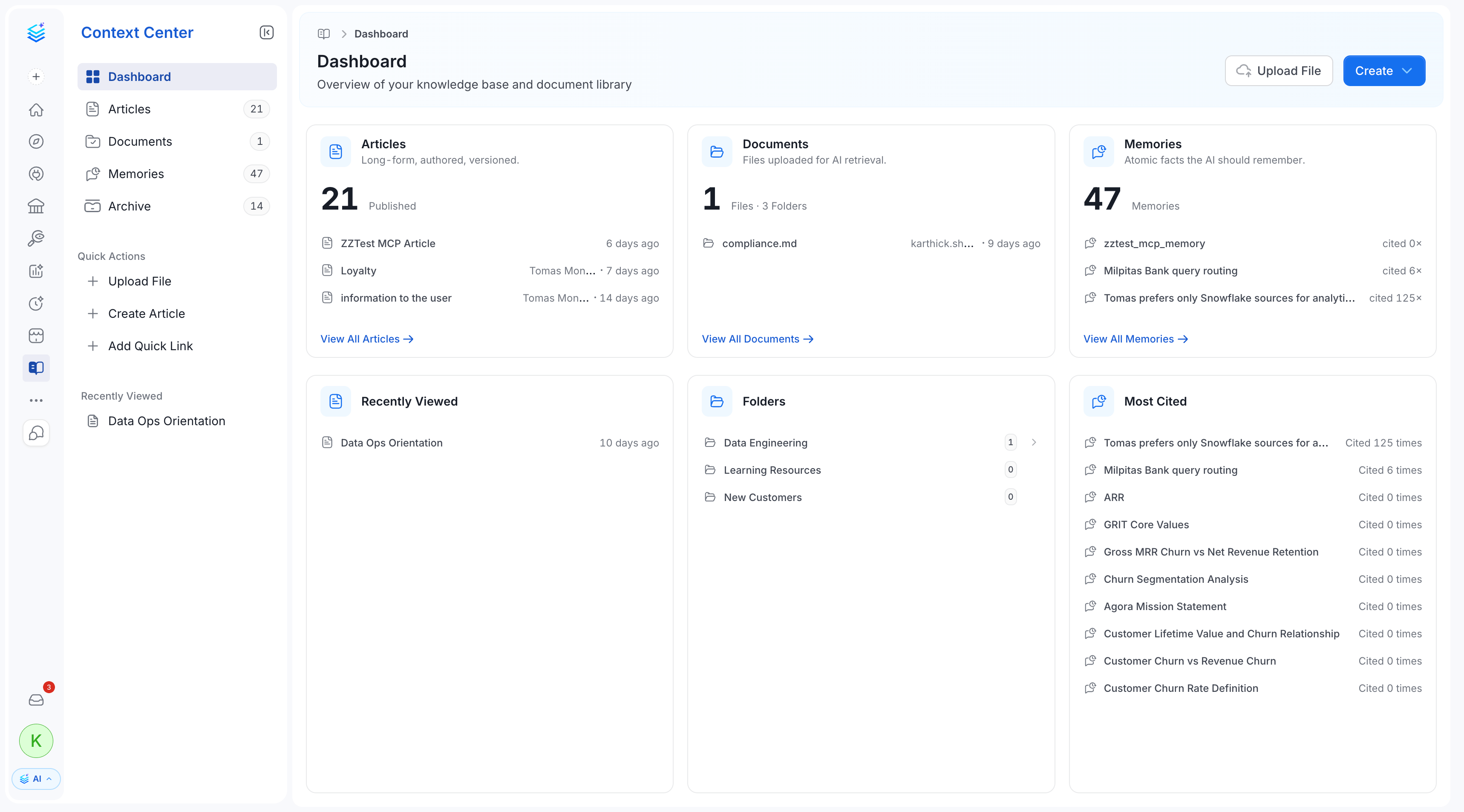
The Knowledge Center UI is removed and replaced by **Context Center**, which adds articles,
documents, uploaded files, memories and an archive. Memory storage is delegated to the AI platform
via a user memory context, while the entity itself is now a platform entity.
The memory endpoints (`/v1/contextCenter/memories/**`, 10 endpoints) keep their **paths** but are
served by the platform implementation, and three operations are gone: `check-duplicates`,
`promote-chat` and `remember`. Rework any client that called them.
## AI Automations: what you get instead
AI Automations are a first-class entity at `/v1/ai/automations` with a considerably larger surface
than the apps they replace.
| Capability | Detail |
| --------------------------- | ---------------------------------------------------------------------------------------------------------------------------------- |
| **Templates** | Ship with Documentation, Tier, Quality, **PII Discovery**, **Glossary Term Linking** and **Domain Assignment** templates |
| **3-step wizard** | Template → Configure → Schedule, with agent icons, scope asset count and a flat query builder |
| **Server-side listing** | Search, filters, pagination and a `runState` filter: `GET /v1/ai/automations/search/list` |
| **Categories & providers** | Filter the catalog by category and by provider |
| **Run history with impact** | Per-run impact statistics, and a persisted latest-run impact snapshot |
| **Streamed logs** | `GET /v1/ai/automations/{id}/logs/stream/{runId}` streams run logs over SSE. A centralised logs modal is also available in the UI. |
| **Lifecycle control** | `deploy`, `trigger`, `toggle`, `kill` |
| **Reporting** | `runs/report` and `runs/publish`, plus chart-bearing email reports that can target Collate AI |
| **Incremental** | Entities already processed in previous runs are skipped |
| **Summary** | `GET /v1/ai/automations/summary` and `GET /v1/ai/automations/status` |
Run records are mapped onto the same shape the app run history used, so dashboards built on agent run
records keep working, but they must read from the automations endpoints, not
`GET /v1/collate/apps/name/{name}/agentRuns`, which is removed.
## Abilities are now Skills
**Breaking.** The `/v1/agents/abilities` namespace is renamed to `/v1/agents/skills`.
All fifteen endpoints move:
```diff theme={null}
- GET|POST|PUT /v1/agents/abilities
- GET|PATCH|DELETE /v1/agents/abilities/{id}
- GET|DELETE /v1/agents/abilities/name/{fqn}
- PUT /v1/agents/abilities/restore
- PUT /v1/agents/abilities/{id}/restoreDefault
- PUT|DELETE /v1/agents/abilities/{id}/followers[/{userId}]
- GET /v1/agents/abilities/{id}/versions[/{version}]
- DELETE /v1/agents/abilities/async/{id}
+ ...the same fifteen operations under /v1/agents/skills
```
The request and response shapes are unchanged: this is a path rename. Update the base path in any
client and you are done.
## Knowledge Center and Context Memory moved into the platform
**Breaking.** Knowledge Center is removed because the capability moved into the platform's own
Context Center. Context Memory keeps its paths but is reimplemented by the platform, dropping
three operations.
| Removed | Replacement |
| --------------------------------------- | ---------------------------- |
| `/v1/knowledgeCenter/**` (18 endpoints) | `/v1/contextCenter/pages/**` |
The Knowledge Center UI is removed and replaced by **Context Center**, which adds articles,
documents, uploaded files, memories and an archive. Memory storage is delegated to the AI platform
via a user memory context, while the entity itself is now a platform entity.
The memory endpoints (`/v1/contextCenter/memories/**`, 10 endpoints) keep their **paths** but are
served by the platform implementation, and three operations are gone: `check-duplicates`,
`promote-chat` and `remember`. Rework any client that called them.
 ## Context Plugins
**New.** `/v1/ai/contextPlugins` lets you connect external knowledge sources so the assistant can
read from them. Notion, Slack, GitHub and Google Drive ship seeded, and each plugin has a
`testConnection` endpoint.
## Context memories enforce visibility
**Behavioural.** Memories are now visibility-scoped in both AI answers and semantic search. You see
org-wide memories, memories you own, and memories shared with you or your team, not everything.
No action required. Search indexing applies the visibility automatically once the instance is
upgraded. If a memory seems to have disappeared from results, check who it is shared with.
## AI Studio labelling follows the Skills rename
**Behavioural.** Because *abilities* became *skills* across the backend and UI, AI Studio's
terminology, labels and navigation change to match. Enablement material and screenshots that say
"abilities" need updating.
## AI Analytics: dashboards and charts
## Context Plugins
**New.** `/v1/ai/contextPlugins` lets you connect external knowledge sources so the assistant can
read from them. Notion, Slack, GitHub and Google Drive ship seeded, and each plugin has a
`testConnection` endpoint.
## Context memories enforce visibility
**Behavioural.** Memories are now visibility-scoped in both AI answers and semantic search. You see
org-wide memories, memories you own, and memories shared with you or your team, not everything.
No action required. Search indexing applies the visibility automatically once the instance is
upgraded. If a memory seems to have disappeared from results, check who it is shared with.
## AI Studio labelling follows the Skills rename
**Behavioural.** Because *abilities* became *skills* across the backend and UI, AI Studio's
terminology, labels and navigation change to match. Enablement material and screenshots that say
"abilities" need updating.
## AI Analytics: dashboards and charts
 ### AI Dashboards now enforce visibility
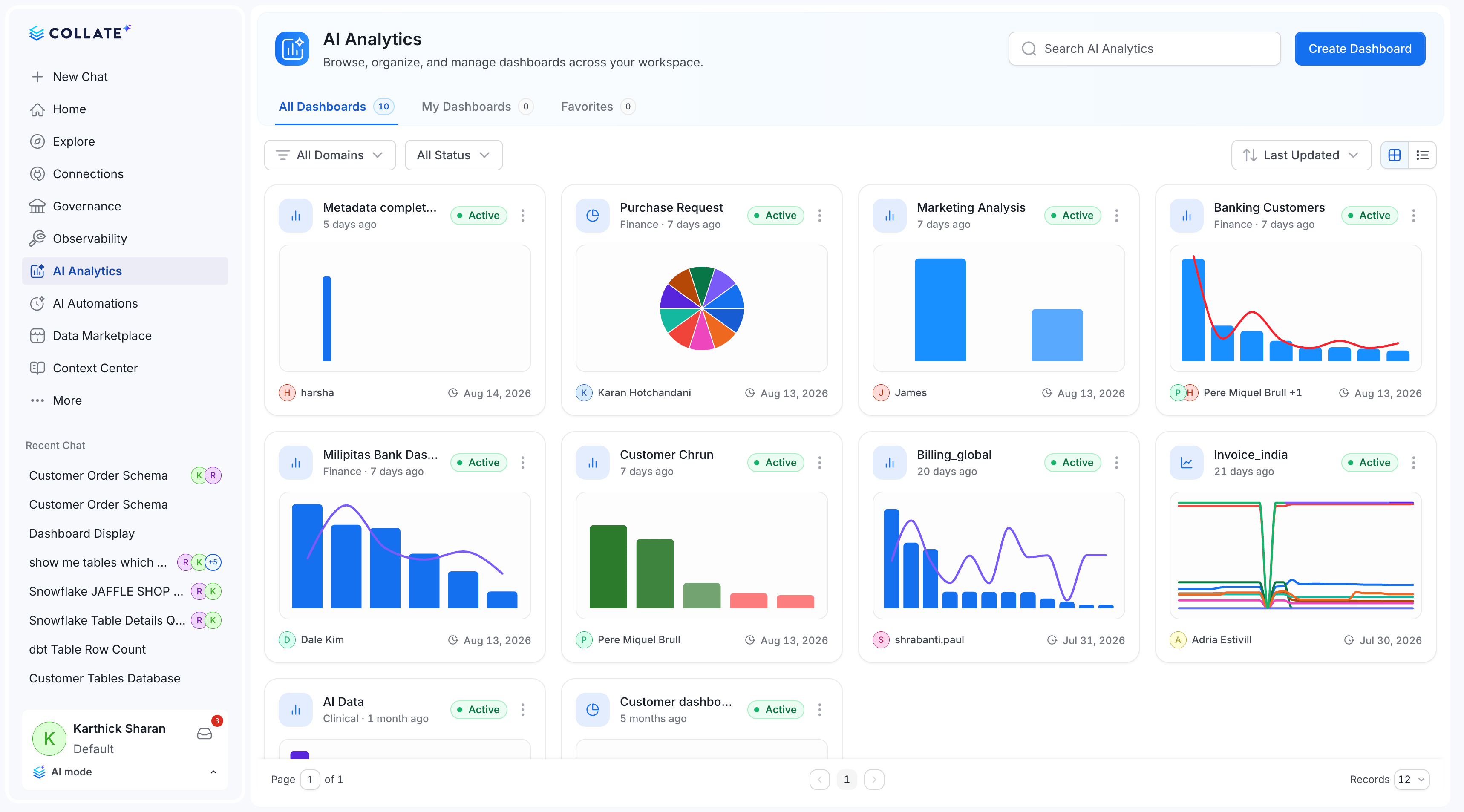
**Breaking behaviour.** Dashboard visibility (**Private**, **Shared**, **Public**) was stored in
1.13 but never applied, so any user with view rights could open any dashboard. 2.0 enforces it, and
new dashboards default to **Private**.
To preserve existing access, the upgrade sets **every existing dashboard to Public**. That is
deliberately permissive. It keeps 1.13 behaviour on day one rather than silently hiding content.
Owners should review their dashboards after upgrading and restrict the ones that should not be
org-wide. Until they do, every dashboard remains visible to everyone who can reach AI Analytics.
### An AI chart now belongs to exactly one dashboard
**Breaking, and a security fix.** In 1.13 a chart carried a *list* of dashboards and its read access
was the **union** of them, so any user could read someone else's chart by pinning it to a dashboard
of their own. In 2.0 access comes from the single parent dashboard.
The create contract changes accordingly:
```diff theme={null}
- "dashboards": ["", ""] // array of parents
+ "dashboard": "" // exactly one parent
- "required": ["name", "queryConfig"]
+ "required": ["name", "queryType", "dashboard"]
```
The query configuration is also split into a discriminated union:
```diff theme={null}
- "queryConfig": { ... }
+ "queryType": "sql" | "dataInsight",
+ "sqlQueryConfig": { ... }, // when queryType is sql
+ "dataInsightQueryConfig": { ... } // when queryType is dataInsight
```
On upgrade, charts pinned to several dashboards are **split into one copy per dashboard**, keeping
title, owners and query but starting a fresh version history. Pinning to a second dashboard now
creates an independent copy rather than sharing one chart.
Any client that posts `dashboards: [...]` or `queryConfig` must be rewritten. `dashboard` is now
required at creation. A chart can no longer exist without a parent.
### Other AI Analytics changes
| Change | Class | Detail |
| ------------------------------------ | ----------- | ---------------------------------------------------------------------------------------------------------------------------------------------- |
| `GET /v1/ai/charts` (list) removed | Breaking | Chart listing moves under the owning dashboard: `GET /v1/ai/dashboards/{id}/charts` |
| `POST /v1/ai/charts/preview` removed | Breaking | Replaced by a single consolidated preview endpoint. Time-range resolution is de-duplicated. |
| Scheduled refresh re-platformed | Behavioural | Refresh now runs on in-JVM Quartz. The ingestion pipeline, Argo workflow and Python path are retired |
| Provenance | Additive | `GET /v1/ai/dashboards/{id}/provenance` and chart-level provenance record how a chart was produced, with dashboard-scoped visibility per chart |
| Chart types | Additive | Composed and Donut chart types. Horizontal scroll and adaptive axis ticks for dense charts. |
| Manual refresh | Additive | Data Insight and SQL charts can be refreshed on demand |
| Favourites & sharing | Additive | Favourite toggle in the dashboard header, plus dashboard schedule sharing |
Because scheduled refresh no longer runs through an ingestion pipeline, any monitoring you built on
those pipelines (alerting on a failed AI dashboard refresh pipeline, for example) will see the
pipelines disappear. Monitor the automation and dashboard endpoints instead.
## AI Studio
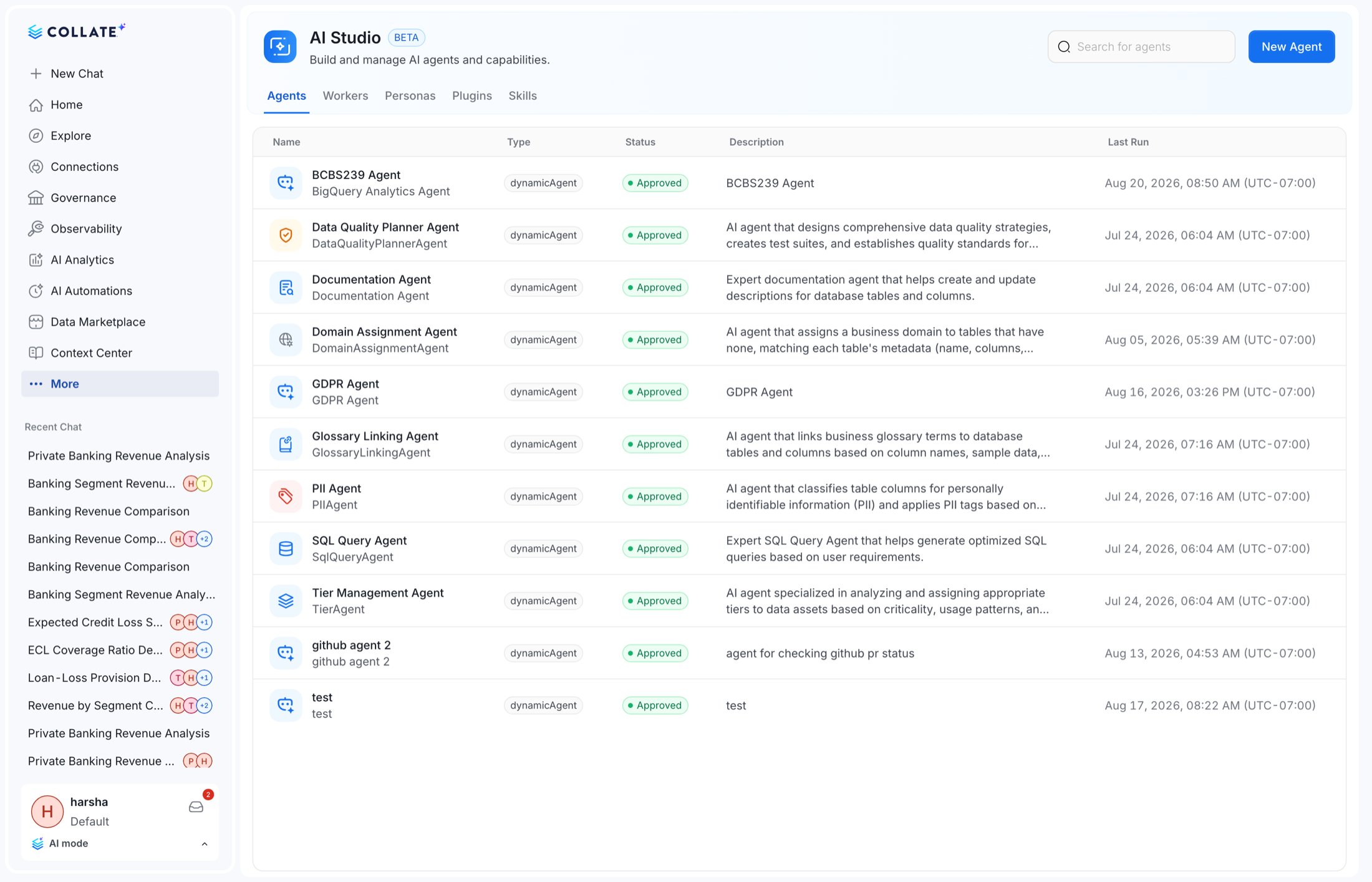
**Additive.** AI Studio gains authoring for agents, personas and skills directly in the UI, including
drafting a planner description for a dynamic agent. The UI-selected persona is forwarded to the AI
platform so agent behaviour follows the persona.
### AI Dashboards now enforce visibility
**Breaking behaviour.** Dashboard visibility (**Private**, **Shared**, **Public**) was stored in
1.13 but never applied, so any user with view rights could open any dashboard. 2.0 enforces it, and
new dashboards default to **Private**.
To preserve existing access, the upgrade sets **every existing dashboard to Public**. That is
deliberately permissive. It keeps 1.13 behaviour on day one rather than silently hiding content.
Owners should review their dashboards after upgrading and restrict the ones that should not be
org-wide. Until they do, every dashboard remains visible to everyone who can reach AI Analytics.
### An AI chart now belongs to exactly one dashboard
**Breaking, and a security fix.** In 1.13 a chart carried a *list* of dashboards and its read access
was the **union** of them, so any user could read someone else's chart by pinning it to a dashboard
of their own. In 2.0 access comes from the single parent dashboard.
The create contract changes accordingly:
```diff theme={null}
- "dashboards": ["", ""] // array of parents
+ "dashboard": "" // exactly one parent
- "required": ["name", "queryConfig"]
+ "required": ["name", "queryType", "dashboard"]
```
The query configuration is also split into a discriminated union:
```diff theme={null}
- "queryConfig": { ... }
+ "queryType": "sql" | "dataInsight",
+ "sqlQueryConfig": { ... }, // when queryType is sql
+ "dataInsightQueryConfig": { ... } // when queryType is dataInsight
```
On upgrade, charts pinned to several dashboards are **split into one copy per dashboard**, keeping
title, owners and query but starting a fresh version history. Pinning to a second dashboard now
creates an independent copy rather than sharing one chart.
Any client that posts `dashboards: [...]` or `queryConfig` must be rewritten. `dashboard` is now
required at creation. A chart can no longer exist without a parent.
### Other AI Analytics changes
| Change | Class | Detail |
| ------------------------------------ | ----------- | ---------------------------------------------------------------------------------------------------------------------------------------------- |
| `GET /v1/ai/charts` (list) removed | Breaking | Chart listing moves under the owning dashboard: `GET /v1/ai/dashboards/{id}/charts` |
| `POST /v1/ai/charts/preview` removed | Breaking | Replaced by a single consolidated preview endpoint. Time-range resolution is de-duplicated. |
| Scheduled refresh re-platformed | Behavioural | Refresh now runs on in-JVM Quartz. The ingestion pipeline, Argo workflow and Python path are retired |
| Provenance | Additive | `GET /v1/ai/dashboards/{id}/provenance` and chart-level provenance record how a chart was produced, with dashboard-scoped visibility per chart |
| Chart types | Additive | Composed and Donut chart types. Horizontal scroll and adaptive axis ticks for dense charts. |
| Manual refresh | Additive | Data Insight and SQL charts can be refreshed on demand |
| Favourites & sharing | Additive | Favourite toggle in the dashboard header, plus dashboard schedule sharing |
Because scheduled refresh no longer runs through an ingestion pipeline, any monitoring you built on
those pipelines (alerting on a failed AI dashboard refresh pipeline, for example) will see the
pipelines disappear. Monitor the automation and dashboard endpoints instead.
## AI Studio
**Additive.** AI Studio gains authoring for agents, personas and skills directly in the UI, including
drafting a planner description for a dynamic agent. The UI-selected persona is forwarded to the AI
platform so agent behaviour follows the persona.
 ## Agent invocation
| Change | Detail |
| ---------------------------------------------------- | ---------------------------------------------------------------- |
| `POST /v1/agents/invoke` | New synchronous invocation endpoint alongside the streaming path |
| `GET /v1/agents/run/{conversationId}/events` | Server-sent events for an agent run |
| `GET /v1/agents/dynamic/run/{conversationId}/events` | The same for dynamic agents |
| `POST /v1/agents/dynamic/draftPlannerDescription` | Draft a planner description when authoring |
Dynamic agents that pointed at the deleted agent-app bots are repointed by the migration.
## Agent invocation
| Change | Detail |
| ---------------------------------------------------- | ---------------------------------------------------------------- |
| `POST /v1/agents/invoke` | New synchronous invocation endpoint alongside the streaming path |
| `GET /v1/agents/run/{conversationId}/events` | Server-sent events for an agent run |
| `GET /v1/agents/dynamic/run/{conversationId}/events` | The same for dynamic agents |
| `POST /v1/agents/dynamic/draftPlannerDescription` | Draft a planner description when authoring |
Dynamic agents that pointed at the deleted agent-app bots are repointed by the migration.