> ## Documentation Index
> Fetch the complete documentation index at: https://docs.getcollate.io/llms.txt
> Use this file to discover all available pages before exploring further.
# Author the Ontology (Edit Mode) | Collate
> Draw typed relations, add attributes and OWL axioms, apply modeling patterns, build subsets, merge structures, and preview delete impact, safely, behind an editing lease.
# Author: Edit Mode
Edit mode turns the studio into an authoring workspace. It has two surfaces: **Graph**, for direct manipulation of concepts and relations, and **Model**, a workbench of structured modeling tools.
Edit mode appears only if you hold `EditAll`, `EditGlossaryTerms`, or `EditEntityRelationship` on Glossary, or you are an admin.
## The Editing Lease
Ontology edits are structural: one person retyping a relation while another deletes its target produces a model neither of them intended. Collate guards this with a **lease** rather than a lock you can forget to release.
* Entering Edit mode acquires a lease on the selected glossary.
* The lease is short: the UI takes **60 seconds** and renews it on a heartbeat while you are working. The server accepts leases between 10 and 300 seconds.
* The lease status is shown in the sub-mode bar with a retry action.
* If someone else holds the lease you can still read the model; you cannot write to it.
* Abandoning the tab lets the lease expire on its own, leaving no stuck lock to clear.
API: `POST /api/v1/ontologyEditLocks/acquire`, `PUT /api/v1/ontologyEditLocks/renew`, `GET|DELETE /api/v1/ontologyEditLocks/{resourceType}/{resourceId}`.
## Graph Authoring
With the lease held, the graph canvas becomes editable and the sub-mode bar gains an **Add Concept** action plus an **Edit · Active** lease indicator. Each concept node grows a **+** handle you drag to draw a relation.
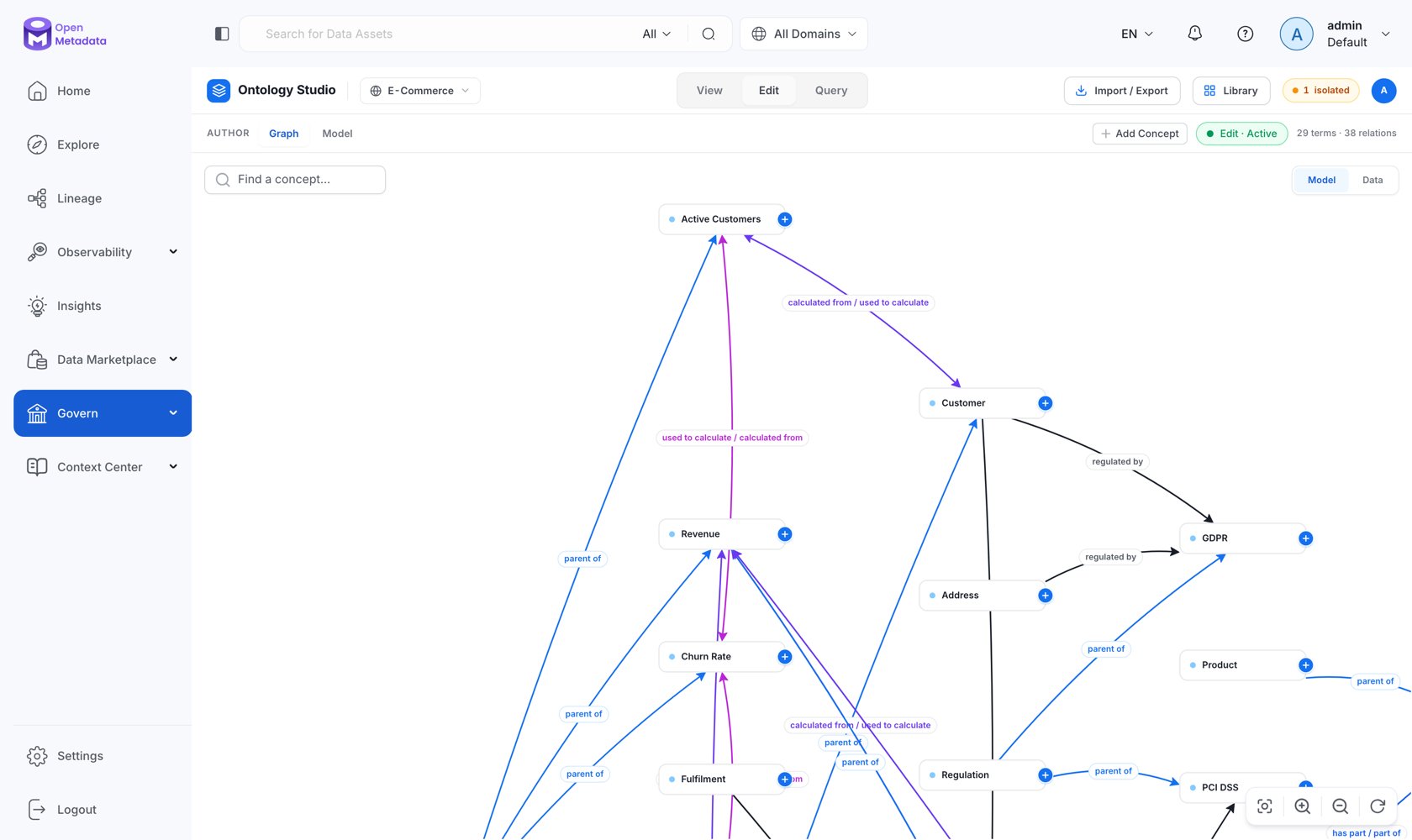 * **Add concept**: new concepts are created in the glossary you have selected.
* **Draw a relation**: connect two concepts and pick the relationship type. Cross-glossary edges are only offered for types where `crossGlossaryAllowed` is set.
* **Retype or remove a relation**: select an edge and change its type or delete it.
* **Inspect and edit**: the authoring inspector edits everything that hangs off a concept.
### The Authoring Inspector
| Section | What you can do |
| ----------------- | ------------------------------------------------------------------------------------------------------------------------------------------------------------------------------------------------------------- |
| **Concept** | Name, display name, description, concept IRI. |
| **Relationships** | Add, retype, and remove typed relations; pick the target concept by search. |
| **Attributes** | Add typed attributes (`STRING`, `INTEGER`, `DECIMAL`, `BOOLEAN`, `DATE`, `ENUM`), mark identifiers, set units and enum values. Inherited attributes are shown read-only with the ancestor that declares them. |
| **Mappings** | Map the concept to an external scheme by IRI with a match type (exact, close, broad, narrow, related, same-as). Duplicate mappings and malformed IRIs are rejected inline. |
| **Realization** | The data assets carrying this concept, grouped by service. |
## Delete with an Impact Preview
Deleting a concept in an ontology is not like deleting a row. Children have to go somewhere, typed relations disappear, external crosswalks break, and assets lose their semantic anchor.
Selecting **Delete** opens an **impact preview** before anything happens, showing:
* **Children**: immediate child concepts that must be reassigned, or explicitly cascaded.
* **Relationships**: every typed relation that would be removed.
* **Bound assets**: assets currently carrying the concept, with a total count and a flag when the sample is truncated (the preview shows up to 100).
* **Mappings**: external crosswalks that would be lost.
* Whether the resulting projection needs SHACL revalidation.
The preview is **version-bound**: it is generated against a specific version of the concept and carries a short-lived signed token (valid for two minutes) tied to both you and that exact snapshot. If the concept changes underneath you, the token no longer applies and you get a fresh preview instead of applying a stale decision.
API: `GET /api/v1/ontology/impacts/glossaryTerms/{id}/delete` to preview, `POST` the same path with the token to apply.
## The Model Workbench
**Edit → Model** is a set of structured tools for changes that are awkward to make node-by-node. Five tabs:
### Concept IRI
Preview the IRI a new concept will receive under the glossary's current `baseIri` and minting pattern *before* creating it. Placeholders are `{glossary}`, `{term}`, and `{uuid}`.
API: `POST /api/v1/ontology/modeling/iris/preview`.
### Template: Modeling Patterns
Instantiate a known-good sub-model instead of hand-drawing it. Three patterns ship today:
| Pattern | Shape |
| ---------------------- | ------------------------------------------------------ |
| **Regulatory Control** | Control `hasPart` Requirement `hasPart` Evidence |
| **Measured KPI** | KPI `calculatedFrom` Metric `calculatedFrom` Dimension |
| **Product Hierarchy** | Product `partOf` Portfolio; Feature `partOf` Product |
You supply names for each role; the pattern is materialized as a **draft change set** for review rather than applied directly.
API: `GET /api/v1/ontology/patterns`, `POST /api/v1/ontology/patterns/instantiate`.
### Include: Subsets
Build a scoped **application ontology** from a canonical one. Pin the source concepts a project needs, optionally pull in descendants and relationships, and Collate produces a draft change set that creates them in the target glossary.
Each materialized concept records its provenance: source glossary and term, the **exact versions** they were pinned at, the source IRI for exact-match traceability, and whether the modeler selected it directly or it came along as a descendant. That is what lets you answer "which version of the canonical model is this project actually built on" months later.
API: `POST /api/v1/ontology/subsets`.
### Merge: Structural Diff and Merge
Compare two ontology structures and reconcile them. The panel previews changes per concept, name, description, parent, entity status, relationships, mappings, custom properties, labels each as changed or unchanged, and offers conflict resolution before producing a draft change set.
API: `POST /api/v1/ontology/structure/diff`, `POST /api/v1/ontology/structure/merge`.
### Ontology Constraints: Axioms
Author OWL axioms with a structured class-expression editor: pick the constraint type, build the subject and target expressions, and **Validate** before saving.
* **Add concept**: new concepts are created in the glossary you have selected.
* **Draw a relation**: connect two concepts and pick the relationship type. Cross-glossary edges are only offered for types where `crossGlossaryAllowed` is set.
* **Retype or remove a relation**: select an edge and change its type or delete it.
* **Inspect and edit**: the authoring inspector edits everything that hangs off a concept.
### The Authoring Inspector
| Section | What you can do |
| ----------------- | ------------------------------------------------------------------------------------------------------------------------------------------------------------------------------------------------------------- |
| **Concept** | Name, display name, description, concept IRI. |
| **Relationships** | Add, retype, and remove typed relations; pick the target concept by search. |
| **Attributes** | Add typed attributes (`STRING`, `INTEGER`, `DECIMAL`, `BOOLEAN`, `DATE`, `ENUM`), mark identifiers, set units and enum values. Inherited attributes are shown read-only with the ancestor that declares them. |
| **Mappings** | Map the concept to an external scheme by IRI with a match type (exact, close, broad, narrow, related, same-as). Duplicate mappings and malformed IRIs are rejected inline. |
| **Realization** | The data assets carrying this concept, grouped by service. |
## Delete with an Impact Preview
Deleting a concept in an ontology is not like deleting a row. Children have to go somewhere, typed relations disappear, external crosswalks break, and assets lose their semantic anchor.
Selecting **Delete** opens an **impact preview** before anything happens, showing:
* **Children**: immediate child concepts that must be reassigned, or explicitly cascaded.
* **Relationships**: every typed relation that would be removed.
* **Bound assets**: assets currently carrying the concept, with a total count and a flag when the sample is truncated (the preview shows up to 100).
* **Mappings**: external crosswalks that would be lost.
* Whether the resulting projection needs SHACL revalidation.
The preview is **version-bound**: it is generated against a specific version of the concept and carries a short-lived signed token (valid for two minutes) tied to both you and that exact snapshot. If the concept changes underneath you, the token no longer applies and you get a fresh preview instead of applying a stale decision.
API: `GET /api/v1/ontology/impacts/glossaryTerms/{id}/delete` to preview, `POST` the same path with the token to apply.
## The Model Workbench
**Edit → Model** is a set of structured tools for changes that are awkward to make node-by-node. Five tabs:
### Concept IRI
Preview the IRI a new concept will receive under the glossary's current `baseIri` and minting pattern *before* creating it. Placeholders are `{glossary}`, `{term}`, and `{uuid}`.
API: `POST /api/v1/ontology/modeling/iris/preview`.
### Template: Modeling Patterns
Instantiate a known-good sub-model instead of hand-drawing it. Three patterns ship today:
| Pattern | Shape |
| ---------------------- | ------------------------------------------------------ |
| **Regulatory Control** | Control `hasPart` Requirement `hasPart` Evidence |
| **Measured KPI** | KPI `calculatedFrom` Metric `calculatedFrom` Dimension |
| **Product Hierarchy** | Product `partOf` Portfolio; Feature `partOf` Product |
You supply names for each role; the pattern is materialized as a **draft change set** for review rather than applied directly.
API: `GET /api/v1/ontology/patterns`, `POST /api/v1/ontology/patterns/instantiate`.
### Include: Subsets
Build a scoped **application ontology** from a canonical one. Pin the source concepts a project needs, optionally pull in descendants and relationships, and Collate produces a draft change set that creates them in the target glossary.
Each materialized concept records its provenance: source glossary and term, the **exact versions** they were pinned at, the source IRI for exact-match traceability, and whether the modeler selected it directly or it came along as a descendant. That is what lets you answer "which version of the canonical model is this project actually built on" months later.
API: `POST /api/v1/ontology/subsets`.
### Merge: Structural Diff and Merge
Compare two ontology structures and reconcile them. The panel previews changes per concept, name, description, parent, entity status, relationships, mappings, custom properties, labels each as changed or unchanged, and offers conflict resolution before producing a draft change set.
API: `POST /api/v1/ontology/structure/diff`, `POST /api/v1/ontology/structure/merge`.
### Ontology Constraints: Axioms
Author OWL axioms with a structured class-expression editor: pick the constraint type, build the subject and target expressions, and **Validate** before saving.
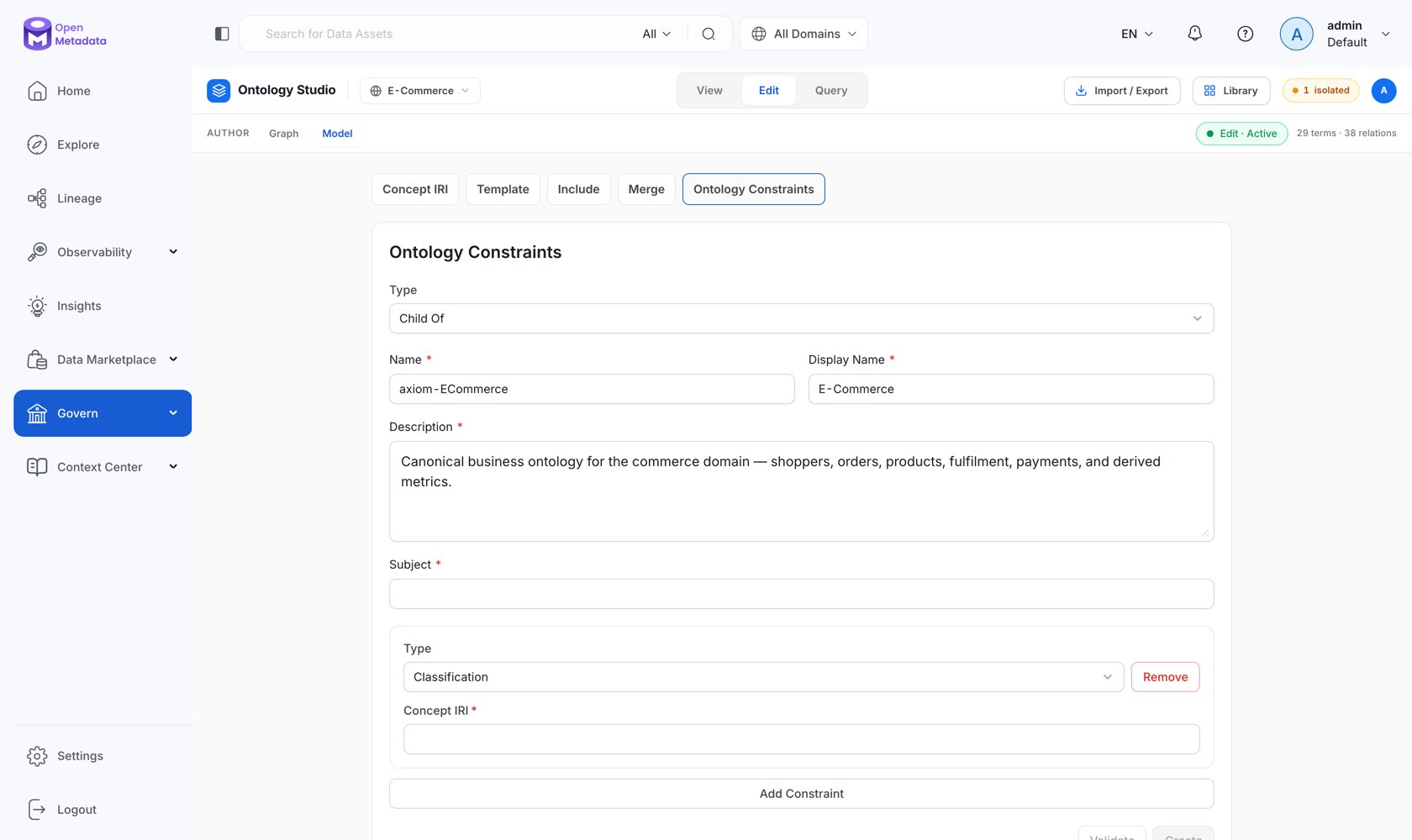 The type dropdown uses plain-language labels for the OWL axiom types:
| Label in the UI | OWL axiom |
| ----------------------- | ------------------------- |
| **Child Of** | `rdfs:subClassOf` |
| **Exact Match** | `owl:equivalentClass` |
| **Conflict Resolution** | `owl:disjointWith` |
| **Classification** | class assertion |
| **Relationship** | object-property assertion |
| **Custom Property** | data-property assertion |
Class expressions compose named classes, intersections, unions, enumerations, and restrictions (`SOME`, `ONLY`, `VALUE`, `MIN`, `MAX`, `EXACT`). With `RDF_STRICT_OWL_PROFILE` enabled, the default, axioms outside the supported OWL 2 DL profile are rejected with an explanation.
Axioms are versioned entities in their own right, with owners, reviewers, and history.
API: `GET|POST|PUT|PATCH|DELETE /api/v1/ontologyAxioms`, `POST /api/v1/ontologyAxioms/validate`.
## Change Sets
Patterns, subsets, and merges all produce an **ontology change set**, a durable authoring session containing typed, reversible operations.
| State | Meaning |
| -------------- | ---------------------------------------------------------- |
| `DRAFT` | Being edited. Operations can be added, undone, and redone. |
| `SUBMITTED` | Sent for review; a review task is attached. |
| `APPLIED` | Operations executed against the ontology. |
| `APPLY_FAILED` | Application failed; the result records why. |
| `DISCARDED` | Abandoned. |
Operations are typed rather than free-form patches: `CREATE_TERM`, `UPDATE_TERM`, `DELETE_TERM`, `ADD_RELATIONSHIP`, `UPDATE_RELATIONSHIP`, `DELETE_RELATIONSHIP`, `UPSERT_ATTRIBUTE`, `DELETE_ATTRIBUTE`, `UPSERT_MAPPING`, `DELETE_MAPPING`, `UPSERT_AXIOM`, `DELETE_AXIOM`.
Each operation that touches an existing entity carries a `baseVersion` for **optimistic concurrency**: if the target moved since the draft was built, application fails loudly instead of silently overwriting. An `undoCursor` tracks the undo/redo position, so a draft is genuinely reviewable: you can walk it backwards before deciding.
API: `POST /api/v1/ontologyChangeSets`, then `/{id}/operations`, `/{id}/undo`, `/{id}/redo`, `/{id}/submit`, `/{id}/apply`, `/{id}/discard`.
The review path exists so ontology change can follow the same governance as anything else in the catalog: a suggester builds a draft, submits it, a reviewer approves, and application is a single audited event with a recorded result.
## Bulk Operations
Changes too large to make interactively, retyping every `relatedTo` edge in a glossary, find-and-replace across concept descriptions, mass attribute upserts, go through an asynchronous **bulk API**:
| Endpoint | Purpose |
| ------------------------------------------------- | ------------------------------------------ |
| `GET /api/v1/ontology/bulk/template` | Download a CSV template for the operation. |
| `POST /api/v1/ontology/bulk` | Submit a bulk job (supports dry run). |
| `GET /api/v1/ontology/bulk/jobs` | List your jobs. |
| `GET /api/v1/ontology/bulk/jobs/{jobId}` | Job status. |
| `PUT /api/v1/ontology/bulk/jobs/{jobId}/cancel` | Cancel a running job. |
| `GET /api/v1/ontology/bulk/jobs/{jobId}/artifact` | Download the result artifact. |
Bulk submissions are planned and validated before execution, and can be run as a **dry run** that produces a full report without persisting anything. Like the workbench tools, they can land as a draft change set for review.
## Next
Govern the edge vocabulary you author with.
Start from a standard instead of a blank canvas.
Bring an existing OWL/SKOS ontology in.
Get proposals for the parts you have not modeled yet.
The type dropdown uses plain-language labels for the OWL axiom types:
| Label in the UI | OWL axiom |
| ----------------------- | ------------------------- |
| **Child Of** | `rdfs:subClassOf` |
| **Exact Match** | `owl:equivalentClass` |
| **Conflict Resolution** | `owl:disjointWith` |
| **Classification** | class assertion |
| **Relationship** | object-property assertion |
| **Custom Property** | data-property assertion |
Class expressions compose named classes, intersections, unions, enumerations, and restrictions (`SOME`, `ONLY`, `VALUE`, `MIN`, `MAX`, `EXACT`). With `RDF_STRICT_OWL_PROFILE` enabled, the default, axioms outside the supported OWL 2 DL profile are rejected with an explanation.
Axioms are versioned entities in their own right, with owners, reviewers, and history.
API: `GET|POST|PUT|PATCH|DELETE /api/v1/ontologyAxioms`, `POST /api/v1/ontologyAxioms/validate`.
## Change Sets
Patterns, subsets, and merges all produce an **ontology change set**, a durable authoring session containing typed, reversible operations.
| State | Meaning |
| -------------- | ---------------------------------------------------------- |
| `DRAFT` | Being edited. Operations can be added, undone, and redone. |
| `SUBMITTED` | Sent for review; a review task is attached. |
| `APPLIED` | Operations executed against the ontology. |
| `APPLY_FAILED` | Application failed; the result records why. |
| `DISCARDED` | Abandoned. |
Operations are typed rather than free-form patches: `CREATE_TERM`, `UPDATE_TERM`, `DELETE_TERM`, `ADD_RELATIONSHIP`, `UPDATE_RELATIONSHIP`, `DELETE_RELATIONSHIP`, `UPSERT_ATTRIBUTE`, `DELETE_ATTRIBUTE`, `UPSERT_MAPPING`, `DELETE_MAPPING`, `UPSERT_AXIOM`, `DELETE_AXIOM`.
Each operation that touches an existing entity carries a `baseVersion` for **optimistic concurrency**: if the target moved since the draft was built, application fails loudly instead of silently overwriting. An `undoCursor` tracks the undo/redo position, so a draft is genuinely reviewable: you can walk it backwards before deciding.
API: `POST /api/v1/ontologyChangeSets`, then `/{id}/operations`, `/{id}/undo`, `/{id}/redo`, `/{id}/submit`, `/{id}/apply`, `/{id}/discard`.
The review path exists so ontology change can follow the same governance as anything else in the catalog: a suggester builds a draft, submits it, a reviewer approves, and application is a single audited event with a recorded result.
## Bulk Operations
Changes too large to make interactively, retyping every `relatedTo` edge in a glossary, find-and-replace across concept descriptions, mass attribute upserts, go through an asynchronous **bulk API**:
| Endpoint | Purpose |
| ------------------------------------------------- | ------------------------------------------ |
| `GET /api/v1/ontology/bulk/template` | Download a CSV template for the operation. |
| `POST /api/v1/ontology/bulk` | Submit a bulk job (supports dry run). |
| `GET /api/v1/ontology/bulk/jobs` | List your jobs. |
| `GET /api/v1/ontology/bulk/jobs/{jobId}` | Job status. |
| `PUT /api/v1/ontology/bulk/jobs/{jobId}/cancel` | Cancel a running job. |
| `GET /api/v1/ontology/bulk/jobs/{jobId}/artifact` | Download the result artifact. |
Bulk submissions are planned and validated before execution, and can be run as a **dry run** that produces a full report without persisting anything. Like the workbench tools, they can land as a draft change set for review.
## Next
Govern the edge vocabulary you author with.
Start from a standard instead of a blank canvas.
Bring an existing OWL/SKOS ontology in.
Get proposals for the parts you have not modeled yet.