> ## Documentation Index
> Fetch the complete documentation index at: https://docs.getcollate.io/llms.txt
> Use this file to discover all available pages before exploring further.
# BYOC
> Deploy Collate components in your own Kubernetes cluster while Collate manages the SaaS control plane.
# Bring Your Own Cloud (BYOC)
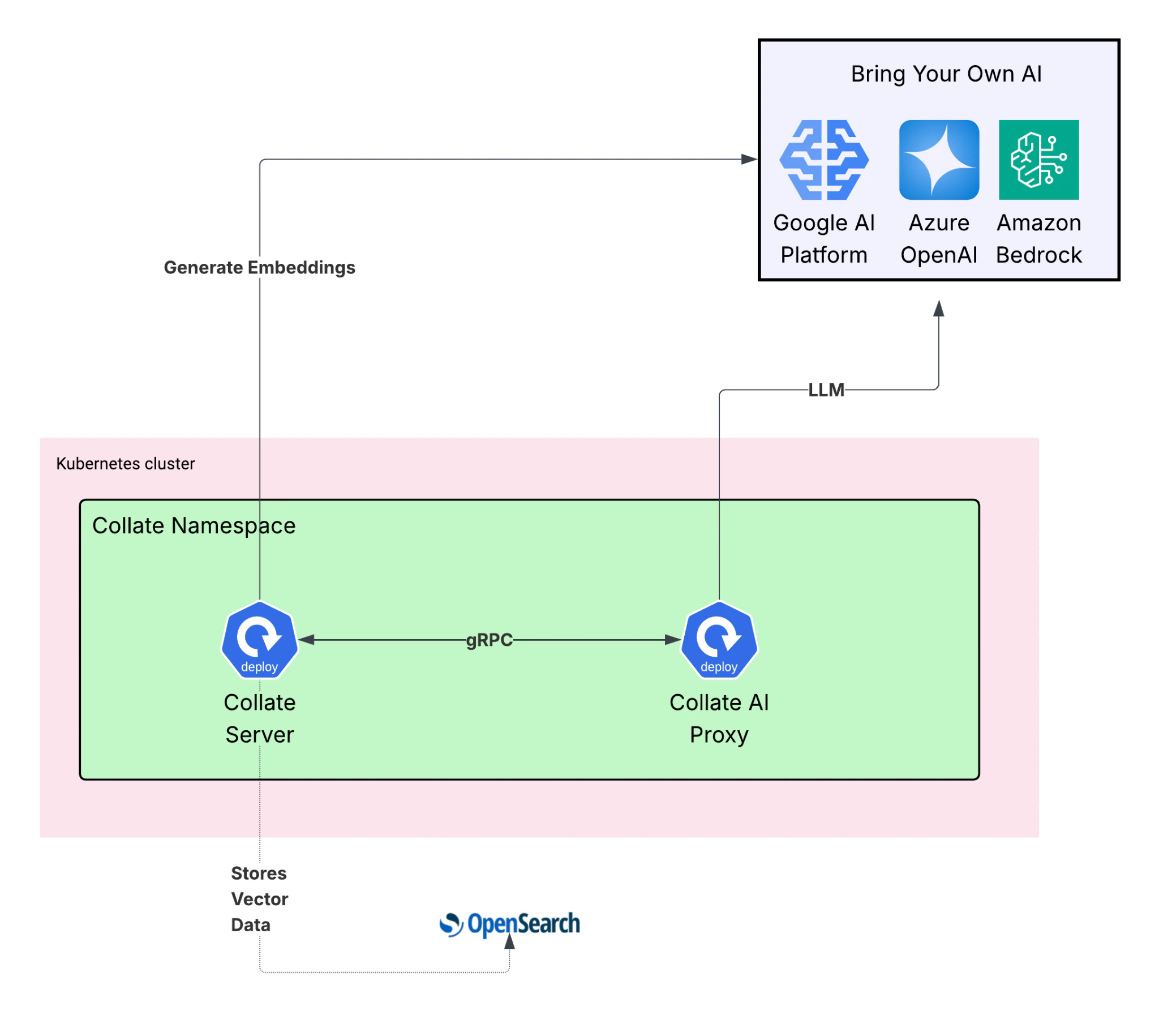
BYOC lets you run Collate components inside your own Kubernetes cluster while Collate manages the SaaS control plane.
Your data and inference traffic never leave your environment. The BYOC component communicates with the Collate Server over gRPC, with the connection initiated outbound from your cluster.
Collate never stores or accesses the credentials used to connect to your infrastructure — those are managed by your own environment and retrieved at runtime.
## Architecture Overview
 ## Requirements
Before deploying BYOC, make sure your cluster meets the following hardware and software requirements.
### Hardware
The BYOC pod requires at least the following resources on the Kubernetes node where it runs:
* CPU: `2000m–4000m` (2–4 cores).
* Memory: `12Gi–16Gi` (12–16 GB RAM).
* Storage: No persistent storage required — the service is stateless.
### Software
Your cluster and local environment must have the following in place:
* Kubernetes **1.19 or later**.
* Helm CLI and `kubectl` installed locally.
* An existing Collate installation running in your cluster.
**Note**: Collate BYOC requires **OpenSearch** as the search engine. ElasticSearch is not supported because Collate AI relies on OpenSearch's vector capabilities for Semantic and Hybrid Search.
## Requirements
Before deploying BYOC, make sure your cluster meets the following hardware and software requirements.
### Hardware
The BYOC pod requires at least the following resources on the Kubernetes node where it runs:
* CPU: `2000m–4000m` (2–4 cores).
* Memory: `12Gi–16Gi` (12–16 GB RAM).
* Storage: No persistent storage required — the service is stateless.
### Software
Your cluster and local environment must have the following in place:
* Kubernetes **1.19 or later**.
* Helm CLI and `kubectl` installed locally.
* An existing Collate installation running in your cluster.
**Note**: Collate BYOC requires **OpenSearch** as the search engine. ElasticSearch is not supported because Collate AI relies on OpenSearch's vector capabilities for Semantic and Hybrid Search.