> ## Documentation Index
> Fetch the complete documentation index at: https://docs.getcollate.io/llms.txt
> Use this file to discover all available pages before exploring further.
# Data Observability Overview | Quality Interface
> Understand your table's data quality at a glance — test run summary, dimension coverage, and incident status in one view.
# Data Observability Overview
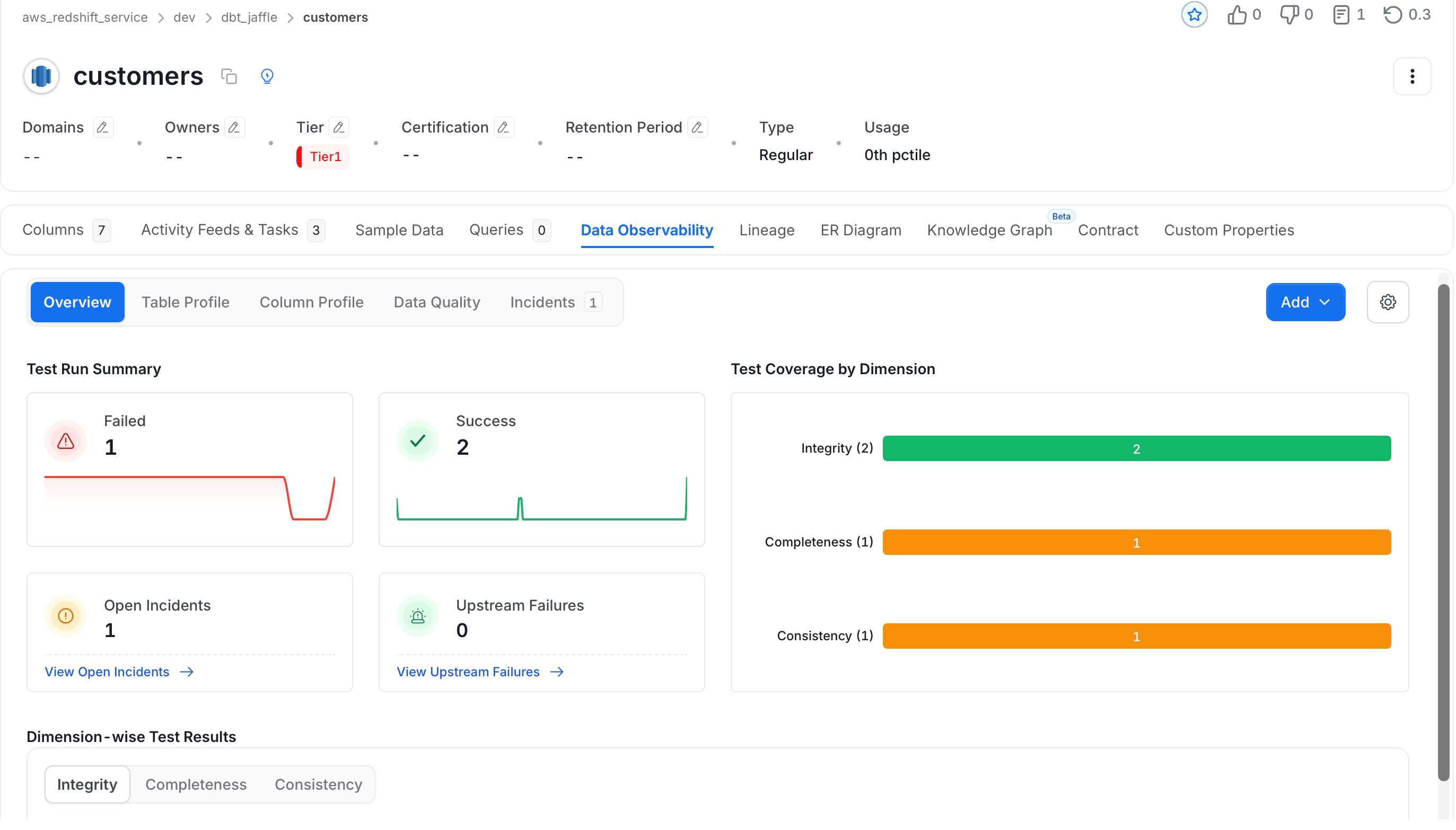
The **Overview** sub-tab on a Table's Data Observability page gives you an instant snapshot of that table's quality health — without digging through individual test cases.
 ## Test Run Summary
The top section shows four key metrics for the table:
* **Failed**: Number of tests that failed in the selected time window, with a trend chart showing how failures have changed over time
* **Success**: Number of tests that passed, with a trend chart
* **Open Incidents**: Active incidents triggered by test failures — click **View Open Incidents** to jump straight to the incident list
* **Upstream Failures**: Test failures in tables upstream in your lineage that may be causing issues here — click **View Upstream Failures** to investigate
## Test Coverage by Dimension
The bar chart on the right shows how your tests are distributed across quality dimensions — Integrity, Completeness, Consistency, and so on. Use this to spot gaps: if a dimension has no bar, you have no tests covering that category for this table.
## Dimension-wise Test Results
Scroll down to see test results broken down by dimension. Each tab shows the test cases assigned to that category and their current pass/fail status.
* **Integrity**: Tests that validate the structural rules of your data — for example, checking that column counts, row counts, or foreign key relationships are within expected bounds
* **Completeness**: Tests that check for missing or null values — ensuring required fields are populated where they should be
* **Consistency**: Tests that verify data stays stable and predictable across processing steps — for example, comparing values between tables or checking that a column's value distribution hasn't shifted unexpectedly
* **Accuracy**: Tests that confirm values reflect real-world expectations — for example, that a price column stays within a valid range
* **Uniqueness**: Tests that catch duplicate values where only unique entries are expected
* **Validity**: Tests that enforce formatting or domain rules — for example, that an email column matches a valid pattern
## Test Run Summary
The top section shows four key metrics for the table:
* **Failed**: Number of tests that failed in the selected time window, with a trend chart showing how failures have changed over time
* **Success**: Number of tests that passed, with a trend chart
* **Open Incidents**: Active incidents triggered by test failures — click **View Open Incidents** to jump straight to the incident list
* **Upstream Failures**: Test failures in tables upstream in your lineage that may be causing issues here — click **View Upstream Failures** to investigate
## Test Coverage by Dimension
The bar chart on the right shows how your tests are distributed across quality dimensions — Integrity, Completeness, Consistency, and so on. Use this to spot gaps: if a dimension has no bar, you have no tests covering that category for this table.
## Dimension-wise Test Results
Scroll down to see test results broken down by dimension. Each tab shows the test cases assigned to that category and their current pass/fail status.
* **Integrity**: Tests that validate the structural rules of your data — for example, checking that column counts, row counts, or foreign key relationships are within expected bounds
* **Completeness**: Tests that check for missing or null values — ensuring required fields are populated where they should be
* **Consistency**: Tests that verify data stays stable and predictable across processing steps — for example, comparing values between tables or checking that a column's value distribution hasn't shifted unexpectedly
* **Accuracy**: Tests that confirm values reflect real-world expectations — for example, that a price column stays within a valid range
* **Uniqueness**: Tests that catch duplicate values where only unique entries are expected
* **Validity**: Tests that enforce formatting or domain rules — for example, that an email column matches a valid pattern
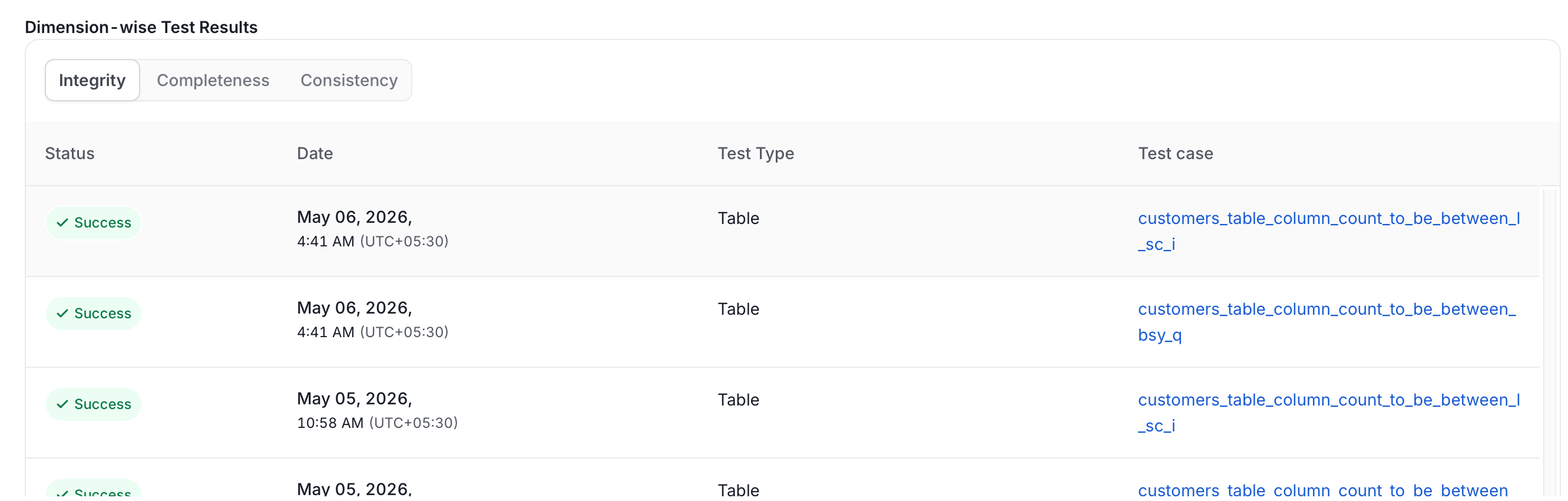 Only dimensions with at least one test assigned to this table appear as tabs. Tabs with failures are the ones to investigate first.
This view pairs with the [Quality by Dimension](/ai-2-0/how-to-guides/data-quality-observability/quality/tests-yaml) page, which lists all available test cases and their assigned dimensions.
Only dimensions with at least one test assigned to this table appear as tabs. Tabs with failures are the ones to investigate first.
This view pairs with the [Quality by Dimension](/ai-2-0/how-to-guides/data-quality-observability/quality/tests-yaml) page, which lists all available test cases and their assigned dimensions.