> ## Documentation Index
> Fetch the complete documentation index at: https://docs.getcollate.io/llms.txt
> Use this file to discover all available pages before exploring further.
# System & Governance Notifications
> Configure notifications for metadata changes, governance events, and collaboration activities.
# System & Governance Notifications
Stay informed about metadata changes, governance events, and collaboration activities across your data catalog.
**Tip**: Use System & Governance Notifications for platform-wide metadata events — governance actions, service changes, collaboration activity, and any entity type not covered by Observability Alerts. For data health monitoring such as test failures and schema changes, use [Data Observability Alerts](/ai-2-0/how-to-guides/data-quality-observability/alerts-notifications/data-observability-alerts) instead.
## Create a new Alert
1. Navigate to **Settings** > **Notifications** > **Alerts**.
2. Click **Add Notification**.
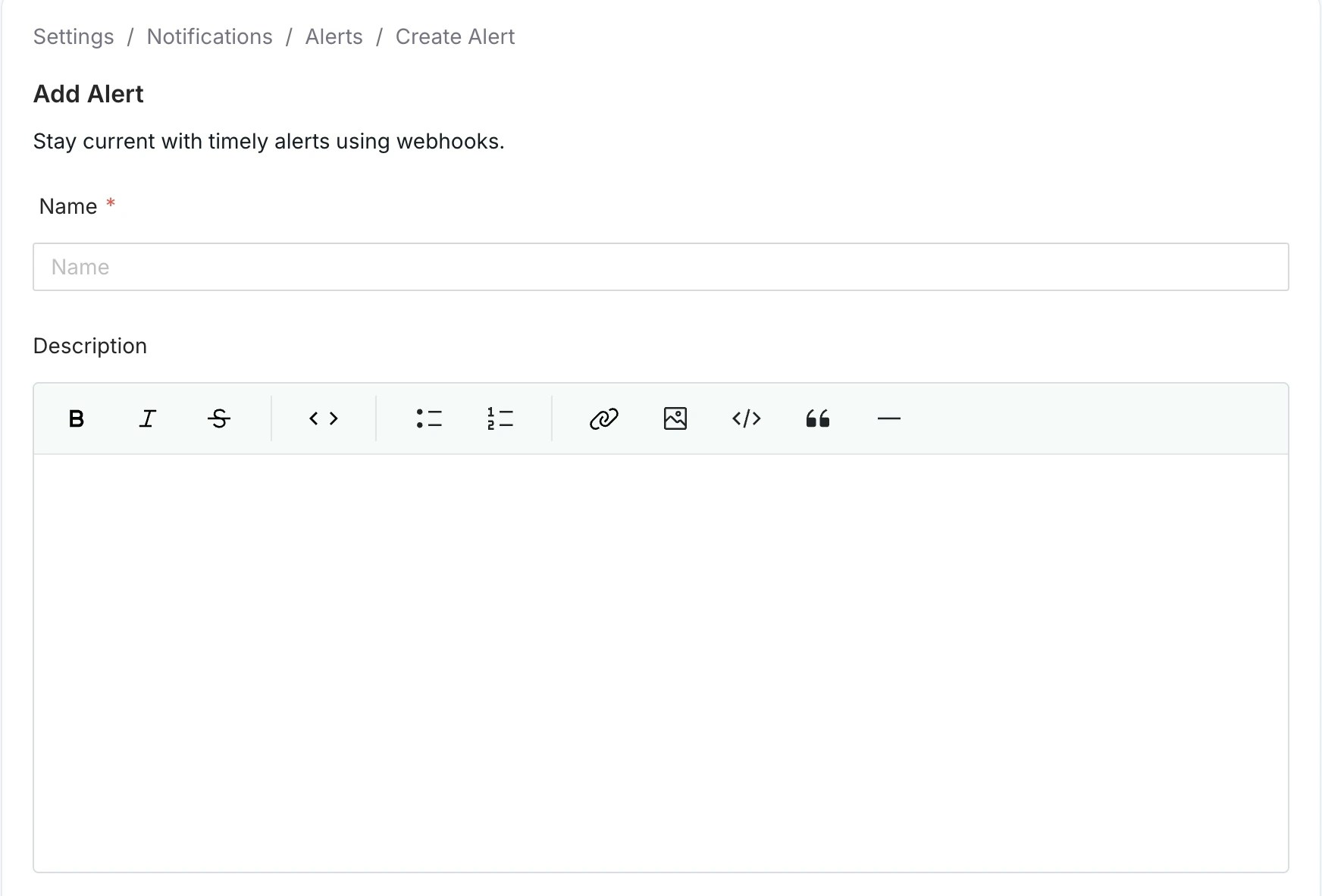
 3. Enter a unique alert **Name** and **Description** (optional) for quick identification.
 4. Select a source entity type to trigger this alert.
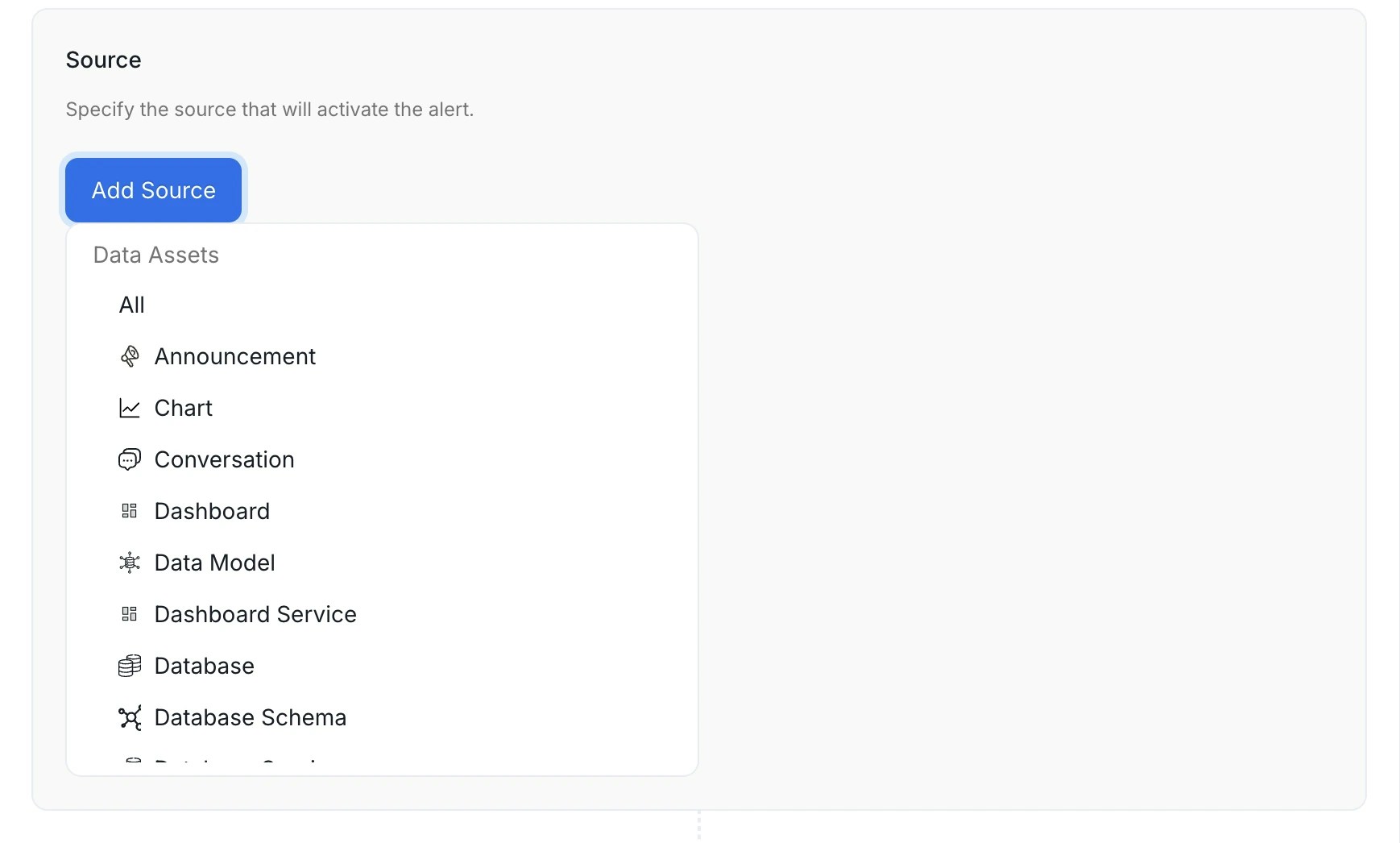 **Available source entities**
The source you pick determines which entity type's events trigger the alert.
Select **All** to receive notifications for every entity type without filtering by source.
To target a specific entity type, choose from data assets, service connections, governance entities, or collaboration threads.
**Data assets**
| Source | What it covers |
| ------------------------ | --------------------------------------------------- |
| **Table** | Database tables and views |
| **Dashboard** | BI dashboards (Tableau, Looker, PowerBI, and so on) |
| **Chart** | Individual charts within a BI dashboard |
| **Dashboard Data Model** | Underlying data models behind BI dashboards |
| **Pipeline** | Data pipeline assets (Airflow, dbt, and so on) |
| **Topic** | Messaging topics (Kafka, Pulsar) |
| **ML Model** | Machine learning model assets |
| **Database** | Database entities within a database service |
| **Database Schema** | Schemas within a database |
| **Data Product** | Data product entities |
**Service connections**
| Source | What it covers |
| ---------------------- | ----------------------------------------------------------------------------------- |
| **Ingestion Pipeline** | Collate metadata ingestion pipelines — fires on success, failure, or config changes |
| **Database Service** | Database service connections (Snowflake, BigQuery, Postgres, and so on) |
| **Dashboard Service** | BI service connections |
| **Pipeline Service** | Pipeline service connections |
| **Messaging Service** | Messaging service connections |
| **Storage Service** | Object storage service connections |
| **ML Model Service** | ML model service connections |
| **Metadata Service** | Metadata service connections |
**Governance**
| Source | What it covers |
| ----------------- | -------------------------------------------- |
| **Glossary** | Business glossary entities |
| **Glossary Term** | Individual terms within a glossary |
| **Tag** | Classification tags |
| **Tag Category** | Tag classifications (for example, PII, Tier) |
| **Domain** | Business domain entities |
| **User** | Collate user accounts |
**Collaboration**
These three sources all relate to threads posted on data assets, but each covers a distinct thread type. Choosing the wrong one is a common source of misconfigured alerts.
| Source | Thread type | What it covers |
| ---------------- | -------------- | --------------------------------------------------------------------------------------------------------------- |
| **Conversation** | `Conversation` | Free-form comments posted on any data asset |
| **Task** | `Task` | Structured workflow tasks — **including incidents**, description requests, tag requests, and approval workflows |
| **Announcement** | `Announcement` | Time-bound announcements posted on data assets |
**Important**:
**Incident alerts require Task as the source, not Conversation.**
Incidents in Collate are Task threads, not Conversation threads. If you set Source = Conversation, the alert will never fire for incident comments, assignments, or status changes. Set Source = **Task** to receive notifications for incident activity.
The **Task** source covers the following task types:
| Task type | When it is created |
| ---------------------------------- | -------------------------------------------------------- |
| `RequestTestCaseFailureResolution` | A data quality test fails and an incident is opened |
| `RequestDescription` | A user requests a description be written for an asset |
| `UpdateDescription` | A user requests an existing description be changed |
| `RequestTag` | A user requests a tag be applied to an asset |
| `UpdateTag` | A user requests an existing tag be changed |
| `RequestApproval` | A governance approval workflow is triggered |
| `RecognizerFeedbackApproval` | An AI recognizer feedback task is submitted for approval |
| `Generic` | A general-purpose task created manually |
The only filter available for **Task** and **Conversation** is **Mentioned User or Team**: narrow the alert to threads where a specific person or team is @-mentioned. You can't filter tasks by task type (for example, incidents only) in the alert UI.
**Note**: An alert scoped to one asset (for example, a single table) now only notifies about conversations and replies on that asset, not on every table or glossary term. If an alert on conversations seems too quiet, its scope may be narrower than you expect. Widen it if needed.
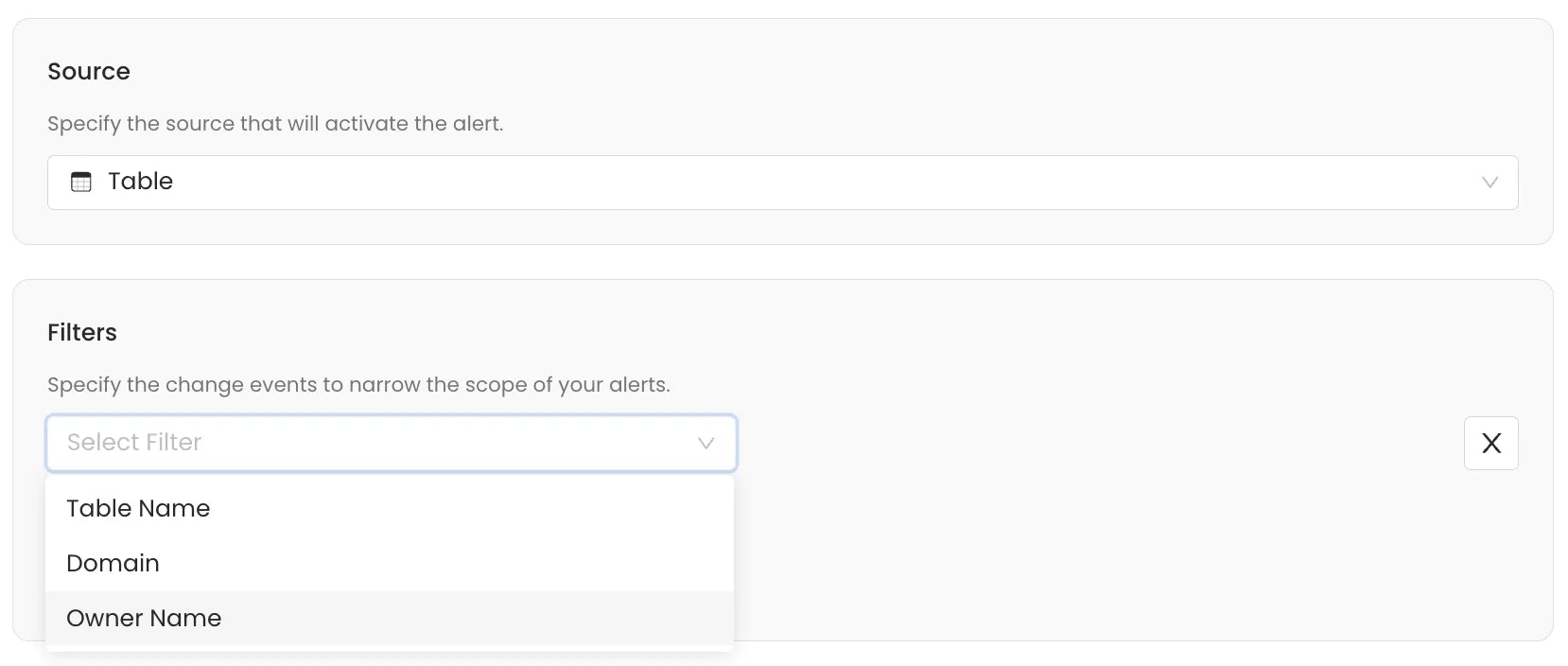
5. Add filters to narrow the alert scope and trigger notifications for specific events.
**Note**: If you don't set any filter, the alert applies to all events over the selected source entity type.
Use filters to narrow the alert to relevant changes. The available criteria depend on the source entity selected. Filter events by:
* **Owner**: Filter events based on the designated owner of the asset.
* **Entity FQN**: Filter by the Fully Qualified Name of the entity.
* **Event Type**: Filter by the specific action that occurred. For more details about the various event types, see the table below.
* **Updater Name**: Filter based on the user or service that executed the change.
* **Domain**: Filter events based on the Data Domain the entity belongs to.
* **Filter By Updater Is Bot**: Filter to include or exclude changes made by automated ingestion or system processes.
| Event Type | What it means |
| ------------------------- | ----------------------------------------------------------------------------------------------------------------------------------------------------------------------------------------------------------------------------------------------------------------------------------------------------------------- |
| `Entity Created` | A new asset is created. |
| `Entity Updated` | A create/update request changes at least one field on the asset. |
| `Entity Fields Changed` | A metadata field changed outside a direct edit. For example, weekly or daily usage statistics were recalculated. |
| `Entity No Change` | A create/update request was processed but produced no actual difference from the asset's current state—for example, a re-ingestion run that found identical metadata. These no-change events are not recorded in the change log that alerts evaluate, so an alert filtered to this event type will never trigger. |
| `Entity Soft Deleted` | An asset is moved to the deleted (recoverable) state. |
| `Entity Deleted` | An asset is permanently removed. |
| `Entity Restored` | A soft-deleted asset is brought back. |
| `Thread Created` | A new conversation thread is started on an asset. |
| `Thread Updated` | An existing conversation thread is edited. |
| `Post Created` | A reply is added to a thread. |
| `Post Updated` | An existing reply is edited. |
| `Task Created` | A task thread is opened. See the task types listed under the Task source above. |
| `Task Updated` | A task's details are edited. |
| `Task Resolved` | A task is marked resolved. |
| `Task Closed` | A task is closed without resolution. |
| `Logical Test Case Added` | A test case is added to a logical test suite. |
| `Suggestion Created` | A new suggestion is created for an asset's description or tag. |
| `Suggestion Updated` | An existing suggestion is edited. |
| `Suggestion Accepted` | A suggestion is accepted and applied to the asset. |
| `Suggestion Rejected` | A suggestion is rejected. |
| `Suggestion Deleted` | A suggestion is deleted. |
| `User Login` | A login to Collate occurs. |
| `User Logout` | A logout from Collate occurs. |
| `Entity Lineage Added` | A lineage edge is added to or from the asset. |
| `Entity Lineage Deleted` | A lineage edge is removed. |
| `Entity Lineage Updated` | An existing lineage edge is changed—for example, column-level lineage details. |
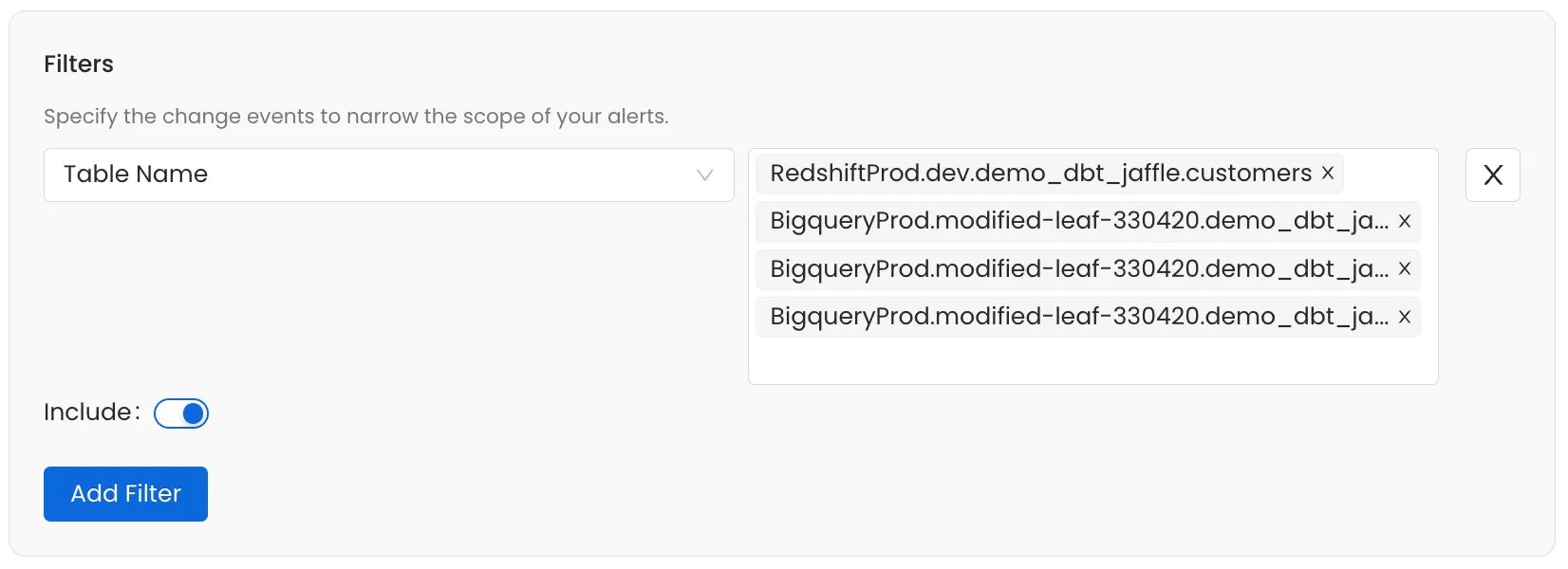
Use the **Include** toggle to define the logic for the filter condition:
* **Include (Toggle ON)**: If the event meets the filter condition, the alert is **sent**.
* **Exclude (Toggle OFF)**: If the event meets the filter condition, the alert is **silenced** (not sent).
Add multiple filters to a single alert subscription.
**Available source entities**
The source you pick determines which entity type's events trigger the alert.
Select **All** to receive notifications for every entity type without filtering by source.
To target a specific entity type, choose from data assets, service connections, governance entities, or collaboration threads.
**Data assets**
| Source | What it covers |
| ------------------------ | --------------------------------------------------- |
| **Table** | Database tables and views |
| **Dashboard** | BI dashboards (Tableau, Looker, PowerBI, and so on) |
| **Chart** | Individual charts within a BI dashboard |
| **Dashboard Data Model** | Underlying data models behind BI dashboards |
| **Pipeline** | Data pipeline assets (Airflow, dbt, and so on) |
| **Topic** | Messaging topics (Kafka, Pulsar) |
| **ML Model** | Machine learning model assets |
| **Database** | Database entities within a database service |
| **Database Schema** | Schemas within a database |
| **Data Product** | Data product entities |
**Service connections**
| Source | What it covers |
| ---------------------- | ----------------------------------------------------------------------------------- |
| **Ingestion Pipeline** | Collate metadata ingestion pipelines — fires on success, failure, or config changes |
| **Database Service** | Database service connections (Snowflake, BigQuery, Postgres, and so on) |
| **Dashboard Service** | BI service connections |
| **Pipeline Service** | Pipeline service connections |
| **Messaging Service** | Messaging service connections |
| **Storage Service** | Object storage service connections |
| **ML Model Service** | ML model service connections |
| **Metadata Service** | Metadata service connections |
**Governance**
| Source | What it covers |
| ----------------- | -------------------------------------------- |
| **Glossary** | Business glossary entities |
| **Glossary Term** | Individual terms within a glossary |
| **Tag** | Classification tags |
| **Tag Category** | Tag classifications (for example, PII, Tier) |
| **Domain** | Business domain entities |
| **User** | Collate user accounts |
**Collaboration**
These three sources all relate to threads posted on data assets, but each covers a distinct thread type. Choosing the wrong one is a common source of misconfigured alerts.
| Source | Thread type | What it covers |
| ---------------- | -------------- | --------------------------------------------------------------------------------------------------------------- |
| **Conversation** | `Conversation` | Free-form comments posted on any data asset |
| **Task** | `Task` | Structured workflow tasks — **including incidents**, description requests, tag requests, and approval workflows |
| **Announcement** | `Announcement` | Time-bound announcements posted on data assets |
**Important**:
**Incident alerts require Task as the source, not Conversation.**
Incidents in Collate are Task threads, not Conversation threads. If you set Source = Conversation, the alert will never fire for incident comments, assignments, or status changes. Set Source = **Task** to receive notifications for incident activity.
The **Task** source covers the following task types:
| Task type | When it is created |
| ---------------------------------- | -------------------------------------------------------- |
| `RequestTestCaseFailureResolution` | A data quality test fails and an incident is opened |
| `RequestDescription` | A user requests a description be written for an asset |
| `UpdateDescription` | A user requests an existing description be changed |
| `RequestTag` | A user requests a tag be applied to an asset |
| `UpdateTag` | A user requests an existing tag be changed |
| `RequestApproval` | A governance approval workflow is triggered |
| `RecognizerFeedbackApproval` | An AI recognizer feedback task is submitted for approval |
| `Generic` | A general-purpose task created manually |
The only filter available for **Task** and **Conversation** is **Mentioned User or Team**: narrow the alert to threads where a specific person or team is @-mentioned. You can't filter tasks by task type (for example, incidents only) in the alert UI.
**Note**: An alert scoped to one asset (for example, a single table) now only notifies about conversations and replies on that asset, not on every table or glossary term. If an alert on conversations seems too quiet, its scope may be narrower than you expect. Widen it if needed.
5. Add filters to narrow the alert scope and trigger notifications for specific events.
**Note**: If you don't set any filter, the alert applies to all events over the selected source entity type.
Use filters to narrow the alert to relevant changes. The available criteria depend on the source entity selected. Filter events by:
* **Owner**: Filter events based on the designated owner of the asset.
* **Entity FQN**: Filter by the Fully Qualified Name of the entity.
* **Event Type**: Filter by the specific action that occurred. For more details about the various event types, see the table below.
* **Updater Name**: Filter based on the user or service that executed the change.
* **Domain**: Filter events based on the Data Domain the entity belongs to.
* **Filter By Updater Is Bot**: Filter to include or exclude changes made by automated ingestion or system processes.
| Event Type | What it means |
| ------------------------- | ----------------------------------------------------------------------------------------------------------------------------------------------------------------------------------------------------------------------------------------------------------------------------------------------------------------- |
| `Entity Created` | A new asset is created. |
| `Entity Updated` | A create/update request changes at least one field on the asset. |
| `Entity Fields Changed` | A metadata field changed outside a direct edit. For example, weekly or daily usage statistics were recalculated. |
| `Entity No Change` | A create/update request was processed but produced no actual difference from the asset's current state—for example, a re-ingestion run that found identical metadata. These no-change events are not recorded in the change log that alerts evaluate, so an alert filtered to this event type will never trigger. |
| `Entity Soft Deleted` | An asset is moved to the deleted (recoverable) state. |
| `Entity Deleted` | An asset is permanently removed. |
| `Entity Restored` | A soft-deleted asset is brought back. |
| `Thread Created` | A new conversation thread is started on an asset. |
| `Thread Updated` | An existing conversation thread is edited. |
| `Post Created` | A reply is added to a thread. |
| `Post Updated` | An existing reply is edited. |
| `Task Created` | A task thread is opened. See the task types listed under the Task source above. |
| `Task Updated` | A task's details are edited. |
| `Task Resolved` | A task is marked resolved. |
| `Task Closed` | A task is closed without resolution. |
| `Logical Test Case Added` | A test case is added to a logical test suite. |
| `Suggestion Created` | A new suggestion is created for an asset's description or tag. |
| `Suggestion Updated` | An existing suggestion is edited. |
| `Suggestion Accepted` | A suggestion is accepted and applied to the asset. |
| `Suggestion Rejected` | A suggestion is rejected. |
| `Suggestion Deleted` | A suggestion is deleted. |
| `User Login` | A login to Collate occurs. |
| `User Logout` | A logout from Collate occurs. |
| `Entity Lineage Added` | A lineage edge is added to or from the asset. |
| `Entity Lineage Deleted` | A lineage edge is removed. |
| `Entity Lineage Updated` | An existing lineage edge is changed—for example, column-level lineage details. |
Use the **Include** toggle to define the logic for the filter condition:
* **Include (Toggle ON)**: If the event meets the filter condition, the alert is **sent**.
* **Exclude (Toggle OFF)**: If the event meets the filter condition, the alert is **silenced** (not sent).
Add multiple filters to a single alert subscription.
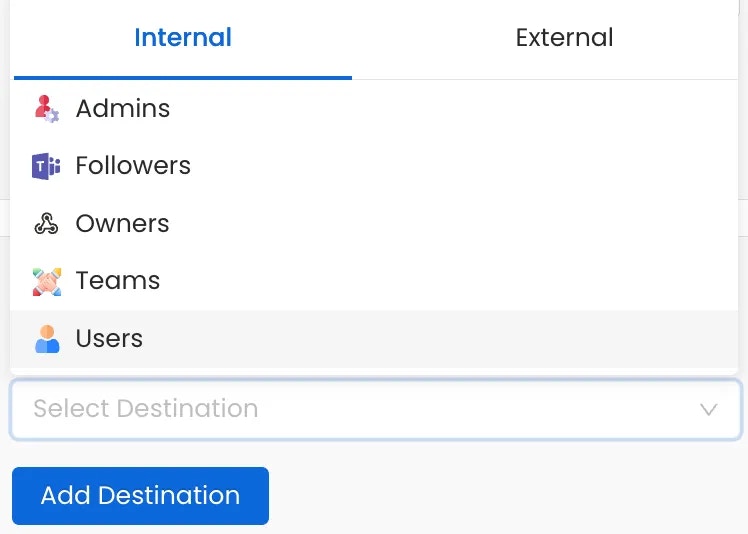
 6. Add destinations where you want to deliver alerts. Select **Add Destination** to add one or more notification targets.
**Internal**:
* **Admins** - Notify all platform administrators
* **Assignees** - Notify users assigned to the asset
* **Followers** - Notify users following the asset
* **Mentions** - Notify users mentioned on the asset
* **Owners** - Notify the owners of the asset
* **Teams** - Notify a specific team
* **Users** - Notify specific individual users
**External** — select a **Type**:
* **Email**
* **G Chat**
* **Ms Teams**
* **Slack**
* **Webhook**
(Optional) Enable **Notify Downstream** to propagate notifications to downstream assets linked to the monitored entity.
6. Add destinations where you want to deliver alerts. Select **Add Destination** to add one or more notification targets.
**Internal**:
* **Admins** - Notify all platform administrators
* **Assignees** - Notify users assigned to the asset
* **Followers** - Notify users following the asset
* **Mentions** - Notify users mentioned on the asset
* **Owners** - Notify the owners of the asset
* **Teams** - Notify a specific team
* **Users** - Notify specific individual users
**External** — select a **Type**:
* **Email**
* **G Chat**
* **Ms Teams**
* **Slack**
* **Webhook**
(Optional) Enable **Notify Downstream** to propagate notifications to downstream assets linked to the monitored entity.
 7. Select a **Notification Template** to control the wording of the message this alert sends — its subject line and body. Choose from:
* **System Default Template** — the built-in wording, used when nothing else is selected.
* **A saved template** — a reusable template created in Notification Templates.
* **Create Custom Template** — wording written here and belonging to this alert alone.
For full details on creating and managing templates, including Handlebars placeholders, helpers, and examples, see [Notification Templates](/ai-2-0/how-to-guides/data-quality-observability/alerts-notifications/notification-templates).
7. Select a **Notification Template** to control the wording of the message this alert sends — its subject line and body. Choose from:
* **System Default Template** — the built-in wording, used when nothing else is selected.
* **A saved template** — a reusable template created in Notification Templates.
* **Create Custom Template** — wording written here and belonging to this alert alone.
For full details on creating and managing templates, including Handlebars placeholders, helpers, and examples, see [Notification Templates](/ai-2-0/how-to-guides/data-quality-observability/alerts-notifications/notification-templates).