> ## Documentation Index
> Fetch the complete documentation index at: https://docs.getcollate.io/llms.txt
> Use this file to discover all available pages before exploring further.
# Deploy a Lineage Workflow
> Build data lineage using workflows to extract upstream and downstream dependencies.
export const connector_0 = "bigquery"
# Deploy a Lineage Workflow
Collate gives you three ways to build lineage for your data assets — automatically through metadata ingestion, through a dedicated Lineage Agent that reads query logs, or manually through the UI.
The lineage workflow is supported for all major database connectors, including [BigQuery](/ai-2-0/connectors/database/bigquery), [Snowflake](/ai-2-0/connectors/database/snowflake), [Redshift](/ai-2-0/connectors/database/redshift), [MSSQL](/ai-2-0/connectors/database/mssql), [Clickhouse](/ai-2-0/connectors/database/clickhouse), [PostgreSQL](/ai-2-0/connectors/database/postgres), [Databricks](/ai-2-0/connectors/database/databricks), [Athena](/ai-2-0/connectors/database/athena), [MySQL](/ai-2-0/connectors/database/mysql), [Oracle](/ai-2-0/connectors/database/oracle), and many more.
## View Lineage from Metadata Ingestion
When metadata ingestion runs, Collate automatically checks whether each table is a view. For sources where Collate can retrieve the view definition query, it pulls in view lineage alongside the regular metadata — no extra configuration needed.
Here's how Collate builds view lineage:
1. **Ingest all tables**: Collate completes metadata ingestion for all tables in the service.
2. **Identify views**: Collate flags any table whose type is **View**.
3. **Parse the view query**: Collate extracts the SQL query used to create the view.
4. **Resolve source and target tables**: Collate checks whether the referenced tables exist in Collate.
5. **Create the lineage relationship**: Collate links the source and target tables in the lineage graph.
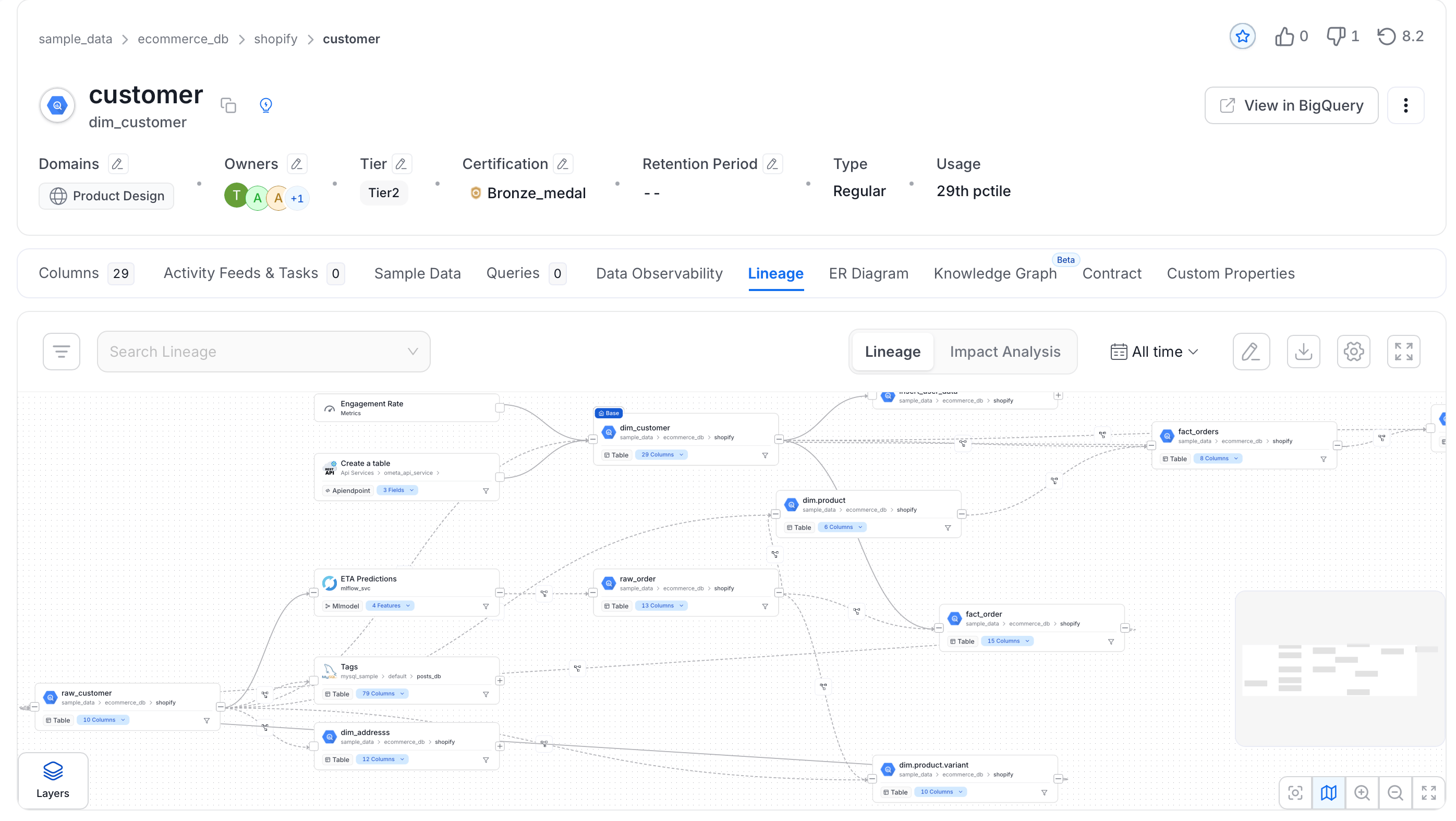
Collate generates both table-level and column-level lineage from views automatically.
 ## Lineage Agent from UI
The Lineage Agent reads query logs from your database and uses them to build lineage. Metadata ingestion captures view lineage only — the Lineage Agent captures all query-based lineage, giving you a more complete picture of how data flows through your systems.
### Step 1: Add a Lineage Agent
Navigate to your service and launch the Lineage Agent wizard.
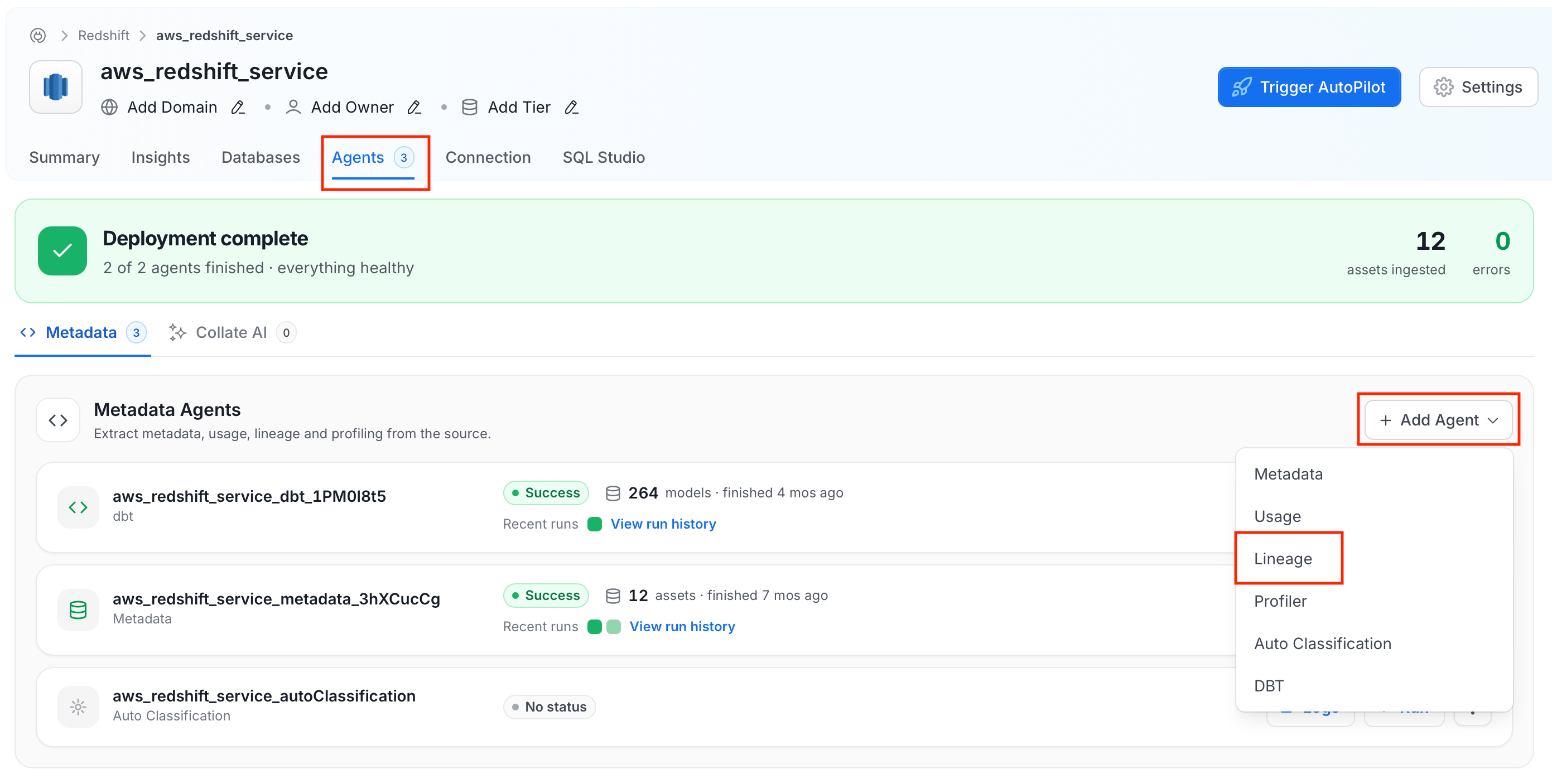
1. In the left navigation, click **Connections** and select your service.
2. Open the **Agents** tab and click **+ Add Agent** > **Lineage**.
## Lineage Agent from UI
The Lineage Agent reads query logs from your database and uses them to build lineage. Metadata ingestion captures view lineage only — the Lineage Agent captures all query-based lineage, giving you a more complete picture of how data flows through your systems.
### Step 1: Add a Lineage Agent
Navigate to your service and launch the Lineage Agent wizard.
1. In the left navigation, click **Connections** and select your service.
2. Open the **Agents** tab and click **+ Add Agent** > **Lineage**.
 3. Give the agent a recognisable name and click **Next**.
### Step 2: Configure the Agent
Configure the core parameters for this agent.
3. Give the agent a recognisable name and click **Next**.
### Step 2: Configure the Agent
Configure the core parameters for this agent.
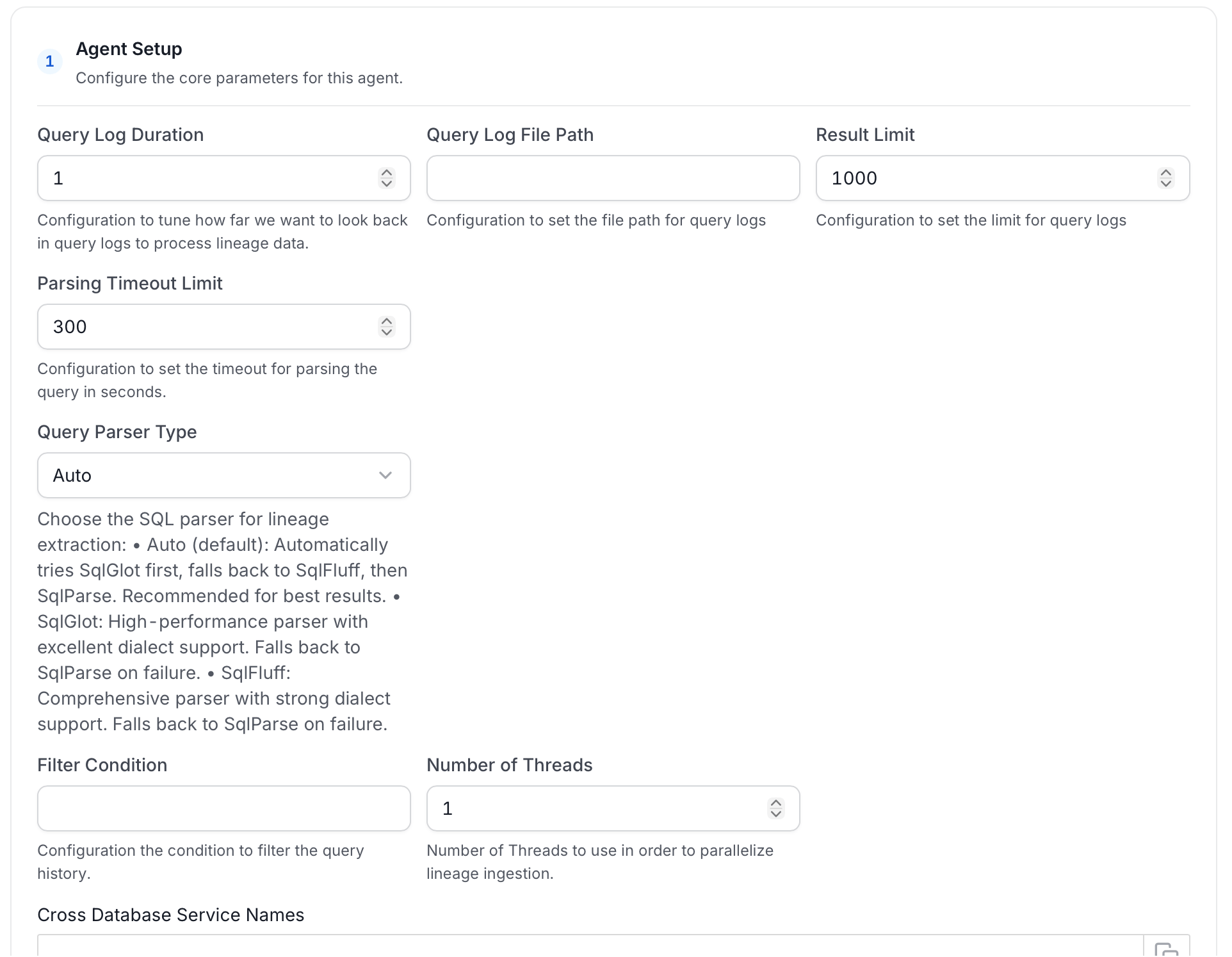 **Agent Setup**
| Field | Default | Description |
| ------------------------------------ | ------- | -------------------------------------------------------------------------------------------------------------------------------------------------------------------------------------------------------------------------------------------------------------------------------------------------------- |
| **Query Log Duration** | `1` | How many days back to look in the query log. |
| **Query Log File Path** | — | Path to a query log file. Use this instead of reading directly from the database. |
| **Result Limit** | `1000` | Maximum number of query log rows to process per run. |
| **Parsing Timeout Limit** | `300` | Timeout in seconds for parsing a single SQL query. |
| **Query Parser Type** | `Auto` | SQL parser for lineage extraction. **Auto** tries SqlGlot first, then SqlFluff, then SqlParse. **SqlGlot** offers high performance with excellent dialect support. **SqlFluff** provides comprehensive dialect support. |
| **Filter Condition** | — | SQL condition applied to the query history result set to exclude specific queries. See [Usage Query Filtering](/ai-2-0/how-to-guides/guide-for-data-users/ingestion/workflows/usage/filter-query-set). |
| **Number of Threads** | `1` | Number of threads to use for parallel lineage ingestion. |
| **Cross Database Service Names** | — | Names of other Collate services to search when resolving table references during lineage extraction. List specific service names. The underlying lookup returns a limited number of matches, so `*` can miss the correct service or resolve to the wrong table when many services or tables share names. |
| **Override View Lineage** | Off | When enabled, overwrites existing view lineage on each run. |
| **Process View Lineage** | On | Parse view definitions for lineage. |
| **Process Query Lineage** | On | Parse query logs for lineage. |
| **Process Stored Procedure Lineage** | On | Parse stored procedure definitions for lineage. |
| **Process Cross Database Lineage** | Off | Build lineage across tables in different databases or projects (for example, across BigQuery projects). Also set **Cross Database Service Names** when enabling this option. See [Cross Database Lineage](/ai-2-0/how-to-guides/data-lineage/cross-database-lineage). |
| **Enable Temp Table Lineage** | Off | Handle lineage for Snowflake temporary and transient tables. |
| **Incremental Lineage Processing** | On | Process only new or changed lineage data on each run. |
**Filter Patterns**
Apply regex patterns to include or exclude specific databases, schemas, tables, or stored procedures.
**Scope & Behaviour**
| Field | Description |
| -------------------- | -------------------------------------------------------------- |
| **Enable Debug Log** | Turn on verbose logging to help troubleshoot ingestion issues. |
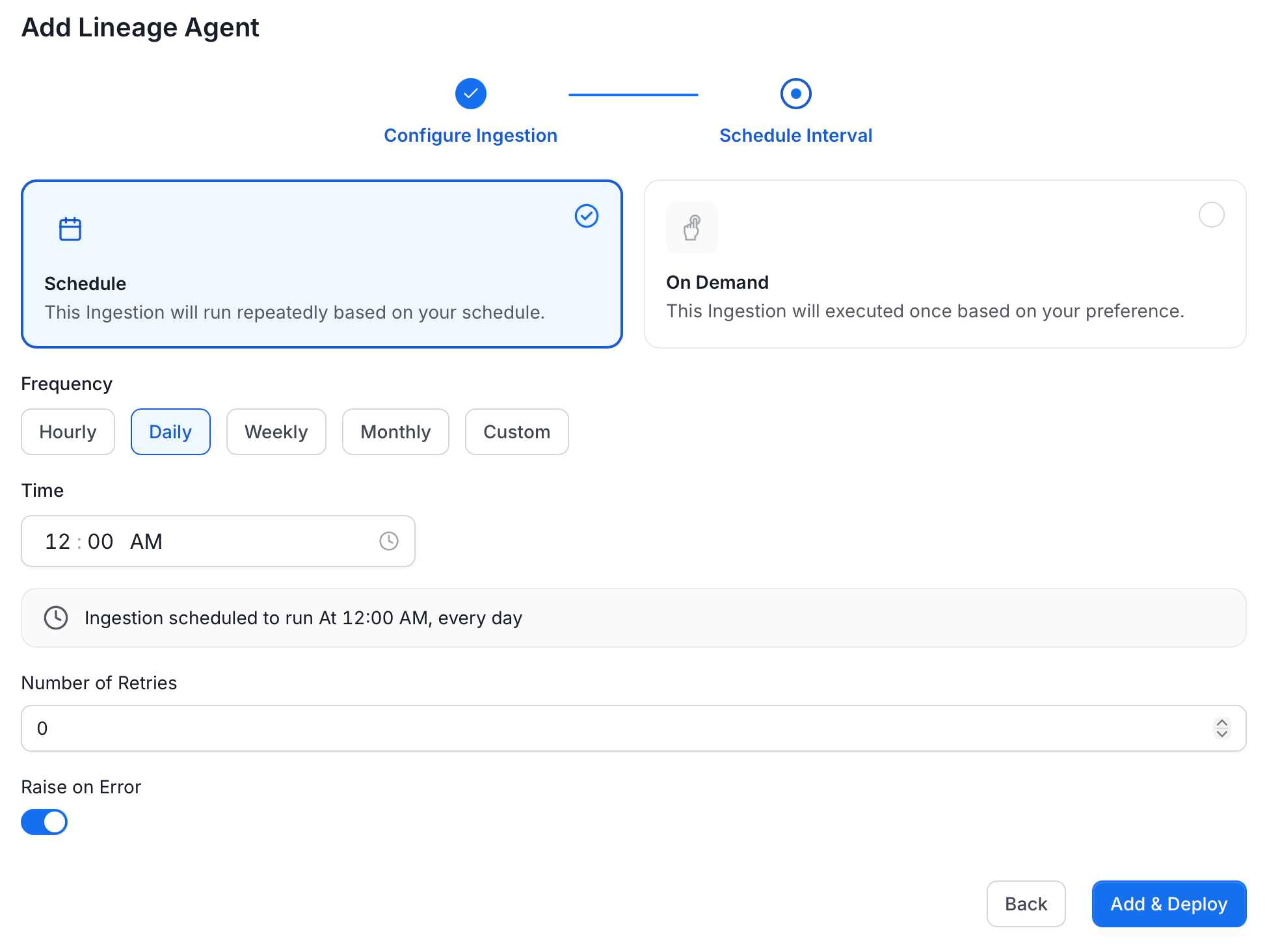
### Step 3: Schedule and Deploy
Set your desired run schedule and click **Add & Deploy**.
**Agent Setup**
| Field | Default | Description |
| ------------------------------------ | ------- | -------------------------------------------------------------------------------------------------------------------------------------------------------------------------------------------------------------------------------------------------------------------------------------------------------- |
| **Query Log Duration** | `1` | How many days back to look in the query log. |
| **Query Log File Path** | — | Path to a query log file. Use this instead of reading directly from the database. |
| **Result Limit** | `1000` | Maximum number of query log rows to process per run. |
| **Parsing Timeout Limit** | `300` | Timeout in seconds for parsing a single SQL query. |
| **Query Parser Type** | `Auto` | SQL parser for lineage extraction. **Auto** tries SqlGlot first, then SqlFluff, then SqlParse. **SqlGlot** offers high performance with excellent dialect support. **SqlFluff** provides comprehensive dialect support. |
| **Filter Condition** | — | SQL condition applied to the query history result set to exclude specific queries. See [Usage Query Filtering](/ai-2-0/how-to-guides/guide-for-data-users/ingestion/workflows/usage/filter-query-set). |
| **Number of Threads** | `1` | Number of threads to use for parallel lineage ingestion. |
| **Cross Database Service Names** | — | Names of other Collate services to search when resolving table references during lineage extraction. List specific service names. The underlying lookup returns a limited number of matches, so `*` can miss the correct service or resolve to the wrong table when many services or tables share names. |
| **Override View Lineage** | Off | When enabled, overwrites existing view lineage on each run. |
| **Process View Lineage** | On | Parse view definitions for lineage. |
| **Process Query Lineage** | On | Parse query logs for lineage. |
| **Process Stored Procedure Lineage** | On | Parse stored procedure definitions for lineage. |
| **Process Cross Database Lineage** | Off | Build lineage across tables in different databases or projects (for example, across BigQuery projects). Also set **Cross Database Service Names** when enabling this option. See [Cross Database Lineage](/ai-2-0/how-to-guides/data-lineage/cross-database-lineage). |
| **Enable Temp Table Lineage** | Off | Handle lineage for Snowflake temporary and transient tables. |
| **Incremental Lineage Processing** | On | Process only new or changed lineage data on each run. |
**Filter Patterns**
Apply regex patterns to include or exclude specific databases, schemas, tables, or stored procedures.
**Scope & Behaviour**
| Field | Description |
| -------------------- | -------------------------------------------------------------- |
| **Enable Debug Log** | Turn on verbose logging to help troubleshoot ingestion issues. |
### Step 3: Schedule and Deploy
Set your desired run schedule and click **Add & Deploy**.
 ## Run Lineage Workflow Externally
## Lineage
After running a Metadata Ingestion workflow, we can run Lineage workflow.
While the `serviceName` will be the same to that was used in Metadata Ingestion, so the ingestion bot can get the `serviceConnection` details from the server.
### 1. Define the YAML Config
This is a sample config for {connector_0} Lineage:
Configure the source type and service name for your lineage workflow.
You can find all the definitions and types for the `sourceConfig` [here](https://github.com/open-metadata/OpenMetadata/blob/main/openmetadata-spec/src/main/resources/json/schema/metadataIngestion/databaseServiceQueryLineagePipeline.json).
**type**: Set to `DatabaseLineage` for database lineage ingestion.
**queryLogDuration**: Configuration to tune how far we want to look back in query logs to process lineage data in days.
**parsingTimeoutLimit**: Configuration to set the timeout for parsing the query in seconds.
**filterCondition**: Condition to filter the query history.
**resultLimit**: Configuration to set the limit for query logs.
**queryLogFilePath**: Configuration to set the file path for query logs. If instead of getting the query logs from the database we want to pass a file with the queries.
**databaseFilterPattern**: Regex to only fetch databases that matches the pattern.
**schemaFilterPattern**: Regex to only fetch tables or databases that matches the pattern.
**tableFilterPattern**: Regex to only fetch tables or databases that matches the pattern.
**overrideViewLineage**: Set the 'Override View Lineage' toggle to control whether to override the existing view lineage.
**processViewLineage**: Set the 'Process View Lineage' toggle to control whether to process view lineage.
**processQueryLineage**: Set the 'Process Query Lineage' toggle to control whether to process query lineage.
**processStoredProcedureLineage**: Set the 'Process Stored ProcedureLog Lineage' toggle to control whether to process stored procedure lineage.
**threads**: Number of Threads to use in order to parallelize lineage ingestion.
To send the metadata to Collate, it needs to be specified as `type: metadata-rest`.
```yaml theme={null}
source:
type: bigquery-lineage
serviceName: bigquery
sourceConfig:
config:
type: DatabaseLineage
# Number of days to look back
queryLogDuration: 1
parsingTimeoutLimit: 300
# filterCondition: query_text not ilike '--- metabase query %'
resultLimit: 1000
# If instead of getting the query logs from the database we want to pass a file with the queries
# queryLogFilePath: /tmp/query_log/file_path
# databaseFilterPattern:
# includes:
# - database1
# - database2
# excludes:
# - database3
# schemaFilterPattern:
# includes:
# - schema1
# - schema2
# excludes:
# - schema3
# tableFilterPattern:
# includes:
# - table1
# - table2
# excludes:
# - table3
# - table4
overrideViewLineage: false
processViewLineage: true
processQueryLineage: true
processStoredProcedureLineage: true
threads: 1
sink:
type: metadata-rest
config: {}
```
* You can learn more about how to configure and run the Lineage Workflow to extract Lineage data from [here](/ai-2-0/how-to-guides/guide-for-data-users/ingestion/workflows/lineage)
### 2. Run with the CLI
After saving the YAML config, we will run the command the same way we did for the metadata ingestion:
```bash theme={null}
metadata ingest -c
```
## Lineage from dbt
Collate builds lineage from [dbt ingestion](/ai-2-0/connectors/database/dbt/configure-dbt-workflow) too. When you run a dbt workflow, Collate reads your `manifest.json` to extract query history and table relationships — including column-level lineage.
To set this up, provide the path to your `catalog.json` and `manifest.json` files in the dbt workflow configuration.
Learn more about [dbt lineage](/ai-2-0/connectors/database/dbt/ingest-dbt-lineage) and [lineage ingestion](/ai-2-0/how-to-guides/guide-for-data-users/ingestion/lineage).
## Lineage from Query Logs (CSV)
If your connector doesn't support the Lineage Agent, you can still bring in lineage by uploading a CSV file of query logs. See [Lineage Workflows using Query Logs](/ai-2-0/how-to-guides/guide-for-data-users/ingestion/workflows/lineage/lineage-workflow-query-logs) for setup instructions.
## Manual Lineage
You can also add and edit lineage directly in the Collate UI — without running any ingestion. See [adding lineage manually](/ai-2-0/how-to-guides/data-lineage/manual).
Explore the rich lineage view in Collate.
## Run Lineage Workflow Externally
## Lineage
After running a Metadata Ingestion workflow, we can run Lineage workflow.
While the `serviceName` will be the same to that was used in Metadata Ingestion, so the ingestion bot can get the `serviceConnection` details from the server.
### 1. Define the YAML Config
This is a sample config for {connector_0} Lineage:
Configure the source type and service name for your lineage workflow.
You can find all the definitions and types for the `sourceConfig` [here](https://github.com/open-metadata/OpenMetadata/blob/main/openmetadata-spec/src/main/resources/json/schema/metadataIngestion/databaseServiceQueryLineagePipeline.json).
**type**: Set to `DatabaseLineage` for database lineage ingestion.
**queryLogDuration**: Configuration to tune how far we want to look back in query logs to process lineage data in days.
**parsingTimeoutLimit**: Configuration to set the timeout for parsing the query in seconds.
**filterCondition**: Condition to filter the query history.
**resultLimit**: Configuration to set the limit for query logs.
**queryLogFilePath**: Configuration to set the file path for query logs. If instead of getting the query logs from the database we want to pass a file with the queries.
**databaseFilterPattern**: Regex to only fetch databases that matches the pattern.
**schemaFilterPattern**: Regex to only fetch tables or databases that matches the pattern.
**tableFilterPattern**: Regex to only fetch tables or databases that matches the pattern.
**overrideViewLineage**: Set the 'Override View Lineage' toggle to control whether to override the existing view lineage.
**processViewLineage**: Set the 'Process View Lineage' toggle to control whether to process view lineage.
**processQueryLineage**: Set the 'Process Query Lineage' toggle to control whether to process query lineage.
**processStoredProcedureLineage**: Set the 'Process Stored ProcedureLog Lineage' toggle to control whether to process stored procedure lineage.
**threads**: Number of Threads to use in order to parallelize lineage ingestion.
To send the metadata to Collate, it needs to be specified as `type: metadata-rest`.
```yaml theme={null}
source:
type: bigquery-lineage
serviceName: bigquery
sourceConfig:
config:
type: DatabaseLineage
# Number of days to look back
queryLogDuration: 1
parsingTimeoutLimit: 300
# filterCondition: query_text not ilike '--- metabase query %'
resultLimit: 1000
# If instead of getting the query logs from the database we want to pass a file with the queries
# queryLogFilePath: /tmp/query_log/file_path
# databaseFilterPattern:
# includes:
# - database1
# - database2
# excludes:
# - database3
# schemaFilterPattern:
# includes:
# - schema1
# - schema2
# excludes:
# - schema3
# tableFilterPattern:
# includes:
# - table1
# - table2
# excludes:
# - table3
# - table4
overrideViewLineage: false
processViewLineage: true
processQueryLineage: true
processStoredProcedureLineage: true
threads: 1
sink:
type: metadata-rest
config: {}
```
* You can learn more about how to configure and run the Lineage Workflow to extract Lineage data from [here](/ai-2-0/how-to-guides/guide-for-data-users/ingestion/workflows/lineage)
### 2. Run with the CLI
After saving the YAML config, we will run the command the same way we did for the metadata ingestion:
```bash theme={null}
metadata ingest -c
```
## Lineage from dbt
Collate builds lineage from [dbt ingestion](/ai-2-0/connectors/database/dbt/configure-dbt-workflow) too. When you run a dbt workflow, Collate reads your `manifest.json` to extract query history and table relationships — including column-level lineage.
To set this up, provide the path to your `catalog.json` and `manifest.json` files in the dbt workflow configuration.
Learn more about [dbt lineage](/ai-2-0/connectors/database/dbt/ingest-dbt-lineage) and [lineage ingestion](/ai-2-0/how-to-guides/guide-for-data-users/ingestion/lineage).
## Lineage from Query Logs (CSV)
If your connector doesn't support the Lineage Agent, you can still bring in lineage by uploading a CSV file of query logs. See [Lineage Workflows using Query Logs](/ai-2-0/how-to-guides/guide-for-data-users/ingestion/workflows/lineage/lineage-workflow-query-logs) for setup instructions.
## Manual Lineage
You can also add and edit lineage directly in the Collate UI — without running any ingestion. See [adding lineage manually](/ai-2-0/how-to-guides/data-lineage/manual).
Explore the rich lineage view in Collate.