> ## Documentation Index
> Fetch the complete documentation index at: https://docs.getcollate.io/llms.txt
> Use this file to discover all available pages before exploring further.
# Metrics
# Metrics in Collate
The **Metrics** entity in Collate lets you define, track, and manage key business and operational metrics. Metrics help your organization maintain consistency, traceability, and accuracy in data-driven decision-making.
## Overview of Metrics
Metrics represent calculated values based on data assets. Collate categorizes them under the **Governance** section. You can link each metric to glossary terms, data assets, and other metrics for comprehensive visibility into data quality and usage.
## Key Properties of a Metric
| **Property** | **Description** | **Example Value** |
| ----------------------- | --------------------------------------------------------------------------- | ------------------------------ |
| **Name** | Unique identifier for the metric, following camelCase naming conventions. | `customerRetentionRate` |
| **Display Name** | Human-readable name for the metric. | `Customer Retention Rate` |
| **Description** | Detailed explanation of what the metric represents. | `Percentage of retained users` |
| **Expression** | Formula or SQL query used to calculate the metric. | `COUNT(returning_customers)` |
| **Granularity** | Time scale for the metric, such as daily, weekly, or monthly. | `Daily` |
| **Metric Type** | Type of calculation applied to the metric (e.g., count, average, ratio). | `Percentage` |
| **Unit of Measurement** | Unit for interpreting metric values, such as count, dollars, or percentage. | `Percentage` |
| **SQL Query** | Optional SQL query defining the metric. | `SELECT COUNT(*) FROM sales` |
| **Owner** | Individual or team responsible for maintaining the metric. | `Data Governance Team` |
## Metric Lineage and Dependencies
Use Collate to trace the source and dependencies of metrics using lineage. This ensures end-to-end traceability from raw data to metric reporting. A typical lineage might look like:
```commandline theme={null}
Database Table → Metric → Pipeline → Dashboard
```
You can view associated tables, pipelines, and dashboards to understand how Collate generates and uses each metric.
## Creating Metrics Using the UI
To create a new metric in Collate using the user interface, follow these steps:
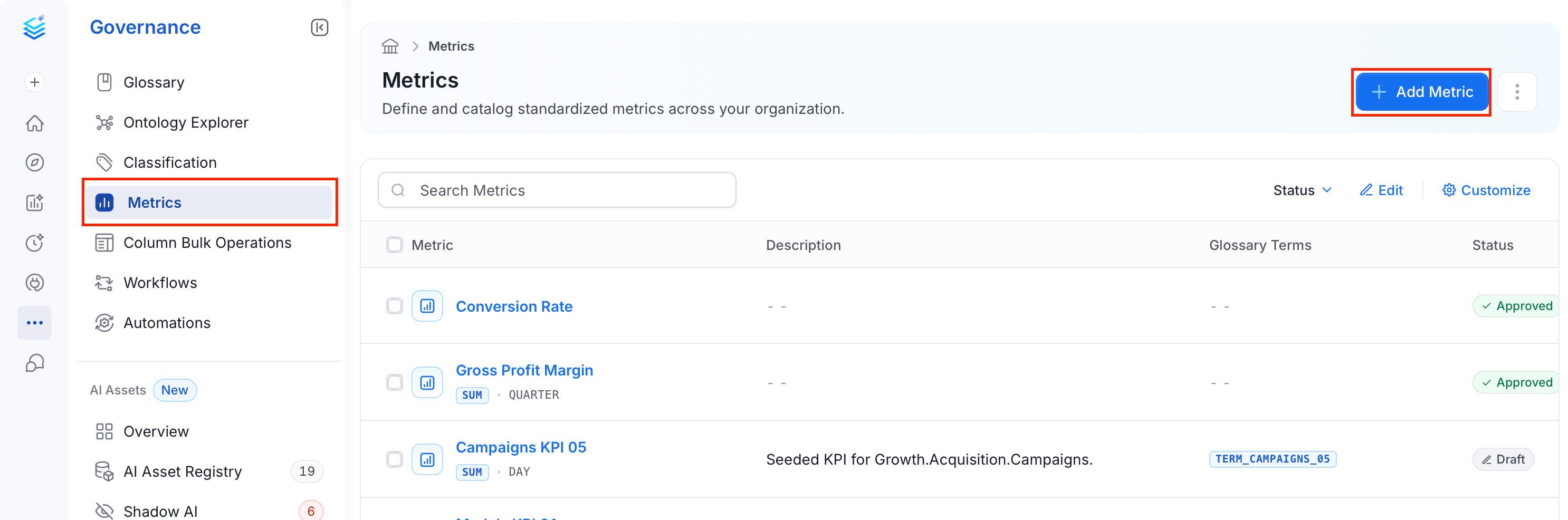
1. From the left navigation bar, navigate to **Governance** > **Metric**.
2. Click **Add Metric**.
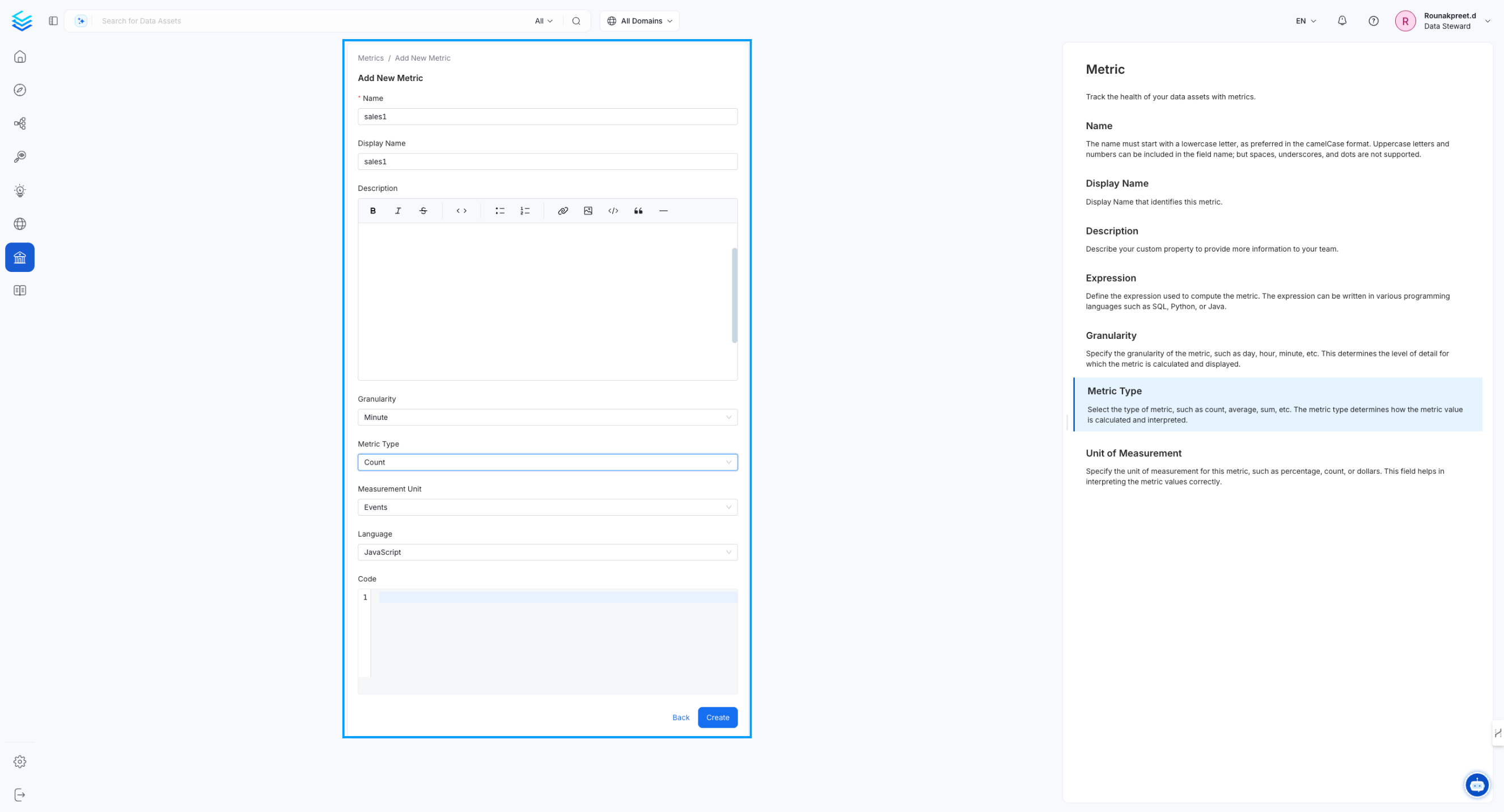
 3. Fill in the following fields:
* **Name** (required): Enter a unique identifier for the metric, using camelCase without spaces (for example, `customerRetentionRate`).
* **Display Name** (Optional): Enter a human-readable name displayed in the UI (for example, `Customer Retention Rate`).
* **Description** (Optional): Describe what the metric measures and how it is used.
* **Granularity** (Optional): Select the time scale for the metric — for example, **Daily**, **Weekly**, or **Monthly**.
* **Metric Type** (Optional): Select the type of calculation — for example, **Count**, **Average**, or **Percentage**.
* **Language** (Optional): Select the programming language for the metric expression — for example, **SQL**, **Python**, or **Java**.
* **Measurement Unit** (Optional): Select the unit used to interpret the metric value — for example, **Count**, **Percentage**, or **Dollar**.
* **Code** (Optional): Enter the formula or query that computes the metric in the selected language.
4. Click **Create** to save the metric.
3. Fill in the following fields:
* **Name** (required): Enter a unique identifier for the metric, using camelCase without spaces (for example, `customerRetentionRate`).
* **Display Name** (Optional): Enter a human-readable name displayed in the UI (for example, `Customer Retention Rate`).
* **Description** (Optional): Describe what the metric measures and how it is used.
* **Granularity** (Optional): Select the time scale for the metric — for example, **Daily**, **Weekly**, or **Monthly**.
* **Metric Type** (Optional): Select the type of calculation — for example, **Count**, **Average**, or **Percentage**.
* **Language** (Optional): Select the programming language for the metric expression — for example, **SQL**, **Python**, or **Java**.
* **Measurement Unit** (Optional): Select the unit used to interpret the metric value — for example, **Count**, **Percentage**, or **Dollar**.
* **Code** (Optional): Enter the formula or query that computes the metric in the selected language.
4. Click **Create** to save the metric.
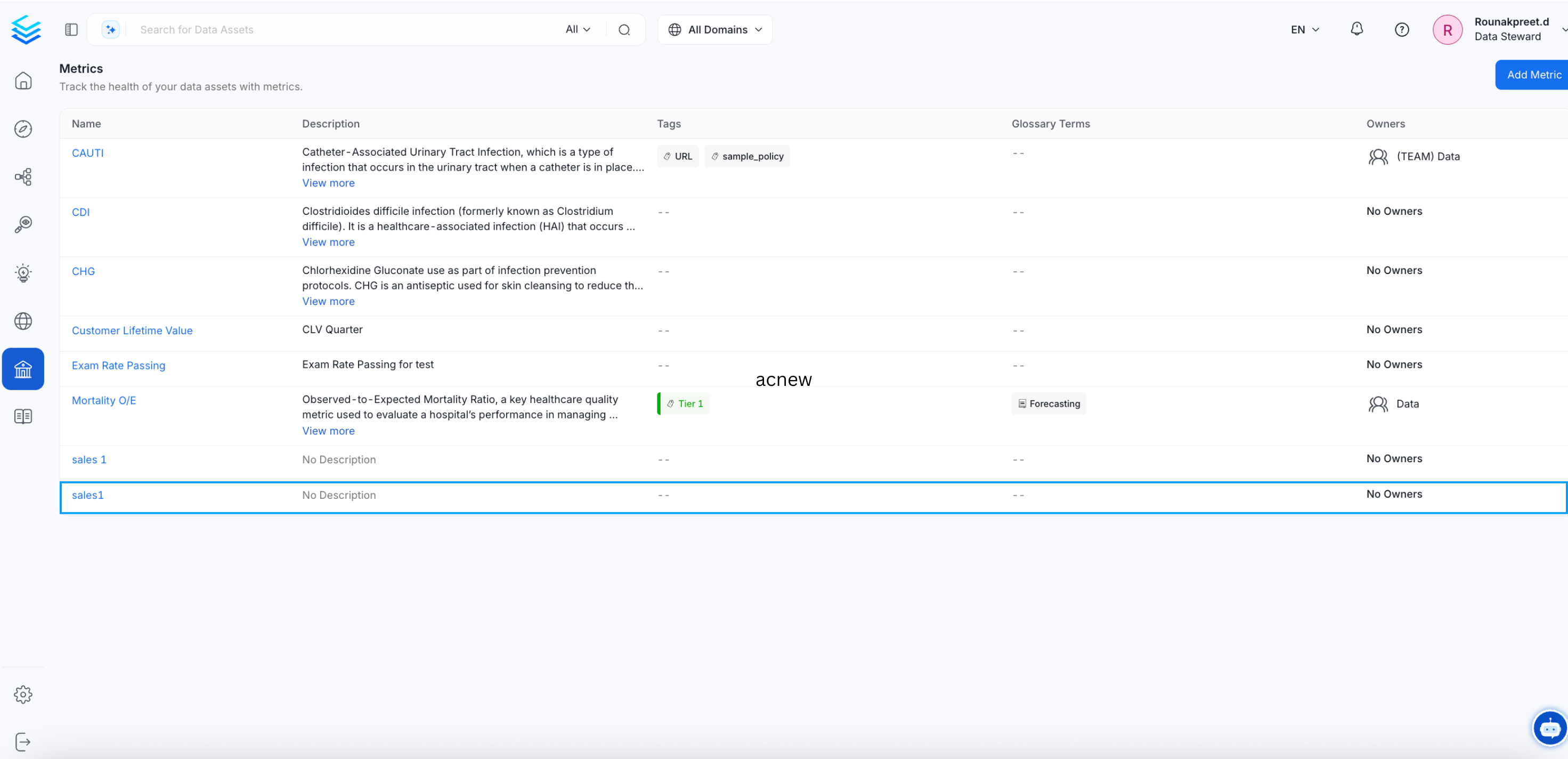
 5. The newly created metric appears in the **Metrics** page.
 ## Example JSON Schema for Metric
```json theme={null}
{
"id": "123e4567-e89b-12d3-a456-426614174000",
"name": "customerRetentionRate",
"displayName": "Customer Retention Rate",
"description": "Percentage of customers retained over a given period.",
"formula": "COUNT(returning_customers) / COUNT(total_customers) * 100",
"sql": "SELECT COUNT(*) FROM customer_activity WHERE status='active'",
"granularity": "Monthly",
"metricType": "Percentage",
"unit": "Percentage",
"owner": "Data Governance Team",
"tags": ["Customer", "KPI", "Retention"]
}
```
## Managing Metrics in Collate
* **Versioning**: Each update to a metric creates a new version, maintaining historical changes.
* **Linking**: Metrics can be linked to glossary terms, tables, dashboards, and pipelines for enriched context.
* **Monitoring**: Monitor metrics for value changes to enable trend analysis over time.
## Best Practices for Metric Management
* **Consistent Naming**: Use camelCase for metric names to ensure consistency across systems.
* **Clear Definitions**: Provide comprehensive descriptions and units for accurate interpretation.
* **Lineage Tracking**: Always associate metrics with source tables and pipelines for traceability.
* **Ownership**: Assign metric owners for accountability and maintenance.
## Example JSON Schema for Metric
```json theme={null}
{
"id": "123e4567-e89b-12d3-a456-426614174000",
"name": "customerRetentionRate",
"displayName": "Customer Retention Rate",
"description": "Percentage of customers retained over a given period.",
"formula": "COUNT(returning_customers) / COUNT(total_customers) * 100",
"sql": "SELECT COUNT(*) FROM customer_activity WHERE status='active'",
"granularity": "Monthly",
"metricType": "Percentage",
"unit": "Percentage",
"owner": "Data Governance Team",
"tags": ["Customer", "KPI", "Retention"]
}
```
## Managing Metrics in Collate
* **Versioning**: Each update to a metric creates a new version, maintaining historical changes.
* **Linking**: Metrics can be linked to glossary terms, tables, dashboards, and pipelines for enriched context.
* **Monitoring**: Monitor metrics for value changes to enable trend analysis over time.
## Best Practices for Metric Management
* **Consistent Naming**: Use camelCase for metric names to ensure consistency across systems.
* **Clear Definitions**: Provide comprehensive descriptions and units for accurate interpretation.
* **Lineage Tracking**: Always associate metrics with source tables and pipelines for traceability.
* **Ownership**: Assign metric owners for accountability and maintenance.