> ## Documentation Index
> Fetch the complete documentation index at: https://docs.getcollate.io/llms.txt
> Use this file to discover all available pages before exploring further.
# Create Glossary Terms
> Learn to create terms within glossary hierarchies and assign owners, reviewers, and asset relationships.
# Create Glossary Terms
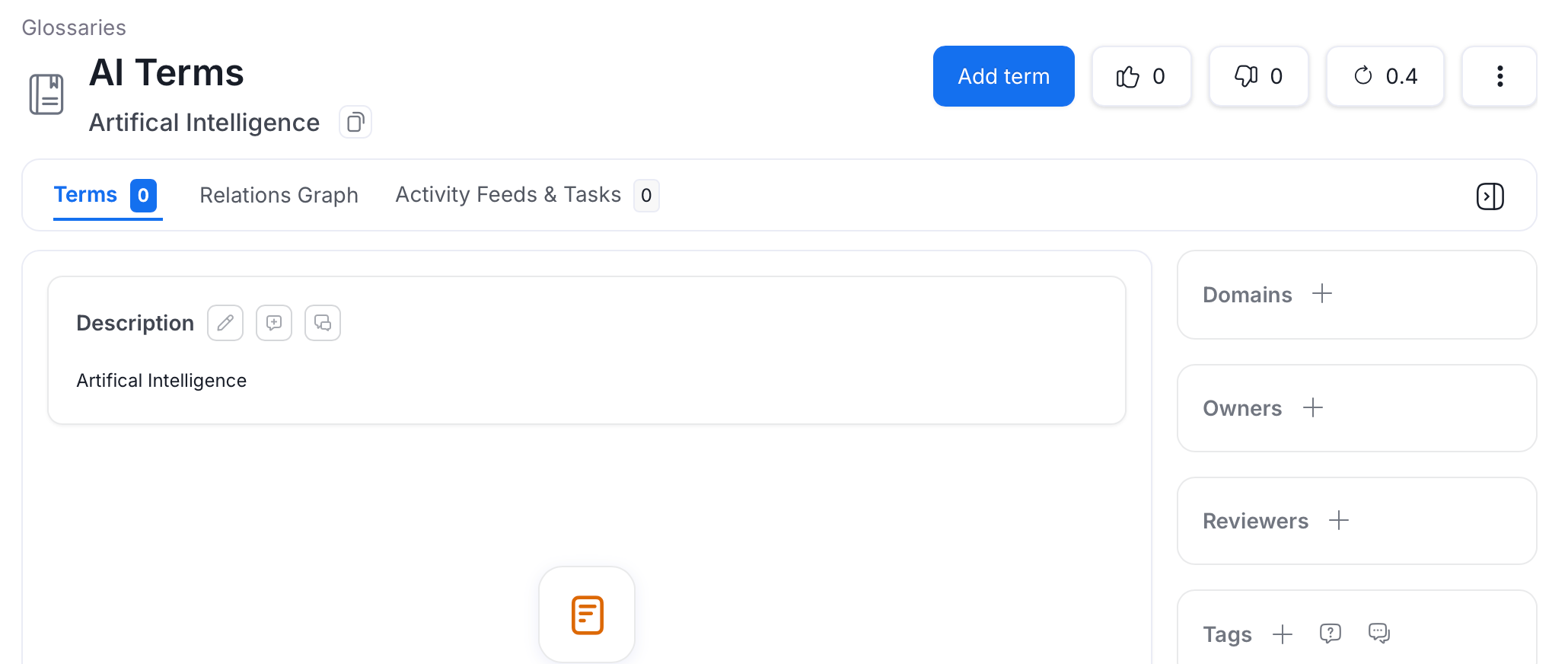
After creating a glossary, you can add multiple **Glossary Terms** and **Child Terms** to it.
To add a glossary term:
1. Select the glossary to add a glossary term.
2. Click **Add Term**.
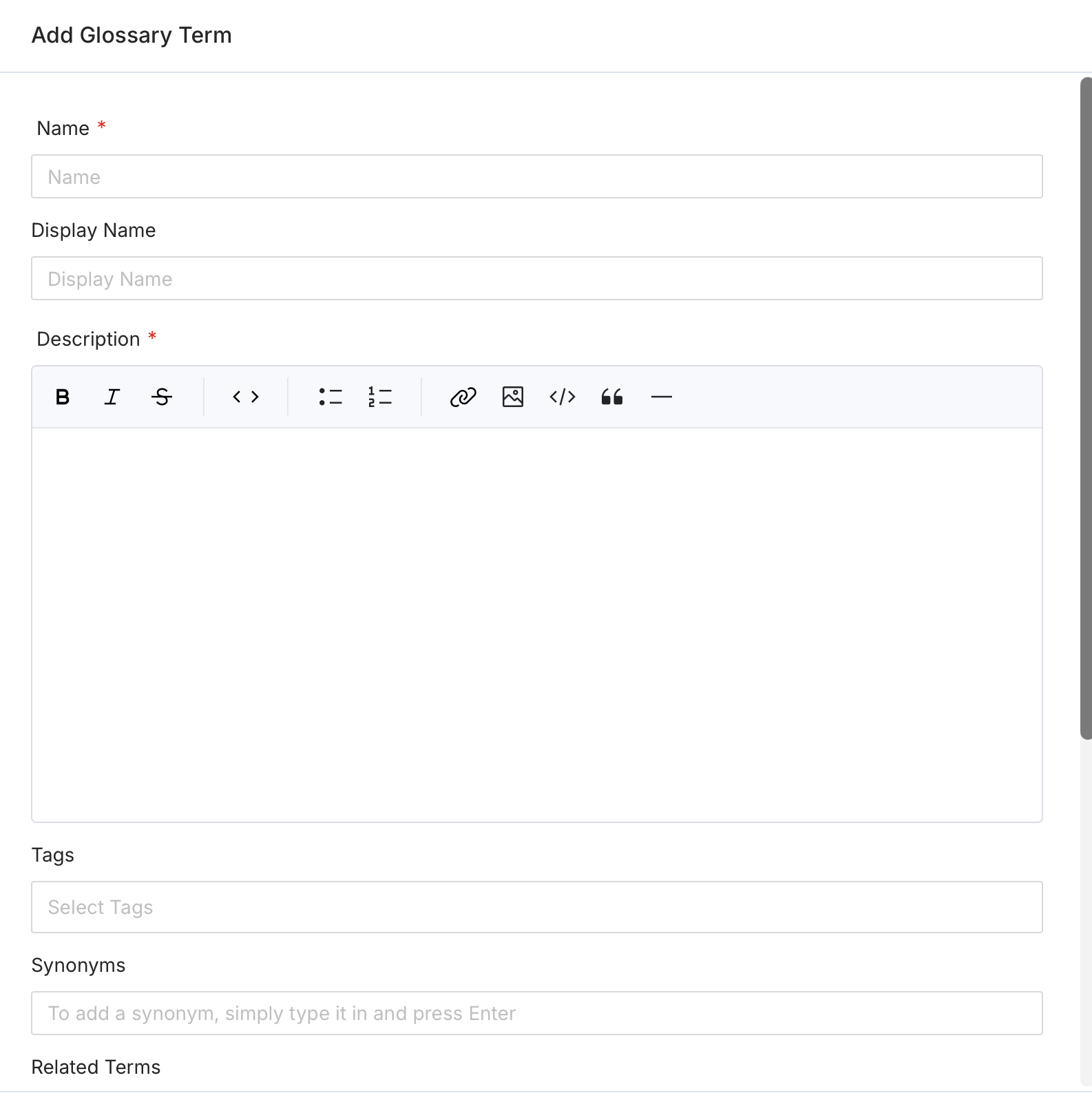
 3. Fill the following details:
* **Name** (required) — The name of the glossary term.
* **Display Name** — A human-friendly label shown in the UI.
* **Description** (required) — A unique and clear definition to establish consistent usage and understanding of the term.
* **Tags** — Add classification tags to the term. When a glossary term is added to an asset, its associated tags are also applied to that asset.
* **Synonyms** — Other terms used for the same concept. For example, for a term ‘Customer’, synonyms can be ‘Client’, ‘Shopper’, or ‘Purchaser’.
* **Related Terms** — Terms that capture an associative relationship. For example, for a term ‘Customer’, related terms can be ‘Customer LTV (LifeTime Value)’ or ‘Customer Acquisition Cost (CAC)’.
* **Mutually Exclusive** — When enabled, only one child term from this glossary term can be assigned to a data asset at a time.
* **References** — Add external links to sources where this term originated or is defined.
* **Owners** — Assign one or more teams or users as owners of the glossary term.
* **Reviewers** — Add multiple reviewers who approve changes to this term.
3. Fill the following details:
* **Name** (required) — The name of the glossary term.
* **Display Name** — A human-friendly label shown in the UI.
* **Description** (required) — A unique and clear definition to establish consistent usage and understanding of the term.
* **Tags** — Add classification tags to the term. When a glossary term is added to an asset, its associated tags are also applied to that asset.
* **Synonyms** — Other terms used for the same concept. For example, for a term ‘Customer’, synonyms can be ‘Client’, ‘Shopper’, or ‘Purchaser’.
* **Related Terms** — Terms that capture an associative relationship. For example, for a term ‘Customer’, related terms can be ‘Customer LTV (LifeTime Value)’ or ‘Customer Acquisition Cost (CAC)’.
* **Mutually Exclusive** — When enabled, only one child term from this glossary term can be assigned to a data asset at a time.
* **References** — Add external links to sources where this term originated or is defined.
* **Owners** — Assign one or more teams or users as owners of the glossary term.
* **Reviewers** — Add multiple reviewers who approve changes to this term.
 After adding a glossary term, you can create **Child Terms** under it. The child terms help to build a conceptual hierarchy (Parent-Child relationship) to go from generic to specific concepts. For example, for a term ‘Customer’, the child terms can be ‘Loyal Customer’, ‘New Customer’, ‘Online Customer’.
Instead of creating a glossary manually, you can **[bulk upload glossary terms](/ai-2-0/how-to-guides/data-governance/glossary/import)** using a CSV file.
Save time and effort by bulk uploading glossary terms using a CSV file.
Associate glossary terms to data assets making it easier for data discovery.
After adding a glossary term, you can create **Child Terms** under it. The child terms help to build a conceptual hierarchy (Parent-Child relationship) to go from generic to specific concepts. For example, for a term ‘Customer’, the child terms can be ‘Loyal Customer’, ‘New Customer’, ‘Online Customer’.
Instead of creating a glossary manually, you can **[bulk upload glossary terms](/ai-2-0/how-to-guides/data-governance/glossary/import)** using a CSV file.
Save time and effort by bulk uploading glossary terms using a CSV file.
Associate glossary terms to data assets making it easier for data discovery.