> ## Documentation Index
> Fetch the complete documentation index at: https://docs.getcollate.io/llms.txt
> Use this file to discover all available pages before exploring further.
# Configure Metadata Ingestion
> Run your first metadata ingestion in Collate to populate the catalog with assets, schemas, lineage, and ownership from your connected data sources.
# Configure Metadata Ingestion
After a connector is added, set up a metadata ingestion agent to bring data into Collate automatically.
To configure the Metadata Agent and schedule ingestion, follow these steps:
1. In the left navigation, click **Connections** and select your service.
2. Click the **Agents** tab.
3. Click **Add Agent** and select **Metadata** from the dropdown.
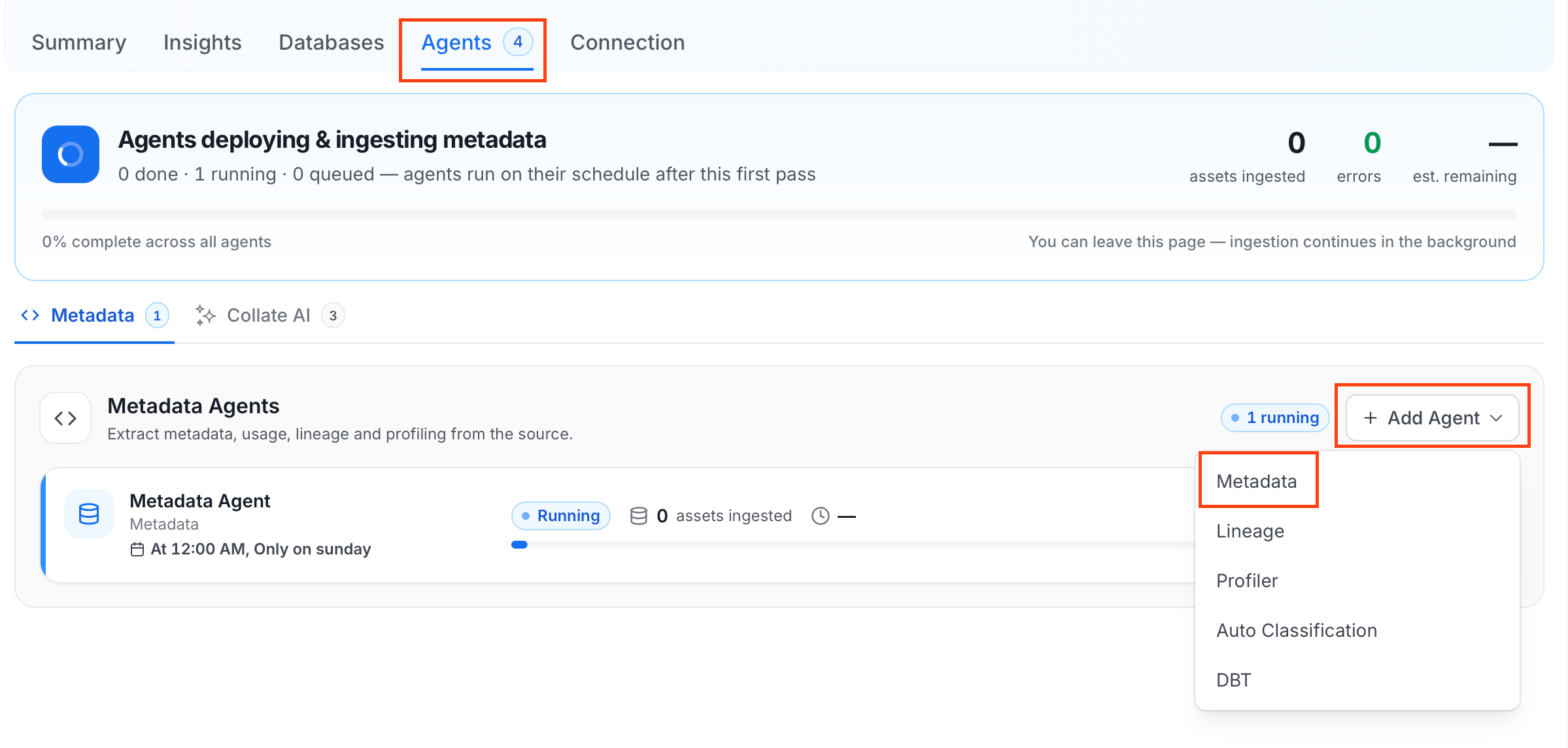 For some services, the dropdown is not available and clicking **Add Agent** takes you directly to the agent configuration page.
4. On the **Configure Ingestion** page, do the following:
* **Name**: Enter a unique recognizable **Name** for this ingestion pipeline.
For some services, the dropdown is not available and clicking **Add Agent** takes you directly to the agent configuration page.
4. On the **Configure Ingestion** page, do the following:
* **Name**: Enter a unique recognizable **Name** for this ingestion pipeline.
 * **Agent Setup**: Configure core parameters for metadata extraction.
* **Filter Patterns**: Apply include or exclude rules to scope which databases, schemas, tables, and stored procedures this agent ingests.
* **Scope & Behaviour**: Control how the agent handles metadata during ingestion.
* **Advanced Config**: Optional connector-specific settings such as Include Views and Extract JSON Schema.
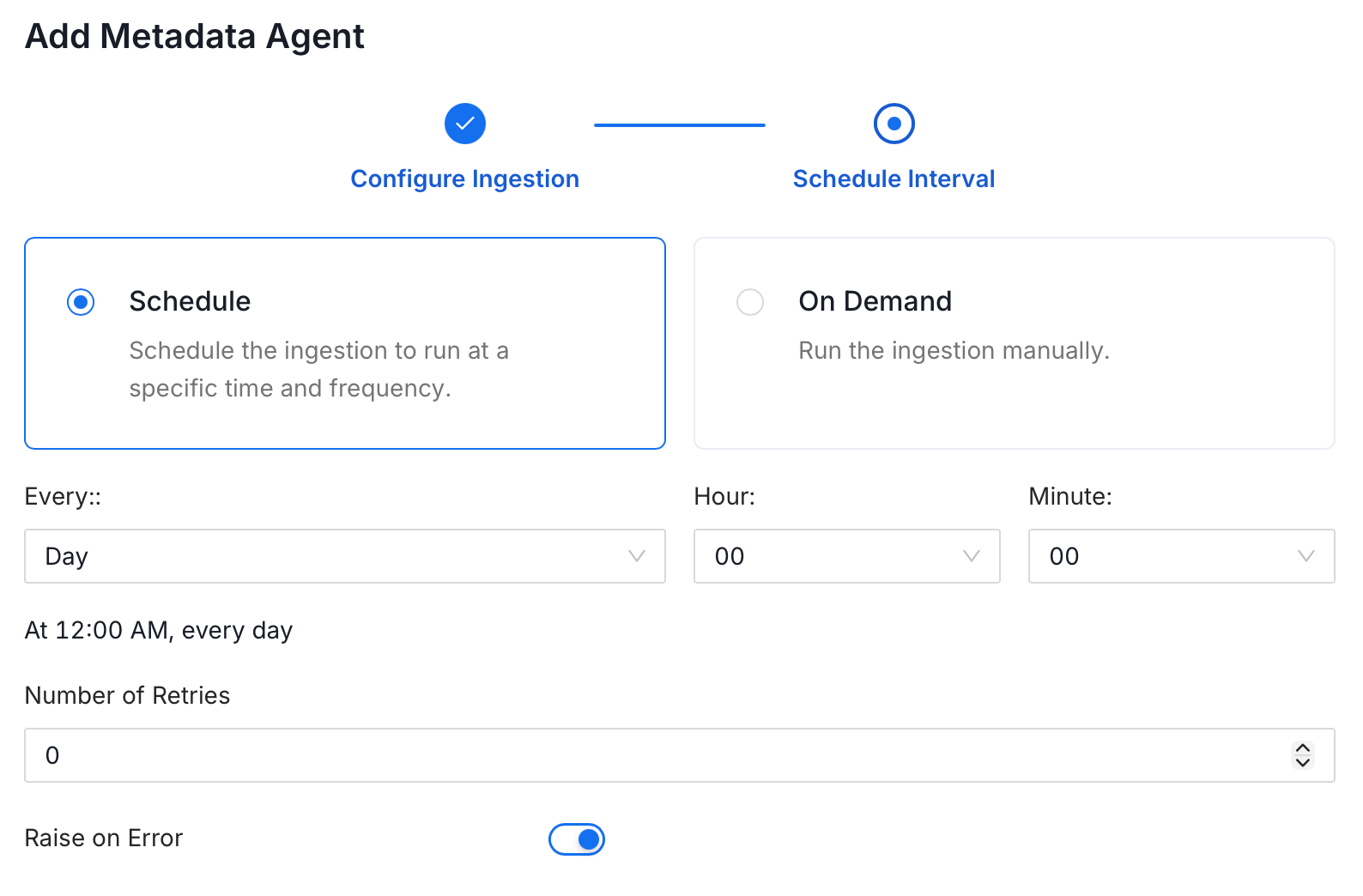
5. On the Schedule Interval page, set when the agent runs:
* **Schedule**: Choose a preset interval (Hourly, Daily, Weekly, Monthly) or enter a custom cron expression.
* **On-Demand**: No automatic schedule; trigger the agent manually when needed.
* **Agent Setup**: Configure core parameters for metadata extraction.
* **Filter Patterns**: Apply include or exclude rules to scope which databases, schemas, tables, and stored procedures this agent ingests.
* **Scope & Behaviour**: Control how the agent handles metadata during ingestion.
* **Advanced Config**: Optional connector-specific settings such as Include Views and Extract JSON Schema.
5. On the Schedule Interval page, set when the agent runs:
* **Schedule**: Choose a preset interval (Hourly, Daily, Weekly, Monthly) or enter a custom cron expression.
* **On-Demand**: No automatic schedule; trigger the agent manually when needed.
 6. Click **Add** to deploy the agent.
After ingestion completes, to view your added data assets in the Collate platform, click **Explore** in the left navigation menu. Next [Step 3 - Invite Users](/ai-2-0/getting-started/lets-get-started/invite-users).
6. Click **Add** to deploy the agent.
After ingestion completes, to view your added data assets in the Collate platform, click **Explore** in the left navigation menu. Next [Step 3 - Invite Users](/ai-2-0/getting-started/lets-get-started/invite-users).