> ## Documentation Index
> Fetch the complete documentation index at: https://docs.getcollate.io/llms.txt
> Use this file to discover all available pages before exploring further.

# Pipeline Connectors

> Browse pipeline connectors including Airflow, Flink, NiFi, and more to ingest lineage metadata.

# Pipeline Services

This is the supported list of connectors for Pipeline Services:

<CardGroup cols="2">
  <Card title="Airbyte" icon="https://mintcdn.com/collatedocs/lyQrThlmh8cYozqe/public/images/connectors/airbyte.webp?fit=max&auto=format&n=lyQrThlmh8cYozqe&q=85&s=eb05f9e39c7aaa3edf85a3af48873ccb" href="/ai-2-0/connectors/pipeline/airbyte" horizontal width="200" height="200" data-path="public/images/connectors/airbyte.webp">
    <img src="https://mintcdn.com/collatedocs/qTqd1tlB8cqEVgXb/public/images/connectors/openmetadata-logo.png?fit=max&auto=format&n=qTqd1tlB8cqEVgXb&q=85&s=ad28bd1f2fd6ae2dd39f0703121c1653" style={{ position: 'absolute', top: '17px', right: '60px', width: 'auto', height: '16px', margin: '0' }} alt="OpenMetadata" width="69" height="83" data-path="public/images/connectors/openmetadata-logo.png" />

    <div className="prod-beta-chip beta">BETA</div>
  </Card>

  <Card title="Airflow" icon="https://mintcdn.com/collatedocs/lyQrThlmh8cYozqe/public/images/connectors/airflow.webp?fit=max&auto=format&n=lyQrThlmh8cYozqe&q=85&s=1ec82cb55cd5ca4eacef88bae5e39f78" href="/ai-2-0/connectors/pipeline/airflow" horizontal width="360" height="360" data-path="public/images/connectors/airflow.webp">
    <img src="https://mintcdn.com/collatedocs/qTqd1tlB8cqEVgXb/public/images/connectors/openmetadata-logo.png?fit=max&auto=format&n=qTqd1tlB8cqEVgXb&q=85&s=ad28bd1f2fd6ae2dd39f0703121c1653" style={{ position: 'absolute', top: '17px', right: '60px', width: 'auto', height: '16px', margin: '0' }} alt="OpenMetadata" width="69" height="83" data-path="public/images/connectors/openmetadata-logo.png" />

    <div className="prod-beta-chip prod">PROD</div>
  </Card>

  <Card title="Azure Data Factory" icon="https://mintcdn.com/collatedocs/12mtkhFtvTP7FUxZ/public/images/connectors/datafactory.png?fit=max&auto=format&n=12mtkhFtvTP7FUxZ&q=85&s=45d69435eced5b81a114e45d947bf9cc" href="/ai-2-0/connectors/pipeline/datafactory" horizontal width="5000" height="5001" data-path="public/images/connectors/datafactory.png">
    <div className="prod-beta-chip prod">PROD</div>
  </Card>

  <Card title="Dagster" icon="https://mintcdn.com/collatedocs/12mtkhFtvTP7FUxZ/public/images/connectors/dagster.webp?fit=max&auto=format&n=12mtkhFtvTP7FUxZ&q=85&s=fbe595238c19db62ce17e1c5f332d507" href="/ai-2-0/connectors/pipeline/dagster" horizontal width="560" height="560" data-path="public/images/connectors/dagster.webp">
    <img src="https://mintcdn.com/collatedocs/qTqd1tlB8cqEVgXb/public/images/connectors/openmetadata-logo.png?fit=max&auto=format&n=qTqd1tlB8cqEVgXb&q=85&s=ad28bd1f2fd6ae2dd39f0703121c1653" style={{ position: 'absolute', top: '17px', right: '60px', width: 'auto', height: '16px', margin: '0' }} alt="OpenMetadata" width="69" height="83" data-path="public/images/connectors/openmetadata-logo.png" />

    <div className="prod-beta-chip prod">PROD</div>
  </Card>

  <Card title="Databricks" icon="https://mintcdn.com/collatedocs/12mtkhFtvTP7FUxZ/public/images/connectors/databrick.webp?fit=max&auto=format&n=12mtkhFtvTP7FUxZ&q=85&s=595ec3832f654c87e1ec35a422933f7f" href="/ai-2-0/connectors/pipeline/databricks-pipeline" horizontal width="360" height="360" data-path="public/images/connectors/databrick.webp">
    <img src="https://mintcdn.com/collatedocs/qTqd1tlB8cqEVgXb/public/images/connectors/openmetadata-logo.png?fit=max&auto=format&n=qTqd1tlB8cqEVgXb&q=85&s=ad28bd1f2fd6ae2dd39f0703121c1653" style={{ position: 'absolute', top: '17px', right: '60px', width: 'auto', height: '16px', margin: '0' }} alt="OpenMetadata" width="69" height="83" data-path="public/images/connectors/openmetadata-logo.png" />

    <div className="prod-beta-chip prod">PROD</div>
  </Card>

  <Card title="dbt Cloud" icon="https://mintcdn.com/collatedocs/sQLcFBJkf-K-wqlw/public/images/connectors/dbtcloud.webp?fit=max&auto=format&n=sQLcFBJkf-K-wqlw&q=85&s=18543fd7e5cf9ea59b0973b7f329a317" href="/ai-2-0/connectors/pipeline/dbtcloud" horizontal width="360" height="360" data-path="public/images/connectors/dbtcloud.webp">
    <img src="https://mintcdn.com/collatedocs/qTqd1tlB8cqEVgXb/public/images/connectors/openmetadata-logo.png?fit=max&auto=format&n=qTqd1tlB8cqEVgXb&q=85&s=ad28bd1f2fd6ae2dd39f0703121c1653" style={{ position: 'absolute', top: '17px', right: '60px', width: 'auto', height: '16px', margin: '0' }} alt="OpenMetadata" width="69" height="83" data-path="public/images/connectors/openmetadata-logo.png" />

    <div className="prod-beta-chip beta">BETA</div>
  </Card>

  <Card title="Domo" icon="https://mintcdn.com/collatedocs/sQLcFBJkf-K-wqlw/public/images/connectors/domo.webp?fit=max&auto=format&n=sQLcFBJkf-K-wqlw&q=85&s=a4857b2f080765f934e516ca7df81fe3" href="/ai-2-0/connectors/pipeline/domo-pipeline" horizontal width="400" height="400" data-path="public/images/connectors/domo.webp">
    <img src="https://mintcdn.com/collatedocs/qTqd1tlB8cqEVgXb/public/images/connectors/openmetadata-logo.png?fit=max&auto=format&n=qTqd1tlB8cqEVgXb&q=85&s=ad28bd1f2fd6ae2dd39f0703121c1653" style={{ position: 'absolute', top: '17px', right: '60px', width: 'auto', height: '16px', margin: '0' }} alt="OpenMetadata" width="69" height="83" data-path="public/images/connectors/openmetadata-logo.png" />

    <div className="prod-beta-chip prod">PROD</div>
  </Card>

  <Card title="Fivetran" icon="https://mintcdn.com/collatedocs/NU2cty4wnF-KyKEi/public/images/connectors/fivetran.webp?fit=max&auto=format&n=NU2cty4wnF-KyKEi&q=85&s=47d5fb4d1fac63be97757617fb0e4226" href="/ai-2-0/connectors/pipeline/fivetran" horizontal width="554" height="768" data-path="public/images/connectors/fivetran.webp">
    <img src="https://mintcdn.com/collatedocs/qTqd1tlB8cqEVgXb/public/images/connectors/openmetadata-logo.png?fit=max&auto=format&n=qTqd1tlB8cqEVgXb&q=85&s=ad28bd1f2fd6ae2dd39f0703121c1653" style={{ position: 'absolute', top: '17px', right: '60px', width: 'auto', height: '16px', margin: '0' }} alt="OpenMetadata" width="69" height="83" data-path="public/images/connectors/openmetadata-logo.png" />

    <div className="prod-beta-chip prod">PROD</div>
  </Card>

  <Card title="Flink" icon="https://mintcdn.com/collatedocs/NU2cty4wnF-KyKEi/public/images/connectors/flink.png?fit=max&auto=format&n=NU2cty4wnF-KyKEi&q=85&s=318c016276869a2b6bf114c3d1d25f18" href="/ai-2-0/connectors/pipeline/flink" horizontal width="1000" height="1000" data-path="public/images/connectors/flink.png">
    <img src="https://mintcdn.com/collatedocs/qTqd1tlB8cqEVgXb/public/images/connectors/openmetadata-logo.png?fit=max&auto=format&n=qTqd1tlB8cqEVgXb&q=85&s=ad28bd1f2fd6ae2dd39f0703121c1653" style={{ position: 'absolute', top: '17px', right: '60px', width: 'auto', height: '16px', margin: '0' }} alt="OpenMetadata" width="69" height="83" data-path="public/images/connectors/openmetadata-logo.png" />

    <div className="prod-beta-chip prod">PROD</div>
  </Card>

  <Card title="Glue" icon="https://mintcdn.com/collatedocs/NU2cty4wnF-KyKEi/public/images/connectors/glue.webp?fit=max&auto=format&n=NU2cty4wnF-KyKEi&q=85&s=8e2aa64237f948df8092adff1d6eab74" href="/ai-2-0/connectors/pipeline/glue-pipeline" horizontal width="360" height="360" data-path="public/images/connectors/glue.webp">
    <img src="https://mintcdn.com/collatedocs/qTqd1tlB8cqEVgXb/public/images/connectors/openmetadata-logo.png?fit=max&auto=format&n=qTqd1tlB8cqEVgXb&q=85&s=ad28bd1f2fd6ae2dd39f0703121c1653" style={{ position: 'absolute', top: '17px', right: '60px', width: 'auto', height: '16px', margin: '0' }} alt="OpenMetadata" width="69" height="83" data-path="public/images/connectors/openmetadata-logo.png" />

    <div className="prod-beta-chip prod">PROD</div>
  </Card>

  <Card title="KafkaConnect" icon="https://mintcdn.com/collatedocs/iER8mGFSfS-lAPO6/public/images/connectors/kafka.webp?fit=max&auto=format&n=iER8mGFSfS-lAPO6&q=85&s=e71cb90fa199dd0704699c7bd7209414" href="/ai-2-0/connectors/pipeline/kafkaconnect" horizontal width="360" height="360" data-path="public/images/connectors/kafka.webp">
    <img src="https://mintcdn.com/collatedocs/qTqd1tlB8cqEVgXb/public/images/connectors/openmetadata-logo.png?fit=max&auto=format&n=qTqd1tlB8cqEVgXb&q=85&s=ad28bd1f2fd6ae2dd39f0703121c1653" style={{ position: 'absolute', top: '17px', right: '60px', width: 'auto', height: '16px', margin: '0' }} alt="OpenMetadata" width="69" height="83" data-path="public/images/connectors/openmetadata-logo.png" />

    <div className="prod-beta-chip prod">PROD</div>
  </Card>

  <Card title="KinesisFirehose" icon="https://mintcdn.com/collatedocs/iER8mGFSfS-lAPO6/public/images/connectors/kinesis-firehose.webp?fit=max&auto=format&n=iER8mGFSfS-lAPO6&q=85&s=2d40097f14fda2ccce54f0fed08b0a87" href="/ai-2-0/connectors/pipeline/kinesis-firehose" horizontal width="512" height="512" data-path="public/images/connectors/kinesis-firehose.webp">
    <div className="prod-beta-chip prod">PROD</div>
  </Card>

  <Card title="Matillion" icon="https://mintcdn.com/collatedocs/iER8mGFSfS-lAPO6/public/images/connectors/matillion.png?fit=max&auto=format&n=iER8mGFSfS-lAPO6&q=85&s=6e98b40fee8b7d2547c44753e4f51331" href="/ai-2-0/connectors/pipeline/matillion" horizontal width="481" height="518" data-path="public/images/connectors/matillion.png">
    <div className="prod-beta-chip prod">PROD</div>
  </Card>

  <Card title="Microsoft Fabric Pipeline" icon="https://mintcdn.com/collatedocs/mDfql4gVhT14RUwy/public/images/connectors/microsoftfabricpipeline.webp?fit=max&auto=format&n=mDfql4gVhT14RUwy&q=85&s=2958d55b3a0902b2dc8660b58c4c8520" href="/ai-2-0/connectors/pipeline/microsoftfabricpipeline" horizontal width="150" height="150" data-path="public/images/connectors/microsoftfabricpipeline.webp">
    <div className="prod-beta-chip beta">BETA</div>
  </Card>

  <Card title="Mulesoft" icon="https://mintcdn.com/collatedocs/iikJxd2e7fEhcaKn/public/images/connectors/mulesoft.webp?fit=max&auto=format&n=iikJxd2e7fEhcaKn&q=85&s=945e246d9f43340f4d5a5736b0c71c71" href="/ai-2-0/connectors/pipeline/mulesoft" horizontal width="800" height="800" data-path="public/images/connectors/mulesoft.webp">
    <div className="prod-beta-chip beta">BETA</div>
  </Card>

  <Card title="NiFi" icon="https://mintcdn.com/collatedocs/XRLyE3HymqoH13_i/public/images/connectors/apachenifi.webp?fit=max&auto=format&n=XRLyE3HymqoH13_i&q=85&s=fc4d02addf9429f1ffa56e1a9d488441" href="/ai-2-0/connectors/pipeline/nifi" horizontal width="360" height="360" data-path="public/images/connectors/apachenifi.webp">
    <img src="https://mintcdn.com/collatedocs/qTqd1tlB8cqEVgXb/public/images/connectors/openmetadata-logo.png?fit=max&auto=format&n=qTqd1tlB8cqEVgXb&q=85&s=ad28bd1f2fd6ae2dd39f0703121c1653" style={{ position: 'absolute', top: '17px', right: '60px', width: 'auto', height: '16px', margin: '0' }} alt="OpenMetadata" width="69" height="83" data-path="public/images/connectors/openmetadata-logo.png" />

    <div className="prod-beta-chip prod">PROD</div>
  </Card>

  <Card title="OpenLineage" icon="https://mintcdn.com/collatedocs/zC_mCmaFzPIaL_6m/public/images/connectors/openlineage.png?fit=max&auto=format&n=zC_mCmaFzPIaL_6m&q=85&s=43ad3dcff5c524b4ceadce61addfed05" href="/ai-2-0/connectors/pipeline/openlineage" horizontal width="400" height="400" data-path="public/images/connectors/openlineage.png">
    <img src="https://mintcdn.com/collatedocs/qTqd1tlB8cqEVgXb/public/images/connectors/openmetadata-logo.png?fit=max&auto=format&n=qTqd1tlB8cqEVgXb&q=85&s=ad28bd1f2fd6ae2dd39f0703121c1653" style={{ position: 'absolute', top: '17px', right: '60px', width: 'auto', height: '16px', margin: '0' }} alt="OpenMetadata" width="69" height="83" data-path="public/images/connectors/openmetadata-logo.png" />

    <div className="prod-beta-chip prod">PROD</div>
  </Card>

  <Card title="Prefect" icon="https://mintcdn.com/collatedocs/bv5oe4uRjuorTJO1/public/images/ai-2.0/connectors/prefect.svg?fit=max&auto=format&n=bv5oe4uRjuorTJO1&q=85&s=8eea34cbb3a3c5d900a932b8f552c281" href="/ai-2-0/connectors/pipeline/prefect" horizontal width="218" height="297" data-path="public/images/ai-2.0/connectors/prefect.svg">
    <img src="https://mintcdn.com/collatedocs/qTqd1tlB8cqEVgXb/public/images/connectors/openmetadata-logo.png?fit=max&auto=format&n=qTqd1tlB8cqEVgXb&q=85&s=ad28bd1f2fd6ae2dd39f0703121c1653" style={{ position: 'absolute', top: '17px', right: '60px', width: 'auto', height: '16px', margin: '0' }} alt="OpenMetadata" width="69" height="83" data-path="public/images/connectors/openmetadata-logo.png" />

    <div className="prod-beta-chip beta">BETA</div>
  </Card>

  <Card title="SAP BW/4HANA Pipeline" icon="https://mintcdn.com/collatedocs/1B1ImZc82_AuJiI7/public/images/connectors/sapbw4hana.png?fit=max&auto=format&n=1B1ImZc82_AuJiI7&q=85&s=10868d77e6134d49eb34ae607f6825d6" href="/ai-2-0/connectors/pipeline/sapbw4hana-pipeline" horizontal width="1076" height="805" data-path="public/images/connectors/sapbw4hana.png">
    <div className="prod-beta-chip beta">BETA</div>
  </Card>

  <Card title="Spline" icon="https://mintcdn.com/collatedocs/qybQN_VCNOUNg9nn/public/images/connectors/spline.webp?fit=max&auto=format&n=qybQN_VCNOUNg9nn&q=85&s=c158091f7e06a75bee2a911b880e74ce" href="/ai-2-0/connectors/pipeline/spline" horizontal width="498" height="501" data-path="public/images/connectors/spline.webp">
    <img src="https://mintcdn.com/collatedocs/qTqd1tlB8cqEVgXb/public/images/connectors/openmetadata-logo.png?fit=max&auto=format&n=qTqd1tlB8cqEVgXb&q=85&s=ad28bd1f2fd6ae2dd39f0703121c1653" style={{ position: 'absolute', top: '17px', right: '60px', width: 'auto', height: '16px', margin: '0' }} alt="OpenMetadata" width="69" height="83" data-path="public/images/connectors/openmetadata-logo.png" />

    <div className="prod-beta-chip beta">BETA</div>
  </Card>

  <Card title="Stitch" icon="https://mintcdn.com/collatedocs/qybQN_VCNOUNg9nn/public/images/connectors/stitch.png?fit=max&auto=format&n=qybQN_VCNOUNg9nn&q=85&s=9ac7941bb93d71372110dbaf9bc772e8" href="/ai-2-0/connectors/pipeline/stitch" horizontal width="200" height="200" data-path="public/images/connectors/stitch.png">
    <div className="prod-beta-chip beta">BETA</div>
  </Card>

  <Card title="Wherescape" icon="https://mintcdn.com/collatedocs/cOe_QuHYxAbkMtTI/public/images/connectors/wherescape.png?fit=max&auto=format&n=cOe_QuHYxAbkMtTI&q=85&s=0f8b702bbd19b25069cc6e0dccdcee29" href="/ai-2-0/connectors/pipeline/wherescape" horizontal width="225" height="225" data-path="public/images/connectors/wherescape.png">
    <div className="prod-beta-chip prod">PROD</div>
  </Card>

  <Card title="Snowplow" icon="https://mintcdn.com/collatedocs/qybQN_VCNOUNg9nn/public/images/connectors/snowplow.png?fit=max&auto=format&n=qybQN_VCNOUNg9nn&q=85&s=f2e1311b086f3f5865b9a9e23a57521a" href="/ai-2-0/connectors/pipeline/snowplow" horizontal width="664" height="600" data-path="public/images/connectors/snowplow.png">
    <div className="prod-beta-chip prod">PROD</div>
  </Card>

  <Card title="SSIS" icon="https://mintcdn.com/collatedocs/qybQN_VCNOUNg9nn/public/images/connectors/ssis.webp?fit=max&auto=format&n=qybQN_VCNOUNg9nn&q=85&s=24af3a82ef07ab7389f1c315f9b4f2c1" href="/ai-2-0/connectors/pipeline/ssis" horizontal width="286" height="272" data-path="public/images/connectors/ssis.webp">
    <div className="prod-beta-chip prod">PROD</div>
  </Card>
</CardGroup>

If you have a request for a new connector, don't hesitate to reach out in [Slack](https://slack.open-metadata.org/) or
open a [feature request](https://github.com/open-metadata/OpenMetadata/issues/new/choose) in our GitHub repo.

## Configure Metadata Agent and Schedule Ingestion

The **Metadata Agent** extracts pipelines, tasks, and other structural metadata from your source and keeps your Collate catalog in sync. It powers discovery, lineage, and governance across your data assets.

When you click **Create & Deploy**, Collate automatically deploys a Metadata Agent for this service and triggers the first ingestion run. View its status and run history from the **Agents** tab on the service detail page.

To configure the additional Metadata Agent and schedule ingestion, follow these steps:

1. In the left navigation, click **Connections** and select your service.

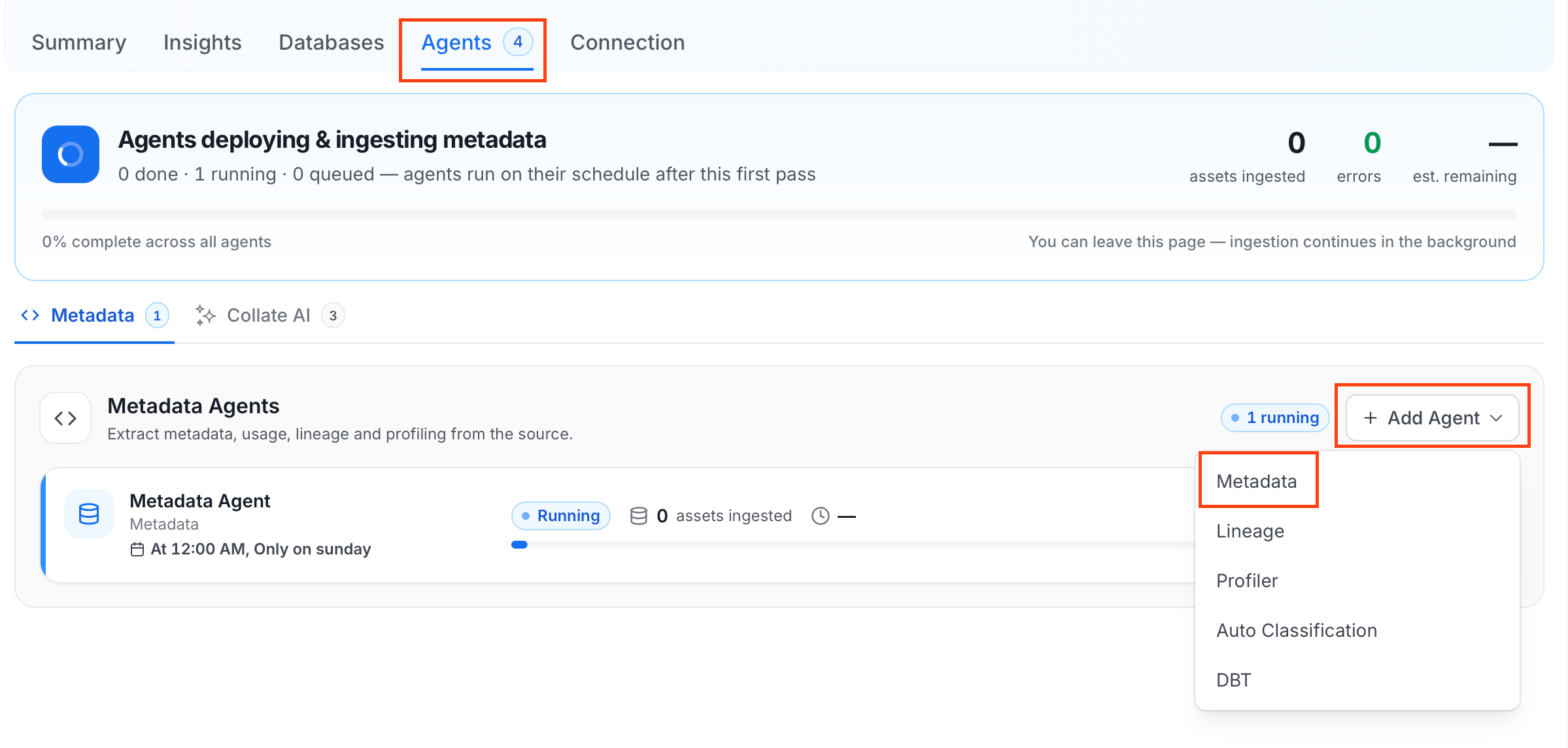
2. Click the **Agents** tab.

3. Click **Add Agent** and select **Metadata** from the dropdown.
   <img src="https://mintcdn.com/collatedocs/bv5oe4uRjuorTJO1/public/images/ai-2.0/connectors/metadata-ingestion/add-metadata-agent.png?fit=max&auto=format&n=bv5oe4uRjuorTJO1&q=85&s=accad7d1c4ddf209781bff851d51d464" alt="Add Metadata Agent" width="2398" height="1144" data-path="public/images/ai-2.0/connectors/metadata-ingestion/add-metadata-agent.png" />
   For some services, the dropdown is not available and clicking **Add Agent** takes you directly to the agent configuration page.

4. On the **Configure Ingestion** page, do the following and click **Next**.

   * **Name this Ingestion**: Enter a unique recognizable name for this ingestion pipeline.

     <img src="https://mintcdn.com/collatedocs/bv5oe4uRjuorTJO1/public/images/ai-2.0/connectors/metadata-ingestion/metadata-agent-name.png?fit=max&auto=format&n=bv5oe4uRjuorTJO1&q=85&s=d5ec1f0f3742cadab8cd54c602c97239" alt="Name this Ingestion" width="1578" height="644" data-path="public/images/ai-2.0/connectors/metadata-ingestion/metadata-agent-name.png" />

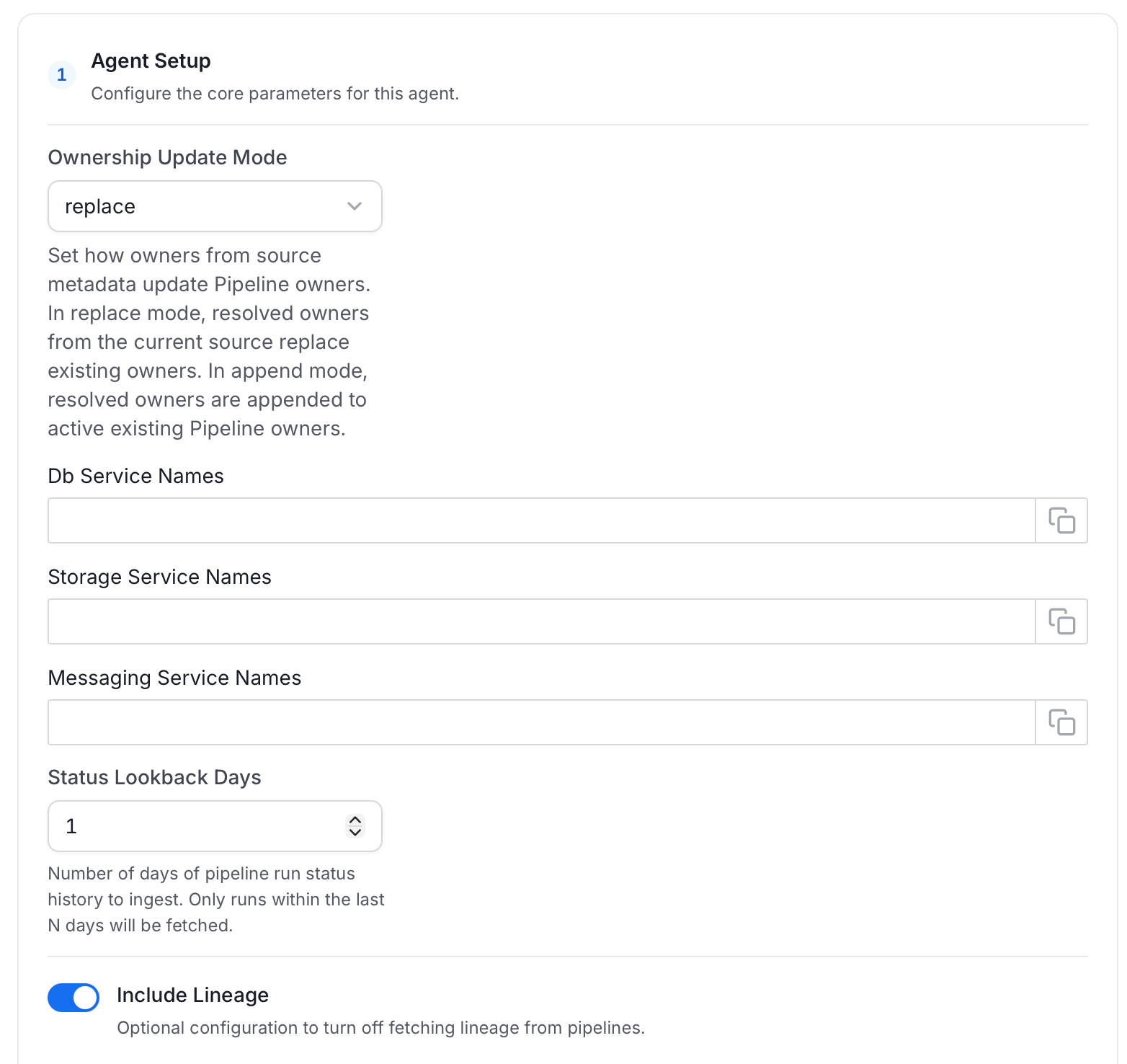
   * **Agent Setup**: Configure the core parameters for this agent. The following fields are available:

     | Field                        | Default | Description                                                                                                                                                                                                                    |
     | ---------------------------- | ------- | ------------------------------------------------------------------------------------------------------------------------------------------------------------------------------------------------------------------------------ |
     | Ownership Update Mode        | replace | Set how owners from source metadata update Pipeline owners. In replace mode, resolved owners from the current source replace existing owners. In append mode, resolved owners are appended to active existing Pipeline owners. |
     | Db Service Names             | —       | List of database service names used for lineage resolution.                                                                                                                                                                    |
     | Storage Service Names        | —       | List of storage service names used for lineage resolution.                                                                                                                                                                     |
     | Messaging Service Names      | —       | List of messaging service names used for lineage resolution.                                                                                                                                                                   |
     | Status Lookback Days         | 1       | Number of days of pipeline run status history to ingest. Only runs within the last N days will be fetched.                                                                                                                     |
     | Include Lineage              | On      | Turn off to stop fetching lineage from pipelines.                                                                                                                                                                              |
     | Mark Deleted Pipeline        | On      | Soft-delete pipelines in Collate when they are removed from the source. Associated entities like lineage are also deleted.                                                                                                     |
     | Include UnDeployed Pipelines | On      | Toggle whether un-deployed pipelines should be ingested. If set to false, only deployed pipelines will be ingested.                                                                                                            |
     <img src="https://mintcdn.com/collatedocs/tVR0kaoXvgs3p2Wx/public/images/ai-2.0/connectors/metadata-ingestion/Pipeline/pipeline-agent-setup.png?fit=max&auto=format&n=tVR0kaoXvgs3p2Wx&q=85&s=471bc2416115b020f9ff6909bb9e3d89" alt="Agent Setup" width="1564" height="1476" data-path="public/images/ai-2.0/connectors/metadata-ingestion/Pipeline/pipeline-agent-setup.png" />

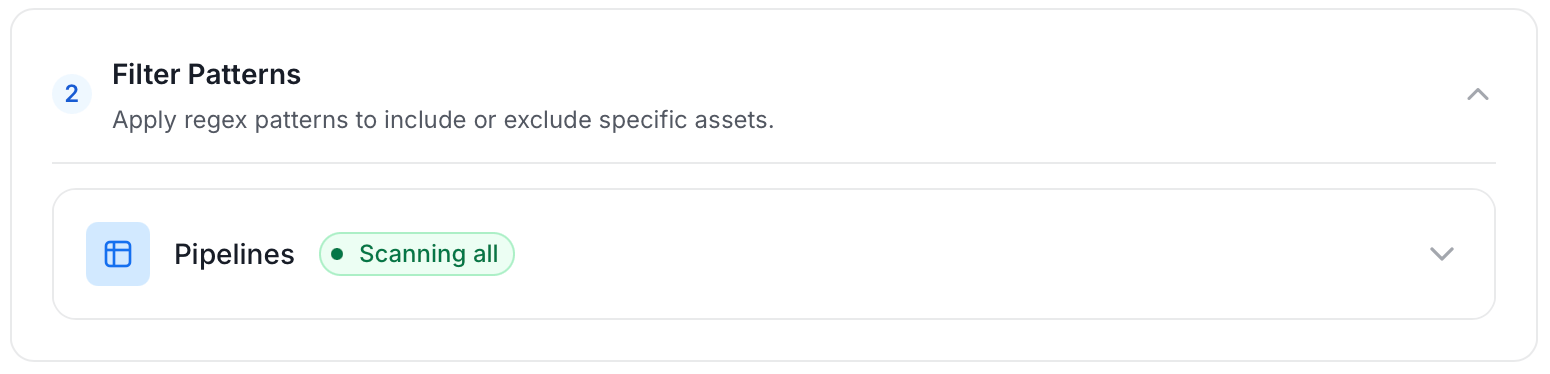
   * **Filter Patterns**: Apply include or exclude rules to scope which pipelines this agent ingests. These follow the same filter options described in **Step 5**.
     <img src="https://mintcdn.com/collatedocs/tVR0kaoXvgs3p2Wx/public/images/ai-2.0/connectors/metadata-ingestion/Pipeline/pipeline-filter-pattern.png?fit=max&auto=format&n=tVR0kaoXvgs3p2Wx&q=85&s=46f6f78c05d40a88a3fe9471f0f31505" alt="Filter Patterns" width="1550" height="374" data-path="public/images/ai-2.0/connectors/metadata-ingestion/Pipeline/pipeline-filter-pattern.png" />

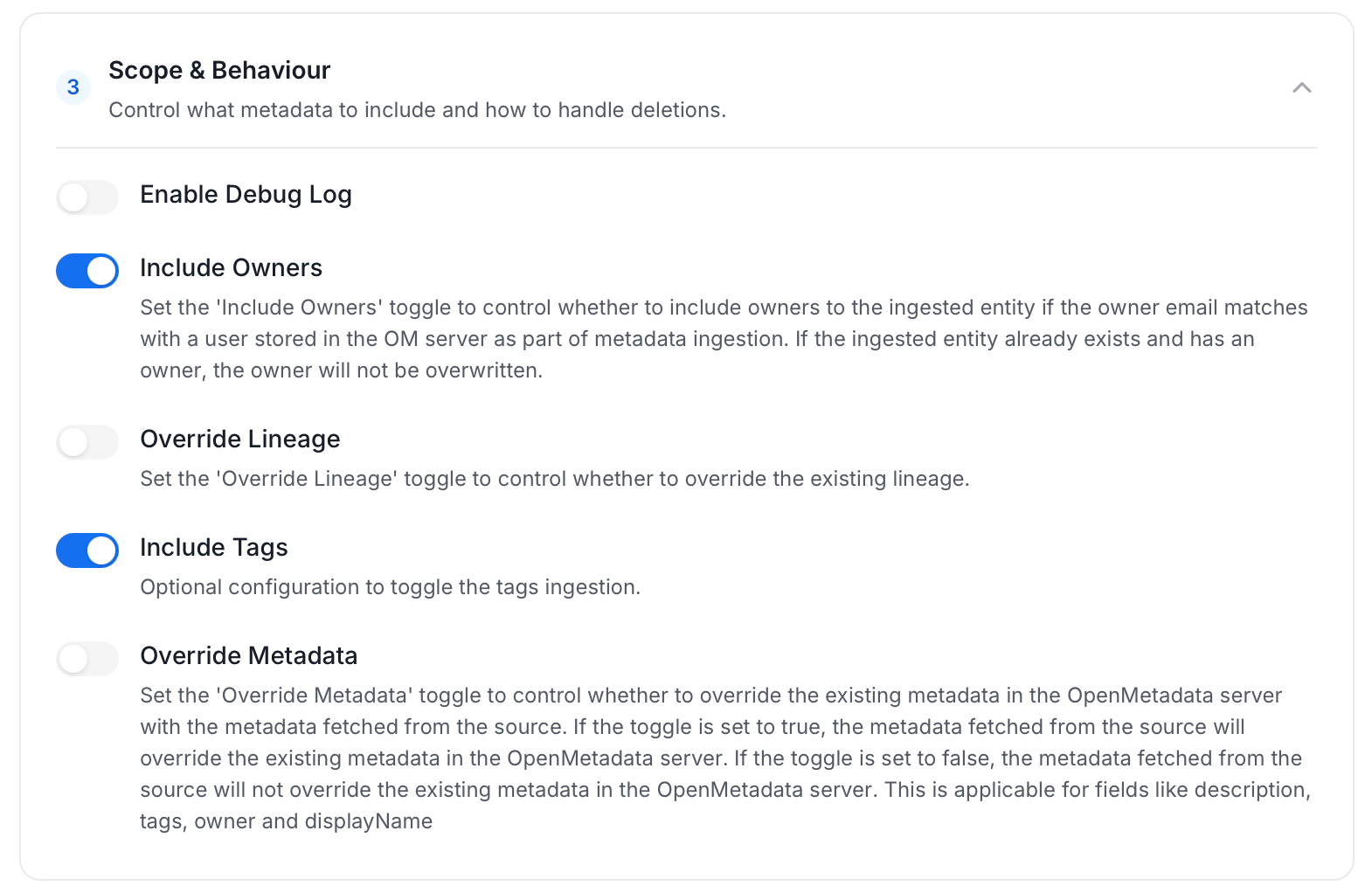
   * **Scope & Behaviour**: Control what metadata to include and how to handle deletions. Toggle each option on or off based on your needs:

     | Toggle            | Default | Description                                                                                                                                                            |
     | ----------------- | ------- | ---------------------------------------------------------------------------------------------------------------------------------------------------------------------- |
     | Enable Debug Log  | Off     | Sets the ingestion log level to DEBUG. Useful for troubleshooting.                                                                                                     |
     | Override Metadata | Off     | When on, source values overwrite existing descriptions, tags, owners, and display names in Collate. When off, Collate only updates fields that have no existing value. |
     | Override Lineage  | Off     | When on, existing lineage is replaced with newly extracted lineage on each run.                                                                                        |
     <img src="https://mintcdn.com/collatedocs/tVR0kaoXvgs3p2Wx/public/images/ai-2.0/connectors/metadata-ingestion/Pipeline/pipeline-scope-behaviour.png?fit=max&auto=format&n=tVR0kaoXvgs3p2Wx&q=85&s=38c7ce4ce152231ee67e2d0519d2fa47" alt="Scope & Behaviour" width="1570" height="1022" data-path="public/images/ai-2.0/connectors/metadata-ingestion/Pipeline/pipeline-scope-behaviour.png" />

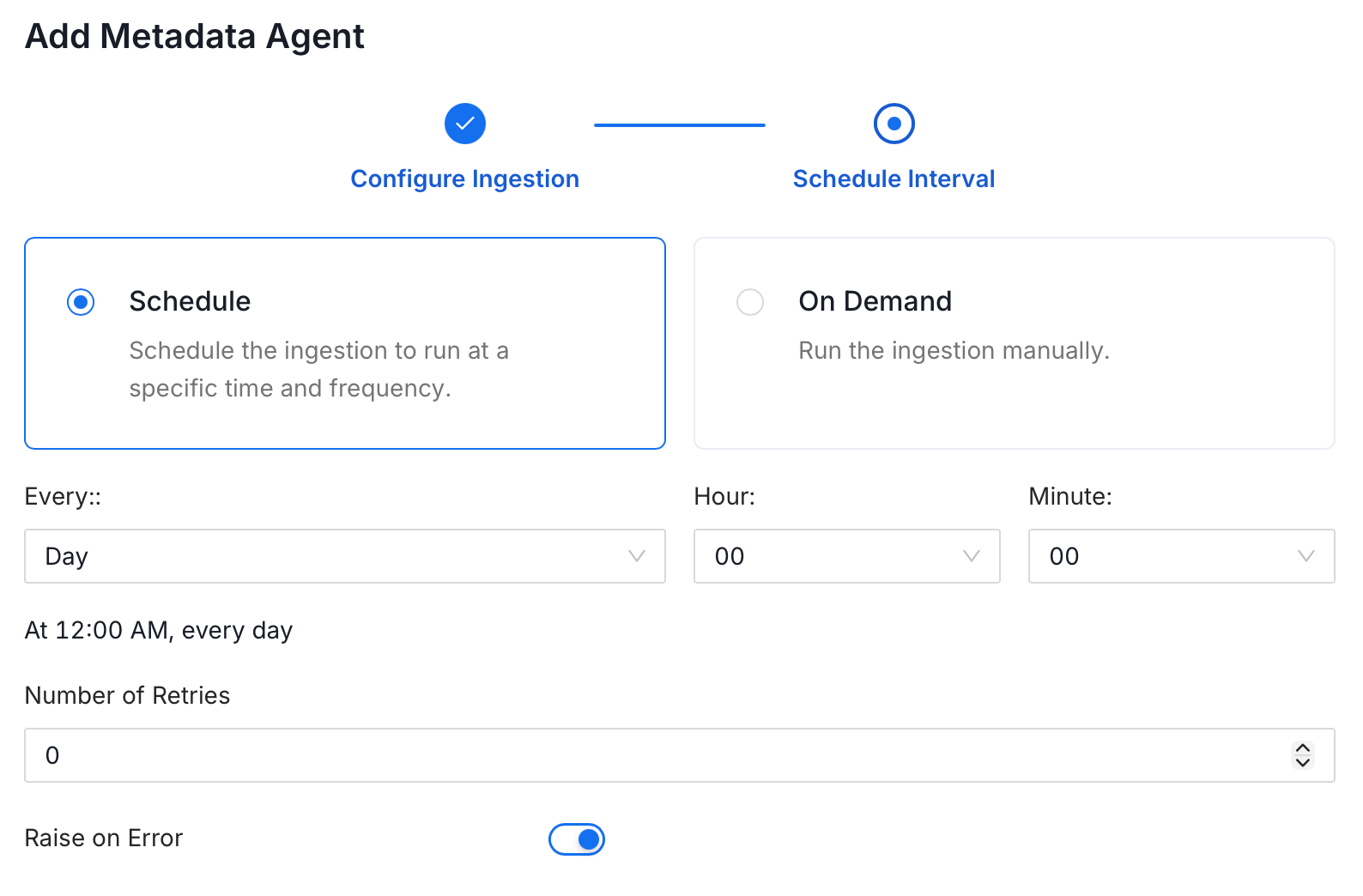
5. On the **Schedule Interval** page, set when the agent runs:

   * **Schedule**: Choose a preset interval (Hourly, Daily, Weekly, Monthly) or enter a custom cron expression.
   * **On-Demand**: No automatic schedule; trigger the agent manually when needed.
   <img src="https://mintcdn.com/collatedocs/bv5oe4uRjuorTJO1/public/images/ai-2.0/connectors/metadata-ingestion/schedule.png?fit=max&auto=format&n=bv5oe4uRjuorTJO1&q=85&s=25cc1d78f6f2a8bd115830d034d1d8d1" alt="Schedule Interval" width="1588" height="1044" data-path="public/images/ai-2.0/connectors/metadata-ingestion/schedule.png" />

6. Click **Add** to deploy the agent.
