
PROD
PROD
PROD
PROD
BETA
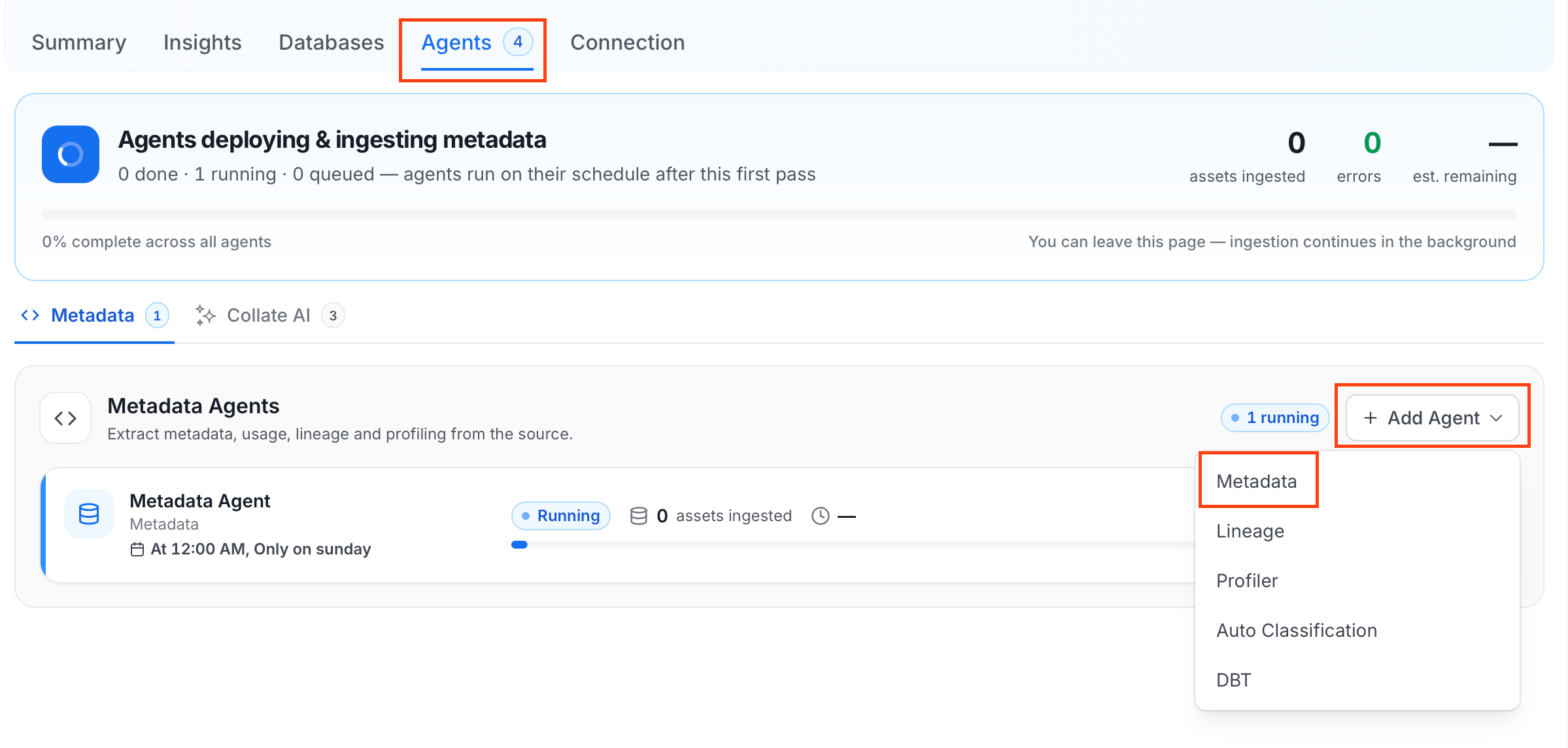 For some services, the dropdown is not available and clicking **Add Agent** takes you directly to the agent configuration page.
4. On the **Configure Ingestion** page, do the following and click **Next**.
* **Name this Ingestion**: Enter a unique recognizable name for this ingestion pipeline.
For some services, the dropdown is not available and clicking **Add Agent** takes you directly to the agent configuration page.
4. On the **Configure Ingestion** page, do the following and click **Next**.
* **Name this Ingestion**: Enter a unique recognizable name for this ingestion pipeline.
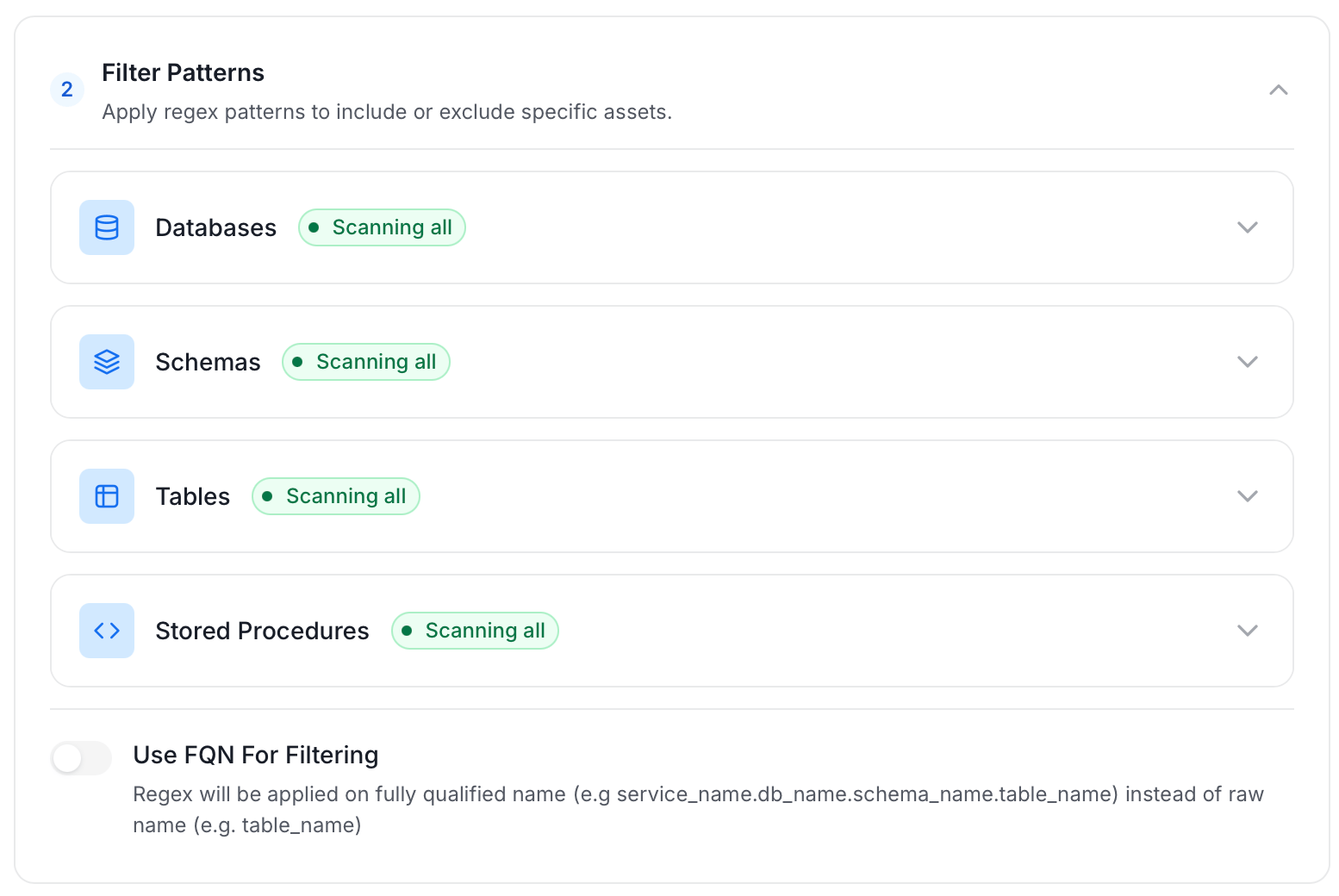
 * **Agent Setup**: Configure the core parameters for this agent. The following fields are available:
| Field | Default | Description |
| --------------------------- | ------- | ------------------------------------------------------------------------------------------------------------------------------------------------------------------------------------ |
| Default Owner | — | Default owner applied to all entities when no specific owner is configured. Accepts a user or team name/email. |
| Service Owner | — | Owner assigned to the service entity. |
| Database Owner | — | Owner assigned to all ingested databases. Accepts a single owner (user or team) for all databases. |
| Database Schema Owner | — | Owner assigned to all ingested schemas. Accepts a single owner (user or team) for all schemas. |
| Table Owner | — | Owner assigned to all ingested tables. Accepts a single owner (user or team) for all tables. |
| Enable Inheritance | On | Enable child entities to inherit owner from parent entities when they don't have a specific owner configured. |
| Query Log Duration | 1 | Number of days to look back in query logs when processing stored procedure results. |
| Query Parsing Timeout Limit | 300 | Timeout in seconds for parsing a single query. |
| Number of Threads | 1 | Number of threads to use for parallel table ingestion. |
| JSON Schema Sample Size | 10 | Number of rows to sample for inferring JSON schema. A larger sample size provides more accurate schema inference but increases query time. |
| Extract JSON Schema | Off | Extract JSON schema from JSON columns by sampling data. Requires SELECT permission on the tables. If disabled or SELECT fails, JSON columns are ingested without schema information. |
* **Agent Setup**: Configure the core parameters for this agent. The following fields are available:
| Field | Default | Description |
| --------------------------- | ------- | ------------------------------------------------------------------------------------------------------------------------------------------------------------------------------------ |
| Default Owner | — | Default owner applied to all entities when no specific owner is configured. Accepts a user or team name/email. |
| Service Owner | — | Owner assigned to the service entity. |
| Database Owner | — | Owner assigned to all ingested databases. Accepts a single owner (user or team) for all databases. |
| Database Schema Owner | — | Owner assigned to all ingested schemas. Accepts a single owner (user or team) for all schemas. |
| Table Owner | — | Owner assigned to all ingested tables. Accepts a single owner (user or team) for all tables. |
| Enable Inheritance | On | Enable child entities to inherit owner from parent entities when they don't have a specific owner configured. |
| Query Log Duration | 1 | Number of days to look back in query logs when processing stored procedure results. |
| Query Parsing Timeout Limit | 300 | Timeout in seconds for parsing a single query. |
| Number of Threads | 1 | Number of threads to use for parallel table ingestion. |
| JSON Schema Sample Size | 10 | Number of rows to sample for inferring JSON schema. A larger sample size provides more accurate schema inference but increases query time. |
| Extract JSON Schema | Off | Extract JSON schema from JSON columns by sampling data. Requires SELECT permission on the tables. If disabled or SELECT fails, JSON columns are ingested without schema information. |
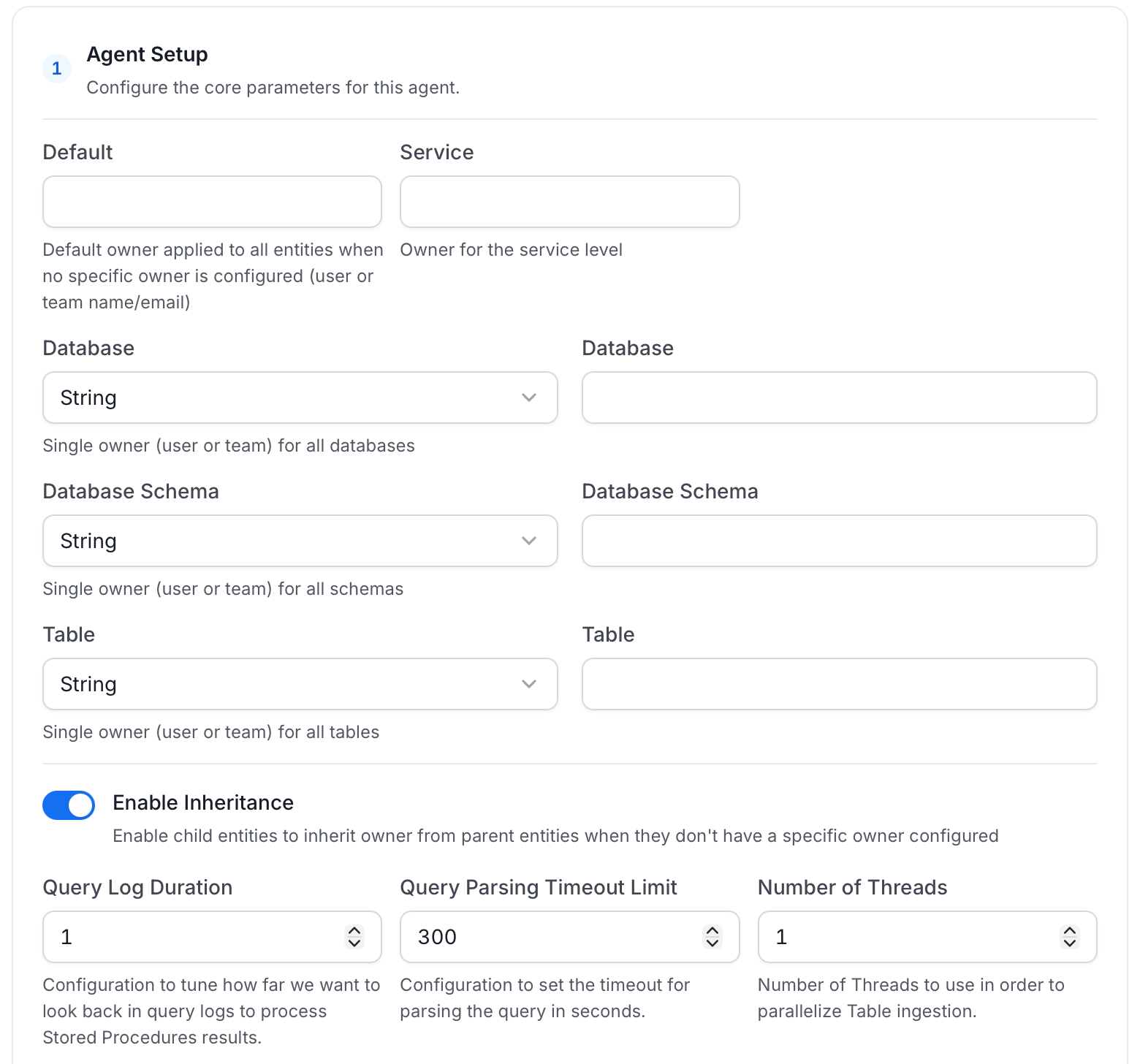 * **Filter Patterns**: Apply include or exclude rules to scope which databases, schemas, tables, and stored procedures this agent ingests. These follow the same filter options described in **Step 5**.
 * **Scope & Behaviour**: Control what metadata to include and how to handle deletions. Toggle each option on or off based on your needs:
| Toggle | Default | Description |
| ------------------------------ | ------- | ---------------------------------------------------------------------------------------------------------------------------------------------------------------------- |
| Enable Debug Log | Off | Sets the ingestion log level to DEBUG. Useful for troubleshooting. |
| Mark Deleted Tables | On | Soft-delete tables in Collate when they are removed from the source. Applies only within the currently ingested schema. |
| Mark Deleted Stored Procedures | On | Soft-delete stored procedures in Collate when they are removed from the source. Associated entities like lineage are also deleted. |
| Mark Deleted Schemas | Off | Soft-delete schemas and all their child assets when removed from the source. |
| Mark Deleted Databases | Off | Soft-delete databases and all their child assets when removed from the source. |
| Include Tables | On | Ingest table metadata from the source. Turn off to skip tables entirely. |
| Include Tags | On | Ingest tags from the source. |
| Include Custom Properties | Off | Ingest connector-specific custom properties onto entities. |
| Include Owners | Off | Assign owners to ingested entities when the source owner's email matches a user in Collate. Does not overwrite an existing owner. |
| Include Stored Procedures | On | Ingest stored procedure metadata. |
| Include DDL Statements | Off | Ingest DDL statements alongside table metadata. |
| Override Metadata | Off | When on, source values overwrite existing descriptions, tags, owners, and display names in Collate. When off, Collate only updates fields that have no existing value. |
* **Scope & Behaviour**: Control what metadata to include and how to handle deletions. Toggle each option on or off based on your needs:
| Toggle | Default | Description |
| ------------------------------ | ------- | ---------------------------------------------------------------------------------------------------------------------------------------------------------------------- |
| Enable Debug Log | Off | Sets the ingestion log level to DEBUG. Useful for troubleshooting. |
| Mark Deleted Tables | On | Soft-delete tables in Collate when they are removed from the source. Applies only within the currently ingested schema. |
| Mark Deleted Stored Procedures | On | Soft-delete stored procedures in Collate when they are removed from the source. Associated entities like lineage are also deleted. |
| Mark Deleted Schemas | Off | Soft-delete schemas and all their child assets when removed from the source. |
| Mark Deleted Databases | Off | Soft-delete databases and all their child assets when removed from the source. |
| Include Tables | On | Ingest table metadata from the source. Turn off to skip tables entirely. |
| Include Tags | On | Ingest tags from the source. |
| Include Custom Properties | Off | Ingest connector-specific custom properties onto entities. |
| Include Owners | Off | Assign owners to ingested entities when the source owner's email matches a user in Collate. Does not overwrite an existing owner. |
| Include Stored Procedures | On | Ingest stored procedure metadata. |
| Include DDL Statements | Off | Ingest DDL statements alongside table metadata. |
| Override Metadata | Off | When on, source values overwrite existing descriptions, tags, owners, and display names in Collate. When off, Collate only updates fields that have no existing value. |
 5. On the **Schedule Interval** page, set when the agent runs:
* **Schedule**: Choose a preset interval (Hourly, Daily, Weekly, Monthly) or enter a custom cron expression.
* **On-Demand**: No automatic schedule; trigger the agent manually when needed.
5. On the **Schedule Interval** page, set when the agent runs:
* **Schedule**: Choose a preset interval (Hourly, Daily, Weekly, Monthly) or enter a custom cron expression.
* **On-Demand**: No automatic schedule; trigger the agent manually when needed.
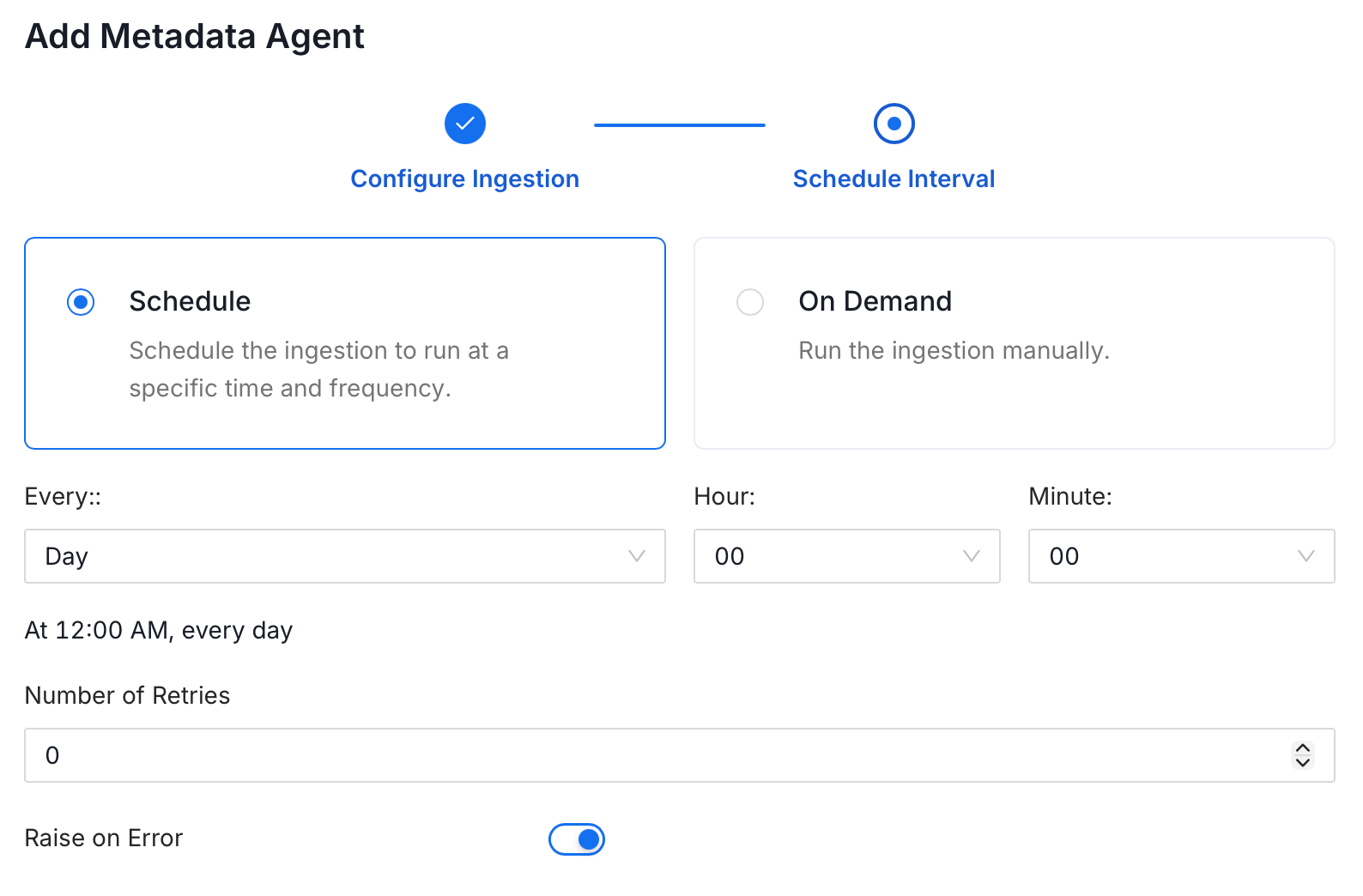 6. Click **Add** to deploy the agent.