{icon &&
 }
}
{name}
{stage}Feature List
{totalAvailableFeatures.map(feature =>
✓ {feature}
)}
{unavailableFeatures.map(feature =>
✕ {feature}
)}
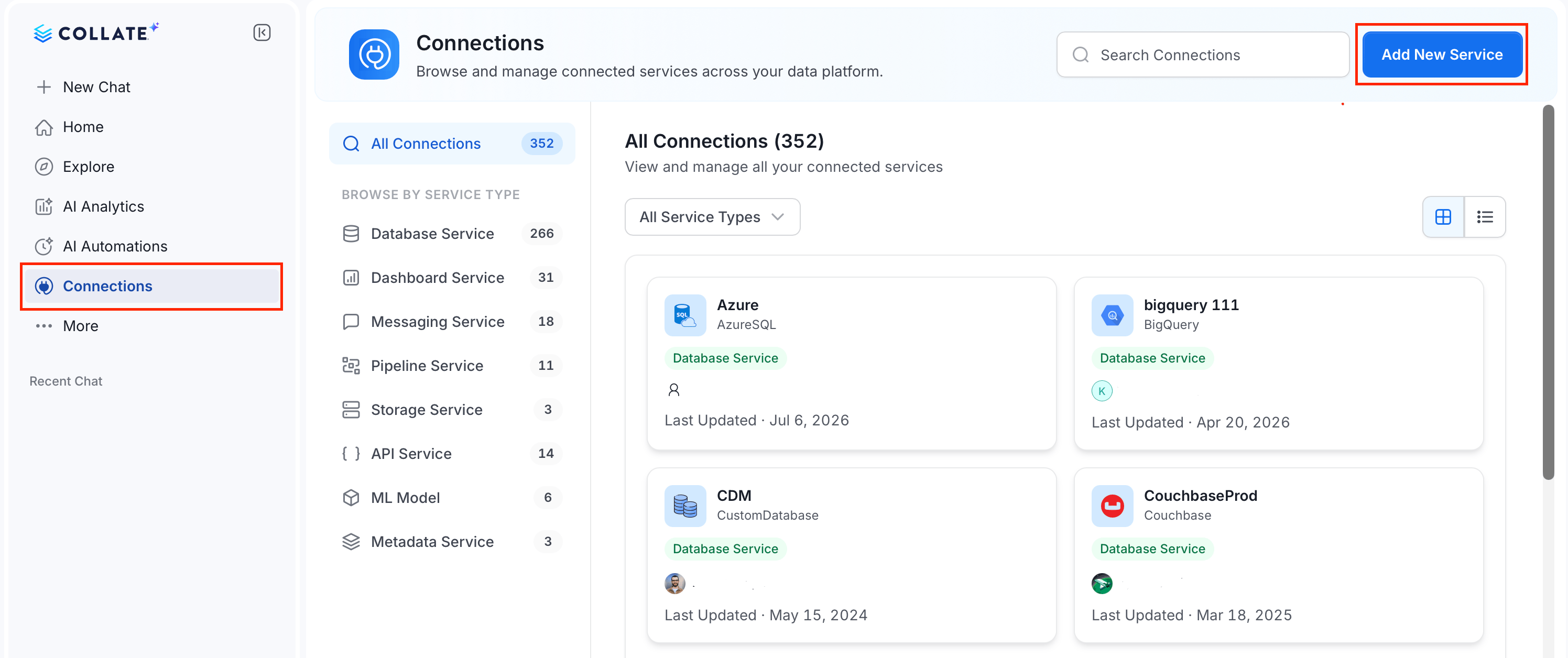 ### Step 2: Select a Service and Connector
From the service type dropdown, select **Metadata Services**, then click the **Alation** connector tile.
### Step 2: Select a Service and Connector
From the service type dropdown, select **Metadata Services**, then click the **Alation** connector tile.
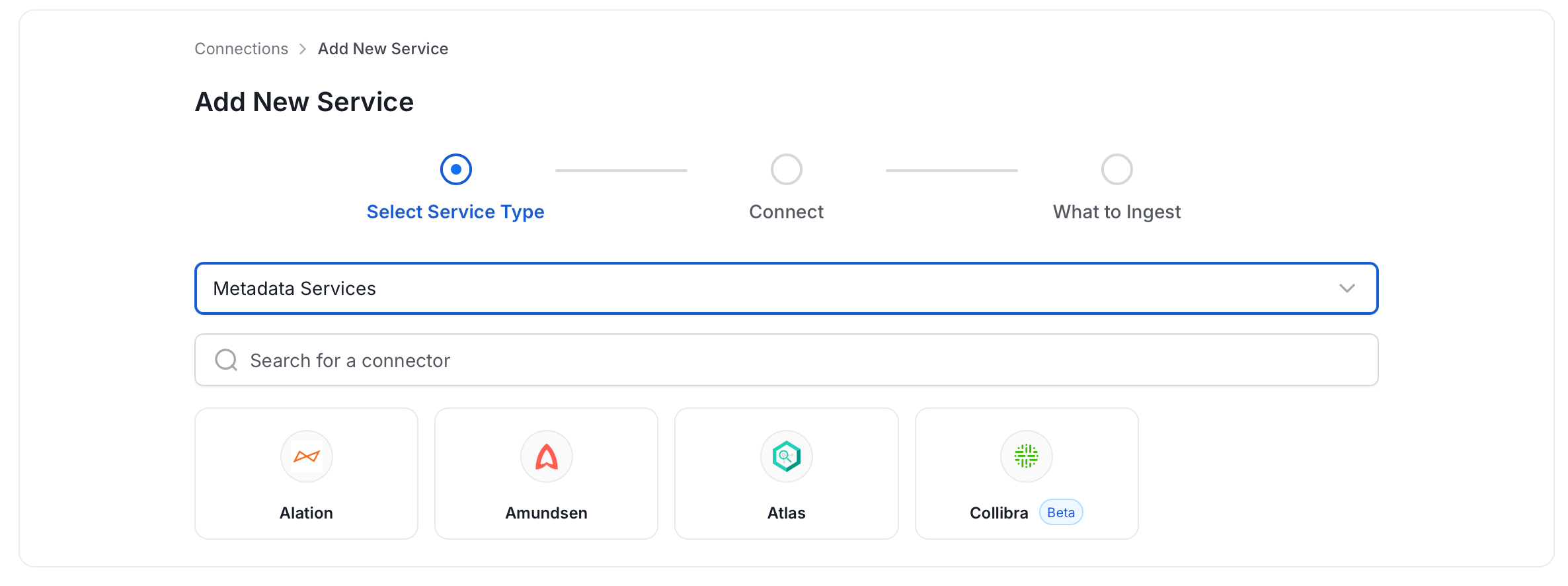 ### Step 3: Add Service Name and Description
* Enter a unique, descriptive **Service Name**. Collate identifies services by their service name. Enter a name that distinguishes this deployment from other Alation services you are ingesting metadata from.
* Optional: Enter a **Description** for the service.
### Step 3: Add Service Name and Description
* Enter a unique, descriptive **Service Name**. Collate identifies services by their service name. Enter a name that distinguishes this deployment from other Alation services you are ingesting metadata from.
* Optional: Enter a **Description** for the service.
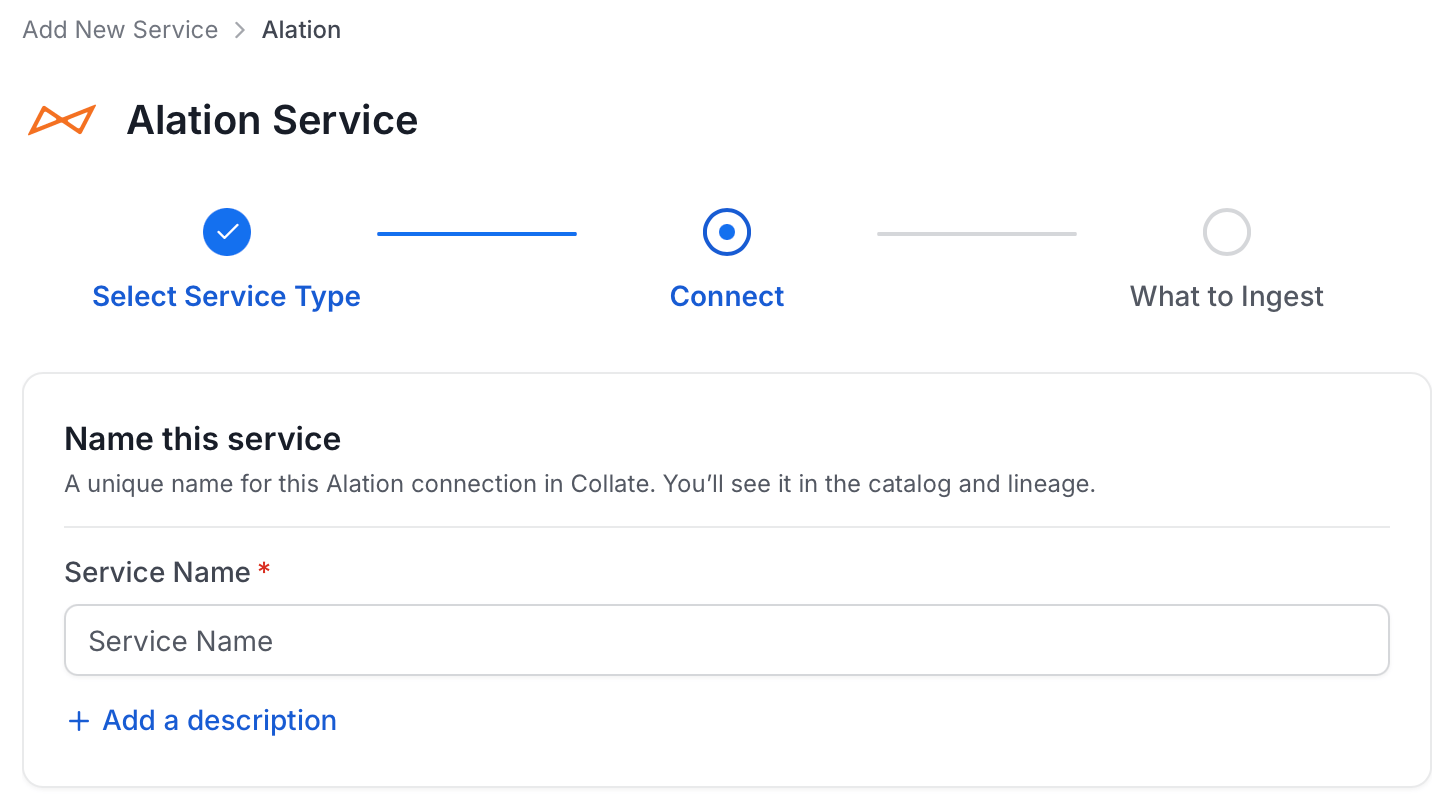
 #### Enter Connection Details
Enter the connection details for Alation. The right-hand panel in the UI displays inline help for each field.
#### Enter Connection Details
Enter the connection details for Alation. The right-hand panel in the UI displays inline help for each field.
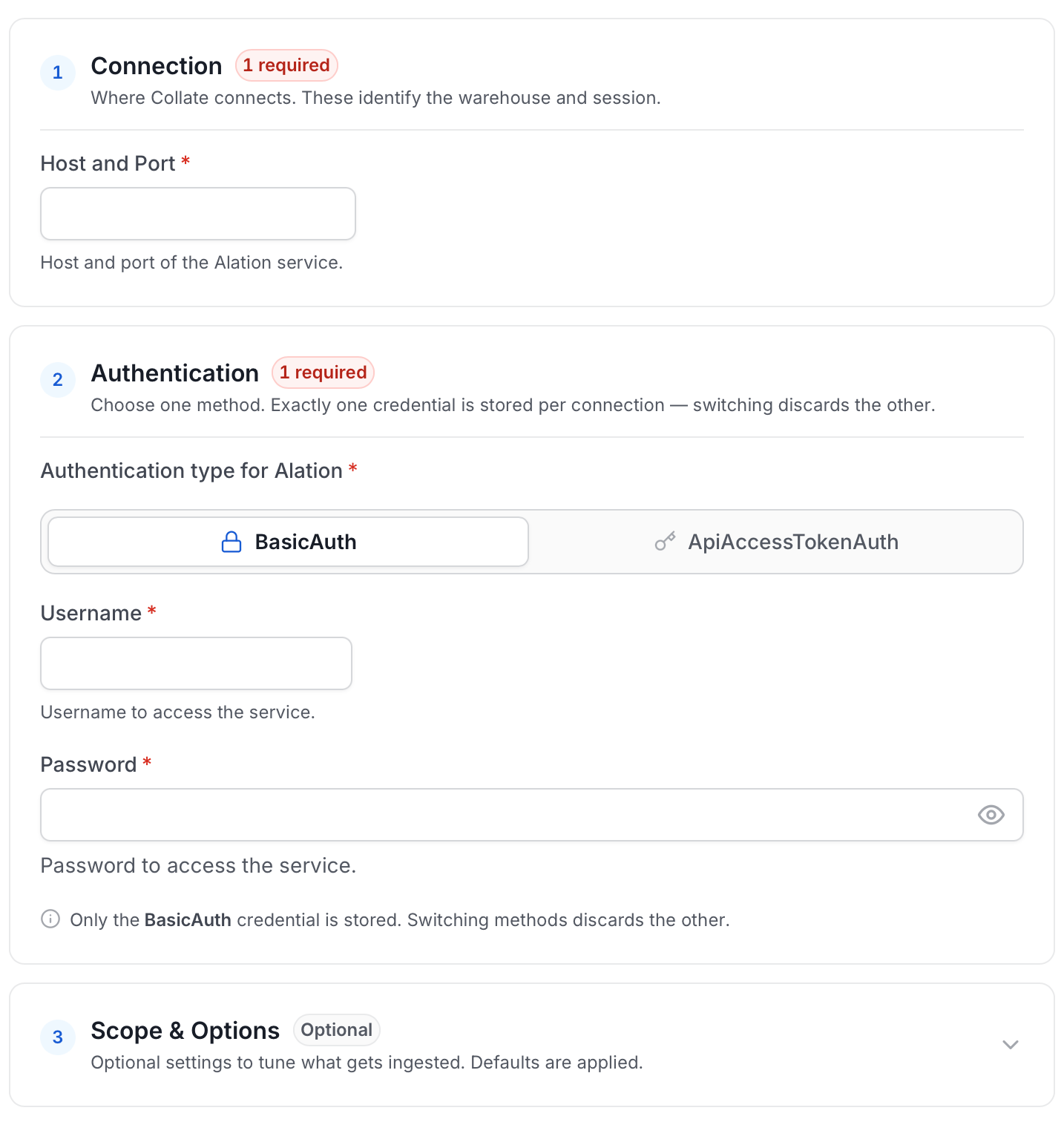 * **hostPort**: Host and port of the Alation instance.
```bash theme={null}
host and port (https://xxxx.alationcloud.com:443)
```
* **authType**: Following authentication types are supported:
1. **Basic Authentication**:
We'll use the user credentials to generate the access token required to authenticate Alation APIs
* **username**: Username of the user.
* **password**: Password of the user.
2. **Access Token Authentication**:
The access token created using the [steps to create an API access token](https://developer.alation.com/dev/docs/authentication-into-alation-apis#create-an-api-access-token) can directly be entered. We'll use that directly to authenticate the Alation APIs
* **accessToken**: Generated access token
#### For Alation backend database Connection:
Alation APIs do not provide some of the metadata. We extract this metadata directly from Alation's backend database by querying the tables.
Note that this is an optional configuration, and if it is not provided, primary metadata will still be ingested.
Below is the metadata fetched from the Alation database:
`1. User and Group Relationships`
Choose either postgres or mysql connection depending on the db:
1. Postgres Connection
* **username**: Specify the user to connect to Postgres. Make sure the user has select privileges on the tables of the Alation schema.
* **password**: Password to connect to Postgres.
* **hostPort**: Enter the fully qualified hostname and port number for your Postgres deployment in the Host and Port field.
* **database**: Initial Postgres database to connect to. Specify the name of the database associated with the Alation instance.
2. MySQL Connection
* **username**: Specify the user to connect to MySQL. Make sure the user has select privileges on the tables of the Alation schema.
* **password**: Password to connect to MySQL.
* **hostPort**: Enter the fully qualified hostname and port number for your MySQL deployment in the Host and Port field.
* **databaseSchema**: Initial MySQL database to connect to. Specify the name of the database schema associated with the Alation instance.
* **projectName**: Project name can be anything, for example `Prod` or `Demo`. It will be used while creating the tokens.
* **paginationLimit**: Pagination limit used for Alation APIs pagination. By default is set to 10.
* **includeUndeployedDatasources**: Specifies if undeployed datasources should be included while ingesting. By default is set to `false`.
* **includeHiddenDatasources**: Specifies if hidden datasources should be included while ingesting. By default is set to `false`.
* **ingestUsersAndGroups**: Specifies if users and groups should be included while ingesting. By default is set to `true`.
* **ingestKnowledgeArticles**: Specifies if knowledge articles should be included while ingesting. By default is set to `true`.
* **ingestDatasources**: Specifies if databases, schemas and tables should be included while ingesting. By default is set to `true`.
* **ingestDomains**: Specifies if domains and subdomains should be included while ingesting. By default is set to `true`.
* **ingestDashboards**: Specifies if BI sources and dashboards should be included while ingesting. By default is set to `true`.
* **alationTagClassificationName**: Specify the classification name under which the tags from Alation will be created in Collate. By default, it is set to `alationTags`.
* **connectionArguments**: These are additional parameters for Alation. If not specified the ingestion will use the predefined pagination logic.
The following arguments are intended to be used in conjunction and are specifically for Alation DataSource APIs:
* skip: This parameter determines the count of records to bypass at the start of the dataset. When set to 0, as in this case, it means that no records will be bypassed. If set to 10, it will bypass the first 10 records.
* limit: This argument specifies the maximum number of records to return. Here, it's set to 10, meaning only the first 10 records will be returned.
To perform incremental ingestion, these arguments should be used together. For instance, if there are a total of 30 datasources in Alation, the ingestion can be configured to execute three times, with each execution ingesting 10 datasources.
* 1st execution: `{"skip": 0, "limit": 10}`
* 2nd execution: `{"skip": 10, "limit": 10}`
* 3rd execution: `{"skip": 20, "limit": 10}`
#### Advanced Configuration
Database Services have an Advanced Configuration section, where you can pass extra arguments to the connector and, if needed, change the connection Scheme. This would only be required to handle advanced connectivity scenarios or customizations.
* **Connection Options (Optional)**: Enter the details for any additional connection options that can be sent to database during the connection. These details must be added as Key-Value pairs.
* **Connection Arguments (Optional)**: Enter the details for any additional connection arguments such as security or protocol configs that can be sent during the connection. These details must be added as Key-Value pairs.
* **hostPort**: Host and port of the Alation instance.
```bash theme={null}
host and port (https://xxxx.alationcloud.com:443)
```
* **authType**: Following authentication types are supported:
1. **Basic Authentication**:
We'll use the user credentials to generate the access token required to authenticate Alation APIs
* **username**: Username of the user.
* **password**: Password of the user.
2. **Access Token Authentication**:
The access token created using the [steps to create an API access token](https://developer.alation.com/dev/docs/authentication-into-alation-apis#create-an-api-access-token) can directly be entered. We'll use that directly to authenticate the Alation APIs
* **accessToken**: Generated access token
#### For Alation backend database Connection:
Alation APIs do not provide some of the metadata. We extract this metadata directly from Alation's backend database by querying the tables.
Note that this is an optional configuration, and if it is not provided, primary metadata will still be ingested.
Below is the metadata fetched from the Alation database:
`1. User and Group Relationships`
Choose either postgres or mysql connection depending on the db:
1. Postgres Connection
* **username**: Specify the user to connect to Postgres. Make sure the user has select privileges on the tables of the Alation schema.
* **password**: Password to connect to Postgres.
* **hostPort**: Enter the fully qualified hostname and port number for your Postgres deployment in the Host and Port field.
* **database**: Initial Postgres database to connect to. Specify the name of the database associated with the Alation instance.
2. MySQL Connection
* **username**: Specify the user to connect to MySQL. Make sure the user has select privileges on the tables of the Alation schema.
* **password**: Password to connect to MySQL.
* **hostPort**: Enter the fully qualified hostname and port number for your MySQL deployment in the Host and Port field.
* **databaseSchema**: Initial MySQL database to connect to. Specify the name of the database schema associated with the Alation instance.
* **projectName**: Project name can be anything, for example `Prod` or `Demo`. It will be used while creating the tokens.
* **paginationLimit**: Pagination limit used for Alation APIs pagination. By default is set to 10.
* **includeUndeployedDatasources**: Specifies if undeployed datasources should be included while ingesting. By default is set to `false`.
* **includeHiddenDatasources**: Specifies if hidden datasources should be included while ingesting. By default is set to `false`.
* **ingestUsersAndGroups**: Specifies if users and groups should be included while ingesting. By default is set to `true`.
* **ingestKnowledgeArticles**: Specifies if knowledge articles should be included while ingesting. By default is set to `true`.
* **ingestDatasources**: Specifies if databases, schemas and tables should be included while ingesting. By default is set to `true`.
* **ingestDomains**: Specifies if domains and subdomains should be included while ingesting. By default is set to `true`.
* **ingestDashboards**: Specifies if BI sources and dashboards should be included while ingesting. By default is set to `true`.
* **alationTagClassificationName**: Specify the classification name under which the tags from Alation will be created in Collate. By default, it is set to `alationTags`.
* **connectionArguments**: These are additional parameters for Alation. If not specified the ingestion will use the predefined pagination logic.
The following arguments are intended to be used in conjunction and are specifically for Alation DataSource APIs:
* skip: This parameter determines the count of records to bypass at the start of the dataset. When set to 0, as in this case, it means that no records will be bypassed. If set to 10, it will bypass the first 10 records.
* limit: This argument specifies the maximum number of records to return. Here, it's set to 10, meaning only the first 10 records will be returned.
To perform incremental ingestion, these arguments should be used together. For instance, if there are a total of 30 datasources in Alation, the ingestion can be configured to execute three times, with each execution ingesting 10 datasources.
* 1st execution: `{"skip": 0, "limit": 10}`
* 2nd execution: `{"skip": 10, "limit": 10}`
* 3rd execution: `{"skip": 20, "limit": 10}`
#### Advanced Configuration
Database Services have an Advanced Configuration section, where you can pass extra arguments to the connector and, if needed, change the connection Scheme. This would only be required to handle advanced connectivity scenarios or customizations.
* **Connection Options (Optional)**: Enter the details for any additional connection options that can be sent to database during the connection. These details must be added as Key-Value pairs.
* **Connection Arguments (Optional)**: Enter the details for any additional connection arguments such as security or protocol configs that can be sent during the connection. These details must be added as Key-Value pairs.
 ### Step 5: Configure Ingestion Options
In the **What to Ingest** step, configure the metadata ingestion pipeline settings, then click **Create & Deploy**.
Collate creates the service connection and automatically triggers the first metadata ingestion run. In AI 2.0, ingestion is managed by the Auto Pilot app — you do not need to schedule a separate pipeline.
After deployment, you can monitor the ingestion status by navigating to **Connections**, selecting your service, and viewing the ingestion pipeline.
### Step 5: Configure Ingestion Options
In the **What to Ingest** step, configure the metadata ingestion pipeline settings, then click **Create & Deploy**.
Collate creates the service connection and automatically triggers the first metadata ingestion run. In AI 2.0, ingestion is managed by the Auto Pilot app — you do not need to schedule a separate pipeline.
After deployment, you can monitor the ingestion status by navigating to **Connections**, selecting your service, and viewing the ingestion pipeline.
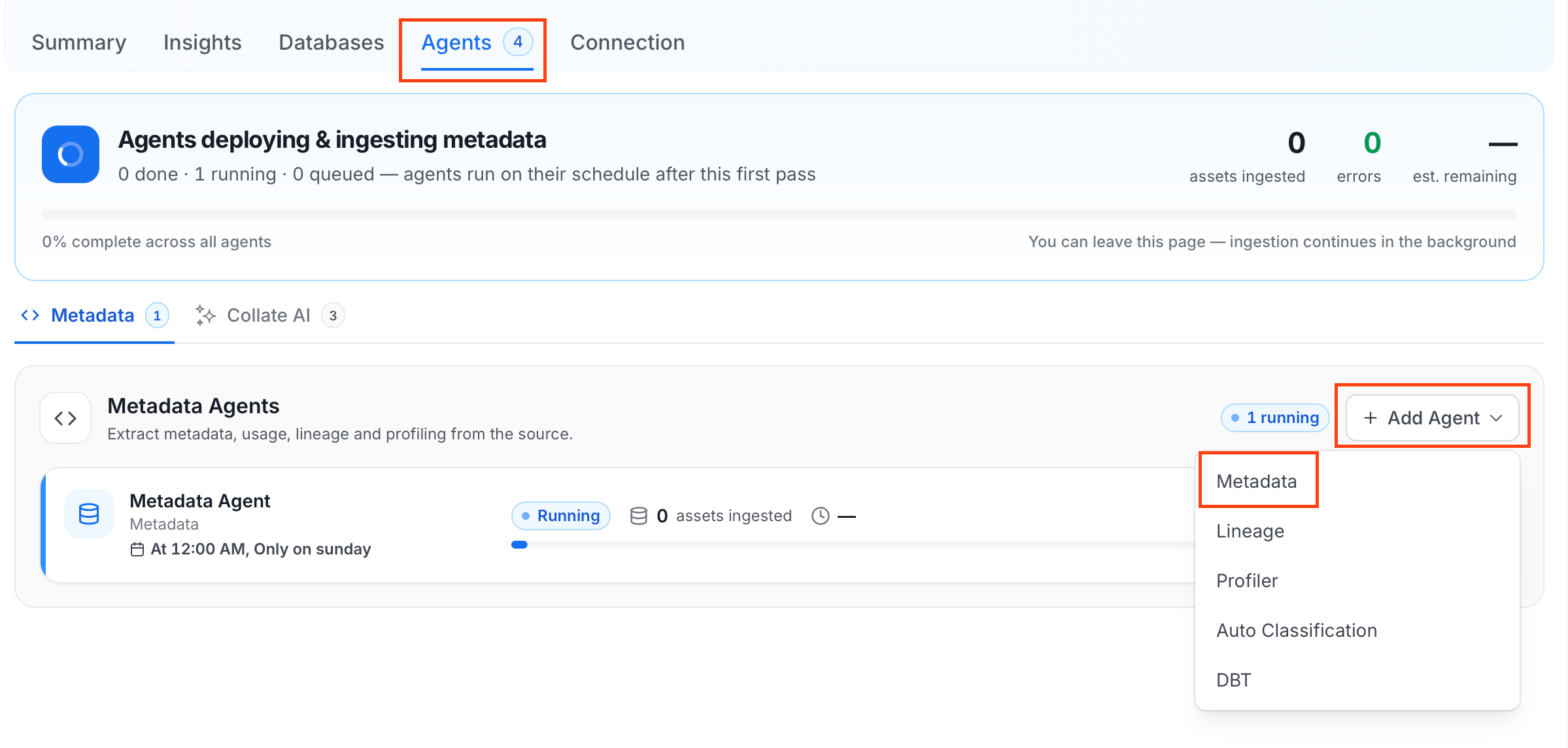 For some services, the dropdown is not available and clicking **Add Agent** takes you directly to the agent configuration page.
4. On the **Configure Ingestion** page, do the following and click **Next**.
* **Name this Ingestion**: Enter a unique recognizable name for this ingestion pipeline.
For some services, the dropdown is not available and clicking **Add Agent** takes you directly to the agent configuration page.
4. On the **Configure Ingestion** page, do the following and click **Next**.
* **Name this Ingestion**: Enter a unique recognizable name for this ingestion pipeline.
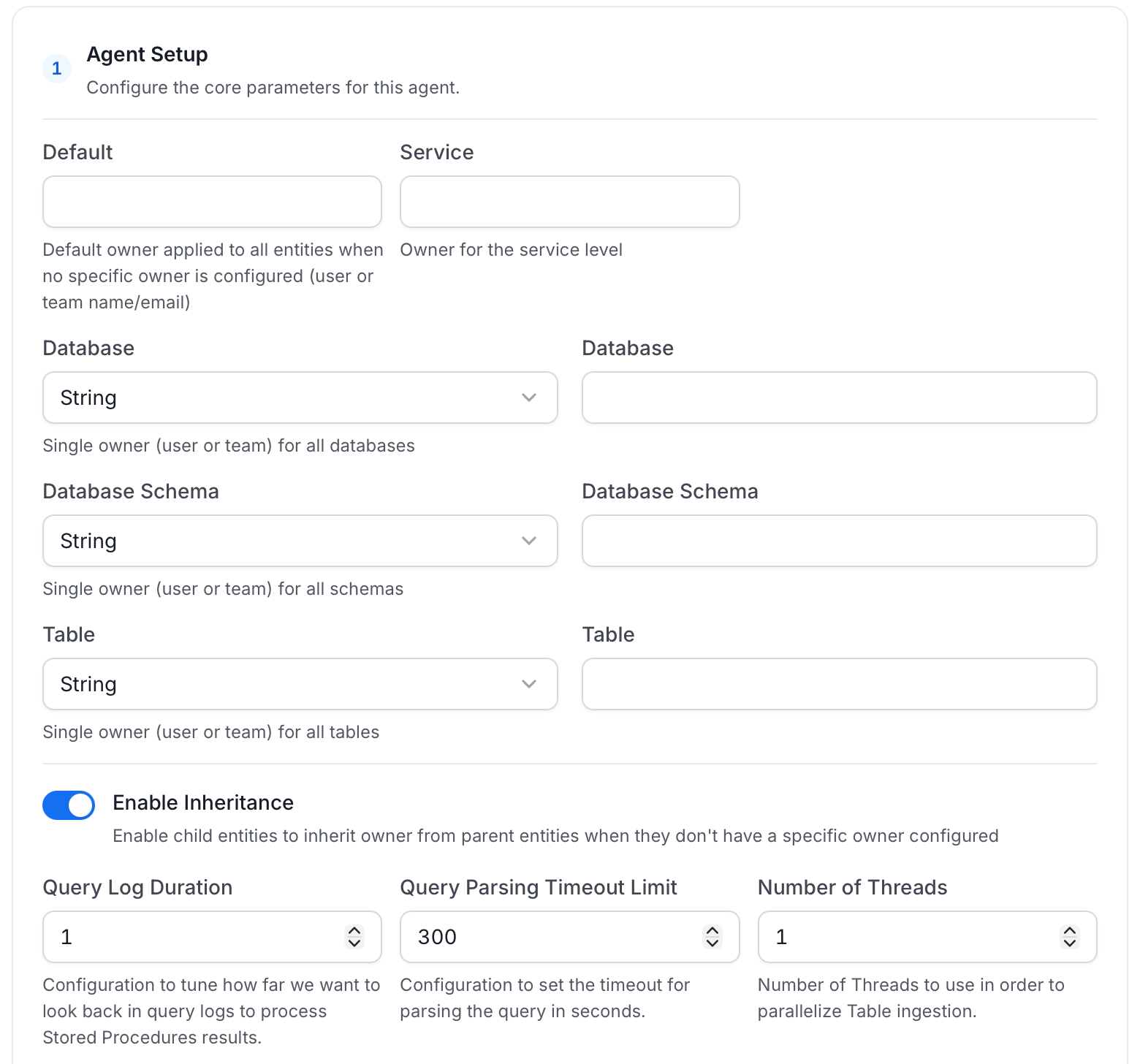
 * **Agent Setup**: Configure the core parameters for this agent. The following fields are available:
| Field | Default | Description |
| --------------------------- | ------- | ------------------------------------------------------------------------------------------------------------------------------------------------------------------------------------ |
| Default Owner | — | Default owner applied to all entities when no specific owner is configured. Accepts a user or team name/email. |
| Service Owner | — | Owner assigned to the service entity. |
| Database Owner | — | Owner assigned to all ingested databases. Accepts a single owner (user or team) for all databases. |
| Database Schema Owner | — | Owner assigned to all ingested schemas. Accepts a single owner (user or team) for all schemas. |
| Table Owner | — | Owner assigned to all ingested tables. Accepts a single owner (user or team) for all tables. |
| Enable Inheritance | On | Enable child entities to inherit owner from parent entities when they don't have a specific owner configured. |
| Query Log Duration | 1 | Number of days to look back in query logs when processing stored procedure results. |
| Query Parsing Timeout Limit | 300 | Timeout in seconds for parsing a single query. |
| Number of Threads | 1 | Number of threads to use for parallel table ingestion. |
| JSON Schema Sample Size | 10 | Number of rows to sample for inferring JSON schema. A larger sample size provides more accurate schema inference but increases query time. |
| Extract JSON Schema | Off | Extract JSON schema from JSON columns by sampling data. Requires SELECT permission on the tables. If disabled or SELECT fails, JSON columns are ingested without schema information. |
* **Agent Setup**: Configure the core parameters for this agent. The following fields are available:
| Field | Default | Description |
| --------------------------- | ------- | ------------------------------------------------------------------------------------------------------------------------------------------------------------------------------------ |
| Default Owner | — | Default owner applied to all entities when no specific owner is configured. Accepts a user or team name/email. |
| Service Owner | — | Owner assigned to the service entity. |
| Database Owner | — | Owner assigned to all ingested databases. Accepts a single owner (user or team) for all databases. |
| Database Schema Owner | — | Owner assigned to all ingested schemas. Accepts a single owner (user or team) for all schemas. |
| Table Owner | — | Owner assigned to all ingested tables. Accepts a single owner (user or team) for all tables. |
| Enable Inheritance | On | Enable child entities to inherit owner from parent entities when they don't have a specific owner configured. |
| Query Log Duration | 1 | Number of days to look back in query logs when processing stored procedure results. |
| Query Parsing Timeout Limit | 300 | Timeout in seconds for parsing a single query. |
| Number of Threads | 1 | Number of threads to use for parallel table ingestion. |
| JSON Schema Sample Size | 10 | Number of rows to sample for inferring JSON schema. A larger sample size provides more accurate schema inference but increases query time. |
| Extract JSON Schema | Off | Extract JSON schema from JSON columns by sampling data. Requires SELECT permission on the tables. If disabled or SELECT fails, JSON columns are ingested without schema information. |
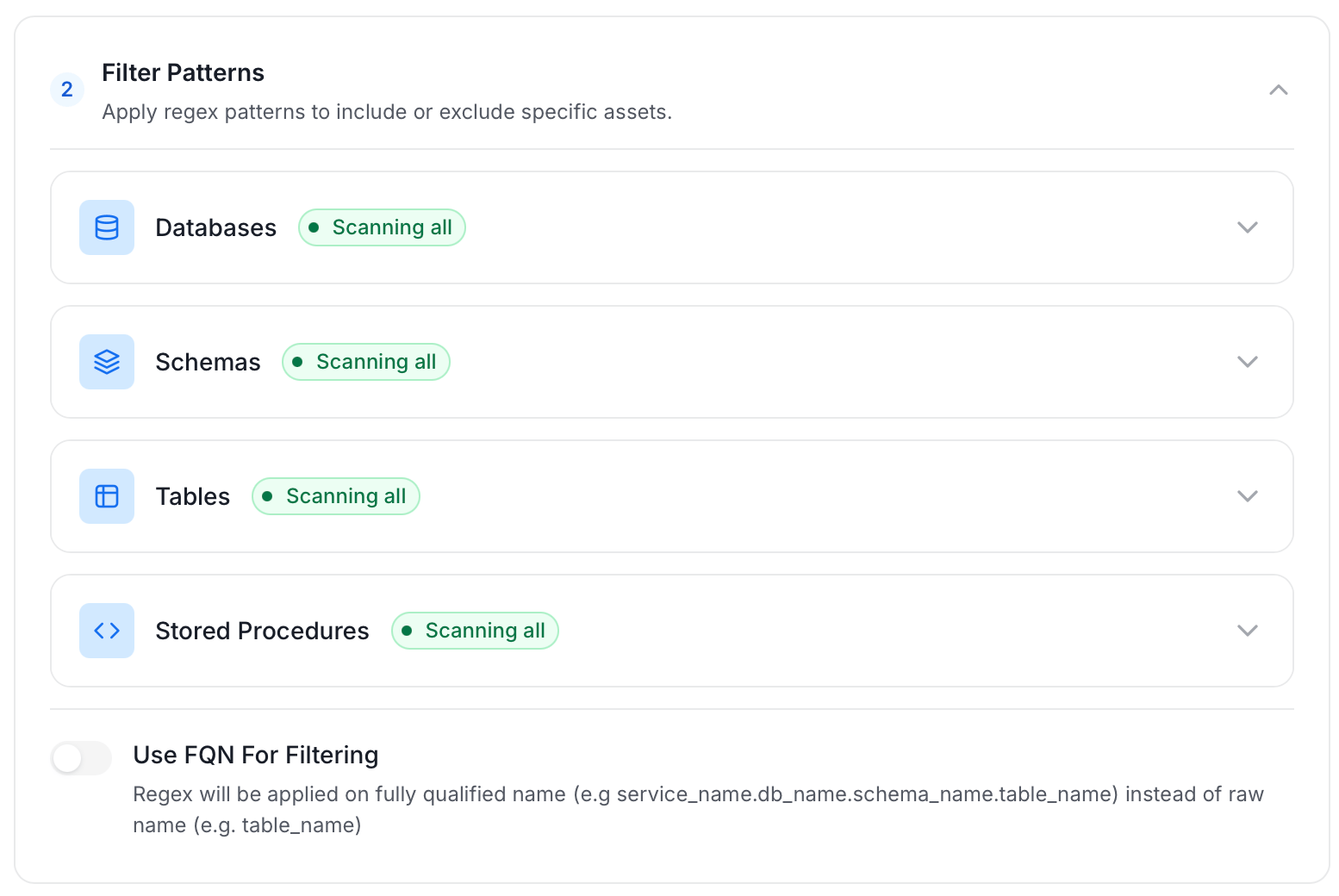
 * **Filter Patterns**: Apply include or exclude rules to scope which databases, schemas, tables, and stored procedures this agent ingests. These follow the same filter options described in **Step 5**.
 * **Scope & Behaviour**: Control what metadata to include and how to handle deletions. Toggle each option on or off based on your needs:
| Toggle | Default | Description |
| ------------------------------ | ------- | ---------------------------------------------------------------------------------------------------------------------------------------------------------------------- |
| Enable Debug Log | Off | Sets the ingestion log level to DEBUG. Useful for troubleshooting. |
| Mark Deleted Tables | On | Soft-delete tables in Collate when they are removed from the source. Applies only within the currently ingested schema. |
| Mark Deleted Stored Procedures | On | Soft-delete stored procedures in Collate when they are removed from the source. Associated entities like lineage are also deleted. |
| Mark Deleted Schemas | Off | Soft-delete schemas and all their child assets when removed from the source. |
| Mark Deleted Databases | Off | Soft-delete databases and all their child assets when removed from the source. |
| Include Tables | On | Ingest table metadata from the source. Turn off to skip tables entirely. |
| Include Tags | On | Ingest tags from the source. |
| Include Custom Properties | Off | Ingest connector-specific custom properties onto entities. |
| Include Owners | Off | Assign owners to ingested entities when the source owner's email matches a user in Collate. Does not overwrite an existing owner. |
| Include Stored Procedures | On | Ingest stored procedure metadata. |
| Include DDL Statements | Off | Ingest DDL statements alongside table metadata. |
| Override Metadata | Off | When on, source values overwrite existing descriptions, tags, owners, and display names in Collate. When off, Collate only updates fields that have no existing value. |
* **Scope & Behaviour**: Control what metadata to include and how to handle deletions. Toggle each option on or off based on your needs:
| Toggle | Default | Description |
| ------------------------------ | ------- | ---------------------------------------------------------------------------------------------------------------------------------------------------------------------- |
| Enable Debug Log | Off | Sets the ingestion log level to DEBUG. Useful for troubleshooting. |
| Mark Deleted Tables | On | Soft-delete tables in Collate when they are removed from the source. Applies only within the currently ingested schema. |
| Mark Deleted Stored Procedures | On | Soft-delete stored procedures in Collate when they are removed from the source. Associated entities like lineage are also deleted. |
| Mark Deleted Schemas | Off | Soft-delete schemas and all their child assets when removed from the source. |
| Mark Deleted Databases | Off | Soft-delete databases and all their child assets when removed from the source. |
| Include Tables | On | Ingest table metadata from the source. Turn off to skip tables entirely. |
| Include Tags | On | Ingest tags from the source. |
| Include Custom Properties | Off | Ingest connector-specific custom properties onto entities. |
| Include Owners | Off | Assign owners to ingested entities when the source owner's email matches a user in Collate. Does not overwrite an existing owner. |
| Include Stored Procedures | On | Ingest stored procedure metadata. |
| Include DDL Statements | Off | Ingest DDL statements alongside table metadata. |
| Override Metadata | Off | When on, source values overwrite existing descriptions, tags, owners, and display names in Collate. When off, Collate only updates fields that have no existing value. |
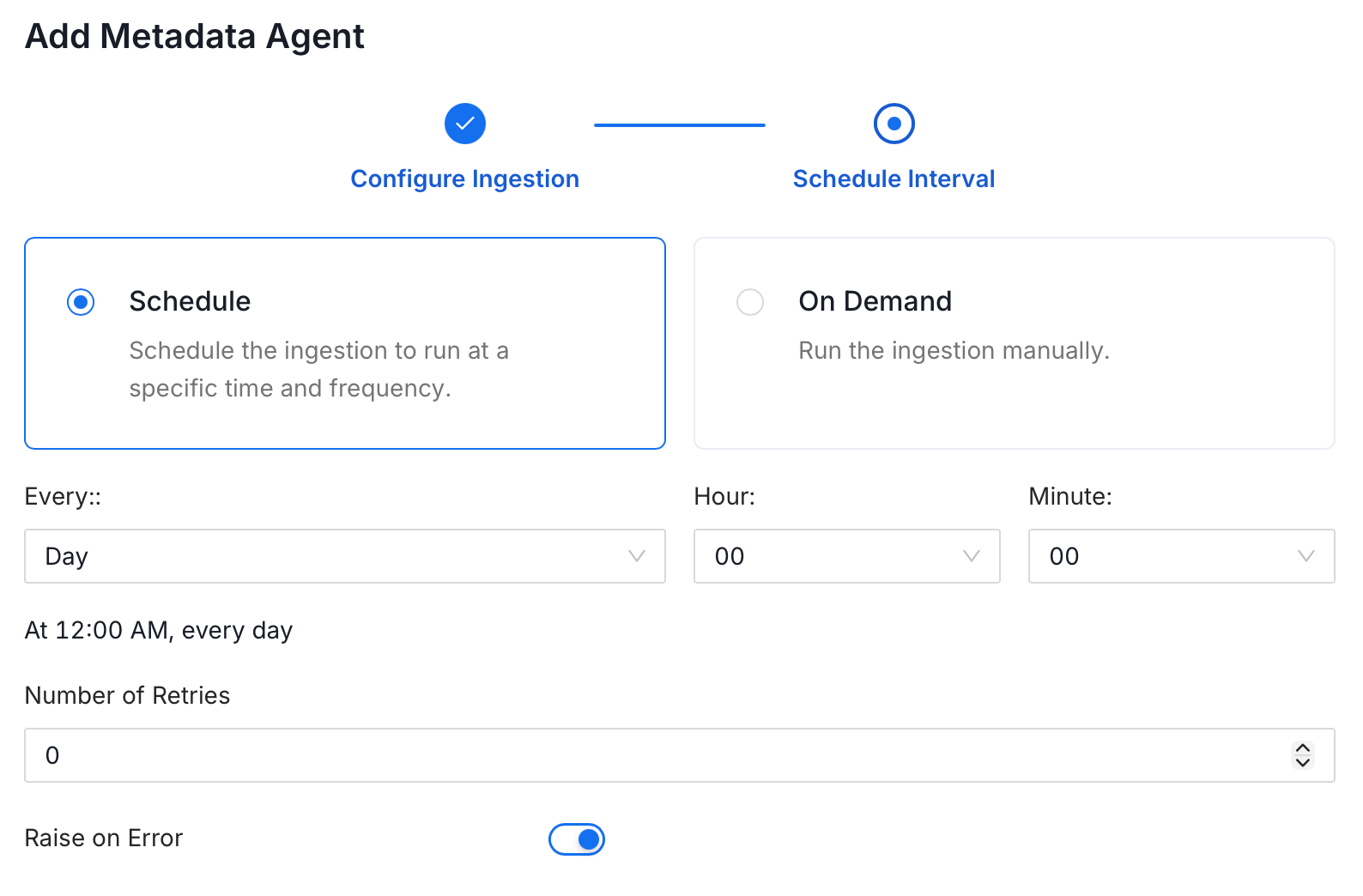
 5. On the **Schedule Interval** page, set when the agent runs:
* **Schedule**: Choose a preset interval (Hourly, Daily, Weekly, Monthly) or enter a custom cron expression.
* **On-Demand**: No automatic schedule; trigger the agent manually when needed.
5. On the **Schedule Interval** page, set when the agent runs:
* **Schedule**: Choose a preset interval (Hourly, Daily, Weekly, Monthly) or enter a custom cron expression.
* **On-Demand**: No automatic schedule; trigger the agent manually when needed.
 6. Click **Add** to deploy the agent.
## Troubleshooting
6. Click **Add** to deploy the agent.
## Troubleshooting