> ## Documentation Index
> Fetch the complete documentation index at: https://docs.getcollate.io/llms.txt
> Use this file to discover all available pages before exploring further.

# Messaging Connectors

> Discover Collate's messaging connectors to integrate Kafka, Pulsar, and other streaming platforms. Extract metadata, lineage, and schema.

# Messaging Services

This is the supported list of connectors for Messaging Services:

<CardGroup cols="2">
  <Card title="Kafka" icon="https://mintcdn.com/collatedocs/iER8mGFSfS-lAPO6/public/images/connectors/kafka.webp?fit=max&auto=format&n=iER8mGFSfS-lAPO6&q=85&s=e71cb90fa199dd0704699c7bd7209414" href="/ai-2-0/connectors/messaging/kafka" horizontal width="360" height="360" data-path="public/images/connectors/kafka.webp">
    <img src="https://mintcdn.com/collatedocs/qTqd1tlB8cqEVgXb/public/images/connectors/openmetadata-logo.png?fit=max&auto=format&n=qTqd1tlB8cqEVgXb&q=85&s=ad28bd1f2fd6ae2dd39f0703121c1653" style={{ position: 'absolute', top: '17px', right: '60px', width: 'auto', height: '16px', margin: '0' }} alt="OpenMetadata" width="69" height="83" data-path="public/images/connectors/openmetadata-logo.png" />

    <div className="prod-beta-chip prod">PROD</div>
  </Card>

  <Card title="Kinesis" icon="https://mintcdn.com/collatedocs/iER8mGFSfS-lAPO6/public/images/connectors/kinesis.webp?fit=max&auto=format&n=iER8mGFSfS-lAPO6&q=85&s=fb8c7c1d2bbaa305f747c4ae289f1574" href="/ai-2-0/connectors/messaging/kinesis" horizontal width="548" height="566" data-path="public/images/connectors/kinesis.webp">
    <img src="https://mintcdn.com/collatedocs/qTqd1tlB8cqEVgXb/public/images/connectors/openmetadata-logo.png?fit=max&auto=format&n=qTqd1tlB8cqEVgXb&q=85&s=ad28bd1f2fd6ae2dd39f0703121c1653" style={{ position: 'absolute', top: '17px', right: '60px', width: 'auto', height: '16px', margin: '0' }} alt="OpenMetadata" width="69" height="83" data-path="public/images/connectors/openmetadata-logo.png" />

    <div className="prod-beta-chip prod">PROD</div>
  </Card>

  <Card title="Pub/Sub" icon="https://mintcdn.com/collatedocs/c1QqkQUTar-TQamP/public/images/connectors/pubsub.svg?fit=max&auto=format&n=c1QqkQUTar-TQamP&q=85&s=17383366dbd062a37b00007af75a170f" href="/ai-2-0/connectors/messaging/pubsub" horizontal width="2500" height="2500" data-path="public/images/connectors/pubsub.svg">
    <img src="https://mintcdn.com/collatedocs/qTqd1tlB8cqEVgXb/public/images/connectors/openmetadata-logo.png?fit=max&auto=format&n=qTqd1tlB8cqEVgXb&q=85&s=ad28bd1f2fd6ae2dd39f0703121c1653" style={{ position: 'absolute', top: '17px', right: '60px', width: 'auto', height: '16px', margin: '0' }} alt="OpenMetadata" width="69" height="83" data-path="public/images/connectors/openmetadata-logo.png" />

    <div className="prod-beta-chip prod">PROD</div>
  </Card>

  <Card title="Redpanda" icon="https://mintcdn.com/collatedocs/kj7ZjFqdvAgAlfBX/public/images/connectors/redpanda.webp?fit=max&auto=format&n=kj7ZjFqdvAgAlfBX&q=85&s=cdfdc4b16e291bd6a4a56016ac821679" href="/ai-2-0/connectors/messaging/redpanda" horizontal width="900" height="741" data-path="public/images/connectors/redpanda.webp">
    <img src="https://mintcdn.com/collatedocs/qTqd1tlB8cqEVgXb/public/images/connectors/openmetadata-logo.png?fit=max&auto=format&n=qTqd1tlB8cqEVgXb&q=85&s=ad28bd1f2fd6ae2dd39f0703121c1653" style={{ position: 'absolute', top: '17px', right: '60px', width: 'auto', height: '16px', margin: '0' }} alt="OpenMetadata" width="69" height="83" data-path="public/images/connectors/openmetadata-logo.png" />

    <div className="prod-beta-chip prod">PROD</div>
  </Card>
</CardGroup>

If you have a request for a new connector, reach out in [Slack](https://slack.open-metadata.org/) or
open a [feature request](https://github.com/open-metadata/OpenMetadata/issues/new/choose) in our GitHub repo.

## Configure Metadata Agent and Schedule Ingestion

The **Metadata Agent** extracts topics, schemas, and other structural metadata from your source and keeps your Collate catalog in sync. It powers discovery, lineage, and governance across your data assets.

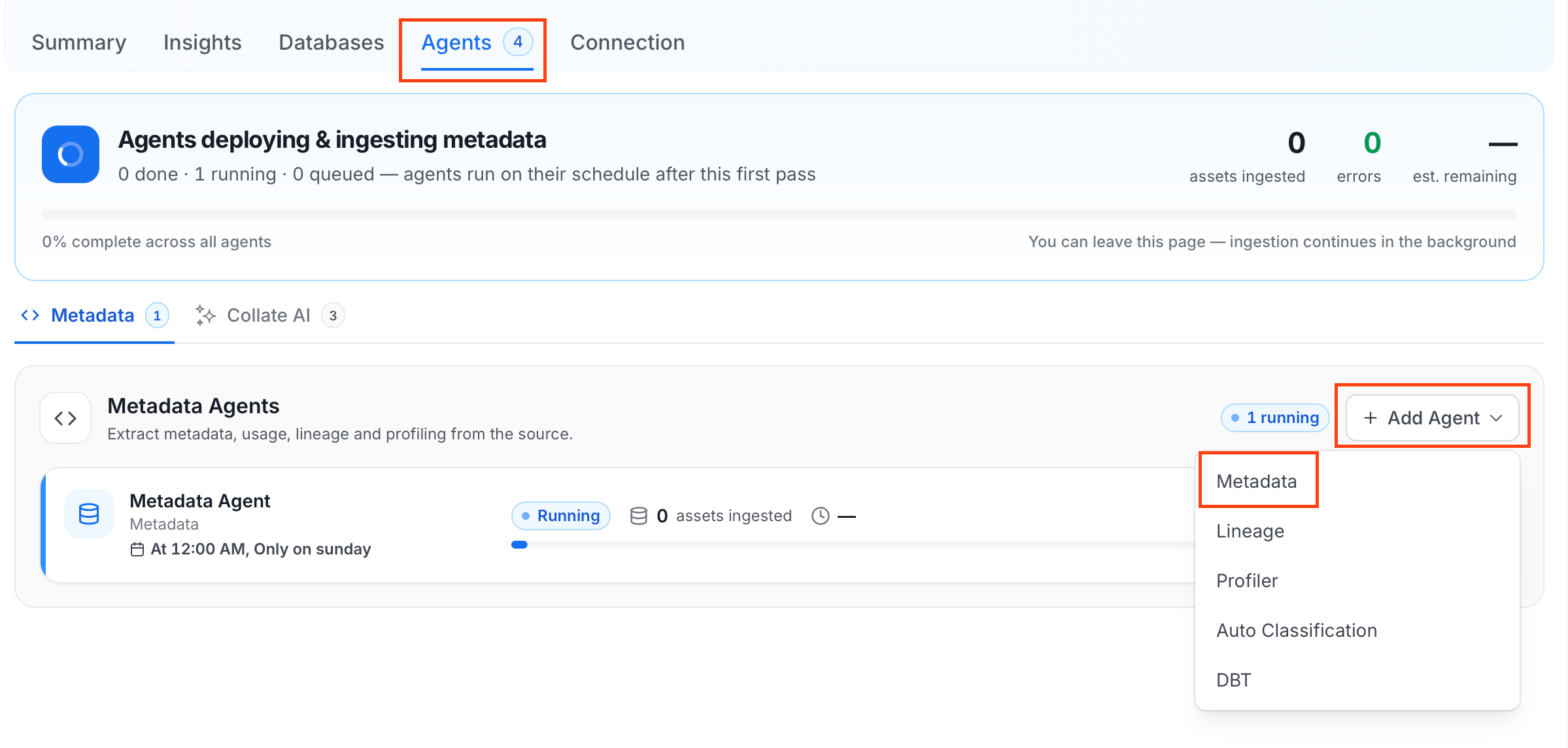
When you click **Create & Deploy**, Collate automatically deploys a Metadata Agent for this service and triggers the first ingestion run. View its status and run history from the **Agents** tab on the service detail page.

To configure the additional Metadata Agent and schedule ingestion, follow these steps:

1. In the left navigation, click **Connections** and select your service.

2. Click the **Agents** tab.

3. Click **Add Agent** and select **Metadata** from the dropdown.
   <img src="https://mintcdn.com/collatedocs/bv5oe4uRjuorTJO1/public/images/ai-2.0/connectors/metadata-ingestion/add-metadata-agent.png?fit=max&auto=format&n=bv5oe4uRjuorTJO1&q=85&s=accad7d1c4ddf209781bff851d51d464" alt="Add Metadata Agent" width="2398" height="1144" data-path="public/images/ai-2.0/connectors/metadata-ingestion/add-metadata-agent.png" />
   For some services, the dropdown is not available and clicking **Add Agent** takes you directly to the agent configuration page.

4. On the **Configure Ingestion** page, do the following and click **Next**.

   * **Name this Ingestion**: Enter a unique recognizable name for this ingestion pipeline.

     <img src="https://mintcdn.com/collatedocs/bv5oe4uRjuorTJO1/public/images/ai-2.0/connectors/metadata-ingestion/metadata-agent-name.png?fit=max&auto=format&n=bv5oe4uRjuorTJO1&q=85&s=d5ec1f0f3742cadab8cd54c602c97239" alt="Name this Ingestion" width="1578" height="644" data-path="public/images/ai-2.0/connectors/metadata-ingestion/metadata-agent-name.png" />

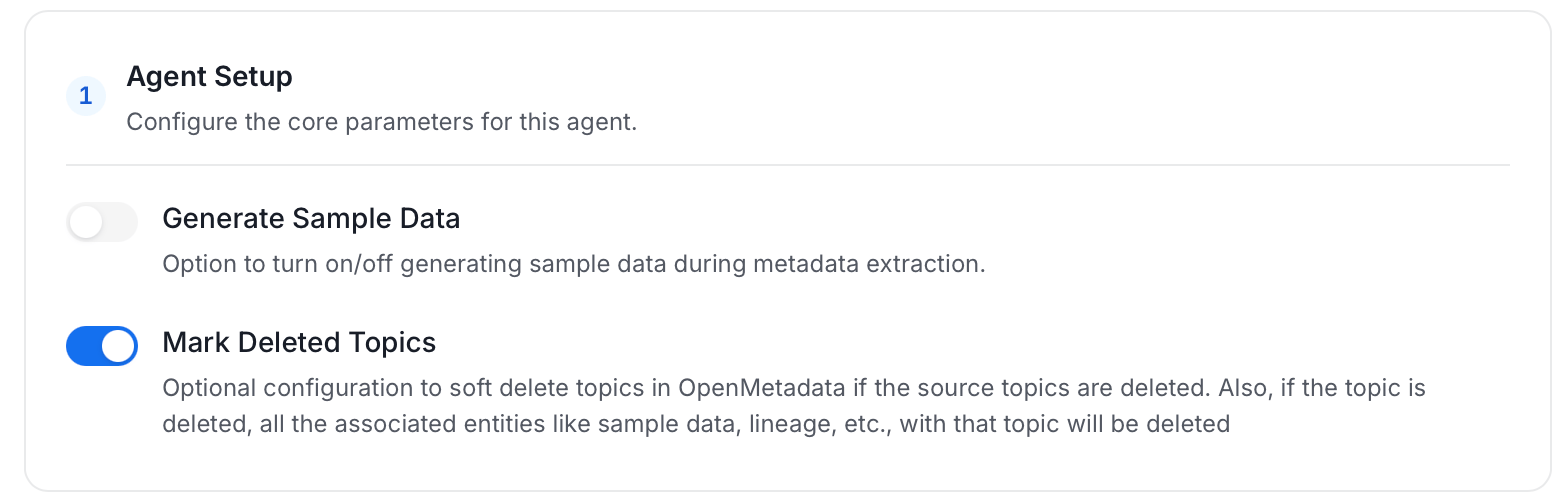
   * **Agent Setup**: Configure the core parameters for this agent. The following fields are available:

     | Field                | Default | Description                                                                                                                             |
     | -------------------- | ------- | --------------------------------------------------------------------------------------------------------------------------------------- |
     | Generate Sample Data | Off     | Option to turn on/off generating sample data during metadata extraction.                                                                |
     | Mark Deleted Topics  | On      | Soft-delete topics in Collate when they are removed from the source. Associated entities like sample data and lineage are also deleted. |
     <img src="https://mintcdn.com/collatedocs/tVR0kaoXvgs3p2Wx/public/images/ai-2.0/connectors/metadata-ingestion/Messaging/messaging-agent-setup.png?fit=max&auto=format&n=tVR0kaoXvgs3p2Wx&q=85&s=8a5f2f280266c29fe5b4e494421fb1ed" alt="Agent Setup" width="1564" height="502" data-path="public/images/ai-2.0/connectors/metadata-ingestion/Messaging/messaging-agent-setup.png" />

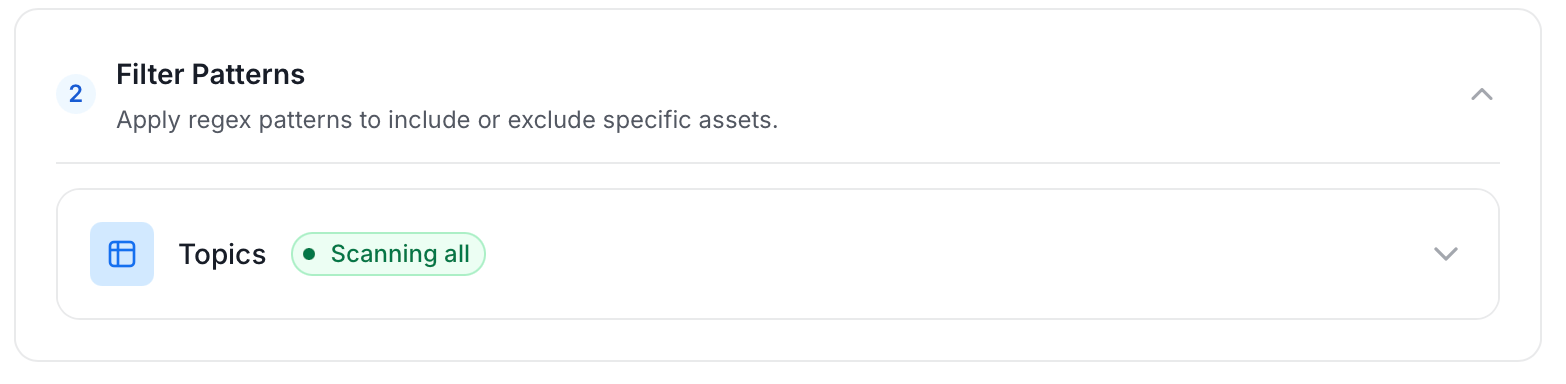
   * **Filter Patterns**: Apply include or exclude rules to scope which topics this agent ingests. These follow the same filter options described in **Step 5**.
     <img src="https://mintcdn.com/collatedocs/tVR0kaoXvgs3p2Wx/public/images/ai-2.0/connectors/metadata-ingestion/Messaging/messaging-filter-pattern.png?fit=max&auto=format&n=tVR0kaoXvgs3p2Wx&q=85&s=c268a706f57ed68e2117621edf5c9bb2" alt="Filter Patterns" width="1566" height="384" data-path="public/images/ai-2.0/connectors/metadata-ingestion/Messaging/messaging-filter-pattern.png" />

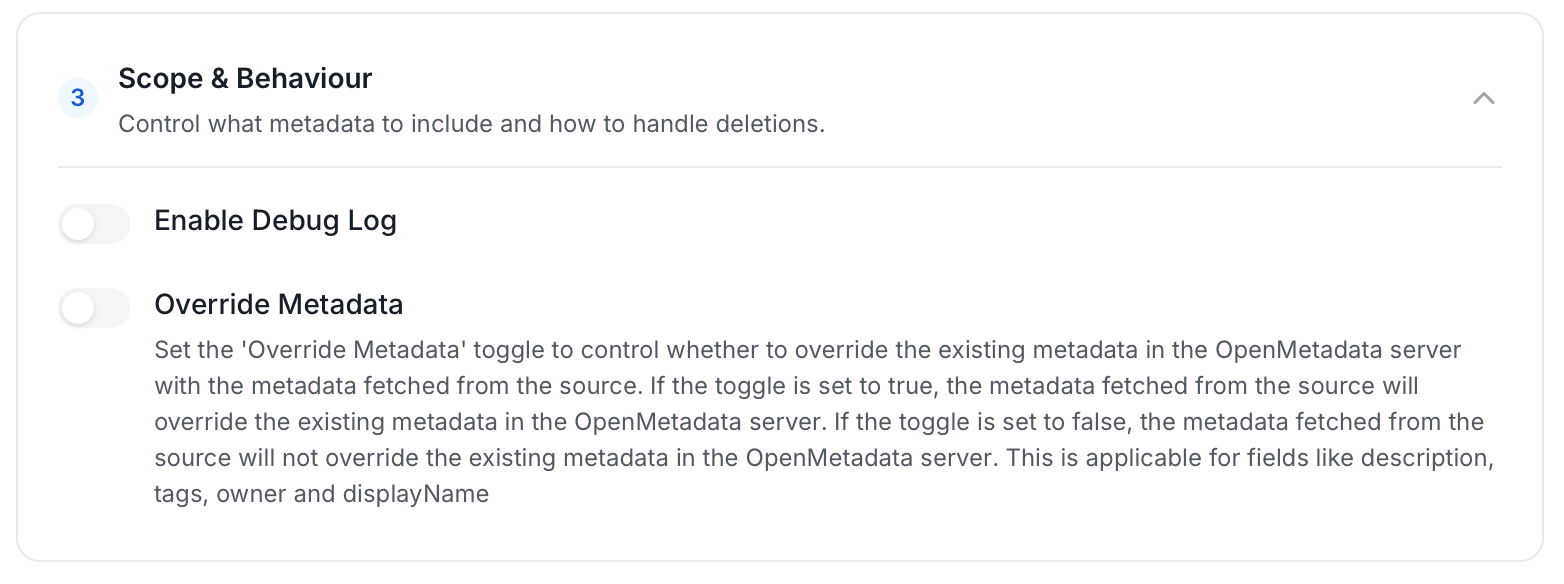
   * **Scope & Behaviour**: Control what metadata to include and how to handle deletions. Toggle each option on or off based on your needs:

     | Toggle            | Default | Description                                                                                                                                                            |
     | ----------------- | ------- | ---------------------------------------------------------------------------------------------------------------------------------------------------------------------- |
     | Enable Debug Log  | Off     | Sets the ingestion log level to DEBUG. Useful for troubleshooting.                                                                                                     |
     | Override Metadata | Off     | When on, source values overwrite existing descriptions, tags, owners, and display names in Collate. When off, Collate only updates fields that have no existing value. |
     <img src="https://mintcdn.com/collatedocs/tVR0kaoXvgs3p2Wx/public/images/ai-2.0/connectors/metadata-ingestion/Messaging/messaging-scope-behaviour.png?fit=max&auto=format&n=tVR0kaoXvgs3p2Wx&q=85&s=c87a124d0550278f6e38619a2711b860" alt="Scope & Behaviour" width="1564" height="584" data-path="public/images/ai-2.0/connectors/metadata-ingestion/Messaging/messaging-scope-behaviour.png" />

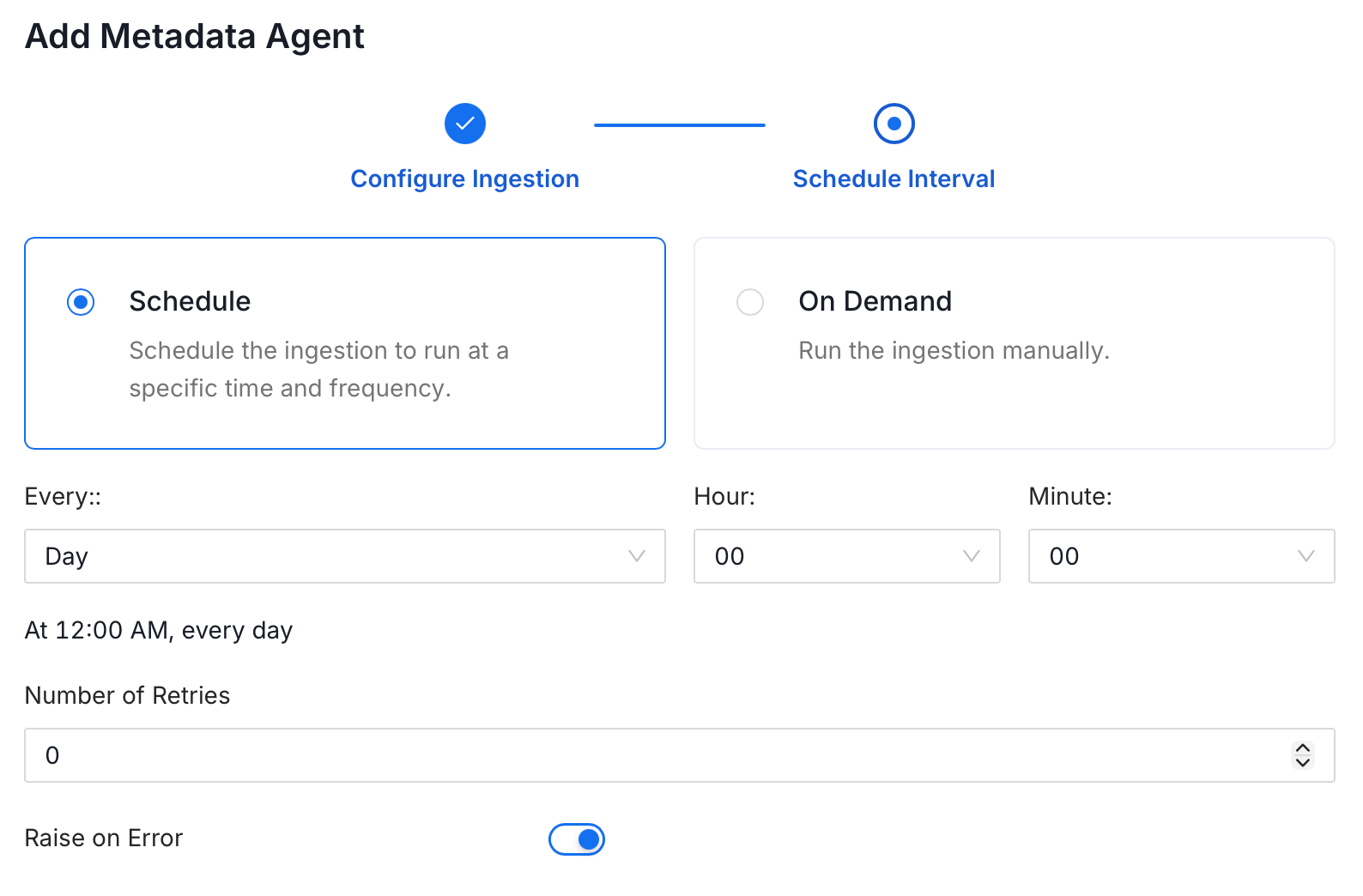
5. On the **Schedule Interval** page, set when the agent runs:

   * **Schedule**: Choose a preset interval (Hourly, Daily, Weekly, Monthly) or enter a custom cron expression.
   * **On-Demand**: No automatic schedule; trigger the agent manually when needed.
   <img src="https://mintcdn.com/collatedocs/bv5oe4uRjuorTJO1/public/images/ai-2.0/connectors/metadata-ingestion/schedule.png?fit=max&auto=format&n=bv5oe4uRjuorTJO1&q=85&s=25cc1d78f6f2a8bd115830d034d1d8d1" alt="Schedule Interval" width="1588" height="1044" data-path="public/images/ai-2.0/connectors/metadata-ingestion/schedule.png" />

6. Click **Add** to deploy the agent.
