> ## Documentation Index
> Fetch the complete documentation index at: https://docs.getcollate.io/llms.txt
> Use this file to discover all available pages before exploring further.
# Ingest Lineage from dbt
> Ingest dbt lineage to build upstream and downstream traceability for models, columns, and data products.
# Ingest Lineage from dbt
Collate reads lineage information from your dbt `manifest.json` file and uses it to build upstream and downstream traceability for your data models.
Collate extracts lineage from two sources in the manifest file: the `depends_on` key (node-level relationships) and the `compiled_code` or `compiled_sql` key (query-level relationships).
**Note**: To capture lineage, the `compiled_code` field must be present in your `manifest.json`.
* If `compiled_code` is missing, Collate will not capture lineage for that node.
* To make sure `compiled_code` is populated, run one of the following commands in your dbt project before ingestion:
* `dbt compile`
* `dbt docs generate`
## How Collate Builds dbt Lineage
Collate uses two approaches to build lineage — node dependencies and query parsing.
### Step 1: Lineage from `depends_on`
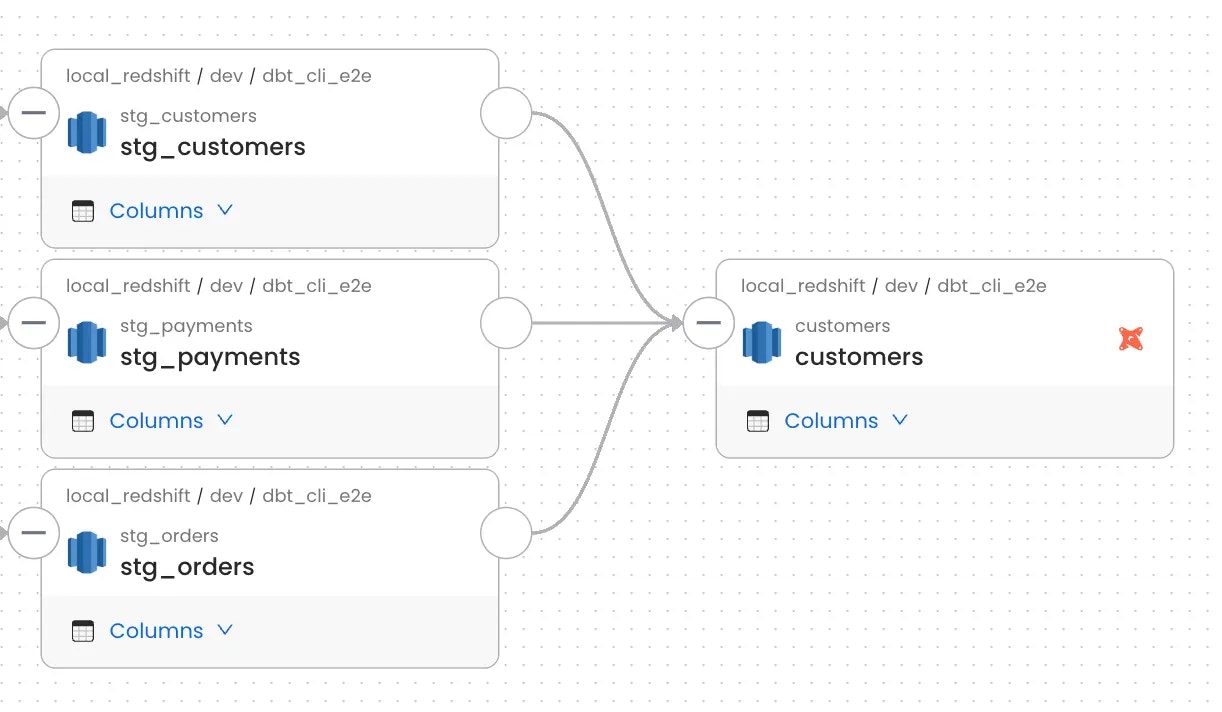
Collate reads node-level lineage from the `depends_on.nodes` field in `manifest.json`.
Here's an example — the `customers` model depends on three staging models:
```json theme={null}
"model.jaffle_shop.customers": {
"compiled": true,
"resource_type": "model",
"depends_on": {
"macros": [],
"nodes": [
"model.jaffle_shop.stg_customers",
"model.jaffle_shop.stg_orders",
"model.jaffle_shop.stg_payments"
]
}
}
```
Collate builds the lineage graph from these dependencies:
 ### Step 2: Lineage from dbt Queries
Collate also parses the compiled SQL query for each model to extract finer-grained source and target relationships.
The query sits under `node_name → compiled_code` (or `compiled_sql` in older dbt versions):
```json theme={null}
"model.jaffle_shop.customers": {
"compiled": true,
"resource_type": "model",
"compiled_code": "Query for the model"
}
```
Collate runs this query through its lineage parser to identify the source and target tables and add them to the lineage graph.
**Note**: If the lineage parser can't interpret the query, lineage for that node won't be created. Check the ingestion logs for parsing errors.
### Step 2: Lineage from dbt Queries
Collate also parses the compiled SQL query for each model to extract finer-grained source and target relationships.
The query sits under `node_name → compiled_code` (or `compiled_sql` in older dbt versions):
```json theme={null}
"model.jaffle_shop.customers": {
"compiled": true,
"resource_type": "model",
"compiled_code": "Query for the model"
}
```
Collate runs this query through its lineage parser to identify the source and target tables and add them to the lineage graph.
**Note**: If the lineage parser can't interpret the query, lineage for that node won't be created. Check the ingestion logs for parsing errors.