> ## Documentation Index
> Fetch the complete documentation index at: https://docs.getcollate.io/llms.txt
> Use this file to discover all available pages before exploring further.
# dbt Workflow | Data Build Tool Integration
> Learn how to integrate dbt workflows with Collate connectors for seamless data lineage tracking and metadata ingestion. Step-by-step setup guide included.
# dbt Workflow
Configure the dbt Workflow.
Configure the dbt Workflow from the CLI.
Configure the auto dbt ingestion for dbt-core.
## dbt Integration
| Feature | Status |
| :------------------------------------------------------------------------ | :------------------------------------------------------ |
| Stage | PROD |
| [dbt Queries](#1-dbt-queries) | |
| [dbt Lineage](#2-dbt-lineage) | |
| [dbt Tags](#3-dbt-tags) | |
| [dbt Tiers](#7-dbt-tiers) | |
| [dbt Domain](#9-dbt-domain) | |
| [dbt Custom Properties](#10-dbt-custom-properties) | |
| [dbt Glossary](#8-dbt-glossary) | |
| [dbt Owner](#4-dbt-owner) | |
| [dbt Descriptions](#5-dbt-descriptions) | |
| [dbt Tests](#6-dbt-tests-and-test-results) | |
| [dbt Exposures](#11-dbt-exposures) | |
| [dbt push metadata](/ai-2-0/connectors/database/dbt/auto-ingest-dbt-core) | |
| Supported dbt Core Versions | `v1.2` `v1.3` `v1.4` `v1.5` `v1.6` `v1.7` `v1.8` `v1.9` |
## Requirements
Collate supports ingestion from both **dbt Core** and **dbt Cloud**.\
The requirements vary depending on how dbt is deployed and executed.
### Why We Need dbt Artifacts
To bring your dbt project into Collate, we need to read the metadata that dbt generates about your transformations. dbt automatically creates JSON files (called "artifacts") whenever you run commands like `dbt run`, `dbt test`, or `dbt docs generate`.
These artifacts allow Collate to:
* **Build lineage graphs**: See how your models connect to sources and each other
* **Sync documentation**: Keep table and column descriptions in sync with your dbt project
* **Track data quality**: Monitor test results and show pass/fail status
* **Import metadata**: Bring over tags, ownership, domains, and custom properties
We read these pre-generated files rather than parsing your SQL and YAML directly, which means the integration works with any dbt setup—whether you run dbt in Airflow, Kubernetes, GitHub Actions, or locally.
## Understanding dbt Artifact Files
dbt generates JSON files in the `target/` directory. Here's what each file provides:
### manifest.json (Required)
The manifest is the heart of dbt metadata. **This file is required** for the integration to work.
**What it contains:**
* Model definitions and SQL code
* `ref()` and `source()` dependencies for lineage
* Descriptions from `schema.yml` files
* dbt tags and meta properties
* Test configurations
* Column definitions
**How Collate uses it:**
* Creates Data Model entities linked to your tables
* Builds lineage graphs showing data flow between models
* Syncs table and column descriptions
* Creates classification tags
* Assigns ownership and domains
* Creates test cases for data quality monitoring
**Generated by:** Any dbt command (`dbt run`, `dbt build`, `dbt compile`)
### catalog.json (Recommended)
The catalog provides database-level details that the manifest doesn't have.
**What it contains:**
* Actual column data types from the database
* Database-level ownership information
* Column ordering as it exists in the database
* Statistics about tables and columns
**How Collate uses it:**
* Provides accurate column data types (more reliable than schema.yml declarations)
* Fallback owner information if not specified in meta properties
* Maintains column position from your database
**Generated by:** `dbt docs generate`
**Note**: Without catalog.json, you'll still get lineage and model information, but column types will only include what's declared in your `schema.yml` files.
### run\_results.json (Recommended)
Run results capture the outcome of your most recent dbt execution.
**What it contains:**
* Test pass/fail/warn status for each test
* Execution timestamps
* Error messages and stack traces
* Model build success/failure status
**How Collate uses it:**
* Updates test case results showing pass/fail status
* Tracks when tests last ran
* Shows failure details for debugging
**Generated by:** `dbt run`, `dbt test`, `dbt build`
**Tip**: Run `dbt test` before the Collate ingestion runs to capture the latest test results.
### Generating Your dbt Artifacts
Run these commands after your dbt models execute:
```bash theme={null}
# Step 1: Run your models (generates manifest.json)
dbt run
# Step 2: Run your tests (updates run_results.json with test outcomes)
dbt test
# Step 3: Generate the catalog (creates catalog.json)
dbt docs generate
```
**Verify your artifacts exist:**
```bash theme={null}
ls -la target/*.json
# Expected files:
# target/manifest.json (required)
# target/catalog.json (recommended)
# target/run_results.json (recommended)
```
## dbt Core Artifact Storage
### Artifact Accessibility
Since **dbt Core runs within your infrastructure** (for example, using Airflow or similar schedulers), Collate does not have direct access to the local file system where dbt executes.
To enable ingestion, the dbt artifacts **must be made accessible to Collate** by storing them in a supported cloud storage service.
Collate currently supports the following storage systems:
* Amazon S3
* Google Cloud Storage (GCS)
* Azure Data Lake / Azure Blob Storage
* HTTP/HTTPS servers
* Local or shared filesystem
### Configuration Steps
To configure dbt Core artifact ingestion:
1. **Generate artifacts**: Ensure dbt generates required files (manifest.json, catalog.json, run\_results.json)
2. **Choose storage method**: Select from S3, GCS, Azure, HTTP, or Local (see options below)
3. **Upload artifacts**: Configure your workflow to upload artifacts to chosen storage
4. **Configure Collate**: Provide storage path and credentials during ingestion setup
See the [Storage Configuration Overview](/ai-2-0/connectors/database/dbt/storage-configuration-overview) for complete implementation guides.
### dbt Core Artifact Configuration
When using dbt Core, artifacts must be accessible to Collate. Choose your storage method:
AWS deployments (ECS, EKS, EC2)
GCP deployments (GKE, Compute)
Azure deployments (AKS, VMs)
Cloud-agnostic, static file servers
Single-server or Docker deployments
## dbt Cloud Requirements
When using dbt Cloud, Collate integrates directly with dbt Cloud using APIs to retrieve metadata and execution details. See the [dbt Cloud API Configuration Guide](/ai-2-0/connectors/database/dbt/dbt-cloud-api-guide) for complete setup instructions.
### Prerequisites
To configure dbt Cloud ingestion, you must have:
* An active dbt Cloud account
* At least one dbt Cloud job configured to generate dbt artifacts
* A valid dbt Cloud API token with sufficient permissions
### Supported Metadata
Using dbt Cloud integration, Collate can ingest:
* dbt models and sources
* Column-level metadata
* Model and source lineage
* dbt test results (when tests are executed as part of the job)
**Note**:
* No external cloud storage configuration is required for dbt Cloud ingestion.
* Ensure that your dbt Cloud job is configured to generate documentation artifacts.
## Metadata Collate Integrates from dbt
### 1. dbt Queries
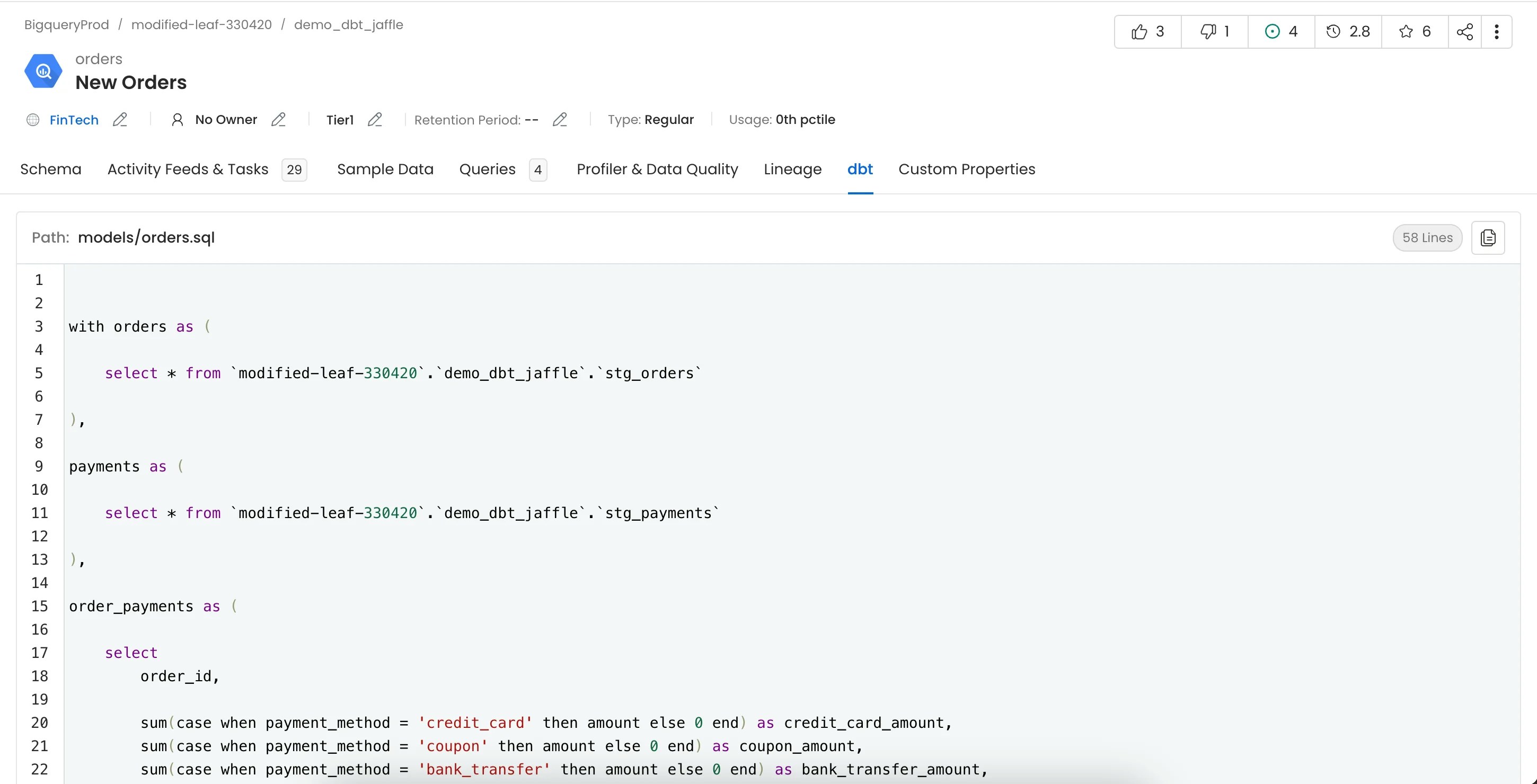
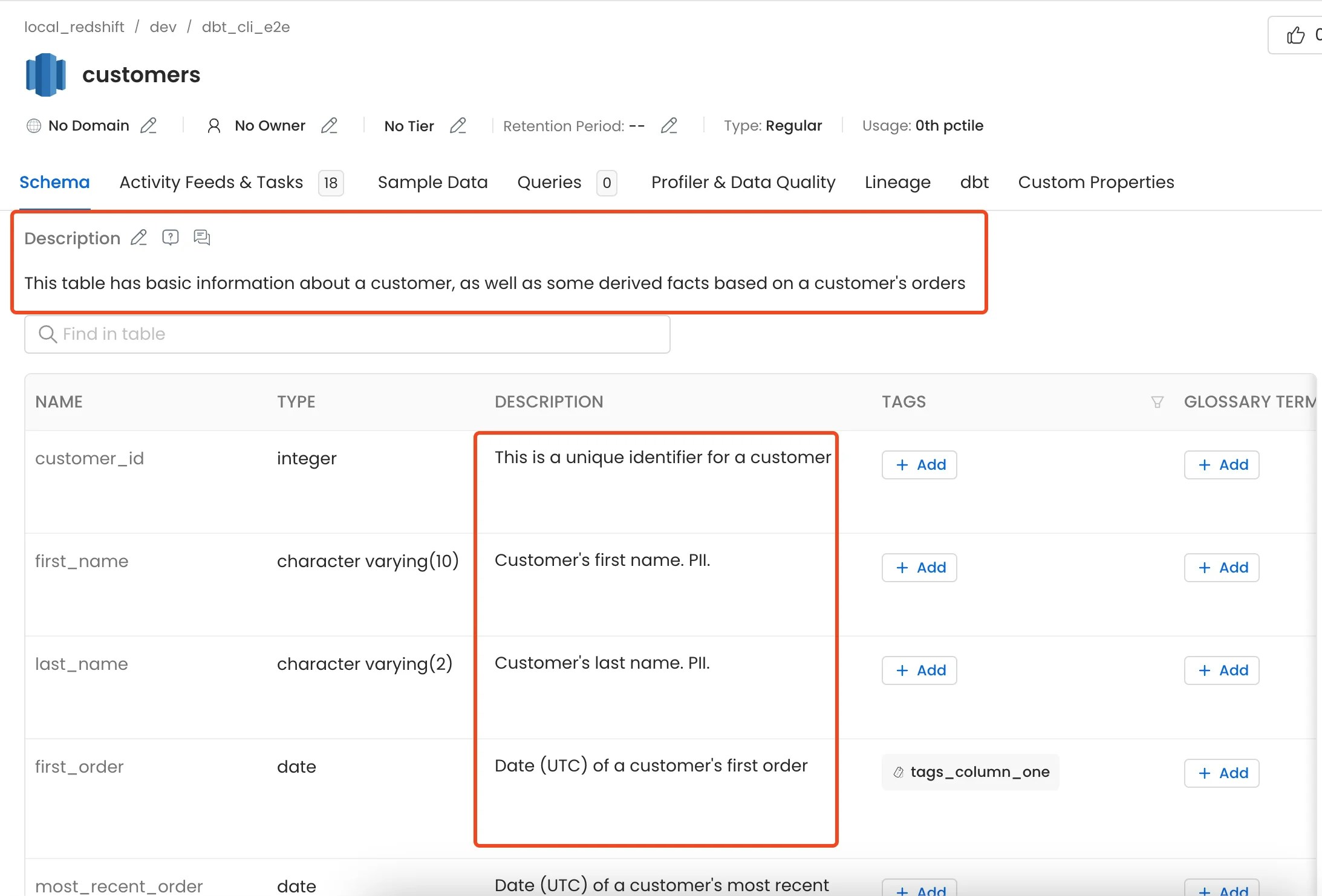
Queries used to create the dbt models can be viewed in the dbt tab.
### 2. dbt Lineage
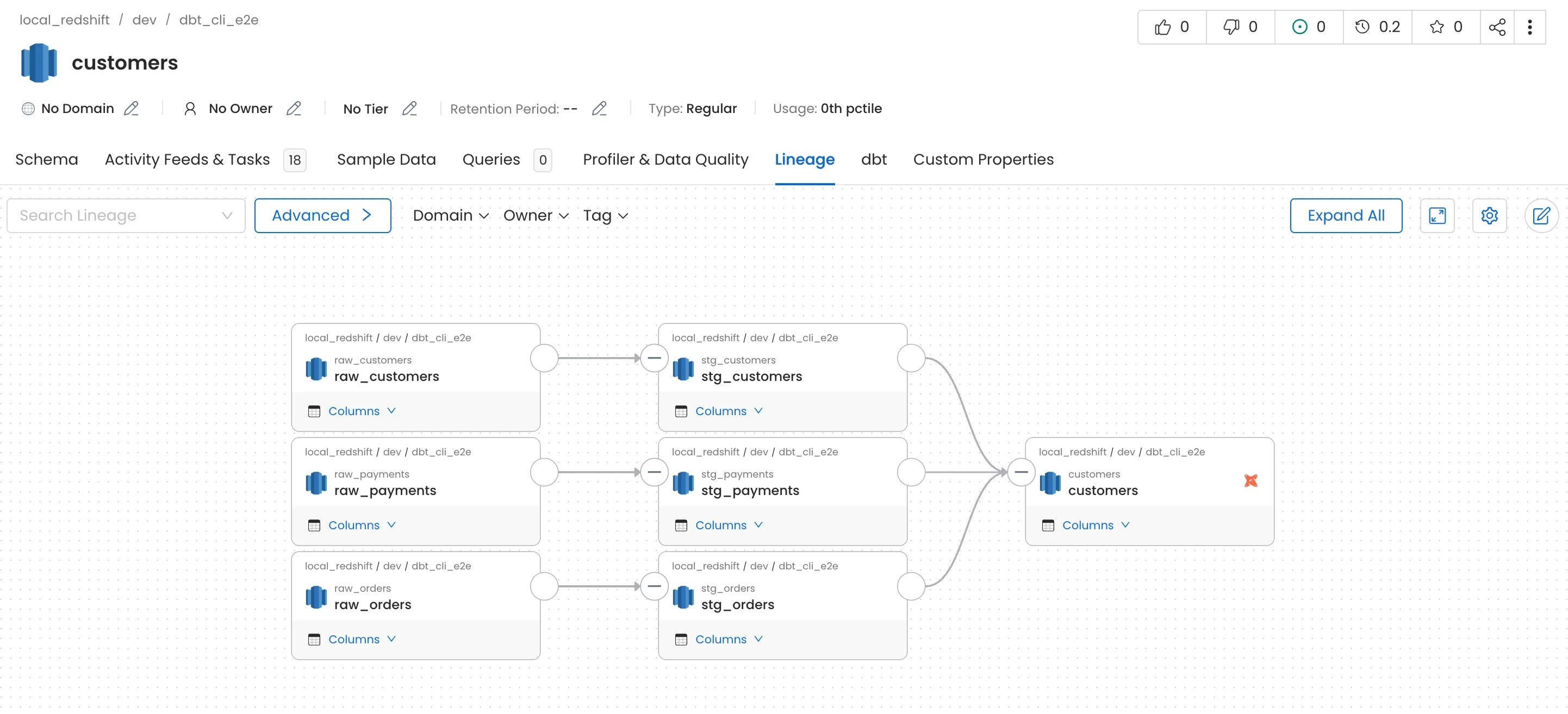
Lineage from dbt models can be viewed in the Lineage tab.
For more information on how lineage is extracted from dbt take a look [here](/ai-2-0/connectors/database/dbt/ingest-dbt-lineage)
**Note**: To capture lineage, the `compiled_code` field must be present in the `manifest.json` file.
* If `compiled_code` is missing, lineage will **not** be captured for that node.
* To ensure `compiled_code` is populated in your dbt manifest, run the following commands in your dbt project:
* `dbt compile`
* `dbt docs generate`
### 3. dbt Tags
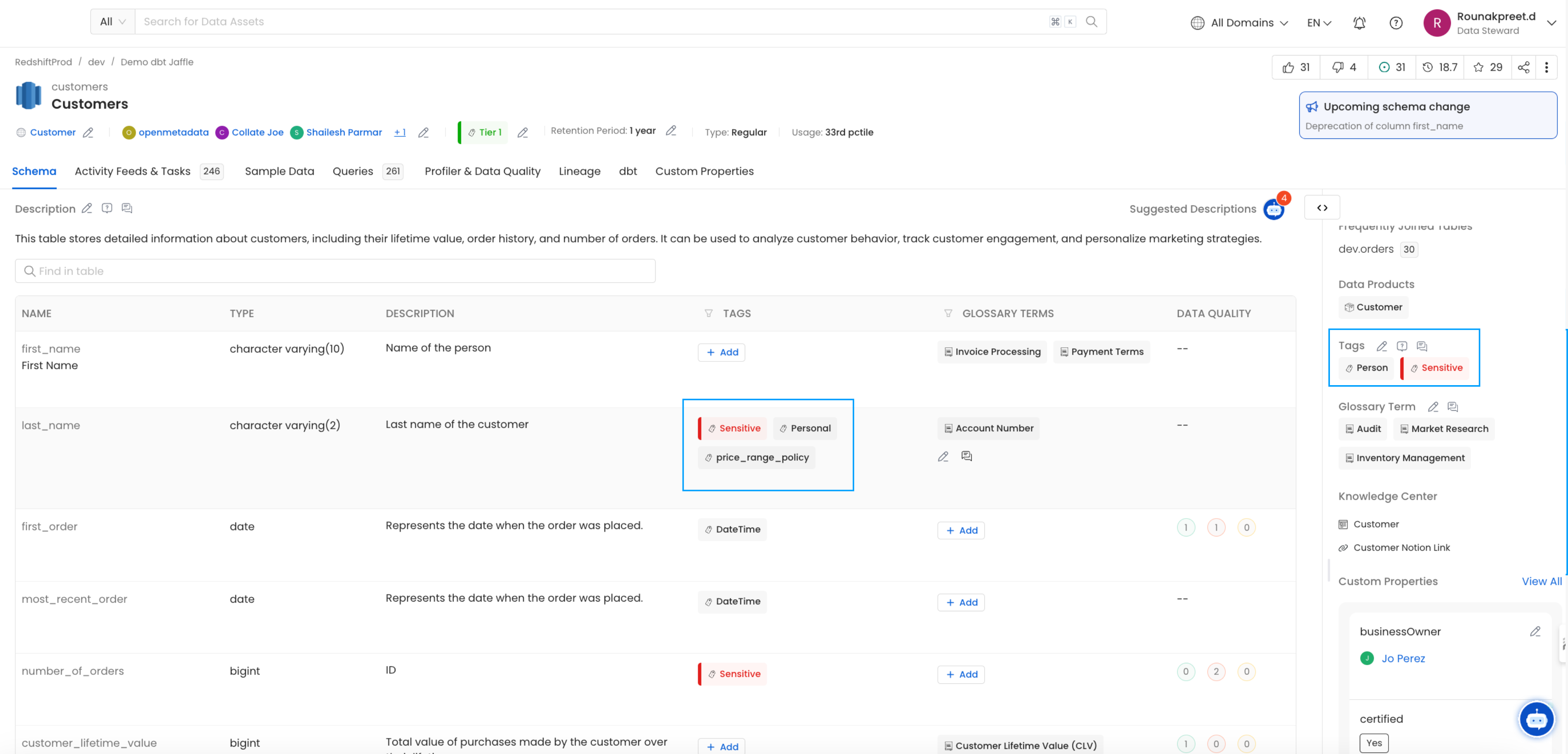
Table and column level tags can be imported from dbt.
See [Add dbt Tags](/ai-2-0/connectors/database/dbt/ingest-dbt-tags).
### 4. dbt Owner
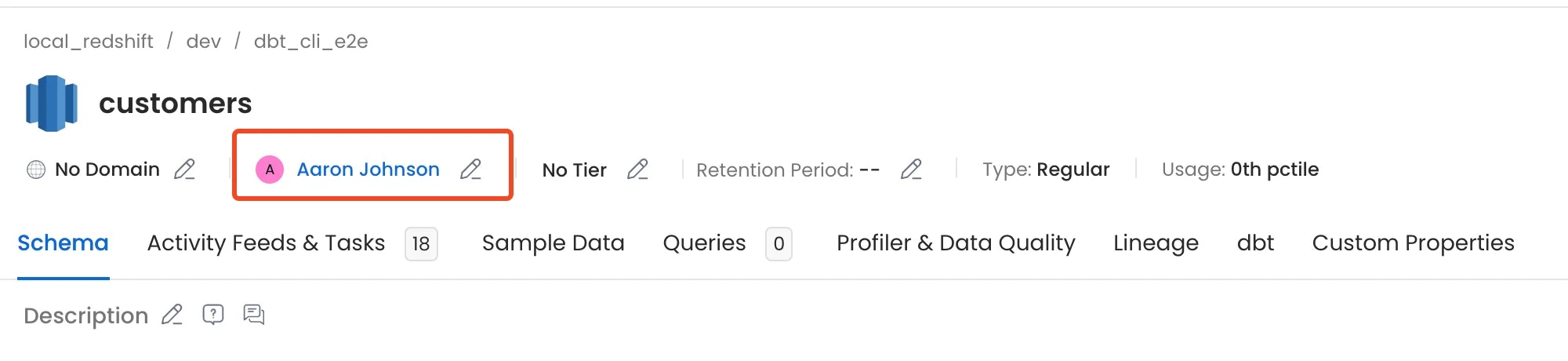
Owner from dbt models can be imported and assigned to respective tables.
See [Add dbt Owner](/ai-2-0/connectors/database/dbt/ingest-dbt-owner).
### 5. dbt Descriptions
Descriptions from dbt `manifest.json` and `catalog.json` can be imported and assigned to respective tables and columns.
For more information and to control how the table and column descriptions are updated from dbt please take a look [here](/ai-2-0/connectors/database/dbt/ingest-dbt-descriptions)
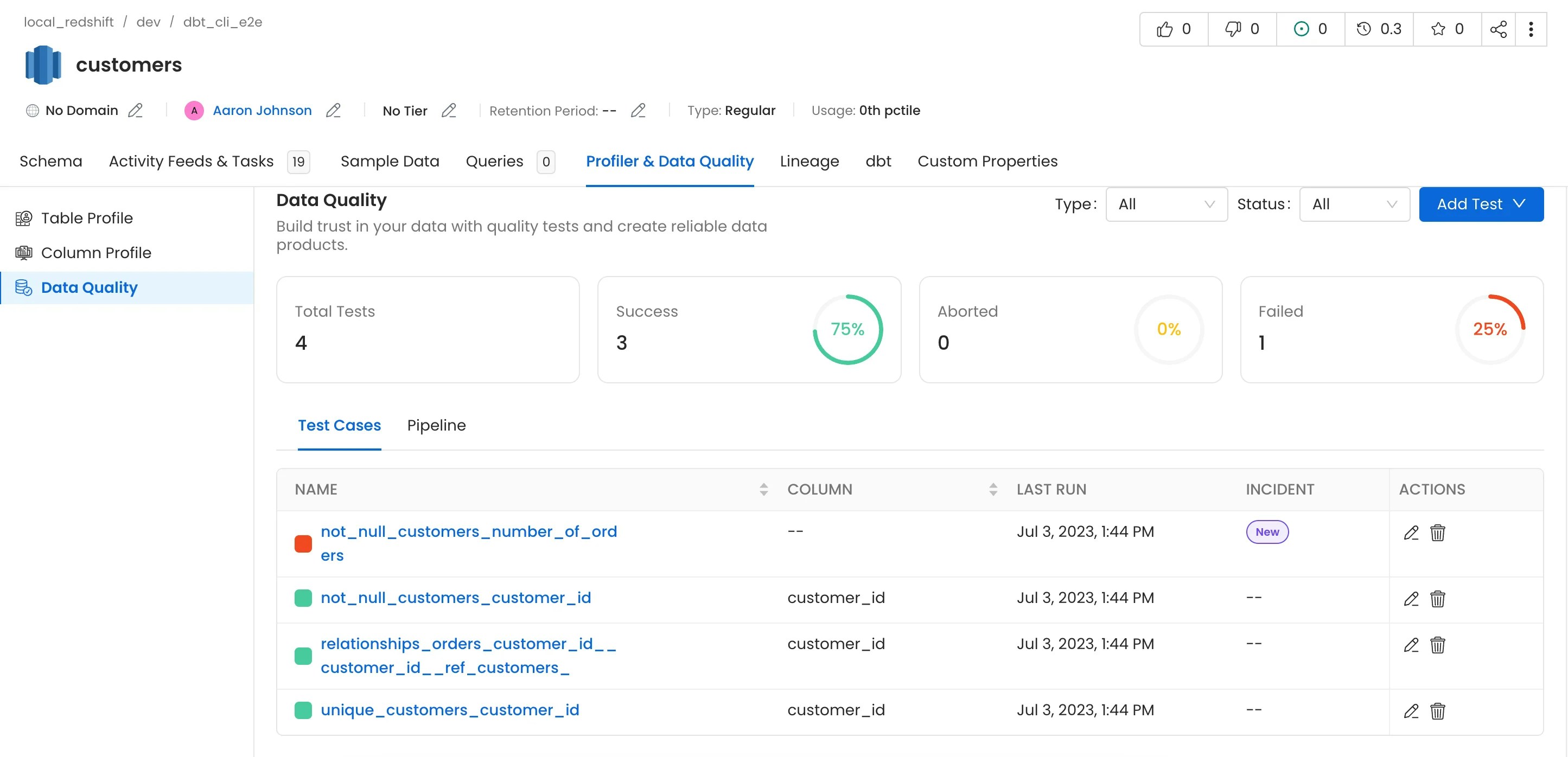
### 6. dbt Tests and Test Results
Tests from dbt will only be imported if the `run_results.json` file is passed.
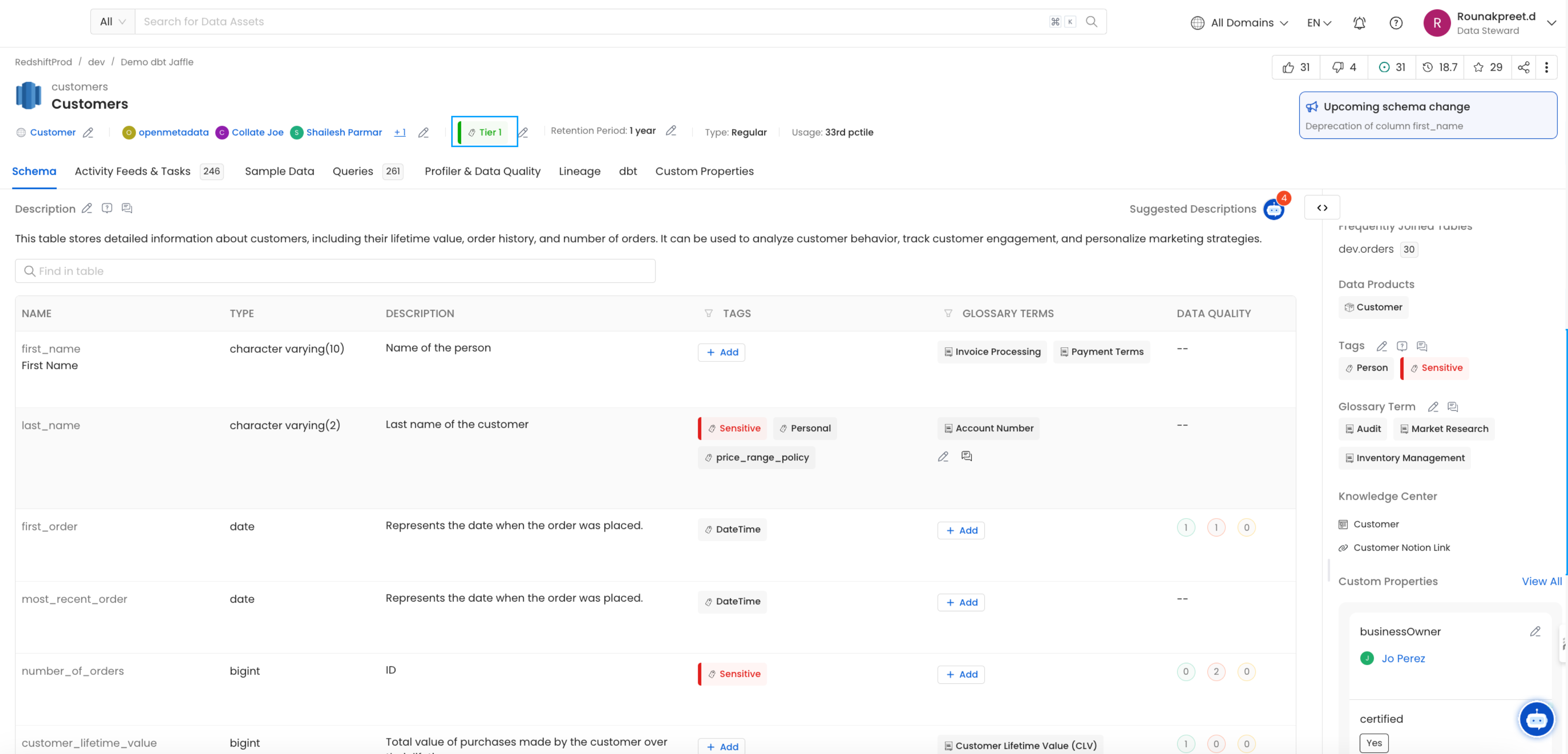
### 7. dbt Tiers
Table and column level Tiers can be imported from dbt.
See [Add dbt Tiers](/ai-2-0/connectors/database/dbt/ingest-dbt-tier).
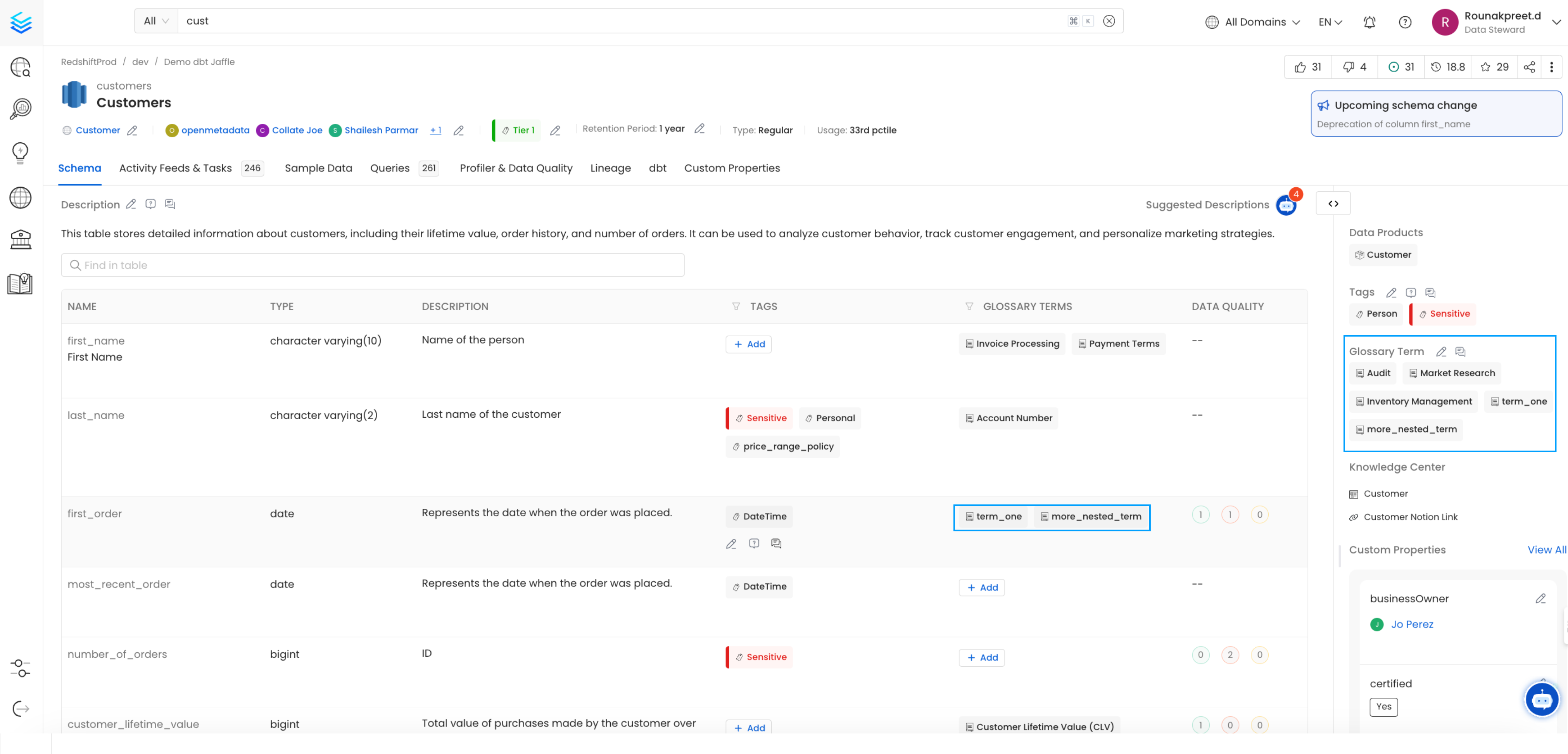
### 8. dbt Glossary
Table and column level Glossary can be imported from dbt.
See [Add dbt Glossary](/ai-2-0/connectors/database/dbt/ingest-dbt-glossary).
### 9. dbt Domain
Table level Domain can be imported from dbt to assign tables to organizational domains.
See [Add dbt Domain](/ai-2-0/connectors/database/dbt/ingest-dbt-domain).
### 10. dbt Custom Properties
Custom property values can be imported from dbt to enrich table metadata with organization-specific attributes.
See [Add dbt Custom Properties](/ai-2-0/connectors/database/dbt/ingest-dbt-custom-properties).
### 11. dbt Exposures
Exposures let you extend lineage from your dbt models to the dashboards, ML models, and API endpoints that consume them.
For more information, see [Ingest Exposures from dbt](/ai-2-0/connectors/database/dbt/ingest-dbt-exposures).
## Configure Metadata Agent and Schedule Ingestion
The **Metadata Agent** extracts schemas, tables, columns, and other structural metadata from your source and keeps your Collate catalog in sync. It powers discovery, lineage, and governance across your data assets.
When you click **Create & Deploy**, Collate automatically deploys a Metadata Agent for this service and triggers the first ingestion run. View its status and run history from the **Agents** tab on the service detail page.
To configure the additional Metadata Agent and schedule ingestion, follow these steps:
1. In the left navigation, click **Connections** and select your service.
2. Click the **Agents** tab.
3. Click **Add Agent** and select **Metadata** from the dropdown.
For some services, the dropdown is not available and clicking **Add Agent** takes you directly to the agent configuration page.
4. On the **Configure Ingestion** page, do the following and click **Next**.
* **Name this Ingestion**: Enter a unique recognizable name for this ingestion pipeline.
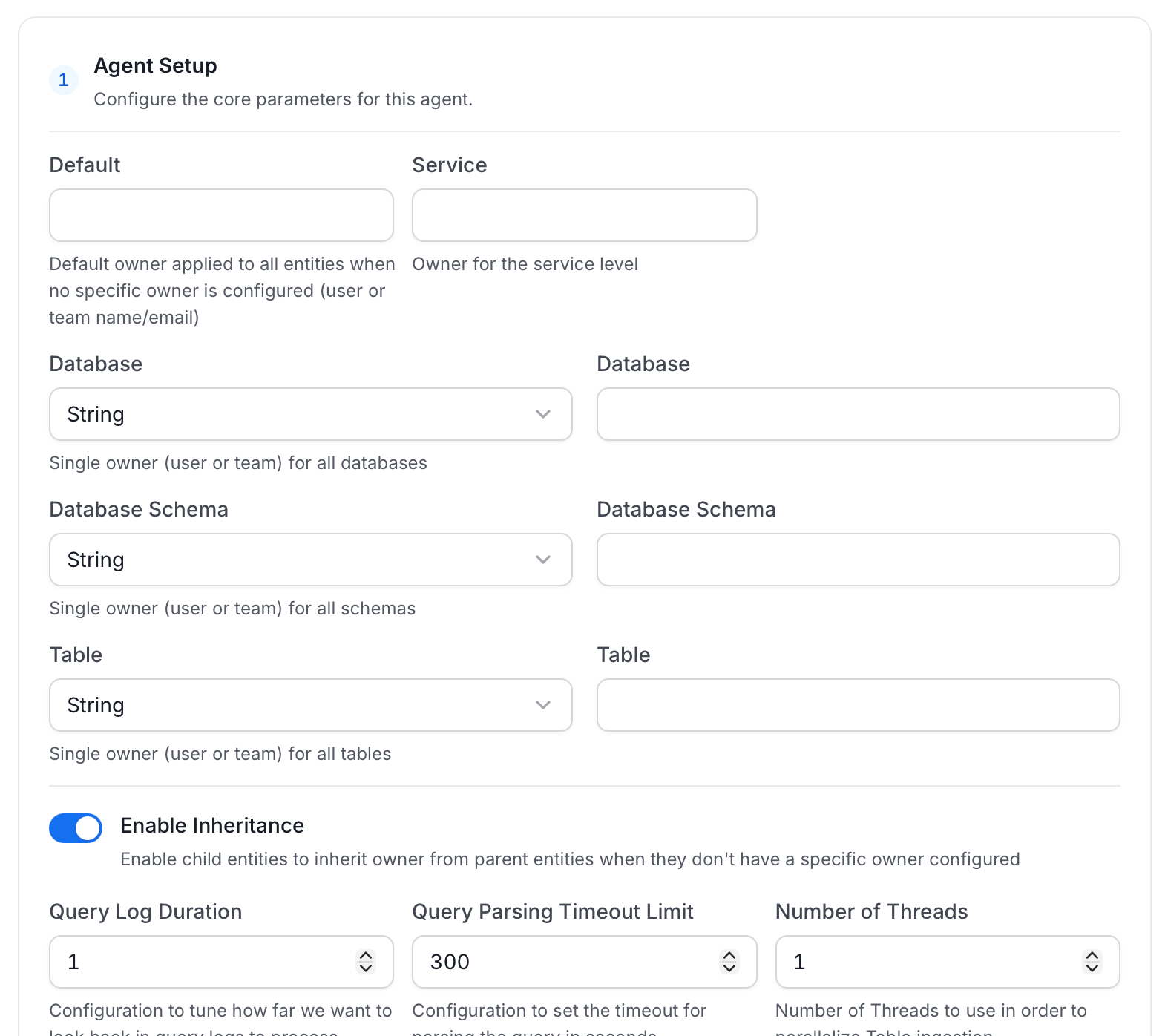
* **Agent Setup**: Configure core parameters for metadata extraction. The following fields are available:
| Field | Default | Description |
| ------------------------------------- | ------- | ------------------------------------------------------------------------------------------------------------------------ |
| Default Owner | — | Owner applied to all entities when no specific level owner is configured. Accepts a user or team name/email. |
| Service Owner | — | Owner assigned to the service entity. |
| Database Owner | — | Owner assigned to all ingested databases. Accepts a single owner or a per-database name mapping. |
| Database Schema Owner | — | Owner assigned to all ingested schemas. Accepts a single owner or a per-schema name mapping. |
| Table Owner | — | Owner assigned to all ingested tables. Accepts a single owner or a per-table name mapping. |
| Enable Inheritance | On | When on, child entities inherit the owner from their parent when they have no owner configured. |
| Query Log Duration | 1 | Number of days to look back in query logs when processing stored procedure results. |
| Query Parsing Timeout Limit | 300 | Timeout in seconds for parsing a single query. |
| Number of Threads | 1 | Number of threads to use for parallel table ingestion. |
| Incremental Extraction | Off | When enabled, subsequent runs only extract entities changed since the last successful run. |
| Successful Pipeline Run Lookback Days | 7 | Number of days to search back for a prior successful run to use as a baseline for incremental extraction. |
| Safety Margin Days | 1 | Additional days added to the baseline timestamp as a buffer for incremental extraction. |
| JSON Schema Sample Size | 10 | Number of rows sampled to infer JSON column schema. Only applies when Extract JSON Schema is enabled in Advanced Config. |
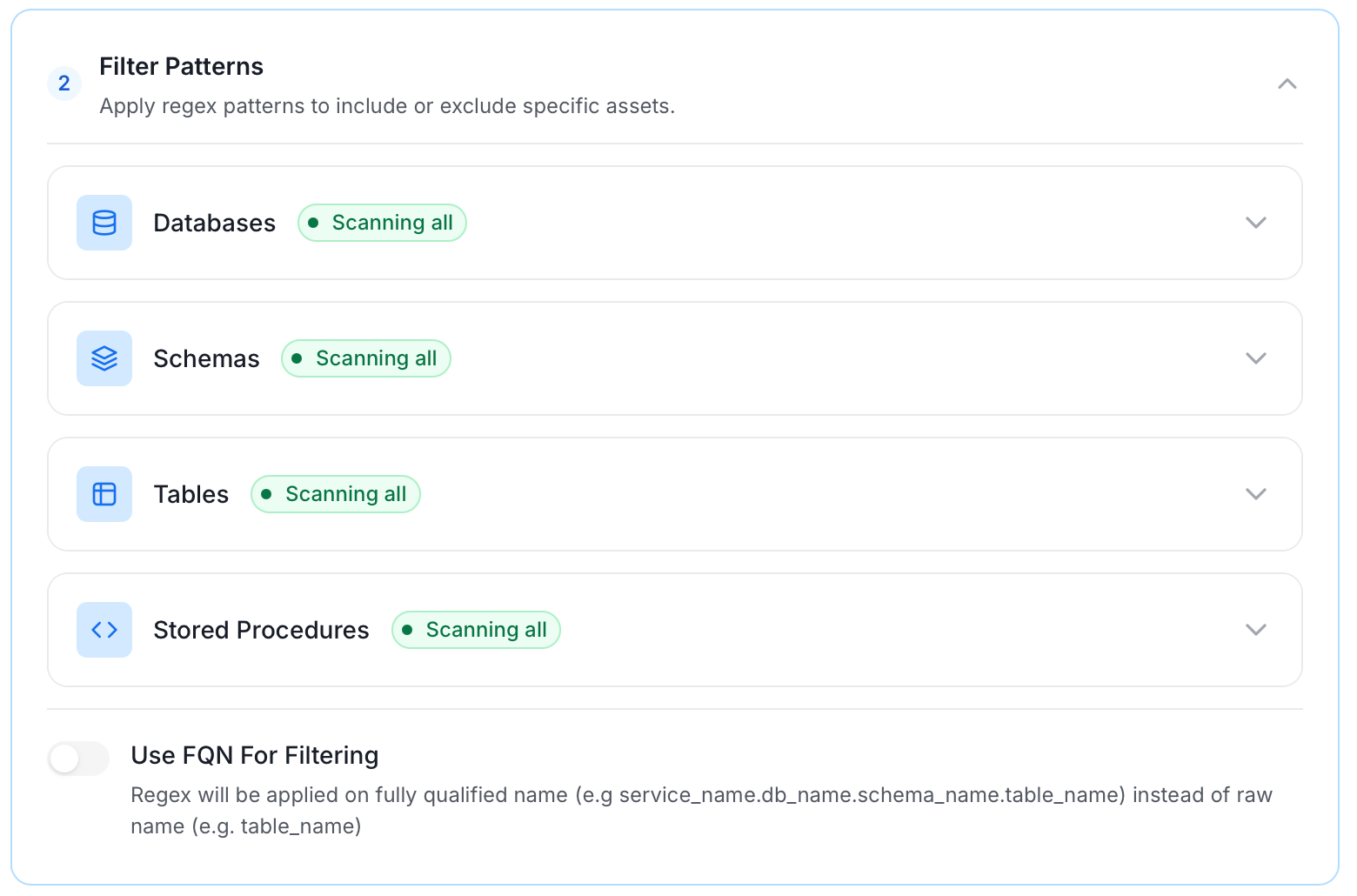
* **Filter Patterns**: Apply include or exclude rules to scope which databases, schemas, tables, and stored procedures this agent ingests. For more information about various filter options, see **Step 5: Configure Ingestion Options**.
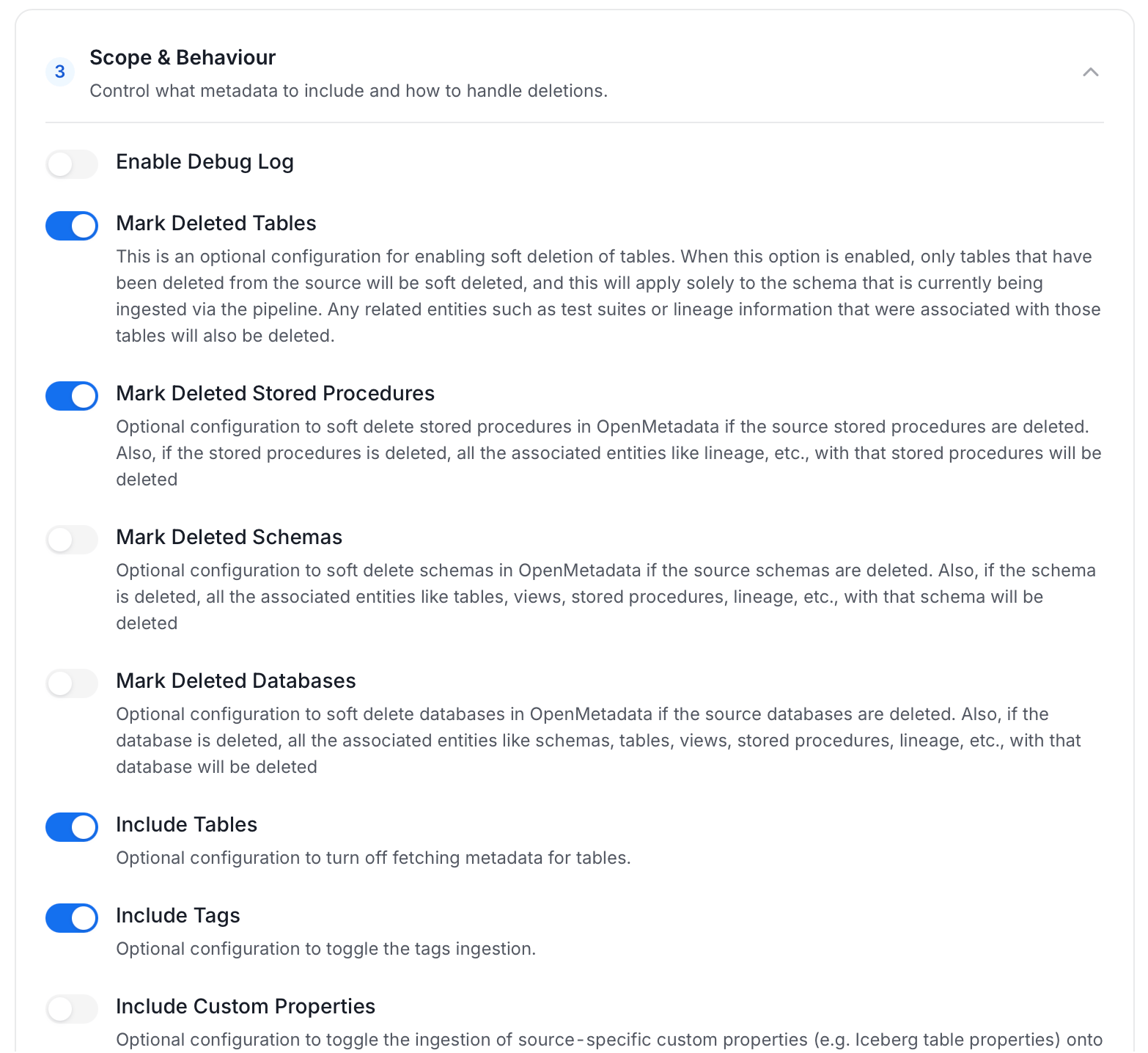
* **Scope & Behaviour**: Control how the agent handles metadata during ingestion. Toggle each option on or off based on your needs:
| Toggle | Default | Description |
| ------------------------------ | ------- | ---------------------------------------------------------------------------------------------------------------------------------------------------------------------- |
| Include Tables | On | Ingest table metadata from the source. Turn off to skip tables entirely. |
| Include Tags | On | Ingest tags from the source. |
| Include Stored Procedures | On | Ingest stored procedure metadata. |
| Include DDL Statements | Off | Ingest DDL statements alongside table metadata. |
| Include Owners | Off | Assign owners to ingested entities when the source owner's email matches a user in Collate. Does not overwrite an existing owner. |
| Include Custom Properties | Off | Ingest connector-specific custom properties onto entities. |
| Mark Deleted Tables | On | Soft-delete tables in Collate when they are removed from the source. Applies only within the currently ingested schema. |
| Mark Deleted Stored Procedures | On | Soft-delete stored procedures in Collate when they are removed from the source. |
| Mark Deleted Schemas | Off | Soft-delete schemas and all their child assets when removed from the source. |
| Mark Deleted Databases | Off | Soft-delete databases and all their child assets when removed from the source. |
| Override Metadata | Off | When on, source values overwrite existing descriptions, tags, owners, and display names in Collate. When off, Collate only updates fields that have no existing value. |
| Enable Debug Log | Off | Sets the ingestion log level to DEBUG. Useful for troubleshooting. |
**Note**: Available toggles vary by connector. Stored procedure options only appear for connectors that support stored procedures.
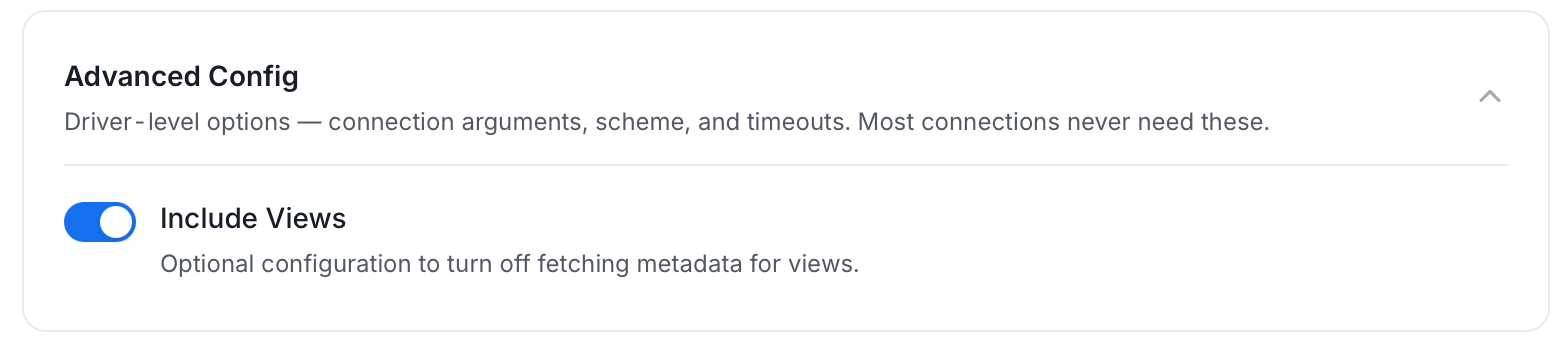
* **Advanced Config**: Optional connector-specific settings such as Include Views and Extract JSON Schema.
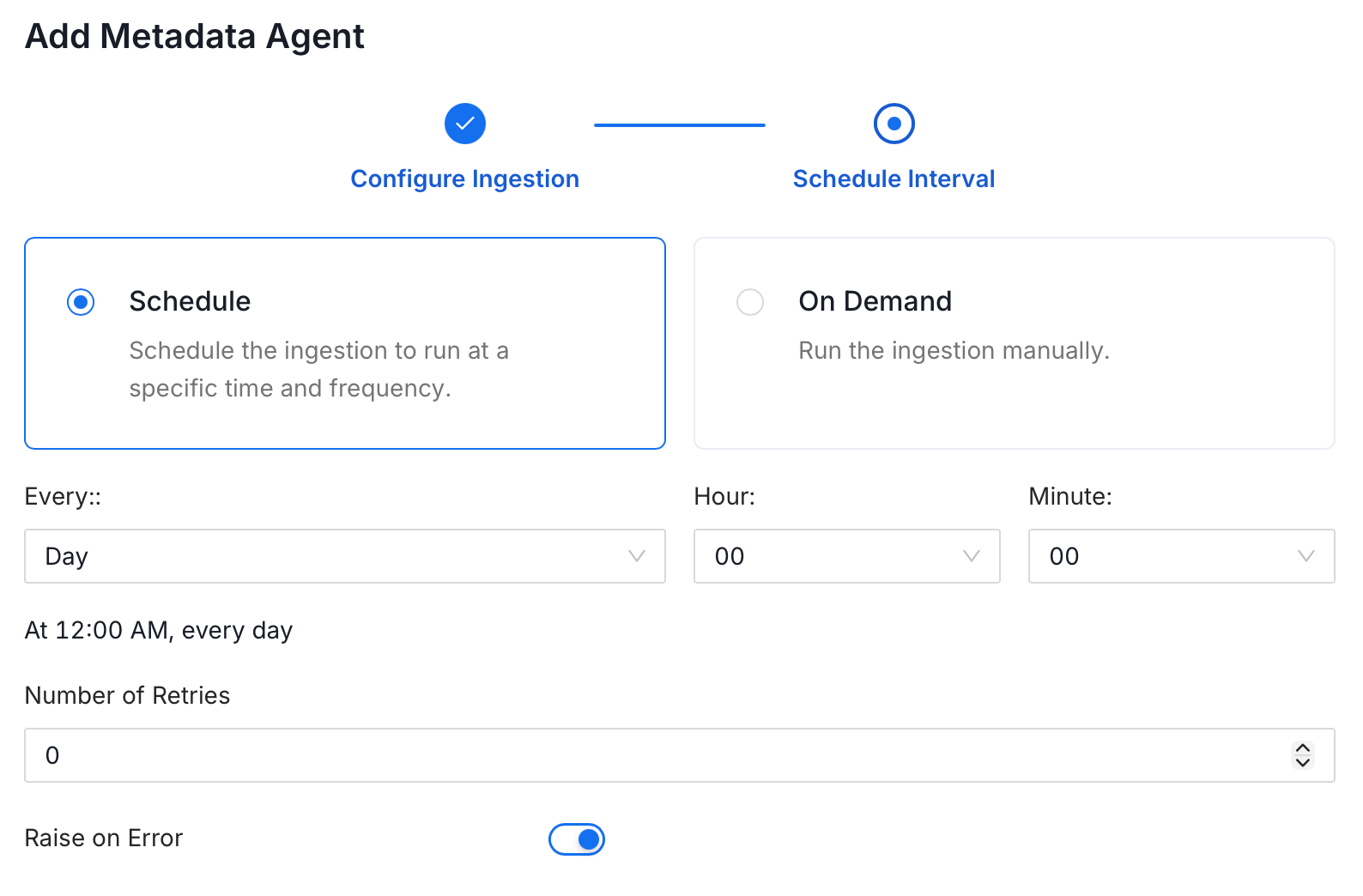
5. On the **Schedule Interval** page, set when the agent runs:
* **Schedule**: Choose a preset interval (Hourly, Daily, Weekly, Monthly) or enter a custom cron expression.
* **On-Demand**: No automatic schedule; trigger the agent manually when needed.
6. Click **Add** to deploy the agent.
## Troubleshooting
For any issues, see the [dbt Troubleshooting](/ai-2-0/connectors/database/dbt/dbt-troubleshooting) guide.
 ### 2. dbt Lineage
Lineage from dbt models can be viewed in the Lineage tab.
For more information on how lineage is extracted from dbt take a look [here](/ai-2-0/connectors/database/dbt/ingest-dbt-lineage)
### 2. dbt Lineage
Lineage from dbt models can be viewed in the Lineage tab.
For more information on how lineage is extracted from dbt take a look [here](/ai-2-0/connectors/database/dbt/ingest-dbt-lineage)
 ### 4. dbt Owner
Owner from dbt models can be imported and assigned to respective tables.
See [Add dbt Owner](/ai-2-0/connectors/database/dbt/ingest-dbt-owner).
### 4. dbt Owner
Owner from dbt models can be imported and assigned to respective tables.
See [Add dbt Owner](/ai-2-0/connectors/database/dbt/ingest-dbt-owner).
 ### 5. dbt Descriptions
Descriptions from dbt `manifest.json` and `catalog.json` can be imported and assigned to respective tables and columns.
For more information and to control how the table and column descriptions are updated from dbt please take a look [here](/ai-2-0/connectors/database/dbt/ingest-dbt-descriptions)
### 5. dbt Descriptions
Descriptions from dbt `manifest.json` and `catalog.json` can be imported and assigned to respective tables and columns.
For more information and to control how the table and column descriptions are updated from dbt please take a look [here](/ai-2-0/connectors/database/dbt/ingest-dbt-descriptions)
 ### 6. dbt Tests and Test Results
Tests from dbt will only be imported if the `run_results.json` file is passed.
### 6. dbt Tests and Test Results
Tests from dbt will only be imported if the `run_results.json` file is passed.
 ### 7. dbt Tiers
Table and column level Tiers can be imported from dbt.
See [Add dbt Tiers](/ai-2-0/connectors/database/dbt/ingest-dbt-tier).
### 7. dbt Tiers
Table and column level Tiers can be imported from dbt.
See [Add dbt Tiers](/ai-2-0/connectors/database/dbt/ingest-dbt-tier).
 ### 8. dbt Glossary
Table and column level Glossary can be imported from dbt.
See [Add dbt Glossary](/ai-2-0/connectors/database/dbt/ingest-dbt-glossary).
### 8. dbt Glossary
Table and column level Glossary can be imported from dbt.
See [Add dbt Glossary](/ai-2-0/connectors/database/dbt/ingest-dbt-glossary).
 ### 9. dbt Domain
Table level Domain can be imported from dbt to assign tables to organizational domains.
See [Add dbt Domain](/ai-2-0/connectors/database/dbt/ingest-dbt-domain).
### 10. dbt Custom Properties
Custom property values can be imported from dbt to enrich table metadata with organization-specific attributes.
See [Add dbt Custom Properties](/ai-2-0/connectors/database/dbt/ingest-dbt-custom-properties).
### 11. dbt Exposures
Exposures let you extend lineage from your dbt models to the dashboards, ML models, and API endpoints that consume them.
For more information, see [Ingest Exposures from dbt](/ai-2-0/connectors/database/dbt/ingest-dbt-exposures).
## Configure Metadata Agent and Schedule Ingestion
The **Metadata Agent** extracts schemas, tables, columns, and other structural metadata from your source and keeps your Collate catalog in sync. It powers discovery, lineage, and governance across your data assets.
When you click **Create & Deploy**, Collate automatically deploys a Metadata Agent for this service and triggers the first ingestion run. View its status and run history from the **Agents** tab on the service detail page.
To configure the additional Metadata Agent and schedule ingestion, follow these steps:
1. In the left navigation, click **Connections** and select your service.
2. Click the **Agents** tab.
3. Click **Add Agent** and select **Metadata** from the dropdown.
### 9. dbt Domain
Table level Domain can be imported from dbt to assign tables to organizational domains.
See [Add dbt Domain](/ai-2-0/connectors/database/dbt/ingest-dbt-domain).
### 10. dbt Custom Properties
Custom property values can be imported from dbt to enrich table metadata with organization-specific attributes.
See [Add dbt Custom Properties](/ai-2-0/connectors/database/dbt/ingest-dbt-custom-properties).
### 11. dbt Exposures
Exposures let you extend lineage from your dbt models to the dashboards, ML models, and API endpoints that consume them.
For more information, see [Ingest Exposures from dbt](/ai-2-0/connectors/database/dbt/ingest-dbt-exposures).
## Configure Metadata Agent and Schedule Ingestion
The **Metadata Agent** extracts schemas, tables, columns, and other structural metadata from your source and keeps your Collate catalog in sync. It powers discovery, lineage, and governance across your data assets.
When you click **Create & Deploy**, Collate automatically deploys a Metadata Agent for this service and triggers the first ingestion run. View its status and run history from the **Agents** tab on the service detail page.
To configure the additional Metadata Agent and schedule ingestion, follow these steps:
1. In the left navigation, click **Connections** and select your service.
2. Click the **Agents** tab.
3. Click **Add Agent** and select **Metadata** from the dropdown.
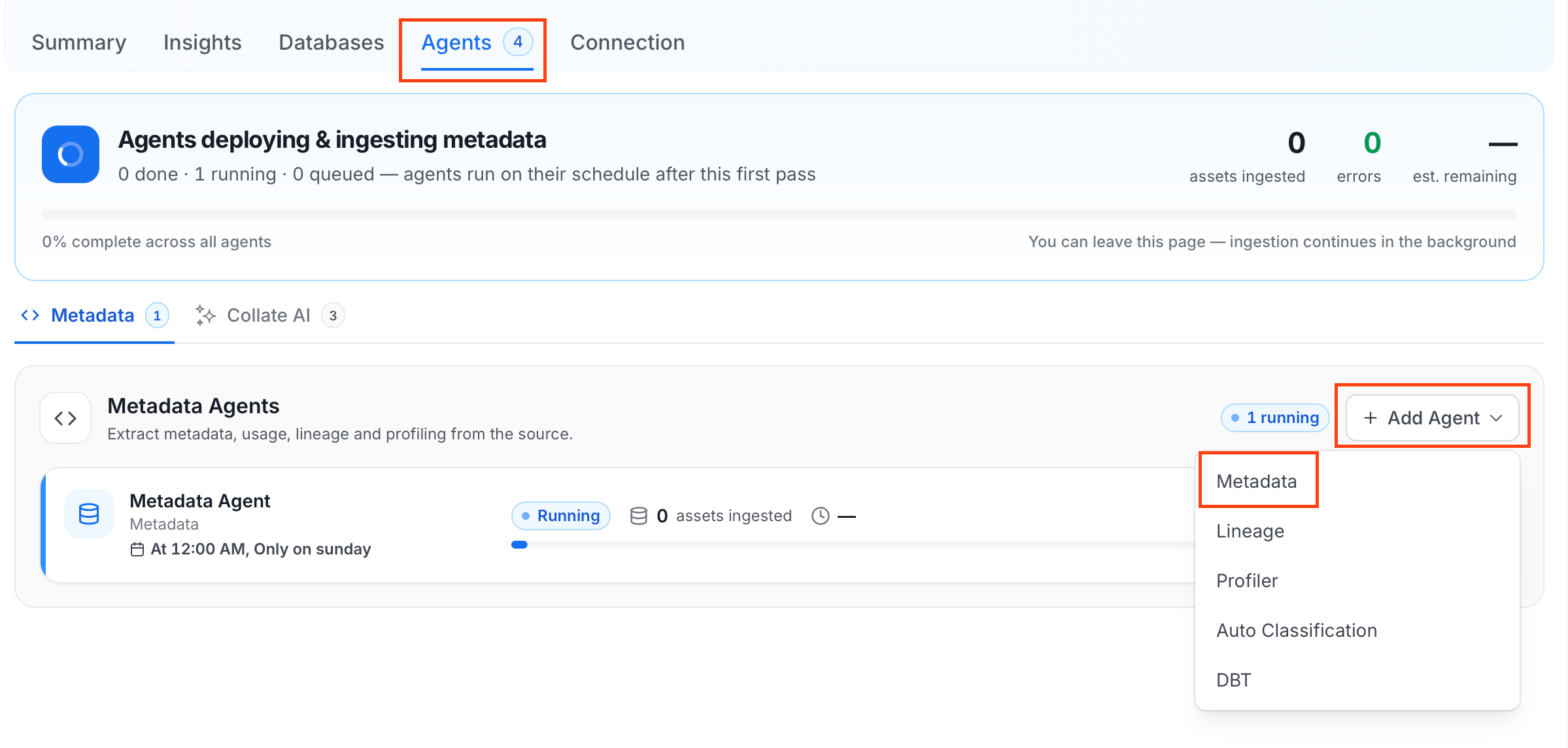 For some services, the dropdown is not available and clicking **Add Agent** takes you directly to the agent configuration page.
4. On the **Configure Ingestion** page, do the following and click **Next**.
* **Name this Ingestion**: Enter a unique recognizable name for this ingestion pipeline.
For some services, the dropdown is not available and clicking **Add Agent** takes you directly to the agent configuration page.
4. On the **Configure Ingestion** page, do the following and click **Next**.
* **Name this Ingestion**: Enter a unique recognizable name for this ingestion pipeline.
 * **Agent Setup**: Configure core parameters for metadata extraction. The following fields are available:
| Field | Default | Description |
| ------------------------------------- | ------- | ------------------------------------------------------------------------------------------------------------------------ |
| Default Owner | — | Owner applied to all entities when no specific level owner is configured. Accepts a user or team name/email. |
| Service Owner | — | Owner assigned to the service entity. |
| Database Owner | — | Owner assigned to all ingested databases. Accepts a single owner or a per-database name mapping. |
| Database Schema Owner | — | Owner assigned to all ingested schemas. Accepts a single owner or a per-schema name mapping. |
| Table Owner | — | Owner assigned to all ingested tables. Accepts a single owner or a per-table name mapping. |
| Enable Inheritance | On | When on, child entities inherit the owner from their parent when they have no owner configured. |
| Query Log Duration | 1 | Number of days to look back in query logs when processing stored procedure results. |
| Query Parsing Timeout Limit | 300 | Timeout in seconds for parsing a single query. |
| Number of Threads | 1 | Number of threads to use for parallel table ingestion. |
| Incremental Extraction | Off | When enabled, subsequent runs only extract entities changed since the last successful run. |
| Successful Pipeline Run Lookback Days | 7 | Number of days to search back for a prior successful run to use as a baseline for incremental extraction. |
| Safety Margin Days | 1 | Additional days added to the baseline timestamp as a buffer for incremental extraction. |
| JSON Schema Sample Size | 10 | Number of rows sampled to infer JSON column schema. Only applies when Extract JSON Schema is enabled in Advanced Config. |
* **Agent Setup**: Configure core parameters for metadata extraction. The following fields are available:
| Field | Default | Description |
| ------------------------------------- | ------- | ------------------------------------------------------------------------------------------------------------------------ |
| Default Owner | — | Owner applied to all entities when no specific level owner is configured. Accepts a user or team name/email. |
| Service Owner | — | Owner assigned to the service entity. |
| Database Owner | — | Owner assigned to all ingested databases. Accepts a single owner or a per-database name mapping. |
| Database Schema Owner | — | Owner assigned to all ingested schemas. Accepts a single owner or a per-schema name mapping. |
| Table Owner | — | Owner assigned to all ingested tables. Accepts a single owner or a per-table name mapping. |
| Enable Inheritance | On | When on, child entities inherit the owner from their parent when they have no owner configured. |
| Query Log Duration | 1 | Number of days to look back in query logs when processing stored procedure results. |
| Query Parsing Timeout Limit | 300 | Timeout in seconds for parsing a single query. |
| Number of Threads | 1 | Number of threads to use for parallel table ingestion. |
| Incremental Extraction | Off | When enabled, subsequent runs only extract entities changed since the last successful run. |
| Successful Pipeline Run Lookback Days | 7 | Number of days to search back for a prior successful run to use as a baseline for incremental extraction. |
| Safety Margin Days | 1 | Additional days added to the baseline timestamp as a buffer for incremental extraction. |
| JSON Schema Sample Size | 10 | Number of rows sampled to infer JSON column schema. Only applies when Extract JSON Schema is enabled in Advanced Config. |
 * **Filter Patterns**: Apply include or exclude rules to scope which databases, schemas, tables, and stored procedures this agent ingests. For more information about various filter options, see **Step 5: Configure Ingestion Options**.
 * **Scope & Behaviour**: Control how the agent handles metadata during ingestion. Toggle each option on or off based on your needs:
| Toggle | Default | Description |
| ------------------------------ | ------- | ---------------------------------------------------------------------------------------------------------------------------------------------------------------------- |
| Include Tables | On | Ingest table metadata from the source. Turn off to skip tables entirely. |
| Include Tags | On | Ingest tags from the source. |
| Include Stored Procedures | On | Ingest stored procedure metadata. |
| Include DDL Statements | Off | Ingest DDL statements alongside table metadata. |
| Include Owners | Off | Assign owners to ingested entities when the source owner's email matches a user in Collate. Does not overwrite an existing owner. |
| Include Custom Properties | Off | Ingest connector-specific custom properties onto entities. |
| Mark Deleted Tables | On | Soft-delete tables in Collate when they are removed from the source. Applies only within the currently ingested schema. |
| Mark Deleted Stored Procedures | On | Soft-delete stored procedures in Collate when they are removed from the source. |
| Mark Deleted Schemas | Off | Soft-delete schemas and all their child assets when removed from the source. |
| Mark Deleted Databases | Off | Soft-delete databases and all their child assets when removed from the source. |
| Override Metadata | Off | When on, source values overwrite existing descriptions, tags, owners, and display names in Collate. When off, Collate only updates fields that have no existing value. |
| Enable Debug Log | Off | Sets the ingestion log level to DEBUG. Useful for troubleshooting. |
* **Scope & Behaviour**: Control how the agent handles metadata during ingestion. Toggle each option on or off based on your needs:
| Toggle | Default | Description |
| ------------------------------ | ------- | ---------------------------------------------------------------------------------------------------------------------------------------------------------------------- |
| Include Tables | On | Ingest table metadata from the source. Turn off to skip tables entirely. |
| Include Tags | On | Ingest tags from the source. |
| Include Stored Procedures | On | Ingest stored procedure metadata. |
| Include DDL Statements | Off | Ingest DDL statements alongside table metadata. |
| Include Owners | Off | Assign owners to ingested entities when the source owner's email matches a user in Collate. Does not overwrite an existing owner. |
| Include Custom Properties | Off | Ingest connector-specific custom properties onto entities. |
| Mark Deleted Tables | On | Soft-delete tables in Collate when they are removed from the source. Applies only within the currently ingested schema. |
| Mark Deleted Stored Procedures | On | Soft-delete stored procedures in Collate when they are removed from the source. |
| Mark Deleted Schemas | Off | Soft-delete schemas and all their child assets when removed from the source. |
| Mark Deleted Databases | Off | Soft-delete databases and all their child assets when removed from the source. |
| Override Metadata | Off | When on, source values overwrite existing descriptions, tags, owners, and display names in Collate. When off, Collate only updates fields that have no existing value. |
| Enable Debug Log | Off | Sets the ingestion log level to DEBUG. Useful for troubleshooting. |
 * **Advanced Config**: Optional connector-specific settings such as Include Views and Extract JSON Schema.
 5. On the **Schedule Interval** page, set when the agent runs:
* **Schedule**: Choose a preset interval (Hourly, Daily, Weekly, Monthly) or enter a custom cron expression.
* **On-Demand**: No automatic schedule; trigger the agent manually when needed.
5. On the **Schedule Interval** page, set when the agent runs:
* **Schedule**: Choose a preset interval (Hourly, Daily, Weekly, Monthly) or enter a custom cron expression.
* **On-Demand**: No automatic schedule; trigger the agent manually when needed.
 6. Click **Add** to deploy the agent.
## Troubleshooting
For any issues, see the [dbt Troubleshooting](/ai-2-0/connectors/database/dbt/dbt-troubleshooting) guide.
6. Click **Add** to deploy the agent.
## Troubleshooting
For any issues, see the [dbt Troubleshooting](/ai-2-0/connectors/database/dbt/dbt-troubleshooting) guide.