> ## Documentation Index
> Fetch the complete documentation index at: https://docs.getcollate.io/llms.txt
> Use this file to discover all available pages before exploring further.
# Memories
> Facts, definitions, and preferences Collate AI Chat should remember.
# Memories
Memories are short, atomic facts—definitions, preferences, and answers to recurring questions—captured by your team while chatting with Collate AI Chat, or added manually. Unlike Articles, Memories aren't meant to be full pages: They're quick, reusable pieces of context Collate AI Chat can recall in future conversations.
## Create a Memory
To create a memory, follow these steps:
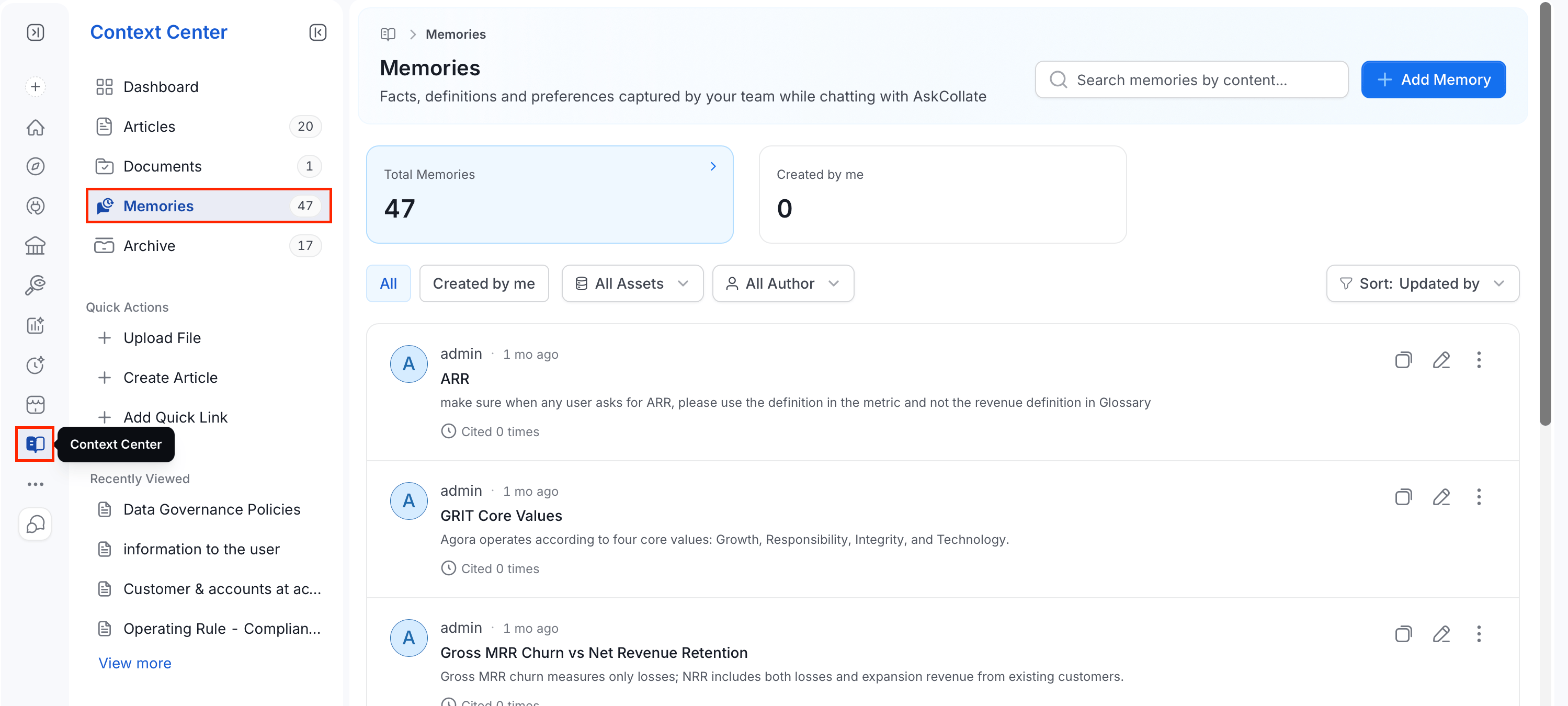
1. From the left navigation bar, navigate to **Context Center** > **Memories**.
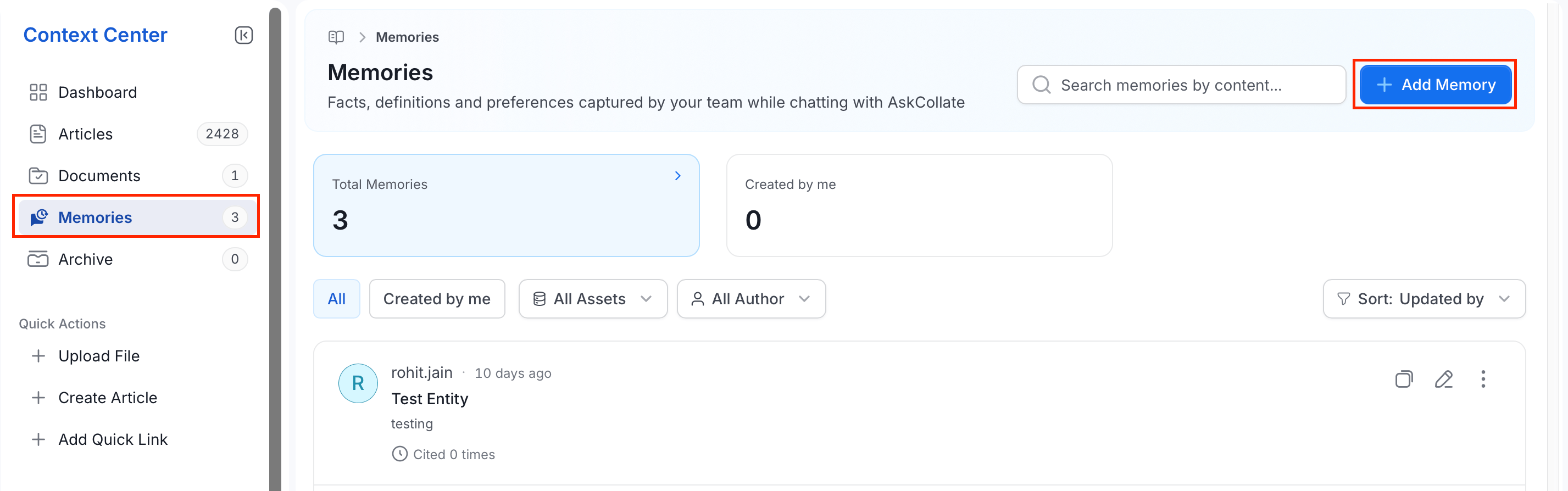
 2. Select **Add Memory**, or use **Quick Actions** in the sidebar. In the **Add Memory** dialog:
 3. In the **Add Memory** dialog, fill in the following details:
* **Title**: An optional label for the memory.
* **Memory**: Required. Describe what Collate AI Chat should remember, written in plain markdown. Click **Preview** to see how the formatted content will look. **Create Memory** stays disabled until this field has content.
* **Type**: Optional. Choose the kind of memory:
* **FAQ**: A recurring question and its answer.
* **Note**: A general fact worth remembering.
* **Preference**: A personal preference for how Collate AI Chat should behave for you.
* **Runbook**: A step-by-step procedure.
* **Use Case**: A specific scenario and how to handle it.
* **Linked Data Assets**: Optionally link the memory to one or more data assets using **Link an Asset**.
* **Metadata**:
* **Visibility**: Choose who can see the memory. Defaults to **Private**.
* **Shared**: Visible to specific people or teams you choose.
* **Entity**: Visible to anyone viewing the linked data asset.
* **Private**: Visible only to you.
* **Tags**: Optionally tag the memory using **Add Tag**.
3. In the **Add Memory** dialog, fill in the following details:
* **Title**: An optional label for the memory.
* **Memory**: Required. Describe what Collate AI Chat should remember, written in plain markdown. Click **Preview** to see how the formatted content will look. **Create Memory** stays disabled until this field has content.
* **Type**: Optional. Choose the kind of memory:
* **FAQ**: A recurring question and its answer.
* **Note**: A general fact worth remembering.
* **Preference**: A personal preference for how Collate AI Chat should behave for you.
* **Runbook**: A step-by-step procedure.
* **Use Case**: A specific scenario and how to handle it.
* **Linked Data Assets**: Optionally link the memory to one or more data assets using **Link an Asset**.
* **Metadata**:
* **Visibility**: Choose who can see the memory. Defaults to **Private**.
* **Shared**: Visible to specific people or teams you choose.
* **Entity**: Visible to anyone viewing the linked data asset.
* **Private**: Visible only to you.
* **Tags**: Optionally tag the memory using **Add Tag**.
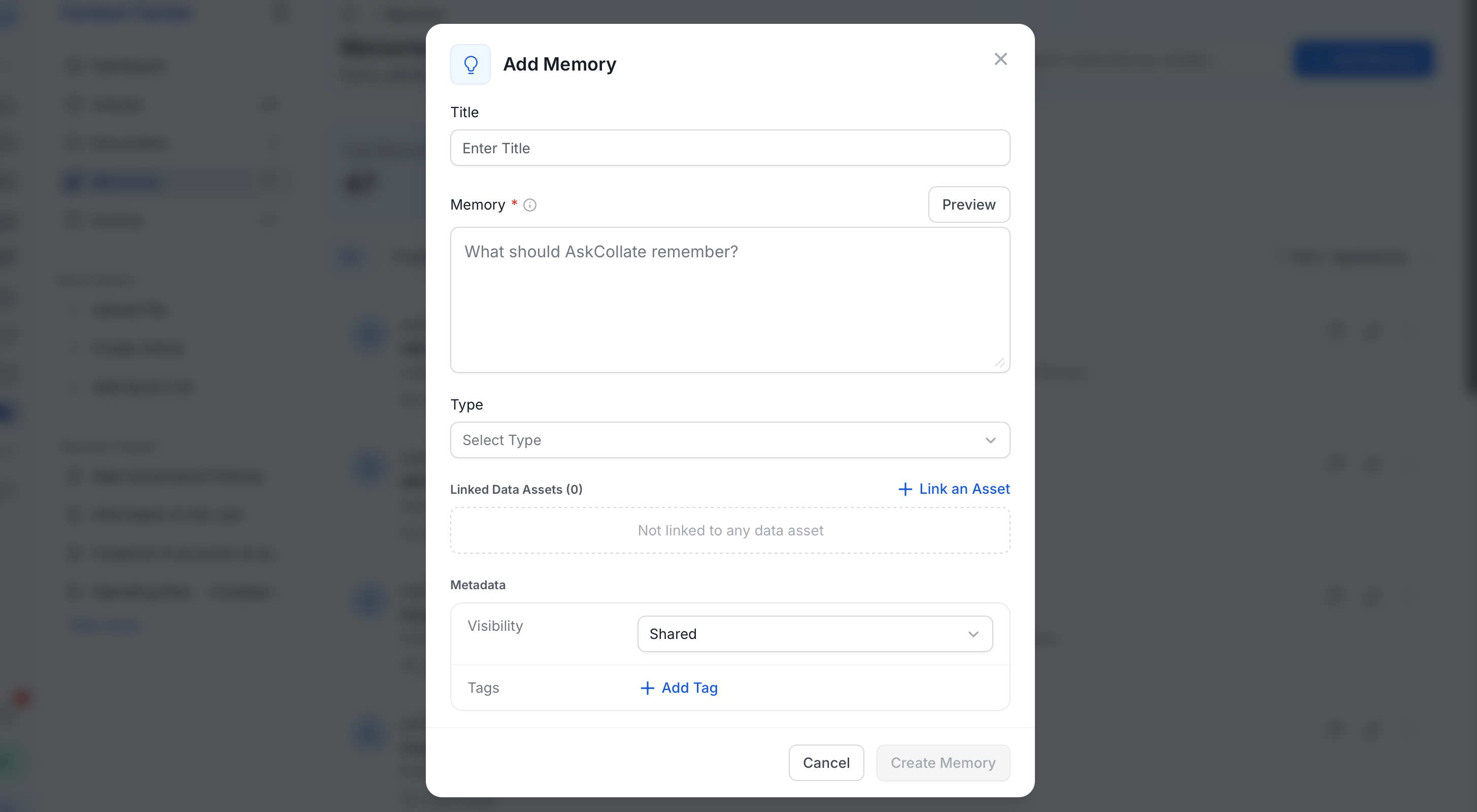 4. Click **Create Memory** to save it.
Collate AI Chat can also create memories on its own during a conversation—for example, when you ask it to remember a preference.
## View and Manage Memories
The **Memories** page shows:
* **Search bar**: Search memories by their content.
* **Summary cards**: **Total Memories** and **Created by me**, each showing a count.
* **Filters**: Switch between **All** and **Created by me**, or narrow the list by **All Assets** or **All Author**.
* **Sort**: Order the list—for example, by **Updated by**.
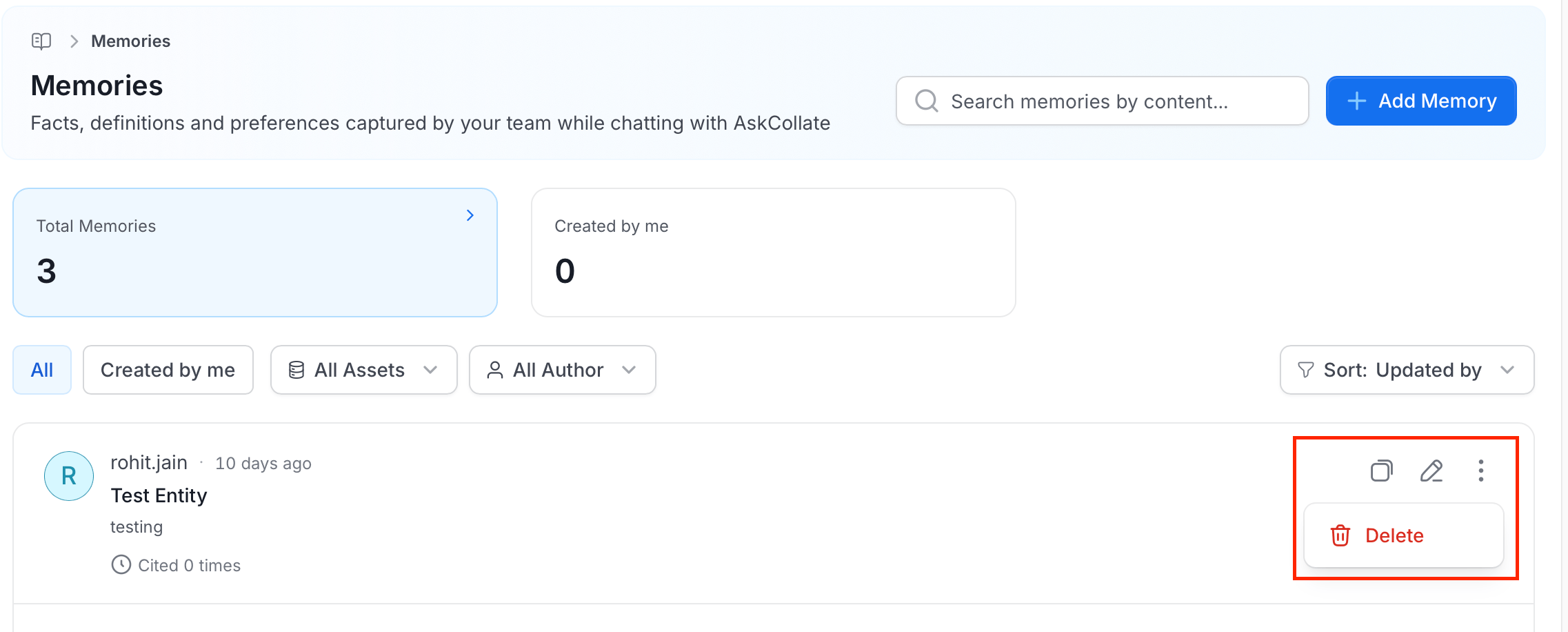
* **Memory list**: Each row shows the author's name and avatar, when it was last updated, the memory's title, its content, and how many times it's been **Cited**—that is, how often Collate AI Chat has actually used it to answer a question.
* **Row actions**:
* **Copy**: Duplicate the memory.
* **Edit**: Open the memory to change its title, content, type, visibility, tags, or linked assets.
* **Delete**: Open the **⋯** menu and select **Delete** to remove the memory.
4. Click **Create Memory** to save it.
Collate AI Chat can also create memories on its own during a conversation—for example, when you ask it to remember a preference.
## View and Manage Memories
The **Memories** page shows:
* **Search bar**: Search memories by their content.
* **Summary cards**: **Total Memories** and **Created by me**, each showing a count.
* **Filters**: Switch between **All** and **Created by me**, or narrow the list by **All Assets** or **All Author**.
* **Sort**: Order the list—for example, by **Updated by**.
* **Memory list**: Each row shows the author's name and avatar, when it was last updated, the memory's title, its content, and how many times it's been **Cited**—that is, how often Collate AI Chat has actually used it to answer a question.
* **Row actions**:
* **Copy**: Duplicate the memory.
* **Edit**: Open the memory to change its title, content, type, visibility, tags, or linked assets.
* **Delete**: Open the **⋯** menu and select **Delete** to remove the memory.
 ## Control Access to Memories with Roles and Policies
Memories are a governed resource in Collate's role-based access control system, listed as **Context Memory** under the Misc resource category. Admins control who can view, create, edit, or delete memories platform-wide by adding a rule to a policy that targets the **Context Memory** resource.
1. Click the **Profile** icon and navigate to **Settings** > **Access Control** > **Policies**.
2. Open an existing policy and click **Add Rule**.
3. Fill in the following details:
* **Name**: Enter a unique rule name.
* **Description** (optional): Add a note explaining what this rule does and why, so other admins reviewing the policy later understand its intent.
* **Resources**: Select `Context Memory`.
* **Operations**: Set the actions to allow or deny, for example `All` to cover every operation, or a specific set such as `Create` and `EditAll`.
* **Effect**: Select from `Allow` or `Deny`.
* **Condition** (optional): A CEL expression to scope the rule further, such as restricting it to a domain.
4. Click **Save**, then attach it to the roles that should have this access.
## Control Access to Memories with Roles and Policies
Memories are a governed resource in Collate's role-based access control system, listed as **Context Memory** under the Misc resource category. Admins control who can view, create, edit, or delete memories platform-wide by adding a rule to a policy that targets the **Context Memory** resource.
1. Click the **Profile** icon and navigate to **Settings** > **Access Control** > **Policies**.
2. Open an existing policy and click **Add Rule**.
3. Fill in the following details:
* **Name**: Enter a unique rule name.
* **Description** (optional): Add a note explaining what this rule does and why, so other admins reviewing the policy later understand its intent.
* **Resources**: Select `Context Memory`.
* **Operations**: Set the actions to allow or deny, for example `All` to cover every operation, or a specific set such as `Create` and `EditAll`.
* **Effect**: Select from `Allow` or `Deny`.
* **Condition** (optional): A CEL expression to scope the rule further, such as restricting it to a domain.
4. Click **Save**, then attach it to the roles that should have this access.
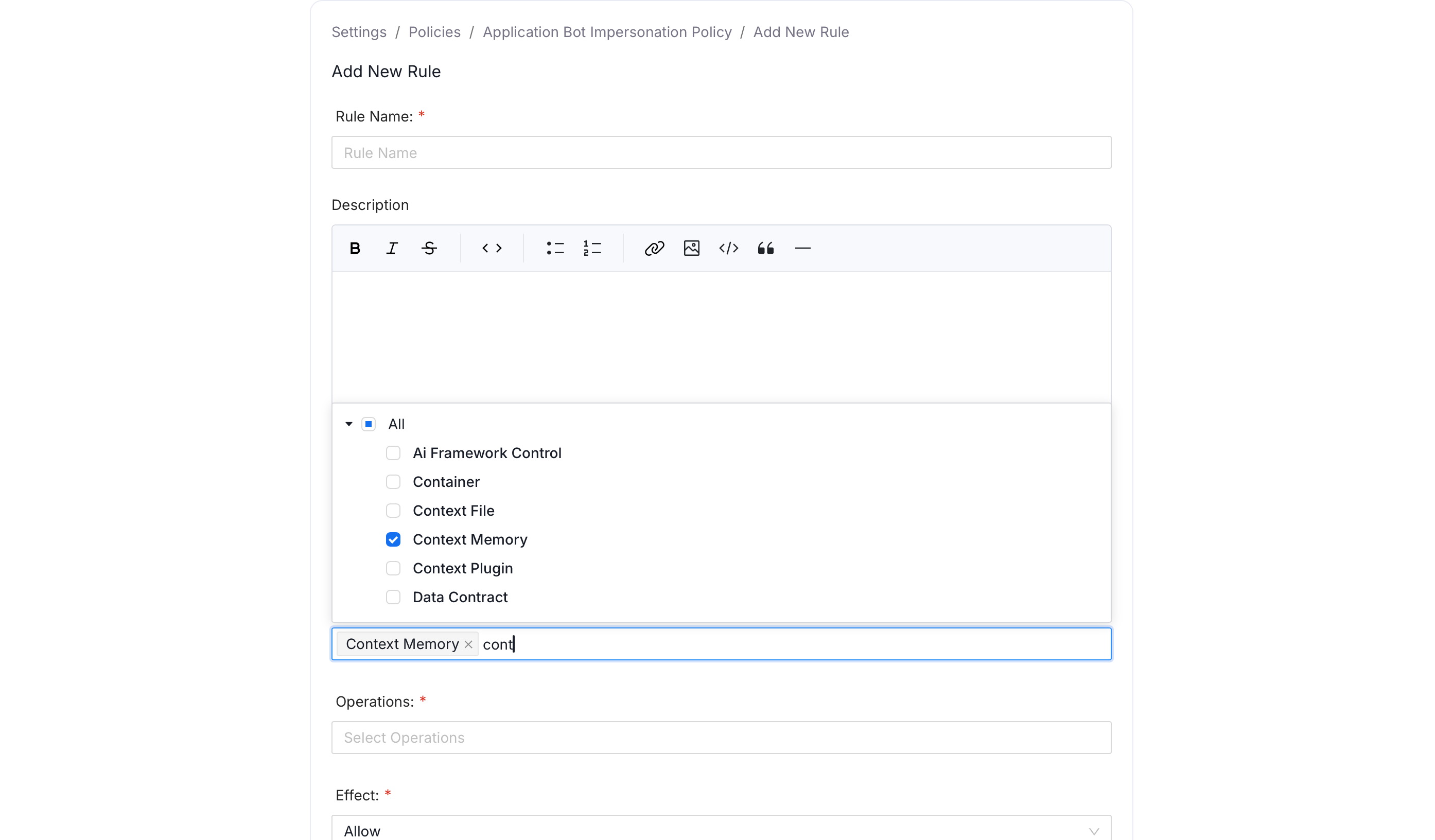 You can also add this rule while creating a new policy, instead of adding it to an existing one.
This RBAC layer is separate from a memory's own **Visibility** setting (see [Create a Memory](#create-a-memory)): RBAC controls whether a role can interact with memories as a resource type at all, while Visibility and sharing control who can see one specific memory once it exists. Seeing a memory requires both: RBAC permission on Context Memory, and visibility into that memory, either as its owner, a shared collaborator, or through Entity visibility on a linked asset.
See [Roles and Policies](/ai-2-0/admin-guide/roles-policies) for how rules, policies, and roles fit together, and [Resource Scope and Operations Reference](/ai-2-0/admin-guide/roles-policies/resource-scope) for the full list of operations available on Context Memory and other resources.
You can also add this rule while creating a new policy, instead of adding it to an existing one.
This RBAC layer is separate from a memory's own **Visibility** setting (see [Create a Memory](#create-a-memory)): RBAC controls whether a role can interact with memories as a resource type at all, while Visibility and sharing control who can see one specific memory once it exists. Seeing a memory requires both: RBAC permission on Context Memory, and visibility into that memory, either as its owner, a shared collaborator, or through Entity visibility on a linked asset.
See [Roles and Policies](/ai-2-0/admin-guide/roles-policies) for how rules, policies, and roles fit together, and [Resource Scope and Operations Reference](/ai-2-0/admin-guide/roles-policies/resource-scope) for the full list of operations available on Context Memory and other resources.