> ## Documentation Index
> Fetch the complete documentation index at: https://docs.getcollate.io/llms.txt
> Use this file to discover all available pages before exploring further.
# AI Asset Registry
> Register an AI Application through the intake wizard, and review any AI asset's compliance, lineage, policies, and activity from its detail page.
# AI Asset Registry
The **AI Asset Registry** is the single inventory of every AI system your organization uses: AI Applications, LLM Models, and MCP Servers. Instead of AI usage being scattered across teams, cloud accounts, and personal experiments with no central record, every asset lives in one list with its owner, risk classification, compliance status, and data exposure visible at a glance.
## Why It Matters
Most organizations can't answer basic questions about their own AI usage: which systems touch sensitive data, who's responsible for them, or whether they were ever reviewed. The registry exists to make those questions answerable without a manual audit:
* **One inventory, not a spreadsheet someone forgets to update.** Assets stay current because registration is tied into how Collate already tracks data, lineage, and ownership.
* **Compliance becomes a byproduct of registration, not a separate fire drill.** Registering an asset captures the information (data access, deployment region, risk factors) that frameworks like the EU AI Act need, so you're not scrambling to reconstruct it when an audit comes up.
* **Risk is visible before it's a problem.** High-risk and unowned assets are surfaced on the registry and the [Overview](/ai-2-0/collate-ai/ai-governance) dashboard, not discovered after something goes wrong.
* **Review doesn't stop at a name and description.** Because Collate already models your data estate, an asset's registry entry connects to real lineage: what tables and tools it actually touches. This lets reviewers assess actual exposure, not just a self-reported summary.
## Access AI Asset Registry
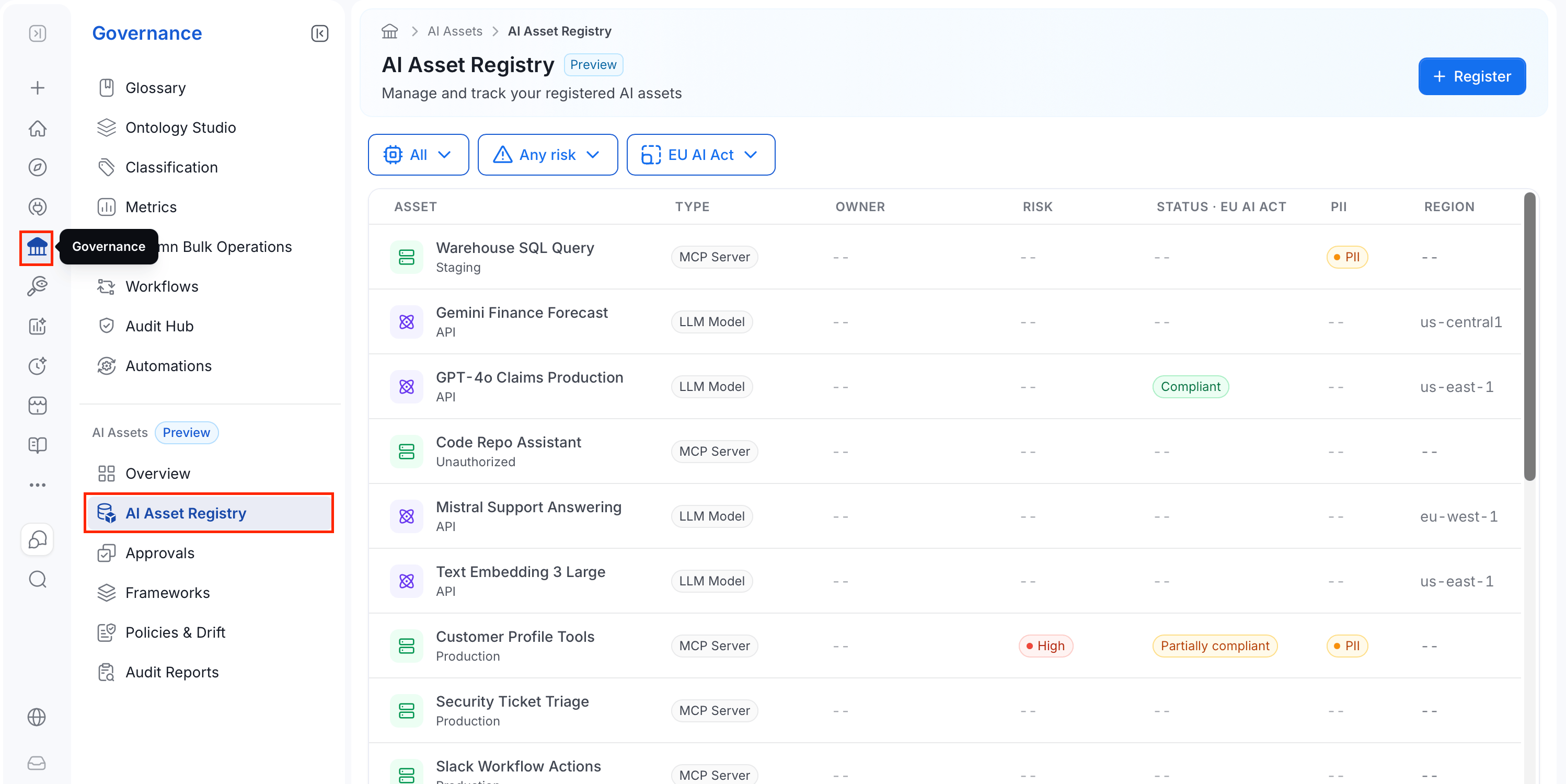
1. In the left navigation bar, select **Governance**.
2. Under the **AI Assets** section, select **AI Asset Registry**.
 ## Register an AI Asset
Registering an asset brings it under governance:
* It becomes visible in the inventory.
* It gets classified against your compliance frameworks.
* It routes into the approval process. For more information, see [Approvals](/ai-2-0/collate-ai/ai-governance/approvals).
Registering doesn't block your work. Creating the asset is deliberately separate from its compliance review, so you register early and the review happens in parallel.
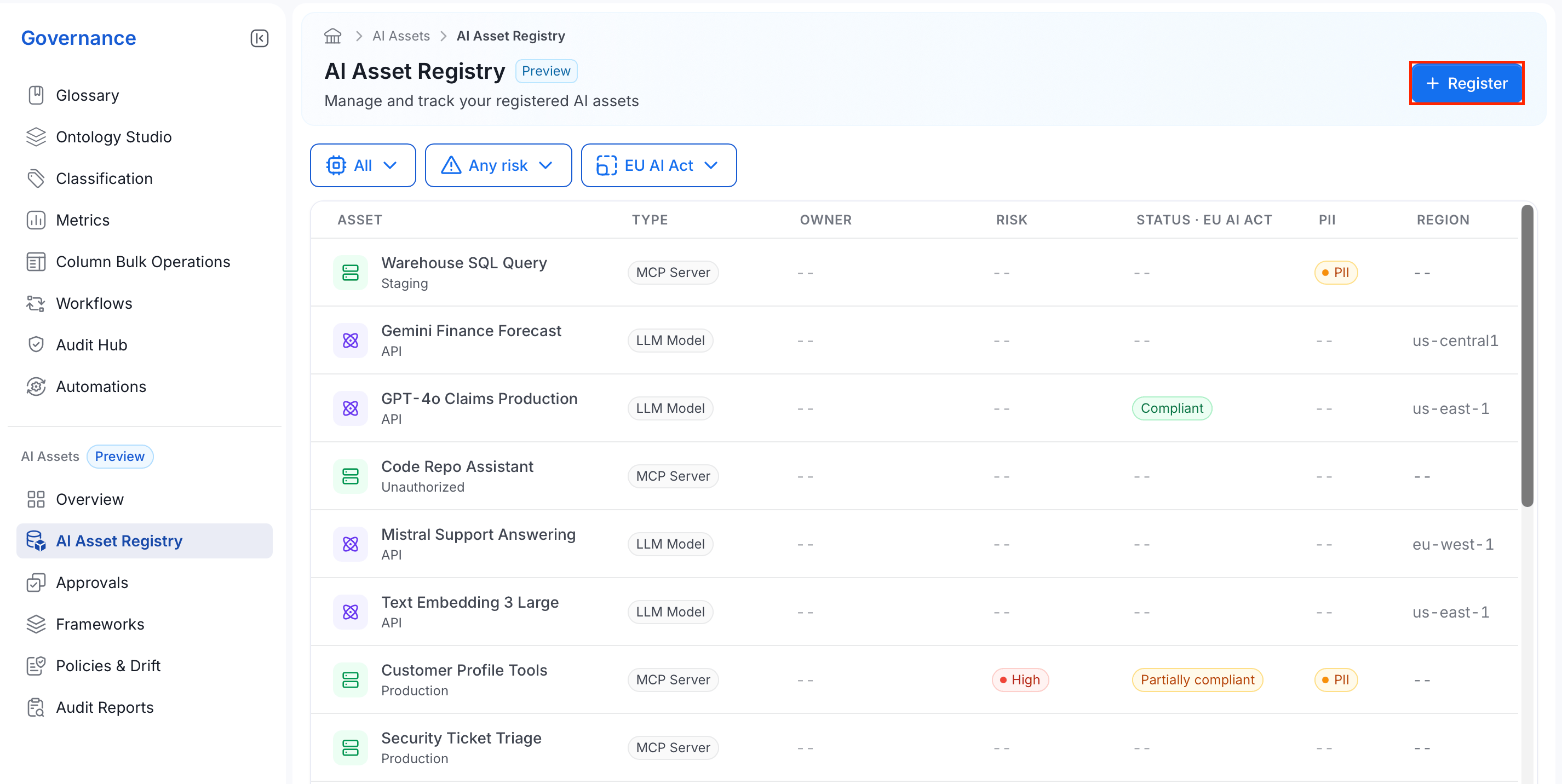
To register an AI asset, click **Register** and follow the steps below:
## Register an AI Asset
Registering an asset brings it under governance:
* It becomes visible in the inventory.
* It gets classified against your compliance frameworks.
* It routes into the approval process. For more information, see [Approvals](/ai-2-0/collate-ai/ai-governance/approvals).
Registering doesn't block your work. Creating the asset is deliberately separate from its compliance review, so you register early and the review happens in parallel.
To register an AI asset, click **Register** and follow the steps below:
 **Note**: This wizard registers an **AI Application** specifically. LLM Models and MCP Servers appear in the registry through other parts of the product rather than through this wizard.
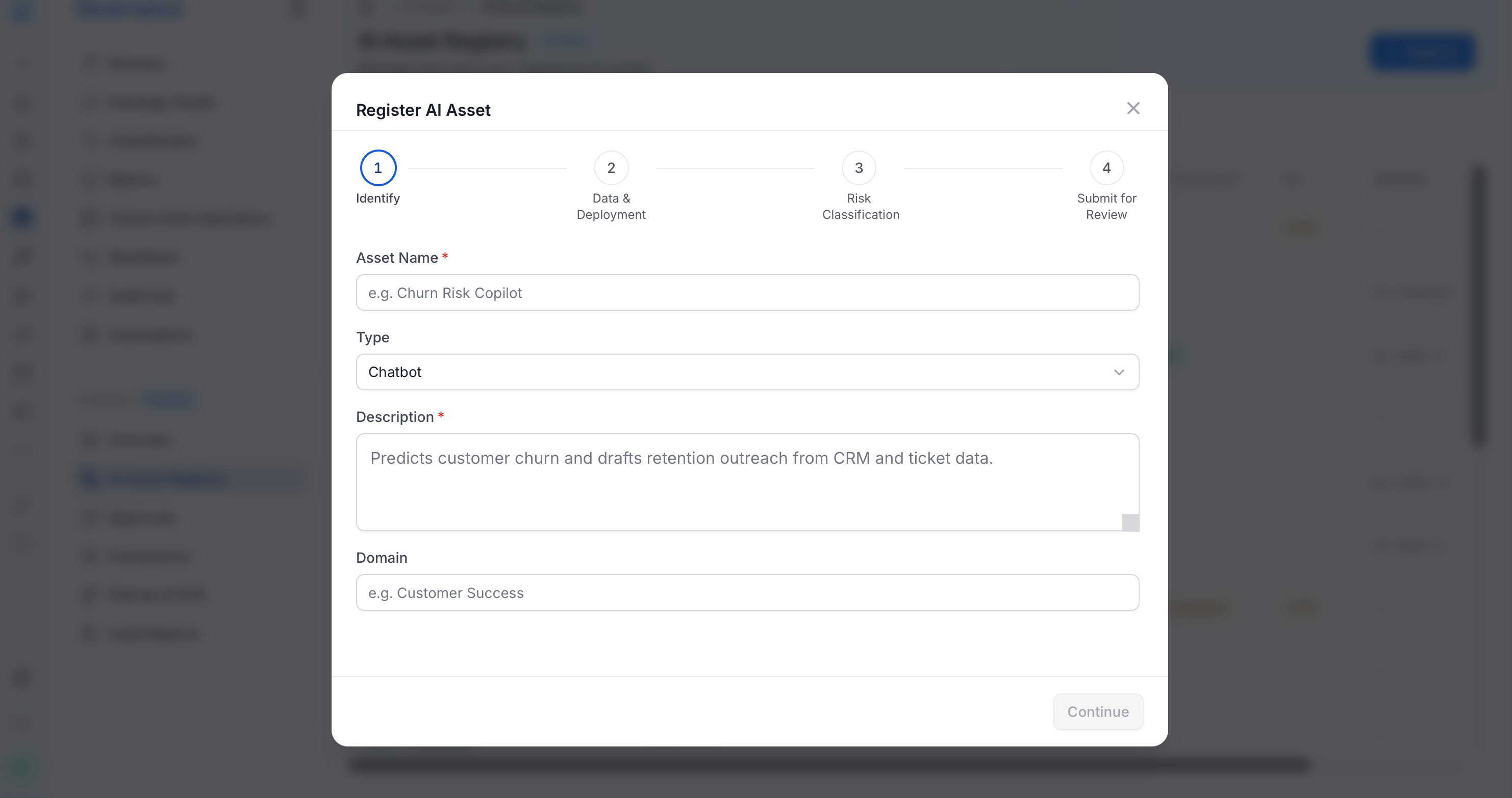
### Step 1: Identify
Start by naming and describing the asset:
* Enter a unique **Asset Name**.
* Select a **Type**:
| Type | Description |
| - | - |
| **Chatbot** | Conversational interface for answering questions in natural language. |
| **Agent** | Autonomous system that takes multi-step actions to complete a task. |
| **Copilot** | AI that assists a user within an existing workflow or tool, rather than acting on its own. |
| **Assistant** | General-purpose AI helper for a range of tasks, not tied to one specific workflow. |
| **RAG** | Retrieval-augmented generation: answers grounded in results retrieved from a knowledge base or document store. |
| **Code Generator** | Generates or completes code. |
| **Data Analyst** | Analyzes data and produces insights, summaries, or reports. |
| **Automation Bot** | Runs a predefined task or workflow without ongoing human input. |
| **Multi-Agent** | Multiple AI agents coordinating together to complete a task. |
| **Custom** | Any AI application that doesn't fit the categories above. |
* Enter a **Description** of what the asset does.
* Optional: Enter a **Domain** to link the asset to the same domain your data already uses, so you're not maintaining a second, parallel structure just for AI.
**Note**: This wizard registers an **AI Application** specifically. LLM Models and MCP Servers appear in the registry through other parts of the product rather than through this wizard.
### Step 1: Identify
Start by naming and describing the asset:
* Enter a unique **Asset Name**.
* Select a **Type**:
| Type | Description |
| - | - |
| **Chatbot** | Conversational interface for answering questions in natural language. |
| **Agent** | Autonomous system that takes multi-step actions to complete a task. |
| **Copilot** | AI that assists a user within an existing workflow or tool, rather than acting on its own. |
| **Assistant** | General-purpose AI helper for a range of tasks, not tied to one specific workflow. |
| **RAG** | Retrieval-augmented generation: answers grounded in results retrieved from a knowledge base or document store. |
| **Code Generator** | Generates or completes code. |
| **Data Analyst** | Analyzes data and produces insights, summaries, or reports. |
| **Automation Bot** | Runs a predefined task or workflow without ongoing human input. |
| **Multi-Agent** | Multiple AI agents coordinating together to complete a task. |
| **Custom** | Any AI application that doesn't fit the categories above. |
* Enter a **Description** of what the asset does.
* Optional: Enter a **Domain** to link the asset to the same domain your data already uses, so you're not maintaining a second, parallel structure just for AI.
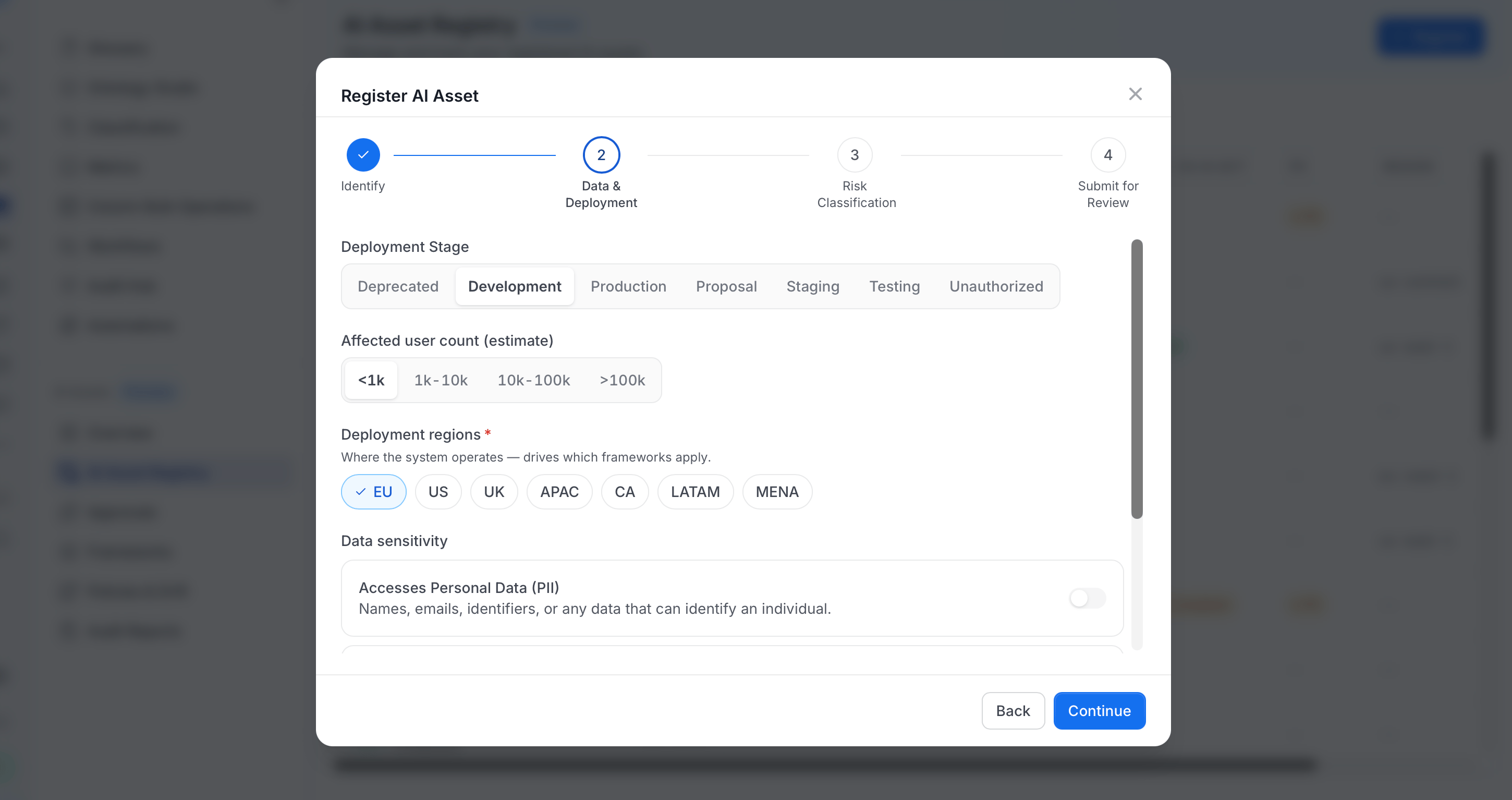
 ### Step 2: Data & Deployment
Next, describe where the asset runs and what data it touches:
* Select a **Deployment Stage**:
| Stage | Description |
| - | - |
| **Proposal** | Not yet built, still being scoped or evaluated. |
| **Development** | Being actively built and not yet accessible to end users. |
| **Testing** | Functionally complete and undergoing QA or validation before wider release. |
| **Staging** | Deployed to a pre-production environment for final checks before going live. |
| **Production** | Live and in active use. |
| **Deprecated** | No longer maintained or being phased out, but might still be running. |
| **Unauthorized** | Found in use outside the normal registration flow, as a shadow AI asset being brought under governance. |
* Select the **Affected user count (estimate)**: `<1k`, `1k-10k`, `10k-100k`, or `>100k`.
* Select one or more **Deployment regions** (required). Each region has its own AI regulations, so this determines which compliance frameworks apply to the asset later.
| Region | Covers |
| - | - |
| **EU** | European Union. |
| **US** | United States. |
| **UK** | United Kingdom. |
| **APAC** | Asia-Pacific. |
| **CA** | Canada. |
| **LATAM** | Latin America. |
| **MENA** | Middle East and North Africa. |
* Turn on **Accesses Personal Data (PII)** if the asset processes names, emails, identifiers, or any other data that can identify an individual.
* Turn on **Accesses Sensitive data** if the asset processes health, financial, biometric, location, or special-category data.
* Select any applicable **Data Categories**:
| Category | Description |
| - | - |
| **Customer profile** | Names, contact details, or account information tied to individual customers. |
| **Support transcripts** | Records of customer support conversations. |
| **Payment history** | Transaction or billing records. |
| **Resume content** | Candidate resumes or job application materials. |
| **Performance ratings** | Employee or vendor performance evaluations. |
| **Telemetry** | Usage or behavioral data collected automatically from a product or service. |
| **Slack messages** | Content from internal Slack conversations. |
| **Marketing leads** | Contact and engagement information for sales or marketing prospects. |
### Step 2: Data & Deployment
Next, describe where the asset runs and what data it touches:
* Select a **Deployment Stage**:
| Stage | Description |
| - | - |
| **Proposal** | Not yet built, still being scoped or evaluated. |
| **Development** | Being actively built and not yet accessible to end users. |
| **Testing** | Functionally complete and undergoing QA or validation before wider release. |
| **Staging** | Deployed to a pre-production environment for final checks before going live. |
| **Production** | Live and in active use. |
| **Deprecated** | No longer maintained or being phased out, but might still be running. |
| **Unauthorized** | Found in use outside the normal registration flow, as a shadow AI asset being brought under governance. |
* Select the **Affected user count (estimate)**: `<1k`, `1k-10k`, `10k-100k`, or `>100k`.
* Select one or more **Deployment regions** (required). Each region has its own AI regulations, so this determines which compliance frameworks apply to the asset later.
| Region | Covers |
| - | - |
| **EU** | European Union. |
| **US** | United States. |
| **UK** | United Kingdom. |
| **APAC** | Asia-Pacific. |
| **CA** | Canada. |
| **LATAM** | Latin America. |
| **MENA** | Middle East and North Africa. |
* Turn on **Accesses Personal Data (PII)** if the asset processes names, emails, identifiers, or any other data that can identify an individual.
* Turn on **Accesses Sensitive data** if the asset processes health, financial, biometric, location, or special-category data.
* Select any applicable **Data Categories**:
| Category | Description |
| - | - |
| **Customer profile** | Names, contact details, or account information tied to individual customers. |
| **Support transcripts** | Records of customer support conversations. |
| **Payment history** | Transaction or billing records. |
| **Resume content** | Candidate resumes or job application materials. |
| **Performance ratings** | Employee or vendor performance evaluations. |
| **Telemetry** | Usage or behavioral data collected automatically from a product or service. |
| **Slack messages** | Content from internal Slack conversations. |
| **Marketing leads** | Contact and engagement information for sales or marketing prospects. |
 ### Step 3: Risk Classification
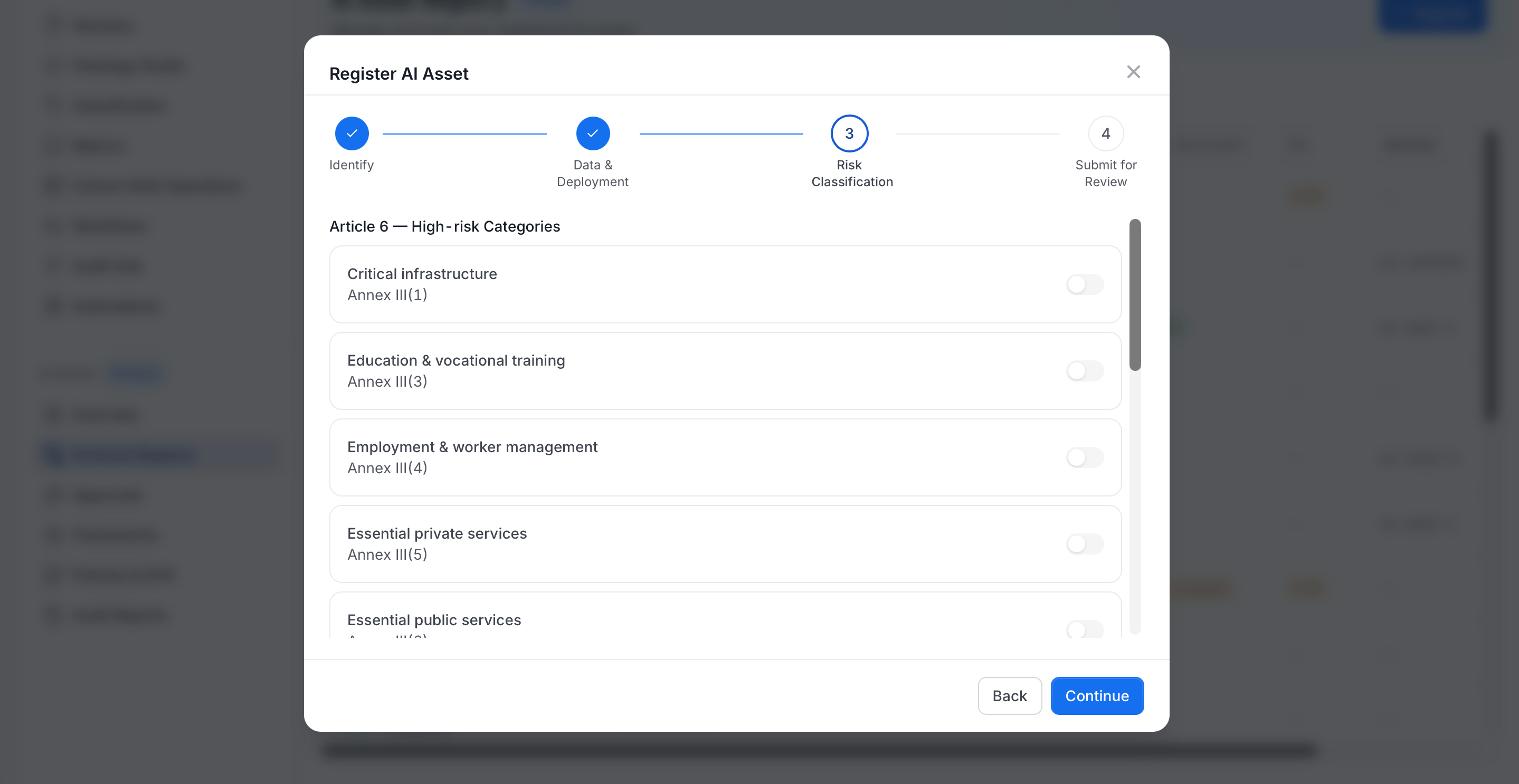
This step walks through the EU AI Act's risk criteria and suggests a risk tier. Override it with your own rationale if needed.
1. Turn on any applicable **Article 6 (High-risk Categories)** (EU AI Act Annex III high-risk use categories). Turning any of these on suggests a **High** risk classification.
| Category | Description |
| - | - |
| **Critical infrastructure** | Manages or supports critical infrastructure such as energy, water, or transport networks. |
| **Education & vocational training** | Determines access to education or evaluates students. |
| **Employment & worker management** | Used in hiring, performance evaluation, or workforce management decisions. |
| **Essential private services** | Determines access to essential private services, such as credit scoring or insurance pricing. |
| **Essential public services** | Determines eligibility for public benefits or essential public services. |
| **Law enforcement purposes** | Supports law enforcement activities, such as risk assessment or evidence evaluation. |
| **Migration, asylum, borders** | Used in migration, asylum, or border control decisions. |
| **Justice & democratic processes** | Assists judicial decision-making or influences democratic processes such as elections. |
2. Turn on any applicable **Article 5 (Prohibited Practices)**. The wizard warns, "None of these may be true. If any are, the system is prohibited." Turning any of these on suggests an **Unacceptable** classification.
| Practice | Description |
| - | - |
| **Subliminal manipulative techniques** | Manipulates behavior beyond a person's awareness in a way that causes harm. |
| **Exploitation of vulnerabilities** | Exploits a person's age, disability, or social or economic situation to distort their behavior. |
| **Social scoring by public authorities** | Evaluates or classifies people based on behavior or characteristics to determine broad social treatment. |
| **Risk assessment solely from profiling** | Predicts the likelihood of someone committing a crime based only on profiling, with no other factors. |
| **Untargeted facial-image scraping** | Builds facial recognition databases by scraping images from the internet or CCTV without targeted collection. |
| **Emotion recognition (workplace/education)** | Infers emotions in workplace or educational settings. |
| **Biometric inference of sensitive attributes** | Infers sensitive attributes, such as race, political views, or sexual orientation, from biometric data. |
| **Real-time biometric ID in public spaces** | Real-time remote biometric identification in publicly accessible spaces for law enforcement purposes. |
3. Select a **Final classification**. The wizard pre-selects a suggestion based on your answers above (including whether the asset accesses PII or sensitive data categories from Step 2). Override it if needed.
| Classification | Meaning |
| - | - |
| **Minimal** | Little to no risk under the EU AI Act. Most everyday AI applications fall here. |
| **Limited** | Some risk, typically requiring transparency measures such as disclosing that a user is interacting with AI. |
| **High** | Falls into an Annex III high-risk category, subject to the strictest requirements: registration, risk management, and human oversight. |
| **Unacceptable** | Matches a prohibited practice under Article 5. The system cannot be deployed. |
### Step 3: Risk Classification
This step walks through the EU AI Act's risk criteria and suggests a risk tier. Override it with your own rationale if needed.
1. Turn on any applicable **Article 6 (High-risk Categories)** (EU AI Act Annex III high-risk use categories). Turning any of these on suggests a **High** risk classification.
| Category | Description |
| - | - |
| **Critical infrastructure** | Manages or supports critical infrastructure such as energy, water, or transport networks. |
| **Education & vocational training** | Determines access to education or evaluates students. |
| **Employment & worker management** | Used in hiring, performance evaluation, or workforce management decisions. |
| **Essential private services** | Determines access to essential private services, such as credit scoring or insurance pricing. |
| **Essential public services** | Determines eligibility for public benefits or essential public services. |
| **Law enforcement purposes** | Supports law enforcement activities, such as risk assessment or evidence evaluation. |
| **Migration, asylum, borders** | Used in migration, asylum, or border control decisions. |
| **Justice & democratic processes** | Assists judicial decision-making or influences democratic processes such as elections. |
2. Turn on any applicable **Article 5 (Prohibited Practices)**. The wizard warns, "None of these may be true. If any are, the system is prohibited." Turning any of these on suggests an **Unacceptable** classification.
| Practice | Description |
| - | - |
| **Subliminal manipulative techniques** | Manipulates behavior beyond a person's awareness in a way that causes harm. |
| **Exploitation of vulnerabilities** | Exploits a person's age, disability, or social or economic situation to distort their behavior. |
| **Social scoring by public authorities** | Evaluates or classifies people based on behavior or characteristics to determine broad social treatment. |
| **Risk assessment solely from profiling** | Predicts the likelihood of someone committing a crime based only on profiling, with no other factors. |
| **Untargeted facial-image scraping** | Builds facial recognition databases by scraping images from the internet or CCTV without targeted collection. |
| **Emotion recognition (workplace/education)** | Infers emotions in workplace or educational settings. |
| **Biometric inference of sensitive attributes** | Infers sensitive attributes, such as race, political views, or sexual orientation, from biometric data. |
| **Real-time biometric ID in public spaces** | Real-time remote biometric identification in publicly accessible spaces for law enforcement purposes. |
3. Select a **Final classification**. The wizard pre-selects a suggestion based on your answers above (including whether the asset accesses PII or sensitive data categories from Step 2). Override it if needed.
| Classification | Meaning |
| - | - |
| **Minimal** | Little to no risk under the EU AI Act. Most everyday AI applications fall here. |
| **Limited** | Some risk, typically requiring transparency measures such as disclosing that a user is interacting with AI. |
| **High** | Falls into an Annex III high-risk category, subject to the strictest requirements: registration, risk management, and human oversight. |
| **Unacceptable** | Matches a prohibited practice under Article 5. The system cannot be deployed. |
 ### Step 4: Submit for Review
Finish by reviewing the summary and submitting:
* Review the summary of everything entered: Deployment Stage, Regions, Affected user count, PII/Sensitive data, and Data Categories.
* Review the **Frameworks that will apply** to this asset, computed from the regions you selected in Step 2. ISO/IEC 42001 always applies, and region-specific frameworks like the EU AI Act are added based on your selection.
* Optional: Enter **Notes for the Reviewer**: context like known limitations or scope decisions.
* Click **Submit for Review**.
### Step 4: Submit for Review
Finish by reviewing the summary and submitting:
* Review the summary of everything entered: Deployment Stage, Regions, Affected user count, PII/Sensitive data, and Data Categories.
* Review the **Frameworks that will apply** to this asset, computed from the regions you selected in Step 2. ISO/IEC 42001 always applies, and region-specific frameworks like the EU AI Act are added based on your selection.
* Optional: Enter **Notes for the Reviewer**: context like known limitations or scope decisions.
* Click **Submit for Review**.
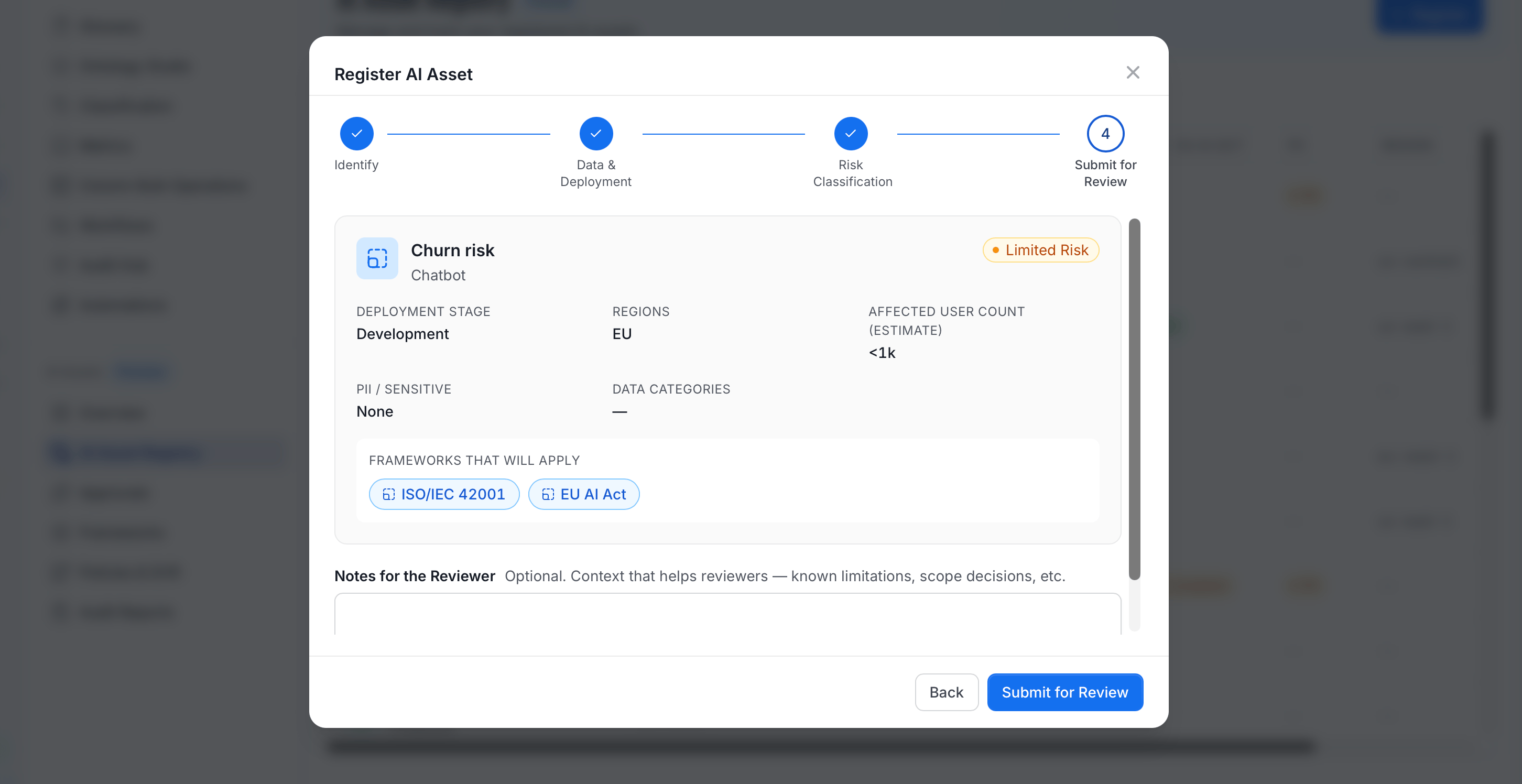 Submitting sets the asset's registration status to **Pending Approval** and adds it to the Approvals queue.
## Explore the AI Asset Registry
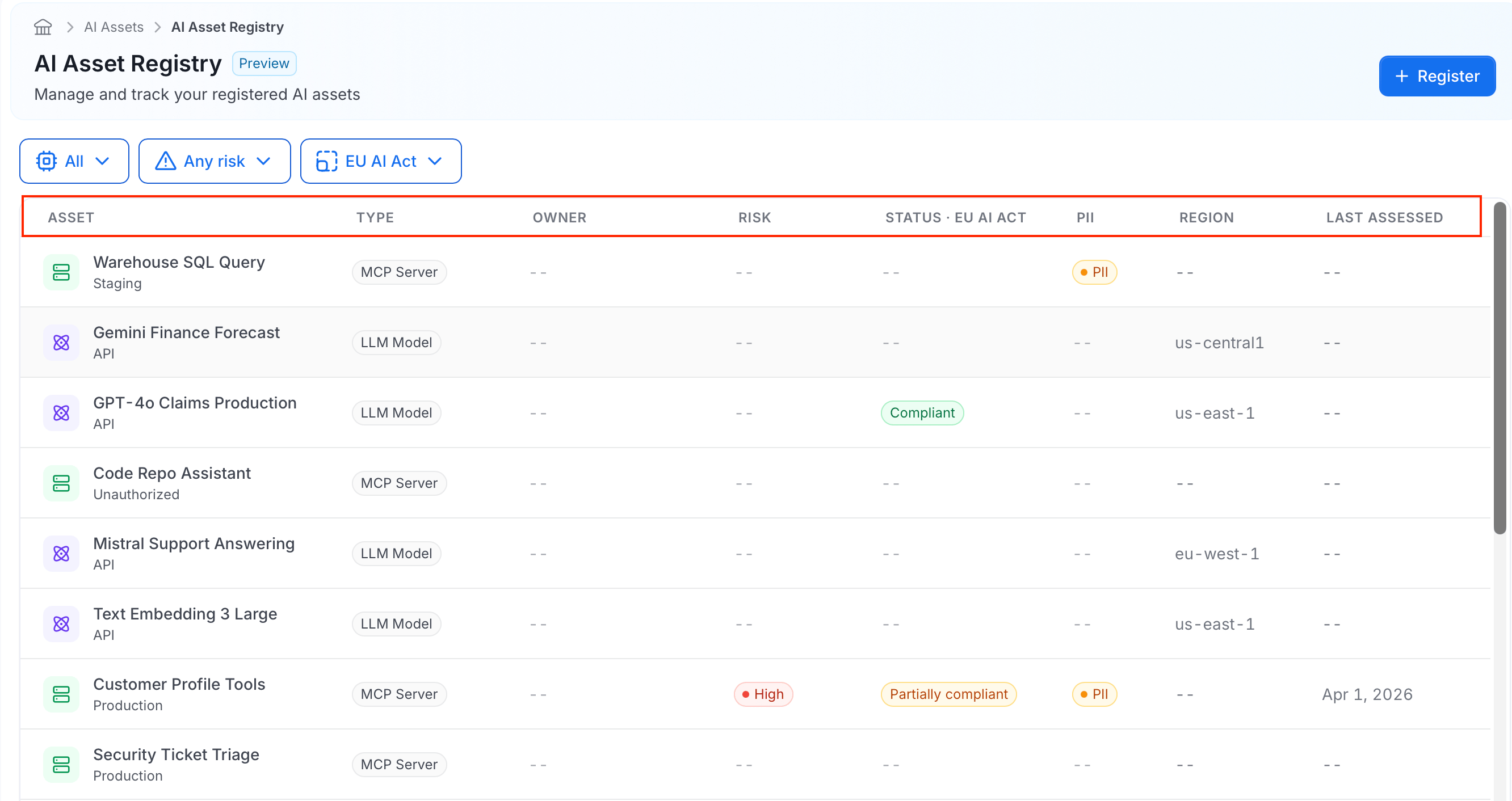
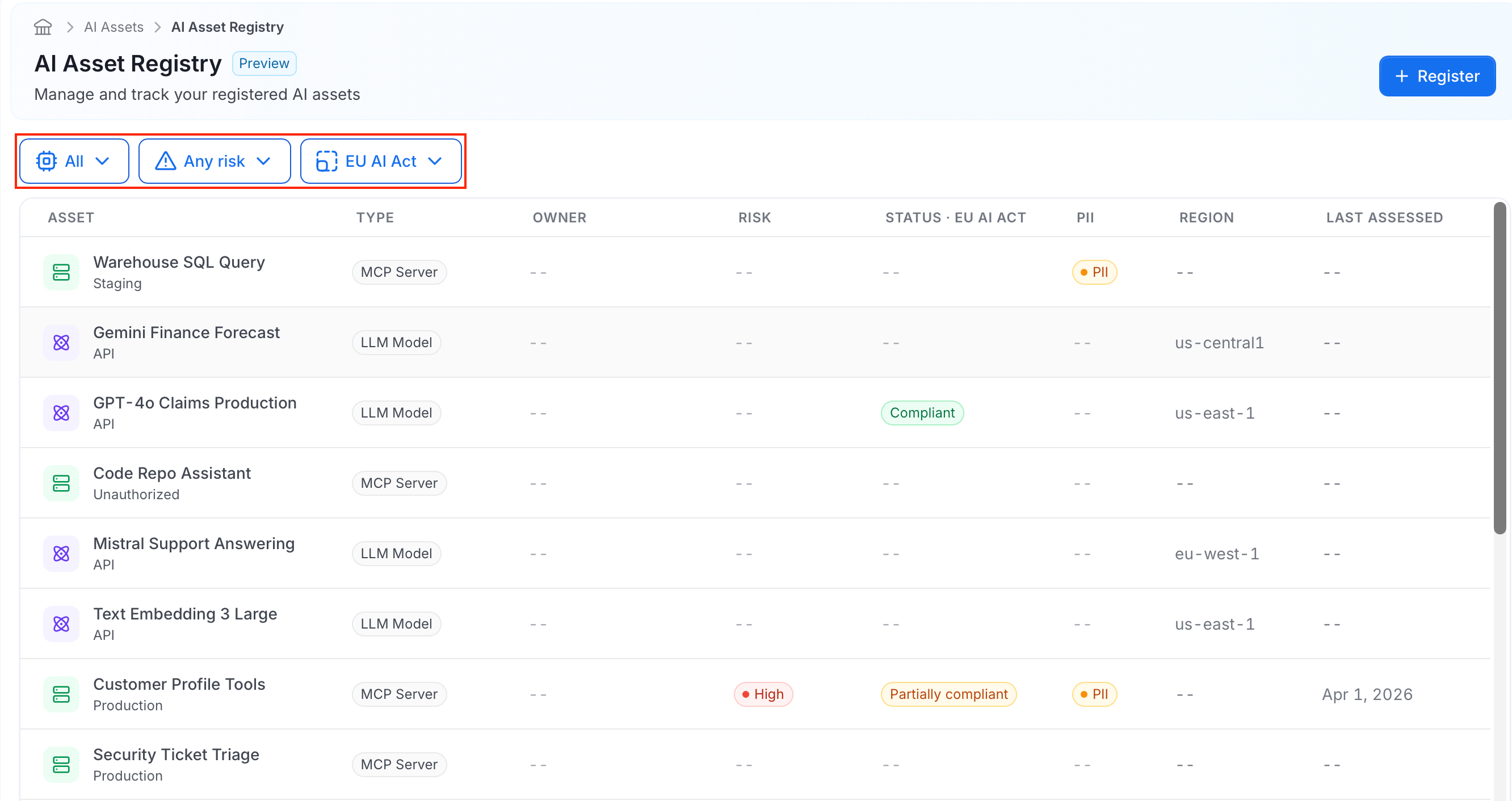
The AI Asset Registry home page shows the list of all registered assets in a table, with the following columns:
* **Asset**: Shows the asset's name, with its deployment stage or connection type displayed underneath.
* **Type**: Indicates which kind of asset it is: an AI Application, LLM Model, or MCP Server.
* **Owner**: Shows the name of the asset's owner.
* **Risk**: Shows the asset's current risk classification.
* **Status**: Shows the asset's compliance status for the currently selected framework.
* **PII**: Indicates whether the asset accesses personal data.
* **Region**: Shows where the asset is deployed.
* **Last Assessed**: Shows the date the asset was last evaluated against the selected framework.
Submitting sets the asset's registration status to **Pending Approval** and adds it to the Approvals queue.
## Explore the AI Asset Registry
The AI Asset Registry home page shows the list of all registered assets in a table, with the following columns:
* **Asset**: Shows the asset's name, with its deployment stage or connection type displayed underneath.
* **Type**: Indicates which kind of asset it is: an AI Application, LLM Model, or MCP Server.
* **Owner**: Shows the name of the asset's owner.
* **Risk**: Shows the asset's current risk classification.
* **Status**: Shows the asset's compliance status for the currently selected framework.
* **PII**: Indicates whether the asset accesses personal data.
* **Region**: Shows where the asset is deployed.
* **Last Assessed**: Shows the date the asset was last evaluated against the selected framework.
 Three dropdowns above the table let you narrow down the list:
| Filter | What it does |
| - | - |
| **Type** (defaults to "All") | Show only assets of one kind: AI Application, LLM Model, or MCP Server. |
| **Risk** (defaults to "Any risk") | Show only assets at a specific risk tier: Minimal, Limited, High, or Unacceptable. |
| **Framework** (defaults to "EU AI Act") | Choose which framework's compliance result appears in the **Status** column, and filters the list to assets that framework applies to. |
For example, select **High** risk and the **EU AI Act** framework to see every asset that needs review under that framework.
Three dropdowns above the table let you narrow down the list:
| Filter | What it does |
| - | - |
| **Type** (defaults to "All") | Show only assets of one kind: AI Application, LLM Model, or MCP Server. |
| **Risk** (defaults to "Any risk") | Show only assets at a specific risk tier: Minimal, Limited, High, or Unacceptable. |
| **Framework** (defaults to "EU AI Act") | Choose which framework's compliance result appears in the **Status** column, and filters the list to assets that framework applies to. |
For example, select **High** risk and the **EU AI Act** framework to see every asset that needs review under that framework.
 ## The Asset Detail Page
Selecting any asset from the registry opens its detail page, a single place to see everything about that one asset:
* Its compliance status across every applicable framework.
* Its real data lineage.
* How it's tracking against your organization's policies.
* A history of everything that's happened to it.
Owners use it to keep an asset's information current. Reviewers and auditors use it to assess or verify an asset without having to ask around for context.
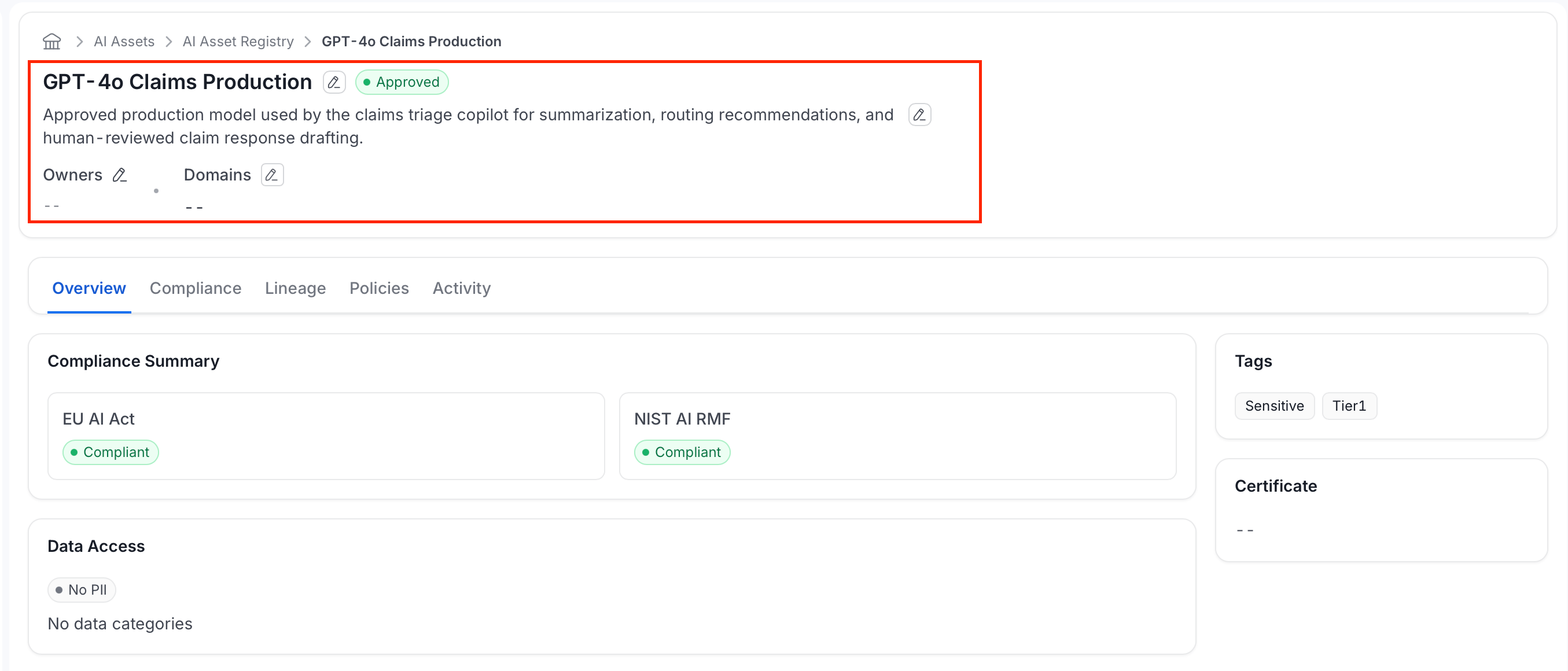
The header shows:
* The asset's **name** and **description** (both inline-editable if you have edit permission on that asset type).
* A **registration-status badge**:
| Status | Meaning |
| - | - |
| **Unregistered** | Not yet brought under governance. This is how shadow AI appears before triage. |
| **Registered** | Registered in the inventory. |
| **Pending Approval** | Submitted for review and waiting on a reviewer. |
| **Approved** | Reviewed and cleared for use. |
| **Rejected** | Reviewed and declined. See the reviewer's comments for why. |
* Its **Owners** and **Domains**.
## The Asset Detail Page
Selecting any asset from the registry opens its detail page, a single place to see everything about that one asset:
* Its compliance status across every applicable framework.
* Its real data lineage.
* How it's tracking against your organization's policies.
* A history of everything that's happened to it.
Owners use it to keep an asset's information current. Reviewers and auditors use it to assess or verify an asset without having to ask around for context.
The header shows:
* The asset's **name** and **description** (both inline-editable if you have edit permission on that asset type).
* A **registration-status badge**:
| Status | Meaning |
| - | - |
| **Unregistered** | Not yet brought under governance. This is how shadow AI appears before triage. |
| **Registered** | Registered in the inventory. |
| **Pending Approval** | Submitted for review and waiting on a reviewer. |
| **Approved** | Reviewed and cleared for use. |
| **Rejected** | Reviewed and declined. See the reviewer's comments for why. |
* Its **Owners** and **Domains**.
 Below the header, the page is organized into five tabs:
| Tab | What it's for |
| - | - |
| **Overview** | A snapshot of compliance status, data access, and operational metrics. |
| **Compliance** | Full framework-by-framework compliance detail, including an ethical AI assessment. |
| **Lineage** | The asset's real data and tool dependencies, traced through the catalog. |
| **Policies** | How the asset is tracking against your organization's AI policies. |
| **Activity** | A timeline of everything that's happened to this asset. |
### Overview Tab
The Overview tab is a quick snapshot of the asset's standing, split across four cards:
Below the header, the page is organized into five tabs:
| Tab | What it's for |
| - | - |
| **Overview** | A snapshot of compliance status, data access, and operational metrics. |
| **Compliance** | Full framework-by-framework compliance detail, including an ethical AI assessment. |
| **Lineage** | The asset's real data and tool dependencies, traced through the catalog. |
| **Policies** | How the asset is tracking against your organization's AI policies. |
| **Activity** | A timeline of everything that's happened to this asset. |
### Overview Tab
The Overview tab is a quick snapshot of the asset's standing, split across four cards:
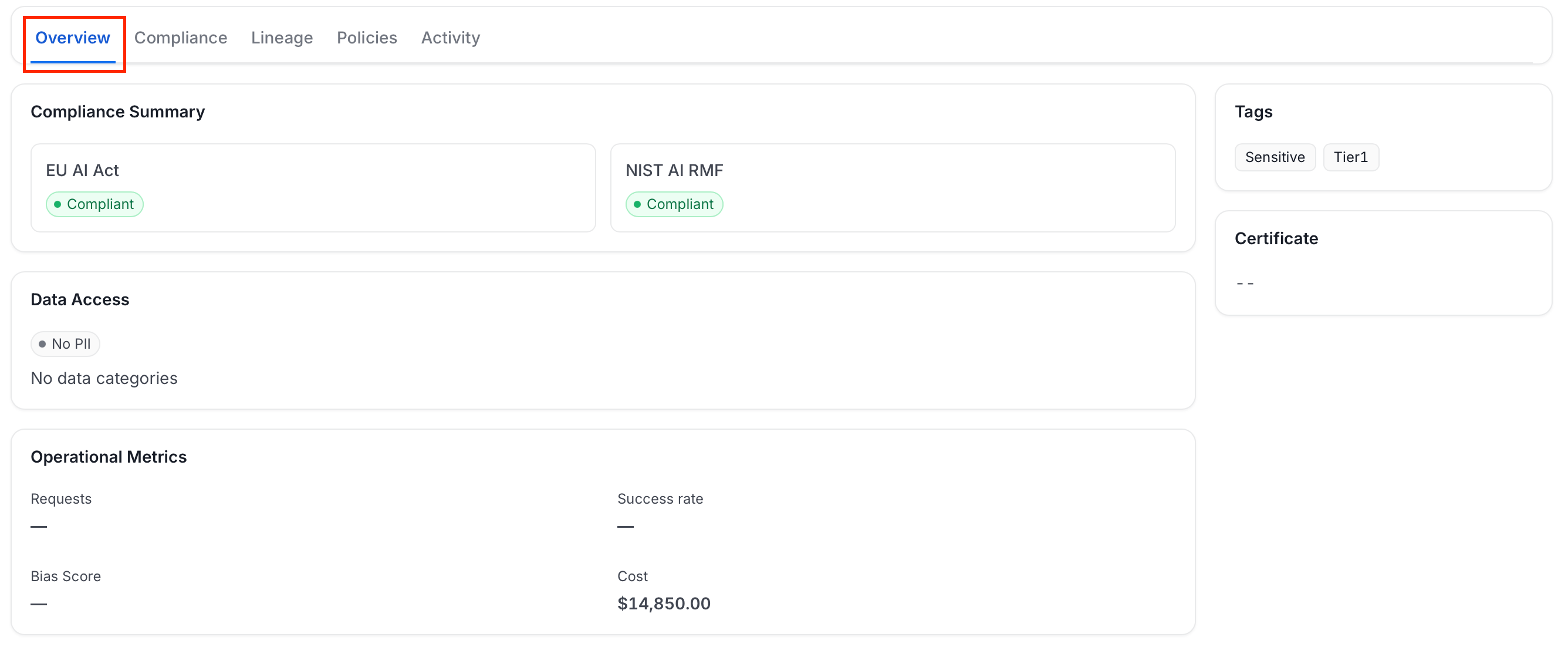 * **Compliance Summary**: One card per framework that applies to this asset, each with a status badge such as Compliant.
* **Data Access**: Whether the asset accesses PII, and its data categories.
* **Operational Metrics**: Requests, Success rate, Bias Score, and Cost.
* **Tags** and **Certificate** (right rail): Any tags applied to the asset, and its compliance certificate once one has been issued.
### Compliance Tab
The Compliance tab shows this asset's full compliance detail against each regulatory framework that applies to it, from its EU AI Act risk classification down to individual Article 5 and Article 6 checklist results.
* **Compliance Summary**: One card per framework that applies to this asset, each with a status badge such as Compliant.
* **Data Access**: Whether the asset accesses PII, and its data categories.
* **Operational Metrics**: Requests, Success rate, Bias Score, and Cost.
* **Tags** and **Certificate** (right rail): Any tags applied to the asset, and its compliance certificate once one has been issued.
### Compliance Tab
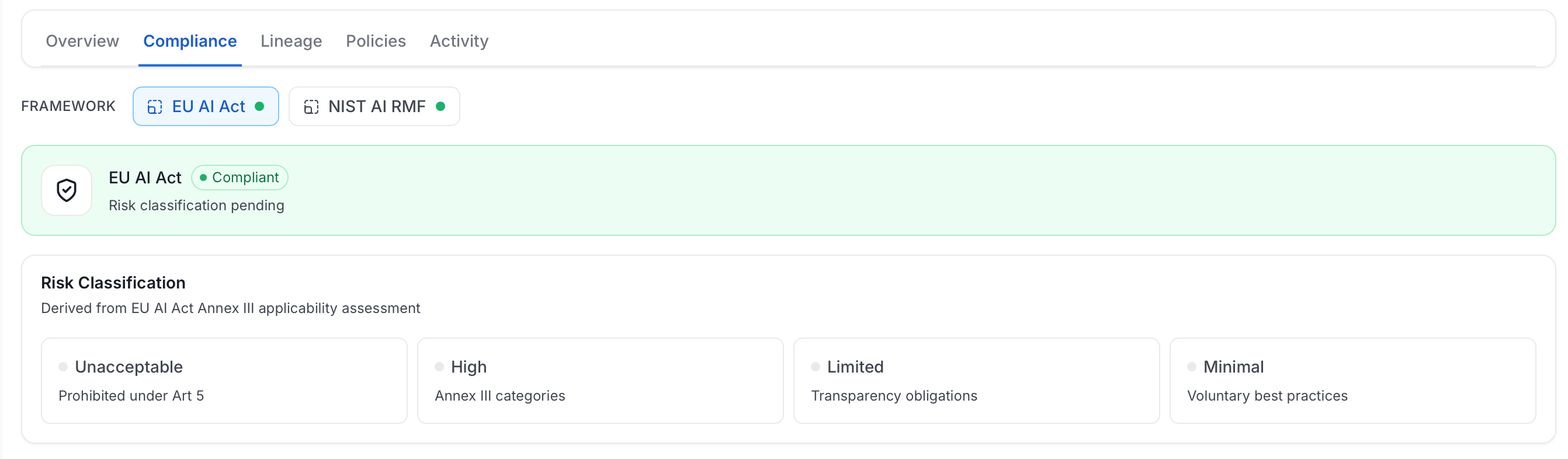
The Compliance tab shows this asset's full compliance detail against each regulatory framework that applies to it, from its EU AI Act risk classification down to individual Article 5 and Article 6 checklist results.
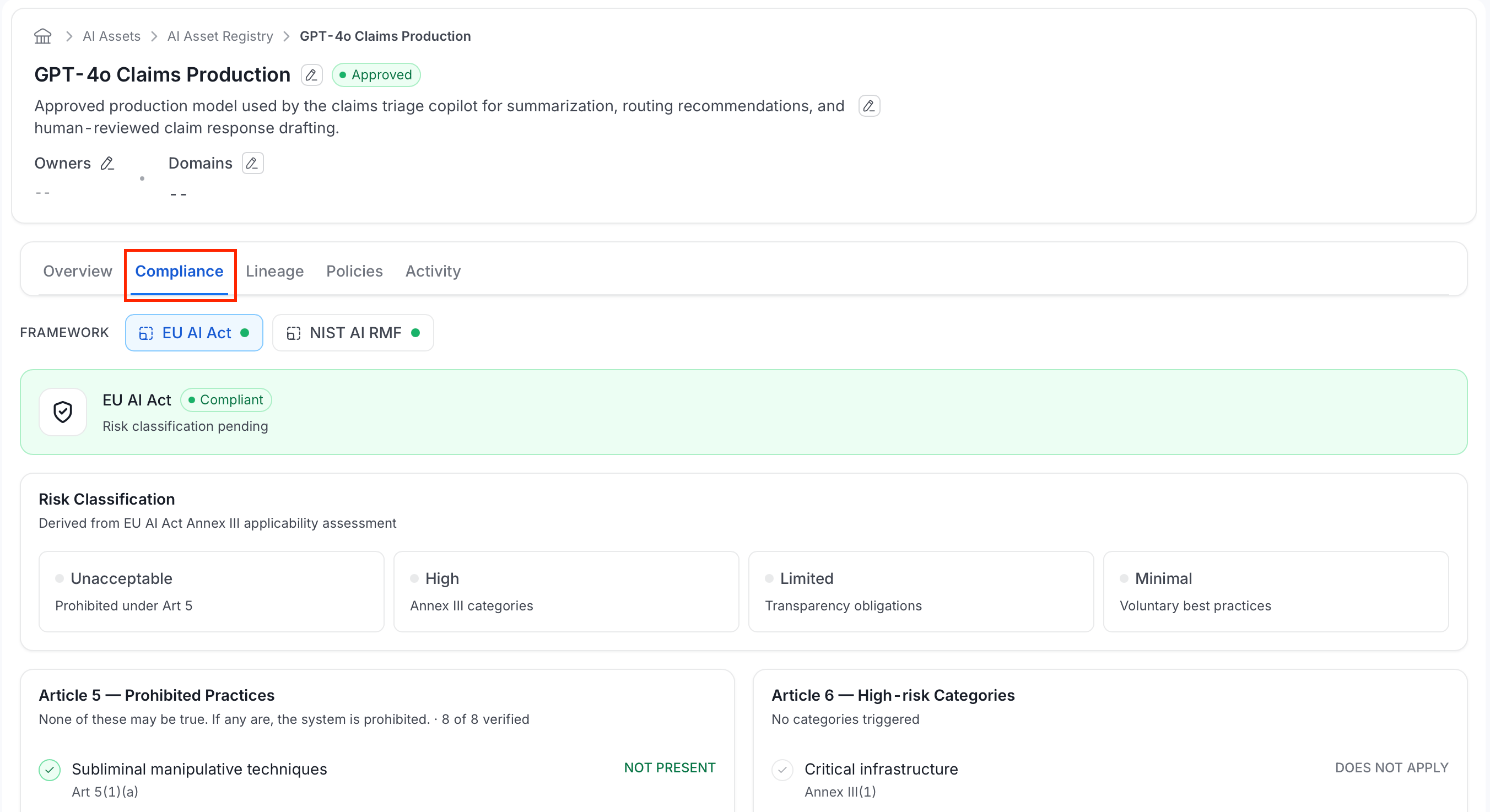 Use the **Framework** selector at the top to switch between the frameworks that apply to this asset. Below it, the tab shows:
* **Status band**: The selected framework's name and overall status:
| Status | Meaning |
| - | - |
| **Compliant** | The asset meets every requirement for this framework. |
| **Partially compliant** | The asset meets some, but not all, requirements. |
| **Non-compliant** | The asset fails one or more requirements. |
This status reflects the assessor's own conclusion, not an automatic pass/fail count of the checklists below. Underneath it, a note appears based on the asset's risk tier:
* **High** or **Unacceptable**: A reminder that conformity assessment is required.
* **Limited**: A note about Article 50 transparency obligations.
* **Minimal**: A note that only voluntary best practices apply.
* **No tier set**: "Risk classification pending."
* **Risk Classification**: A reference strip showing what each of the four EU AI Act risk tiers means: **Unacceptable** (prohibited under Article 5), **High** (an Annex III category), **Limited** (transparency obligations), **Minimal** (voluntary best practices). This asset's own tier is highlighted.
Use the **Framework** selector at the top to switch between the frameworks that apply to this asset. Below it, the tab shows:
* **Status band**: The selected framework's name and overall status:
| Status | Meaning |
| - | - |
| **Compliant** | The asset meets every requirement for this framework. |
| **Partially compliant** | The asset meets some, but not all, requirements. |
| **Non-compliant** | The asset fails one or more requirements. |
This status reflects the assessor's own conclusion, not an automatic pass/fail count of the checklists below. Underneath it, a note appears based on the asset's risk tier:
* **High** or **Unacceptable**: A reminder that conformity assessment is required.
* **Limited**: A note about Article 50 transparency obligations.
* **Minimal**: A note that only voluntary best practices apply.
* **No tier set**: "Risk classification pending."
* **Risk Classification**: A reference strip showing what each of the four EU AI Act risk tiers means: **Unacceptable** (prohibited under Article 5), **High** (an Annex III category), **Limited** (transparency obligations), **Minimal** (voluntary best practices). This asset's own tier is highlighted.
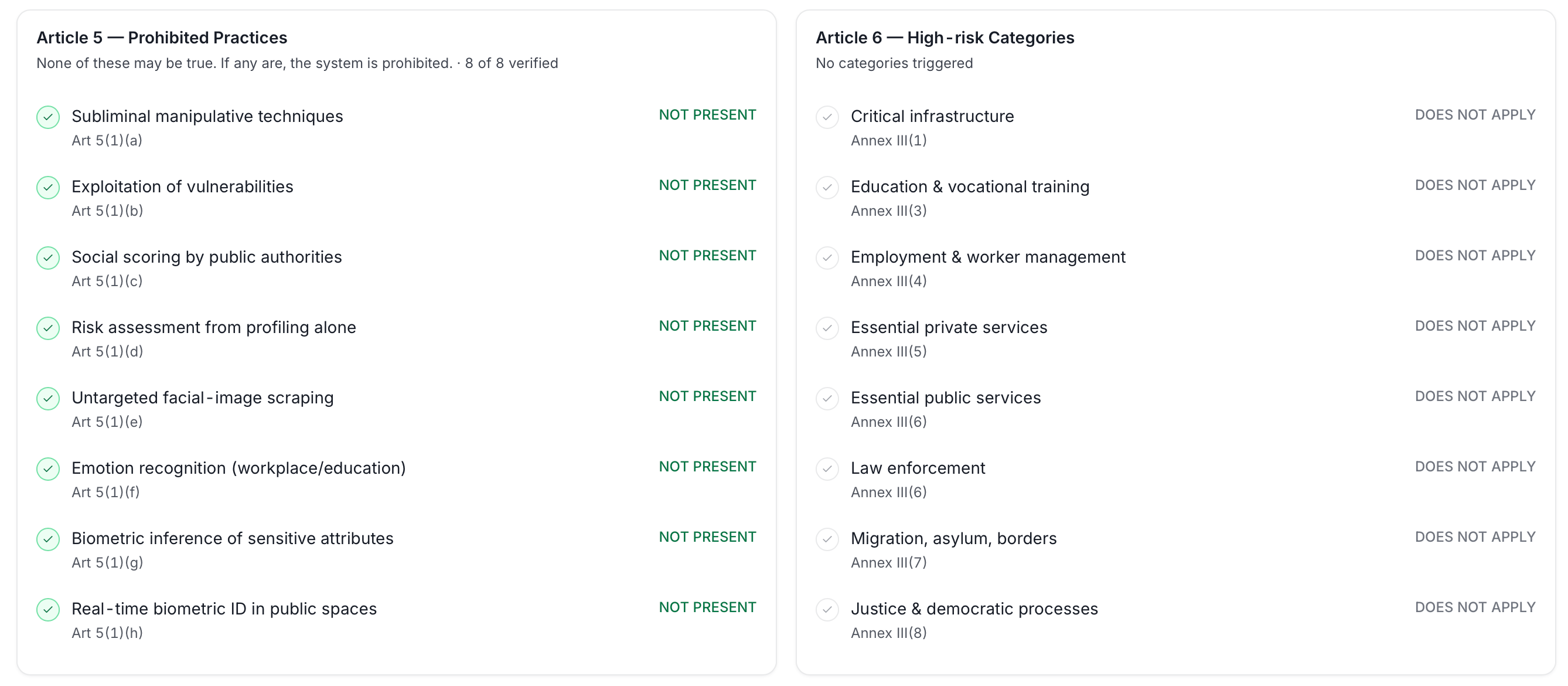
 * **Article 5 (Prohibited Practices)**: The same eight practices from the registration wizard, each shown with its article citation (Art 5(1)(a) through (h)) and a **Not Present** or triggered status for this specific asset.
* **Article 6 (High-risk Categories)**: The same eight categories from the registration wizard, each shown with its Annex III citation and a **Does Not Apply** or triggered status for this specific asset.
* **Article 5 (Prohibited Practices)**: The same eight practices from the registration wizard, each shown with its article citation (Art 5(1)(a) through (h)) and a **Not Present** or triggered status for this specific asset.
* **Article 6 (High-risk Categories)**: The same eight categories from the registration wizard, each shown with its Annex III citation and a **Does Not Apply** or triggered status for this specific asset.
 * **Conformity Assessment**: Required for High-risk systems before they can be placed on the market. Tracks whether an assessment is required, its type, the assessment body, certificate, validity date, and supporting documentation.
* **Transparency Obligations**: Article 50 disclosures to end users: whether users are informed they're interacting with AI, whether AI-generated content is labeled as such, and, optionally, whether emotion recognition or biometric categorization is disclosed.
* **Conformity Assessment**: Required for High-risk systems before they can be placed on the market. Tracks whether an assessment is required, its type, the assessment body, certificate, validity date, and supporting documentation.
* **Transparency Obligations**: Article 50 disclosures to end users: whether users are informed they're interacting with AI, whether AI-generated content is labeled as such, and, optionally, whether emotion recognition or biometric categorization is disclosed.
 * **Ethical AI Assessment**: A cross-framework evaluation across six areas:
| Area | What it evaluates |
| - | - |
| **Privacy** | How the asset handles personal and sensitive data. |
| **Fairness & bias** | Whether the asset's outputs treat different groups of people equitably. |
| **Reliability & safety** | How consistently and safely the asset performs, including failure handling. |
| **Transparency** | Whether users are informed they're interacting with AI and how it reaches its outputs. |
| **Accountability** | Whether ownership, oversight, and escalation paths are clearly defined. |
| **Environmental impact** | The asset's computational and resource footprint. |
* **Ethical AI Assessment**: A cross-framework evaluation across six areas:
| Area | What it evaluates |
| - | - |
| **Privacy** | How the asset handles personal and sensitive data. |
| **Fairness & bias** | Whether the asset's outputs treat different groups of people equitably. |
| **Reliability & safety** | How consistently and safely the asset performs, including failure handling. |
| **Transparency** | Whether users are informed they're interacting with AI and how it reaches its outputs. |
| **Accountability** | Whether ownership, oversight, and escalation paths are clearly defined. |
| **Environmental impact** | The asset's computational and resource footprint. |
 ### Lineage Tab
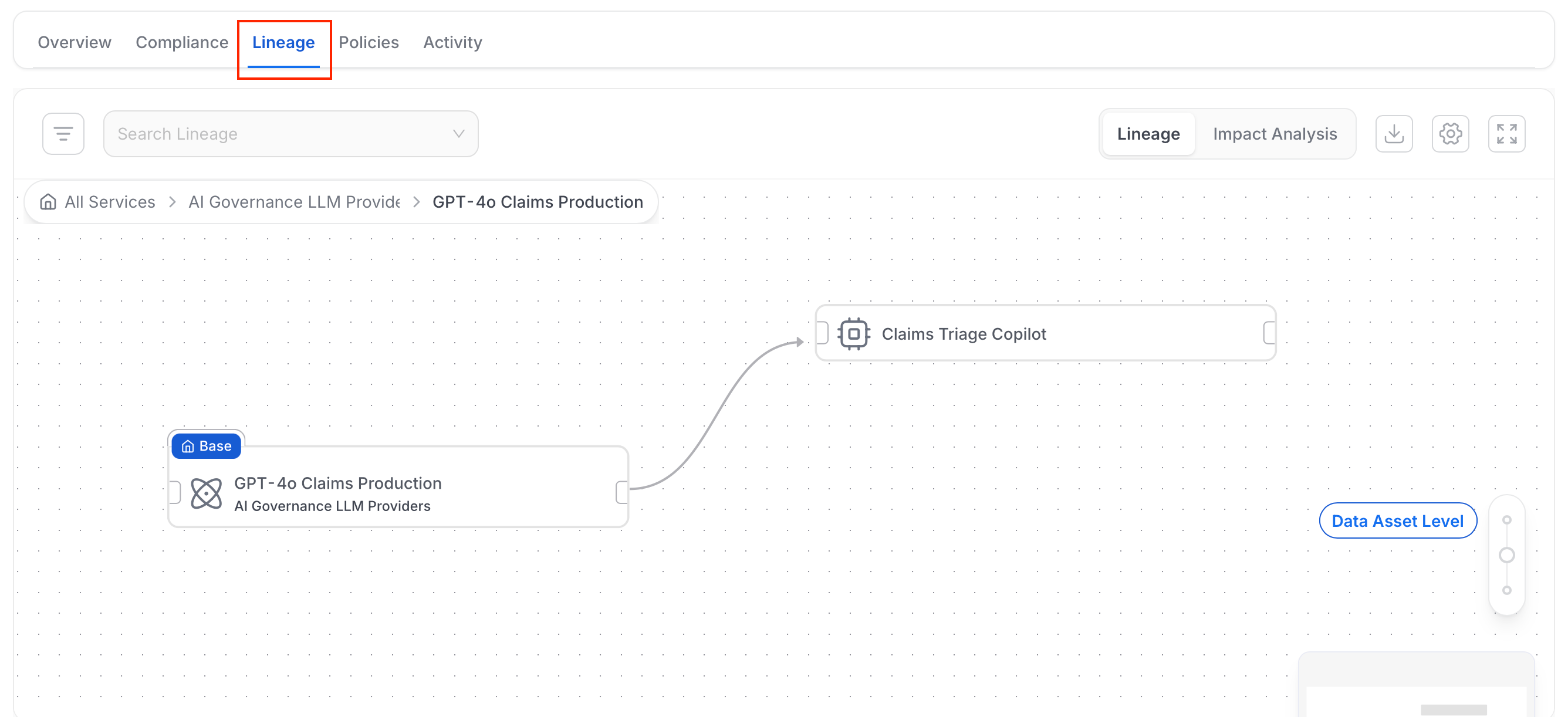
The standard Collate lineage graph, anchored on this asset. This is the same lineage experience used across the rest of the catalog. For an AI asset, it traces the full chain:
* Which tables and data products feed the MCP tools or SDKs the asset uses.
* Which downstream assets depend on it in turn.
Reviewers use this to check not just what an asset is named or described as, but what data it actually touches.
### Lineage Tab
The standard Collate lineage graph, anchored on this asset. This is the same lineage experience used across the rest of the catalog. For an AI asset, it traces the full chain:
* Which tables and data products feed the MCP tools or SDKs the asset uses.
* Which downstream assets depend on it in turn.
Reviewers use this to check not just what an asset is named or described as, but what data it actually touches.
 ### Policies Tab
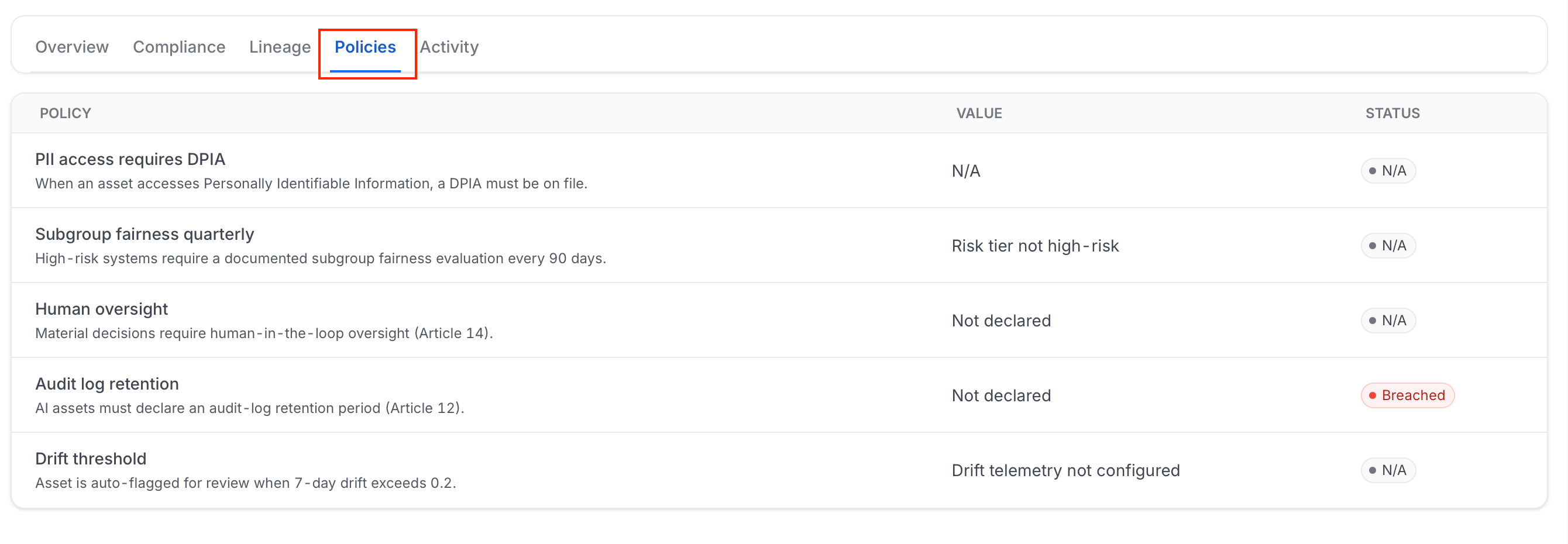
A table of this asset's [AI Governance Policies](/ai-2-0/collate-ai/ai-governance/policies-and-drift) status: policy name and description, current value, and a Passing, Breached, or N/A (Not Applicable) status badge.
**Note**: Policy evaluation currently checks a fixed set of governance criteria (for example, whether PII access has a data protection impact assessment (DPIA) on file, and whether human oversight is documented) rather than every rule defined in your organization's custom policies. Full evaluation against custom policy rules is planned but not yet available.
### Policies Tab
A table of this asset's [AI Governance Policies](/ai-2-0/collate-ai/ai-governance/policies-and-drift) status: policy name and description, current value, and a Passing, Breached, or N/A (Not Applicable) status badge.
**Note**: Policy evaluation currently checks a fixed set of governance criteria (for example, whether PII access has a data protection impact assessment (DPIA) on file, and whether human oversight is documented) rather than every rule defined in your organization's custom policies. Full evaluation against custom policy rules is planned but not yet available.
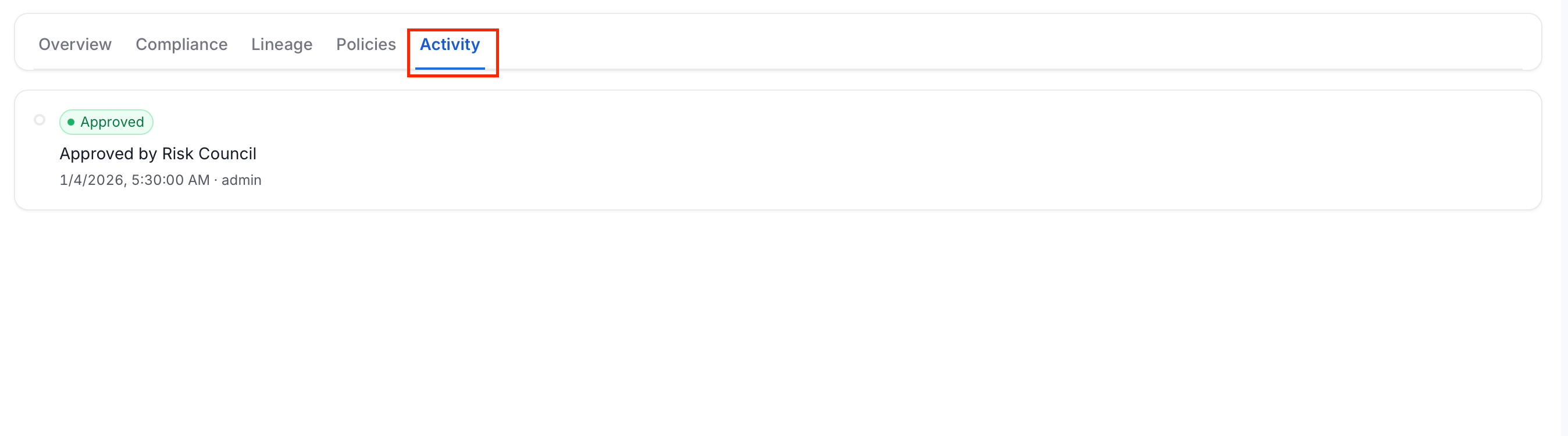
 ### Activity Tab
A timeline of events for this asset:
| Event | What it means |
| - | - |
| **Submitted for Review** | The asset was submitted through the registration wizard, or via Shadow AI triage. |
| **Approved** | A reviewer approved the asset. |
| **Rejected** | A reviewer declined the asset. |
| **Assessed** | The asset's compliance was evaluated against a framework. |
| **Next Review Scheduled** | A follow-up assessment was scheduled based on the framework's assessment cadence. |
| **Shadow AI Detected** | The asset was first identified as unregistered AI usage. |
### Activity Tab
A timeline of events for this asset:
| Event | What it means |
| - | - |
| **Submitted for Review** | The asset was submitted through the registration wizard, or via Shadow AI triage. |
| **Approved** | A reviewer approved the asset. |
| **Rejected** | A reviewer declined the asset. |
| **Assessed** | The asset's compliance was evaluated against a framework. |
| **Next Review Scheduled** | A follow-up assessment was scheduled based on the framework's assessment cadence. |
| **Shadow AI Detected** | The asset was first identified as unregistered AI usage. |