> ## Documentation Index
> Fetch the complete documentation index at: https://docs.getcollate.io/llms.txt
> Use this file to discover all available pages before exploring further.
# Reindexing Search
> Resolve search issues in Collate — missing assets, count mismatches, and empty Explore results — by running the Search Indexing application to reindex your data.
# Reindexing Search
If you are encountering any of the following issues:
* Mismatch in counts of Data Assets.
* Data not appearing.
* Errors such as `shards_exception`.
* Problems with the search mechanism.
* Empty results in the Explore section.
* Missing lineage information.
Run the Search Indexing app to initiate the reindexing process.
### Reindex
1. Select the **Profile** icon and go to **Settings** > **Applications** > **Search Indexing**.
 2. In the Configuration tab, check whether **Recreate Indexes** is enabled or not. If not, enable it and save the settings.
 3. Click **Run Now**.
 If you want to reindex specific entities, in the **Configuration** tab, add the entities.
 **Tip**:
**Note:** If you continue to experience issues, re-install the **Search Indexing** application.
## Configuration Parameters for Reindexing
**Tip**:
**Note:** If you continue to experience issues, re-install the **Search Indexing** application.
## Configuration Parameters for Reindexing
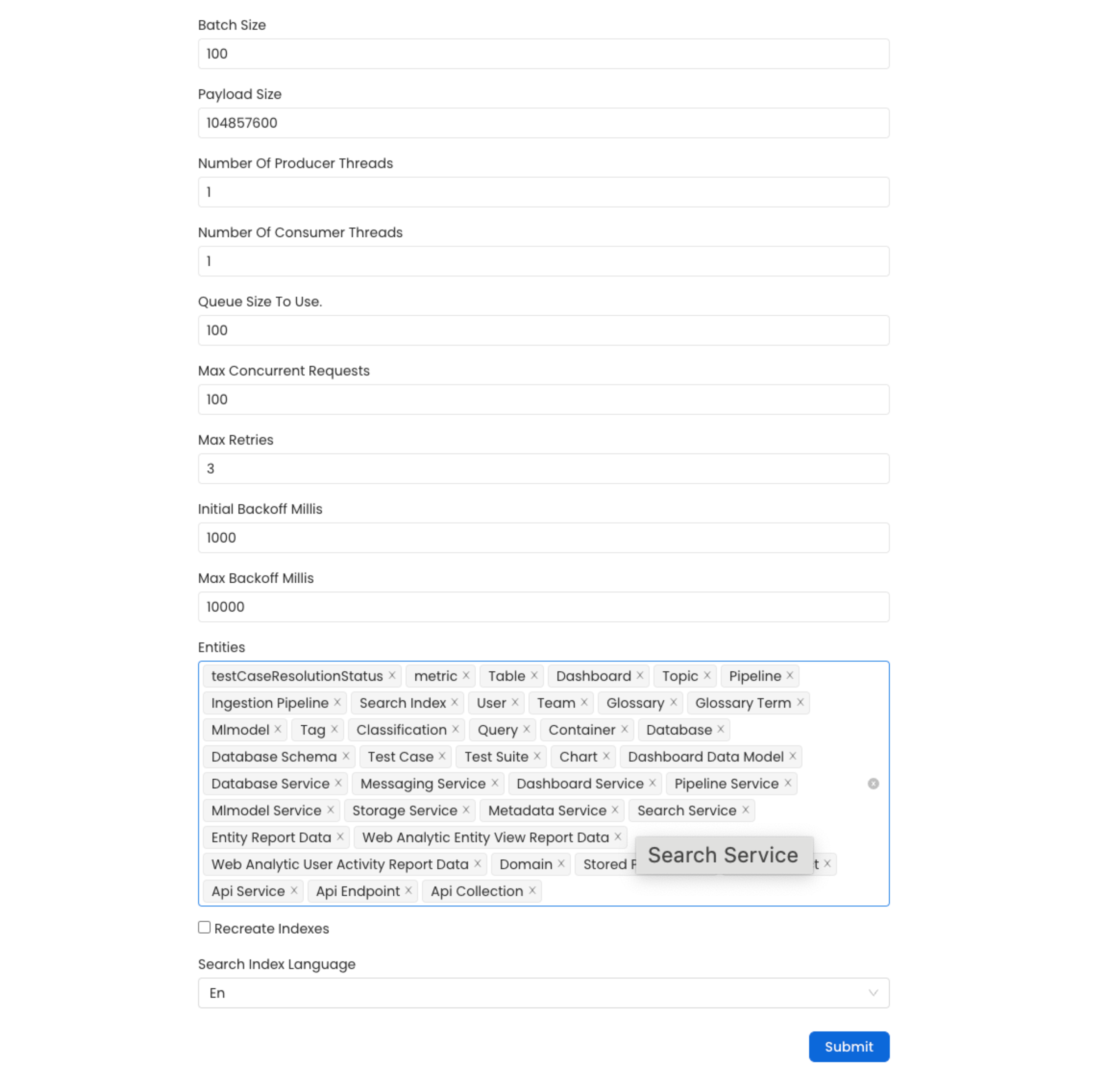 ### Batch Size
**Description** — Maximum number of entities sent in a single batch during reindexing. Default: `100`.
**Best Practice** — Adjust based on system capabilities. A larger batch size improves throughput but may increase memory usage. Monitor performance and fine-tune accordingly.
### Payload Size
**Description** — Maximum payload size in bytes per batch. Default: `104,857,600 bytes` (100 MB).
**Best Practice** — Ensure the payload size is within your system’s capacity. If memory issues or timeouts occur, reduce this value.
### Number of Producer Threads
**Description** — Number of threads used to produce reindexing events. Default: `1`.
**Best Practice** — Increasing this improves throughput but may cause contention if set too high. Balance with system CPU and I/O capacity.
### Number of Consumer Threads
**Description** — Number of threads used to consume reindexing events. Default: `1`.
**Best Practice** — Keep in sync with producer threads. Increase when the queue fills up frequently.
### Queue Size
**Description** — Internal queue size for reindexing operations. Default: `100`.
**Best Practice** — A larger queue handles processing spikes but requires more memory. Adjust based on expected load.
### Max Concurrent Requests
**Description** — Maximum number of simultaneous requests sent to the search index. Default: `100`.
**Best Practice** — Tune based on your indexing server’s capacity. Too many concurrent requests can overwhelm the server.
### Max Retries
**Description** — Maximum retry attempts for failed requests. Default: `3`.
**Best Practice** — Keep this reasonable to avoid excessive load during failures.
### Initial Backoff Millis
**Description** — Wait time in milliseconds before the first retry. Default: `1000 ms` (1 second).
**Best Practice** — Increase if failures occur frequently due to server overload or network issues.
### Max Backoff Millis
**Description** — Maximum wait time in milliseconds between retries. Default: `10,000 ms` (10 seconds).
**Best Practice** — Align with your latency tolerance. A longer backoff reduces load during peak times but slows recovery.
### Entities
**Description** — Entity types to include in the reindexing process. Defaults to **All** entities.
**Best Practice** — When troubleshooting a specific entity type, select only that type to speed up the reindex and reduce system load.
### Recreate Indexes
**Description** — When enabled, drops the existing index and builds a new one from scratch.
**Best Practice** — Enable only when you need a clean slate — such as after major data model changes or during migration. Leave disabled for routine reindexing to preserve the existing index.
### Search Index Language
**Description** — Language used when recreating indexes. Default: `EN`.
**Best Practice** — Change only if your data assets are primarily in a language other than English. Changing the language recreates indexes with updated language-specific analyzers.
### Auto Tune
**Description** — When enabled, automatically adjusts performance settings based on cluster capabilities and entity count.
**Best Practice** — Leave enabled unless you want manual control over performance parameters.
### Use Distributed Indexing
**Description** — When enabled, distributes the indexing workload across partitions for improved throughput.
**Best Practice** — Enable on large datasets or multi-node clusters. On small single-node setups, the overhead may outweigh the benefit.
### Partition Size
**Description** — Chunk size used when distributing indexing work across partitions. Default: `10,000`.
**Best Practice** — Use larger values for high-throughput environments. Reduce if individual partitions are causing memory pressure.
### Time Series Max Days
**Description** — Limits reindexing to time-series data within the specified number of days. Default: `0` (reindex all data).
**Best Practice** — Set a positive value (e.g., `15`) to limit reindexing to recent data. This significantly reduces reindexing time for large datasets.
## Live Index Settings
Settings applied to the index before it goes live. These control read freshness and availability during normal operation.
### Number of Replicas
**Description** — Number of replica shards for the live index. Default: `1`.
**Best Practice** — Use `1` for high availability on multi-node clusters; use `0` for single-node setups.
### Refresh Interval
**Description** — How often new writes become searchable. Default: `1s`.
**Best Practice** — The default provides near-real-time search. Increase (e.g., `5s`) to reduce overhead on write-heavy workloads.
### Translog Durability
**Description** — Controls when the translog is flushed to disk. Options: `request` or `async`.
**Best Practice** — Use `request` for stronger durability. Switch to `async` only if you need higher write throughput and can tolerate the risk.
### Translog Sync Interval
**Description** — How frequently the translog syncs when durability is set to `async`. Default: `5s`.
**Best Practice** — Keep low if durability is important. Increase to improve write performance when some data loss risk is acceptable.
## Bulk Index Settings (During Reindex)
Temporary settings applied during the bulk reindex write phase to maximize throughput. These automatically revert to Live Index Settings before the alias swap.
### Number of Replicas
**Description** — Replica count during bulk write. Default: `0`.
**Best Practice** — Keep at `0` during reindex. Replicas are populated after the new index is promoted.
### Refresh Interval
**Description** — How often the index is refreshed during bulk write. Default: `-1` (disabled).
**Best Practice** — Leave at `-1`. Disabling refresh dramatically speeds up indexing. The staged index is not searchable during this phase, so this is safe.
### Translog Durability
**Description** — Durability setting used during bulk write. Default: `async`.
**Best Practice** — Using `async` improves write speed. Settings revert to live values before the index becomes searchable.
### Translog Sync Interval
**Description** — How frequently the translog syncs during bulk indexing. Default: `30s`.
**Best Practice** — A longer sync interval reduces I/O overhead during the write phase.
### Force-merge before alias swap
**Description** — When enabled, forces a segment merge before the index goes live.
**Best Practice** — Leave disabled for most reindexing runs. Enable only when optimizing the index for read performance, at the cost of additional reindex time.
## Example Configuration for Best Practices
For high-performance systems, consider the following values as a starting point:
```json theme={null}
{
"batchSize": 300,
"queueSize": 500,
"producerThreads": 20,
"maxConcurrentRequests": 500
}
```
Monitor system performance and adjust these parameters to optimize throughput and resource usage.
### Batch Size
**Description** — Maximum number of entities sent in a single batch during reindexing. Default: `100`.
**Best Practice** — Adjust based on system capabilities. A larger batch size improves throughput but may increase memory usage. Monitor performance and fine-tune accordingly.
### Payload Size
**Description** — Maximum payload size in bytes per batch. Default: `104,857,600 bytes` (100 MB).
**Best Practice** — Ensure the payload size is within your system’s capacity. If memory issues or timeouts occur, reduce this value.
### Number of Producer Threads
**Description** — Number of threads used to produce reindexing events. Default: `1`.
**Best Practice** — Increasing this improves throughput but may cause contention if set too high. Balance with system CPU and I/O capacity.
### Number of Consumer Threads
**Description** — Number of threads used to consume reindexing events. Default: `1`.
**Best Practice** — Keep in sync with producer threads. Increase when the queue fills up frequently.
### Queue Size
**Description** — Internal queue size for reindexing operations. Default: `100`.
**Best Practice** — A larger queue handles processing spikes but requires more memory. Adjust based on expected load.
### Max Concurrent Requests
**Description** — Maximum number of simultaneous requests sent to the search index. Default: `100`.
**Best Practice** — Tune based on your indexing server’s capacity. Too many concurrent requests can overwhelm the server.
### Max Retries
**Description** — Maximum retry attempts for failed requests. Default: `3`.
**Best Practice** — Keep this reasonable to avoid excessive load during failures.
### Initial Backoff Millis
**Description** — Wait time in milliseconds before the first retry. Default: `1000 ms` (1 second).
**Best Practice** — Increase if failures occur frequently due to server overload or network issues.
### Max Backoff Millis
**Description** — Maximum wait time in milliseconds between retries. Default: `10,000 ms` (10 seconds).
**Best Practice** — Align with your latency tolerance. A longer backoff reduces load during peak times but slows recovery.
### Entities
**Description** — Entity types to include in the reindexing process. Defaults to **All** entities.
**Best Practice** — When troubleshooting a specific entity type, select only that type to speed up the reindex and reduce system load.
### Recreate Indexes
**Description** — When enabled, drops the existing index and builds a new one from scratch.
**Best Practice** — Enable only when you need a clean slate — such as after major data model changes or during migration. Leave disabled for routine reindexing to preserve the existing index.
### Search Index Language
**Description** — Language used when recreating indexes. Default: `EN`.
**Best Practice** — Change only if your data assets are primarily in a language other than English. Changing the language recreates indexes with updated language-specific analyzers.
### Auto Tune
**Description** — When enabled, automatically adjusts performance settings based on cluster capabilities and entity count.
**Best Practice** — Leave enabled unless you want manual control over performance parameters.
### Use Distributed Indexing
**Description** — When enabled, distributes the indexing workload across partitions for improved throughput.
**Best Practice** — Enable on large datasets or multi-node clusters. On small single-node setups, the overhead may outweigh the benefit.
### Partition Size
**Description** — Chunk size used when distributing indexing work across partitions. Default: `10,000`.
**Best Practice** — Use larger values for high-throughput environments. Reduce if individual partitions are causing memory pressure.
### Time Series Max Days
**Description** — Limits reindexing to time-series data within the specified number of days. Default: `0` (reindex all data).
**Best Practice** — Set a positive value (e.g., `15`) to limit reindexing to recent data. This significantly reduces reindexing time for large datasets.
## Live Index Settings
Settings applied to the index before it goes live. These control read freshness and availability during normal operation.
### Number of Replicas
**Description** — Number of replica shards for the live index. Default: `1`.
**Best Practice** — Use `1` for high availability on multi-node clusters; use `0` for single-node setups.
### Refresh Interval
**Description** — How often new writes become searchable. Default: `1s`.
**Best Practice** — The default provides near-real-time search. Increase (e.g., `5s`) to reduce overhead on write-heavy workloads.
### Translog Durability
**Description** — Controls when the translog is flushed to disk. Options: `request` or `async`.
**Best Practice** — Use `request` for stronger durability. Switch to `async` only if you need higher write throughput and can tolerate the risk.
### Translog Sync Interval
**Description** — How frequently the translog syncs when durability is set to `async`. Default: `5s`.
**Best Practice** — Keep low if durability is important. Increase to improve write performance when some data loss risk is acceptable.
## Bulk Index Settings (During Reindex)
Temporary settings applied during the bulk reindex write phase to maximize throughput. These automatically revert to Live Index Settings before the alias swap.
### Number of Replicas
**Description** — Replica count during bulk write. Default: `0`.
**Best Practice** — Keep at `0` during reindex. Replicas are populated after the new index is promoted.
### Refresh Interval
**Description** — How often the index is refreshed during bulk write. Default: `-1` (disabled).
**Best Practice** — Leave at `-1`. Disabling refresh dramatically speeds up indexing. The staged index is not searchable during this phase, so this is safe.
### Translog Durability
**Description** — Durability setting used during bulk write. Default: `async`.
**Best Practice** — Using `async` improves write speed. Settings revert to live values before the index becomes searchable.
### Translog Sync Interval
**Description** — How frequently the translog syncs during bulk indexing. Default: `30s`.
**Best Practice** — A longer sync interval reduces I/O overhead during the write phase.
### Force-merge before alias swap
**Description** — When enabled, forces a segment merge before the index goes live.
**Best Practice** — Leave disabled for most reindexing runs. Enable only when optimizing the index for read performance, at the cost of additional reindex time.
## Example Configuration for Best Practices
For high-performance systems, consider the following values as a starting point:
```json theme={null}
{
"batchSize": 300,
"queueSize": 500,
"producerThreads": 20,
"maxConcurrentRequests": 500
}
```
Monitor system performance and adjust these parameters to optimize throughput and resource usage.