> ## Documentation Index
> Fetch the complete documentation index at: https://docs.getcollate.io/llms.txt
> Use this file to discover all available pages before exploring further.
# Platform Settings | Collate Admin Guide
> Find every platform-wide setting, including theme, email, search, lineage, and profiler, in the Platform Settings section of the Collate Profile page.
# Platform Settings
**Platform Settings** is where admins configure platform-wide behavior from the **Profile** page. Most of these settings are also available under **Settings** > **Preferences**. It is visible only to users with the Admin role.
## Open Platform Settings
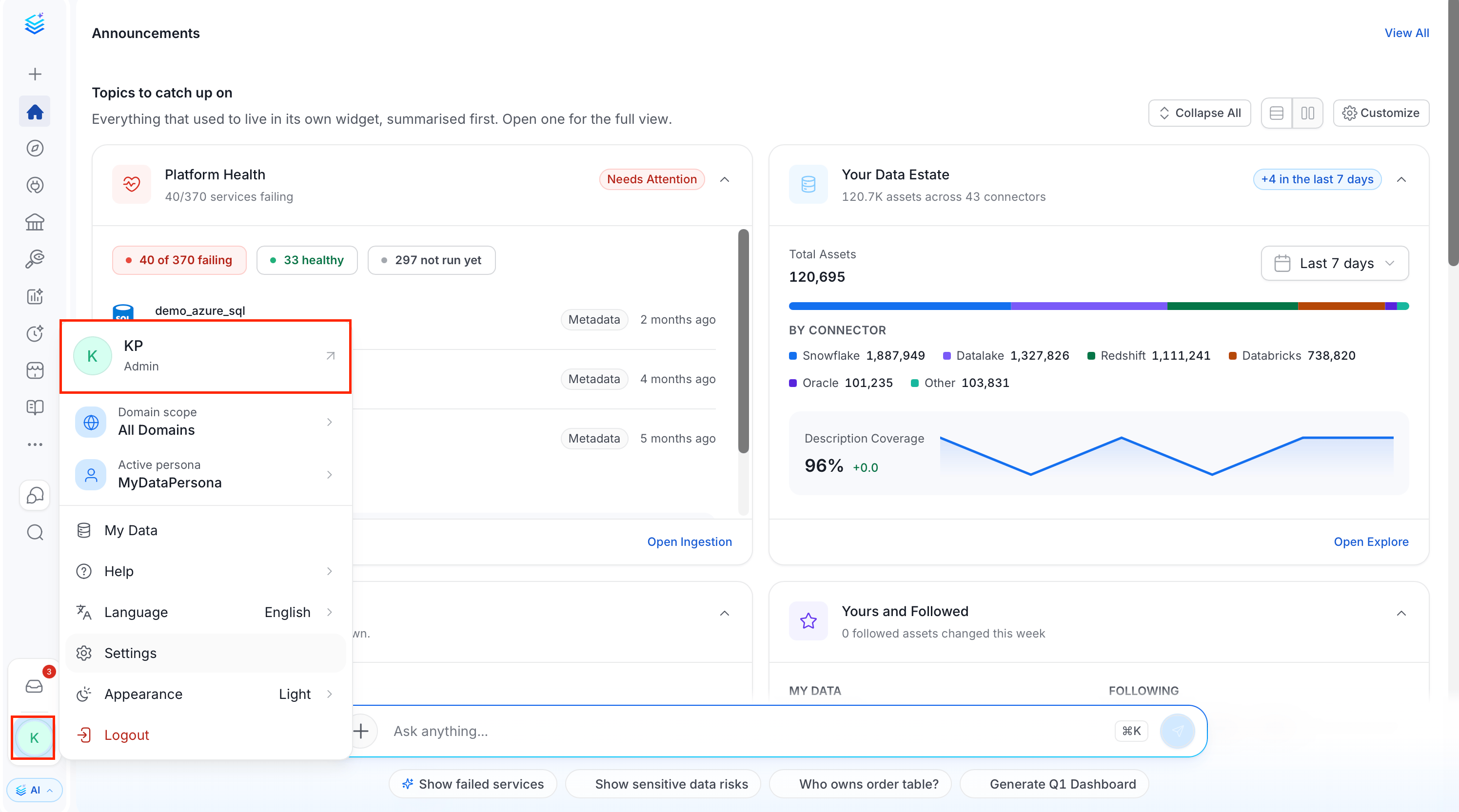
1. Click the **Profile** icon and select your user name.
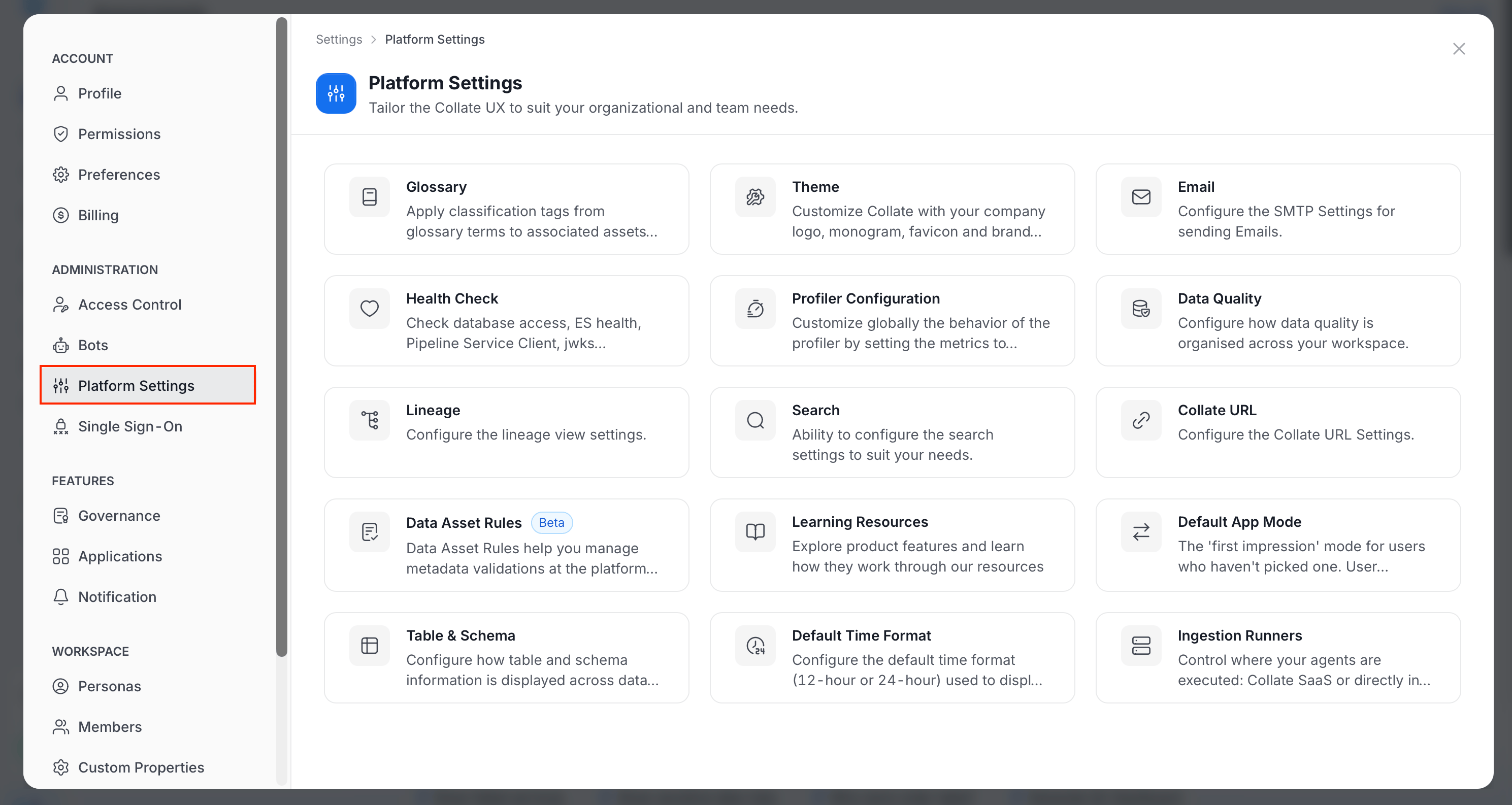
 2. In the **Administration** group, click **Platform Settings**.
3. Select the setting you want to change.
2. In the **Administration** group, click **Platform Settings**.
3. Select the setting you want to change.
 ## Available Settings
| Setting | What it does | Guide |
| - | - | - |
| **Glossary** | Apply classification tags from glossary terms to their associated assets. | [Glossary](/ai-2-0/admin-guide/preferences/other-preferences#glossary) |
| **Theme** | Customize Collate with your company logo, monogram, favicon, and brand color. | [Theme and Branding](/ai-2-0/admin-guide/preferences/theme-and-branding) |
| **Email** | Configure the SMTP settings used to send emails. | [Email](/ai-2-0/admin-guide/preferences/email) |
| **Health Check** | Check database access, search health, the pipeline service client, `jwks` configuration, and migrations. | [Health Check](/ai-2-0/admin-guide/preferences/health-check) |
| **Profiler Configuration** | Set globally which metrics the profiler computes for each column data type. | [Profiler Configuration](/ai-2-0/admin-guide/preferences/profiler-configuration) |
| **Data Quality** | Configure how data quality is organized across your workspace. | [Data Quality](/ai-2-0/admin-guide/preferences/other-preferences#data-quality) |
| **Lineage** | Configure the lineage view settings. | [Lineage](/ai-2-0/admin-guide/preferences/lineage) |
| **Search** | Configure the search settings to suit your needs, including ranking. | [Search Configuration](/ai-2-0/admin-guide/search-configuration-settings) |
| **Collate URL** | Configure the Collate URL settings. | [Collate URL](/ai-2-0/admin-guide/preferences/email#collate-url) |
| **Data Asset Rules** (Beta) | Manage metadata validations at the platform level. | [Data Asset Rules](/ai-2-0/admin-guide/data-asset-rules) |
| **Learning Resources** | Manage the learning resources that explain product features to users. | [Learning Resources](/ai-2-0/admin-guide/learning-resources) |
| **Default App Mode** | Choose the first-impression app mode for users who haven't picked one. | [App Mode](/ai-2-0/admin-guide/preferences/app-mode) |
| **Table & Schema** | Configure how table and schema information is displayed across data assets. | [Table & Schema](/ai-2-0/admin-guide/preferences/other-preferences#table-and-schema) |
| **Default Time Format** | Configure the default time format, 12-hour or 24-hour, used to display timestamps for all users. | [Default Time Format](/ai-2-0/admin-guide/preferences/other-preferences#default-time-format) |
| **Ingestion Runners** | Control where your agents run: Collate SaaS or in your own environment. | [Ingestion Runners](/ai-2-0/admin-guide/preferences/ingestion-runners) |
Most of these settings are also available under **Settings** > **Preferences**. Click the **Profile** icon and navigate to **Settings** > **Preferences**. The guides linked above use that path. The Preferences page also includes **Login Configuration**, which defines how failed login attempts and JWT token expiry are handled. For more information, see [Login Configuration](/ai-2-0/admin-guide/preferences/login-configuration).
This documentation is built and hosted on [Mintlify](https://mintlify.com), a developer documentation platform.
## Available Settings
| Setting | What it does | Guide |
| - | - | - |
| **Glossary** | Apply classification tags from glossary terms to their associated assets. | [Glossary](/ai-2-0/admin-guide/preferences/other-preferences#glossary) |
| **Theme** | Customize Collate with your company logo, monogram, favicon, and brand color. | [Theme and Branding](/ai-2-0/admin-guide/preferences/theme-and-branding) |
| **Email** | Configure the SMTP settings used to send emails. | [Email](/ai-2-0/admin-guide/preferences/email) |
| **Health Check** | Check database access, search health, the pipeline service client, `jwks` configuration, and migrations. | [Health Check](/ai-2-0/admin-guide/preferences/health-check) |
| **Profiler Configuration** | Set globally which metrics the profiler computes for each column data type. | [Profiler Configuration](/ai-2-0/admin-guide/preferences/profiler-configuration) |
| **Data Quality** | Configure how data quality is organized across your workspace. | [Data Quality](/ai-2-0/admin-guide/preferences/other-preferences#data-quality) |
| **Lineage** | Configure the lineage view settings. | [Lineage](/ai-2-0/admin-guide/preferences/lineage) |
| **Search** | Configure the search settings to suit your needs, including ranking. | [Search Configuration](/ai-2-0/admin-guide/search-configuration-settings) |
| **Collate URL** | Configure the Collate URL settings. | [Collate URL](/ai-2-0/admin-guide/preferences/email#collate-url) |
| **Data Asset Rules** (Beta) | Manage metadata validations at the platform level. | [Data Asset Rules](/ai-2-0/admin-guide/data-asset-rules) |
| **Learning Resources** | Manage the learning resources that explain product features to users. | [Learning Resources](/ai-2-0/admin-guide/learning-resources) |
| **Default App Mode** | Choose the first-impression app mode for users who haven't picked one. | [App Mode](/ai-2-0/admin-guide/preferences/app-mode) |
| **Table & Schema** | Configure how table and schema information is displayed across data assets. | [Table & Schema](/ai-2-0/admin-guide/preferences/other-preferences#table-and-schema) |
| **Default Time Format** | Configure the default time format, 12-hour or 24-hour, used to display timestamps for all users. | [Default Time Format](/ai-2-0/admin-guide/preferences/other-preferences#default-time-format) |
| **Ingestion Runners** | Control where your agents run: Collate SaaS or in your own environment. | [Ingestion Runners](/ai-2-0/admin-guide/preferences/ingestion-runners) |
Most of these settings are also available under **Settings** > **Preferences**. Click the **Profile** icon and navigate to **Settings** > **Preferences**. The guides linked above use that path. The Preferences page also includes **Login Configuration**, which defines how failed login attempts and JWT token expiry are handled. For more information, see [Login Configuration](/ai-2-0/admin-guide/preferences/login-configuration).
This documentation is built and hosted on [Mintlify](https://mintlify.com), a developer documentation platform.